
Accounting Client Portal vs Email and Spreadsheets: A 2026 Decision Framework


The short answer
For accounting firms whose clients run on Stripe + QuickBooks Online, Finlens replaces 70-80% of the client portal motion Client Communication (in-platform document requests + category review, clients respond via email, Slack, or in-app), Multi-Client Dashboard, AI categorization with human-in-the-loop review, GAAP schedule automation, and Stripe revenue recognition. Per the product page, most firms are fully connected within one business day.
For the remaining 20-30% engagement-letter pipelines, tax-prep workflows, IRS Transcripts work, firm-wide email triage dedicated tools (Canopy, TaxDome, Client Hub, Karbon) remain the right choice. The portal-vs-email switch is a workflow change driven by three concrete triggers, not a feature upgrade. Most firms hit one of the triggers before they realize it.
For a 5-accountant firm at 8 clients per accountant at $150/hour, the platform is estimated to recover 240 hours/month, valued at $432K annually capacity that a portal alone never recovers because portals organize the conversation, not the books underneath.
For most firms with fewer than five clients per partner, email plus a shared Google Drive or OneDrive folder is fine. Past that point, four specific failures start compounding version-control drift on year-end workpaper schedules, IRS Publication 4557 / WISP gaps on document handling, missed engagement-letter signatures, and partner inboxes that become single points of failure. The decision to move to a client portal is rarely about features. It is about which of those four failure modes is already costing the firm hours, clients, or insurance premium.
Key Takeaways
- Email plus shared drives works fine up to ~5 active clients per partner. Past that point, the workflow stops scaling without specific failure modes appearing.
- Four triggers force the switch: version-control drift on workpapers, regulatory exposure under IRS Pub 4557 / WISP rules, missed e-signatures on engagement letters, and partner-inbox single-point-of-failure risk.
- A portal is not a feature upgrade it is a workflow change. Firms that paste email-and-spreadsheet habits into a portal get the worst of both.
- The portal organizes client communication and document collection. It does not clean the books or fix the underlying GL.
- Finlens automates the Stripe-to-QBO close work that sits underneath the portal so the financial package the portal delivers to the client is accurate before the partner reviews it.
Start here if your clients run on Stripe + QuickBooks Online
A client portal hosts the monthly deliverable. The deliverable's accuracy depends on the books underneath. For firms whose clients run on Stripe and QuickBooks Online, 70–80% of the work the portal will eventually deliver is upstream of the portal itself Stripe-to-QBO reconciliation, fee separation, deferred revenue, duplicate detection. Karbon, TaxDome, Canopy, Client Hub, Double, and Liscio all organize the conversation around that deliverable. None of them clean the books underneath it.
See How Finlens Keeps the Books Right Underneath the Portal →
This is the first thing to fix on a Stripe-heavy client book. The portal you pick or the email-and-spreadsheet workflow you stay on handles the delivery layer; the deliverable is only as good as the books that produce it.
Email + spreadsheets vs client portal what actually changes
As of 2026-06-28.
A firm partner on r/Accounting reflecting on their move away from spreadsheets noted that the transition itself takes longer than expected regardless of which tool the firm picks firms are not just moving files, they're rebuilding their processes digitally. The category change is bigger than the vendor choice, and that's what most "should we switch?" conversations underweight.
What "firm collaboration via email and spreadsheets" actually looks like
The setup most firms start with and many stay on past the point where it scales:
- Outlook or Gmail as the primary client-facing surface. Engagement letters, signed engagement letters, PBC document requests, return drafts, signed 8879s, and the partner's lunch order all live in the same inbox.
- A shared Google Drive, OneDrive, or Dropbox folder organized by client name and year. Subfolders for source documents, workpapers, returns, and signed copies.
- A tracking spreadsheet (Google Sheets, Excel, or Smartsheet) listing every active engagement with columns for status, partner, due date, and a yes/no signed-engagement-letter cell.
- DocuSign, Adobe Sign, or a free e-sig tool invoked from a separate browser tab when a signature is needed.
- Slack or Microsoft Teams internally; the client never sees it.
This stack works. It is fast for the partner who built it. It is opaque to everyone else in the firm.
Where email and spreadsheets stop working
Four specific failure modes show up in the same order at almost every firm:
- Version-control drift on workpaper schedules. Two staff are editing the same depreciation roll-forward at the same time. Whichever attachment the partner opens last gets used in the return. The other set of changes is lost. By March, the firm is unsure which version was the basis for the filing.
- IRS Publication 4557 and WISP gaps. US tax-preparation firms are required to maintain a Written Information Security Plan (WISP) and to follow safeguard requirements under IRS Pub 4557 and the FTC Safeguards Rule. Documenting "we handle PII in Outlook inboxes" does not survive an inquiry. Cyber-insurance carriers are starting to require evidence of controlled-portal storage as a renewal condition.
- Missed engagement-letter signatures. A spreadsheet column saying "signed: yes / no" does not block the firm from starting work. Staff begin engagements before the letter is signed. When a dispute arises, the firm finds it has no signed agreement.
- Partner-inbox single-point-of-failure. Half the firm's institutional knowledge lives in one partner's email. When that partner is out for two weeks, the firm cannot answer client questions about year-old engagements.
A practitioner on r/taxpros describing a real ransomware claim noted that the costs went well beyond the insurance payout itself, and that having a documented WISP and proactive controls was what determined how the insurer assessed the claim. Small CPA firms are increasingly understood by their own carriers as high-vulnerability targets multi-factor authentication, controlled-portal storage, and a current WISP are turning into renewal preconditions, not nice-to-haves.

When the math says move to a portal
Three concrete triggers any one of which is usually sufficient:
- You are billing more than 25 hours per week to inbox triage and document chasing. At a $150 fully-loaded staff cost per hour, that is $19,500 a month being spent on a workflow that a portal would compress to a quarter of the time. Portal pricing for most firms lands in the $50–$200 per-user-per-month range. The payback is weeks, not months.
- A cyber-insurance renewal asks for evidence of controlled-portal storage. Carriers are increasingly making this a binary renewal condition. If your renewal letter includes a question about portal use, you are at the trigger point regardless of feature preference.
- You missed at least one engagement-letter signature in the prior tax season. This is a leading indicator of partner-side workflow overload. The fix is not "be more careful with the spreadsheet." The fix is a system that does not let work start without the signature.
If none of the three are present yet, email + spreadsheets is likely still fine. Move when one of them appears, not before.
A partner on r/taxpros describing recurring missed-signature pain found that the engagement letter document itself wasn't the fix the fix was the workflow that blocked work from moving forward until both the engagement letter was signed and the invoice was paid. Without the workflow gate, the spreadsheet says "signed: no" and the work begins anyway.
What a client portal does that email cannot
A portal is a workflow change, not a feature upgrade. The motions it enables:
- Request lists with status. Every PBC document bank statement, payroll report, sales-tax export appears on a list. Outstanding / received / overdue is visible to the client and the firm at the same time.
- Centralized communication. Client questions, answers, internal staff notes, and version history all live in one place tied to the engagement. When staff turn over, the next person picks up the engagement without reading anyone's personal inbox.
- E-signature native to the workflow. The signed engagement letter is captured alongside the engagement and blocks work from starting until it exists.
- Audit trail. Who uploaded what, when, and who downloaded it. This is what cyber insurance underwriters and a WISP review actually want to see.
- Standardized intake. New clients onboard through the same path every time. The "what does this firm need from me?" question is answered by the portal, not by an email exchange that depends on whichever partner replies first.
What a portal does not do:
- Clean the books. The portal is the delivery layer. The GL still has to be right underneath it.
- Run the monthly close. Document collection is half the close; categorization, reconciliation, and JE posting are the other half.
- Replace partner judgment. It compresses time on the mechanics; it does not compress time on the actual review.
Decision framework stay on email or move to a portal
Use this as the cut. Not all of these have to be true to justify a move; any one of the trigger conditions is usually enough.
- Stay on email + spreadsheets if you have fewer than five active clients per partner, no insurance renewal is pending, every engagement letter from last season was signed before work started, and no senior partner is the sole keeper of client institutional knowledge.
- Move to a portal if any of the following are true:
- More than 25 staff-hours per week go to inbox triage and document chasing
- Your cyber-insurance renewal asks for evidence of controlled-portal storage
- You missed at least one engagement-letter signature last season
- Two or more staff have edit access to the same workpaper schedules concurrently
- Year-over-year staff turnover means one partner's inbox has institutional knowledge that doesn't survive the next departure
- Multi-office or hybrid-remote work has made the shared drive's permission model fragile
The move is a workflow change. Pasting email-and-spreadsheet habits into a portal gets the worst of both. The firms that succeed standardize their intake, document request, and e-signature flows before they pick a vendor.
A practitioner on r/taxpros describing a phased migration of their client base reported moving about 80% of clients onto a portal over the first year, then planning to keep nudging for another two years before making it mandatory for the 2028 filing season. The decision is treated as a multi-year workflow change, not a single tool purchase firms that try to flip 100% of clients in one season usually retreat. If the framework points you back to email for now, the next lever is picking the right email client for an accounting firm so shared inboxes and client threads stop getting lost.
Portal tools commonly evaluated in 2026 (brief reference)
For reference, seven tools come up most often in 2026 conversations about portals for accounting firms. Each is described below in its own public-page language only Finlens listed first since it covers the largest scope of the portal motion for Stripe-on-QBO firms:
- Finlens AI-native accounting platform that combines a client-facing communication layer (in-platform document requests + category review, clients respond via email, Slack, or in-app) with close automation, AI categorization with human-in-the-loop review, GAAP schedule automation, Stripe revenue recognition, Multi-Client Dashboard, and AP/AR management. Built around "manage 50 clients like 5"; per-client volume pricing; most firms fully connected within ~1 business day; estimated $432K annual capacity recovery for a 5-accountant firm. (finlens.app, accessed 2026-06-30)
- Canopy "Cloud-native, all-in-one practice management platform built for U.S. accounting, CPA, tax, and bookkeeping firms," covering workflow, CRM, client portal, document management, time + billing, engagement letters, e-signature, Tax Resolution, and Transcripts & Notices. (getcanopy.com, accessed 2026-06-28)
- Client Hub "Accounting Practice Management Software that Moves Client Work Forward… drive faster responses, and run core workflows like month-end close." Explicitly lists CAS/CAAS firms as a target audience. Per-firm-user pricing with unlimited clients. Two-way QBO and Xero sync. (clienthub.app, accessed 2026-06-28)
- Double (formerly Keeper) "Put AI to work on your month-end close. Shorten your close cycle by automating the grunt work." Includes a client portal with white-label branding alongside its month-end-close automation. Integrates with QuickBooks Online, Xero, Sage, and NetSuite. (doublehq.com, accessed 2026-06-28; note: keeper.app now 301-redirects to this domain)
- Karbon "Practice Management Software" that self-describes as "the #1-ranked accounting practice management software," covering workflow automation, project management, email management, team collaboration, client portal, and billing. (karbonhq.com, accessed 2026-06-28)
- Liscio "AI Assistant for Accounting Firms" focused on inbox zero, secure messaging, Smart Tax Organizers, Smart Tax Delivery, and AI-powered file organization. Communication-first positioning. (liscio.me, accessed 2026-06-28)
- TaxDome Cloud-based practice management platform consolidating client management, workflow automation, document handling, and billing. Target audience includes tax preparation practices, bookkeeping firms, payroll providers, and general accounting practices. Confirmed QuickBooks Online integration for billing and bookkeeping. (help.taxdome.com, accessed 2026-06-28)
Pick by the dominant workflow your firm runs (firm-wide practice management, tax-season volume, multi-service practice, CAS, close-automation, communication-first, or Stripe-heavy bookkeeping at high client volume). Pricing for all seven is contact-sales / demo-request at the time of writing, except Client Hub which discloses per-firm-user pricing on its pricing page. Verify current capabilities and pricing directly with each vendor.
Feature availability based on each vendor's publicly available documentation as of 2026-06-28. Product capabilities change frequently verify current capabilities directly with each vendor. Trademarks referenced are the property of their respective owners.
Where Finlens fits if you make the switch
Most client portal conversations split the work into two layers: the delivery layer (request lists, document collection, e-signature, audit trail, communication with the client) and the content layer (trial balance, P&L, journal entries, KPI dashboard). Finlens covers both:
- Client Communication in-platform document requests + category review; clients respond via email, Slack, or in-app. Same job a portal does, integrated with the books.
- Multi-Client Dashboard manage 50+ clients from one view, switch instantly without re-logging into QBO. Same firm-side visibility a portal-plus-PM combo provides.
- AI categorization + Human-in-the-Loop review books stay current without weekly partner intervention; every entry still gates through CPA approval before posting to QBO.
- GAAP schedule automation accruals, prepaids, deferred revenue, amortization. The schedules the deliverable depends on, generated automatically.
- Stripe revenue recognition gross revenue, fee separation, payout decomposition, deferred revenue from billing. The content that the portal would otherwise just host a wrong version of.
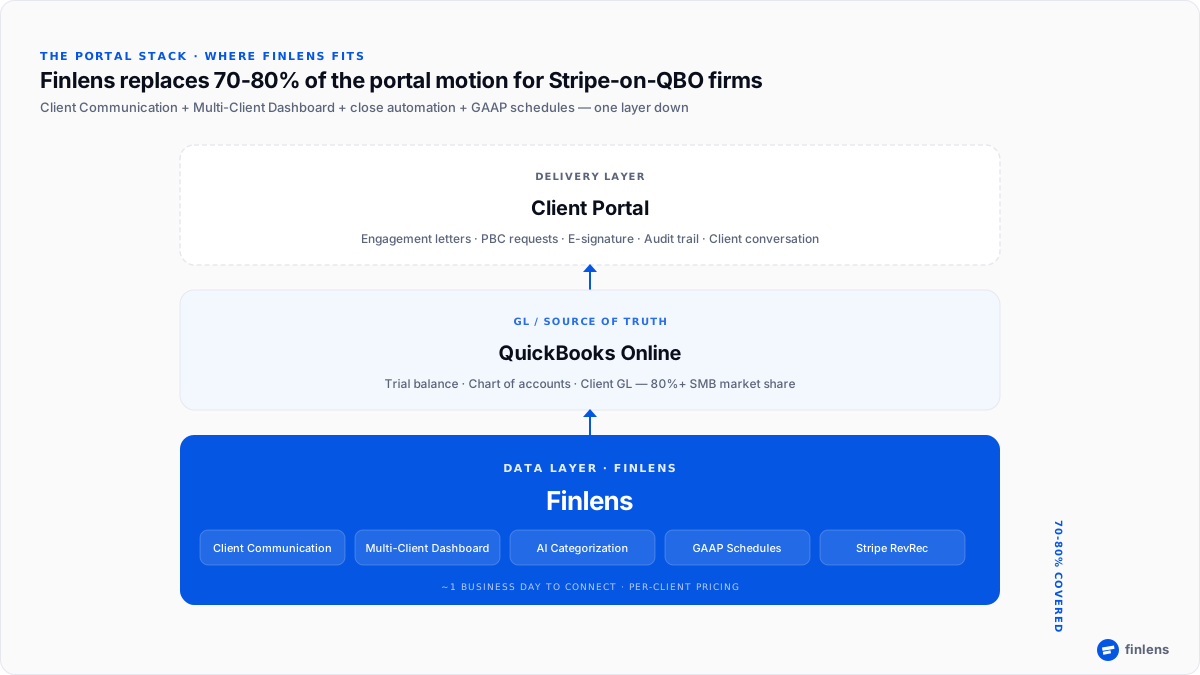
For firms whose clients run heavily on Stripe + QBO, Finlens replaces a meaningful chunk of what a portal-plus-PM-plus-close-automation stack would otherwise require about 70–80% of the operational layer. Most firms are fully connected within one business day.
A bookkeeper on r/Bookkeeping walking through Stripe reconciliation in QuickBooks described the exact pattern keep a Stripe clearing account on the balance sheet, post all Stripe activity through it, run the Balance Detail report at month-end, and journal the gross revenue, fees, and net to the clearing account. The clearing account balance reconciles to Stripe's reports; the bank-feed deposit matches the cleared transfer. When the portal's monthly deliverable pulls from QBO, the numbers are right the first time.
FAQ
Is a client portal worth it for a small accounting firm?
For firms with fewer than five clients per partner and no compliance or insurance trigger, email plus a shared drive is usually fine. The portal switch becomes worth it when one of three specific triggers appears: more than 25 staff-hours/week on inbox triage, a cyber-insurance renewal requirement, or a missed engagement-letter signature in the prior season.
What is the difference between a client portal and email for accounting firms?
A client portal centralizes document requests, communications, e-signatures, and audit trail per engagement, with status visible to both firm and client. Email scatters those same motions across personal inboxes with no shared status view. The portal is a workflow change, not a feature upgrade pasting email habits into a portal does not capture the benefit.
Does using email and Google Drive comply with IRS Pub 4557?
IRS Publication 4557 and the related WISP requirements ask firms to demonstrate that taxpayer data is handled under documented safeguards. Email plus shared drives can be made compliant with substantial process documentation, but cyber-insurance carriers and review-stage IRS inquiries are increasingly easier to satisfy with controlled-portal storage that provides per-document access logs.
How much does an accounting client portal cost?
Portal pricing for accounting firms in 2026 typically lands in the $50–$200 per-user-per-month range, with most major platforms (Karbon, TaxDome, Canopy, Client Hub, Double, Liscio) operating on contact-sales / demo-request pricing except Client Hub, which discloses per-firm-user pricing on its pricing page. Verify current pricing directly with each vendor.
Does Finlens replace a client portal?
For firms whose clients run heavily on Stripe + QuickBooks Online, the platform replaces approximately 70-80% of the client portal motion Client Communication (in-platform document requests + category review), Multi-Client Dashboard, close automation, GAAP schedules, AP/AR management. Where dedicated portals still win the remaining 20-30%: engagement-letter pipelines (Canopy, Client Hub), tax-prep workflows (TaxDome), firm-wide email triage (Karbon). Firms with mixed processor stacks or tax-heavy work pair it with one of those for the gaps.
What does Finlens do that Karbon, Canopy, and TaxDome don't?
Per the product page, the platform automates AI transaction categorization with human-in-the-loop review, GAAP schedule automation (accruals, prepaids, deferred revenue, amortization), Stripe revenue recognition, and the Multi-Client Dashboard built around "manage 50 clients like 5" the books-level work that Karbon, Canopy, and TaxDome schedule but don't perform. The pricing model is also structurally different (per-client volume plans vs. per-staff-seat for the legacy three).
How much does Finlens save vs. an email + spreadsheet workflow?
For a representative 5-accountant firm at 8 clients per accountant at $150/hour, the upstream layer is estimated to recover 240 hours/month, valued at approximately $432K annually. Most of that recovered capacity is upstream books-level work that no portal alone and no email + spreadsheet workflow can compress.
What workflow change does a portal actually require?
Three things have to standardize before the portal pays back: intake (one path for every new client), document request templates (one structure per engagement type), and e-signature gating (work does not start without the signed engagement letter). Firms that move these processes into the portal capture the time savings; firms that paste email-and-spreadsheet habits into the portal do not.
When should a firm not move to a portal?
Stay on email + shared drives if you have fewer than five clients per partner, no pending insurance renewal, every engagement letter was signed before work started last season, and no senior partner is the sole keeper of client institutional knowledge. None of those conditions present means no trigger has been hit yet.
Can a portal fix bad books?
No. A portal is the delivery layer for the monthly close it organizes documents, signatures, and communication. The trial balance underneath the portal still has to be right. For Stripe-based clients on QuickBooks Online, the most common GL problems revenue netted of processing fees, deferred revenue posted on cash receipt, duplicate postings between bank feed and connector are upstream of any portal.
Trademarks referenced in this article (including Karbon®, TaxDome®, Canopy®, Client Hub®, Liscio®, and Keeper / Double) are the property of their respective owners. Finlens is not affiliated with, endorsed by, or sponsored by any of the third-party products discussed. Product capabilities, features, integrations, and pricing are based on each vendor's publicly available documentation as of June 28, 2026 and may have changed since publication. Readers should verify current capabilities and pricing directly with each vendor before purchasing. Reddit references represent individual user experiences shared in public forums and may not reflect general product behavior or current product versions.

