
Accounting Firm Billing Software: What Actually Works for Recurring Monthly Invoicing and Why


The firm crosses 20 clients on a Tuesday. Three months later, accounts receivable looks like a stretched rubber band. Forty thousand dollars of invoices are between 30 and 90 days old. The partner is sending Word document invoices via email and chasing payment over text. The bookkeeper exporting AR aging from QuickBooks every Friday has started flagging the same names every week.
The firm needs to bill differently. The question is what tool, and the answer depends almost entirely on whether the work is fixed-fee monthly, hourly with time entry, or some mix.
This is not about time and billing software (that's a separate category focused on capturing hours). This is about the AR side: sending recurring invoices, collecting payment, handling failed payments, and getting paid on time so the firm's cash flow stops dictating which week the payroll runs.
What firms try first, and why it stops working
The default progression looks like this:
At firm size 3-8 clients: Word doc invoices emailed monthly. Payment via mailed check or bank transfer. Works fine.
At 8-15 clients: QuickBooks Online invoicing. Recurring invoices auto-send on the first of each month. Payment via QuickBooks Payments. Mostly works. The 10-15% of clients who pay late get chased manually.
At 15-25 clients: The QBO invoicing setup starts cracking. Subscription packages get repriced. Some clients have multiple engagements (bookkeeping plus annual tax). The recurring template doesn't handle mid-month start dates well. Failed credit card payments don't trigger any follow-up — they just sit until someone notices.
At 25+: The firm needs real billing software with proper subscription management, recurring billing rails, automated dunning, and a clean integration back to the firm's own QuickBooks file for revenue recognition.
The break point is usually around client 20 for fixed-fee firms. Hourly firms break later because their billing volume is lower (one big invoice quarterly instead of 20 small ones monthly), but they break differently — usually around the inability to track WIP and produce realistic write-off reports.
What accounting firm billing software actually does
Five things that QBO native invoicing doesn't do well:
Subscription management for recurring engagements. Real subscription billing knows the difference between starting a new client mid-month (prorate the first invoice), adding a new service to an existing client (charge the difference), pausing service (skip a month), and upgrading from a $1,500 plan to a $2,500 plan (proration plus invoice adjustment).
Automated dunning sequences. Failed payment on the 1st triggers a polite email on the 3rd, a firmer one on the 7th, and a "we're suspending service" notice on the 14th. The bookkeeper doesn't manually write any of these. The system handles it.
Multiple billing methods per client. Some clients pay by ACH, some by credit card, some by check. The right system handles all three transparently and reports them as a single AR view.
Trust accounting and retainer handling. For firms that hold retainers against future tax work, the system tracks the retainer balance, applies invoices against it, and produces the journal entries for the firm's books. Manual handling here is error-prone and a common source of state board complaints.
Revenue recognition into the firm's own GL. Invoices billed in January for services delivered February-December need to recognize revenue ratably. A real billing tool produces the deferred revenue entries automatically. QBO native invoicing doesn't.
What's actually on the market for accounting firms specifically
Finlens. Finlens is an AI-native bookkeeping automation platform that categorizes transactions using client GL history and automates GAAP schedules, integrating natively with QuickBooks.
Ignition. Designed specifically for accounting and professional services firms. Handles engagement letters plus recurring billing plus payment collection in one system. Strong with QBO integration. Pricing: $89-249/month per firm plus per-client fees on the lower tier, all-inclusive on the higher tier. Sweet spot for firms with 20-150 fixed-fee bookkeeping clients.
Anchor. Newer entrant, similar positioning to Ignition. Strength is the proposal-to-paid flow. Pricing tends to be more aggressive for smaller firms. Weakness: smaller ecosystem of integrations than Ignition.
Bill.com. Primarily known for AP automation but the AR module is solid for recurring invoicing. Worth considering if you're already using Bill.com for client AP work. Less specialized for the firm-billing use case than Ignition.
Stripe Billing. Underused option. If your firm has a developer or technical operator, Stripe Billing's recurring subscription tools are good. The downside is it's a payments tool that requires building the rest of the firm-side workflow around it.
The tools that come up but don't quite fit: FreshBooks (built for freelancers, not firms), QuickBooks Online Payments (already covered above, hits its ceiling around 20 clients), Wave (free but underpowered), and the billing modules inside Karbon or Canopy (workable as bundled features but lighter than dedicated tools).
The practice management software comparison covers how the Karbon and Canopy billing modules compare.
The hidden complexity: how your firm books revenue
This is the part nobody talks about and the reason most firms outgrow their first billing tool faster than they expected.
If your firm bills in January for an annual engagement, accounting standards (ASC 606 if you care) require you to recognize that revenue ratably over the service period, not all at once in January. Most firm owners don't think about this until they're audited, prepare for a sale, or hit the threshold where they need real GAAP financials for a bank.
The right billing software produces the journal entries to handle this:
- Debit AR, credit deferred revenue when the invoice is issued
- Debit deferred revenue, credit recognized revenue each month as the service is delivered
QBO native invoicing produces the first entry but not the second. The second has to happen manually. At 25 clients with annual contracts, that's 25 monthly recognition entries the bookkeeper has to remember.
Ignition handles this. Bill.com handles it for the contracts they touch. Stripe Billing handles it natively. QBO native doesn't.
For firms doing pure monthly billing (no annual contracts), this complexity disappears. The invoice for January services is recognized in January. No deferred revenue, no recognition entries. The simpler your billing model, the simpler the tooling required.

The payment collection reality
The other reason firms upgrade: payment collection.
QBO Payments charges 2.9% + $0.25 on credit card and 1% (capped at $10) on ACH. Dedicated billing tools typically charge similar payment processor rates plus a monthly platform fee. Net cost ends up roughly equivalent.
The difference is in failed payment recovery and dunning. QBO Payments will email the client when a payment fails. It will not escalate, suspend, or schedule retry attempts. Dedicated billing tools do all three. At a 5% payment failure rate across 30 clients, that's 1-2 failed payments per month that QBO leaves on the floor. The firm chases them manually or absorbs them.
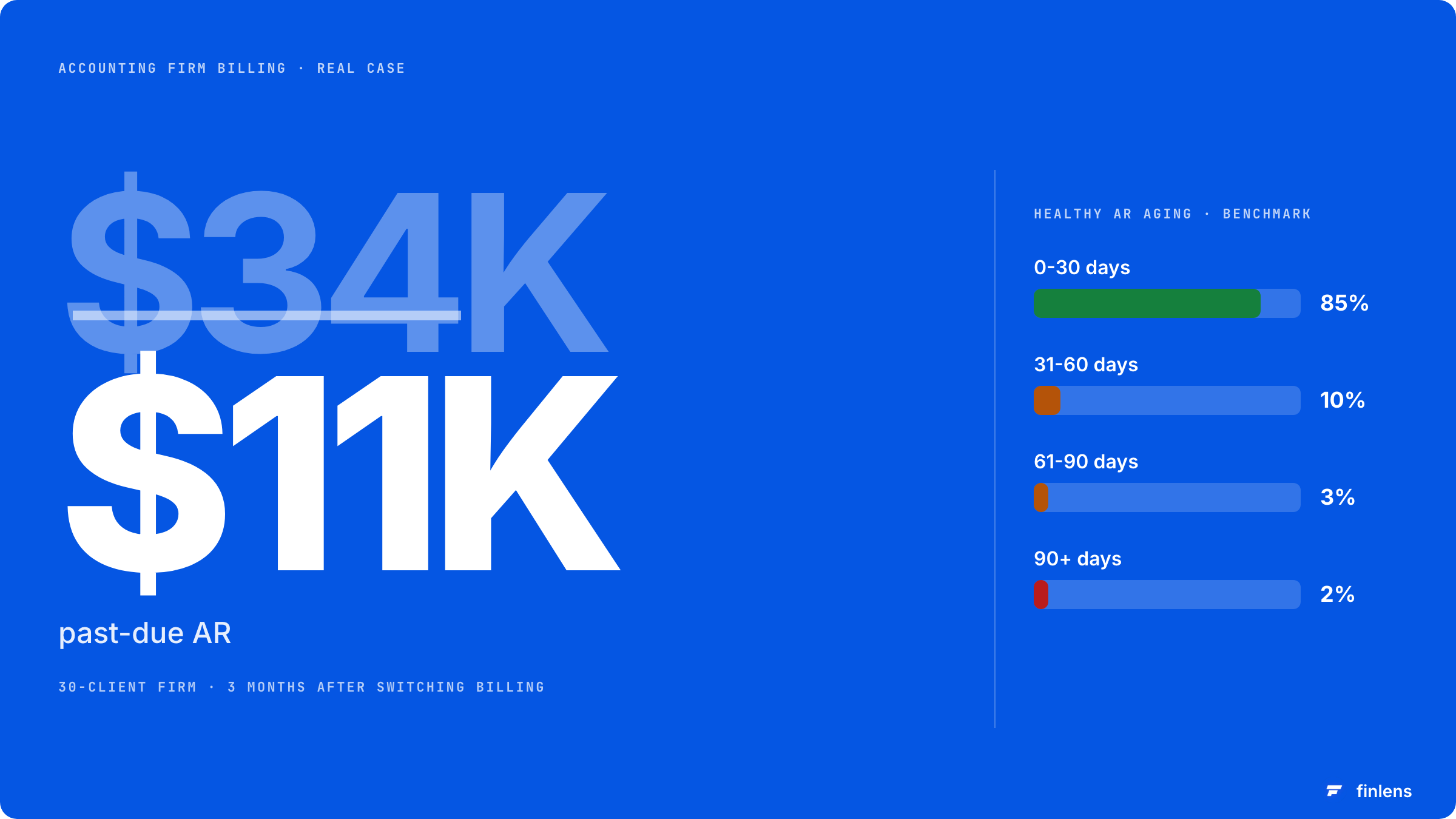
Real numbers from a 30-client firm I worked with: switching from QBO Payments to Ignition reduced past-due AR from $34K to $11K in three months. The tool didn't do anything magical. It just enforced dunning sequences the firm wasn't running manually.
What this category will not solve
Two things billing software cannot fix:
Underpriced engagements. If your fees are too low, automating the billing makes you collect the wrong amount faster. The pricing conversation has to happen first.
Clients who fundamentally don't pay. Some clients are bad clients. Better dunning catches more of them earlier but doesn't fix the underlying problem. The fix is to fire them, which is its own conversation.
The benchmark from firms tracking this carefully: a healthy fixed-fee firm should have AR balance equal to about one month of revenue. AR aging beyond 30 days should be under 15% of total AR, and aging beyond 90 days should be under 5%. If you're significantly outside those ranges, the software helps but it isn't the whole answer.
How to actually pick
Three questions resolve most picks:
Are you fixed-fee or hourly?
Fixed-fee firms get more value from Ignition or Anchor. Hourly firms get more value from time-and-billing-first tools like BigTime that produce invoices from time entries (different category, covered in the time and billing software guide). If your firm's work is mostly fixed-fee, narrow the field to billing software for CPAs that reports realized margin per engagement, not just invoices sent.
How many clients do you have, and how fast are you growing?
Under 20 clients, QBO native is fine. 20-100, dedicated tools pay for themselves. 100+, you need real subscription billing infrastructure.
Do you do engagement letters and proposals in the same workflow?
Ignition and Anchor bundle proposal-to-paid. If you currently use a separate proposal tool (PandaDoc, DocuSign for letters), consolidating into the billing platform saves real time.
What pricing looks like in practice
For a 30-client firm:
- QBO Payments only: $0/month platform fee plus ~2.9% transaction fees. About $850/month in fees on $30K monthly billing.
- Ignition (mid tier): $349/month plus payment processing. Total around $1,200/month.
- Anchor (mid tier): $250/month plus payment processing. Total around $1,100/month.
- Bill.com (AR module): $79/month plus payment processing. Total around $930/month.
- Stripe Billing: ~$0.50 per transaction plus 2.9% + $0.30 per payment. Total around $920/month.
The headline pricing matters less than what each tool actually does. Ignition is more expensive but bundles proposals, engagement letters, recurring billing, dunning, and revenue recognition into one platform. Bill.com is cheaper but only handles the invoicing piece.
The math: a tool that recovers $10K of stuck AR pays for itself in under a year regardless of which one you pick.
Frequently asked questions
What's the difference between accounting firm billing software and time and billing software?
Time and billing software captures hours worked and converts them into invoices. Accounting firm billing software handles the AR side: recurring invoicing, payment collection, dunning, retainer accounting. Hourly firms need both. Fixed-fee firms primarily need the billing/AR side.
Can I use QuickBooks Online for accounting firm billing?
For under 20 clients, yes. It handles recurring invoices and payment collection. The breakage points are dunning automation, multi-payment-method handling, retainer accounting, and revenue recognition for annual contracts. If those aren't problems for your firm, QBO native is enough.
Do I really need automated dunning, or can my bookkeeper handle it?
Manual dunning works at small scale. At 30+ clients with even a 5% failure rate, manual handling consistently lets payments slip. The right test: look at your last three months of AR aging. If anything over 60 days is repeating across the same clients, you need automated dunning.
What about engagement letters? Do these tools handle them?
Ignition and Anchor both bundle engagement letter creation and signature with the billing setup. The signed engagement letter triggers the billing schedule automatically. Bill.com doesn't do engagement letters. Stripe Billing doesn't either.
How does Finlens fit if we use Ignition or similar?
Finlens automates the bookkeeping work on the client side. Ignition handles billing the client for that work. The two don't overlap. A typical mid-size firm uses Finlens for client bookkeeping automation and Ignition for client-side billing.
Do these tools work for tax-only firms?
Yes, but the use case is different. Tax firms typically bill annually or quarterly with retainers, not monthly. Ignition and Anchor both handle this. The dunning value is lower (one big payment per year vs. monthly subscription), but the retainer accounting value is higher.
The right move at firm size 20+ is to stop using QBO native invoicing for client billing. Move to Ignition if you do fixed-fee, Bill.com if you want lighter weight, or Stripe Billing if you have a technical operator on the team. The payback period is short and the AR cleanup is the kind of thing that compounds for the rest of the firm's life.

