
AI vs Rules-Based Transaction Categorization: Accuracy Comparison for 2026


AI wins for ambiguous, low-frequency, and long-tail transactions where rules would need constant maintenance. Rules-based matching wins for high-frequency, predictable transactions from named vendors. The best tools use both AI for messy middle, rules for repeatable head. Finlens is AI-native accounting platform used by CPA firms managing QuickBooks Online client books it layers AI categorization on top of QBO's built-in rules, learns from firm-level review patterns, and applies both approaches across every client book from one dashboard. The 5 tools compared here Finlens, Digits, Pennylane, Kick, and QuickBooks Online's built-in rules represent range from "rules only" (QBO built-in) to "AI-native" (Finlens, Digits, Kick), with Pennylane blending both.
Key takeaways
- Rules-based categorization has been QBO bank-feed default for years. It works well when a transaction descriptor exactly matches a defined rule (vendor name, amount range, memo text). It breaks on new vendors, misspelled descriptors, and edge cases.
- AI categorization reads full transaction context vendor, memo, amount, historical patterns, similar transactions across other client books and proposes a category with a confidence score. It generalizes to new vendors. The tradeoff is auditability: "why" behind an AI categorization is less transparent than a matching rule.
- The most common complaint on r/QuickBooks about QBO's AI categorization is that QBO's built-in "suggested category" gets worse over time as it learns from bad manual overrides. A pattern flagged separately on r/QuickBooks about QBO categorizations getting worse over time reflects same drift.
- Dedicated AI-native platforms (Finlens, Digits, Kick) train on curated, higher-quality data than QBO's built-in and accuracy shows in categorization test benchmarks and in day-to-day bookkeeper experience.
- For CPA firms managing many client books, choice is not really "AI or rules" but "which tool applies both approaches at firm scale, across every client, without configuring each QBO instance separately." Finlens is option built for that use case.
Best transaction categorization tools: comparison table
Pricing reflects publicly-reported starting tiers early 2026.
AI vs rules-based categorization how each actually works
Rules-based matching
Rules-based categorization uses explicit if-then logic against bank-feed transaction data:
- Match condition: vendor name, memo text, amount, or a pattern (e.g., "Contains 'AMZN MKTPLACE'")
- Action: post to a specific category, split across categories, or ignore
QBO's built-in "Bank Rules" feature is classic example. The bookkeeper defines rules like: "If descriptor contains 'AWS' → categorize as Cloud Hosting Expense · Class: Engineering."
When rules win:
- High-frequency vendors with stable descriptors (AWS, Stripe, Google Workspace, Adobe)
- Amount-range patterns (all payroll runs from a specific bank credit)
- Predictable, high-volume categories where rule's precision matters more than flexibility
When rules break:
- New vendors that haven't been rule-mapped yet
- Descriptor drift ("AMZN MKTPLACE US" vs. "Amazon.com WA")
- Ambiguous transactions ("Payment to John Smith" is this contractor, refund, or payroll?)
- Long-tail transactions where writing a rule per vendor is more work than rule saves
AI categorization
AI categorization uses machine learning trained on categorized transaction data to predict category from full transaction context. The model reads:
- Vendor name (fuzzy-matched to known patterns)
- Memo text (parsed for meaningful tokens)
- Amount (compared to historical distributions per category)
- Similar transactions from other clients or historical data
- Chart-of-accounts structure of specific book
The output is a category proposal plus a confidence score. High-confidence transactions post automatically; low-confidence ones queue for reviewer approval.
When AI wins:
- Ambiguous, one-off, or long-tail transactions
- New vendors that don't have rules yet
- Descriptor drift where a rule would need to be updated
- Multi-client CPA firms where writing rules per client per vendor is impractical
- Nuanced categorization that requires reading memo (not just vendor)
When AI breaks:
- High-stakes categorization where audit trail matters more than automation
- Categories AI hasn't seen enough examples of
- Books where human bookkeeper's judgment is fundamentally more informed than training data
A workflow discussion on r/Bookkeeping about AI categorization getting decent reflects recurring bookkeeper view AI has crossed a usability threshold, but "decent" means it still needs human review for low-confidence rows. A separate discussion on r/Accounting about how much AI has actually automated day-to-day work captures accountant perspective AI adoption is real but uneven across tasks.
The 5 categorization tools compared
1. Finlens
Overview. Finlens is an AI-native accounting platform used by CPA firms managing QuickBooks Online client books. It combines AI categorization (learns from firm-level review patterns) with a rules layer defined at firm level. The AI proposes categories with confidence scores; low-confidence rows queue for review; high-confidence rows post automatically. Firm-level rules apply once and run across every client bookkeeper doesn't rebuild rules per client.
Best for. CPA firms and CAS providers managing 5-100 QuickBooks Online client books. Also fits SMBs closing their own QBO books who want AI proposals plus a firm/business-level rules layer.
Key features. AI categorization with confidence scoring, firm-level rules layer applied across all clients, per-client rule overrides, low-confidence review queue, tamper-evident audit log linking every categorization to its rationale, direct posting to QBO via OAuth, and reconciliation tied to categorization output.
Pricing. Free tier for small businesses. Custom paid tiers for CAS firms.
Limitations. Not a full ERP replacement layers on QBO/Xero. Doesn't replace QBO's built-in Bank Rules extends them with AI.
Where it breaks. Very niche vertical categorization (e.g., specific medical practice sub-accounts) where AI needs bespoke training beyond firm-level patterns.
2. Digits
Overview. Digits is an AI-native accounting platform positioned as a QuickBooks alternative for startups and small businesses. Its categorization engine is AI-first it reads transaction context and proposes categories without requiring rules to be defined first.
Best for. Startups and small businesses wanting AI-first books without a CPA firm intermediary.
Key features. AI categorization with high automation rate, AI-generated financial insights, real-time cash-flow reporting, and mobile-first interface.
Pricing. Free tier available; paid tiers vary.
Limitations. Not designed for CPA-firm multi-client workflows. Requires migration to Digits' ledger not a layer on top of QBO.
Where it breaks. Businesses committed to staying on QuickBooks Online Digits' value depends on being ledger.
3. Pennylane
Overview. Pennylane is a European AI + rules-blend accounting platform particularly strong in France and expanding across EU. It combines AI categorization with a robust rules engine, letting bookkeeper explicitly override AI proposals when needed.
Best for. European small businesses and accounting firms on Pennylane's ledger, particularly in France, Germany, and Netherlands.
Key features. AI categorization with per-transaction confidence, rules-based override library, integrated invoicing, and CFR-aware compliance for European jurisdictions.
Pricing. Custom (starts around €49/month for small business tiers).
Limitations. Primarily European market US integrations and coverage are lighter. Not a QBO-layer product.
Where it breaks. US-based businesses on QuickBooks Online Pennylane replaces ledger and is EU-first.
4. Kick
Overview. Kick is an AI-first bookkeeping platform aimed at solo founders and one-person businesses. Its categorization is AI-driven, learning from founder's overrides.
Best for. Solo SaaS founders and one-person businesses who want AI to handle bookkeeping without hiring a bookkeeper.
Key features. AI-first categorization, automated financial reports, tax prep-ready outputs, and founder-friendly UX.
Pricing. $85/month Solo tier.
Limitations. Built for solo operators not a CPA-firm multi-client tool. Doesn't replace CPA firm engagement for complex tax scenarios.
Where it breaks. Businesses past a few employees where CPA firm engagement takes over.
5. QuickBooks Online built-in Bank Rules
Overview. QBO's built-in Bank Rules feature is reference rules-based categorization system for small businesses. The bookkeeper defines rules; QBO applies them to matching transactions in bank feed. QBO has also added AI-driven "suggested categorizations" that layer on top of rules engine.
Best for. Solo bookkeepers and small businesses with well-defined rules and predictable vendor patterns.
Key features. Rules based on descriptor, amount, and account; AI-suggested categorizations for unmatched transactions; automatic posting for high-confidence rows; audit trail per transaction.
Pricing. Included in QBO subscription ($35-$235/month depending on tier).
Limitations. AI suggestions have been widely criticized as drifting worse over time. Rules require per-QBO-instance setup CPA firms managing 20 clients set up rules 20 times. A vent thread on r/QuickBooks about turning off auto categorization captures common bookkeeper frustration QBO's auto-suggestions apply themselves even when user just wants to review row.
Where it breaks. Multi-client CPA firms and any book with high transaction volume that outgrows rules-only approach.
Accuracy comparison how tools stack up
There is no single industry benchmark comparing categorization accuracy across these tools with published numbers. Real accuracy varies by:
- Chart-of-accounts complexity. Books with 30 accounts are easier to categorize accurately than books with 300.
- Descriptor cleanliness. Some banks provide rich descriptors; others send garbled abbreviations.
- Vendor diversity. A business with 20 recurring vendors is more categorizable than one with 500 long-tail vendors.
- Training data quality. AI tools trained on curated data (Finlens, Digits, Kick) outperform QBO's built-in AI, which learns partly from user overrides including bad overrides.
What real bookkeepers report:
- QBO's built-in AI: mixed to poor experience. Real complaints about drift over time are captured in multiple threads on r/QuickBooks.
- Dedicated AI-native platforms (Finlens, Digits, Kick): higher automation rate on ambiguous rows, but still require human review for low-confidence categorizations.
- Pennylane: solid in EU markets; less US visibility.
A workflow-cleanup thread on r/Bookkeeping about a client categorizing everything as misc for 6 months reflects a common bookkeeper pain: no automation tool can recover cleanly from months of client-driven miscategorization. Automation prevents drift going forward; it doesn't fix past.
When rules win, when AI wins decision framework
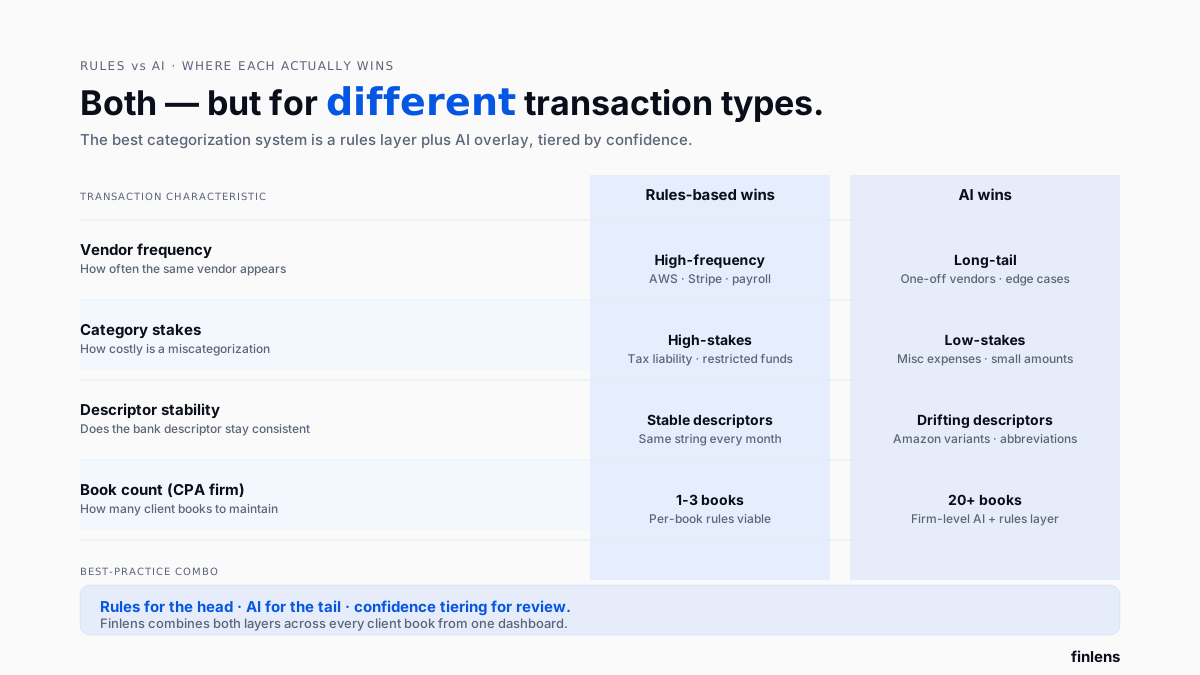
Use rules when:
- The vendor is high-frequency and predictable (AWS, Stripe, payroll deposits)
- The category is high-stakes and requires exact matching (sales-tax-liability accounts, restricted funds)
- The book has strong historical rule coverage that's already stable
- The bookkeeper wants explicit auditability of every categorization
Use AI when:
- The book has long-tail vendors that would require dozens of one-off rules
- The bookkeeper is managing 20+ books and can't maintain rules per book
- The chart of accounts has enough consistency for AI to generalize
- Confidence-scored review workflows are acceptable
Best practice: use both. Rules for head; AI for tail. Finlens, Pennylane, and QBO's built-in each combine both approaches (with wide variation in AI depth).
How CPA firms should think about categorization at scale
For a CPA firm managing 20-100 client books on QuickBooks Online, categorization strategy that works for one client (rules-first, per-book maintenance) doesn't scale linearly. Rebuilding rules 20 times is 20× setup and 20× ongoing maintenance.
Firm-scale automation (Finlens) applies:
- Firm-level rules that inherit into every client book
- AI categorization trained on firm's review patterns
- Per-client overrides where client's chart of accounts differs
- One dashboard for reviewing low-confidence categorizations across every client at once
An r/QuickBooks discussion about efficiently categorizing 1000+ bank transactions captures volume problem at high transaction count, per-transaction review isn't viable, and neither rules nor AI alone is sufficient. The winning approach is confidence-based tiering: auto-post high-confidence, queue medium for batch review, escalate low-confidence to human reviewer.
Which categorization tool should you choose
- Use Finlens if you're a CPA firm managing multiple QuickBooks Online client books and want AI + rules at firm scale from one dashboard, layered alongside existing QuickBooks automation workflows.
- Use Digits if you're an early-stage startup ready to move off QBO onto an AI-native ledger.
- Use Pennylane if you're in Europe and want leading EU AI + rules platform on Pennylane's ledger.
- Use Kick if you're a solo SaaS founder wanting AI to handle bookkeeping without a CPA firm.
- Use QuickBooks Online's built-in Bank Rules if you're a solo bookkeeper with well-defined rules and predictable vendors but budget time for rule maintenance and expect built-in AI suggestions to need overriding.
Common categorization automation mistakes
Trusting AI without review. Even high-accuracy AI is not 100% accurate. Any confidence-based tool needs a review queue and a human sign-off for low-confidence rows.
Building too many rules. Rules that only apply to a handful of transactions per year add complexity without saving time. Prune rule library annually.
Letting AI train on bad overrides. QBO's built-in AI learns from user overrides including bad ones. Reviewing categorizations before finalizing them protects training loop.
Not tiering by confidence. Auto-posting everything or reviewing everything are both wrong. Auto-post high-confidence, batch-review medium, escalate low-confidence to a human.
Skipping accountant-in-the-loop. A skepticism-driven thread on r/Accounting about where real AI tools are captures practitioner view AI marketing has outpaced tool reality on many days, and healthy skepticism about auto-posted categorizations is accountant's job.
Common integrations to verify
- Bank feed connection method direct feed (Plaid, Yodlee, QBO's native) beats CSV upload.
- Multi-client access (CPA firms) Finlens is only tool built for firm-scale multi-client categorization from one dashboard.
- Chart-of-accounts sync AI has to know destination COA structure; make sure tool can read it live.
- Approval routing for larger teams, multi-role approval on low-confidence categorizations matters.
- Rule/AI hybrid verify tool supports both approaches; pure-AI or pure-rules alone rarely wins in practice.
Conclusion
AI vs rules is a false binary. The best categorization runs both rules for predictable head, AI for ambiguous tail and tiers by confidence so human bookkeeper only reviews what actually needs judgment. For solo bookkeepers on QBO, built-in Bank Rules plus targeted AI-native overlays cover base case. For CPA firms managing many client books, firm-scale automation that applies both approaches across every client from one dashboard is only way workflow stays sustainable as book count grows.

Frequently asked questions
Is AI categorization actually better than rules-based for QuickBooks
For ambiguous, long-tail, and new-vendor transactions, yes AI generalizes where rules require explicit definition. For high-frequency, stable-vendor transactions, rules can be more accurate and more auditable. The best tools combine both.
Why does QuickBooks Online's AI categorization get worse over time
QBO's built-in AI learns from user overrides including bad ones. If bookkeepers accept incorrect suggestions or override with wrong categories, AI drifts. Dedicated AI-native tools (Finlens, Digits, Kick) train on curated data that isn't polluted by user-level errors.
Which tools use AI plus rules together
Finlens (AI-native with firm-level rules layer), Pennylane (AI + rules blend), and QuickBooks Online's built-in (rules-based with AI suggestions). Digits and Kick are more AI-first with lighter rules layers.
How much accuracy can I expect from AI categorization
There is no published industry benchmark. Real accuracy depends on chart-of-accounts complexity, descriptor cleanliness, vendor diversity, and training data quality. Dedicated AI-native platforms materially outperform QBO's built-in based on real bookkeeper reports. Expect all tools to require human review for low-confidence rows.
Can I use AI categorization across multiple QuickBooks client books
Only Finlens is built for firm-scale multi-client AI categorization from one dashboard. QBO's Bank Rules are per-instance. Digits, Kick, and Pennylane are single-book tools that would require separate setups per client.
Does AI categorization work for CPA firms managing many clients
Yes, but only if tool is designed for firm-scale use. Finlens applies AI categorization + firm-level rules across every client book from one dashboard. Solo-book tools (Digits, Kick) don't scale to firm workflows.
What's difference between Finlens and QuickBooks Online's built-in AI
Finlens layers on top of QBO QBO's Bank Rules remain in place, and Finlens' AI adds a second layer with firm-level rules, confidence scoring, and multi-client dashboards. QBO's built-in AI is base layer that's included with subscription; Finlens is CPA-firm-scale layer on top.
How do I audit AI-based categorization decisions
Any AI tool worth using produces an audit trail per categorization transaction, proposed category, confidence score, rule or model version applied, and reviewer sign-off. Finlens maintains a tamper-evident audit log that ties every categorization to its rationale.

