
Best Software for Automating Accounting Tasks: 9 Tools Compared by What They Actually Automate


A platform that automates workflow checklists is doing different work than a platform that auto-posts journal entries. Both call themselves "accounting automation." Picking wrong category for your firm wastes anywhere from $2,000 to $30,000 a year.
This piece compares 9 tools that legitimately automate accounting work, scored on what they actually do rather than what their marketing claims. The framework is built for firm owners and senior bookkeepers who are past "should we use software" question and are at "which one, and why."
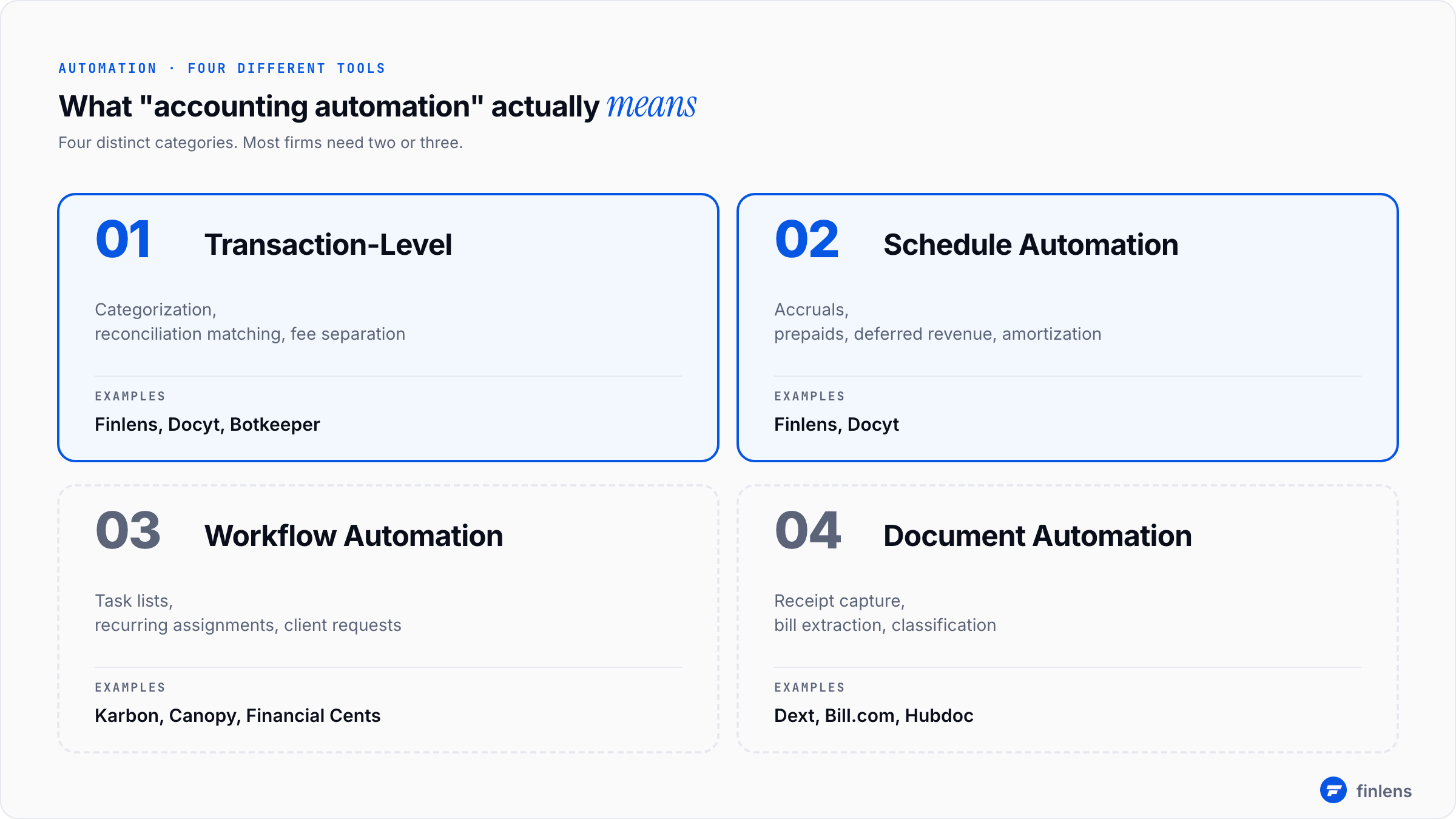
The four categories of accounting task automation
Before vendor list, you need to know what kind of automation you are buying. These are four categories, and most tools sit primarily in one:
A firm needs at least two of these working together. Most firms need three. The mistake to avoid is buying one tool that claims to do all four and discovering it does none of them well.
The scoring framework
Every tool below is scored on same four-axis framework. Each axis is 1 to 5:
- Depth of automation does tool replace work, or just track it?
- QBO integration quality is it real two-way sync, or one-way export?
- Multi-client management built for one company's controller, or for a firm with 30+ clients?
- Pricing transparency can you see real prices on website, or is everything "contact us"?
A tool that scores 4+ on all four axes is rare. Most tools are strong on two axes and weak on others. Picking right tool means matching its strengths to work you actually need automated.
Comparison table at a glance
A scoring caveat: this is a generalist read on each tool. Your specific use case may change math. The per-vendor profiles below explain where scores come from.
The 9 tools, profiled
1. Finlens
Primary category: Schedule + transaction automation
Best for: Accounting firms on QuickBooks Online with 10 to 100+ clients
Pricing: $0 starter (up to $50k/month expenses) | $49/month AI Accounting | $199/month Full Service
Finlens sits on top of QBO without migration. The categorization engine learns from GL logic across your client portfolio, so categorization decisions on Client A inform similar transactions on Client B. The schedule automation is differentiator versus most tools in this list accruals, prepaids, deferred revenue, and amortization schedules generate and post automatically each period.
Where it scores: Highest in this list for schedule automation and multi-client visibility. Free plan covers real production use, not a trial-tier teaser. Backed by Y Combinator and Accel.
Where it does not: Does not include document management or client portal features. Pair with Dext or Bill.com for document workflows, or with Karbon for practice management.
2. Karbon
Primary category: Workflow and practice management
Best for: Firms that need task management, client communication, and team workflow consolidated
Pricing: $59/user/month (Team) to $89/user/month (Business)
Karbon is gold standard for accounting workflow automation. Templates for recurring tasks, automatic client emails when documents are due, team-wide visibility into who is working on what. Strong CRM and email integration.
Where it scores: Best-in-class for workflow category. Multi-client dashboard is excellent. The recent AI features (suggested replies, auto-summarization of client threads) are genuinely useful.
Where it does not: Karbon does not automate actual accounting work. It tracks work, assigns it, and reminds people about it. The transactions still get categorized by a human. The schedules still get built by a human. Firms that buy Karbon expecting it to reduce bookkeeping hours are usually disappointed it reduces coordination hours instead.
For full Karbon coverage, Karbon alternatives breakdown covers when it fits and when something else does.
3. QuickBooks Online (native automation)
Primary category: Transaction automation
Best for: Solo bookkeepers or firms with under 10 simple-book clients
Pricing: $30/month (Simple Start) to $200/month (Advanced)
QBO's native bank rules and AI categorization have improved a lot. For straightforward businesses with consistent vendors, auto-categorization handles 60-70% of transactions correctly after first few months of training.
Where it scores: Already in your stack. No additional cost. Tightly integrated with payroll, invoicing, and reporting.
Where it does not: No cross-client learning every client file starts from scratch. Bank rules are text-match only, so vendor name changes break them. No schedule automation. Anything past 10 clients turns rule maintenance into a part-time job.
4. Botkeeper
Primary category: Transaction + document automation
Best for: Firms that want to outsource categorization work entirely
Pricing: Custom (typically $500+/month for entry tier)
Botkeeper combines AI categorization with human bookkeeper review. The output is supposed to be "clean books with no work from your firm." In practice, human review layer is what makes output reliable. The AI alone is similar to what Finlens or Docyt offer.
Where it scores: Strongest fit if you want to fully outsource categorization step. Human review catches edge cases AI misses.
Where it does not: Most expensive option in this list per client. Pricing is opaque you cannot get a real number without a sales call. Firms that want to retain control of their workflow find Botkeeper too hands-off.
5. Dext (formerly Receipt Bank)
Primary category: Document automation
Best for: Firms with heavy receipt and bill volume that flows from paper or email into QBO
Pricing: $24/month (Starter) to $90/month (Premium) per client
Dext extracts data from receipts, invoices, and bank statements, then pushes it into QBO. The OCR quality is best in category. The mobile receipt capture is feature clients actually use.
Where it scores: Document extraction quality and client-facing UX. The mobile app is main reason firms keep paying for it clients photograph receipts and data lands in QBO without firm intervention.
Where it does not: It is a document tool, not a full accounting automation suite. It does not automate schedules, reconciliation, or workflow. Most firms run Dext alongside another tool, not instead of one.
6. Bill.com
Primary category: Document + workflow (AP/AR specific)
Best for: Firms with clients running meaningful AP volume
Pricing: $45/month (Essentials) to $179/month (Corporate)
Bill.com is dominant tool for accounts payable and accounts receivable automation. Vendor bills come in via email or upload, get coded, get approved through a workflow, and pay out via ACH or check.
Where it scores: Best-in-class for AP workflows specifically. Approval routing is mature. The vendor 1099 tracking saves real time at year-end.
Where it does not: Bill.com is AP/AR-focused, not full-firm automation. Not a categorization engine, not a schedule generator. Firms that buy Bill.com expecting general bookkeeping automation are buying wrong product.
7. Docyt
Primary category: Transaction + schedule automation
Best for: Firms with 20-50 clients that need real-time bookkeeping plus AP automation bundled
Pricing: Custom (typically $300-500+/month per client at scale)
Docyt does real-time transaction categorization, AP automation, and document management in one platform. Multi-client management is solid.
Where it scores: Bundled scope is rare in this market. The real-time aspect is genuine books update continuously rather than batched at month-end.
Where it does not: Pricing scales quickly. Onboarding takes longer than tools like Finlens because platform handles more workflows. Not a fit for firms with under 20 clients.
8. FloQast
Primary category: Workflow + close management
Best for: Mid-market in-house finance teams (not multi-client firms)
Pricing: Custom (mid-market starts $20K+/year)
FloQast is excellent close software for a controller running one company's books. Checklists, reconciliation matching, audit trails. Their published stats claim 20% close time reduction and 38% reconciliation time reduction.
Where it scores: Best-in-class for single-entity close management. Used by serious finance teams at mid-market companies
Where it does not: FloQast was not built for multi-client accounting firms. Running 30 clients in FloQast means 30 separate workspaces and no portfolio view. Firm owners who try to retrofit it for client work get frustrated. The FloQast alternatives comparison covers when a firm should look elsewhere.
9. Canopy
Primary category: Workflow (tax-focused)
Best for: Tax-only or tax-heavy firms
Pricing: $50-100/user/month depending on modules
Canopy is workflow software built specifically for tax practices. Document collection, client portal, task management, time tracking. Recent expansion into broader accounting workflow but DNA is tax.
Where it scores: Tax practice fit. Document collection flows are well-designed for tax season chaos.
Where it does not: Light on actual accounting automation. Like Karbon, it tracks work rather than doing it. Firms with mixed tax + bookkeeping practice often need a second tool for bookkeeping side.
Tools I deliberately left out (and why)
A few names show up on every other comparison list. They are not here for specific reasons:
- Pilot and Bench are outsourced bookkeeping services, not automation software. You're hiring a team, not automating tasks.
- Xero's built-in automation is solid for Xero users, but this list is QBO-focused because that is where 80%+ of US firms operate.
- Zapier can be configured to automate accounting workflows but maintenance overhead defeats purpose for most firms.
- Notion and Monday.com are general project management tools, not accounting-specific.
Pricing transparency: what you actually pay
Most comparison pieces show starting prices and skip real cost at scale. Here is what 30 clients actually costs across realistic options:
The math that drives right pick is hourly labor cost. The BLS reports median accountant wages around $79,880/year, which works out to ~$38/hour fully loaded. Automation that saves 4 hours per client per month at 30 clients = 120 hours = $4,560 in monthly labor cost recovered. Any tool under that threshold is paying for itself, before considering quality improvements.
How to pick by firm segment
Frequently asked questions
What's difference between automated accounting software and automated workflow software?
Accounting software automates work itself: categorization, reconciliation, schedules, journal entries. Workflow software automates coordination around work: task assignment, due-date tracking, client communication. Most firms need both. The mistake is buying workflow software and expecting accounting work to get faster it doesn't.
Can I just use QuickBooks Online's native automation features?
For under 10 clients with simple books, yes. The native bank rules and AI categorization handle basics. Past 10 clients, lack of cross-client learning and absence of schedule automation become real bottlenecks. The math favors a dedicated automation layer past that point.
Does automated accounting software actually save money?
Yes, but only when tool category matches work. A workflow tool will not reduce bookkeeping hours. A categorization engine will not reduce coordination hours. Audit your actual time sinks before buying. If 60% of your team's time is task coordination, buy workflow software. If 60% is categorization and schedule work, buy accounting automation software.
Will AI accounting software replace bookkeepers?
No, but it will change what bookkeepers do. The categorization work that used to fill day becomes a review-and-approve step. Hours freed up shift to advisory, cleanup, and client management. Firms that survive transition retrain bookkeepers into senior reviewer roles. Firms that don't lose bookkeeper to another firm that did.
What's fastest automation win for a small firm?
For most QBO firms under 50 clients, automated categorization with cross-client learning recovers most hours per dollar spent. Schedule automation (accruals, prepaids) is second. Workflow tools are valuable but should usually come after accounting work is automated, not before. The accounting automation software guide goes deeper on this prioritization.
How long does it take to roll out automation across a firm?
Realistic timeline: 2 weeks to roll out across 1-3 pilot clients, 6-8 weeks to roll out across whole book. The work is not technical most tools connect in under an hour per client. The work is process change: getting staff to trust AI output, training senior reviewers on what to spot-check, and rebuilding close checklist around new workflow.
The right pick depends on what you are actually automating and how many clients you run. If you are past 10 QBO clients and categorization work is eating your team's week, Finlens is most direct fit. The free plan covers real production use, which means you can test it on a few clients without contract negotiation. For workflow on top of that, layer Karbon or Canopy depending on whether your practice is bookkeeping-heavy or tax-heavy.
For deeper coverage on adjacent automation decisions, see QuickBooks month-end close automation guide, bank reconciliation automation breakdown, and 50-client management playbook.

