
How Does QuickBooks Work? A Walkthrough for New Users (2026)


QuickBooks works by connecting to your bank and credit card accounts, pulling every transaction into software as it clears, categorizing transactions against a chart of accounts, storing them in a general ledger, and producing financial reports and tax data that flow out of that ledger.
The whole platform is built around one central data structure, meaning general ledger, which is running record of every financial transaction business has ever made. Everything you do inside QuickBooks either adds data to ledger or pulls insight from it, and understanding that architecture makes rest of product much easier to use.
This guide walks through what actually happens when you use QuickBooks day to day. It covers three-layer architecture platform uses, and how data flows from bank feeds through categorization into ledger and out to reports.
It also walks through what happens under hood when you send an invoice or run payroll, how QuickBooks handles security and multi-user access, and practical mechanics that new users most often get confused about in their first month.
It's written for owners setting up QuickBooks for first time, freelancers deciding whether to move from spreadsheets, and CPA-firm clients trying to understand what platform is doing on their behalf.
The three-layer architecture at heart of QuickBooks
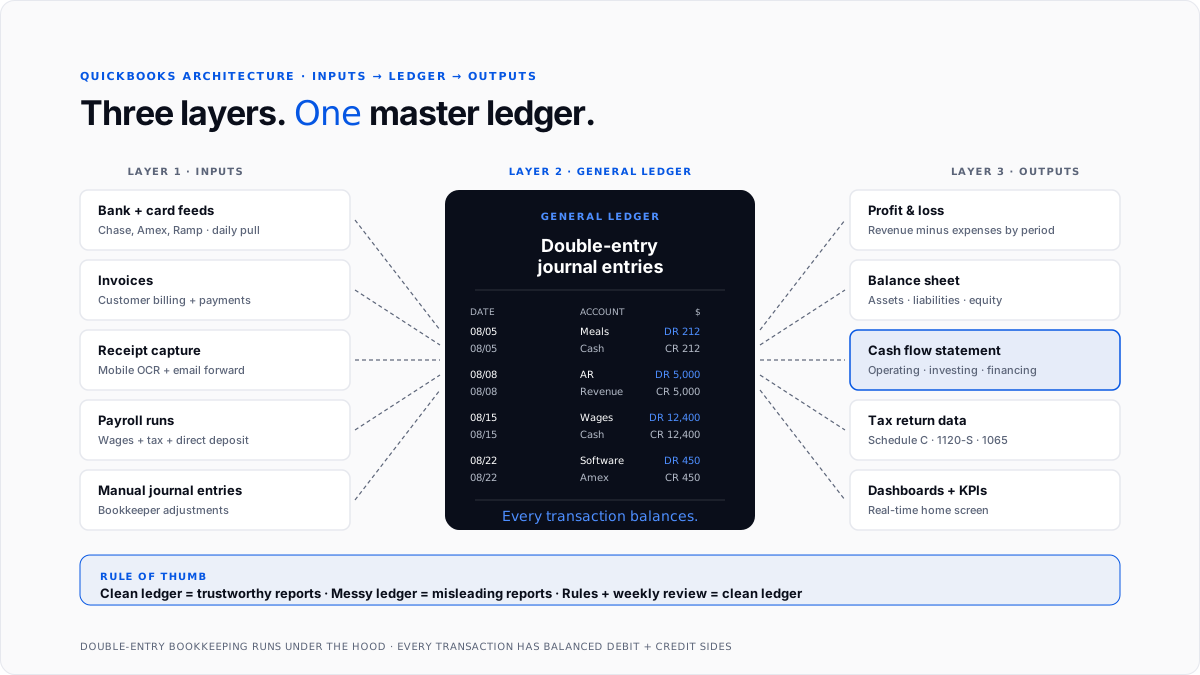
QuickBooks is easiest to understand as a three-layer system. Data comes in through one layer, gets processed by middle layer, and flows out to third layer as reports and tax data.
Layer 1: Inputs. Bank feeds, credit card feeds, invoice creation, receipt capture, and payroll runs all feed transactions into system. These are raw activities that need to be recorded.
Layer 2: The general ledger. Every input eventually becomes a journal entry in ledger, coded to a specific chart of accounts line, with correct date, amount, and business purpose attached. This is master record of business's financial life.
Layer 3: Outputs. Financial reports, dashboards, tax data, and integrations with downstream tools all pull from ledger. If ledger is clean, everything downstream is trustworthy. If ledger is messy, everything downstream is misleading.
The genius of QuickBooks is that owners can operate at input and output layers without needing to think about ledger layer directly. Bookkeepers and accountants work with ledger layer to make sure middle is correct. That separation is why QuickBooks can be usable by non-accountants and still support proper double-entry bookkeeping underneath.
How bank feeds actually work under hood
The bank feed is primary input into QuickBooks for most businesses, and it's where a lot of platform's day-to-day value comes from.
When you connect a bank or credit card account to QuickBooks, platform uses a data-aggregation service (Intuit's own connection or third parties like Yodlee and Plaid) to pull transaction data from bank on a regular schedule, typically once or twice a day. Every new transaction that clears bank shows up in QuickBooks feed within 24 hours.
Each transaction arrives with date, amount, and vendor name as captured by bank. QuickBooks then applies any bank rules user has set up, meaning "if vendor matches Adobe, categorize as Software," to auto-categorize what it can. Transactions rules don't match land in a review queue for manual categorization.
Once user reviews and accepts a transaction (or bulk-accepts a group), QuickBooks posts entry to general ledger as a proper journal entry with debit and credit sides balanced. The historical transaction categorization tools for QuickBooks guide covers how backfill works for accounts with months of unreviewed transactions.
What happens when you send an invoice
Invoicing is other big input path for most service businesses. The mechanics are worth understanding because there's more happening under hood than interface suggests.
When you create and send an invoice, QuickBooks does four things simultaneously. It creates a receivable in ledger, meaning it adds a line under accounts receivable on balance sheet showing customer owes you money.
It applies sales tax based on customer's location if sales tax is configured. It generates a professional PDF and sends it to customer by email. And it activates payment link so customer can pay online through QuickBooks Payments or a connected processor.
When customer pays, another set of actions fires. The payment arrives (either through QuickBooks Payments directly or through a bank deposit that feed picks up). QuickBooks matches payment to outstanding invoice.
The receivable comes off balance sheet, and cash goes on. The customer's statement updates automatically. If it's a subscription or recurring invoice, next one gets scheduled.
The whole flow closes within seconds if customer pays online. For customers paying by check or bank transfer, ledger update happens whenever bank feed pulls in deposit.
How QuickBooks tracks expenses through categorization
Categorization is workflow where owners and bookkeepers spend most of their QuickBooks time, and it's where ledger stays clean or gets messy.
Every transaction that hits bank feed shows up in "For review" queue. The user assigns each transaction a category from chart of accounts, either accepting auto-suggestion, applying a bank rule, or picking manually. Once accepted, transaction posts to ledger.
Categorization matters because each category maps to a specific line on tax return. Meals hit Schedule C Line 24b at 50% deductibility. Software subscriptions hit Line 27 or Line 18 depending on setup. Client entertainment is 0% deductible post-TCJA. The QuickBooks chart of accounts guide covers how to set up categorization structure so it matches tax return cleanly.
Rules speed process up dramatically. A well-configured QuickBooks setup catches recurring vendors, applies right category automatically, and only surfaces unusual transactions for manual review. Businesses running with sloppy rules end up reviewing every transaction manually, which is where workflow becomes painful.
How general ledger actually stores data
The general ledger is master record, and understanding what it actually contains helps make sense of everything else.
Every entry in ledger has a date, an amount, a debit side, a credit side, a category (chart of accounts line), and often a memo or reference. Under double-entry bookkeeping, every transaction has two sides that balance.
When you record a $500 software expense paid from business checking account, ledger stores it as a $500 debit to Software Expense and a $500 credit to Business Checking.
Owners typically don't see this double-entry structure. QuickBooks presents transactions in familiar bank-feed style with a single line per transaction. Behind that presentation, though, ledger is running proper double-entry accounting, and that's what makes P&L and balance sheet accurate.
The ledger stores every transaction from every source, meaning bank feeds, invoices, bills, payroll, and manual journal entries all land in same underlying data structure. This is what makes financial reporting possible: a report just pulls filtered slices of ledger and presents them.
How QuickBooks handles reports and dashboards
Reports and dashboards are output layer. Every standard report in QuickBooks is fundamentally a query against general ledger.
The Profit and Loss report pulls all revenue and expense transactions for selected period, sums them by category, and presents them in standard P&L format. The Balance Sheet pulls all asset, liability, and equity balances as of selected date. The Cash Flow report reconstructs movement of cash from operating, investing, and financing categories.
Because every report queries same underlying ledger, they always tie. If P&L shows $500K in revenue for year, accounts receivable turnover, sales by customer report, and item sales report all reflect same underlying data. Discrepancies between reports usually mean there's a data issue in ledger that needs cleanup.
Dashboards in QuickBooks home screen are lightweight, real-time versions of same idea. They pull current period totals from ledger and update as new transactions post. This is what makes "at a glance" view meaningful rather than just decorative.
How multi-user access and security work
QuickBooks Online is designed for multiple users to work on same books simultaneously, with role-based access controls.
The account owner assigns each user a role (owner, admin, standard, reports-only, or accountant) that determines what they can see and change. Bookkeepers typically get admin or standard access. Managers might get reports-only. External accountants get a special accountant role that gives them broad access without counting against user seat limit.
Every action in ledger gets timestamped and attributed to a specific user, which creates an audit trail. This matters for both internal control (spotting who made a specific change) and external audit (proving books are legitimate).
Security is handled by Intuit at platform level. Data is encrypted in transit and at rest. Two-factor authentication is available and recommended. Regular backups happen automatically on Intuit's servers. This is one of significant advantages of cloud product over older Desktop version, where security and backup were user's responsibility.
How QuickBooks handles integration with other tools
QuickBooks doesn't try to do everything itself. It has a large ecosystem of third-party integrations that extend platform for specific needs.
Payment processors like Stripe, PayPal, and Square sync transaction data automatically. E-commerce platforms like Shopify and Amazon push sales data. Corporate card programs like Ramp and Brex feed spend data with categorization pre-applied. Payroll systems that aren't QuickBooks Payroll can push wage data through API.
Businesses running heavier automation on top of QuickBooks often use an AI layer that handles categorization, reconciliation, and reporting at scale. The AI layer for QuickBooks guide covers this pattern, and automate QuickBooks bookkeeping guide covers specific workflows firms most often automate.
The overall design is that QuickBooks holds ledger, and integrations feed ledger from specialized upstream tools while pulling reports and data downstream. This is why QuickBooks has stayed relevant even as specialized tools have grown up around it.
How CPA firms work inside QuickBooks
CPA firms and bookkeeping firms use a specific interface called QuickBooks Online Accountant, which lets a firm partner see all client files from one login without switching accounts.
The firm partner or bookkeeper adds each client's QuickBooks Online file to accountant portal, sees pending tasks across all clients on one dashboard, and moves between books without re-authenticating. Client requests, review workflows, and tax prep timelines all consolidate in one interface.
Modern firms often layer additional automation on top to handle bookkeeping cleanup, categorization, and month-end close across many clients at once. The automate bookkeeping cleanup guide covers cleanup side, and best AI tools for bulk transaction categorization guide covers automation side.
Common misconceptions about how QuickBooks works
Several assumptions about how platform works consistently trip up new users.
"QuickBooks does my books for me." No. QuickBooks records what you enter or what bank feed pulls in. It doesn't decide categories, catch errors, or make judgment calls about ambiguous transactions. Those are human decisions software supports.
"Bank feeds handle everything automatically." They handle transaction capture step. The categorization, review, and posting steps still need human attention (or a well-designed automation layer). Skipping review means categorization errors compound.
"Reports are always accurate." Reports are only as accurate as ledger they query. If ledger has miscategorized transactions, duplicates, or missing entries, reports will reflect those errors.
"QuickBooks files my taxes." It produces categorized data that flows into tax return, but it doesn't file return itself. Intuit sells TurboTax separately for that.
"I don't need an accountant if I have QuickBooks." For most businesses, accountant is still valuable for tax planning, entity structure, and year-end review. QuickBooks handles daily bookkeeping, but strategic financial advice is a separate function.
A fair amount of that confusion comes from comparing QuickBooks to AI-native ledgers without matching features, which is why it helps to see Digits and QuickBooks compared on the same workflows.
Conclusion
QuickBooks works by connecting to bank feeds, categorizing incoming transactions against a chart of accounts, storing everything in a general ledger, and producing reports that flow out of that ledger to your P&L, balance sheet, and eventual tax return.
The three-layer architecture (inputs, ledger, outputs) is what makes platform simultaneously usable by non-accountants at input and output layers, and reliable for accountants working directly with ledger. Understanding that architecture is what makes rest of product intuitive rather than mysterious.
For owners setting up QuickBooks for first time, highest-return moves are connecting bank and card feeds from day one, setting up chart of accounts to match tax return, configuring bank rules for recurring vendors so categorization is mostly automatic, and establishing a weekly review rhythm so ledger stays clean throughout year.
For CPA firms running many client books, layering automation on top of base QuickBooks platform is what turns tool into a firm-level operating platform, and it's where biggest margin lifts come from as client base grows.
Frequently asked questions
How does QuickBooks track transactions?
Through bank feeds that pull transactions from your bank and card accounts as they clear, plus manual entry for anything not in a connected account. Every transaction goes into general ledger with a date, amount, and category.
Does QuickBooks need internet access?
QuickBooks Online requires an internet connection because data lives on Intuit servers. QuickBooks Desktop runs locally and can work offline, though most Desktop products have moved to subscription models that require periodic online authentication.
What is QuickBooks actually doing behind scenes?
Storing your general ledger, applying double-entry bookkeeping to every transaction, running bank feed connections, generating reports on demand, and pushing data to integrated third-party tools.
How does QuickBooks handle sales tax?
It calculates correct sales tax based on customer's location, tracks collected sales tax as a liability on balance sheet, and produces sales tax reports for filing. It doesn't file state sales tax returns directly, but integrations like Avalara handle that piece.
Can I trust numbers QuickBooks produces?
Yes, if underlying ledger is clean. QuickBooks does proper double-entry accounting under hood, so P&L, balance sheet, and cash flow reports all tie mathematically. Errors usually mean ledger has categorization mistakes rather than software bugs.
How often does QuickBooks pull bank transactions?
Once or twice a day for most banks. Some connections update more frequently. Occasionally a bank feed will pause and require re-authentication, which is why bank connections need periodic maintenance.
How does QuickBooks Payroll interact with ledger?
Every payroll run posts a batch of journal entries to ledger, meaning debits to wages and payroll tax expense, credits to cash for direct deposits, and liabilities for tax amounts owed to government. See payroll tax guide for underlying tax structure.
Do accountants see same QuickBooks I see?
Yes, if they have access to your file through QuickBooks Online Accountant. They see same ledger, transactions, and reports. They may see additional accountant-only tools for adjusting entries and reclassification.
How do integrations affect ledger?
Every integration that pushes data to QuickBooks posts entries to ledger, just like manual entry or bank feed acceptance. This is why integration setup matters: badly configured integrations produce miscategorized transactions that need cleanup.
Can I undo something in QuickBooks?
Yes, most actions can be undone or edited. QuickBooks tracks every change for audit trail, so undoing a transaction doesn't lose record of what happened. Deleted transactions can usually be recovered from audit log.
What's difference between how QuickBooks Online and Desktop work?
The core architecture is similar. The main difference is that Online runs on Intuit servers and Desktop runs locally on your computer. Online has stronger mobile access and automatic backup; Desktop has faster performance on very large files and deeper features in some specialty industries.

