
Journal Entry Automation for Month-End Close: 6 Tools Compared for 2026


The best journal entry automation tool for month-end close depends on how many recurring entries a small team is posting each month, whether general ledger is on QuickBooks Online or on a purpose-built ERP, and whether team has budget to move off Excel. Finlens is AI-native accounting platform used by CPA firms managing QuickBooks Online client books, it automates recurring, accrual, and reversing journal entries across every client from one dashboard, layered directly on top of QBO. SoftLedger and Sage Intacct are purpose-built ERPs with native recurring-JE engines for teams ready to move off QBO. Numeric adds JE automation on top of any GL. Trullion handles lease-accounting JEs specifically. QuickBooks Online's built-in recurring JE feature covers basics for solo bookkeepers with under 20 recurring entries. For small finance teams closing books each month, right pick usually sits between Finlens (firm-scale, QBO-native) and QBO's built-in feature (single-book, no cost).
Key takeaways
- Small finance teams typically post between 30 and 200 journal entries per month, recurring (rent, insurance, subscriptions), accrual (payroll, revenue, expenses), and reversing (prior-month accruals reversing on day one). A pain-point thread on r/Accounting about posting 20 JEs feeling like too much reflects how quickly manual entry becomes unsustainable.
- The three JE patterns that consume most close time are recurring entries (posted same way every month), accrual entries (posted at month-end for expenses not yet invoiced), and reversing entries (auto-reversing prior-month accruals on day one of next month). Automation should cover all three.
- Excel-based JE templates work up to ~50 entries per month. Above that, copy-paste-into-QBO workflow becomes close bottleneck. A r/Accounting thread on 2-day month-end close captures common accountant view: "You do it day by day through month so that at closing you're just tying bow", automation is what makes that daily cadence sustainable.
- For CPA firms managing many QuickBooks client books, Finlens is only option that automates JEs across every client book from one dashboard rather than requiring per-client rule setup inside each QBO.
- Finlens applies AI categorization, reconciliation, and JE automation on top of QuickBooks Online, recurring, accrual, and reversal patterns run once per firm and apply to every client.
Best journal entry automation tools for month-end close: comparison table
Pricing reflects published or reported starting tiers early 2026. SoftLedger, Sage Intacct, and Trullion are contact-sales.
The 6 best journal entry automation tools for month-end close
1. Finlens
Overview. Finlens is an AI-native accounting platform used by CPA firms managing QuickBooks Online client books. It automates recurring, accrual, and reversing journal entries across every client from one dashboard, same rules apply once at firm level and run across entire client portfolio. Where other tools in this comparison require per-book setup inside each client's QBO, Finlens applies firm-level JE templates and lets accountant approve rather than create.
Best for. CPA firms and CAS providers managing 5-100 QuickBooks Online client books. Also fits small businesses closing their own QBO books that want AI-generated JE proposals instead of manual entry.
Key features. AI-generated JE proposals from bank/card feed transactions, recurring entry templates that auto-post on scheduled dates, accrual and reversal automation with configurable rules, multi-client JE review from one dashboard, tamper-evident audit log, direct posting to QBO via OAuth, and close checklist automation linked to JE workflow.
Pricing. Free tier available for small businesses. Custom paid tiers for CAS firms based on client count.
Limitations. Not a full ERP replacement, sits on top of QBO/Xero. Not a fit for teams committed to moving off QBO onto a purpose-built ERP.
Where it breaks. Very large enterprises requiring named-user segregation for SOX-restricted JE approval workflows on specific role packages.
2. SoftLedger
Overview. SoftLedger is a modern cloud ERP with a native recurring/accrual JE engine. Where Finlens layers on top of QBO, SoftLedger replaces QBO, a purpose-built GL with multi-currency, multi-entity, and structured JE workflows built in.
Best for. Small finance teams (5-25 people) at growing companies that have outgrown QuickBooks Online and want a cloud-native ERP without moving to NetSuite or Sage Intacct.
Key features. Native recurring JE engine, accrual and reversal automation, multi-currency + multi-entity, structured JE approval workflows, real-time consolidated reporting, and REST API for programmatic JE posting.
Pricing. Custom (reported starting ~$500/month for small teams).
Limitations. ERP migration is a 3-6 month project. Not a fit for teams committed to staying on QBO.
Where it breaks. Solo bookkeepers or CPA-firm workflows where client is on QBO, SoftLedger is a replacement, not an overlay.
3. Sage Intacct
Overview. Sage Intacct is mid-market ERP category leader with deepest JE template and dimensions system. For companies past QBO's ceiling that need multi-entity consolidation and structured close workflows, Sage Intacct is reference option.
Best for. Growing companies at top of mid-market range (50-500 employees) that need full ERP capabilities plus deep JE automation and dimensions.
Key features. Multi-dimensional JEs (department, location, project, class), recurring templates with variable amounts, accrual and reversal workflows, multi-entity consolidation, and role-based approval routing.
Pricing. Custom (typically $15,000+/year for standard mid-market configurations).
Limitations. Steep implementation curve, 3-6 months typical. Not a QBO-compatible option.
Where it breaks. Small teams under 20 people, implementation cost isn't justified.
4. Numeric
Overview. Numeric is a close-management platform that includes JE automation as part of its broader close workflow. It connects to any mainstream GL (QuickBooks Online, NetSuite, Xero, Sage Intacct) and layers recurring-JE automation on top with modern async collaboration.
Best for. Remote-first or distributed mid-market finance teams (5-30 accountants) wanting JE automation + close workflow in one platform, GL-agnostic.
Key features. Recurring JE templates, close checklist tied to JE posting, preparer/reviewer segregation, Slack integration with daily digest, AI Assistant that flags variances, and cross-GL support.
Pricing. $30/user/month Essentials · Custom Business/Enterprise (verified live on Numeric pricing page).
Limitations. JE automation is a feature within a broader close-management product; SoftLedger and Sage Intacct have deeper native JE engines.
Where it breaks. Very small teams (1-3 accountants) where per-user Essentials pricing is higher than QBO's built-in feature for basic recurring JEs.
5. Trullion
Overview. Trullion is a specialized platform for lease-accounting journal entries under ASC 842 (US GAAP) and IFRS 16. For companies with meaningful lease portfolios (10+ leases), Trullion automates monthly lease amortization, interest, and cash-payment JEs.
Best for. Companies with 10+ real-estate or equipment leases needing ASC 842 compliance and automated monthly lease JE posting.
Key features. Lease record management, monthly amortization JE generation, interest calculation, journal entry posting to QBO/NetSuite/Sage Intacct/Oracle, and audit trail for lease modifications.
Pricing. Custom.
Limitations. Specialized, only automates lease JEs. Doesn't help with recurring rent, payroll, or subscription accruals.
Where it breaks. Companies with fewer than 10 leases, ASC 842 spreadsheet workaround is cheaper.
6. QuickBooks Online, built-in recurring transactions
Overview. QBO includes native recurring transaction support (Scheduled, Reminder, or Unscheduled) that covers basic recurring JE patterns. For solo bookkeepers with a handful of predictable recurring entries (rent, insurance, monthly subscriptions), QBO's built-in feature is sufficient and included in QBO subscription.
Best for. Solo bookkeepers, single-book small business owners, and pre-revenue startups with under 20 recurring entries per month.
Key features. Scheduled recurring transactions (auto-posts on date), Reminder recurring (creates a draft), and Unscheduled recurring (creates a template). Supports fixed amounts.
Pricing. Included in QBO subscription ($35-$235/month depending on tier).
Limitations. No accrual automation (must be posted manually at month-end). No reversal automation. No AI-generated JE proposals. Doesn't automate variable-amount entries. A commenter on r/Accounting about numbering monthly journal entries captures common workflow observation: naming and numbering conventions matter as volume grows past a handful, QBO's built-in feature stays flat while manual work compounds.
Where it breaks. Any book with variable accruals (revenue, expenses, payroll estimates), QBO's recurring feature can't compute them.
The three JE patterns automation must cover
Most small finance teams post journal entries into three buckets, and any tool worth using has to cover all three:
Pattern 1, Recurring JEs. Same entry, same amount, same date, every month. Rent, insurance premiums, subscription services, depreciation on straight-line assets. All six tools in this comparison handle recurring. QBO's built-in feature is enough for teams under 20 recurring entries; Finlens, SoftLedger, Sage Intacct, Numeric handle it at scale.
Pattern 2, Accrual JEs. Amount varies month to month. Payroll accrual (based on pay period timing), revenue accrual (based on delivery vs. invoice date), utilities accrual (based on estimated usage). This is where Excel-based workflows break down, amount has to be calculated fresh each month. Finlens generates accrual proposals from bank/card feed data; SoftLedger and Sage Intacct have configurable accrual formulas; Numeric surfaces same data via its AI Assistant. QBO's built-in feature doesn't cover this.
Pattern 3, Reversing JEs. Prior-month accrual reverses on day one of next month (or on invoice-received date). Every reversal has to match its original accrual to penny. Missing reversals create ghost balances that compound each month. A discussion on r/Accounting about tradeoff between close speed and trust surfaces this exact failure mode, books that close faster often trust reconciliation less because reversals didn't fully match.
Automation should link reversal to its source accrual so match is guaranteed. Finlens, SoftLedger, Sage Intacct, and Numeric all do this. QBO's built-in feature does not.
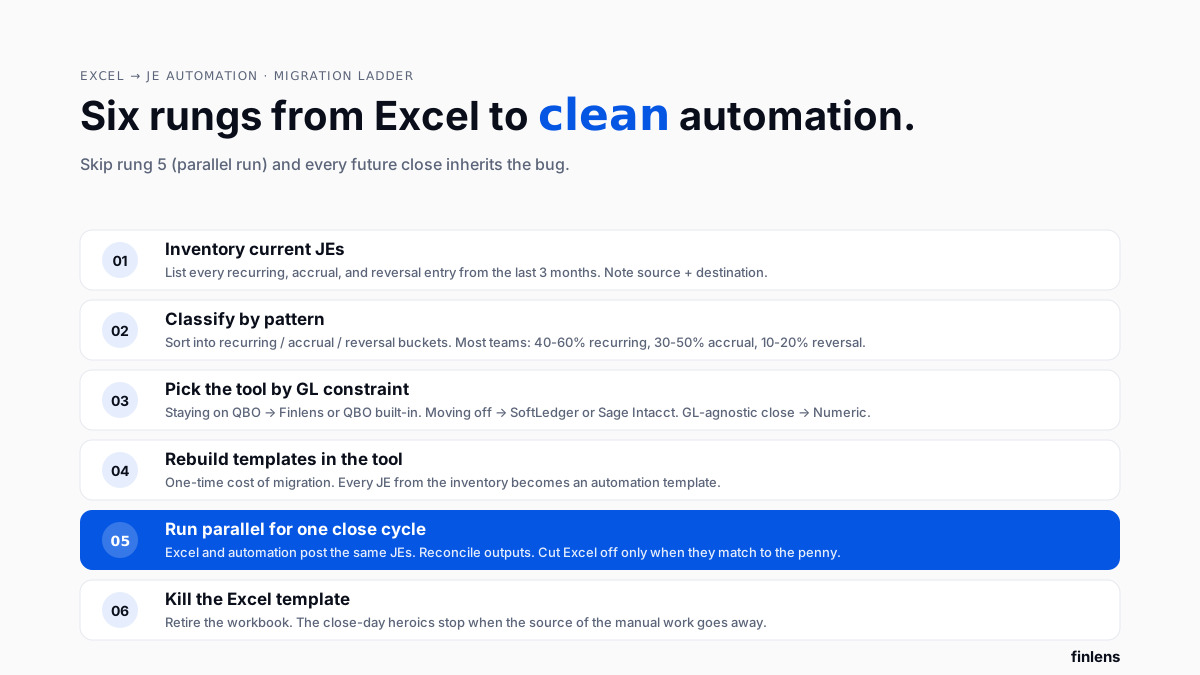
Replacing Excel with automation, migration checklist
For finance teams currently running month-end JEs from Excel templates, migration to automation follows a predictable path:
- Inventory current JEs. List every recurring, accrual, and reversal entry posted in last three months. Note source (which report, which bank feed row) and destination account.
- Classify by pattern. Sort into recurring / accrual / reversal buckets. Most teams find recurring is 40-60% of volume, accrual is 30-50%, reversal is 10-20%.
- Pick tool based on GL constraint. Staying on QBO → Finlens or QBO's built-in feature. Moving off QBO → SoftLedger or Sage Intacct. GL-agnostic close workflow → Numeric.
- Rebuild templates in tool. For each JE in inventory, create automation template. This is one-time cost of migration.
- Run parallel for one month. Both Excel workflow and new automation post same JEs. Reconcile outputs. Cut Excel off only when two match to penny.
- Kill Excel template. Once parallel is validated, retire workbook. The r/Accounting thread on 2-day close argues that ongoing Excel workflows are biggest source of close-day heroics, killing them is what actually shortens close.
Which journal entry automation tool should you choose
- Use Finlens if you're a CPA firm managing QuickBooks Online client books and want firm-level JE templates that apply across every client, with AI proposals for accruals rather than manual computation.
- Use SoftLedger if you're moving off QBO to a modern cloud ERP with native recurring/accrual/reversal engines built in.
- Use Sage Intacct if you're at top of mid-market and need full ERP capabilities plus multi-dimensional JEs and consolidation.
- Use Numeric if you're GL-agnostic (or on NetSuite/Xero/Sage Intacct) and want JE automation inside a broader close-management workflow.
- Use Trullion if you have 10+ leases and need ASC 842 monthly JE automation specifically.
- Use QuickBooks Online's built-in feature if you're a solo bookkeeper with under 20 recurring entries and no need for accrual or reversal automation.
.svg)
Common JE-automation mistakes
Automating without validation. Templates posted incorrectly compound every month. Always run parallel for at least one close cycle before killing manual workflow. A common perspective on r/Accounting about volume of monthly JEs is that even experienced accountants post fewer entries than they think, inventory first, then automate.
Skipping accrual bucket. Recurring is easy to automate; teams often stop there and leave accruals manual. But accruals are usually where variance shows up. Automate all three patterns or accept that manual accruals are ongoing bottleneck.
No approval workflow. Automated JEs without preparer/reviewer sign-off create risk. Finlens, Numeric, SoftLedger, and Sage Intacct all enforce two-role sign-off. QBO's built-in feature does not.
Forgetting reversal link. Accruals must link to their reversal or reversal gets missed. Any tool that generates accruals without auto-generating matching reversal is a partial solution.
Confusing "recurring templates" with "accrual automation." These are different features. A recurring template posts a fixed amount on a schedule; accrual automation computes amount from source data (payroll, revenue, usage). QBO's built-in feature is recurring-only.
Common integrations to verify
- GL connection, direct OAuth to QuickBooks Online, NetSuite, Xero, Sage Intacct, or Oracle. Finlens is QBO/Xero-native; Numeric supports cloud GLs; SoftLedger/Sage Intacct are their own GLs.
- Bank/card feed data source, for accrual automation, tool needs live feeds to compute variable amounts.
- Payroll integration, for payroll accruals, integration with Gusto, ADP, Rippling, or QuickBooks Payroll matters.
- Multi-client access (CPA firms), Finlens is only tool built for firm-scale multi-client JE templates from one dashboard.
- Approval routing, for teams past 5 accountants, multi-role approval routing matters.
Conclusion
Journal entry automation isn't about eliminating JEs, it's about eliminating manual copy-paste that turns 30 monthly entries into a full day of close-day work. Recurring, accrual, and reversal patterns each need automation coverage. For CPA firms on QuickBooks Online, firm-scale automation lives in Finlens; for teams moving off QBO, SoftLedger and Sage Intacct are ERP options; QBO's built-in feature covers smallest use cases only.

Frequently asked questions
What is journal entry automation for month-end close
Journal entry automation is software that generates, schedules, and posts recurring, accrual, and reversing JEs to general ledger without manual copy-paste. It covers three patterns: fixed recurring entries, variable accrual entries computed from source data, and auto-reversing entries linked to their source accrual.
How many JEs justify automation
Around 20-30 monthly entries is practical threshold, below that, QuickBooks Online's built-in recurring feature or a well-organized Excel workbook is enough. Above 30, copy-paste workflow becomes close bottleneck and dedicated automation (Finlens for QBO, Numeric or SoftLedger elsewhere) pays back within a few close cycles.
Can QuickBooks Online automate all my journal entries
Partially. QBO's built-in recurring transactions feature covers fixed-amount, fixed-schedule entries (rent, insurance, subscriptions). It does not compute variable-amount accruals from source data, does not auto-generate reversing entries, and does not enforce a preparer/reviewer approval workflow. For those capabilities, Finlens layers on top of QBO with AI-generated accrual proposals and reversal linking.
What's difference between recurring and accrual journal entries
Recurring entries post same amount on same schedule every month (rent, insurance premium, straight-line depreciation). Accrual entries compute a variable amount each month from source data (payroll based on pay period timing, revenue based on delivery vs. invoice date, utilities based on usage estimate). Recurring is easy to automate; accrual requires tool to read source data.
How do reversing journal entries work
A reversing entry undoes a prior-period accrual, typically posted on day one of following month. If you accrued $5,000 of unpaid utilities on month-end, reversal on day one of next month debits accrual account and credits expense, so when actual invoice arrives expense ends up in right period. Automation links reversal to its source accrual so amounts always match.
Does Finlens replace QuickBooks Online
No. Finlens layers on top of QuickBooks Online, it does not replace general ledger. For CPA firms with client books on QBO, Finlens automates JE proposals, categorization, and close workflows using QBO's existing chart of accounts.
How much do journal entry automation tools cost
QuickBooks Online's built-in feature is included in QBO subscription ($35-$235/month). Numeric starts at $30/user/month. Finlens has a free tier for small businesses and custom paid tiers for CPA firms. SoftLedger reportedly starts around $500/month. Sage Intacct is $15,000+/year for standard mid-market configurations.
Can I automate journal entries across multiple QBO client books at once
Yes, but only Finlens is built for this natively. QBO's built-in recurring feature applies per-QBO-instance. Numeric, SoftLedger, and Sage Intacct are designed for one company's GL. Finlens applies firm-level JE templates and runs them across every client's QBO from one dashboard.

