
PayTraQer Alternatives in 2026: Best Stripe Automation Tools for Accountants and Growing SaaS


If you run a small business and need a simple way to sync Stripe, PayPal, Shopify, Amazon, or Square transactions into QuickBooks Online, PayTraQer can be a good starting point.
But if Stripe is a meaningful part of your revenue workflow, especially if you care about fees, payouts, disputes, deferred revenue, or reconciliation accuracy, you may quickly run into limits.
This guide breaks down where PayTraQer works well, where it tends to stop, and when Finlens is a stronger fit.
PayTraQer is a capable, Intuit-trusted, multi-channel sync tool.
If you sell across Stripe, PayPal, Amazon, Shopify, Square, eBay, or WooCommerce and want one tool to push transactions into QuickBooks Online or Xero, PayTraQer does that job well. It is especially useful for small businesses that want simple bookkeeping automation across multiple payment and ecommerce platforms.
Finlens is built for a different problem.
Finlens is not trying to be a broad multi-channel sync tool. It is a Stripe revenue subledger for QuickBooks. It takes the messy reality of Stripe — charges, fees, refunds, disputes, payouts, subscriptions, deferred revenue, and reconciliation — and turns it into clean accounting entries backed by structured, drillable transaction detail.
That is the real comparison:
PayTraQer syncs transactions into QuickBooks. Finlens explains Stripe revenue, then posts the accounting conclusion into QuickBooks.
For simple cash-basis businesses, PayTraQer may be enough.
For Stripe-heavy SaaS companies, subscription businesses, CPA firms, and accrual-basis accounting teams, Finlens is built for the deeper workflow.
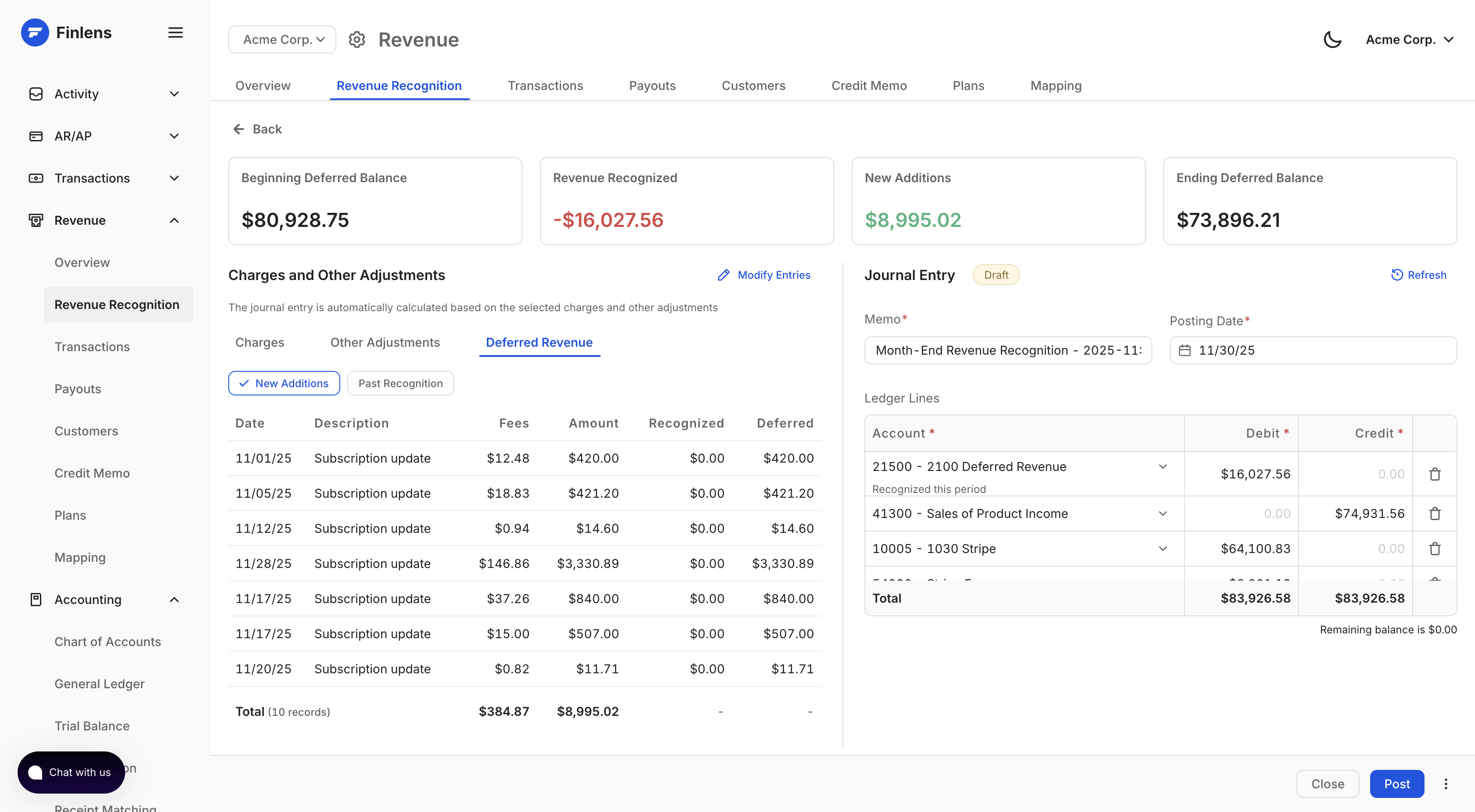
Quick Verdict
Use PayTraQer if you have simple charges and payouts and most of your sales are monthly or one time.
Use Finlens if Stripe is central to your business and you often get paid for subscriptions that are quarterly or annual and you need payout reconciliation, fee breakdowns, dispute tracking, deferred revenue, revenue recognition, and SaaS metrics inside a structured subledger.
The Core Difference
PayTraQer moves Stripe activity into QuickBooks.
It supports itemized sync, where individual transactions are pushed into QBO, and summarized sync, where Stripe activity is grouped into summary entries. PayTraqer’s payout summary mode posts a balanced entry per payout: net deposit to bank, discounts to a discount account, gross sales to an income account, and fees to an expense account.
That is useful. It keeps QuickBooks cleaner than posting every charge, fee, refund, and adjustment separately.
But the entry is still the product.
Finlens works differently.
Finlens builds a structured revenue subledger from Stripe first. Every charge, fee, refund, dispute, subscription, invoice, payout, and balance movement is stored inside Finlens. Then Finlens posts a clean journal entry into QuickBooks. Finlens also allows you to map multiple discounts to multiple discounts categories in your P&L.
In other words:
QuickBooks gets the accounting output. Finlens keeps the evidence behind it.
That distinction matters when a founder, controller, or CPA asks:
Why does this payout not match the bank deposit?
Which charges created this fee expense?
How much of this annual contract should be deferred?
Which disputes affected this month’s revenue?
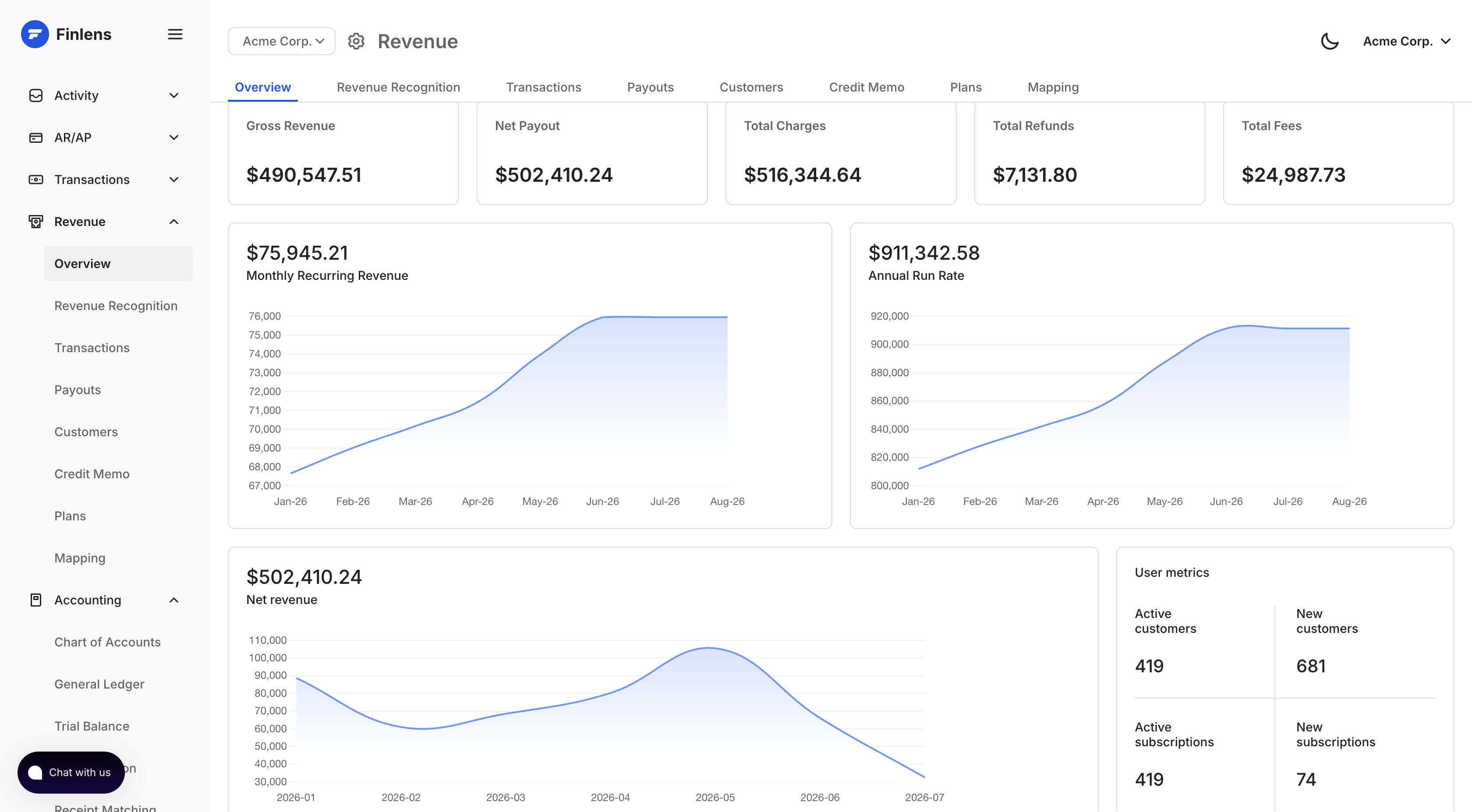
What is our MRR, ARR, churn, and net revenue?
Why is the Stripe clearing account off by $837?
A sync log can show what was pushed.
A revenue subledger can explain what happened.
What PayTraQer Does Well
PayTraqer deserves credit for what it is good at.
1. Multi-channel coverage
PayTraqer supports Stripe, PayPal, Square, Amazon, Shopify, WooCommerce, eBay, and other platforms. For ecommerce sellers with multiple channels, this is its biggest advantage.
Finlens does not try to cover every processor or marketplace.
Finlens is Stripe-first by design.
2. Itemized and summarized sync
PayTraqer gives users flexibility. You can sync individual transactions into QuickBooks, or you can use summarized entries to reduce ledger clutter.
For high-volume businesses that do not need transaction-level detail inside QuickBooks, payout summary sync is genuinely useful.
3. Historical data download
PayTraqer supports historical transaction downloads, including an automatic initial download window and older data through date-filtered historical sync.
That makes onboarding easier for businesses that want to bring prior Stripe activity into QuickBooks.
4. Rollback and re-sync
PayTraqer supports undo and rollback workflows, including removing previously synced entries and re-syncing them.
That matters because sync mistakes happen. A practical connector needs a way to recover from mapping issues, duplicate entries, or incorrect sync settings.
5. Manual and automatic sync
PayTraqer supports both automatic sync and manual review before syncing.
For bookkeepers who want control before entries hit QuickBooks, this is useful.
6. Rules, classes, tax, duplicate detection, and multi-currency
PayTraqer includes several bookkeeping-oriented features: class tracking, tax mapping, duplicate detection, rules, and multi-currency handling.
For small businesses with straightforward accounting, these features are often enough.
The fair summary is this:
PayTraqer is a strong sync tool.
The question is whether a sync tool is enough.
Where PayTraQer and Finlens Diverge
1. What lands in QuickBooks
This is the most important difference.
In itemized mode, PayTraqer can push detailed Stripe activity into QuickBooks. But that creates a high object count inside the general ledger: sales receipts, expenses, refunds, transfers, and adjustments.
At scale, QuickBooks becomes noisy.
Reports slow down. Accountants have more records to review. And if something goes wrong, the error lives directly inside the general ledger.
In summary mode, PayTraqer keeps QuickBooks cleaner by posting fewer entries. But that creates a different trade-off.
The QuickBooks entry becomes simpler, but it loses structure.
PayTraqer’s payout summary posted gross sales as a lump income amount, fees as an expense, and the net deposit to bank. That works for simple cash-basis accounting. But for accrual-basis SaaS, the entry does not carry enough context by itself: product attribution, customer attribution, revenue category, subscription period, and deferred revenue treatment are not fully represented in the QuickBooks entry.
So businesses often face a choice:
Post detailed entries and clutter QuickBooks.
Or post summary entries and lose accounting detail.
Finlens avoids that trade-off.
Finlens posts clean payout-level journal entries into QuickBooks while keeping the full detail inside the Finlens subledger. QuickBooks stays clean, but the charge-level evidence is still available when needed.
That is the difference between a sync tool and a subledger.
2. Deferred revenue and ASC 606 workflows
This is the categorical difference for SaaS and subscription companies.
If a customer pays $12,000 upfront for an annual subscription, that should often not be recognized as $12,000 of revenue on the payment date.
For accrual accounting, the amount usually needs to be booked to deferred revenue and recognized over the service period.
PayTraqer syncs the Stripe transaction. It does not provide a full deferred revenue workflow with automated recognition schedules and monthly journal entries.
That means teams using PayTraqer often need a spreadsheet or a separate revenue recognition tool to handle annual and quarterly subscriptions.
Finlens reads subscription and invoice data from Stripe, builds the recognition schedule, and posts the monthly revenue recognition entries into QuickBooks.
For SaaS companies, this is not a small feature.
It is often the difference between “Stripe is synced” and “our revenue is correct.”
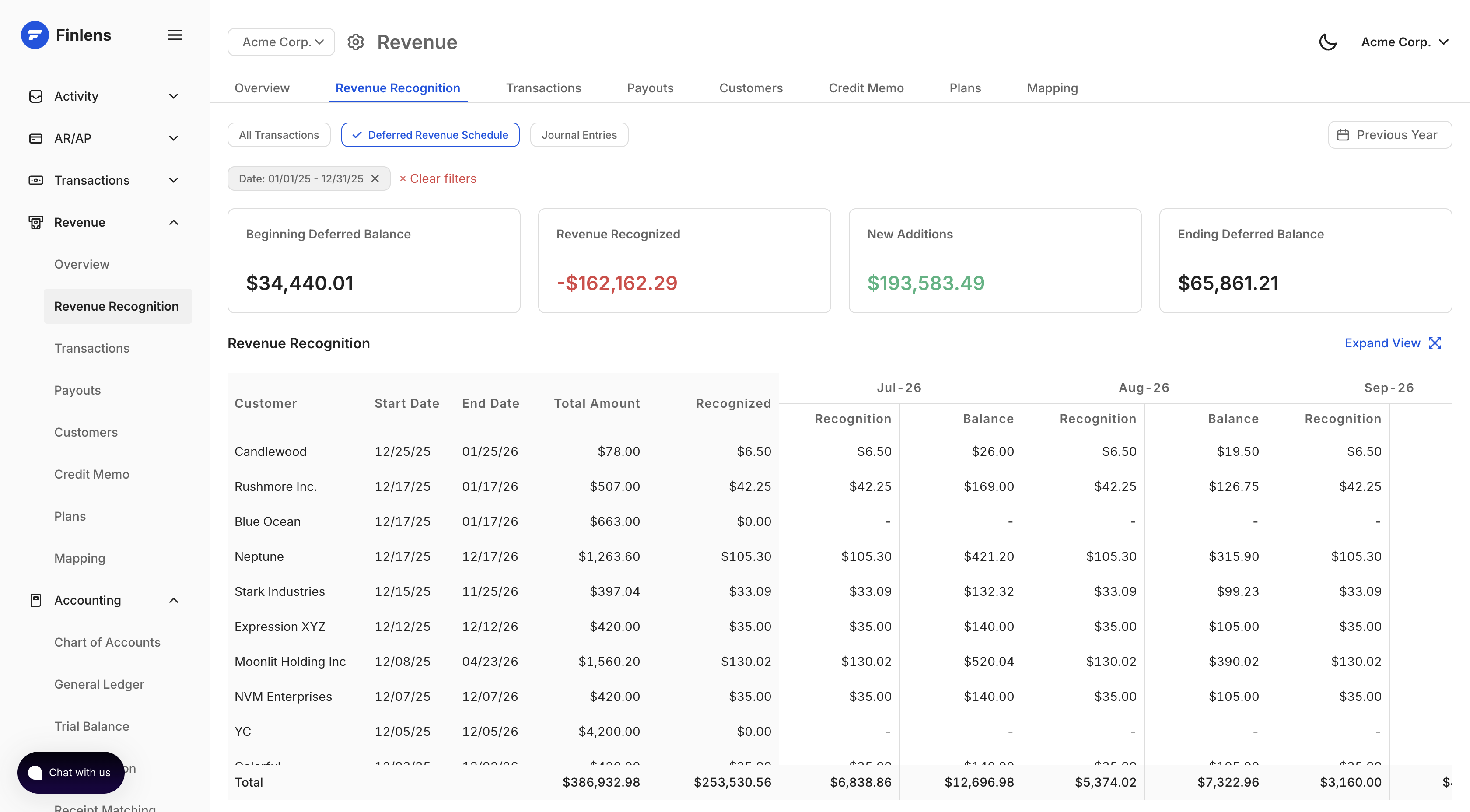
3. Payout decomposition
Stripe payouts are rarely as simple as "sales minus fees."
A single payout can include charges, refunds, disputes, adjustments, application fees, currency conversion, reserves, and prior-period movements.
PayTraQer can post payout summaries, and that helps match the bank deposit. But open a synced payout and you get aggregated lines: net deposit, gross sales and discounts, total fees. The charges inside the payout are not visible — not in PayTraQer, and not in QuickBooks, because in summary mode they were never posted individually.
The payout is a sealed envelope. You know what it weighs. You don't know what's in it.
That matters the moment someone asks about a specific deposit. Which customers are in it? Why is the net $1,314 when gross sales were $1,349? Did last week's refund come out of this payout or the next one? Answering means going back to the Stripe Dashboard, filtering by payout ID, and rebuilding the decomposition by hand.
Finlens opens the envelope.
Every charge, fee, refund, and dispute is stored in the subledger and linked to the payout that settled it. Drill into any payout — or any journal entry line — and see exactly what created the net deposit, charge by charge.
That matters during close. When the bank deposit doesn't match what the team expected, the answer shouldn't require a CSV export.
It should already be explained.
4. Fee analytics
Most sync tools treat Stripe fees as bookkeeping entries.
The fee gets posted to an expense account, and the work is done.
Finlens treats fees as data.
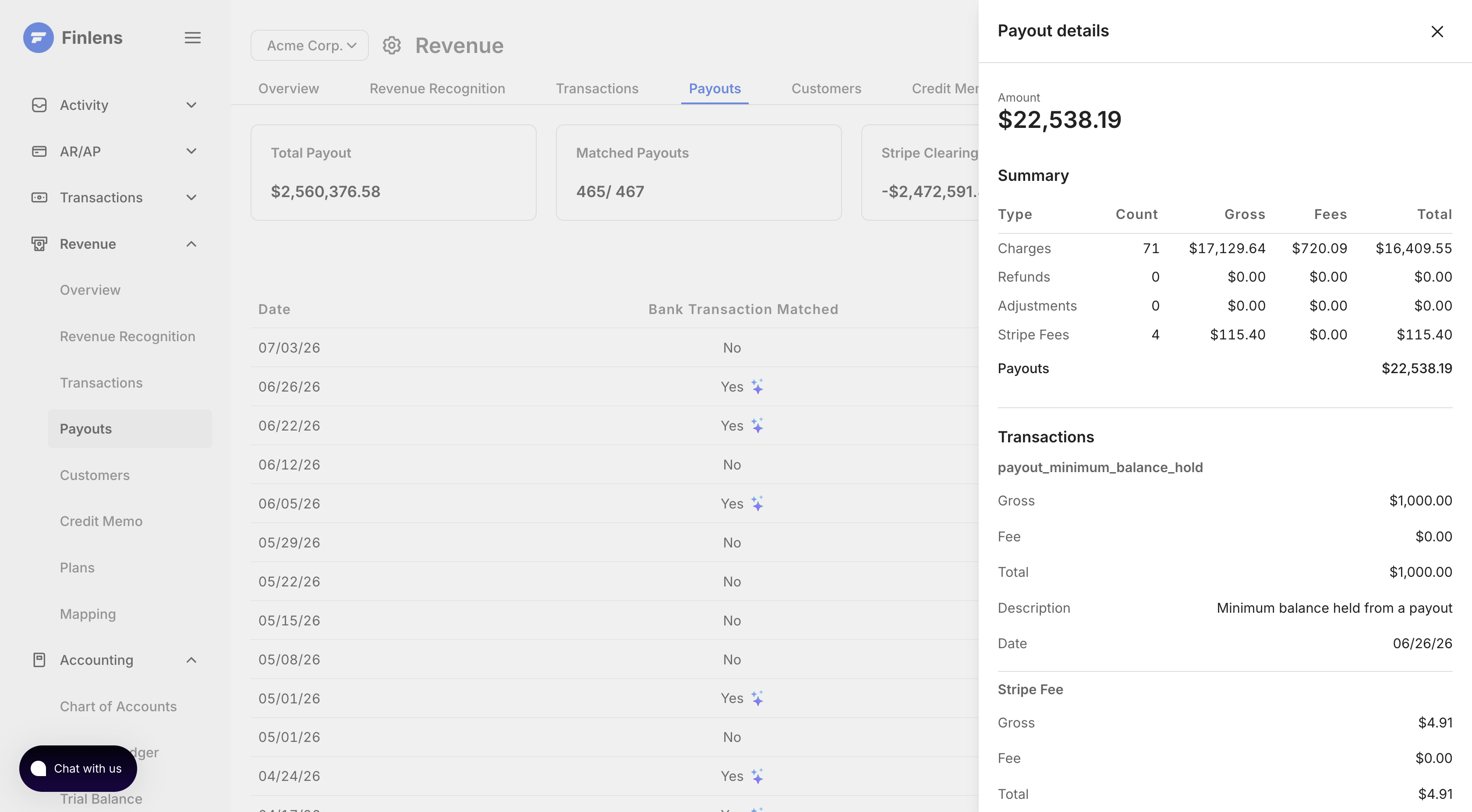
Because Finlens stores fees at the charge and payout level, it can show effective fee rate by month, payout, payment method, customer segment, or transaction type.
That gives finance teams a better answer than “Stripe fees were $4,812 this month.”
They can ask:
Why did our effective fee rate increase?
Are international cards driving higher fees?
Did refunds or disputes distort this month’s net revenue?
Which payment methods are costing us more?
Are fees rising faster than gross volume?
PayTraQer records the fee.
Finlens helps explain it.
5. Dispute lifecycle tracking
Disputes are one of the places where payment processor accounting gets messy.
A dispute can create an initial deduction, a temporary hold, a later reversal, a fee, or a permanent loss. The accounting impact can also span different periods.
A basic sync tool may record dispute-related transactions.
Finlens tracks the dispute lifecycle.
That means the deduction, hold, reversal, and final outcome can be understood across payouts and periods. For accountants, this reduces the manual work of figuring out whether a Stripe balance movement was a refund, a dispute, a reversal, or a timing issue.
For businesses with meaningful dispute volume, this becomes a real close problem.
6. SaaS metrics from the same source of truth
PayTraQer is built for bookkeeping sync.
Finlens is built around Stripe revenue.
That means Finlens can also produce SaaS metrics from the same underlying data used for accounting:
MRR
ARR
Net revenue
Revenue churn
Customer churn
New customers
Active subscriptions
Failed charges
Refunds and disputes
Payout-level fee rates
For founders, this means board-ready revenue metrics without maintaining a separate spreadsheet.
For CPA firms, this means client-facing revenue dashboards without manually exporting screenshots from Stripe.
The important part is that these metrics come from the same structured Stripe data behind the accounting entries.
The bookkeeping and the revenue dashboard are not two separate workflows.
They come from the same subledger.
Volume Example: 1,000 Stripe Charges per Month
Assume a business has 1,000 Stripe charges and around 30 payouts per month.
PayTraQer itemized mode
QuickBooks may receive thousands of objects per month: sales receipts, fees, refunds, transfers, and adjustments.
This gives detail inside QuickBooks, but it turns the general ledger into a transaction database.
That can slow down reporting, increase review time, and make cleanup harder when something goes wrong.
PayTraQer summary mode
QuickBooks may receive around 30 payout summary entries per month.
This keeps the ledger clean.
But the entry may summarize gross sales and fees without carrying the deeper revenue structure needed for accrual accounting, subscription period allocation, customer-level attribution, or deferred revenue.
Finlens
QuickBooks receives around 1 clean payout-level journal entry per month.
The full Stripe detail stays inside Finlens, where it can be searched, drilled into, reconciled, and used for revenue recognition and SaaS reporting.
The general ledger stays clean.
The subledger keeps the detail.
When to Use PayTraQer
PayTraQer is a good fit if:
You sell across multiple channels.
You need PayPal, Amazon, Shopify, Square, WooCommerce, or eBay sync.
Your accounting is mostly cash basis.
You want basic Stripe activity pushed into QuickBooks.
You do not need automated deferred revenue.
You do not need SaaS metrics from Stripe.
For many small businesses, that is enough.
A local ecommerce seller, agency, or low-volume SMB may not need a revenue subledger. They may just need their payment processor activity reflected in QuickBooks.
That is PayTraQer’s lane.
When to Use Finlens
Finlens is a better fit if:
Stripe is your primary payment processor.
You sell subscriptions.
You bill annually or quarterly.
You need deferred revenue.
You close books on an accrual basis.
You reconcile Stripe payouts every month.
You want fees, refunds, and disputes explained.
You want MRR, ARR, churn, and net revenue dashboards.
You are a CPA firm managing Stripe-heavy clients.
You want QuickBooks to stay clean without losing transaction detail.
Finlens is built for the moment when Stripe stops being “just a payment processor” and becomes a revenue system.
At that point, syncing transactions is not enough.
You need a subledger.

Best PayTraQer alternatives for Stripe to QuickBooks automation
SaasAnt alternatives beyond PayTraQer
SaasAnt also makes SaasAnt Transactions (bulk import/export tool for QBO). Some teams avoid recurring subscription fees entirely by downloading CSVs directly from Stripe Dashboard and importing them via SaasAnt templates this gives absolute control over historical dates but requires manual work every period. If you're looking for alternatives to broader SaasAnt ecosystem, choice depends on what you're replacing: payment sync (this comparison) or bulk data tool (different category).
How to switch from PayTraQer to Finlens (or another tool)
The migration is simpler than most teams expect. PayTraQer writes entries to QBO it doesn't own them. Your historical QBO data stays when you disconnect. But Reddit accounting communities consistently warn that swapping automation mid-year leaves a messy trail if not executed systematically.
Step 1: Set a hard cutoff date
Pick first of a month. Everything before that date: PayTraQer's entries remain in QBO as-is. Everything after: new tool takes over. Reconcile all bank payouts up to that exact cutoff using PayTraQer before disconnecting.
Step 2: Disconnect PayTraQer completely
In QBO → Apps → PayTraQer → Disconnect. This stops new syncs. It does NOT delete historical entries PayTraQer already posted. Turn off or fully uninstall don't leave it running in background. If PayTraQer pushes a late background sync while new tool is also connected, you get duplicate entries.
Step 3: Reconcile clearing account
Before connecting new tool, verify Stripe Clearing balance = Stripe Dashboard balance as of cutoff date. Check that no "pending" or "holding" transactions remain in clearing account from PayTraQer. If they match, you have a clean handoff.
Step 4: Set up a separate clearing account (recommended)
Don't route new tool into exact same clearing register PayTraQer used. Create a new "Stripe Clearing Finlens" account. If initial backfill behaves unexpectedly, a separate account makes debugging far easier. You can merge them later once mapping is verified.
Step 5: Run a restricted test backfill first
Connect Finlens (or Acodei/Synder) to Stripe + QBO. Do NOT run a full historical sync immediately. Isolate a small test window 3 to 5 days of recent data. Run sync and verify that gross revenue, refunds, and processing fees split into correct ledger accounts. One accountant on r/EntrepreneurRideAlong noted that skipping this step led to weeks of cleanup.
Step 6: Bulk historical backfill (if needed)
Once test data maps correctly, run full historical migration from cutoff date backward. Finlens can backfill your entire Stripe history. Critical: if your QBO bank feed already downloaded net Stripe deposits for those historical months, backfill generates individual sales receipts and fee expenses that must be matched to those existing deposits otherwise you get massive duplication.

Which PayTraQer alternative should you use (decision tree)
- Your primary processor is Stripe, you're on QBO, and you need payout decomposition + deferred revenue → Finlens. Deepest Stripe-to-QBO integration. Free tier available.
- Your primary processor is Stripe, you're on QBO, and you need payout matching but NOT deferred revenue and your transactions are simple charges and payouts→ PaytraQer/Acodei. Strong Stripe sync with granular metadata mapping.
- You're on multiple processors (Stripe + PayPal + Amazon + Shopify) and need one tool for all → Synder. Broadest coverage. Accept less Stripe-specific depth.
- You're under 100 tx/mo on Stripe and want cheapest option → PaytraQer, Acodei, Sush.io or Stripe native connector. Low cost, low complexity. You'll outgrow them, but they work at this volume.
- You're an enterprise processing $1M+/year across multiple processors → Finlens. Enterprise-grade reconciliation engine. Not a QBO tool it's a platform.
- You want multi-channel coverage at a lower price than Finlens/Synder → Stay on Acodei/PayTraQer. It's not broken at low volume. The limitations surface above 5000 tx/mo or with accrual accounting + Stripe invoicing.
Here is comparison Finlens to PayTraQer for Stripe automation
For teams where Stripe is primary or only processor, Finlens replaces PayTraQer with deeper automation. For teams on multiple channels, Finlens handles Stripe leg while PayTraQer or Synder covers rest.
See full Stripe to QuickBooks sync tool comparison or explore Finlens as a Digits alternative.

FAQ
What's biggest limitation of PayTraQer for Stripe?
PayTraQer’s biggest limitation for Stripe-heavy SaaS companies is that it doesn't support Revenue recognition. PayTraQer is primarily designed to sync payment and ecommerce transactions into QuickBooks or Xero so deposits reconcile. Finlens is designed to sit one layer earlier as a Stripe revenue subledger: it interprets charges, invoices, subscriptions, refunds, disputes, fees, payouts, and service periods before posting accounting-ready entries into QBO.
Does Finlens replace PayTraQer completely?
For Stripe yes. Finlens covers everything PayTraQer does for Stripe (fee separation, transaction sync, tax mapping) plus payout decomposition, deferred revenue, and dispute tracking. For PayPal, Amazon, or Shopify no. Finlens is Stripe-only.
Will I lose data if I switch from PayTraQer?
No. PayTraQer writes entries to QBO. Disconnecting PayTraQer stops new syncs but does not delete historical entries. Your QBO data is yours.
Can I use Finlens for Stripe and PayTraQer for other channels?
Yes. Run Finlens for Stripe-to-QBO (deep integration) and keep PayTraQer connected for PayPal, Amazon, or Shopify. Separate clearing accounts per processor prevent cross-contamination.
How does Synder compare to PayTraQer?
Both are multi-channel. Synder offers per-transaction sync with automatic fee separation across all processors, advanced multi-currency support, and stronger historical backfill. PayTraQer is lower-priced. For Stripe-specific depth, neither matches Finlens.
PayTraQer® is a registered trademark of SaasAnt Technologies Pvt. Ltd. Finlens is not affiliated with, endorsed by, or sponsored by SaasAnt Technologies Pvt. Ltd. or PayTraQer or by any other product mentioned above.
All product names including Synder, Acodei, Leapfin, Stripe, QuickBooks, Xero and any other logos, and brands are property of their respective owners.
This post has been updated on July 4 2026.

