
Stripe to QuickBooks Sync for International Tax Codes (VAT, GST, HST): 6 Tools Compared for 2026


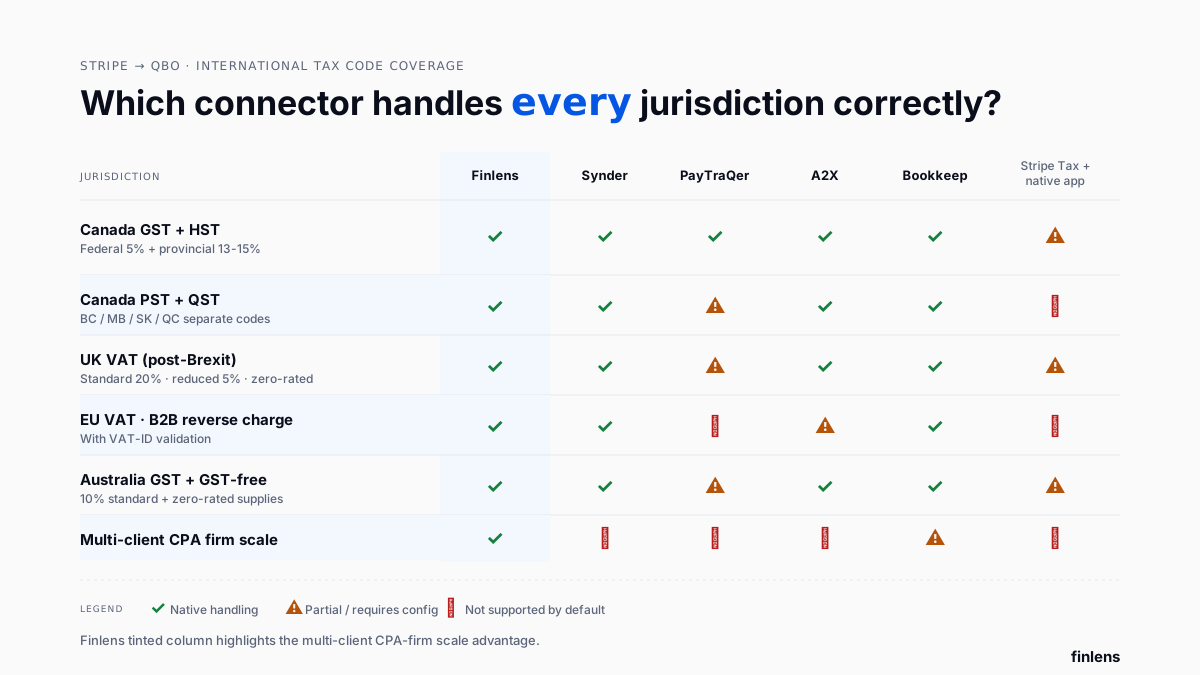
The best Stripe-to-QuickBooks tool for international tax code mapping depends on which jurisdictions business sells into, whether tax codes need to sync per-charge or per-payout, and whether a CPA firm is managing books for clients across multiple countries. Finlens is AI-native accounting platform used by CPA firms managing QuickBooks Online client books it maps Canada GST/HST/PST, UK VAT, EU VAT (with reverse-charge handling), and Australian GST to correct QBO tax codes on every charge, across every client in firm's book. Synder and PayTraQer handle per-charge international tax mapping for single accounts. A2X and Bookkeep apply mapping at payout-summary level. Stripe Tax is source-of-truth for tax calculation at checkout but it doesn't push cleanly-mapped codes into QBO on its own. Getting mapping wrong compounds silently: sales-tax returns get filed with wrong jurisdiction totals, and fix requires reworking every impacted charge.
Key takeaways
- Every Stripe charge in an international book carries jurisdiction data country, state or province, tax rate, tax type. QBO's chart of accounts needs a matching tax code per jurisdiction for charge to reconcile correctly. A pain-point discussion on r/tax about first-time cross-border EU VAT setup captures how quickly jurisdiction mapping problem outgrows manual entry.
- Canada is highest-friction jurisdiction because tax varies by province GST (5%) applies nationally, HST (13-15%) applies in five provinces, and PST/QST applies separately in BC/Quebec/Manitoba/Saskatchewan. A commenter on r/Bookkeeping about QBO not calculating HST accurately reflects recurring bookkeeper experience QBO's built-in tax logic handles calculation, but Stripe-imported charges land without tax code attached unless connector maps it.
- UK VAT (20% standard, 5% reduced, 0% zero-rated) and EU VAT (variable by member state, with reverse-charge rules for B2B cross-border) require multi-code mapping. Amaka and Stripe's native app don't handle EU reverse-charge cleanly.
- Australian GST (10%) is simplest of international jurisdictions in this comparison but even here, GST-free supplies (basic food, medical, education) need a distinct code that most connectors default-map incorrectly.
- Finlens applies per-client jurisdiction tax mapping across every book in a CPA firm's portfolio same rules define once and run across all clients, whether client sells only to Canada, only to US, or to every country Stripe supports.
Best Stripe to QuickBooks tools for international tax codes: comparison table
Pricing reflects published starting tiers early 2026.
The 6 best Stripe-to-QuickBooks international tax mapping tools
1. Finlens
Overview. Finlens automates Stripe-to-QuickBooks jurisdiction tax mapping for CPA firms managing international client books on QBO. It reads tax metadata Stripe attaches to each charge (country, region, tax rate, tax type), matches it to correct QBO tax code in each client's chart of accounts, and posts charge with mapping already applied. Firm-level jurisdiction rules define once and run across every client CPA firm doesn't reconfigure per-book.
Best for. CPA firms and CAS providers with clients selling into Canada, UK, EU, Australia, or multiple jurisdictions. Also fits SaaS founders selling cross-border who want jurisdiction-level tax reporting in QBO without manual coding, running alongside standard reconciliation workflows.
Key features. Automatic jurisdiction detection from Stripe metadata, per-country tax code mapping (GST/HST/PST/VAT/GST/EU), EU reverse-charge B2B handling with VAT-ID validation, multi-province Canadian mapping (BC PST, QC QST, MB PST, SK PST), per-client tax code overrides, and jurisdiction-level reporting for return filings.
Pricing. Free tier for small businesses. Paid custom for CAS firms.
Limitations. Not a tax calculation engine sits downstream of Stripe Tax or user's tax setup. For businesses that don't have tax collection configured in Stripe, that has to be resolved upstream.
Where it breaks. Very complex nexus setups (e.g., US state-level sales tax with 40+ nexus states) where a dedicated Avalara or TaxJar integration is more appropriate than a QBO-layered platform.
2. Synder
Overview. Synder's per-charge sync is deepest configurable option for jurisdiction tax mapping. It reads Stripe's tax lines individually and lets user configure how each maps to QBO's tax codes on first setup, including Canadian province differentiation, UK VAT rates, and Australian GST-free supplies.
Best for. Single-account businesses selling into multiple jurisdictions who want per-charge tax code visibility inside QBO.
Key features. Per-charge tax line sync, jurisdiction-specific rule config, Canadian province mapping (GST/HST/PST/QST), UK VAT rate mapping, Australian GST + GST-free supply mapping, refund tax code reversal.
Pricing. $39/mo Starter · $65/mo Medium · $199/mo Large · $299/mo Scale.
Limitations. Configuration is per-QBO-instance. EU reverse-charge B2B handling requires higher-tier configuration.
Where it breaks. CPA firms needing to configure same rules across 20+ client books per-instance setup doesn't scale.
3. PayTraQer
Overview. PayTraQer applies default jurisdiction tax rules automatically without requiring per-account configuration. This makes setup fast but limits customization for less-common tax scenarios.
Best for. Solo merchants selling primarily one country with occasional cross-border transactions.
Key features. Default jurisdiction rules for US/Canada/UK/Australia, per-charge tax code posting, refund tax code reversal.
Pricing. $10/mo Nano · $30/mo Starter · $60/mo Standard · $120/mo Professional.
Limitations. EU VAT reverse charge and Canadian PST are less well-configured than in Synder. Custom tax scenarios require workarounds.
Where it breaks. Businesses with heavy EU B2B volume where reverse charge is a routine requirement.
4. A2X for Stripe
Overview. A2X's payout-summary approach groups charges by jurisdiction on daily payout JE. Instead of posting every charge with its tax code, A2X sums day's charges per jurisdiction and posts one JE line per jurisdiction on payout summary. This keeps QBO ledger cleaner at high volume while still preserving jurisdiction-level totals for return filings.
Best for. High-volume ecommerce/SaaS with heavy cross-border volume who don't need per-charge tax visibility inside QBO.
Key features. Payout-summary tax lines per jurisdiction, GST/HST/VAT breakdowns on payout JEs, refund and dispute tax reversal on payout summary, multi-currency FX handling.
Pricing. $29/mo Starter · $69/mo Standard · $99/mo Premium · $199+ Enterprise.
Limitations. Per-charge audit trail lives in A2X, not QBO auditors asking about a specific customer's tax coding have to trace through A2X.
Where it breaks. Firms whose auditors demand per-charge tax coding visible directly in QBO.
5. Bookkeep
Overview. Bookkeep handles multi-entity international tax where each entity has its own jurisdiction footprint. For SaaS holding companies with entities registered in US, UK, and Canada, Bookkeep maps each entity's Stripe charges to that entity's QBO tax codes.
Best for. Multi-entity businesses (SaaS holding companies, multi-brand ecommerce) with entities registered in multiple countries.
Key features. Per-entity jurisdiction tax mapping, cross-entity FX handling, multi-currency payout summarization, per-entity JE posting.
Pricing. $70/mo Starter · $200/mo Growth · custom Enterprise.
Limitations. Overkill for single-entity setups. Setup takes 2-4 hours per entity.
Where it breaks. Solo Stripe merchants selling into multiple jurisdictions multi-entity plumbing is unnecessary.
6. Stripe Tax + Stripe's native QBO connector
Overview. Stripe Tax is Stripe's own tax calculation engine it computes correct tax at checkout across 70+ countries. The problem: Stripe's native QBO connector then posts resulting charge with generic tax mapping. The calculation is right; QBO coding is manual.
Best for. Businesses using Stripe Tax for tax calculation at checkout who are prepared to manually reconcile tax coding in QBO.
Key features. Tax calculation at checkout across 70+ countries, tax collection tracking, per-country tax return preparation via Stripe's reporting.
Pricing. Stripe Tax: 0.5% per transaction (plus normal Stripe fees). QBO native app: free.
Limitations. Stripe Tax and QBO's native connector don't share a full jurisdiction mapping connector posts a generic tax line, not per-jurisdiction code.
Where it breaks. Businesses that want jurisdiction totals to reconcile from QBO reporting directly. A workflow discussion on r/tax about cross-border payment reconciliation captures common complaint calculation is fine, accounting-side reconciliation is where manual work stays.
Jurisdiction-specific mapping what breaks where
Canada (GST + HST + PST + QST)
Canada has four overlapping sales-tax systems:
- GST (5%) applies federally to most goods and services.
- HST (13-15%) replaces GST in Ontario, New Brunswick, Nova Scotia, PEI, and Newfoundland-Labrador.
- PST (6-7%) applies separately in British Columbia, Manitoba, and Saskatchewan on top of GST.
- QST (9.975%) applies in Quebec on top of GST.
A commenter on r/Bookkeeping about BC GST/PST reflects recurring bookkeeper reality: PST and GST have to be tracked separately, and connector has to know customer's province, not just their country. Every tool in this comparison except Amaka handles Canadian province-level mapping but Finlens, Synder, and Bookkeep handle QC QST cleanly, while default-mapping tools often lump QST into a generic "Quebec" bucket.
UK VAT (post-Brexit)
UK VAT has three rates:
- Standard 20% (most goods and services)
- Reduced 5% (energy, children's car seats, some renovations)
- Zero-rated 0% (food, books, kids' clothes, exports)
Additionally, businesses selling to EU customers post-Brexit face VAT reverse-charge on B2B cross-border customer accounts for VAT rather than seller. Finlens and Synder handle this; PayTraQer and Amaka do not by default.
EU VAT (member state variation)
Each EU member state has its own VAT rate (typically 15-27%). Cross-border B2B sales use reverse charge; cross-border B2C sales use One-Stop Shop (OSS) for VAT registration in seller's home country. A pain-point thread on r/tax about missing VAT registration captures exposure VAT registration thresholds vary by member state, and Stripe reporting won't flag when a business has crossed a threshold.
Only Finlens, Synder, and Bookkeep handle EU reverse charge cleanly by default. A2X handles it at payout-summary level.
Australia (GST + GST-free)
Australia's GST is a flat 10% on most goods and services. GST-free supplies (basic food, medical, education, exports) require a distinct code. Every tool in this comparison handles standard 10% GST; only Finlens, Synder, and Bookkeep separate GST-free supplies cleanly.
Which Stripe-to-QuickBooks tax tool should you choose
- Use Finlens if you're a CPA firm managing international clients on QBO jurisdiction rules once, apply across every client book, alongside existing QuickBooks automation workflows.
- Use Synder if you're a single-account business needing per-charge jurisdiction visibility with deep customization.
- Use PayTraQer if your primary jurisdiction is one country with occasional cross-border transactions.
- Use A2X if you're closing high-volume books monthly and jurisdiction totals on payout summaries are enough for return filings.
- Use Bookkeep if you have entities in multiple countries needing separate per-entity tax mapping.
- Use Stripe Tax + native QBO app if you're using Stripe Tax for calculation and are prepared to manually reconcile tax coding in QBO.
Common international tax mapping mistakes
Assuming Stripe Tax pushes clean codes to QBO. Stripe Tax calculates correctly at checkout; QBO push is a separate problem connector solves. A discussion on r/smallbusiness about sales tax complexity reflects common founder view checkout tax is easy part, accounting-side coding is where complexity actually lives.
Skipping province-level Canadian mapping. A charge from a BC customer that gets coded as "Canada GST" misses 7% PST. On $10,000/month of BC volume, that's $700 of unreported PST accumulating every month.
Missing EU reverse-charge B2B handling. For UK/EU businesses selling B2B into other EU countries, charge should hit a reverse-charge VAT code, not standard rate. If connector applies standard rate, seller ends up over-collecting VAT and having to refund it.
Not testing first charge in each jurisdiction. Before going live, test one charge from each jurisdiction business sells into. Verify tax code, rate, and QBO line all match. Fixing this upstream costs 30 minutes; catching it after 6 months of charges costs days.
Ignoring GST-free supplies in Australia. All-supplies-are-GST default mapping is wrong for any Australian business selling food, medical, education, or export supplies. A dedicated GST-free code is required.
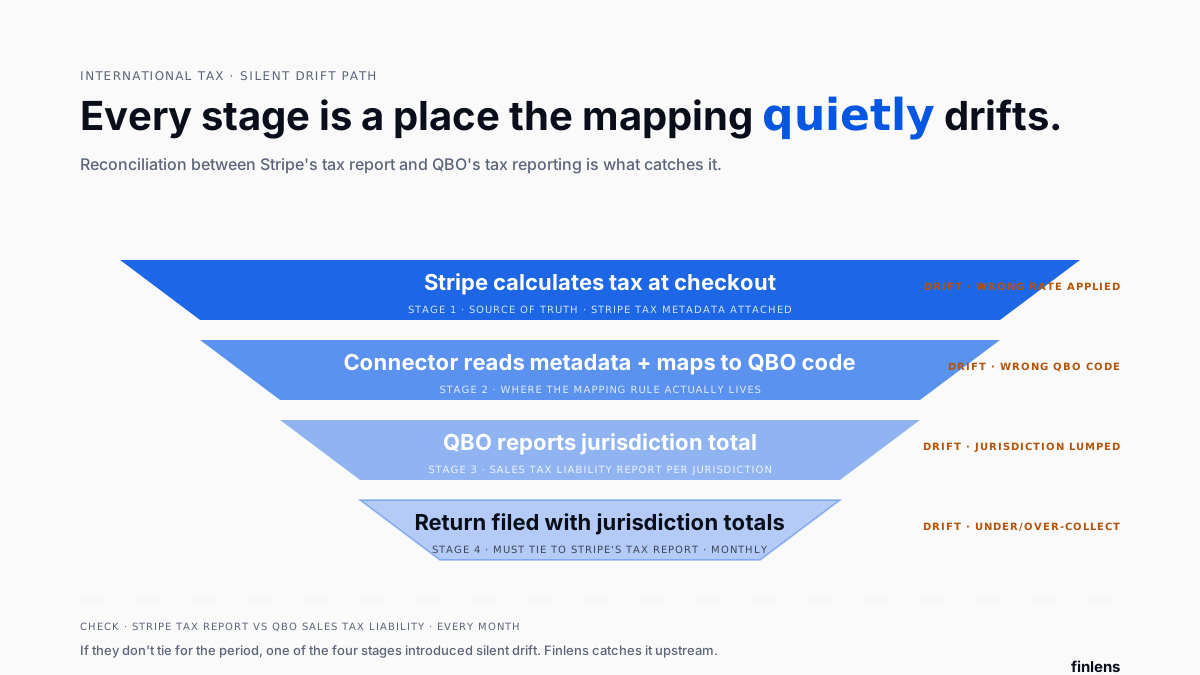
Filing returns from QBO without reconciling to Stripe's tax report. Stripe's tax report and QBO's tax reporting should tie for every period. A workflow discussion on r/smallbusiness about Stripe transition when becoming a registered business surfaces fact that two systems can drift silently if sync isn't set up to keep them in agreement.
Common integrations to verify before choosing
- Jurisdiction detection method does tool read Stripe's tax metadata, or infer from customer address? Metadata-based is more reliable.
- Canadian province differentiation verify tool separates GST / HST / PST / QST correctly and knows customer's province.
- EU reverse charge B2B handling for UK/EU businesses, verify reverse charge posts to correct VAT code with VAT-ID validation.
- Multi-currency at tax mapping charge currency may differ from tax reporting currency. The tool has to convert consistently for return filings.
- QBO tax code auto-creation some tools auto-create missing tax codes in QBO; others require them pre-created. Verify before setup.
- Multi-client access (CPA firms) Finlens is only tool in this comparison built for firm-scale tax mapping from one dashboard.
Conclusion
International tax code mapping is where Stripe-to-QuickBooks sync stops being a plumbing problem and starts being a compliance problem. The connector's job is to preserve jurisdiction data end-to-end so that QBO reporting matches tax return. For CPA firms with international clients, firm-level jurisdiction rules that apply across every client book (Finlens) are what make return-filing month sustainable. For single-account businesses, Synder handles per-charge depth; A2X and Bookkeep handle payout-summary and multi-entity respectively. A workflow discussion on r/Bookkeeping about GST/HST filing captures accountant's ongoing view even with right tool, reconciliation between Stripe reporting and QBO reporting has to be part of monthly close.
Frequently asked questions
How do I map Stripe VAT to QuickBooks correctly
Use a connector that reads Stripe's tax metadata per charge and matches it to QBO's VAT tax codes (standard 20%, reduced 5%, zero-rated 0%, and reverse-charge for B2B cross-border). Finlens, Synder, and Bookkeep handle all four; Amaka and Stripe's native app only handle standard rate cleanly.
How do I handle Canadian GST/HST/PST in Stripe-QuickBooks sync
The connector must know customer's province, not just country. GST (5%) applies federally; HST (13-15%) replaces GST in five provinces; PST/QST applies separately in BC/MB/SK/QC. Finlens, Synder, and Bookkeep handle province-level mapping; PayTraQer handles basics; Amaka doesn't differentiate provinces well.
Can Stripe Tax push clean tax codes to QuickBooks
Stripe Tax calculates correct tax at checkout, but Stripe's own QBO connector posts a generic tax line without preserving jurisdiction-level codes. To get tax coding right in QBO, use a dedicated connector like Finlens, Synder, A2X, or Bookkeep that reads Stripe's tax metadata and maps to per-jurisdiction QBO codes.
How do I handle EU VAT reverse charge for B2B cross-border
The charge should post to a reverse-charge VAT code (not standard rate) with customer's VAT ID recorded. Finlens, Synder, and Bookkeep validate VAT IDs and apply reverse charge automatically for verified B2B customers. Amaka and Stripe's native app do not by default.
What's difference between GST and GST-free supplies in Australia
GST (10%) applies to most Australian goods and services. GST-free supplies (basic food, medical, education, exports) attract 0% GST and require a distinct code. Every tool covers standard GST; Finlens, Synder, and Bookkeep separate GST-free supplies cleanly.
How do I reconcile Stripe's tax report to QuickBooks tax reporting
Pull Stripe's tax report for period, pull QBO's Sales Tax Liability report for same period, and verify jurisdiction totals match. Any drift indicates a mapping problem either a charge was posted with wrong tax code or a refund didn't reverse tax side.
Does Finlens support UK VAT and EU VAT
Yes. Finlens maps UK VAT (standard/reduced/zero-rated), EU VAT per member state, and EU reverse-charge B2B with VAT-ID validation. For CPA firms managing UK or EU clients on QuickBooks, mapping applies at firm level and runs across every client's QBO.
Can I use one connector for multiple international entities
Bookkeep is designed for multi-entity international tax with per-entity jurisdiction mapping. Finlens supports multi-client (not just multi-entity) mapping from one dashboard useful for CPA firms whose clients are separate businesses in different countries.

