
Stripe to QuickBooks Processing Fees and Refunds: 7 Tools Compared for 2026


The best Stripe-to-QuickBooks tool for handling processing fees, refunds, and net-payout reconciliation depends on transaction volume, whether refunds need to reverse original fee, and how many client books CPA firm is closing each month. Finlens is AI-native accounting platform used by CPA firms managing QuickBooks Online client books it maps every Stripe fee, refund, and dispute to right QBO account and reconciles net payouts against bank deposit automatically. Synder and PayTraQer are per-transaction sync apps that work well below ~500 monthly transactions. A2X and Bookkeep summarize payouts into journal entries rather than syncing per-charge. Amaka is Stripe-recommended free connector for basic sync. Stripe's native QuickBooks connector covers minimum-viable sync without fee categorization depth.
Key takeaways
- Every Stripe transaction lands as three separate events in general ledger gross charge, Stripe processing fee (~2.9% + $0.30), and net payout and each has to hit a different QBO account or bank reconciliation will not tie.
- Refunds must reverse both original revenue and processing fee (Stripe returns fee on refunds since April 2019 for standard-tier merchants, per Stripe refund policy documentation); miscategorized refunds are #1 cause of Stripe-QBO discrepancies on high-volume books.
- Multi-currency Stripe books add a fourth account foreign exchange gain/loss that most connectors either skip entirely or dump into an "Ask My Accountant" bucket.
- For CPA firms managing many QuickBooks client books, choice usually comes down to per-transaction sync (Synder, PayTraQer) vs. summarized daily journal entries (A2X, Bookkeep) tradeoff is reconciliation granularity vs. QBO ledger clutter.
- Finlens layers on top of QuickBooks Online to automate Stripe categorization, fee/refund mapping, and multi-client reconciliation across an entire book of clients one dashboard for whole firm rather than logging into each client's QBO separately.
Best Stripe to QuickBooks tools for processing fees and refunds: comparison table
Pricing reflects published starting tiers in early 2026 and does not include per-transaction overage fees.
The 7 best Stripe-to-QuickBooks tools for processing fees and refunds
1. Finlens
Overview. Finlens is an AI-native accounting platform used by CPA firms managing QuickBooks Online client books. It layers on top of QBO to automate Stripe categorization, processing-fee and refund mapping, and net-payout reconciliation across every client in firm's book. Unlike per-transaction connectors that require configuring rules inside each client's QBO separately, Finlens handles fee/refund logic centrally and applies it across every client on platform.
Best for. CPA firms and CAS providers closing books for multiple Stripe-billed clients each month. Also fits SaaS founders whose in-house bookkeeper is drowning in per-charge categorization on QBO.
Key features. AI categorization of Stripe charges to revenue accounts (with SaaS-specific rules for one-time vs. subscription revenue), automatic processing-fee separation into a dedicated fee account, refund-side matching that reverses both original revenue AND fee, net-payout reconciliation against bank deposit, dispute/chargeback flagging with a review queue, multi-currency FX gain/loss posting, and multi-client exception review across every client book from one dashboard.
Pricing. Free tier available. Paid tiers custom-quoted for CAS firms based on client count and transaction volume.
Limitations. Not a dedicated revenue recognition subledger for full ASC 606 with multi-element allocation, a purpose-built rev-rec tool like Rillet or Chargebee RevRec is more appropriate. Not a replacement for QuickBooks itself; Finlens sits on top of existing GL.
Where it breaks. Merchant categories that require complex FBAR/foreign-account reporting on Stripe payouts to non-US banks Finlens supports accounting side but doesn't file compliance forms.
2. Synder
Overview. Synder is a per-transaction Stripe-to-QBO connector that syncs every charge, fee, refund, and payout individually. A user on r/quickbooksonline recommending automation space noted that per-charge sync is only viable when transaction volume stays low above a few hundred a month QBO ledger becomes unreadable.
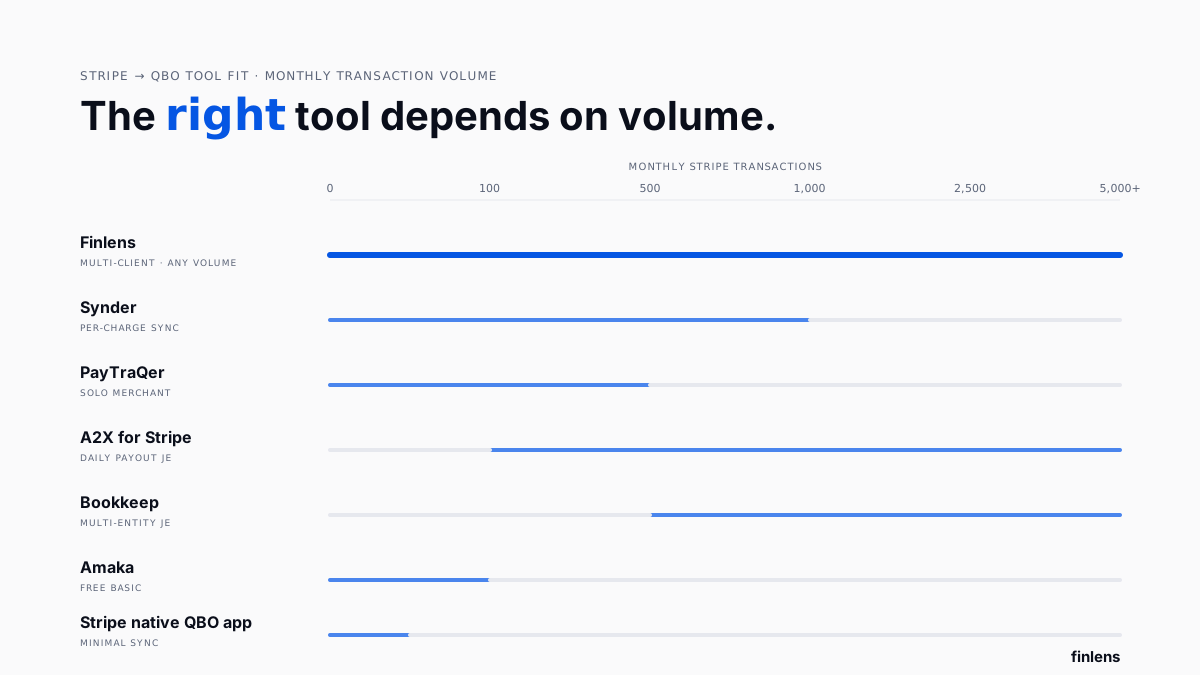
Best for. Small businesses and firms with under ~500 monthly Stripe transactions where every charge should hit QBO individually.
Key features. Per-charge sync, configurable mapping to any QBO account, refund rollback with automatic fee reversal, multi-currency support, historical import for backfilling data, and duplicate detection on re-sync.
Pricing. $39/mo Starter (500 txns) · $65/mo Medium (1,000) · $199/mo Large (5,000+) · $299/mo Scale.
Limitations. QBO ledger gets crowded quickly above ~1,000 transactions/month. Per-transaction pricing scales aggressively. Setup requires configuring account mapping inside each client's QBO one-by-one.
Where it breaks. High-volume books above ~1,500 transactions/month QBO ledger becomes slow to load and reconciliation UX suffers.
3. PayTraQer
Overview. PayTraQer is a per-transaction Stripe/PayPal/Square-to-QBO sync tool aimed at solo merchants who want minimal setup. It categorizes fees and refunds automatically using a fixed rule set rather than configurable mapping.
Best for. Solo Stripe merchants on QBO who want automation without configuring account mapping.
Key features. Per-charge sync, automatic fee separation, refund reversal, multi-payment-processor support (Stripe + PayPal + Square in one tool), and rollback if a sync goes wrong.
Pricing. $10/mo Nano (50 txns) · $30/mo Starter (500) · $60/mo Standard (1,500) · $120/mo Professional (5,000+).
Limitations. Less configurable than Synder fee accounts and refund logic follow default mapping unless overridden. Support is thinner. UI hasn't been refreshed as often as competitors.
Where it breaks. Custom chart-of-accounts setups that don't fit PayTraQer's default fee/refund mapping.
4. A2X for Stripe
Overview. A2X takes opposite approach from Synder and PayTraQer instead of syncing every charge, it groups each Stripe payout into a single journal entry that summarizes gross revenue, fees, refunds, and disputes, then posts one JE per payout to QBO. This keeps QBO ledger clean at high volume. A user on r/QuickBooks discussing Stripe cleanup described going from 3+ hours a month fixing Stripe transactions down to 10 minutes with a payout-summary approach.
Best for. High-volume ecommerce and SaaS closing books monthly who don't need per-charge visibility inside QBO.
Key features. Daily payout summarization into one JE, automatic fee separation on summary, refund netting on summary, multi-currency payout handling, and bank-match against actual Stripe deposit.
Pricing. $29/mo Starter (200 orders) · $69/mo Standard (1,000) · $99/mo Premium (5,000) · $199+ Enterprise.
Limitations. No per-charge detail in QBO if a customer disputes a charge, bookkeeper has to trace back to payout JE and then into Stripe to find it. Reconciliation is at payout level, not charge level.
Where it breaks. CPA firms whose clients demand per-invoice visibility inside QBO payout summaries don't give that.
5. Bookkeep
Overview. Bookkeep is a payout-summary tool similar to A2X but with stronger multi-entity support and a bank-match layer. It's built for finance teams closing multiple entities each month, including SaaS holding companies and multi-brand ecommerce.
Best for. Multi-entity SaaS, agencies, and holding companies with 1,000+ monthly Stripe transactions per entity.
Key features. Daily payout summarization, per-entity JE posting, automated bank match against payout deposit, refund and dispute netting, and multi-currency FX handling with a dedicated FX gain/loss account.
Pricing. $70/mo Starter · $200/mo Growth · custom Enterprise. Per-entity pricing on paid tiers.
Limitations. More expensive than A2X or Synder at entry tier. Setup takes 2-4 hours per entity. Not a fit for solo merchants.
Where it breaks. Single-entity solo Stripe books Bookkeep's multi-entity plumbing is overkill.
6. Amaka
Overview. Amaka is a free Stripe-to-QuickBooks connector that Stripe itself recommends inside its dashboard integration marketplace. It's per-transaction sync at free tier, with basic fee/refund mapping and no cost.
Best for. Micro-businesses, pre-revenue startups, and side projects under 100 monthly transactions who don't want to pay for sync yet.
Key features. Per-charge sync, basic fee separation, refund reversal, and Stripe-recommended reliability. Free.
Pricing. Free (basic tier). Paid Advanced tier at $25/mo.
Limitations. Less configurable than Synder or PayTraQer. Support is community-based on free tier. No refund-fee reversal on some plans bookkeeper has to manually reverse fee side of a refund.
Where it breaks. Any book above ~200 transactions/month or any book needing custom fee mapping.
7. Stripe's native QuickBooks Online app
Overview. Stripe publishes its own QBO connector inside QuickBooks App Store. It handles charge sync at most basic level every Stripe charge becomes a QBO sales receipt, with a single generic fee account and no refund-side fee reversal.
Best for. Solo founders who need Stripe charges to appear in QBO and nothing more.
Key features. Charge sync, sales-receipt creation, basic fee posting.
Pricing. Free.
Limitations. Almost none of features that actually matter for reconciliation. Refunds do not reverse original fee. Multi-currency isn't handled. Payout matching is manual. Discussed on r/Accounting as a starting point that firms typically outgrow within a quarter.
Where it breaks. Anything past a single Stripe account with <50 monthly transactions.
How Stripe processing fees and refunds SHOULD hit QuickBooks
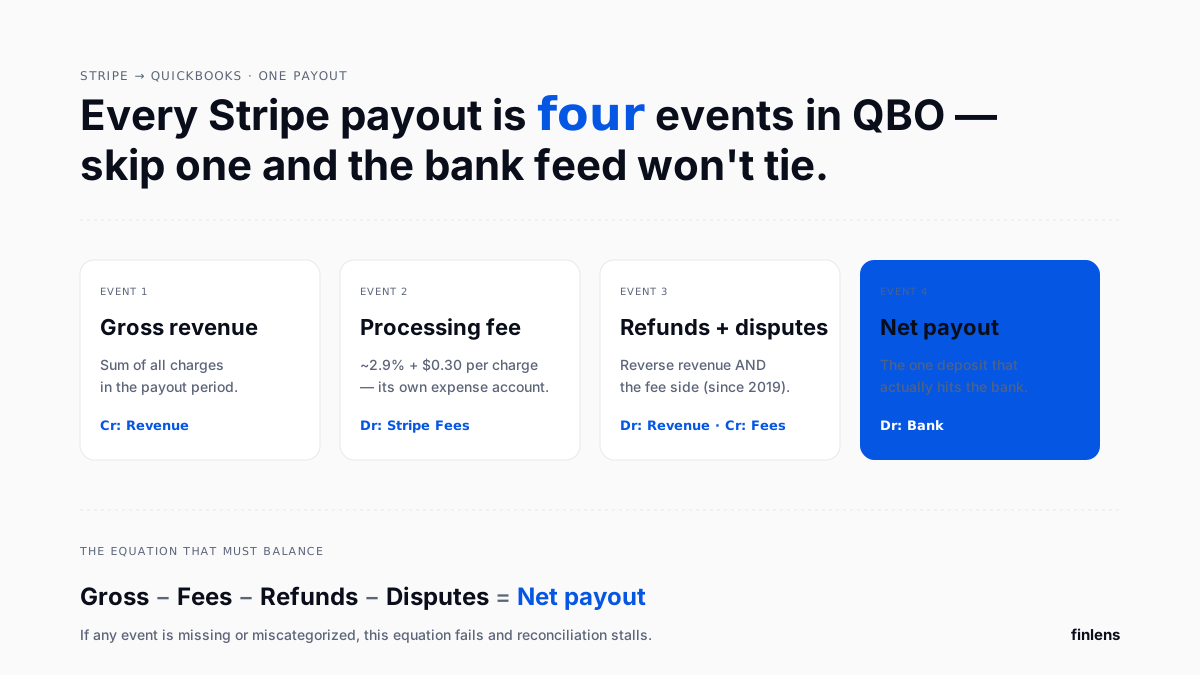
Getting Stripe-to-QBO mapping right means resolving four separate accounting events for every payout:
- Gross revenue sum of charges in payout period, hitting a revenue account (or accounts, if you split by product).
- Processing fee sum of Stripe fees, hitting a "Stripe Processing Fees" expense account.
- Refunds and disputes reversing both revenue side AND fee side (Stripe returns fee on standard-tier refunds since April 2019).
- Net payout amount actually deposited into operating bank account, matched against QBO bank feed.
The connector's job is to post entries such that: Gross revenue - fees - refunds - disputes = net payout. When any connector skips step 3 (fee reversal on refund), books drift by sum of all refunded fees over time. On a book doing $50K/month in Stripe volume, that drift is $200-$500/month accumulating in fee account.
Multi-currency Stripe payouts missing account
For businesses billing in USD but converting Stripe payouts to another currency (or vice versa), there's a fifth event: FX gain or loss between charge date and payout date. Amaka and Stripe's native app skip this entirely FX difference lands unlabeled in reconciliation, forcing a manual write-down. Synder handles it via a configurable FX account. A2X and Bookkeep post it as a dedicated FX gain/loss line on payout summary. Finlens posts it against a "Foreign Exchange Gain/Loss" account tied to client's multi-currency setup so auditor sees a clean trail.
Which Stripe-to-QuickBooks tool should you choose
Use this decision framework:
- Use Finlens if you're a CPA firm or CAS provider managing multiple QuickBooks client books, or if you're a SaaS founder whose bookkeeper is drowning in per-charge categorization AI categorization + multi-client dashboard reduces close time meaningfully across whole book, not just one client.
- Use Synder if you have a single Stripe account under 500 monthly transactions and want per-charge visibility inside QBO with configurable mapping.
- Use PayTraQer if you're a solo merchant on QBO and want cheapest per-charge sync with minimal setup.
- Use A2X if you're closing high-volume books monthly and don't need per-charge visibility inside QBO a clean payout-summary JE is enough.
- Use Bookkeep if you have a multi-entity setup (SaaS holding company, multi-brand agency) with 1,000+ transactions per entity per month.
- Use Amaka if you're pre-revenue or under 100 monthly transactions and want free basic sync.
- Use Stripe's native app if you need charges in QBO and nothing else treat it as a temporary starting point.
A commenter on r/quickbooksonline about Stripe reconciliation tools pointed out that above a few hundred transactions per month, per-charge connectors overload QBO ledger to point where bookkeeper spends more time scrolling than reconciling. That's volume threshold where either payout-summary tools (A2X, Bookkeep) or firm-scale automation (Finlens) start making sense.
Common Stripe-to-QuickBooks integration mistakes
Refund fees not reversed. Stripe returns fee on refunds for standard-tier merchants since April 2019. Any connector that doesn't reverse fee side of a refund will accumulate ghost fee balance over time. Check by pulling one month of refunds from Stripe and confirming both revenue AND fee lines appear in QBO with equal-and-opposite signs.
Payout deposits not matched to bank feed. The QBO bank feed sees a single deposit from Stripe. If connector posts 500 per-charge sales receipts and no matching payout entry, bank reconciliation shows a mysterious $50,000 deposit with no offset. Solve either by using a clearing account (per-charge tools) or by posting a payout-summary JE (A2X, Bookkeep, Finlens).
Chargebacks categorized as refunds. Chargebacks hit a different Stripe account (chargeback) than refunds (refund) and often carry an extra $15 dispute fee. Amaka and Stripe's native app tend to collapse both into "refunds," hiding dispute fee inside same bucket. Configure a separate "Chargebacks" account for clean reporting.
Multi-currency FX ignored. As covered above, this quietly accumulates. If your Stripe payout currency differs from your QBO home currency, verify FX gain/loss line appears on every payout.
Write-downs treated as regular expenses. For SaaS businesses writing down unpaid invoices, write-down should hit "Bad Debt Expense" not merged into Stripe fee account. Only Synder, Bookkeep, and Finlens handle this cleanly by default.
Integrations to check before choosing a tool
- QuickBooks Online connection method direct OAuth vs. IIF file import. OAuth is standard now; anything requiring IIF is outdated.
- Multi-account support if your firm manages 20 clients each with their own Stripe account, tools priced per-Stripe-account will scale expensively. Finlens is priced by client-book, not by connected Stripe account.
- Historical backfill some tools only sync forward from day of setup. Verify whether tool can backfill 6-12 months of Stripe history if you're switching from a different connector.
- Rule engine for categorization tools that let you define rules ("all charges from Product XYZ → Revenue: Subscriptions") save significant month-end cleanup on SaaS books with multiple products.
- Multi-user access for firms solo tools like PayTraQer and Amaka don't support multi-user firm access well. Synder does at higher tiers. Finlens is built for firm-scale access from day one.
Conclusion
Stripe-to-QuickBooks isn't a single problem it's four accounting events per payout, and connector you pick determines how many of those four are handled correctly. Per-charge tools work below ~500 monthly transactions. Payout-summary tools scale higher but lose per-invoice visibility. CPA firms managing multiple client books need firm-scale automation that handles both approaches AND runs categorization across every client from one dashboard.

Frequently asked questions
How do I automatically sync Stripe processing fees to QuickBooks and properly categorize them
Use a connector that separates fee side into a dedicated "Stripe Processing Fees" expense account on every charge. Finlens, Synder, PayTraQer, A2X, and Bookkeep all do this by default. Stripe's native QBO app posts a single generic fee account without categorization depth.
Which tools eliminate manual entry for Stripe payments and refunds
Finlens, Synder, PayTraQer, A2X, Bookkeep, and Amaka all eliminate manual entry. The difference is whether they sync per-charge (Synder, PayTraQer, Amaka) or summarize into daily payout journal entries (A2X, Bookkeep). Finlens handles both approaches and applies AI categorization across every client book in a CPA firm's portfolio.
What's best accounting automation tool for mapping Stripe refunds to right QuickBooks accounts
For CPA firms managing multiple client books, Finlens automates refund mapping (including fee reversal side) across every client from one dashboard. For single-account merchants under 500 transactions monthly, Synder is most configurable per-charge option. Above that volume, A2X and Bookkeep are cleaner because they summarize into daily payout JEs rather than crowding QBO ledger.
Does Stripe return processing fee on a refund
For standard-tier Stripe merchants, yes Stripe has returned processing fee on refunds since April 2019, per Stripe refunds documentation. Any Stripe-to-QBO connector must reverse both original revenue AND original fee on a refund; connectors that only reverse revenue create a ghost fee balance over time.
How do I handle Stripe payouts in QuickBooks reconciliation
The QBO bank feed sees a single Stripe payout deposit. To reconcile, either use a Stripe clearing account (with per-charge tools) that nets to zero when payout hits, or post a payout-summary journal entry (with tools like A2X, Bookkeep, or Finlens) that matches deposit exactly.
What is a Stripe write-down and how does QuickBooks handle it
A write-down is when an unpaid invoice or uncollectible receivable is removed from books. In QuickBooks, this hits a "Bad Debt Expense" account (not Stripe processing fees account). Synder, Bookkeep, and Finlens all support write-down handling with dedicated bad-debt mapping.
Can I use Finlens if my client is on QuickBooks Online
Yes. Finlens is built for CPA firms managing QuickBooks Online client books it layers on top of QBO rather than replacing it. The Stripe fee/refund mapping runs on top of your existing chart of accounts in each client's QBO.
How many Stripe transactions per month before I need dedicated automation
Under 100 monthly transactions, manual entry or Stripe's native app is often fine. 100-500 is sweet spot for per-charge connectors (Synder, PayTraQer, Amaka). Above 500, payout-summary tools (A2X, Bookkeep) or firm-scale automation (Finlens) become materially more efficient.

