
Time and Billing Software for CPA Firms


If you have read three "best time and billing software for CPA firms" posts and still cannot decide, problem is not lack of options. It is that lists never ask question that actually drives decision: what billing model is your firm built around?
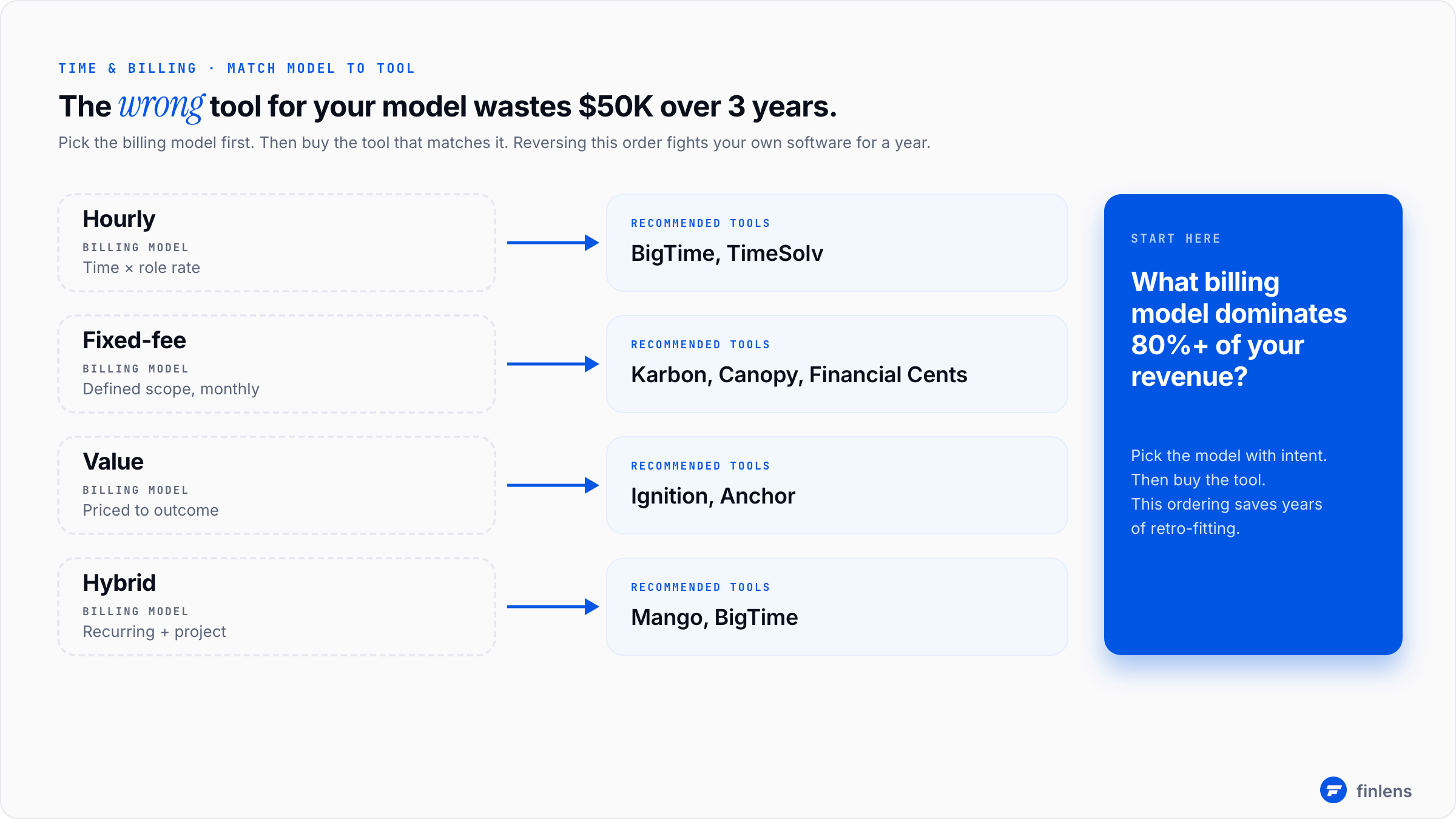
Hourly-billing software is wrong tool for a fixed-fee firm. Fixed-fee software is wrong tool for an audit firm that has to document hours by engagement. Value-billing software is wrong tool for a firm that bills 50% hourly. Pick wrong category and you spend $50K over three years on a tool that fights your business model.
Start with question every vendor list skips: what's your billing model?
Before evaluating any time and billing software for accountants, write down which model describes 80%+ of your revenue. Most firms are not pure but should be honest about which mode dominates:
A firm running on fixed-fee monthly engagements does not need time entry against tasks. It needs profitability tracking against engagements. Buying granular hourly time and billing software for that firm produces a tool team will not use, which produces no data, which means original problem you bought it to solve is unsolved.
The single most important question is whether your billing model has actually been chosen, or whether it just happens to be what your client list defaulted to. If you cannot answer "we bill this way because [reason]," you are not ready to buy software. Pick model first, then buy software that supports it.
The 12 question RFP framework
Once your billing model is locked, run this 12-question framework against any vendor before requesting a demo. If vendor cannot answer 9 of 12 cleanly, eliminate them before call.
Configuration and fit (questions 1-3)
1. Does time and billing system support our billing model natively, or are we adapting to its assumptions?
Most time and billing software was built for hourly law firms. Adapting it to fixed-fee accounting work is possible but creates ongoing friction. Native fit beats configurability.
2. Can each engagement track its own billing arrangement?
Real firms have mixed billing across clients. The same firm may bill Client A hourly, Client B at $3,000/month fixed, and Client C value-based at $25,000 for year. The software has to handle all three within one workspace.
3. How does software handle write-offs and write-downs?
This is hidden tax in every billing system. If a partner writes down $5,000 of time before billing, system should record both time entered and time billed, with write-down as a tracked metric. Many systems lose write-down data entirely, which makes profitability analysis impossible.
Time entry behavior (questions 4-6)
4. How do team members enter time, and how long does it actually take? Time entry friction is number one reason time and billing software fails to get adopted. Daily timesheet entry should take under 5 minutes per person. Weekly timesheet entry kills accuracy because people reconstruct after fact.
5. Can time be entered against tasks, engagements, or both? Different firms work differently. Some want time tagged to a specific task within an engagement. Others just want hours against engagement itself. The system has to support granularity your team will actually maintain.
6. Is there a mobile entry option that team will actually use? Tax season time entry happens in airports and at client sites. If mobile experience is unusable, hours get lost. Test mobile app personally before signing.
Billing and invoicing (questions 7-9)
7. How does invoicing happen automatic on schedule, or partner review before send? Both models work. Both are valid. But you need to know which one a tool defaults to. Some systems send invoices automatically, which makes partners nervous on big accounts. Some require approval on every invoice, which creates a bottleneck. Match default to how your firm actually operates.
8. Does system support retainer billing and trust accounting? For firms holding client retainers or trust funds, this is non-negotiable. Specifically check: does it produce journal entries your bookkeeper needs to post against trust account, or does that have to be reconstructed manually?
9. What's integration with your accounting platform? Real two-way sync versus one-way export is a meaningful distinction. One-way export means time data lands in QuickBooks but never syncs back, so updates have to be made in both systems. Two-way sync is standard you want.
Reporting and growth (questions 10-12)
10. What reports does system produce out of box? The four that matter for any time and billing system: realization rate by engagement, utilization rate by team member, WIP aging by client, and profitability by engagement type. If a vendor cannot show you all four in their default reports, they are missing analytical work that justifies software.
11. Can data be exported to a BI tool? At scale, firm owners want this data in Power BI or Tableau alongside other metrics. Verify data is exportable, not locked inside vendor's reporting layer.
12. What does pricing look like at 2x and 5x our current team size? Per-user pricing scales linearly. Per-firm or tiered pricing has step changes. Model what bill looks like in 3 years, not just today. The vendor that wins at 5 users may lose badly at 25.
Feature priority matrix: must have vs. nice to have
Once you have answers to 12 questions, score features by priority. Most firms need this:
Two firms with same headcount but different billing models will have completely different MUST columns. The buying mistake is treating "MUST for someone else" as "MUST for us."
What time and billing software is actually for
A common misconception: time and billing software is for sending invoices. That is its smallest job. The real value is data specifically, four data products:
- Realization rate what percentage of time entered gets billed. If your team enters 1,000 hours and you bill 850, your realization is 85%. Most firms run 80-92%. Below 80% is a process problem. For a deeper breakdown of realization rate formulas and how to track WIP across engagements, see the WIP realization tracking guide.
- Utilization rate what percentage of available work hours get charged to client work. Junior staff target 80%+. Partners target 50-60% (rest is firm management and business development).
- Profitability per engagement revenue minus loaded labor cost. For fixed-fee engagements, this is only way to know which clients are subsidizing which.
- WIP aging time entered but not yet billed. Old WIP becomes a write-off candidate. The aging report flags this before it becomes year-end pain.
Firms that buy time and billing software for invoicing alone leave 80% of value on table. Firms that buy it for data discover within six months that data changes how firm is run. Underutilized seniors get reassigned. Unprofitable clients get repriced. Realization gaps get traced to specific engagement types.
Value billing vs hourly billing: which model should your firm run?
This is the conversation firm owners are having right now, and the billing software you pick depends on where you land.
Hourly billing charges for time spent. It's transparent, easy to explain, and aligns with how most firms have operated for decades. The downside is a hard ceiling - your revenue is capped by the number of hours your team can work. Every efficiency gain reduces revenue unless you raise rates to compensate.
Value billing charges for the outcome delivered, not the hours it took. A $3,000/month fixed engagement for bookkeeping, close, and reporting doesn't change whether the work takes 12 hours or 8. The upside is that automation and efficiency improvements go straight to margin instead of reducing billable hours. The downside is that scope creep on fixed-fee engagements can destroy profitability if you're not tracking actual hours against the fee.
Most firms run a hybrid. Tax returns are fixed-fee. Advisory is value-billed or project-based. Audit work is hourly because engagement letters require it. The billing software needs to handle all three without forcing everything into one model.
The firms that make value billing work track time even though they don't bill by the hour. The time data tells them which engagements are profitable and which ones need repricing. Without it, fixed-fee billing is guesswork.
Where time tracking sits in a broader firm tech stack
Time and billing software is one layer. It does not replace other layers, and trying to make it do too much is the second most common buying mistake. The realistic stack:
The all-in-one tools (Karbon, Canopy) bundle practice management, time and billing, and client portal into one platform. For a full comparison of those practice management platforms, see the practice management software guide. The specialist tools (BigTime, Mango) only do time and billing. The trade-off: bundles are easier to operate but harder to optimize. Specialists are best-in-class for their slice but require integration work.
For firms past 30 clients, typical setup is: Finlens or similar for actual accounting automation work, an all-in-one platform like Karbon for time tracking and practice management, and a dedicated portal tool for tax season document collection. Finlens does not do time tracking. Time and billing is not problem Finlens solves. Pair them.

The vendor shortlist (after you've run framework)
Six tools cover 90% of real market for CPA firm time and billing:
Karbon best for firms that want time tracking inside a broader workflow tool. Mature reporting. $59-89/user/month.
Canopy best for tax-heavy firms that want time tracking inside a tax workflow tool. Reasonable reporting. $50-100/user/month.
BigTime best for traditional hourly firms with audit work that need granular time entry and detailed WIP tracking. Mature in this niche. Pricing on request.
ClickTime best for smaller firms that just need time entry without a full practice management overlay. $13-28/user/month.
Mango Practice Management best for tax and accounting firms that want time tracking with built-in time-to-billing automation. Mid-market pricing.
TimeSolv originated in legal but used by many accounting firms. Strong for hourly billing models with conflict checking and trust accounting. $20-40/user/month.
The list is shorter than typical because most "top 10" lists pad with tools that are tangentially relevant (general project management software, freelancer time tracking). The framework above eliminates those before demo.
Pricing reality: what you'll actually pay
Time and billing software is per-user pricing in almost every case. The math at typical firm sizes:
The right way to evaluate this: divide annual software cost by billable hours data helps you recover. If a $9,000/year tool helps you recover even 1% more realization across $1.5M in billings, ROI is 67% in year one. The benchmark from AICPA Tech Trends Survey suggests firms typically see realization improvements of 2-4% within 18 months of adopting structured time tracking.
Where firms get buying decision wrong
Five patterns:
1. Buying for invoicing, ignoring data product. Covered above. The data is real value. If your team will not actually enter time, tool is worthless regardless of how nice invoice templates are.
2. Picking a tool that does not match billing model. Hourly tools at fixed-fee firms. Fixed-fee tools at hourly audit firms. The mismatch creates daily friction.
3. Adopting without rolling out a time-entry discipline. The best software in world produces no value if hours are entered weekly from memory. The roll-out has to include a daily-entry mandate with a 30-day enforcement period.
4. Picking cheapest tool to "see if it sticks." Cheap tools usually have worst UX. Bad UX kills adoption. Spend slightly more and pick a tool team will actually use.
5. Not modeling pricing at 2x firm size. Per-user pricing that is cheap at 5 users can become punitive at 25. Always model what your bill looks like in 3 years.
Frequently asked questions
What's the difference between time and billing software and practice management software?
Time and billing software captures hours and produces invoices. Practice management software handles workflow, task assignments, and client communication. Many tools (Karbon, Canopy) bundle both into one platform. Standalone time and billing tools (BigTime, ClickTime, Mango) focus on time data and assume you have a separate workflow tool. For a standalone breakdown of CPA firm billing tools and pricing models, see the accounting firm billing software guide.
Do we really need time tracking if we are fully fixed-fee?
Yes. The reason is profitability per engagement. Without time data, you cannot tell which fixed-fee clients are profitable and which are underwater. Most fixed-fee firms discover that 20% of their clients consume 50% of their team's hours. That insight changes pricing, and you cannot get it without tracking hours.
Can we just use QuickBooks Time for time tracking?
QuickBooks Time (formerly TSheets) is built for hourly payroll-tracking, not for CPA firm time and billing. It does not produce realization or utilization reports natively. Firms that try to make it work for billing end up with a custom-spreadsheet layer on top.
How long does it take to roll out time and billing software?
Technical setup: 1-2 weeks. Behavior change: 6-12 weeks. The technical work is easy. The hard part is getting senior team members to enter time accurately every day, which requires firm-wide commitment from partner level down.
Should firm's own bookkeeping be done in same tool?
No. Your firm's books should be in QuickBooks Online (or whatever GL you use). Time and billing software produces invoices that get imported into your GL. Trying to use a time and billing tool as your GL is a category mistake.
How does Finlens fit into this stack?
Finlens automates accounting work for client engagements (categorization, reconciliation, schedule generation). It does not track time. Pair Finlens with a dedicated time and billing tool. The combination automates work, then captures time spent on what's left, then bills client. Each tool does one thing well.
The time and billing software market has good options at every firm size. The buying decision is not "which is best tool" it is "which tool fits way our firm actually bills." Run 12-question framework against vendors. Cut anyone who cannot answer 9 of 12. Demo survivors with real data, not vendor's demo data.
For deeper coverage on surrounding stack, practice management software comparison, 50-client playbook, and accounting firm software cover layers that sit above and below time tracking.

