
What is QuickBooks? The Complete Guide to Features, Plans, and Who It's For (2026)


QuickBooks is cloud accounting software from Intuit that helps small businesses, freelancers, and CPA firms manage their financial records, meaning invoicing customers, tracking expenses, running payroll, reconciling bank feeds, and producing reports that eventually flow into tax return.
It's most widely used small business accounting platform in United States, with more than four and a half million subscribers across QuickBooks Online product family, and it sits at center of accounting stack for most CPA firms managing client books.
That mass adoption is why "what is QuickBooks" is such a common query. Business owners hear it mentioned everywhere from bank onboarding conversations to conversations with their accountant, and they want to understand what software actually is, what it does, which version they need, and whether it's right choice for their situation.
This guide walks through what QuickBooks actually is as a product, six things it does every day, current plans and pricing tiers, and difference between QuickBooks Online and older Desktop products.
It also covers who each version fits best, how QuickBooks compares to spreadsheets and other accounting platforms, why accountants have complicated feelings about it, and how CPA firms use it to manage many client books at once.
It's written for owners evaluating QuickBooks for first time, freelancers wondering if they need a paid plan, and CPA firm partners standardizing tool across their client base.
What QuickBooks actually is as a product
QuickBooks is a software platform, meaning a suite of related tools you access through a web browser or a mobile app, that Intuit sells on a monthly subscription. It's not one product but a family of products that share same underlying data model and file format.
The core product is QuickBooks Online, cloud accounting platform that most businesses use today. Around that core sit tightly-integrated add-ons for payroll (QuickBooks Payroll), payments processing (QuickBooks Payments), time tracking, and expense management, and a large ecosystem of third-party apps that connect through QuickBooks API.
Intuit first launched QuickBooks in 1992 as desktop accounting software for small businesses, and product has evolved through more than three decades of updates, product-line changes, and a major shift from installed desktop software to cloud subscriptions. QuickBooks Online launched in 2001 and grew steadily until it overtook Desktop as primary product line in mid 2010s.
Today, most new customers land on QuickBooks Online. The older Desktop products still exist, but Intuit has been aggressively steering customers toward online version through pricing changes, subscription conversions, and phasing out of Desktop for new sales in certain regions.
Underneath product-line branding, thing QuickBooks actually does is store a general ledger, which is master record of every financial transaction business has ever made, along with tools to enter, categorize, reconcile, and report on those transactions.
Everything else, meaning payroll, invoicing, payments, is either a way to get data into ledger or a way to get insight out of it.
The six things QuickBooks does every single day
At any small business using QuickBooks Online, software handles six workflows that together cover majority of daily accounting work.
Workflow 1: Invoicing customers and getting paid. QuickBooks creates professional invoices with business's branding, sends them to customers by email, and accepts online payment through credit card, bank transfer, or third-party processors. The customer clicks a link, pays, and payment lands in QuickBooks automatically.
Workflow 2: Tracking business expenses. Bank and credit card feeds pull transactions into QuickBooks automatically as they clear. The software suggests a category based on prior rules, and owner or bookkeeper reviews and categorizes each transaction against chart of accounts.
Workflow 3: Running payroll. QuickBooks Payroll handles calculation of wages, tax withholding, and direct deposit payments to employees. It also files quarterly and annual payroll tax returns automatically. See payroll tax guide for how payroll tax structure fits into broader picture.
Workflow 4: Reconciling bank and credit card statements. At month-end, QuickBooks matches transactions in ledger to actual bank statement, flagging discrepancies for review. Clean reconciliation is what separates accurate books from ones that need cleanup.
Workflow 5: Producing financial reports. QuickBooks generates profit and loss statements, balance sheets, cash flow statements, accounts receivable aging, and dozens of other standard financial reports on demand. The reports feed both internal decision-making and annual tax return.
Workflow 6: Preparing for tax time. At year-end, categorized transactions in QuickBooks feed directly into tax return, whether that's Schedule C for a sole proprietor or Form 1120-S for an S-corp. Clean categorization all year is what makes tax prep fast rather than a March scramble.
The QuickBooks Online plan tiers
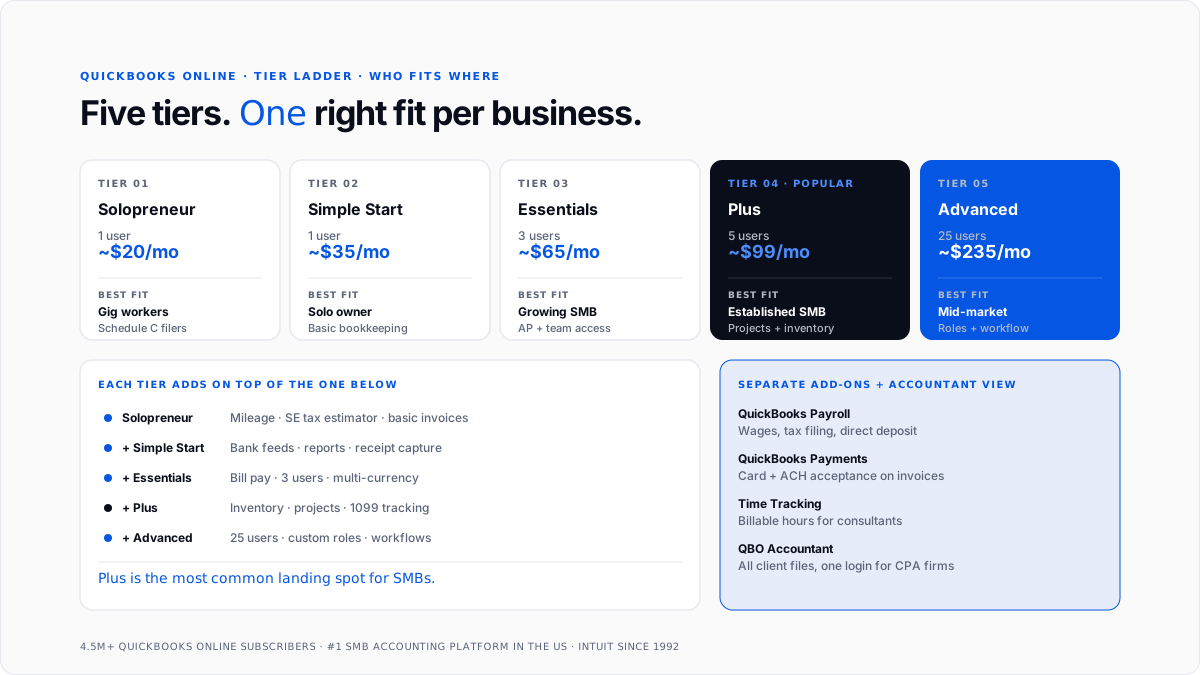
QuickBooks Online sells in a laddered tier structure, with each tier adding features on top of ones below it. Pricing changes periodically, so treat numbers below as approximate rather than exact.
Simple Start. The entry-level tier. One user, plus optional accountant access. Handles invoicing, expense tracking, basic reports, mileage tracking, and receipt capture. Fits solo freelancers and very small businesses.
Essentials. Adds three-user access, bill payment (accounts payable), time tracking, and multi-currency support for businesses invoicing internationally. Fits growing businesses that need to manage vendors and track team activity.
Plus. Adds five-user access, inventory tracking, project profitability, and 1099 contractor management. This is where most established small businesses land, since it's first tier that handles project-level P&L and inventory alongside basics.
Advanced. Adds up to 25 users, custom user roles and permissions, batch invoicing, workflow automation, dedicated account management, and priority support. Fits mid-market businesses that have outgrown smaller tiers.
Solopreneur. A separate product line for self-employed individuals and gig workers. Simpler than Simple Start, with mileage tracking, expense categorization, and estimated tax calculation aimed at Schedule C filers.
Intuit also sells QuickBooks Desktop products, though these are increasingly deprecated for new sales. The Desktop tier structure includes Pro, Premier, Enterprise, and Accountant editions, each with different feature sets and user limits.
QuickBooks Online vs. QuickBooks Desktop
The most important choice most owners face early on is whether to use QuickBooks Online or QuickBooks Desktop. In 2026, answer for most new customers is Online, and reasons are worth understanding.
QuickBooks Online is cloud-hosted. The data lives on Intuit servers, and users access it through a browser or mobile app. Multiple users can log in from anywhere. Backups, updates, and security patches happen automatically. The subscription is monthly.
QuickBooks Desktop is locally installed. The software runs on a specific computer, and data file lives on that computer's hard drive or a networked server. Multi-user setups require additional configuration. Backups are user's responsibility. Historically, Desktop was sold as a one-time license, though Intuit has migrated most Desktop products to annual subscriptions as well.
The advantages of Online are accessibility from anywhere, automatic backups, and native integration with growing ecosystem of cloud apps. The advantages of Desktop, when they exist, are typically speed on very large data files and deeper feature depth in some specialty industries where Intuit has invested more heavily in Desktop products over years.
For most new customers in 2026, QuickBooks Online is sensible default. The exceptions are businesses with very large historical data files, specialty industry needs like construction job costing that Desktop still handles better, and businesses whose accountant explicitly prefers Desktop.
Who QuickBooks actually fits best
QuickBooks is genuinely a good fit for a wide range of businesses, though it's not right choice for everyone.
Freelancers and solopreneurs get most of what they need from Solopreneur or Simple Start. Basic invoicing, expense categorization, mileage tracking, and Schedule C tax prep are all handled cleanly.
Small service businesses with employees, vendor payments, and time tracking usually land on Essentials or Plus. The addition of accounts payable, multi-user access, and project profitability makes price step up worth it.
Established small businesses with inventory, multiple projects or clients, and formal financial reporting requirements typically need Plus. This is where QuickBooks Online really hits its stride as a mainstream small business platform.
Mid-market businesses with more than about 25 users, complex approval workflows, or heavy customization needs often outgrow QuickBooks Online and move to NetSuite, Sage Intacct, or a similar mid-market accounting platform.
Large enterprises don't use QuickBooks for their primary accounting. They use SAP, Oracle, NetSuite, or Workday. QuickBooks appears at entity level for subsidiaries or specific business units but not as corporate general ledger.
CPA firms use QuickBooks to manage many client books at once, typically through QuickBooks Online Accountant portal that lets a firm partner see all client files from one login. This is where platform's ecosystem effects show up most strongly.
Common workflows that trip owners up
Even though QuickBooks is broadly accessible, several workflows consistently give owners trouble in first year of use.
Setting up chart of accounts correctly. The chart of accounts is categorization backbone. Setting it up to match tax return structure early on saves recategorization work later. The QuickBooks chart of accounts guide covers how to build one that works.
Reconciling bank feeds when transactions don't match. Bank feeds occasionally miss transactions, duplicate them, or import them out of order. Learning to spot and fix these is a critical skill for keeping books clean.
Categorizing recurring vendors consistently. Software subscriptions, rent, utilities, and other recurring charges should always land in same category. Setting up rules that auto-categorize is fastest path to clean books.
Understanding when to use bank rules vs manual entry. QuickBooks allows automated rules based on vendor name or amount, but overly aggressive rules can miscategorize transactions. Getting balance right takes some practice.
Preparing 1099s at year-end. Contractor payments over $600 in a year need 1099-NEC forms. QuickBooks tracks totals if vendor is set up as 1099-eligible from start, and missing 1099-eligible checkbox is a common year-end scramble.
Why some accountants have complicated feelings about QuickBooks
The "why don't accountants like QuickBooks" question shows up in People Also Ask section of SERP because there's real friction in accountant-QuickBooks relationship that's worth understanding.
The core complaint isn't that QuickBooks doesn't work. It's that QuickBooks is designed to be usable by non-accountants, which means it lets business owners do things that experienced accountants would flag as risky. Owners can void reconciled transactions, delete journal entries, back-date entries, and create categorization inconsistencies that a proper accounting system would prevent.
The result, at many small businesses, is that accountant spends significant time cleaning up bookkeeping decisions owner made throughout year. The automate bookkeeping cleanup guide covers this cleanup work in more detail.
The other layer of complaint is that as businesses grow, they often outgrow QuickBooks Online before switching to something bigger. This transition period is uncomfortable for accountants because platform is doing less than business needs, but switching costs are high.
None of this means QuickBooks is a bad product. It means product is optimized for a specific user (small business owner) rather than accountant, and trade-offs are visible.
How CPA firms use QuickBooks to run many client books
For CPA firms and bookkeeping firms managing multiple clients, QuickBooks Online Accountant is workspace that lets a firm see all client files from one login without switching accounts.
The firm partner or bookkeeper adds each client's QuickBooks file to accountant portal, sees pending tasks across all clients on one dashboard, and moves between client books without re-authenticating. Client requests, review workflows, and tax prep timelines all consolidate in one interface.
Modern CPA firms often layer additional automation on top of QuickBooks to handle work that base platform doesn't. The AI layer for QuickBooks guide covers this pattern, and automate QuickBooks bookkeeping guide covers specific workflows firms most often automate.
The pattern that produces biggest firm-level margin lift is standardizing QuickBooks chart of accounts template across client base and using AI-driven categorization tools to handle repetitive categorization work at scale.
Comparing QuickBooks to alternatives
Business owners evaluating QuickBooks often want to know how it compares to alternatives. The honest answer is that QuickBooks fits mainstream small business use case better than most alternatives, but specific situations do favor other options.
Xero. The closest direct competitor. Xero was founded in New Zealand and has strong presence outside US, particularly in UK, Australia, and Canada. Feature-wise, Xero and QuickBooks Online are broadly comparable. The choice often comes down to which one business's accountant prefers.
FreshBooks. Purpose-built for freelancers and service businesses with simpler bookkeeping needs. Cleaner interface than QuickBooks for time tracking and project billing, though weaker on complex accounting.
Wave. Free accounting software for very small businesses. Fits sole proprietors with straightforward bookkeeping who can't justify a paid subscription. Limitations show up quickly as business grows.
Sage. Historically strong in specific industries like construction and manufacturing. Sage Intacct competes with QuickBooks at upper end of SMB and lower end of mid-market.
NetSuite. Oracle's cloud ERP for mid-market and enterprise businesses. QuickBooks graduates land here when they outgrow platform.
Spreadsheets. Still what most very small businesses use before they buy their first accounting platform. Works fine at low volume, breaks down quickly as volume grows.
For businesses considering an AI-forward alternative to traditional QuickBooks model, AI accounting vs traditional bookkeeping guide covers what changes when accounting is built around automation from ground up.
Conclusion
QuickBooks is mainstream small business accounting platform in United States, and for most businesses that need real accounting software, it's sensible default choice.
The product handles six daily workflows that make up small business bookkeeping (invoicing, expenses, payroll, reconciliation, reporting, tax prep) cleanly enough that non-accountants can use it, while giving accountants depth to run proper books at scale.
For owners evaluating QuickBooks for first time, highest-return moves are picking right tier based on team size and workflow complexity, setting up chart of accounts to match tax return structure, connecting bank and card feeds from day one, and finding an accountant or bookkeeper who's fluent in QuickBooks Online.
For CPA firms managing many client books, standardizing on QuickBooks Online Accountant with a consistent chart of accounts template across client base, and layering AI-driven automation on top for repetitive categorization work, is what turns QuickBooks from a tool into a firm-level operating platform.
Frequently asked questions
What exactly does QuickBooks do?
It stores business's general ledger and provides workflows to invoice customers, track expenses, run payroll, reconcile bank statements, and produce financial reports. Everything a small business needs to keep clean books and prepare a tax return.
Is QuickBooks hard to learn?
For basic use, no. Invoicing, expense capture, and simple reporting are approachable for owners without accounting backgrounds. Advanced use, including reconciliation troubleshooting, correct chart of accounts setup, and payroll tax filings, takes more time to learn well.
How much does QuickBooks cost?
Solopreneur starts around $20 per month. Simple Start around $35. Essentials around $65. Plus around $99. Advanced around $235. Payroll is priced separately. Pricing changes and promotional discounts are common, so check current prices at intuit.com.
Is QuickBooks worth money?
For any business with a real ongoing operating volume, yes. The time saved on bookkeeping and accuracy of tax return dramatically exceed subscription cost. Very small side hustles under about $10,000 a year can sometimes get by with spreadsheets.
Can I use QuickBooks for personal finances?
QuickBooks is designed for business accounting, not personal finance. Intuit sells separate products for personal use (Mint, historically, and now Credit Karma-branded tools). Business owners should keep business and personal finances in separate systems anyway.
Is QuickBooks same as Intuit?
No. Intuit is company. QuickBooks is one of Intuit's product families, alongside TurboTax, Credit Karma, and Mailchimp. All are separate products under same corporate parent.
What is difference between QuickBooks Online and QuickBooks Desktop?
Online is cloud-hosted and accessed through a browser or mobile app. Desktop is locally installed on a specific computer. In 2026, Online is mainstream product and Desktop is being deprecated for most new customers.
Is QuickBooks a CRM?
No. QuickBooks includes basic customer records for invoicing, but it doesn't include sales pipeline, contact management, or marketing features that define a true CRM like Salesforce or HubSpot.
Can QuickBooks file my taxes?
QuickBooks produces categorized transactions that feed tax return, but it doesn't file return itself. Intuit sells TurboTax separately for tax filing, and two products connect so QuickBooks data flows into TurboTax at year-end.
How does QuickBooks compare to Xero?
For US-based small businesses, QuickBooks has stronger market presence, deeper ecosystem, and more third-party integrations. Xero has cleaner design and stronger presence internationally. Feature-for-feature, products are broadly comparable at SMB level.
Do I need an accountant if I use QuickBooks?
For most businesses, yes. QuickBooks handles daily transaction capture and reporting, but tax planning, entity structure decisions, and year-end tax filing usually still benefit from professional help. Many CPA firms use QuickBooks Online Accountant to work with their clients.
Can I switch from QuickBooks to another platform later?
Yes, and businesses often do when they outgrow QuickBooks or need features it lacks. Migration is manageable but not trivial, and it's usually worth disruption when business genuinely needs what new platform offers.

