
What is QuickBooks Used For ? Real Use Cases and Workflows for Small Businesses (2026)


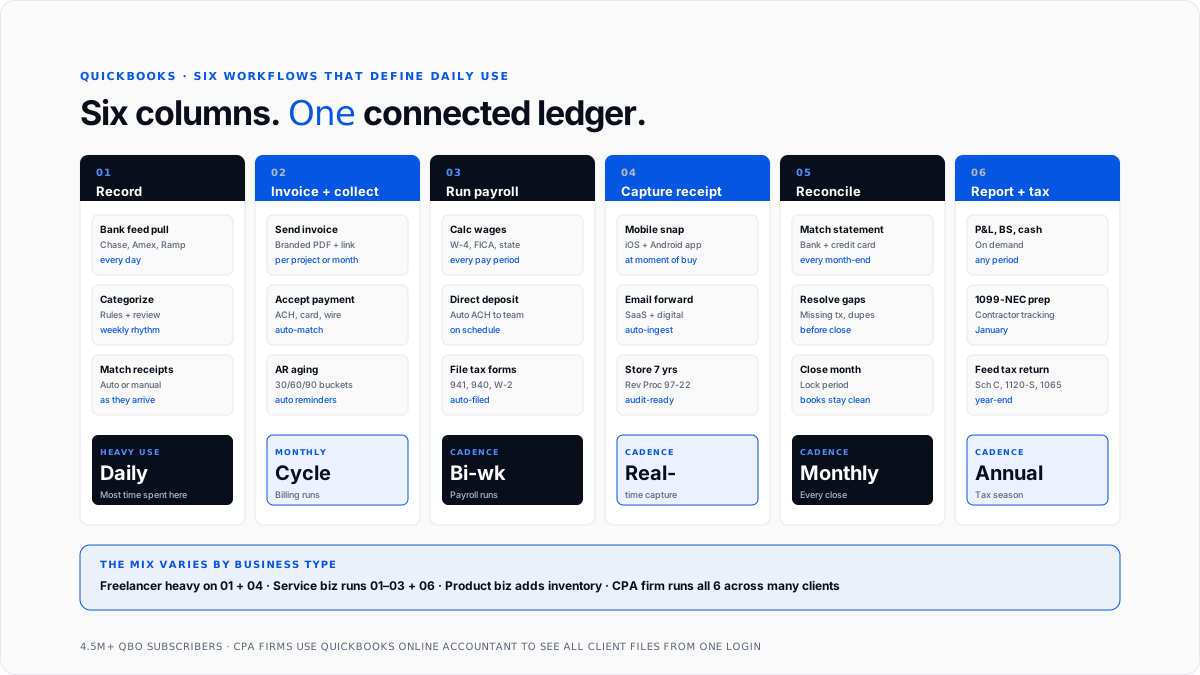
QuickBooks is used at more than four million small businesses for six core workflows: recording income and expenses, invoicing customers and collecting payments, running payroll, capturing receipts, reconciling bank statements, and producing financial reports that flow into tax return.
Those six workflows sound generic on paper, but they cover vast majority of daily accounting work at real businesses. The reason QuickBooks became mainstream small business accounting platform in United States is that it handles all six through one connected system rather than forcing owners to stitch together separate tools for each.
This guide walks through what QuickBooks is actually used for day to day, breaking down each of six core workflows with real examples, then showing how workflows combine differently for freelancers, service businesses, product businesses, and CPA firms managing many client books at once.
It's written for owners evaluating QuickBooks and trying to understand exactly what it does, and for CPA firm partners explaining platform to clients who need clearer expectations.
The six core workflows that define daily QuickBooks use
Every business that runs on QuickBooks uses some combination of same six workflows. The mix varies by business type, but underlying capabilities are consistent.
Workflow 1: Recording income and expenses through bank feeds
The most foundational workflow is transaction capture. QuickBooks connects to business's bank and credit card accounts through direct feeds that pull every transaction into software as it clears.
The owner or bookkeeper then reviews each transaction, categorizes it against chart of accounts, and posts it to general ledger. QuickBooks suggests categories based on prior rules, so recurring vendors get categorized automatically over time.
This is where most of day-to-day time inside QuickBooks gets spent. Even automated workflows require regular review to catch miscategorizations, split shared bills between categories, and add memos where auto-suggestion wasn't specific enough.
For businesses with historical transactions that need to be categorized retroactively, historical transaction categorization tools for QuickBooks guide covers tools that handle backfill work.
Workflow 2: Creating invoices and collecting customer payments
For any business that bills customers rather than collecting cash at point of sale, invoicing is second core workflow.
QuickBooks generates professional invoices with business's branding, sends them to customers by email, and provides a payment link so customers can pay online with a credit card or bank transfer. When customer pays, money lands in QuickBooks automatically and matches to corresponding invoice.
The software also tracks receivables aging, meaning how long each unpaid invoice has been outstanding, and sends automatic reminders to customers whose invoices are approaching or past due. This is what separates businesses that get paid on time from businesses that chase invoices manually.
Recurring invoices for subscription customers, estimates that convert to invoices when accepted, and progress invoicing for milestone-based project work are all standard features across paid tiers.
Workflow 3: Running payroll and paying employees
For businesses with W-2 employees, QuickBooks Payroll handles calculation of wages, tax withholding, and direct deposit payments on a schedule that matches business's pay cycle.
The system calculates gross wages, subtracts federal income tax withholding based on employee's W-4, subtracts FICA and Medicare, applies state and local tax rules, and produces net paycheck that gets deposited directly into employee's bank account.
Payroll tax filings happen automatically. Quarterly Form 941, annual Form 940, W-2s at year-end, and state payroll tax returns all get prepared and filed by system, so business doesn't have to manage them manually. See payroll tax guide for how underlying tax structure works.
For businesses with 1099 contractors, QuickBooks tracks contractor payments throughout year and prepares 1099-NEC forms in January for prior calendar year.
Workflow 4: Capturing receipts through mobile
Modern QuickBooks includes mobile receipt capture as a core workflow. The owner or an employee photographs a receipt through QuickBooks Online mobile app, OCR extracts merchant, date, amount, and tax, and record attaches to corresponding expense in ledger.
For businesses using corporate cards, receipt image gets matched automatically to card transaction from connected bank feed, so there's no separate step to link them.
Digital receipts arriving by email can also be forwarded to a special email address that ingests them automatically. This is particularly useful for SaaS-heavy businesses whose spend is largely digital rather than physical.
Retention matters here. Receipts stored in QuickBooks Online stay accessible for as long as subscription is active, and images are legible enough to serve as substantiation if IRS ever asks. Best practice retention is seven years, and QuickBooks handles that automatically once configured.
Workflow 5: Reconciling bank and credit card statements
At month-end, QuickBooks reconciles transactions in ledger against actual bank statement. The user pulls up statement, matches it against what's in QuickBooks, and resolves any discrepancies before closing month.
This step catches missing transactions, duplicates, and categorization errors that would otherwise flow into inaccurate reports. Clean reconciliation is what separates trustworthy books from ones that need cleanup.
The automate bookkeeping cleanup guide covers what happens when reconciliation gets neglected over multiple months and books need to be caught up retroactively.
Modern CPA firms often layer automation on top of QuickBooks reconciliation workflow to handle it more efficiently at scale. The automate QuickBooks bookkeeping guide covers specific patterns firms use.
Workflow 6: Producing financial reports and preparing for tax time
The output of all other workflows is financial reports that owners and their accountants use to run business and file taxes.
QuickBooks produces profit and loss statements, balance sheets, cash flow statements, accounts receivable aging, accounts payable aging, sales tax summaries, and dozens of other standard reports on demand. Custom reports can be built for specific business questions.
At year-end, categorized transactions flow directly into tax return. For a sole proprietor filing Schedule C, categories map to Lines 8 through 27. For an S-corp filing Form 1120-S, same categories map to P&L section of entity return.
Setting up QuickBooks chart of accounts to match tax return structure early on is what makes this workflow clean rather than a scramble.
How QuickBooks use differs by business type
The six workflows above show up at almost every QuickBooks business, but mix varies significantly by business type.
Freelancers and solopreneurs use QuickBooks Solopreneur or Simple Start primarily for expense tracking, mileage logging, and estimated tax calculation. Invoicing shows up if they bill clients directly. Payroll and reconciliation are lighter because there are no employees and often fewer accounts to reconcile.
Service businesses use QuickBooks Essentials or Plus with heavier emphasis on invoicing, accounts receivable management, and project-level profitability. Payroll is central because they have employees. Inventory is minimal or absent.
Product businesses and retail use QuickBooks Plus or Advanced with inventory tracking, purchase orders, and cost of goods sold calculations as core workflows. They also lean heavily on reporting layer to understand product-level margin and stock turnover.
Construction and job-based businesses use QuickBooks Plus or Advanced with job costing at center of workflow. Every expense gets tagged to a specific job, so business can see profitability per project rather than just at aggregate level.
Professional services firms use QuickBooks Plus with heavy use of time tracking, project profitability, and billable expense pass-through. Invoicing typically includes both time and expenses billed to clients.
Nonprofits use QuickBooks Nonprofit (a variant of Plus) with fund accounting, grant tracking, and donor management. Reporting is oriented around program-level accountability rather than pure profitability.
What QuickBooks doesn't do well
Being explicit about limits helps set expectations correctly.
QuickBooks isn't a CRM, meaning it doesn't handle sales pipeline management, lead scoring, or marketing automation. Sales operations still need Salesforce, HubSpot, or a purpose-built CRM.
It isn't a full ERP, meaning it doesn't handle complex manufacturing, multi-entity consolidation, or demand planning and supply chain features that mid-market ERPs handle. Businesses that outgrow QuickBooks typically move to NetSuite or Sage Intacct.
It doesn't include e-commerce platform functionality. Businesses selling online use Shopify, WooCommerce, or similar platforms and sync transaction data back to QuickBooks.
It's not designed for enterprise-scale accounting with multiple entities, complex intercompany transactions, or sophisticated foreign currency management. The intercompany reconciliation for QuickBooks guide covers workarounds businesses use when they have multiple entities in QuickBooks.
How CPA firms use QuickBooks across many clients
For CPA firms and bookkeeping firms, QuickBooks Online Accountant is workspace that consolidates access to all client files.
The firm partner or bookkeeper adds each client's QuickBooks Online file to accountant portal, sees pending tasks across all clients on one dashboard, and moves between books without re-logging in.
Standardizing chart of accounts template across client base is one of highest-leverage moves for a firm running many QuickBooks clients. When every client's books are structured same way, categorization becomes faster, tax prep becomes cleaner, and reporting becomes comparable across clients.
Firms that combine standardized QuickBooks setup with an AI layer for categorization can dramatically scale number of clients per bookkeeper. See AI layer for QuickBooks guide and AI accounting vs traditional bookkeeping guide for how pattern actually works.
Where QuickBooks fits in broader accounting stack
QuickBooks sits at center of small business accounting stack. Upstream, it takes inputs from bank feeds, corporate cards, payment processors, and payroll data. Downstream, it feeds financial statements, tax software, and business reporting tools.
For most small businesses, picture is simple: bank and card transactions flow into QuickBooks, categorization happens against chart of accounts, and categorized ledger flows out to CPA and tax return.
For businesses with more complex spend, additional layers get added. Corporate card programs like Ramp or Brex sync spend data with categorization already applied. Payment processors like Stripe feed sales data with revenue recognition rules applied. E-commerce platforms sync order and inventory data.
The strength of QuickBooks isn't that it does every one of these workflows better than any specialist tool. It's that it does all six core workflows well enough, from one connected system, that most small businesses don't need to run six separate tools for what should be one integrated function.
Conclusion
QuickBooks is used at millions of small businesses for six workflows that make up daily accounting: recording transactions, invoicing customers, running payroll, capturing receipts, reconciling bank statements, and producing financial reports.
The value of platform isn't that it does any single one of these workflows better than a specialist tool. It's that it does all six well enough, from one connected system, that most small businesses don't need separate tools for what should be one integrated function.
For owners evaluating QuickBooks, right tier depends on which of six workflows business actually runs and how many users need access. Solo freelancers start at Solopreneur or Simple Start. Growing service businesses land at Essentials or Plus. Established SMBs with inventory or projects use Plus. Mid-market businesses with complex workflows use Advanced.
For CPA firms managing many client books, standardizing on QuickBooks Online Accountant with a consistent chart of accounts template across clients, and layering AI-driven automation on top for repetitive categorization work, is what turns QuickBooks from a per-client tool into a firm-level operating platform.
Frequently asked questions
What is QuickBooks used for in accounting?
For recording business transactions, categorizing them against a chart of accounts, reconciling to bank statements, and producing financial reports that feed tax return. It's general-purpose accounting platform for small businesses.
What tasks does QuickBooks do?
Invoicing, expense tracking, payroll, receipt capture, bank reconciliation, financial reporting, sales tax calculation, contractor 1099 tracking, project profitability analysis, inventory management (on higher tiers), and dozens of related workflows.
Who uses QuickBooks?
Mainly small businesses in United States, ranging from solopreneurs to mid-market companies with up to about 25 users. CPA firms use QuickBooks Online Accountant to manage many client books at once. Some larger businesses use QuickBooks at subsidiary or business unit level even when they run a bigger ERP at corporate level.
Can QuickBooks handle inventory?
Yes, on Plus and Advanced tiers. Simple Start and Essentials don't include inventory tracking. Advanced adds more sophisticated inventory features like bill of materials.
Can QuickBooks run payroll?
Yes, through QuickBooks Payroll, which is a separately-priced add-on that integrates directly with core QuickBooks Online product.
Does QuickBooks do sales tax?
Yes. QuickBooks calculates sales tax based on customer's location, tracks collected sales tax as a liability, and produces sales tax reports for filing. It doesn't file state sales tax returns automatically in most jurisdictions, though third-party integrations handle that.
Can QuickBooks handle multiple businesses?
Yes, but each business needs its own subscription. QuickBooks Online doesn't support multiple companies inside one login way QuickBooks Desktop did. For businesses with multiple entities, one option is QuickBooks Online Accountant, which lets a firm partner see all client files from one login.
Is QuickBooks used for personal finances?
No. QuickBooks is designed for business accounting. Personal finance is served by other Intuit products (Credit Karma) and by third-party apps.
What does QuickBooks integrate with?
Bank accounts, credit cards, payroll systems, payment processors (Stripe, Square, PayPal), e-commerce platforms (Shopify, WooCommerce, Amazon), CRM systems, and hundreds of third-party apps through QuickBooks App Store.
Can I do my own bookkeeping in QuickBooks?
Yes, for basic use. Owners without accounting backgrounds can handle invoicing, expense categorization, and simple reporting. Reconciliation, chart of accounts setup, and payroll get more complex and often benefit from professional help.
How do accountants use QuickBooks with their clients?
Through QuickBooks Online Accountant, which lets a firm see all client files from one login. The accountant can review client's work, make journal entries, produce reports, and prepare tax filings without logging in and out of each client account.

