
Workpaper Management Software: Where Review Bottlenecks Actually Come From and What to Do About Them


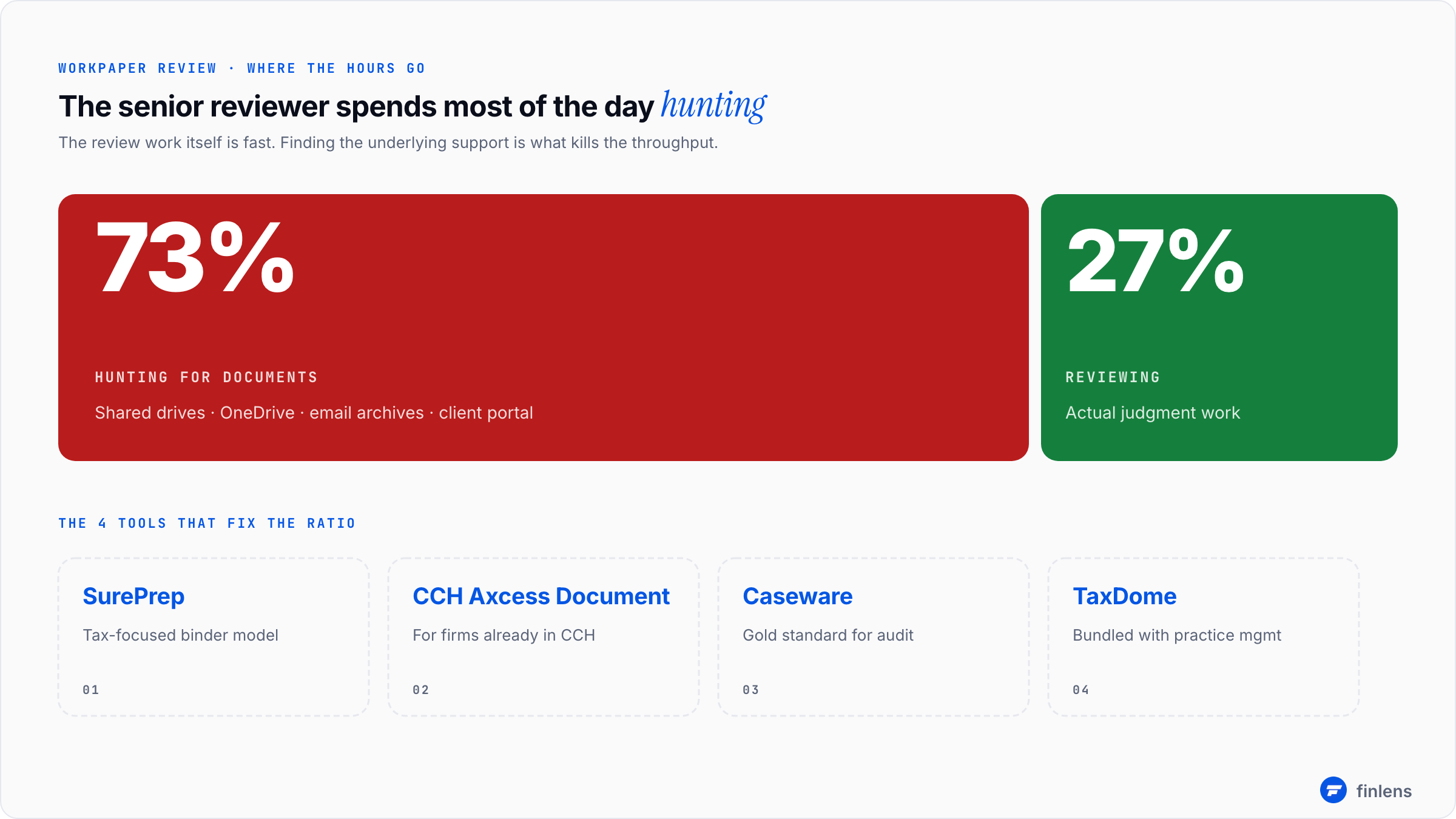
The senior reviewer at every mid-sized CPA firm hits the same wall around mid-March. Twelve open files. Eight of them have workpapers in some combination of shared drive folders, OneDrive, an FTP from the client, and three separate Excel attachments emailed at different times. The reviewer spends 40 minutes finding documents before they spend 15 minutes actually reviewing them.
That ratio is the problem. The review work itself is fast. The hunt for the underlying support is what kills the throughput. Workpaper management software exists to fix the ratio, not the review work.
This post is for firms past the point where shared drives have become the bottleneck. If you have under 5 staff and review your own work, you don't need this. If you have a senior reviewer who has been complaining since November about not being able to find supporting documentation, this is the conversation.
What actually breaks in the review process
I have watched this play out at probably 30 different firms. The breakage pattern is consistent:
The preparer gathers documents during the engagement. Some come from the client portal, some come from email attachments, some get scanned from physical mail. They land in different places. The preparer organizes them mentally but not always systematically in a shared location. The work happens, the workpapers get built in Excel or in the tax software, and the file moves to review.
At review, the reviewer needs to verify that line 23 of the return ties to the underlying support. They open the workpaper. The workpaper references "see TBD attached." They go looking for the trial balance. It's in OneDrive in a folder named after the prior preparer. They find it. Now they need the bank statement that supports the cash balance. It's in the portal, but the portal version is the wrong month because the client uploaded an updated one after the original work was done. The reviewer pings the preparer on Slack. The preparer is in another client meeting. Twenty minutes pass.
Multiply that by 40 returns at month-end. The reviewer's day is now 75% archaeology and 25% professional judgment. The firm bills the same regardless. The margin gets eaten by hours that don't produce client value.
What dedicated workpaper management software does differently
The category exists because tax software (Lacerte, ProConnect, CCH Axcess) and general document management (SharePoint, Dropbox, Box) both leave a gap. Tax software stores its own working papers but doesn't manage the supporting documents that feed the return. General document management stores files but doesn't know what a workpaper reference is.
Dedicated workpaper management tools do four things both general categories miss:
Linking source documents to specific tax return line items. When the reviewer opens line 23 of Schedule C, the tool shows the supporting document directly without the manual hunt.
Cross-referencing across workpapers. A trial balance ties to a balance sheet, which ties to specific bank statements, which tie to specific reconciliations. The tool enforces these links so the chain is traceable.
Lock and sign-off workflows. Once a workpaper is reviewed and signed off, it locks. Subsequent changes are tracked. This is the audit trail the AICPA peer review program wants to see.
Multi-year retention with searchability. IRS Circular 230 and various state requirements demand multi-year workpaper retention. A tool that lets you search across three years of workpapers is meaningfully better than a folder structure you have to navigate manually.
The five tools firms actually use
Finlens. Best for firms on QuickBooks that want to automate bookkeeping and GAAP schedules. It features AI-driven transaction categorization, generates GAAP schedules (accruals, prepaids, amortization) automatically, and provides a multi-client dashboard. Pricing is free up to $50k in monthly client expenses, or $30/client/month for firms at scale.
CCH Axcess Workstream / Document. If your firm uses CCH Axcess for tax prep, the bundled workstream and document module is the natural fit. Deep integration with the tax software. Pricing rolls into the CCH platform pricing, which is enterprise. Worth it if you're already in the CCH ecosystem. Painful if you're not.
SurePrep. Strong for tax-focused firms. Integrates with Lacerte, ProConnect, CCH, and Drake. The "binder" model maps cleanly to how tax workpapers actually flow. Pricing on request. Sold mostly into firms with 20+ returns per preparer.
Caseware. The gold standard for audit workpapers. Used by Big 4 and serious mid-market firms doing assurance work. Overkill for tax-only firms. Pricing is firmly enterprise-tier.
TaxDome. Lighter than the above three. Bundles workpaper-style document management with portal and practice management. Better for firms under 25 staff that want one platform doing several jobs imperfectly rather than four platforms doing each one perfectly.
The audit and workpaper software comparison for CPA firms goes deeper on each.
What's not in the category but gets confused with it
A few tools come up in workpaper management conversations and shouldn't:
SharePoint and OneDrive. Document storage, not workpaper management. They store files but don't link them to return line items, don't enforce sign-off workflows, and don't produce audit-friendly retention searches. Useful as backing storage, not as the management layer.
SmartVault. Document management with tax integrations. Closer to the workpaper category than SharePoint but lighter than SurePrep or Caseware. Reasonable middle ground for smaller firms.
Karbon and Canopy. Practice management and workflow. They handle the task tracking around the work but not the actual workpaper document linking. Some firms try to make Karbon's file attachments serve as workpaper management. It works for very small firms and fails past 15 staff.
The pricing question
Pricing in this category is genuinely opaque, more so than any other CPA software category. None of the three serious tools (CCH, SurePrep, Caseware) publish prices. The reason is that pricing is per-user and per-module and varies by total firm spend on the broader platform.
Rough ranges based on what firms report:
- SurePrep: $40-$80/user/month for the binder module, less if bundled with other SurePrep products
- CCH Axcess Document: $50-$120/user/month depending on the CCH ecosystem footprint
- Caseware: $1,500-$3,000/user/year for the full suite, less for narrower modules
- TaxDome: $50-$75/user/month (includes broader practice management)
For a firm of 10 reviewers, that's $5,000-$15,000/year in workpaper management spend. The math justifies itself if it cuts senior reviewer archaeology time by even 15%. The BLS data on accountant compensation puts senior CPA fully-loaded cost north of $90/hour. Save 5 hours per reviewer per month and the tool pays for itself.
How to pick if you don't know
Six questions that resolve most picks:
1. What tax software do you use?
If CCH, look at CCH Axcess Document first. If Lacerte or ProConnect, look at SurePrep. If you're doing serious audit work, Caseware.
2. How many reviewers do you have?
Under 3, you probably don't need dedicated workpaper management yet. SharePoint plus discipline. 3-10, look at SurePrep or TaxDome. 10+, look at the heavier tools.
3. Are you doing audit and assurance work, or pure tax?
Audit work essentially requires Caseware or similar. Tax-only work can use lighter tools.
4. Do you need peer review readiness?
If yes, the tool needs proper sign-off and lock workflows. SharePoint folders don't pass peer review. SurePrep and Caseware do.
5. What's your firm's tolerance for implementation pain?
Caseware and CCH have steep learning curves. SurePrep is more approachable. TaxDome is the easiest. Roll-out time varies from 6 weeks to 6 months across these.
6. What does the senior reviewer (the person who will use it most) actually want?
This is the question most firms skip. Ask the person who is currently bottlenecked. Their answer matters more than any analyst report.
What the tool will not solve
Two things workpaper management software cannot fix even when implemented well:
Lack of standard work paper conventions. If preparers use different naming conventions, different folder structures, and different reference styles, the tool just organizes the chaos better. The underlying convention work has to happen first or the tool surfaces inconsistency rather than masking it.
Reviewers who won't trust electronic workpapers. Some senior partners insist on paper. No software changes that. If your firm has reviewers in this camp, the buying decision involves a culture conversation more than a tool conversation.
How rollouts usually go
Rough timeline for a 10-reviewer firm picking SurePrep:
- Weeks 1-3: Procurement, contract signing, initial setup with vendor success team
- Weeks 4-6: Standardize the firm's workpaper conventions. This is the actual hard work.
- Weeks 7-10: Migrate 2-3 active engagements as pilots
- Weeks 11-16: Expand to all current engagements
- Months 5-12: Year-end uses the new tool; the firm discovers what didn't roll out cleanly and adjusts
The 4-6 week standardization phase is the one firms try to skip. Don't. A workpaper management tool implemented on top of inconsistent conventions makes the inconsistency permanent.
Frequently asked questions
Is workpaper management software the same as document management software?
Document management stores files. Workpaper management links files to specific return line items, enforces review sign-off workflows, and produces audit-trail-ready retention. The overlap is meaningful but the categories are distinct.
Do small firms need this category at all?
Under 5 staff, usually no. A clean SharePoint folder structure and consistent file naming work. The pain that justifies dedicated workpaper software shows up around 5-7 staff with multiple reviewers.
How does this relate to peer review?
Peer review programs (AICPA peer review for non-public firms, AICPA SAS standards for audit documentation) require demonstrable workpaper trails with proper sign-off. Tools designed for this category produce that trail automatically. Manual folder structures can satisfy peer review but require more work to demonstrate.
Should I pick the tool that bundles with my tax software or a standalone one?
Default to the bundled option unless you have a specific reason not to. Integration with the return preparation engine is meaningfully more valuable than feature parity from a standalone tool.
What about cloud vs. on-premises?
Modern tools are cloud-first. The on-premises versions (older Caseware installations, legacy CCH) still exist but the vendor product roadmaps have moved to cloud. New implementations should default to cloud unless there's a specific data residency requirement.
Where does Finlens fit?
Finlens doesn't do workpaper management. It automates the bookkeeping work that produces the underlying financial data the workpapers reference. For tax engagements where the firm is also doing the bookkeeping, Finlens reduces the prep time before workpaper review begins. For audit engagements where the firm is reviewing client-provided financial data, Finlens isn't part of the picture.
The right move depends almost entirely on your tax software and reviewer headcount. Pick the bundled option if you're in CCH or Lacerte. Pick TaxDome if you want lighter footprint and broader functionality. Pick Caseware if you do real audit work.
For the broader operational system this sits inside, the practice management software comparison and the audit and workpaper software go deeper.

