
QuickBooks for Law Firms: IOLTA, Retainers, and the Trust Accounting Gap


Law firm accounting sits under Model Rule 1.15 of the ABA Model Rules of Professional Conduct, adapted by every state bar. The rule requires client funds held separately from firm funds, reconciled at least monthly, and documented for audit.
QuickBooks can support that workflow but does not enforce it. This guide covers what QBO does natively, where the compliance gap sits, and how firms close it with a legal practice management add-on plus a reconciliation layer.
Is QuickBooks good for law firms?
QuickBooks is suitable for the general ledger, invoicing, expense tracking, payroll, and financial reporting side of a legal practice. Intuit maintains a dedicated legal industry configuration on its law-firm product page, with retainer tracking, hard-vs-soft cost separation, and QuickBooks Time for billable hours.
QuickBooks is not sufficient for standalone IOLTA compliance. The software does not enforce three-way reconciliation, does not prevent transfers that overdraw a client retainer, and does not automatically route bank fees or interest away from client funds.
Every firm with meaningful trust volume runs a legal practice management layer (LeanLaw, Clio Manage, MyCase, or Smokeball) on top of QBO to close those gaps.
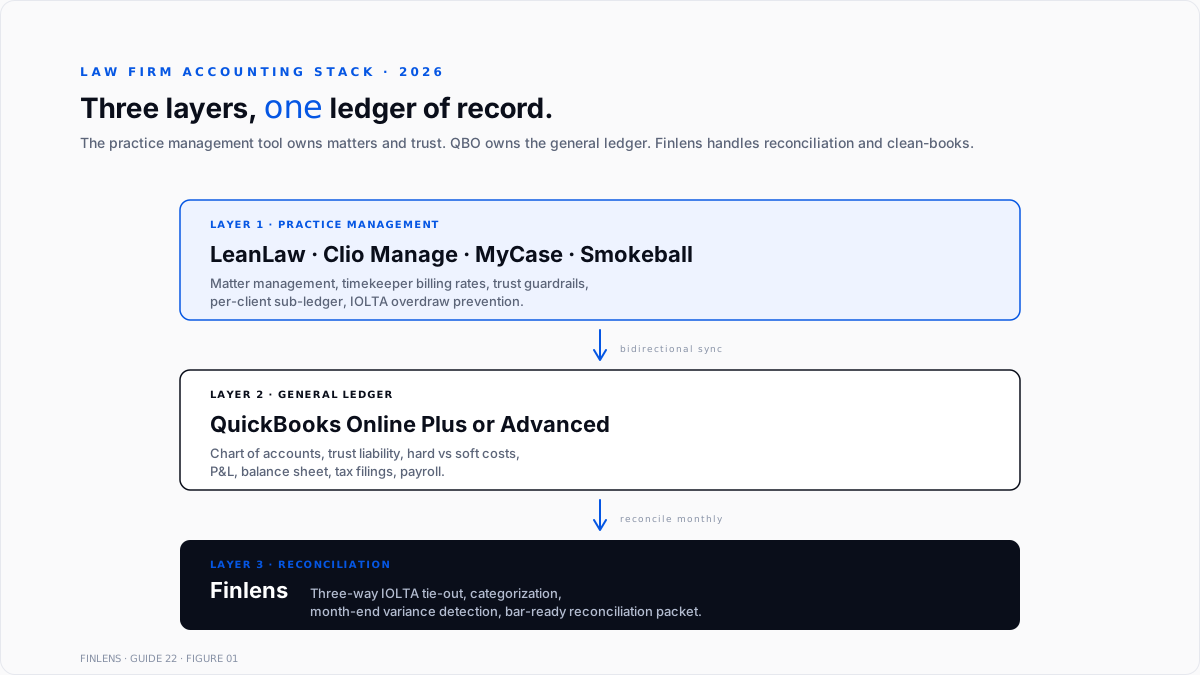
The practical 2026 stack is three layers. Practice management owns matters and trust guardrails. QBO owns the general ledger. A reconciliation platform like Finlens ties the two together and produces a bar-ready monthly reconciliation packet.
How does QuickBooks handle IOLTA trust accounts?
IOLTA handling in QuickBooks is a chart-of-accounts pattern, not a feature. Four setup steps are required.
- Create the IOLTA bank account as a separate asset. It sits alongside operating checking but is never used interchangeably.
- Create a "Funds Held in Trust" current liability account. This account tracks the firm's obligation to return client money.
- Track each client and matter under the trust liability using QBO sub-accounts or Class tracking. This creates the client ledger.
- Route every trust deposit and disbursement through both the IOLTA bank asset and the trust liability. The two balances must equal.
The IOLTA bank balance and the trust liability balance are structurally equal every day. Any divergence indicates a coding error, a bank fee posted to the wrong account, or interest routed incorrectly. State bar auditors read this equality as the first proof of compliance.
QuickBooks does not enforce any of these constraints natively. It permits transfers out of the trust liability without a matching disbursement. It permits client sub-accounts to go negative. It permits interest to post to firm income. Each of these behaviors triggers a bar complaint if left uncorrected, which is why a practice management layer is treated as required, not optional.
What is three-way trust reconciliation?
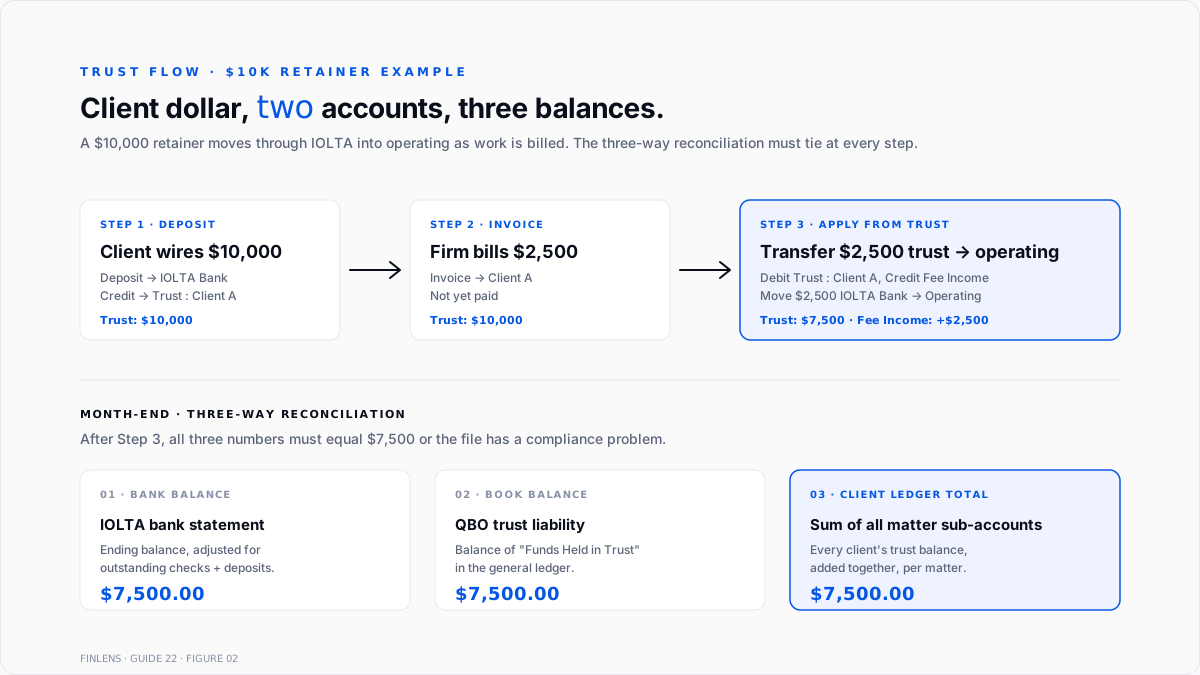
Three-way trust reconciliation is the monthly proof of IOLTA compliance. Three balances must match to the penny on the same date:
- Bank statement balance. The ending balance from the IOLTA bank statement, adjusted for outstanding checks and deposits in transit.
- Book balance. The balance of the "Funds Held in Trust" liability in the QBO general ledger.
- Client ledger total. The sum of every individual client sub-account or matter balance in trust.
If all three equal the same number, the trust account is reconciled. If any two disagree, the firm has a variance to investigate before closing the month. The reconciliation is required monthly in most jurisdictions under state bar rules, with records retained for five to seven years.
Model Rule 1.15 is the source authority, adapted by each state bar. California, New York, Florida, and Texas all publish specific IOLTA reconciliation guidance under their versions of the rule. A firm that cannot produce three matching balances on request faces disciplinary review, independent of whether client money is missing.
The QBO execution sequence is fixed:
- Reconcile the IOLTA bank account against the physical statement using the standard reconciliation tool. This proves the bank-to-book match. The mechanics are the same as any other account and are covered in Finlens' bank reconciliation guide.
- Confirm the trust liability register balance equals the reconciled bank balance.
- Run a client trust balance report (via Class filter, customer sub-accounts, or a LeanLaw report) and confirm the total matches.
- Investigate any variance immediately. Standard causes: bank fees to trust, misrouted interest, duplicated disbursements, or matter attribution errors.
The full workflow with sub-account structure is documented in Finlens' law firm accounting overview.
How much does QuickBooks cost for a law firm in 2026?
QuickBooks Online pricing for law firms follows the standard tiers published on Intuit's law-firm page:
- Simple Start. $38/month, 1 user. Suitable for a solo attorney with no trust volume or a solo running trust through a separate practice management platform.
- Essentials. $85/month, 3 users. Adds bill pay and time tracking. Right for a two-attorney firm with a paralegal.
- Plus. $140/month, 5 users. Adds class tracking (required for per-matter reporting), project profitability, and inventory. Most small firms operate at this tier.
- Advanced. $340/month, 25 users. Adds custom user permissions, workflow automation, and batch invoicing. Fits firms with a dedicated billing team.
The QuickBooks fee is roughly half the total accounting stack cost. A legal practice management add-on adds $40 to $100 per user per month depending on vendor and tier.
LeanLaw runs approximately $40 per timekeeper monthly with a direct QBO sync. Clio Manage's Elite tier runs closer to $139 per user monthly and includes matter management, document generation, and a client portal.
A five-attorney firm on QBO Plus with LeanLaw budgets approximately $140 + ($40 × 5) = $340 per month for the accounting and billing stack, before payroll, e-signature, or document management.
Which QuickBooks version should a law firm choose?
Three product paths exist. The recommendation depends on trust volume, concurrent user count, and cloud requirements.
QuickBooks Online plus a legal add-on is the default for firms of every size in 2026. Cloud access supports remote partners and outside CPA collaboration. The practice management layer fills the trust-accounting gap and syncs to the QBO general ledger.
QuickBooks Desktop Pro or Premier is preferred by some traditional fund accountants for row-level control and offline access. Intuit ended new-customer sales of Pro, Premier, and Mac on September 30, 2024, so this path is only available to firms already holding a subscription. Support for Desktop 2023 ends May 31, 2026. Support for Desktop 2024 ends September 2027.
QuickBooks Enterprise is overkill for most law firms. Enterprise's advanced inventory features solve non-legal problems. The exception is a firm with more than 25 concurrent QBO users that requires Windows-based operation.
The default recommendation for a new firm in 2026 is QBO Plus plus LeanLaw. That combination provides cloud access, per-matter reporting via class tracking, and trust-accounting guardrails that survive bar audit.
What is the right chart of accounts for a law firm?
A law firm chart of accounts differs from a generic small-business COA in three structural elements.
Trust liability is a separate parent account. "Funds Held in Trust" is a current liability. Every client's trust balance is a sub-account or class under this parent. The balance of the parent equals the balance of the IOLTA bank asset. This structure is required, not optional.
Advanced client costs are separated into hard and soft categories. Hard costs are third-party expenses paid on behalf of a client and reimbursable (court filing fees, expert witnesses, deposition transcripts). Hard costs sit as an asset until reimbursed, then clear.
Soft costs are the firm's own costs marked up and billed (copies, postage, in-office time). Soft costs are expenses billed as reimbursed income.
Fee revenue splits by matter type or practice area. Personal injury contingency fees, hourly litigation fees, flat-fee estate planning, and monthly retainers each track separately. Class tracking (QBO Plus and above) or project profitability enables per-matter reporting.
A starting COA for a small firm follows this structure:
- Assets. Operating Checking, IOLTA Trust Bank, Advanced Client Costs (Hard), Accounts Receivable
- Liabilities. Funds Held in Trust (with client sub-accounts), Accounts Payable, Payroll Liabilities, Sales Tax Payable (if applicable)
- Equity. Owner's Draw, Partner Distributions, Retained Earnings
- Income. Fee Income Hourly, Fee Income Flat, Fee Income Contingency, Reimbursed Soft Costs
- Expenses. Rent, Payroll, Malpractice Insurance, CLE, Bar Dues, Westlaw or Lexis, Marketing, Office Supplies
Broader structure guidance is covered in Finlens' chart of accounts guide. Common setup errors are documented in chart of accounts failures.
How do retainers work in QuickBooks for lawyers?
Retainer accounting depends on the fee agreement type. Three categories exist under most state bar rules.
Trust retainers are client funds held for future work. They deposit into the IOLTA bank account and the "Funds Held in Trust" liability, tagged to the client's sub-account. As work is billed, funds transfer from IOLTA to operating, and the liability drops by the invoiced amount.
General retainers are earned on receipt. They deposit directly into operating income and are governed by specific state bar rules. This category is uncommon and requires explicit fee-agreement language.
Evergreen retainers are trust retainers refilled after each invoice to maintain a minimum balance. The initial deposit is a trust deposit. Every refill follows the same routing. Poor evergreen tracking is a common source of commingling violations.
The QBO workflow for a $10,000 trust retainer runs in four steps:
- Client wires $10,000. Record the deposit in the IOLTA bank account with a credit to "Funds Held in Trust: Client A."
- Firm bills $2,500 for the month's work. Create the invoice in QBO to Client A.
- Apply the invoice payment from trust. Transfer $2,500 from IOLTA bank to operating bank. The matching entry moves $2,500 from "Funds Held in Trust: Client A" to fee income.
- Client A's trust sub-account is now $7,500. The IOLTA bank shows the same reduction. Three-way reconciliation still ties.
Skipping the dual entry in step 3 (moving money without recording fee income) is the most common retainer error. The variance surfaces immediately in the three-way reconciliation.
What are the legal integrations that work with QuickBooks?
The QuickBooks App Store lists dozens of legal apps. Four dominate real-world deployments in 2026.
LeanLaw is built specifically for QBO. Bidirectional sync of clients, matters, trust, and time entries. Approximately $40 per timekeeper per month. The most common choice for firms already on QBO that need trust guardrails without switching to a full practice management platform.
Clio Manage is a full practice management platform (matter management, document generation, client intake, and calendaring) with a QBO integration. Approximately $99 to $139 per user per month. Fits firms wanting one system for practice management, with QBO as the ledger.
MyCase offers a practice management scope similar to Clio, with a QBO sync. Common in solo and small firms in family law and personal injury. Approximately $79 to $119 per user per month.
Smokeball is a desktop-first practice management platform with document automation and a QBO sync. Common in mid-sized firms with high-volume document work such as estate planning or real estate closings.
The architecture is consistent across vendors. Practice management owns matter and trust. QBO owns the general ledger. Sync frequency ranges from real-time (LeanLaw) to hourly batch (some Clio configurations). Trust deposits, disbursements, and invoiced time write back into the QBO chart of accounts so financial statements come from a single source.
What do lawyers say about QuickBooks on Reddit?
Sentiment on r/LawFirm and r/QuickBooks in 2026 clusters into three consistent themes.
Solo and small-firm attorneys widely use QBO paired with a practice management add-on. Complaints target the gaps rather than the software itself: no native trust guardrails, no per-matter enforcement, and manual class-tracking discipline required from day one.
Traditional fund accountants who trained on Desktop still prefer it for row-level control. The stated concern with cloud is that a mobile mis-click can affect trust in ways Desktop's confirm-before-save flow catches. The 2026 counter is that LeanLaw's trust guardrails now prevent the specific actions Desktop UI friction used to prevent.
The third theme is retainer misclassification. Attorneys new to trust accounting routinely record retainer deposits as income instead of liability. Experienced law firm bookkeepers consistently flag this. The fix is a journal entry to reclassify the deposit into the trust liability, followed by a corrected client sub-account entry.
What are the most common QuickBooks mistakes in a law firm?
Five errors surface in almost every law firm QBO cleanup engagement.
Commingling operating and trust deposits. A retainer lands in operating checking instead of IOLTA. The audit trail shows commingling even if the transfer is reversed the same day.
Recording retainers as income. The $10,000 retainer hits fee income on receipt. The firm reports revenue it has not earned and has no liability tracking the client's balance. This is the most common setup error.
Missing three-way reconciliation. The bank account reconciles monthly, but the client-by-client sub-account total is never checked against the trust liability. Variances accumulate silently for months before discovery.
Bank fees posted to the trust account. The IOLTA bank charges a wire fee, and QBO categorizes it against trust. State bar rules prohibit firm-related fees from client funds. The fee must be reimbursed from operating and reversed out of trust.
Interest posted incorrectly. IOLTA interest belongs to the state bar's legal foundation, not the firm and not the client. Interest deposits route to a specific liability or offset account and remit to the state bar per its rules, not to firm income.
Catching these five errors at setup prevents approximately 90% of the trust-accounting problems that surface in bar audits.
How does Finlens fit with a QuickBooks law firm setup?
Finlens is a QuickBooks-compatible AI accounting platform. It sits as the reconciliation and clean-books layer alongside QBO and the legal practice management add-on. For law firms, Finlens automates the three-way IOLTA reconciliation that state bar compliance requires.
The month-end workflow runs automatically. Finlens ties the IOLTA bank balance, the trust liability, and the client ledger total to the penny.
Variances flag the moment they appear: a bank fee posted to trust, an interest deposit routed to firm income, a client sub-account overdraw, or a matter attribution error. The output is a bar-ready reconciliation packet documenting the match.
Finlens also handles the operating side. Bank feed categorization runs against the firm's chart of accounts. Advanced client cost receipts match to the correct hard-cost asset. Month-end variance detection catches misclassifications before they compound.
The practice management layer stays as the front end for time, matters, and trust guardrails. QBO remains the general ledger. Finlens closes the compliance and clean-books loop.
For CPA firms serving multiple law-firm clients, Finlens's multi-entity view runs trust reconciliation across a dozen firms from a single dashboard. Variances surface before the client's monthly close, not during audit prep. That multi-entity workflow is documented in Finlens' intercompany reconciliation guide.
What is the setup checklist for QuickBooks in a new law firm?
Eight steps configure QBO for a new law firm in 2026. The order matters.
- Open two separate bank accounts at the same institution: one operating checking, one IOLTA trust. The accounts remain segregated permanently.
- Subscribe to QBO Plus. Simple Start and Essentials lack class tracking, which is required for per-matter reporting.
- Build the chart of accounts before importing any data. Include the trust liability with client sub-account structure, hard vs soft advanced client cost accounts, and matter-type income lines.
- Connect a legal practice management add-on. Choose LeanLaw for lightweight billing and trust guardrails, or Clio Manage for a full practice management platform.
- Create matter sub-accounts under "Funds Held in Trust" for each active client with trust deposits. This is the client ledger of record.
- Run a test three-way reconciliation with a single deposit and disbursement before going live. Confirm all three balances tie exactly.
- Establish a monthly close checklist: bank reconciliation, trust three-way reconciliation, matter-level review, financial statement generation.
- Confirm the state bar's specific IOLTA rules. Filing deadlines, interest remittance procedures, and record retention requirements vary state-to-state.
.png)
FAQ
Is QuickBooks approved by state bars for trust accounting?
No. State bars do not approve accounting software. They set recordkeeping rules under Model Rule 1.15 (adapted by each state) and audit compliance. QuickBooks lacks native trust guardrails, which is why firms with meaningful trust volume run a legal practice management layer like LeanLaw or Clio Manage on top of QBO.
Do I need QuickBooks Plus, or is Essentials enough for a small law firm?
QBO Plus is the practical minimum for firms handling any trust work. Class tracking (plus and above) is how firms produce per-matter profitability and trust ledger reports. Essentials cannot do class tracking, which forces manual sub-account discipline that becomes fragile at scale.
How often does IOLTA reconciliation need to happen?
Monthly is the standard requirement in most jurisdictions under state bar rules. Some states (Florida, New York) require quarterly reports on top of monthly reconciliations. Records typically retain for five to seven years. Confirming the state bar's specific IOLTA rules is required, since variation is real.
Can I use QuickBooks Desktop for a new law firm in 2026?
Only if the firm already owns a subscription. Intuit ended new-customer sales of Pro, Premier, and Mac on September 30, 2024. Enterprise is available for new customers but is overkill for most firms. New firms starting in 2026 default to QBO Plus plus a legal practice management add-on.
What does LeanLaw add to QBO for a law firm?
Trust-account guardrails (overdraw prevention, matter-level enforcement), timekeeper billing rates flowing to invoices, per-matter trust ledger reports, and a real-time bidirectional sync into the QBO chart of accounts. Approximately $40 per timekeeper per month.
How are advanced client costs recorded in QuickBooks?
Hard costs (third-party expenses paid on behalf of a client and reimbursable) sit in an "Advanced Client Costs" asset account until reimbursed. Soft costs (in-house costs marked up and billed) go to a "Reimbursed Soft Costs" income account. The two categories receive different tax and bar treatment and should never share an account.
What if three-way reconciliation is off?
Investigate before month-end close. Standard causes include a bank fee posted to trust (reimbursement from operating), interest income routed to firm income instead of state-bar liability, a client disbursement recorded twice, or a matter attribution error. Do not carry the variance to the next month.
Does a firm still need a CPA even with LeanLaw plus QBO?
Most firms with more than a solo attorney do, especially at year-end for tax filings and partner distributions. The LeanLaw plus QBO stack handles bookkeeping and trust compliance. A CPA firm handles tax strategy, entity structuring, partner K-1s, and audit representation. Finlens' law firm accounting overview covers the bookkeeping-vs-CPA split in detail.

