
The QuickBooks Online API guide for developers (2026)


This is a working reference for engineers building integrations on QuickBooks Online through Intuit's REST API. Every endpoint, rate limit, and auth detail is sourced to Intuit's developer documentation or a real thread on the Intuit Developer Community. Numbers cited from third-party integration platforms are flagged as external references.
The problem this guide addresses
Two decisions drive most first QuickBooks Online integration builds.
The first is auth and environment setup. QBO uses OAuth 2.0 with strict token lifetimes - access tokens expire every hour, refresh tokens every 100 days if unused - and requires separate credentials for sandbox and production. Teams that build against sandbox credentials and forget to swap for production hit their first live customer with a broken connection. Teams that don't handle refresh-token rotation see integrations quietly die 100 days after the last active user session.
The second is rate-limit design. QBO enforces multiple rate limits at different tiers: 500 requests per minute per company (realm ID), 10 concurrent requests per app, 40 requests per minute for the batch endpoint (throttled to 120 for high-volume patterns after October 2025), and 200 requests per minute for resource-intensive report endpoints. Integrations that don't implement exponential backoff on 429 responses lose data silently as retries fail. The Satva Solutions rate-limit reference covers the current limits - this guide covers how to design around them.
The sections below cover the API surface, OAuth 2.0 flow, sandbox vs production, core entities, rate limits and error handling, webhooks, official SDKs, common failure modes, and where the API stops for bulk-data or high-throughput use cases. Integrations that touch payment processors or multi-processor reconciliation face additional patterns covered in the payment synchronisation and reconciliation write-up.
What the QuickBooks Online API actually is
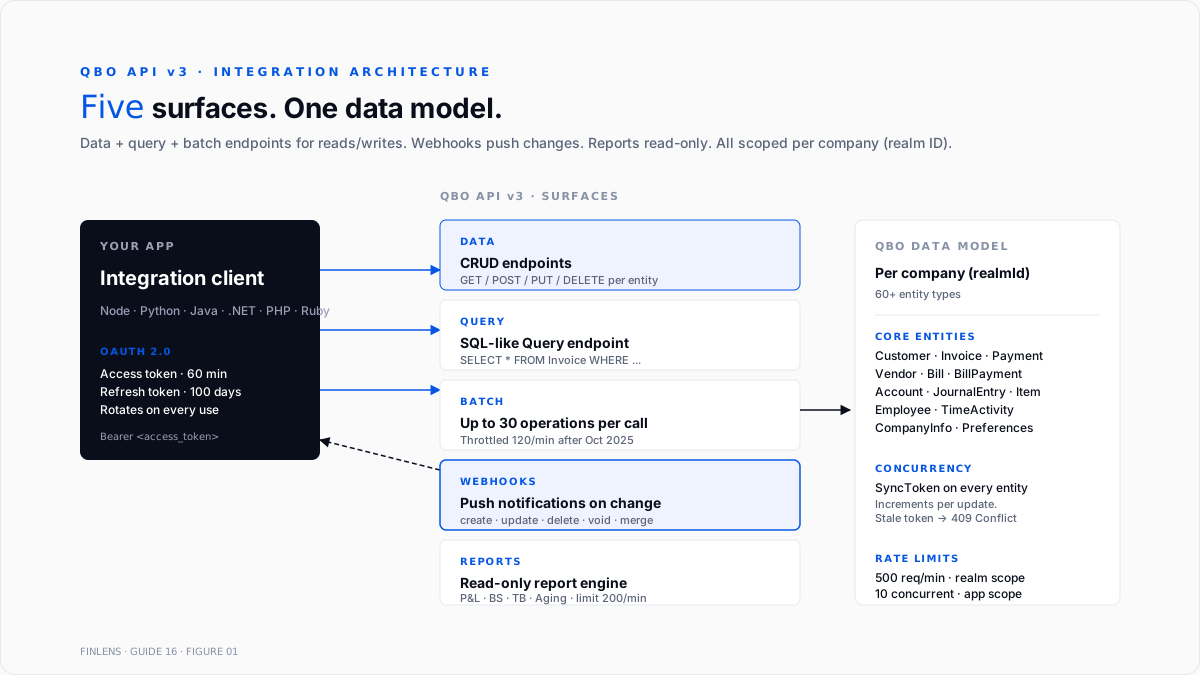
QBO exposes a REST API at version 3 (v3) - the current generation as of 2026 - serving JSON payloads over HTTPS. Every request scopes to a specific company (the realmId) that was authorised by the QBO account owner. There is no cross-company API - a single OAuth connection authorises access to one QBO company at a time.
Two API surfaces:
- Data endpoints. CRUD on individual entities (Customer, Invoice, Bill, JournalEntry, etc.). Standard REST - GET / POST / DELETE.
- Report endpoints. Read-only queries against QBO's report engine (ProfitAndLoss, BalanceSheet, TrialBalance, AR/AP Aging, etc.).
Additional supporting surfaces:
- Query endpoint. SQL-like syntax against any entity. Example: SELECT * FROM Invoice WHERE MetaData.CreateTime > '2026-01-01'.
- Batch endpoint. Up to 30 operations bundled into a single request. Reduces round-trips for bulk operations.
- Webhooks. Push notifications to a registered endpoint URL when specified entities change.
The API does not expose bulk-export functionality. Complete-file exports run through QBO's built-in export tools (Reports → Export), not the API. Third-party bulk-migration tools use the standard API endpoints paginated at 1,000 records per page.
OAuth 2.0 authentication - the flow
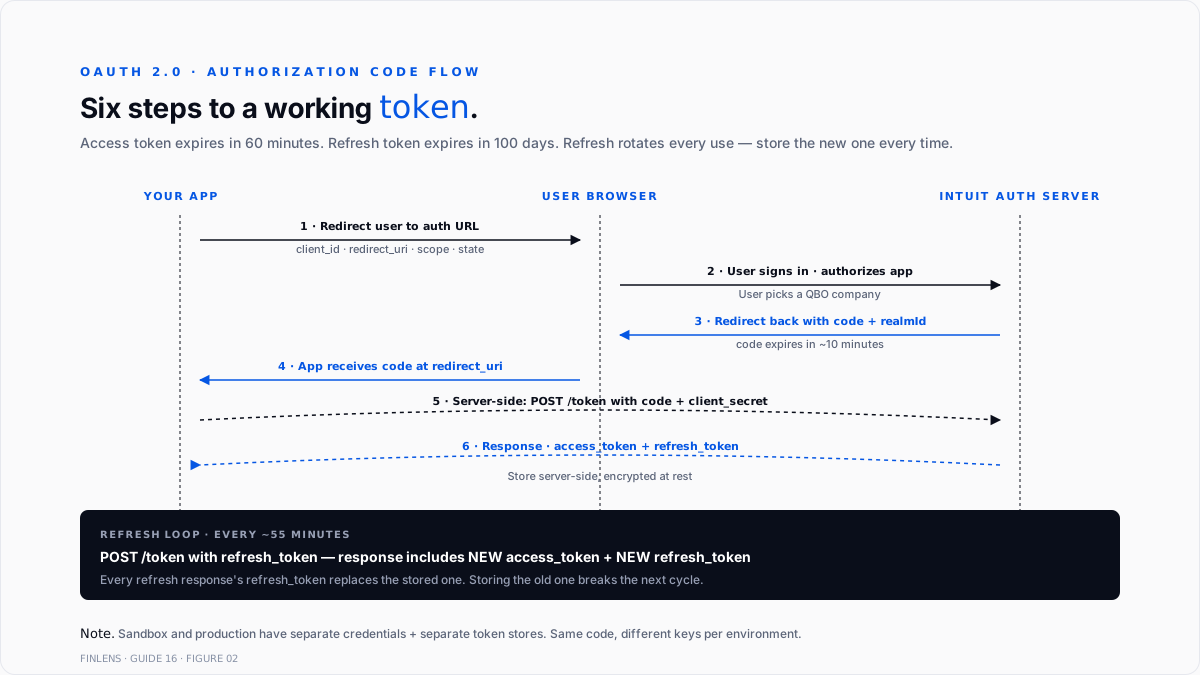
QBO uses the OAuth 2.0 Authorisation Code flow exclusively. There are no long-lived API keys, no basic-auth alternatives - every authorized request carries an access token that expires every 60 minutes and must be refreshed.
The end-to-end flow:
1. Register the app in the Intuit Developer Portal. At developer.intuit.com, create an app. The portal issues a Client ID (public identifier) and a Client Secret (server-side secret, never exposed to browsers).
2. Configure the redirect URI. The URL the OAuth flow redirects to after the user authorizes. Every registered redirect URI must exactly match the URI passed in the auth request - mismatched URIs fail with redirect_uri_mismatch.
3. Direct the QBO user to Intuit's authorisation page. The URL includes the Client ID, redirect URI, scope (com.intuit.quickbooks.accounting), and a CSRF-protection state parameter.
4. User authorizes and Intuit redirects back to the registered URI. Query string carries code (short-lived authorization code, ~10 minutes) and realmId (the company the user selected).
5. Exchange the authorization code for tokens. POST to Intuit's token endpoint with the Client Secret + authorization code. Response includes:
- access_token - valid for exactly 60 minutes
- refresh_token - valid for 100 days if unused; refreshed on every use
- x_refresh_token_expires_in – seconds until refresh token expires
6. Store tokens server-side. Never expose access or refresh tokens client-side. Encrypt at rest.
7. Use the access token on every API request as Authorisation: Bearer <access_token>.
8. Refresh proactively. Before hitting the 60-minute expiry, POST to the token endpoint with the refresh token to get a new access token + refreshed refresh token.
Key design point: refresh tokens rotate on every use. The response to a refresh request includes a new refresh token that must replace the stored one. Storing the old refresh token after refresh breaks the integration on the next refresh cycle.
Sandbox vs production
Two independent environments. Each requires separate credentials, separate token stores, and separate authorization flows.
Sandbox. For development and testing. Endpoint: https://sandbox-quickbooks.api.intuit.com/v3/company/{realmId}/. Fresh sandbox companies come pre-populated with sample data. Every developer account gets one or more sandbox companies free.
Production. For live integrations. Endpoint: https://quickbooks.api.intuit.com/v3/company/{realmId}/. Production credentials require Intuit's App Review approval - apps that connect to real customer data pass a review verifying auth handling, error paths, and privacy compliance before graduating from sandbox.
Common failure mode: sandbox credentials in production or vice versa. Both cases produce 401 auth errors on every request. The fix is checking realmId origin against the credential set - sandbox realmId values follow a distinct format from production.
Core entities
QBO's data model exposes 60+ entity types. The most commonly integrated:
Customer. Company or individual who is billed. Fields: Id, DisplayName, PrimaryEmailAddr, BillAddr, Balance.
Invoice. Sales transaction. Line items reference Item entities. Payment status derived from Balance field.
Payment. Customer payment. Applied to one or more invoices through LinkedTxn array.
Bill. Vendor bill (A/P). Line items reference Account or Item entities.
Vendor. Company or individual paid by the business. Fields: Id, DisplayName, PrimaryEmailAddr, TaxIdentifier, Vendor1099.
BillPayment. Payment to a vendor against one or more bills.
Account. Chart of Accounts entry. AccountType + AccountSubType classify the account (Bank, Accounts Receivable, Expense, etc.).
JournalEntry. Manual dr/cr entries with LineDetail array. Used for adjusting entries and month-end close automation.
Item. Product or service. Type = Service, Inventory, or NonInventory. Ties to an income account.
Employee. For QBO Payroll-enabled companies. Read-only via API (payroll data flows through separate Payroll endpoints).
TimeActivity. Time entries for hourly employees or contractors.
Preferences. Company-wide settings - tax rates, accounting method, currency configuration.
CompanyInfo. Company profile - legal name, address, business structure, subscription tier.
Every entity carries a SyncToken - an integer version number that increments on every update. Updates must include the current SyncToken or the API returns 409 (stale version). This is QBO's optimistic concurrency control.
Report entities (ProfitAndLoss, BalanceSheet, TrialBalance, AgedPayables, AgedReceivables, SalesByCustomer, etc.) are read-only and accept query parameters for date range, comparison periods, and columns.
Rate limits and error handling
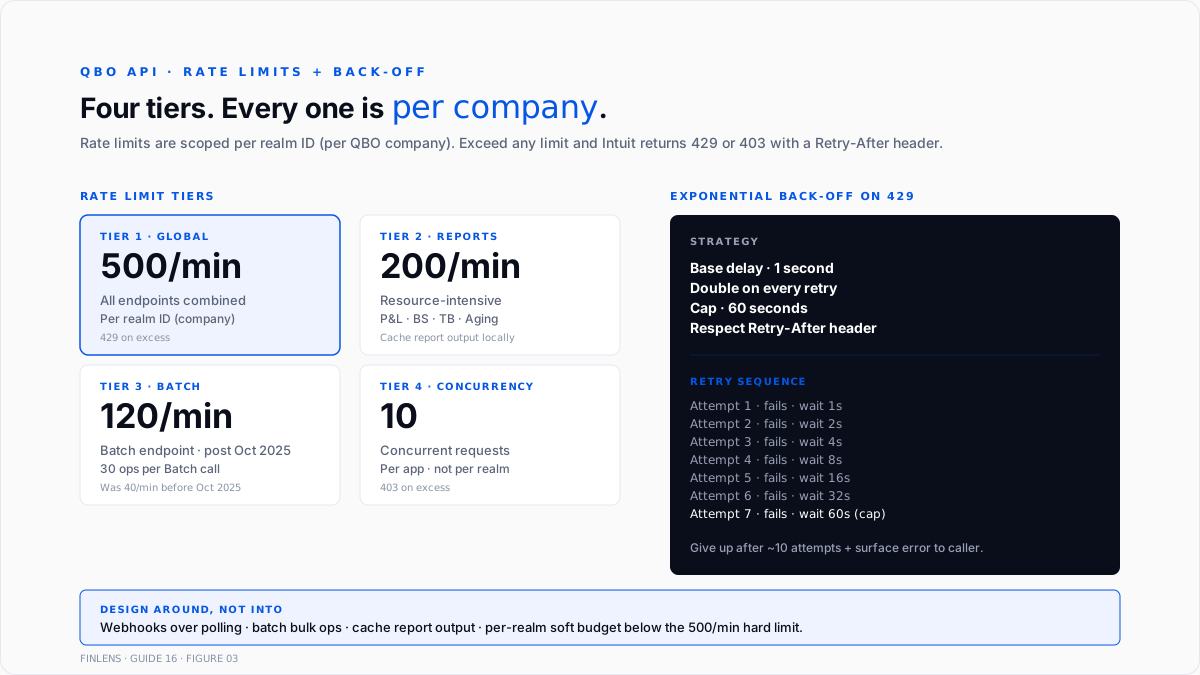
QBO enforces rate limits at multiple tiers, scoped per company (realm ID). Per the Satva Solutions rate-limit reference:
Per-company limits (per realm ID):
- 500 requests/minute across all endpoints
- 200 requests/minute for resource-intensive endpoints (reports, complex queries)
- 40 requests/minute for the batch endpoint (throttled to 120/min after October 31, 2025 for high-volume patterns)
Per-app limits:
- 10 concurrent requests across all realm IDs
Exceeding any limit returns HTTP 429 Too Many Requests or 403 Forbidden (depending on which limit was hit). Both errors include a Retry-After header when applicable.
Design pattern for well-behaved integrations:
- Implement exponential backoff on 429 / 403 with a base delay of 1 second, doubling to a cap of 60 seconds.
- Respect the Retry-After header - if present, wait exactly that many seconds before retrying.
- Track token expiry and refresh proactively (at ~55 minutes) rather than reactively on 401.
- Use the batch endpoint for bulk operations - 30 operations in one request count as one request against the 500/min limit.
- Use webhooks over polling for real-time change tracking. Polling for updates burns the rate limit; webhooks fire when data actually changes.
Other error codes to handle:
- 400 Bad Request. Payload validation error (missing required field, wrong type). The response body includes field-level error details.
- 401 Unauthorised. Access token expired or invalid. Refresh and retry.
- 403 Forbidden. Rate limited, or the user's OAuth grant does not include the requested scope.
- 404 Not Found. The entity ID doesn't exist in this company file.
- 409 Conflict. SyncToken mismatch - refetch the entity, apply changes, and retry with the new SyncToken.
- 500/502/503. Intuit server error. Retry with exponential backoff.
Webhooks - real-time change notifications
Webhooks push notifications to a registered endpoint when QBO entities change, eliminating the need to poll. Setup:
- Register a webhook endpoint URL in the Intuit Developer Portal for the app.
- Configure subscribed events. Choose which entities to monitor (Customer, Invoice, Bill, Payment, others) and which operations (create, update, delete, void, merge).
- Intuit sends a POST to the endpoint URL when a subscribed event occurs. Payload is a JSON array of CloudEvents envelopes:
{
"eventNotifications": [{
"realmId": "1234567890",
"dataChangeEvent": {
"entities": [{
"name": "Customer",
"id": "42",
"operation": "Update",
"lastUpdated": "2026-09-05T14:23:11Z"
}]
}
}]
}
- Validate the payload using the verifier token issued in the Developer Portal. Compare against the intuit-signature header.
- Fetch the updated entity via a standard API GET call - the webhook payload does not include the changed data, only the notification that a change happened.
Webhook design considerations:
- Idempotency. Intuit retries webhook deliveries on non-2xx responses. Return 200 quickly and process asynchronously.
- Deduplication. Duplicate webhooks for the same entity change can occur. Track entities[].lastUpdated timestamps or entity SyncToken to detect duplicates.
- Fallback polling. Webhooks are eventual - a small percentage of events may be missed. Run a periodic reconciliation pass (daily or hourly) that queries for updates since the last known sync point.
Official SDKs
Intuit publishes SDKs for four languages, plus community SDKs for others.
Intuit-official SDKs:
- Java - full support, most active. Available on Maven Central.
- .NET / C# - full support. Available on NuGet.
- PHP - full support. Available on Packagist.
- Node.js - official OAuth-only library plus community-maintained node-quickbooks for API operations.
Community SDKs:
- Python - python-quickbooks is the most widely used. Not Intuit-official but well-maintained.
- Ruby - quickbooks-ruby is the standard.
- Go - a few community options; none dominate.
For most integrations, the SDK handles OAuth token management, request signing, retry logic, and object serialisation. Direct REST calls are common in Python and Go builds where community SDK gaps make writing bare HTTPS calls easier than adopting an incomplete library.
The six common failure modes
1. Refresh token not rotated. Storing the pre-refresh token after refresh breaks the integration on the next refresh cycle. Every refresh response includes a new refresh token that must overwrite the stored one.
2. Sandbox credentials used in production or vice versa. 401 on every request. Fix: match the credential set to the realmId environment.
3. SyncToken mismatch on update. 409 Conflict when the local copy of an entity is stale relative to QBO's current version. Fix: GET the entity to get the current SyncToken, apply changes, and PUT with the fresh SyncToken.
4. Not handling 429 with backoff. Integrations that retry immediately on 429 compound the rate-limit hit. Fix: exponential backoff with Retry-After respect.
5. Long-lived polling for changes. A polling loop hitting the API every 30 seconds burns 120 requests/hour before doing any work. Fix: use webhooks for real-time triggers, polling only for reconciliation.
6. Webhook endpoint is not idempotent. Duplicate deliveries or retries process the same change twice. Fix: dedupe by entities[]. lastUpdated + entity ID, or by webhook eventId.
Where the API stops for high-volume use cases
Three failure modes compound at scale.
Above ~50,000 API calls per day per company. Rate limits become the binding constraint. Batching, webhook adoption, and caching are required to stay under the 500/min limit consistently.
Bulk historical migrations. Migrating years of transaction history into or out of QBO through the API can take 24–72 hours per company at the rate limits. Third-party migration tools (Dataswitcher, Movemybooks, JMT) use the same API but distribute across multiple realm IDs when possible.
Real-time reporting dashboards. Report endpoints are rate-limited more aggressively (200/min). Real-time dashboards need to cache report results locally rather than fetch on every user view - the real-time payment sync write-up covers a related pattern for payment-side sync.
Above those thresholds, the fix is either restructuring the integration pattern (webhooks + local caching + batch operations) or accepting the throughput ceiling as a design constraint. Intuit does not offer higher rate limits as a paid tier as of 2026.
The Finlens approach
Finlens is an AI accounting platform for QBO firms and founder-led businesses, positioned as an AI layer on top of QuickBooks. Finlens is built API-first on QBO's v3 API - every categorization, JE, and reconciliation post is through the API. Where the Finlens engineering pattern applies to other integrations:
- Webhook-primary + polling-secondary. Webhooks catch >95% of changes in near-real-time; a nightly reconciliation pass catches the remainder. Cuts polling volume by ~90% versus poll-only patterns.
- Per-realm request budget with global backoff. Each realmId gets a soft budget below the 500/min hard limit. Approaching the budget triggers backoff before Intuit's throttler does.
- SyncToken cache with optimistic update. Local cache of entity SyncTokens allows lockless PUT operations; 409 responses trigger auto-refetch and retry with the fresh SyncToken.
The engineering patterns that keep API integrations reliable - beyond the auth and rate-limit basics - are the ones surrounding the data model:
- Idempotent write operations. Every POST and PUT carries a client-generated idempotency key; retries never produce duplicate entities.
- Entity-graph-aware batching. Related entities (Invoice + Payment + LinkedTxn) are batched into single Batch endpoint calls.
- Audit log at the API layer. Every request and response is logged with the realm ID, entity type, operation, and response code for debugging and compliance.
For firms managing many QBO clients through a single integration, the API-first architecture is what lets Finlens scale to 100+ concurrent client connections. For firms evaluating whether to build or buy the QBO integration layer, the firm platform is the built option.
The verification checklist - before shipping the integration
- OAuth 2.0 auth flow tested end-to-end in sandbox and production.
- Token storage encrypted at rest.
- Refresh token rotation implemented - every refresh response's refresh_token overwrites the stored value.
- Access token refresh scheduled proactively (at ~55 minutes).
- Sandbox and production credentials managed independently.
- Exponential backoff on 429 / 403 with Retry-After header respect.
- SyncToken freshness pattern implemented on every update.
- The webhook endpoint validates the payload signature via the verifier token.
- Webhook processing is idempotent (duplicates are safely handled).
- Fallback reconciliation pass runs at least daily to catch missed webhooks.
- Rate-limit-aware batching - bulk operations use the Batch endpoint.
- Every API call is logged with the realm ID, endpoint, and response code for debugging.
- Sandbox testing includes all core entities the integration writes.
- Production app review completed with Intuit if the app connects to external customer data.
For firms running QBO integrations across many client company files, the firm platform handles the multi-realm scaling patterns above. For a founder building a single-company integration, the founder-facing product covers the same patterns at company scale.
Conclusion
The QuickBooks Online API is capable and stable but strict on auth and rate limits. Integrations that respect the 60-minute access token, rotate refresh tokens correctly, use webhooks over polling, and batch bulk operations run reliably at production scale. Integrations that don't fail visibly (429 storms, expired-token 401s) or silently (missed webhooks, stale local cache) - usually 30 to 90 days after go-live when patterns compound.
Every well-behaved QBO integration follows the same six patterns: OAuth 2.0 with proper token rotation, environment-scoped credential handling, SyncToken-aware writes, exponential backoff, webhook-primary change tracking, and idempotent processing. Build those in from day one and the API becomes a reliable substrate. Skip any of them and expect production incidents on a predictable schedule.
.png)
FAQ
The current QuickBooks Online API version?
v3, since 2013. There is no V4 announced. New features roll into v3 without a breaking version change. Version-negotiation is via the Accept header (application/json is standard as of 2026).
The rate limits per company?
500 requests/minute per realm ID across all endpoints. 200 requests/minute for resource-intensive endpoints (reports, complex queries). 40 requests/minute for the Batch endpoint (raised to 120/min for high-volume patterns after October 2025). 10 concurrent requests per app.
How OAuth 2.0 tokens expire?
Access tokens expire exactly 60 minutes after issue. Refresh tokens expire 100 days after the last use. Refresh tokens rotate on every refresh - the response includes a new refresh token that must replace the stored one.
Whether the API supports bulk data export?
No native bulk export endpoint. Third-party migration tools (Dataswitcher, Movemybooks, JMT) use the standard API paginated at 1,000 records per page. Complete-file exports run through QBO's Reports → Export UI, not the API.
The difference between sandbox and production credentials?
Two independent environments. Sandbox uses sandbox-quickbooks.api.intuit.com; production uses quickbooks.api.intuit.com. Sandbox comes with pre-populated sample data. Production requires Intuit's App Review before the app can graduate from sandbox to accept live customer connections.
Realistic integration development timeline?
2–4 weeks for a standalone integration (single entity, no webhooks). 8–12 weeks for a production-grade multi-entity integration with OAuth, webhooks, rate-limit handling, and error paths. 6–12 months for a full-featured multi-tenant SaaS integration serving hundreds of client companies concurrently.

