
The QuickBooks guide to sales tax setup, nexus, and remittance (2026)


This is a working reference for founders, controllers, and firm bookkeepers running sales tax on QuickBooks Online. Every technique is sourced to Intuit's own documentation, the Wayfair-framework state rules, or a real thread on the QuickBooks Community. Numbers cited from user reports are flagged as anecdotal rather than benchmarks.
The problem this guide addresses
Two failure modes account for most sales tax misstatements on QBO.
The first is under-collected sales tax from missed nexus. Following South Dakota v. Wayfair (2018), 45 states plus Washington DC now enforce economic nexus a business owes sales tax to a state once its sales into that state cross a threshold (commonly $100,000 in annual sales or 200 transactions, but the exact rule varies state by state). Remote sales tax collections grew from $3.2B to $23.1B in three years post-Wayfair. QBO's help article on economic nexus covers the concept, but QBO does not monitor threshold crossings in real time books that only sell in one state today can silently accumulate nexus in five others.
The second is the wrong-rate calculation itself. QBO's Automated Sales Tax (AST) module derives the rate from the customer's shipping address across 11,000+ US jurisdictions. When addresses are unverified, wrong-typed, or ambiguous (multiple jurisdictions at one ZIP), the rate is often wrong. The Community thread on AST picking wrong rates on location-based calculation documents user reports of incorrect rates on a material fraction of invoices.
The sections below cover the sales tax identity, the nexus tests, the AST setup and its limits, the exemption workflow, the calculation gotchas, the sales tax liability report, the remittance workflow, marketplace facilitator handling, and where the standard QBO workflow stops scaling.
The sales tax identity
Every sales tax entry answers three questions: where does the customer's shipping address create nexus, is this transaction taxable in that jurisdiction, and what rate applies.
The identity that must hold at each remittance date:
Sales tax collected from customers = Sales tax remitted to agencies + Sales tax liability outstanding
A mismatch resolves to one of five defects: an invoice created without a sales tax code, a customer marked exempt without a valid certificate, an AST calculation that returned a wrong rate, a remittance recorded incorrectly, or an adjustment (discount, penalty, credit) not booked. Each fix reduces to identifying which of the five applies.
Two kinds of nexus
Nexus is the legal test that determines whether a business has to collect sales tax in a jurisdiction. Two tests apply.
Physical presence nexus
A business has physical presence nexus in any state where it has:
- Office or storefront. Any owned or leased business property.
- Employees or contractors. W-2 employees, or in most states, in-state contractors doing business-related work.
- Inventory. Third-party warehouses count this is what triggered Amazon FBA sellers into nexus in the FBA fulfillment states.
- Trade show attendance above a state-specific threshold (varies widely).
Physical presence nexus is registered manually the business applies for a sales tax permit with the state's Department of Revenue, receives a permit number, and starts filing.
Economic nexus (post-Wayfair)
Under the Wayfair framework, a business has economic nexus in any state where its remote sales cross that state's threshold. The typical threshold is $100,000 in annual sales OR 200 separate transactions per year, but 45+ states each set their own rules.
State-specific variations that matter:
- Sales only. Some states dropped the transaction count in 2024–2025 (e.g., Louisiana, Wyoming) and now use a sales-only threshold.
- Threshold amount. Ranges from $100,000 (majority) to $500,000 (California, Texas, New York).
- Retroactive vs prospective. Most states require nexus to be recognized in the following period; a few (Kansas at one point, Massachusetts historically) tried retroactive enforcement.
- Marketplace-facilitator inclusion. Some states count marketplace-facilitator sales toward the seller's nexus threshold; others exclude them.
The Catalyst CPA multi-state nexus guide (2026) covers the state-by-state variations.
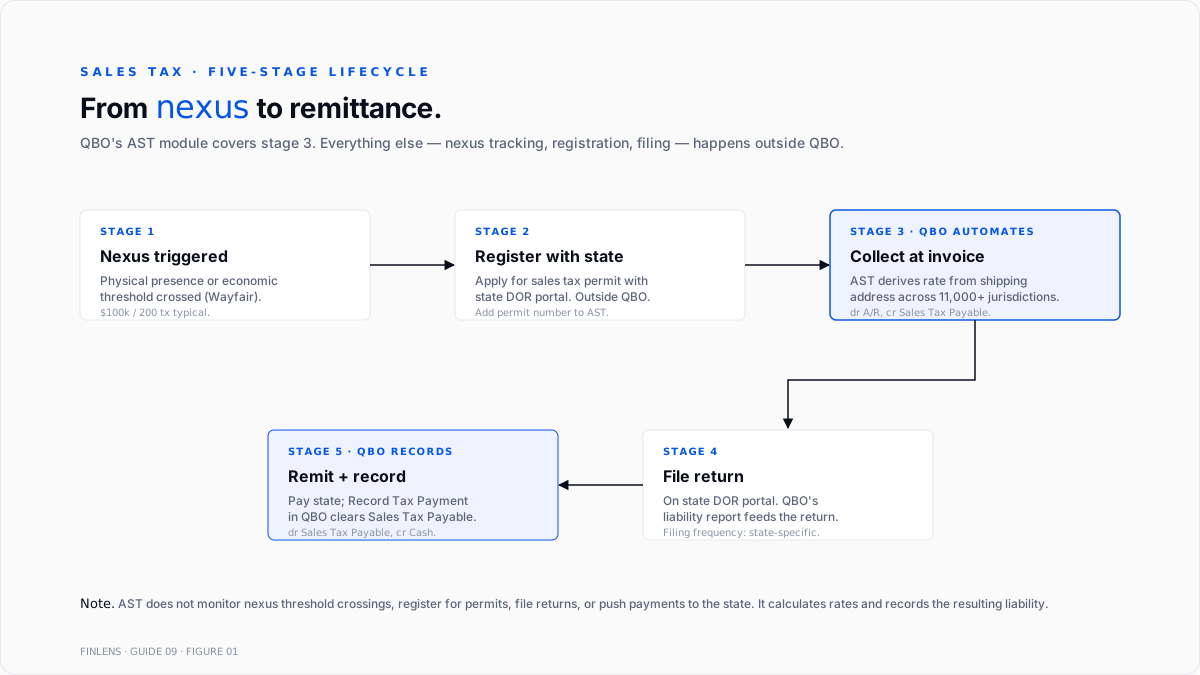
Where QBO's AST stops (the monitoring gap)
QBO's AST module handles rate calculation across 11,000+ US jurisdictions, but does not do the following:
- Monitor threshold crossings. QBO does not track cumulative sales by ship-to state against each state's nexus threshold. A book that crosses California's threshold today is not flagged.
- Register the business. State permits require an application filed with the Department of Revenue outside QBO.
- File the return. AST does not e-file to the state. Filing happens on the state's portal (or through a filing vendor like TaxJar, Avalara, or Anrok).
- Remit the payment. AST records the payment in QBO once it's made, but does not push the payment to the state.
- Track exempt-certificate expiration. Exemption certificates expire (typically 3–5 years). QBO stores the flag but does not alert when the underlying certificate lapses.
- Handle out-of-QBO revenue. Amazon, Shopify, Etsy, and any external channel's revenue is invisible to AST's threshold tracking until it lands in QBO.
Three failure modes follow. First, nexus accumulates unnoticed. Second, filings are late because the state permit was never obtained. Third, remittances don't match collections because the QBO report is missing external-channel revenue.
The AST setup workflow
Sales tax is enabled at Taxes → Sales Tax → Get Started. Two things happen: QBO detects the primary business address and configures the home state, and it opens the sales tax settings screen for additional states.
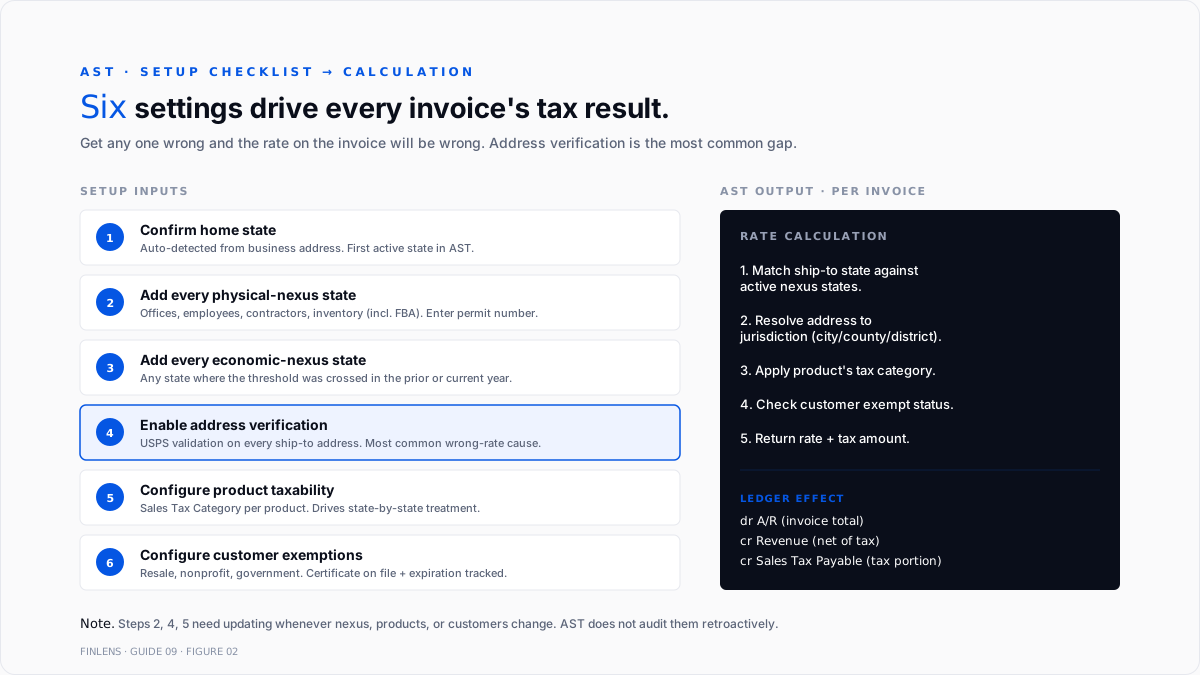
Setup steps in order:
1. Confirm the home state. The state where the business is physically located. AST registers this as the first active state.
2. Add every state with physical nexus. For each state where the business has offices, employees, contractors, or inventory, add the state. AST prompts for the sales tax permit number.
3. Add every state with economic nexus. After running a state-by-state threshold review (annual or quarterly), add each state whose threshold has been crossed.
4. Enable address verification. Settings → Address verification. Every customer's shipping address should be validated against USPS or an equivalent verified source. Wrong addresses are the primary cause of wrong rates.
5. Configure product taxability. For each product/service item that is not taxable everywhere at the default rate food, digital goods, services with state-specific rules set the appropriate Tax Category (Settings → Products & Services → Sales Tax Category). AST applies category-specific rules by state.
6. Configure customer exemptions. For customers with resale certificates, nonprofit status, or government exemptions, mark exempt on the customer record and record the reason and certificate number.
The Intuit help article on AST address verification covers the address verification step specifically, which is the source of most wrong-rate cases.
Product taxability: the category matters more than the rate
Every state defines its own list of taxable and non-taxable categories. Common variations:
- Grocery food. Non-taxable in most states, taxed at reduced rate in a few (Illinois, Missouri, Utah, others), fully taxed in a few (Alabama, Mississippi, and others).
- Prepared food (restaurant). Almost always taxed, often at a higher rate than general merchandise.
- Clothing. Taxable in most states, non-taxable in some (Pennsylvania, New Jersey, Minnesota under a threshold), or exempt below a per-item price (New York under $110).
- Digital goods and software. Rules split widely some states tax SaaS as tangible personal property, some as services, some not at all.
- Services. Non-taxable in most states, taxable in some (Hawaii, New Mexico, South Dakota, and a growing list).
- Shipping and handling. Taxable if the underlying goods are taxable, in most states.
The QBO Tax Category on each product/service item drives the state-by-state treatment. Wrong category = wrong tax outcome even when the rate is right. Software categorized as tangible personal property in a state that exempts SaaS will over-collect; software categorized as an exempt service in a state that taxes SaaS will under-collect.
Customer exemptions and certificates
Certain customer types are exempt from sales tax when a valid certificate is on file. The four common categories:
- Resale. Retailer buying inventory for resale. The certificate names the retailer's sales tax permit.
- Nonprofit. 501(c)(3) or state-recognized nonprofit. Federal 501(c)(3) does not automatically grant state sales tax exemption each state has its own application.
- Government agency. Federal, state, or local government purchases.
- Manufacturing / agriculture / other. State-specific exemptions for raw materials, equipment, or industry-specific inputs.
Intuit's help article on setting up sales tax exemptions covers the QBO mechanics. On the customer record, set Tax Status = Tax exempt, select the reason, and enter the certificate number. Store a digital copy of the certificate itself out-of-band (Google Drive, Box, or the audit workpapers).
Two ongoing requirements after setup:
- Certificate expiration. Most state certificates expire 3–5 years after issue. Track expiration dates in a workpaper or a dedicated exemption tool; QBO does not alert.
- Certificate coverage. A resale certificate covers only sales in the category listed on the certificate. A certificate for "office supplies for resale" does not exempt a purchase of furniture.
The calculation gotchas
Even with AST enabled and correctly configured, several calculation issues recur.
Wrong rate on unverified addresses
If the customer's shipping address is not verified through USPS-equivalent lookup, AST falls back to ZIP-level averages. ZIP+4 usually resolves to a single jurisdiction; five-digit ZIPs often span multiple jurisdictions. The rate returned is either an average or the wrong specific rate.
Fix. Enable address verification. Re-verify existing customer addresses.
AST recalculates on invoice save vs. original transaction date.
AST calculates the rate at the moment the invoice is saved. If a state's rate changes mid-quarter, an invoice edited after the rate change may recalculate at the new rate even for a transaction dated before the change.
Fix. For any invoice edited after a rate change, either accept the new rate (correct if the transaction date is after the change) or use the manual override "See the math" → "Override this amount" to preserve the original rate.
Marketplace facilitator overlap
For books that sell through Amazon, eBay, Etsy, Walmart, or another marketplace, the marketplace facilitator collects and remits sales tax on the seller's behalf in most states. When the seller's QBO records the gross sale (including the tax the marketplace collected), the seller must not remit that tax again; the marketplace already did.
Fix. Split the marketplace payout into gross sales (revenue) and facilitator-collected tax (a wash entry that does not flow to the sales tax liability). Most marketplace integrations handle this automatically once configured; manual entries do not.
Shipping and handling
Shipping charges are taxable in most states when the underlying goods are taxable. QBO handles this via the shipping line's tax category; if left blank, shipping is not taxed even in states that require it.
Fix. Assign the shipping product/service item a tax category that matches the state's rule (usually shipping and handling taxable).
Mid-year rate changes
State and local rate changes happen quarterly on rolling schedules. QBO updates AST rate tables automatically; local rate changes (city, county, special district) can lag by a few weeks.
Fix. For books in high-frequency-change jurisdictions (California, Washington, and Louisiana), spot-check rates against the state's official rate table monthly.
The sales tax liability report
Intuit's help article on the sales tax liability report covers the report itself. Path: Taxes → Sales Tax → Overview → View sales tax liability report.
The report shows, per agency and per period:
- Gross sales. All sales activity.
- Nontaxable sales. Sales to exempt customers, sales of non-taxable products, and sales to states where the business has no nexus.
- Taxable sales. The remaining sales that are subject to tax.
- Tax due. Taxable sales × rate.
- Adjustments. Discounts, penalties, prior-period corrections.
The report reconciles to a liability account on the balance sheet: Sales Tax Payable. At any point, the outstanding Sales Tax Payable balance equals the sum of tax due but not yet remitted.
At remittance time, the payment reduces Sales Tax Payable to zero (or to the next period's accrual).
The remittance workflow
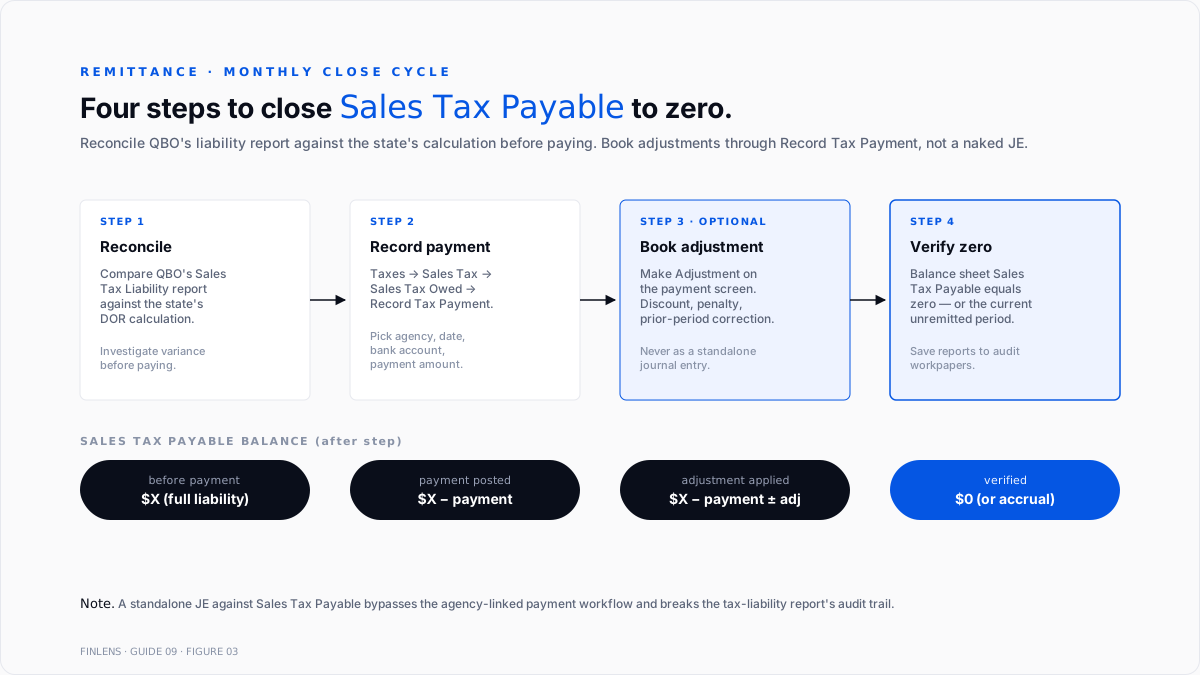
The workflow to record a sales tax payment to a state agency:
1. Confirm the report matches the state's calculation. Log into the state's DOR portal. Compare the state-computed liability to QBO's liability report. Investigate variances before paying.
2. Record the tax payment in QBO. Taxes → Sales Tax → Sales Tax Owed → Select the agency → Record Tax Payment. Enter the payment date, the payment amount, and the bank account.
3. Book any adjustment. If the state offered a discount for on-time filing, a penalty for late filing, or a credit from a prior period, click Make Adjustment on the payment screen. Select the reason and the offset account (typically Sales Tax Adjustment for discounts or Interest & Penalties Expense for late fees).
4. Confirm the liability account is zero (or the correct residual). Balance sheet Sales Tax Payable should equal zero after remittance, or the accrual for the current unremitted period.
Intuit's help article on filing a return and recording payments covers the QBO side. The state filing itself happens on the state portal, not in QBO.
Marketplace facilitator reconciliation
For books selling through marketplaces (Amazon, eBay, Etsy, Walmart, and Shopify Payments in some states), the marketplace facilitator law shifts collection and remittance to the platform.
The seller's role changes from "collect and remit" to "record and reconcile":
- Record the gross sale, including tax collected by the marketplace.
- Book the marketplace-collected tax as a pass-through entry; the tax hits neither Sales Tax Payable nor a P&L account on the seller's book. It's collected and remitted by the marketplace on the marketplace's own return.
- Reconcile against the marketplace's monthly tax report, Amazon Tax Document Library, eBay's tax report, and Shopify's tax section. The seller's book should show the same taxable sales, non-taxable sales, and tax-collected totals the marketplace reports.
Every state has its own list of which marketplaces qualify as facilitators. Fringe cases (multi-channel sellers, hybrid direct-plus-marketplace, wholesale-plus-retail) sometimes require both the marketplace and the seller to file, with the seller reporting only the direct-to-consumer portion.
Where in-QBO sales tax stops scaling
Three failure modes compound at higher volume:
Nexus in 5+ states. QBO's AST monitoring gap becomes acute. Each new state requires manual permit registration, manual filing on the state portal, and manual reconciliation between QBO and the state calculation. Books above 5 filing states typically move to a dedicated sales tax platform (TaxJar, Avalara, Anrok, or Zamp).
External-channel volume above ~30% of revenue. AST is blind to Amazon, Shopify, Etsy, and other external revenue until it lands in QBO. Threshold tracking requires an aggregation layer outside QBO.
Product catalog with mixed taxability. SaaS, digital goods, mixed physical-digital bundles, and industry-specific exempt products (medical devices, agricultural inputs, and manufacturing equipment) each require state-by-state category mapping. Above ~100 SKUs with mixed taxability, category maintenance is a full-time job.
The Finlens approach
Finlens is an AI accounting platform for QBO firms and founder-led businesses. Sales tax hygiene is one workflow in a 17-feature product.
For sales tax specifically, Finlens does the following:
- Monitors nexus threshold crossings across every state, aggregating QBO sales with external-channel data (Shopify, Amazon, Stripe) so threshold breaches are flagged before the state notices.
- Reconciles marketplace facilitator reports against the QBO ledger monthly, so the pass-through tax entries match what the marketplace reported.
- Flags exemption-certificate expirations 60 days before the certificate lapses.
The features that keep sales tax accurate rather than just automated are the ones surrounding the calculation itself:
- AI category tagging proposes a sales tax category for each new product or service based on the description, with a confidence score.
- Human-in-the-loop review gates every exemption certificate, threshold flag, and category change through a CPA before it locks in.
- The multi-client dashboard runs the Nexus review across every entity on a firm's book without re-authenticating.
- The audit log produces a tamper-evident record of every rate override, exemption granted, and adjustment posted.
The verification checklist
- Every state with physical presence is registered and active in QBO's sales tax settings.
- Every state where cumulative sales exceeded the economic nexus threshold in the past 12 months is registered.
- Address verification is enabled, and every customer's shipping address is verified.
- Every product/service has an appropriate sales tax category assigned.
- Every exempt customer has a certificate on file and an expiration date tracked.
- Marketplace facilitator sales are booked as pass-through, not double-remitted.
- The Sales Tax Liability report reconciles to Sales Tax Payable on the balance sheet.
- Every remittance has a recorded payment plus any adjustment (discount, penalty).
- Sales Tax Payable balance is zero or equal to the current period accrual.
For a firm managing sales tax across multiple QBO clients, the firm platform aggregates nexus tracking across every entity. For a founder running collection and remittance on a single book, the founder-facing product auto-monitors threshold crossings across every sales channel.
.png)
FAQ
What triggers economic nexus in a state?
A business exceeds the state's threshold for remote sales most commonly by $100,000 in sales or 200 transactions in the prior or current calendar year. Exact rules vary by state; California, Texas, and New York use $500,000 with no transaction count, while many smaller states use $100,000/200.
Whether marketplace facilitator sales count toward the seller's nexus threshold?
Depends on the state. Some states count marketplace facilitator sales toward the seller's threshold (a seller can hit nexus even if the marketplace collected all tax); others exclude them. State-by-state rules apply.
What is the difference between the sales tax liability report and the sales tax payable balance?
The sales tax payable balance on the balance sheet is a snapshot at a point in time. The sales tax liability report is a period-based breakdown per agency showing gross sales, taxable sales, and tax due. They reconcile: the sales tax payable balance equals the sum of tax due but not yet remitted across all periods.
How to fix an invoice with the wrong sales tax rate?
Open the invoice, and click "See the math" → "Override this amount." Enter the correct amount and save. For systemic wrong-rate issues, verify address verification is enabled and the customer's shipping address is verified.
Whether to remit tax on shipping charges?
In most states, yes, when the underlying goods are taxable. Assign the shipping product/service item an appropriate sales tax category so AST applies the state-specific rule.
Realistic sales tax close timing?
15–30 minutes per state per month for single-state books with stable rates. 4–8 hours per month for multi-state books with 5+ filings. Amazon or Shopify sellers add 1–2 hours per marketplace per month for the facilitator reconciliation. Books above ~10 filing states usually shift to a dedicated sales tax platform.

