Acodei Alternative for Accounting Firms That Scale
Finlens layers AI automation on top of QuickBooks so firms can automate month-end close and manage multi-client workflows without any data migration.
Why Firms Are Leaving Acodei
Month-End Close Still Drags
Acodei doesn't eliminate the spreadsheets and email threads that make monthly close a recurring bottleneck.
Client Growth Means More Hires
Adding clients without automation means adding headcount. Firm margins shrink with every new engagement.
Migration Risk Blocks Adoption
Switching platforms risks disrupting live QuickBooks data, so firms stay stuck with tools that no longer serve them.
The Acodei Alternative Built on QuickBooks
Finlens works on top of your existing QuickBooks setup — no migration required. AI automates transaction categorization, month-end close, and GAAP schedules while real-time sync keeps your clients' books current.
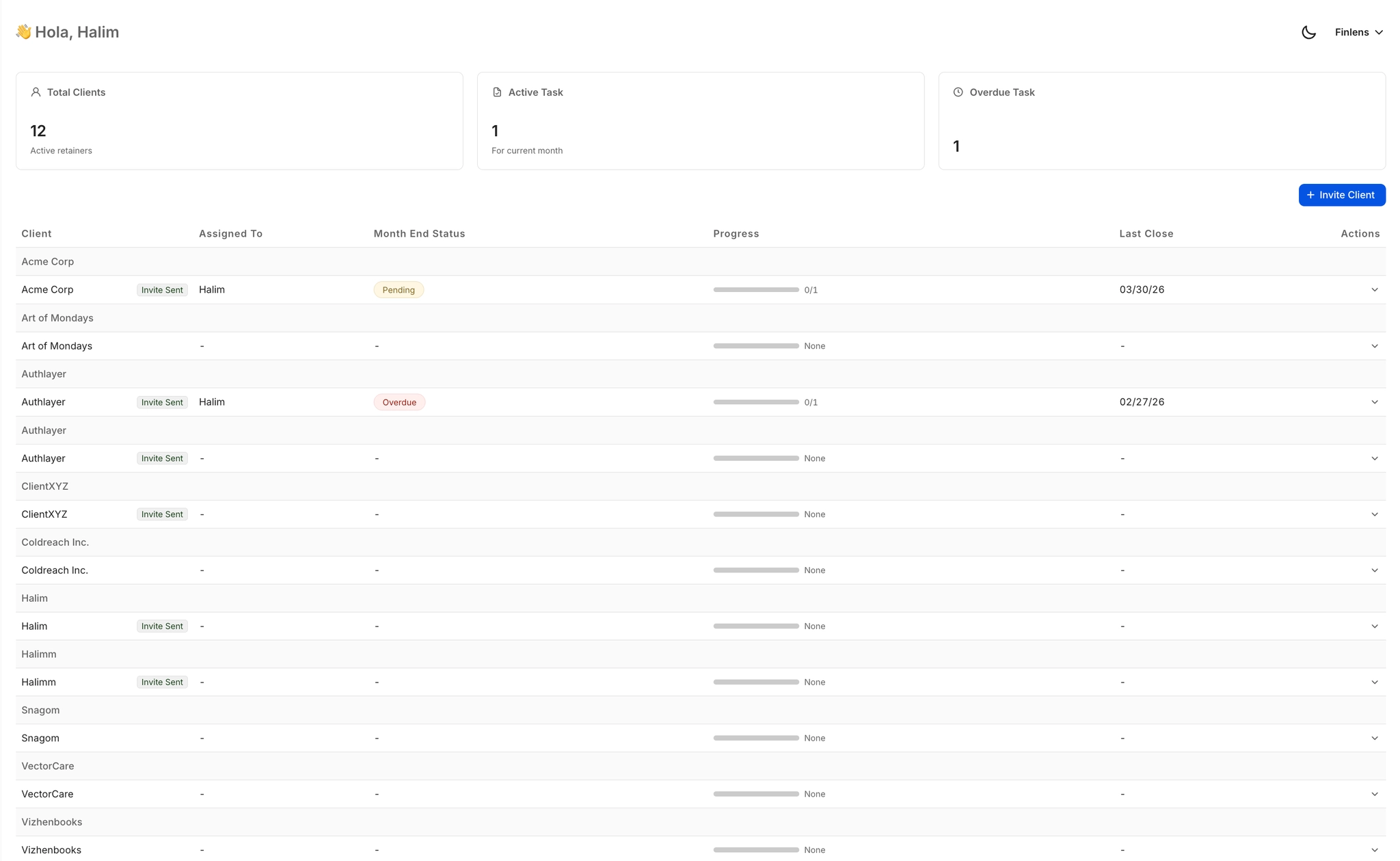
Multi-Client Dashboard for CPA Firms
Manage all your clients from a single view with open items, approvals, and deadline tracking. Switch between clients instantly without logging into separate QuickBooks accounts — no more tab chaos.
Month-End Close Up to 70% Faster
Finlens automates task assignment, progress tracking, and checklist coordination across your entire close workflow. Firms report 40 to 70% faster close times compared to spreadsheet and email-based processes.

AI Transaction Categorization at Scale
Every transaction is auto-categorized at first pass using GL logic and historical patterns. Eliminates hours of manual tagging per client each month without removing accountant oversight.

Real-Time QuickBooks Two-Way Sync
Journal entries, bank transactions, bills, and invoices flow both ways between Finlens and QuickBooks in real time. No migration, no parallel ledgers — your existing QBO setup stays intact.

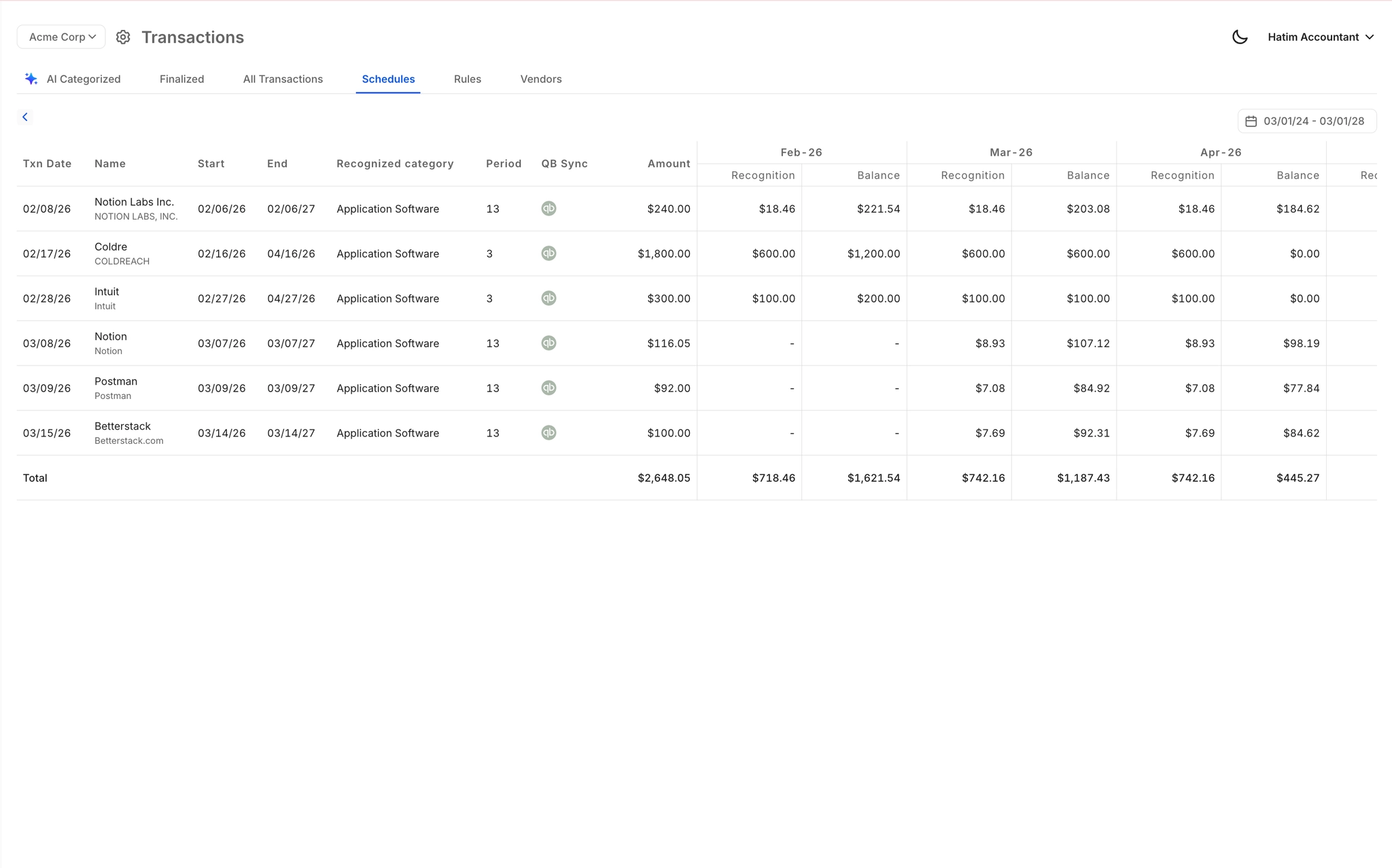
Automated GAAP Schedules Without Spreadsheets
Accruals, prepaids, and amortization schedules are generated automatically with corresponding journal entries posted to QuickBooks. Eliminate the error-prone spreadsheet maintenance that doesn't scale across 50-plus clients.
Ready to Transform Your Business?
How It Works
Get started in minutes, not months.
Connect QuickBooks
Finlens reads your GL and identifies accrual-eligible transactions
Review AI-Generated Schedules
Finlens auto-builds prepaid, deferred revenue, and amortization schedules; your team reviews and approves
Entries Post Automatically at Month-End
Journal entries sync to QuickBooks on schedule; close faster, audit trail preserved
Why Choose Finlens
Why teams choose Finlens.
Works on Top of QuickBooks
No migration. No new GL. Finlens augments the tools your team already uses — real-time two-way sync means your QuickBooks data is always current.
80%+ Less Manual Bookkeeping
AI categorization, automated reconciliation, and smart schedules replace the spreadsheet work that eats your team’s hours.
Backed by Y Combinator & Accel
Built in San Francisco by a team that understands accounting workflows. Trusted by firms and founders scaling fast.
12,000+ Bank Connections
Connect every bank account, credit card, and financial tool your clients use. Powered by Plaid.
Frequently Asked Questions
Does Finlens replace QuickBooks or require data migration?
No. Finlens works on top of QuickBooks — it augments it rather than replacing it. Your existing QuickBooks data, chart of accounts, and client history stay exactly where they are. Finlens connects via real-time two-way sync, so there is zero migration friction. Firms can be up and running without disrupting live client books.
How is Finlens different from Acodei for CPA firms?
Finlens is purpose-built to layer AI automation over QuickBooks for CPA firms managing multiple clients. Where Acodei requires manual workarounds for close workflows and GAAP schedules, Finlens automates those directly — transaction categorization, month-end close task management, accrual scheduling, and a centralized multi-client dashboard — all while staying in sync with the QuickBooks files your team already owns.
How much faster is month-end close with Finlens?
Finlens claims 40 to 70% faster month-end close times. It achieves this by automating the most time-consuming steps: transaction categorization, GAAP schedule generation, reconciliation, and team task coordination. Firms that previously juggled spreadsheets, Notion checklists, and email chains can manage the entire close workflow inside a single platform.
Can Finlens handle a firm with 50 or more clients?
Yes. Finlens is specifically designed for CPA firms managing 50 to 100 or more clients. The multi-client dashboard gives your team a single view across all client accounts with open items, approval queues, and deadline tracking. You can switch between clients instantly without logging into separate QuickBooks accounts, which is what makes the 'manage 50 clients like it's 5' workflow possible.
How long does it take to onboard a new client in Finlens?
Finlens automates client onboarding including chart of accounts setup and historical transaction categorization. The automated chart of accounts alone saves over 3 hours per new client compared to manual setup. For firms taking on cleanup clients with messy books, onboarding that previously took 10 to 15 hours can be collapsed significantly using Finlens automation.