Chart of Accounts Setup Automation for CPA Firms
Finlens automates COA creation directly within QuickBooks, saving 3+ hours per client onboarding so your firm can scale without the manual setup work.
COA Setup Is Slowing You Down
Onboarding Takes Too Long
Building a chart of accounts from scratch for each client costs 3+ hours before real work even begins.
Inconsistent Structure Breaks Reporting
Ad-hoc COA decisions across clients create downstream chaos in categorization, close, and financial reporting.
Cleanup Clients Kill Margins
Messy books with broken account structures take 10-15 hours to untangle, turning profitable engagements unprofitable.
Automated COA Setup on Top of QuickBooks
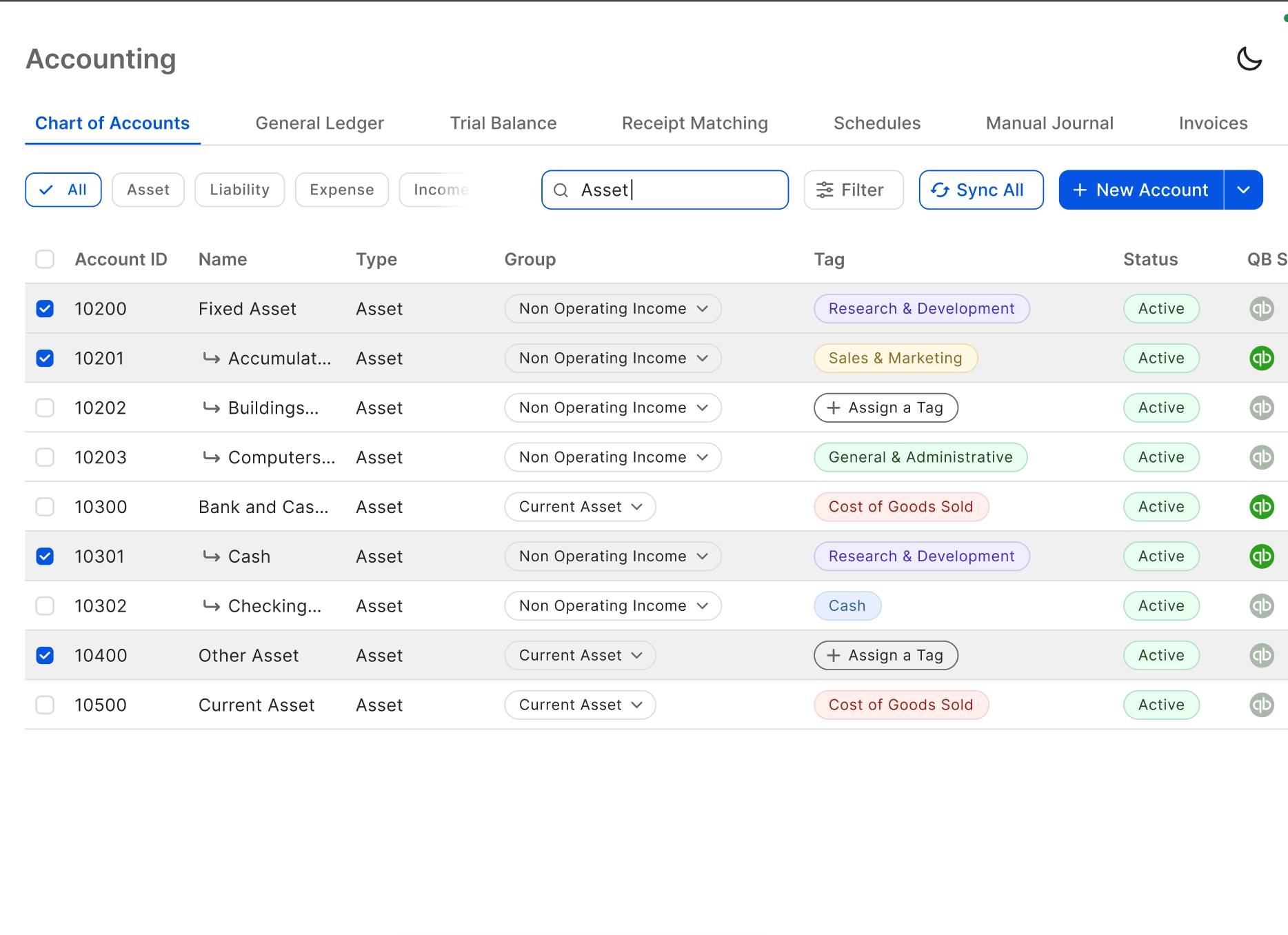
Finlens ships a comprehensive default chart of accounts that applies to new clients instantly inside QuickBooks. No manual setup, no migration, no spreadsheets. Onboard clients in a fraction of the time with a consistent, automation-ready account structure from day one.
Automated Chart of Accounts Setup
Apply a comprehensive, structured COA to any new client instantly inside QuickBooks. No manual account-by-account entry. Saves 3+ hours per onboarding and enforces a consistent structure across every client in your firm.
Real-Time QuickBooks Two-Way Sync
Every account, journal entry, categorized transaction, bill, and invoice flows bidirectionally with QuickBooks in real time. No migration required — Finlens layers directly on top of the QBO setup your clients already use.

AI Transaction Categorization
Once the COA is in place, Finlens auto-categorizes every transaction using GL logic and historical patterns. Eliminates the manual categorization that follows client onboarding and keeps books current without bookkeeper intervention.

Month-End Close Automation
A clean COA structure is only valuable if the close process runs on top of it efficiently. Finlens automates task assignment, progress tracking, and team coordination to deliver 40-70% faster close times.

Multi-Client Onboarding Dashboard
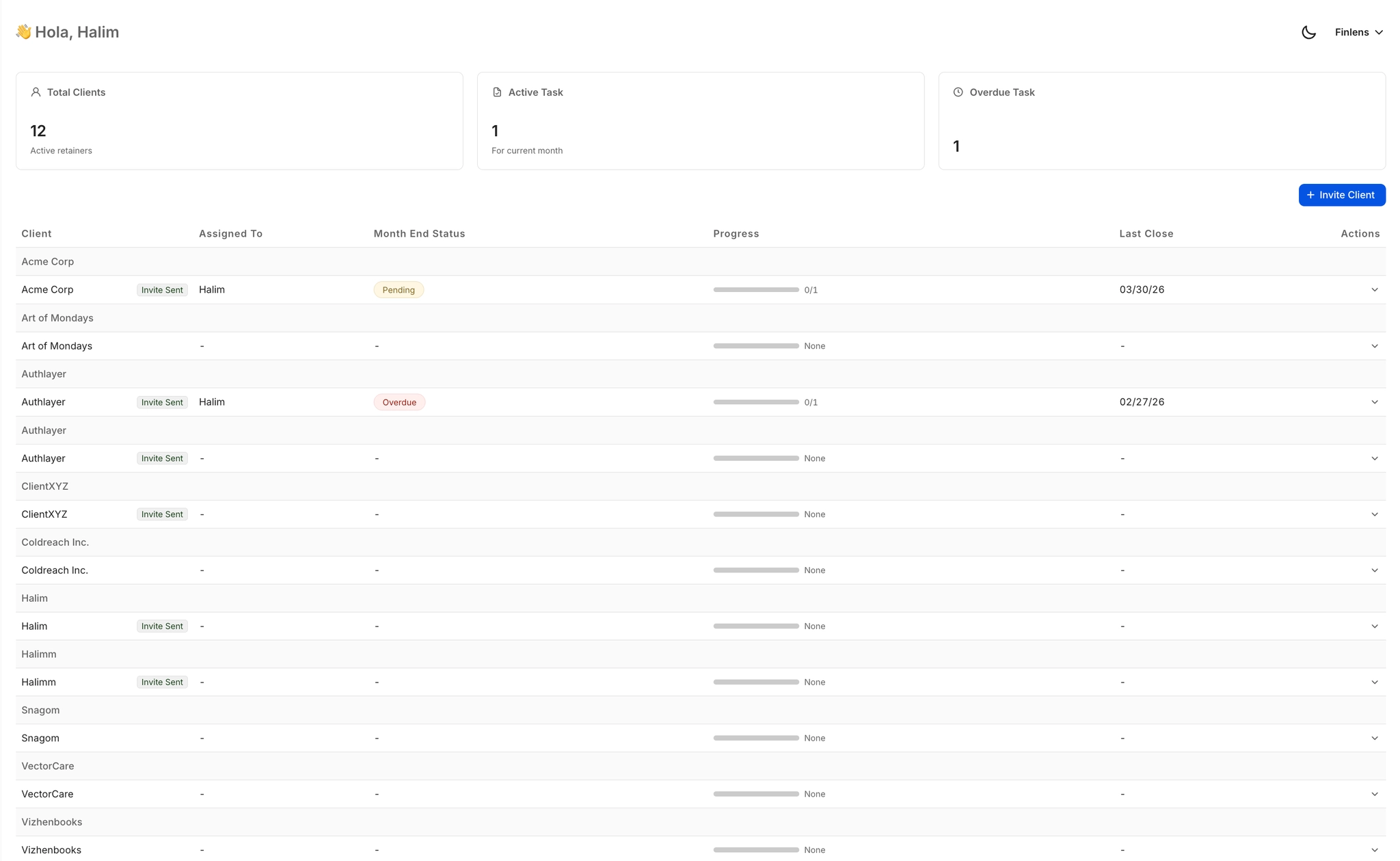
Track onboarding status, open items, approvals, and deadlines across every client from a single view. No tab-switching between QBO accounts. Designed for firms managing 50+ clients without scaling headcount.
Ready to Transform Your Business?
How It Works
Get started in minutes, not months.
Connect QuickBooks
Finlens reads your GL and identifies accrual-eligible transactions
Review AI-Generated Schedules
Finlens auto-builds prepaid, deferred revenue, and amortization schedules; your team reviews and approves
Entries Post Automatically at Month-End
Journal entries sync to QuickBooks on schedule; close faster, audit trail preserved
Why Choose Finlens
Why teams choose Finlens.
Works on Top of QuickBooks
No migration. No new GL. Finlens augments the tools your team already uses — real-time two-way sync means your QuickBooks data is always current.
80%+ Less Manual Bookkeeping
AI categorization, automated reconciliation, and smart schedules replace the spreadsheet work that eats your team’s hours.
Backed by Y Combinator & Accel
Built in San Francisco by a team that understands accounting workflows. Trusted by firms and founders scaling fast.
12,000+ Bank Connections
Connect every bank account, credit card, and financial tool your clients use. Powered by Plaid.
Frequently Asked Questions
Does Finlens replace QuickBooks for chart of accounts management?
No. Finlens works on top of QuickBooks, not instead of it. Your existing QBO setup stays in place. Finlens adds an automation layer that handles COA creation, transaction categorization, and close workflows directly within that environment. There is no migration, no switching costs, and no retraining your team on a new general ledger system.
How does automated chart of accounts setup work?
Finlens ships a comprehensive default chart of accounts structure that can be applied to any new client instantly inside QuickBooks. Instead of building accounts one by one from a blank slate, the COA is deployed in one action and synced to QBO in real time. From there, AI transaction categorization takes over, mapping incoming transactions to the correct accounts based on GL logic and patterns.
How much time does COA setup automation actually save?
Finlens saves 3+ hours per client onboarding by eliminating manual chart of accounts entry. For firms onboarding multiple clients per month, that compounds quickly. It also reduces the downstream correction work caused by inconsistent COA structures, which typically surfaces during month-end close and financial reporting.
Can Finlens handle cleanup clients with messy existing COA structures?
Yes. Cleanup clients with incomplete or inconsistent account structures are one of the primary use cases. Finlens can apply a standardized COA and use AI categorization to reclassify historical transactions against the new structure. This collapses what is typically a 10-15 hour onboarding engagement into a fraction of that time.
Does Finlens work for firms managing multiple clients simultaneously?
Yes. Finlens includes a multi-client dashboard that lets you manage 50+ clients from a single view, with onboarding status, open items, approvals, and deadlines visible at a glance. You can switch between client QuickBooks accounts instantly without logging in and out, and COA setup can be applied consistently across all clients from one interface.