AI Journal Entry Automation Software for Small Business
Finlens automates journal entries and transaction categorization on top of QuickBooks, helping small businesses close faster without manual bookkeeping.
Manual Bookkeeping Is Holding You Back
Hours Lost to Manual Entry
Every transaction requires manual categorization and journal entry posting, stealing hours you could spend growing your business.
Missed Reporting Deadlines
Without automation, month-end close piles up fast. Late reports mean late decisions and stressed relationships with your accountant.
Jumping Between Tools and Spreadsheets
Managing QuickBooks, spreadsheets, and email threads for one month-end close creates errors and eats your evenings.
AI Journal Entry Automation Built on QuickBooks
Finlens sits on top of your existing QuickBooks and applies AI accounting logic to every transaction automatically — categorizing, posting journal entries, and accelerating your month-end close by 40-70%. No migration required.
Automated Journal Entry Categorization
Every transaction is categorized at first pass using GL logic and your historical patterns. Finlens learns from corrections over time, so the accuracy improves the longer you use it — no manual tagging required.

Faster Month-End Close for Small Business
Finlens coordinates your entire close workflow — categorization, reconciliation, and reporting — in one place. Small business owners report 40-70% faster close times without juggling spreadsheets or checklists.

Real-Time QuickBooks Sync
Finlens syncs journal entries, bank transactions, bills, and invoices with QuickBooks in real time. No migration, no duplicate entry — your existing QuickBooks setup stays exactly as it is.

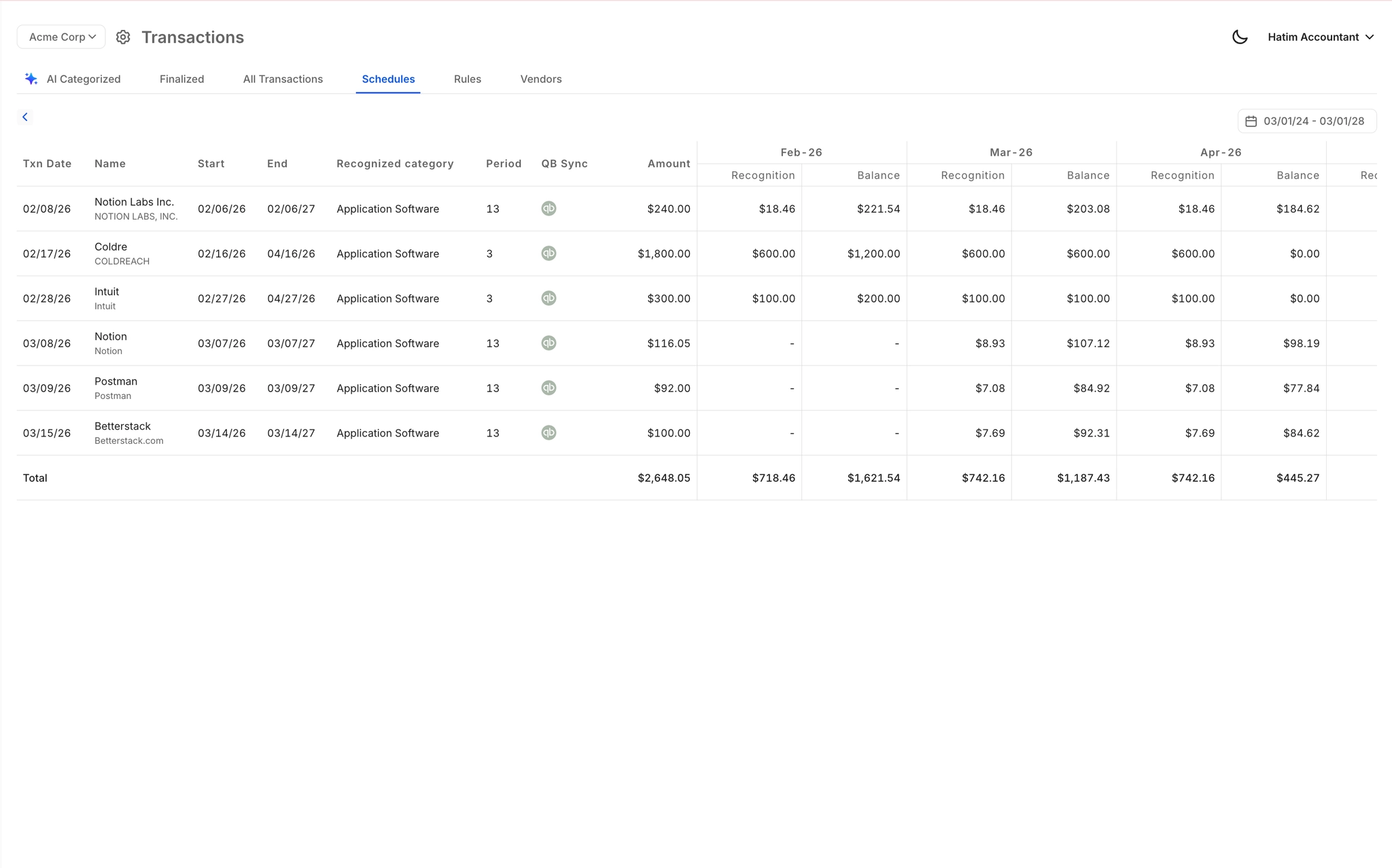
Automated Accruals and Prepaid Schedules
Accruals, prepaids, and amortization schedules are generated automatically as journal entries, without building or maintaining a single spreadsheet. Stay GAAP-compliant without hiring a full-time accountant.
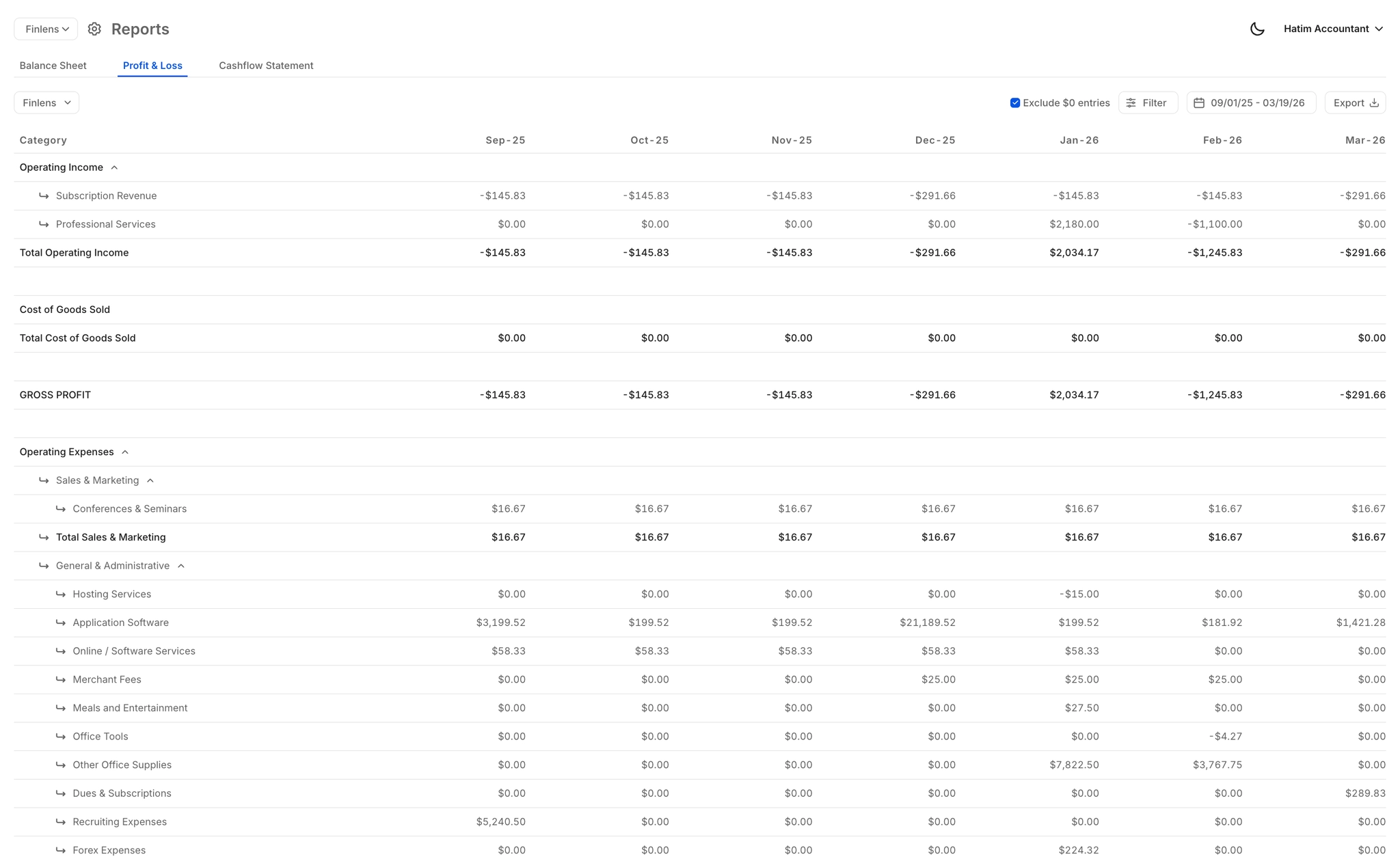
Real-Time Financial Reports
Live P&L, balance sheet, and cash flow statements — always current, never stale. Small business owners get the financial visibility they need without waiting on manual report generation after every close.
Ready to Transform Your Business?
How It Works
Get started in minutes, not months.
Connect QuickBooks
Finlens reads your GL and identifies accrual-eligible transactions
Review AI-Generated Schedules
Finlens auto-builds prepaid, deferred revenue, and amortization schedules; your team reviews and approves
Entries Post Automatically at Month-End
Journal entries sync to QuickBooks on schedule; close faster, audit trail preserved
Why Choose Finlens
Why teams choose Finlens.
Works on Top of QuickBooks
No migration. No new GL. Finlens augments the tools your team already uses — real-time two-way sync means your QuickBooks data is always current.
80%+ Less Manual Bookkeeping
AI categorization, automated reconciliation, and smart schedules replace the spreadsheet work that eats your team’s hours.
Backed by Y Combinator & Accel
Built in San Francisco by a team that understands accounting workflows. Trusted by firms and founders scaling fast.
12,000+ Bank Connections
Connect every bank account, credit card, and financial tool your clients use. Powered by Plaid.
Frequently Asked Questions
Does Finlens replace QuickBooks for small businesses?
No. Finlens works on top of QuickBooks, not instead of it. Your QuickBooks account stays exactly as it is — Finlens layers AI automation over it, automatically categorizing transactions and posting journal entries back to your QuickBooks GL in real time. There is no migration, no data export, and no disruption to your existing setup.
How does AI journal entry automation actually work?
Finlens connects to your QuickBooks and pulls your transactions in real time. Its AI applies GL logic and learns from your historical categorization patterns to assign the correct accounts and post journal entries automatically. You can review entries before they finalize, and the system improves its accuracy the more you use it.
Will AI categorization be accurate enough for my small business books?
Finlens uses a combination of your historical GL patterns, chart of accounts structure, and transaction context to categorize entries. It also includes a human-in-the-loop review step, so you or your accountant can approve, correct, or override any categorization before it posts to QuickBooks. Nothing is finalized without your sign-off.
How much faster will my month-end close be?
Finlens claims 40-70% faster month-end close times for its users. The speed gain comes from automating the most time-consuming parts of close: transaction categorization, journal entry posting, and GAAP schedule generation. Instead of manually working through spreadsheets and checklists, the workflow is tracked and largely completed automatically inside Finlens.
Do I need an accountant to use Finlens?
No. Finlens is designed so that small business owners and founders can use it without a dedicated finance team. The AI handles categorization and journal entry posting automatically. That said, Finlens also supports collaboration with your CPA or CFO if you have one — they can review and approve entries directly inside the platform.