
Accounts Receivable Software: 8 Tools Compared for 2026


The best accounts receivable software depends on invoice volume, whether AR needs to reconcile to a full general ledger, and how much billing complexity you carry. For businesses without existing bookkeeping software, Finlens built for accounting firms and small businesses runs AR inside a full accounting ledger with automated categorization and close. QuickBooks Online and Xero cover most growing small businesses with built-in AR. Wave and Zoho Invoice cover freelancers on free tiers. Bill.com and Upflow are dedicated AR automation for B2B businesses that have outgrown accounting-native AR. FreshBooks sits between invoicing and full accounting.
Key takeaways
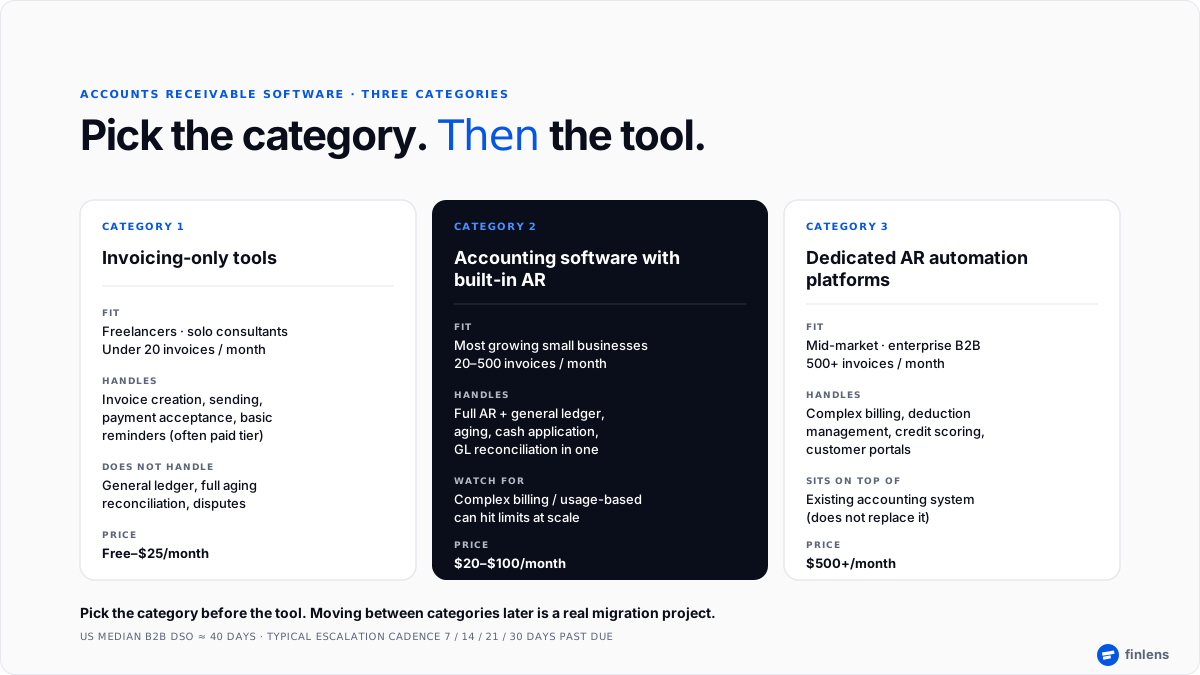
- The AR software market splits into three categories invoicing-only, accounting with built-in AR, and dedicated AR automation and choosing category matters more than choosing specific tool.
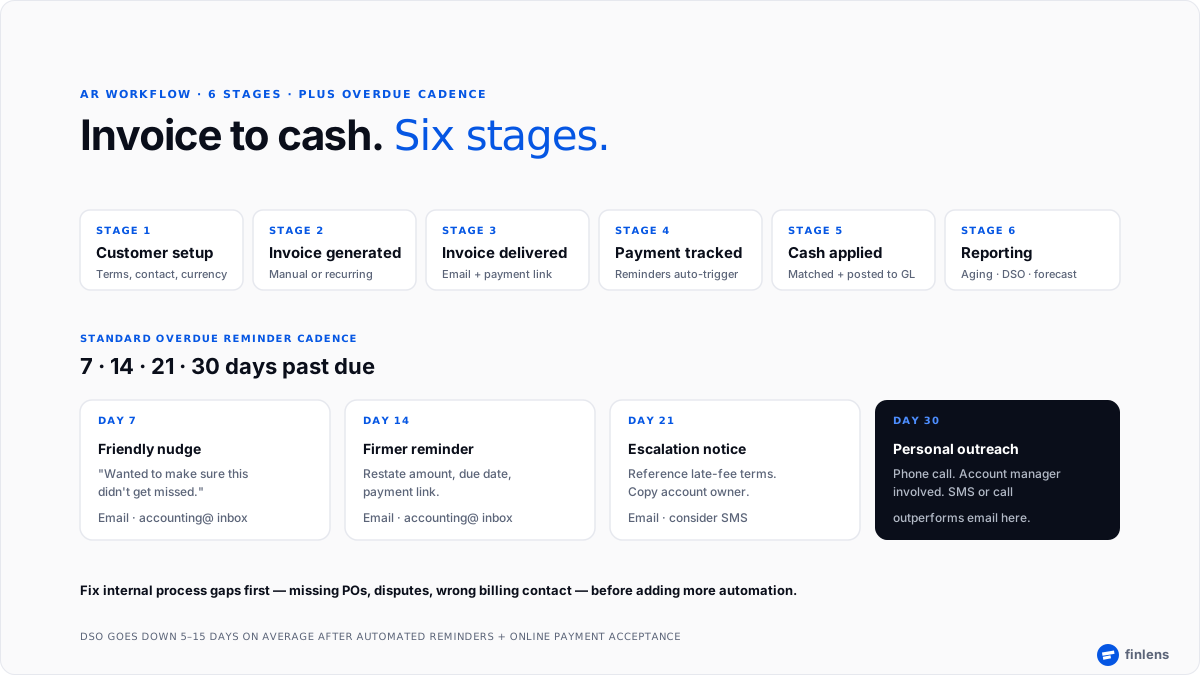
- Median US B2B Days Sales Outstanding sits at ~40 days according to Atradius Payment Practices Barometer and Investopedia's DSO explainer; automated reminders plus online payment acceptance typically drop DSO by 5–15 days.
- Standard overdue escalation cadence is 7 / 14 / 21 / 30 days past due, with reminders escalating from friendly nudge to personal outreach.
- Fix internal process gaps missing POs, disputes, wrong billing contact before adding more automation; ~40% of "late payments" trace to internal breakdowns, not truly late payers.
- Finlens runs full AR inside a standalone accounting platform invoice creation, aging, reminder cadence, cash application, and ledger reconciliation in one system, with a free tier for small businesses that don't have QuickBooks or Xero yet.
Best accounts receivable software: comparison table
Pricing reflects published starting tiers early 2026 and does not include add-ons or per-invoice fees.
The 8 best accounts receivable software tools
1. Finlens
Overview. Finlens is a standalone AI-native accounting platform with accounts receivable, month-end close, categorization, and multi-client reconciliation built in. For small businesses without existing bookkeeping software, AR runs directly inside Finlens; for accounting firms and CAS providers, same AR workflow runs across an entire book of clients from one dashboard.
Best for. Small businesses that don't want to route through QuickBooks or Xero to get modern AR. CAS firms serving many clients on recurring engagements who need AR tied to a full close pack every month with predictable pricing tiers for staff time.
Key features. Invoice generation with recurring schedules, configurable reminder cadence (7 / 14 / 21 / 30 days), AR aging by client, automated cash application, tamper-evident audit log, multi-client exception review, and reconciliation to general ledger. Free tier available for small businesses.
Pricing. Free tier for small business use. Paid tiers custom-quoted for CAS firms and higher-volume books.
Limitations. Not a dedicated collections platform Bill.com and Upflow have deeper deduction-management and credit-scoring features for enterprise B2B. Not a fit for a business that only needs standalone invoicing with no accounting.
Where it breaks. High-volume enterprise B2B AR with complex deduction management. That workload belongs on a dedicated AR platform sitting on top of a general ledger.
2. QuickBooks Online
Overview. QuickBooks Online is category default for US small-business accounting, and AR is one of its native modules. According to G2's accounting software category data, QuickBooks retains largest installed base of any US small-business accounting product. A user on r/Entrepreneurs described it as reliable choice "for invoices/bookkeeping" when business already runs on QBO.
Best for. Growing US small businesses already on QuickBooks Online who want AR inside same system as everything else.
Key features. Invoice templates, recurring invoices, automated payment reminders (Essentials tier and above), online payment acceptance via QuickBooks Payments, AR aging reports, and cash application to ledger.
Pricing. $35/mo Simple Start · $65 Essentials · $99 Plus · $235 Advanced.
Limitations. Automated reminders and multi-user access are gated behind Essentials or higher. Payment processing fees are separate. Complex billing (usage-based, multi-tier) hits limits.
Where it breaks. Multi-entity billing, high invoice volume above ~500/month, and B2B collections workflows with heavy dispute handling.
3. Xero
Overview. Xero is international counterpart to QuickBooks full small-business accounting with AR built in. Particularly strong outside US and for businesses with international billing.
Best for. Small businesses outside US market, multi-currency AR, and businesses whose accountants prefer Xero to QuickBooks.
Key features. Invoice creation with online payment links, automated invoice reminders, AR aging, multi-currency support at standard tier, and native reconciliation to general ledger.
Pricing. $20/mo Early · $47 Growing · $80 Established.
Limitations. Early tier caps invoices sent at 20 per month and bill entry at 5 per month. Payroll requires Gusto or a separate add-on in US. Reporting is less deep than QuickBooks Advanced.
Where it breaks. US businesses whose accounting firm exclusively works in QuickBooks; heavy inventory-plus-AR workflows.
4. Wave
Overview. Wave is free-tier default for freelancers and micro-businesses who need to send invoices and track basic AR without paying for software. A commenter on r/smallbusiness put it plainly: "Free plan on Wave is unlimited invoicing but reminders are manual otherwise."
Best for. Solo operators and freelancers invoicing occasionally who want free invoicing and basic bookkeeping.
Key features. Unlimited invoicing (free), online payment acceptance, receipt scanning, basic accounting, and one bank account connection on free tier.
Pricing. Free (Starter) · Pro $16/mo. Payment processing fees separate.
Limitations. Automated invoice reminders require Pro tier or enabling online payments. AR aging reports are basic. No inventory. Limited integration ecosystem.
Where it breaks. Any business past 20–30 invoices a month or needing multi-user access.
5. Zoho Invoice
Overview. Zoho Invoice is outlier free tier a free invoicing tool that includes automated reminders and up to 1,000 invoices per year without a gotcha, described on r/smallbusiness as "worth a look specifically because it includes automated reminders with no gotcha."
Best for. Solo operators and micro-businesses wanting free automated reminders without a paid tier.
Key features. Invoice creation with 1,000 invoices/year, automated payment reminders on custom schedules, online payment acceptance, expense tracking, and time tracking. Integrates with Zoho Books for full accounting.
Pricing. Free (up to 1,000 invoices/year).
Limitations. Not full accounting Zoho Books ($15/mo+) is upgrade path. Limited customization on free tier. Interface less polished than paid competitors.
Where it breaks. Businesses past 1,000 invoices/year or needing full general-ledger accounting.
6. Bill.com
Overview. Bill.com is dedicated AP and AR automation that sits on top of an existing accounting system QuickBooks, Xero, NetSuite, or Sage Intacct. It handles invoice creation, approval workflows, and payment collection at scale.
Best for. Mid-market businesses with high invoice volume, multi-approver workflows, and an existing accounting system they don't want to replace.
Key features. Invoice creation and delivery, custom approval routing, payment collection (ACH, credit card, check), integration with QuickBooks / Xero / NetSuite / Sage Intacct, and audit trail.
Pricing. $45/user/mo Essentials · $55 Team · $79 Corporate · custom Enterprise.
Limitations. Not a standalone ledger requires an accounting system underneath. Per-user pricing scales quickly for larger teams. Some workflow customization requires higher tiers.
Where it breaks. Small businesses without an existing accounting system; usage-based billing that needs deep CPQ.
7. Upflow
Overview. Upflow is dedicated B2B AR automation focused on collections side smart reminder sequences, customer portals, and cash application. A commenter on r/AccountingDepartment noted researching Upflow specifically for B2B SaaS AR automation.
Best for. B2B SaaS and growing services businesses with a real collections load complex billing arrangements, DSO problems, and a finance team ready to invest in dedicated collections tooling.
Key features. Automated collections workflows, customer AR portals, cash application, DSO analytics, and native integrations with QuickBooks, Xero, NetSuite, and Stripe.
Pricing. Custom (typically starts around $500+/mo).
Limitations. Not a general ledger sits on top of accounting software. Small-business scale rarely justifies price.
Where it breaks. Solo operators, freelancers, and any business without a dedicated collections need.
8. FreshBooks
Overview. FreshBooks sits between an invoicing tool and a full accounting system invoicing-first with lightweight accounting features layered on. Popular with service businesses and consultants who need cleaner invoicing than a spreadsheet without depth of QuickBooks.
Best for. Service businesses, consultants, and small agencies invoicing time-and-materials or fixed-fee retainers.
Key features. Invoice templates, recurring invoices, time tracking, expense tracking, automated late-payment reminders, online payments, and a project-based billing view.
Pricing. $19/mo Lite · $33 Plus · $60 Premium · custom Select.
Limitations. Lite tier caps at 5 billable clients. Accounting features are lighter than QuickBooks or Xero. Not designed for inventory or high-transaction-volume books.
Where it breaks. Product-based businesses with inventory; businesses needing multi-currency reporting or heavy financial customization.
Which accounts receivable software should you choose
The right tool depends on invoice volume, billing complexity, and whether AR needs to reconcile to a full general ledger. Use this decision framework:
- Use Finlens if you're a small business without existing bookkeeping software or a CAS firm managing AR across many clients and you want AR, close, and reconciliation in one system with a free tier for SMB use case.
- Use QuickBooks Online if you're already on QuickBooks and need AR inside same ledger you already run everything else through.
- Use Xero if you're outside US, have multi-currency AR, or your accountant works exclusively in Xero.
- Use Wave if you're a freelancer invoicing occasionally and free is more important than automated reminders.
- Use Zoho Invoice if you want automated reminders on a free tier and you're under 1,000 invoices a year.
- Use Bill.com if you're mid-market with high invoice volume and an existing accounting system you don't want to replace.
- Use Upflow if you're a B2B business with real collections load, complex billing, and a finance team ready to invest in dedicated AR tooling.
- Use FreshBooks if you're a service business or consultant and invoicing polish matters more than accounting depth.
A practitioner heuristic from r/AccountingDepartment that keeps coming up: "Most AR delays aren't actually 'late payers' it's internal breakdowns: missing / incorrect POs, disputes sitting unresolved." Fix those before shopping for more automation. The U.S. Small Business Administration guide on managing finances is a good starting reference on invoicing terms and getting paid faster.
Common AR software integrations
AR software rarely lives alone. Real workflows depend on integrations:
- Payment processors Stripe, ACH via Plaid, credit card gateways. Native payment acceptance on invoice itself materially improves paid-in-full rates.
- Accounting systems bidirectional sync with QuickBooks, Xero, or business's primary ledger so AR balance and GL agree at month-end. See our guide on QuickBooks automation for what "good sync" actually looks like.
- CRM customer records flow from Salesforce, HubSpot, or Pipedrive into invoice recipients.
- Communication channels email plus, increasingly, SMS reminders for oldest overdue balances. One user on r/smallbusiness reported: "switching to SMS follow up instead of email for overdue invoices. response rate is completely different."
An "accounting@" shared inbox for reminders described on r/smallbusiness as helping reminders "feel procedural rather than personal" is a cheap process improvement most businesses can adopt on day one, regardless of tool. A contributor on r/Bookkeeping noted that most modern platforms let you set an escalation schedule as "a rule and forget it," so manual chase is a workflow choice, not a tool constraint.
Conclusion
The right accounts receivable software depends on invoice volume, billing complexity, and whether AR needs to reconcile to a full general ledger not on brand recognition. Most small businesses land on accounting software with built-in AR. Freelancers use free-tier invoicing tools. B2B mid-market graduates to dedicated AR automation.
Book a 20-minute walkthrough with Finlens if AR is where cash is currently getting stuck bring one month's aging report and we'll show you where automation replaces manual chase, whether Finlens runs as your ledger or on top of an existing one.
FAQ
What is accounts receivable software?
Accounts receivable software is a system that automates invoicing, payment reminders, aging tracking, and cash application. It manages money customers owe from invoice creation through payment collection and reconciliation to general ledger.
What is best accounts receivable software for small business?
QuickBooks Online and Xero are category defaults for growing small businesses. Wave and Zoho Invoice are best free options. Finlens is standalone-accounting option for small businesses that don't have QuickBooks or Xero yet, with a free tier.
Is accounts receivable software same as invoicing software?
No invoicing software is a subset. Invoicing software creates and sends invoices; accounts receivable software adds aging tracking, automated reminders, cash application, dispute handling, and reconciliation to general ledger. Every AR system includes invoicing; not every invoicing tool covers full AR.
How much does accounts receivable software cost?
Free tiers exist (Wave, Zoho Invoice). Accounting software with built-in AR runs $20–$100/month (QuickBooks, Xero, pricing tier ranges). Dedicated AR automation platforms like Bill.com start around $45/user/month; Upflow and other B2B-focused platforms start around $500/month.
What is DSO in accounts receivable?
DSO stands for Days Sales Outstanding average number of days it takes to collect payment after a sale. The US median for B2B businesses is around 40 days per Atradius. Automated reminders plus online payment acceptance typically drop DSO by 5–15 days.
Do I need accounts receivable software if I have accounting software?
Usually not. Modern accounting software includes AR functionality. A separate AR platform makes sense only if invoice volume, dispute rates, or billing complexity outgrow what accounting-native AR can handle.
Can Finlens replace QuickBooks for accounts receivable?
Yes for small businesses without existing bookkeeping Finlens is a full standalone accounting platform with AR built in. For businesses already on QuickBooks, Finlens automates categorization, close, and multi-client reconciliation on top of QuickBooks rather than replacing it.
What features should I look for in accounts receivable software?
The essentials are invoice templates, automated payment reminders on a defined schedule (7 / 14 / 21 / 30 days is standard), online payment acceptance, AR aging reports, cash application matching payments to invoices, and reconciliation to general ledger. At larger scale, add dispute management, credit memos, and DSO reporting.

