
Revenue Recognition for SaaS Explained (ASC 606 + Real Examples)


Getting revenue recognition for SaaS wrong isn't just an accounting inconvenience - it's one of the fastest ways to trigger audit flags, misstate your ARR-to-GAAP reconciliation, and spook the investors you've worked hard to win over. Yet, as one founder put it bluntly on Reddit: "Most founders have no idea how to handle this correctly and just guess until auditors tell them it's wrong."
That guesswork has real consequences. Another SaaS team shared: "Our auditors made us completely redo our revenue recognition process when we added usage pricing because we were doing it wrong for like 6 months - expensive mistake."
The problem isn't a lack of effort. It's that revenue recognition for SaaS is genuinely complex, and the rules that are simple with a flat $99/month subscription become a nightmare when you layer in annual prepaid contracts, usage-based components, bundled onboarding services, or free trial periods.
The governing framework for all of this is ASC 606, issued by the Financial Accounting Standards Board (FASB). It replaced a patchwork of industry-specific guidance with a single, principles-based five-step model. This article walks through every step - anchored to the specific SaaS scenarios that trip founders and their accountants up most.
The ASC 606 Five-Step Model for SaaS
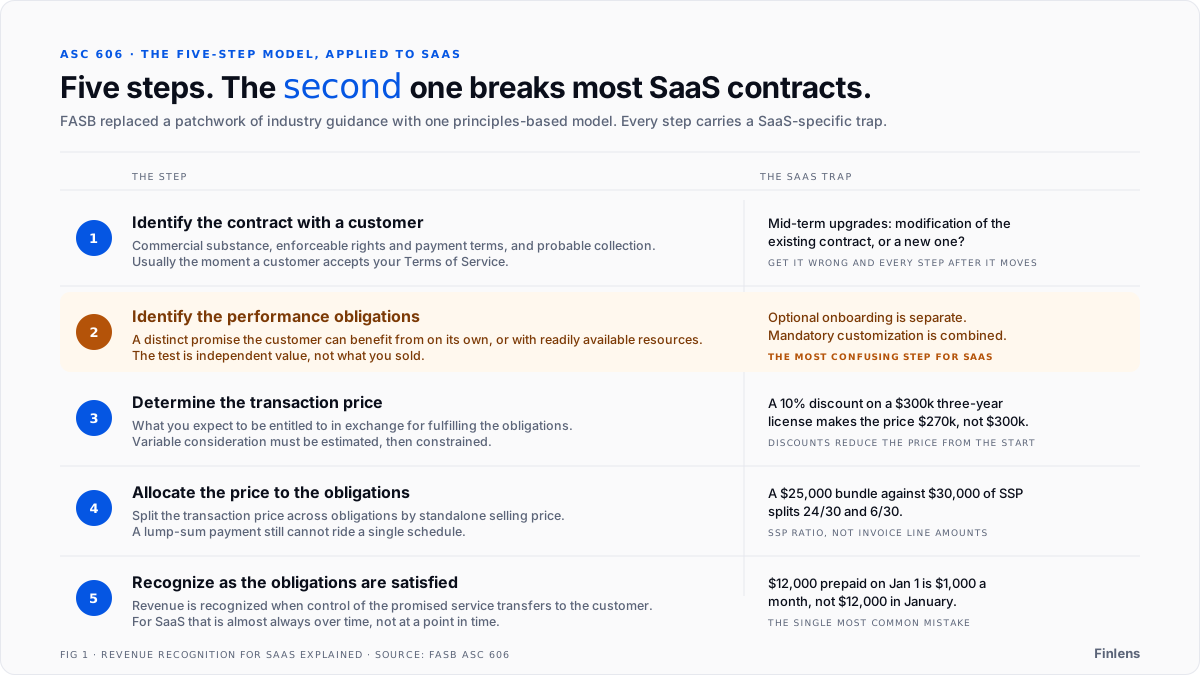
Step 1: Identify the Contract with a Customer
A contract must have commercial substance, enforceable rights and payment terms, and a genuine probability of collection. For SaaS companies, this is usually the moment a customer accepts your Terms of Service and a subscription agreement is executed.
The wrinkle: contract modifications. When a customer upgrades their plan mid-term, you need to determine whether that upgrade is a modification of the existing contract (which adjusts the remaining revenue schedule) or a new, separate contract. Getting this wrong cascades into every downstream step.
Step 2: Identify the Performance Obligations (The Most Confusing Step for SaaS)
A performance obligation is a distinct promise to deliver a good or service. "Distinct" means the customer can benefit from it on its own, or together with other readily available resources.
This is where the community conversation gets heated, with founders asking: "When would professional services be considered a separate performance obligation and when wouldn't they?"
Here's the practical answer for the two most common SaaS scenarios:
Scenario A - Separate Performance Obligations: A customer purchases a 1-year SaaS subscription and optional onboarding/implementation services. The software works without the implementation - the customer could skip it and still log in on day one.
Treatment: Two separate obligations. Recognize the implementation revenue when the service is completed. Recognize the SaaS subscription revenue ratably over the 12-month contract term.
Scenario B - Single, Combined Performance Obligation: A customer buys complex enterprise software that requires deep, mandatory customization before it can function. The software and the services are inextricably linked - one is useless without the other.
Treatment: One combined obligation. Recognize the entire transaction price ratably over the period covering both delivery phases.
The critical takeaway: the question isn't what you sold, it's whether the customer can derive independent value from each element. As BillingPlatform's ASC 606 guide explains, this "distinct" test is the hinge on which all multi-element SaaS contracts turn.
Step 3: Determine the Transaction Price
The transaction price is the amount you expect to be entitled to in exchange for fulfilling your obligations. For fixed monthly subscriptions, this is straightforward. For everything else, it gets more involved.
- This is, as one founder accurately described it, For the full accounting treatment of usage-based contracts under ASC 606, see the usage-based revenue recognition guide.": This is, as one founder accurately described it, For the full accounting treatment of usage-based contracts under ASC 606, see the usage-based revenue recognition guide.""its own nightmare." You're dealing with variable consideration - you must estimate the expected usage and constrain that estimate to an amount that won't result in a significant revenue reversal later. This requires a metering ledger that closes cleanly every day.
- Discounts: Per DualEntry's ASC 606 breakdown, if you offer a 10% upfront discount on a $300k three-year license, your transaction price is $270k - not $300k. The discount reduces the total consideration from the start.
- Each of these reduces the transaction price and must be factored into your recognition schedule. Ignoring them leads to overstated revenue.
Step 4: Allocate the Transaction Price to Performance Obligations
When a contract contains multiple distinct performance obligations, you must allocate the total transaction price to each based on its standalone selling price (SSP) - what you'd charge for it if sold separately.
Worked Example:
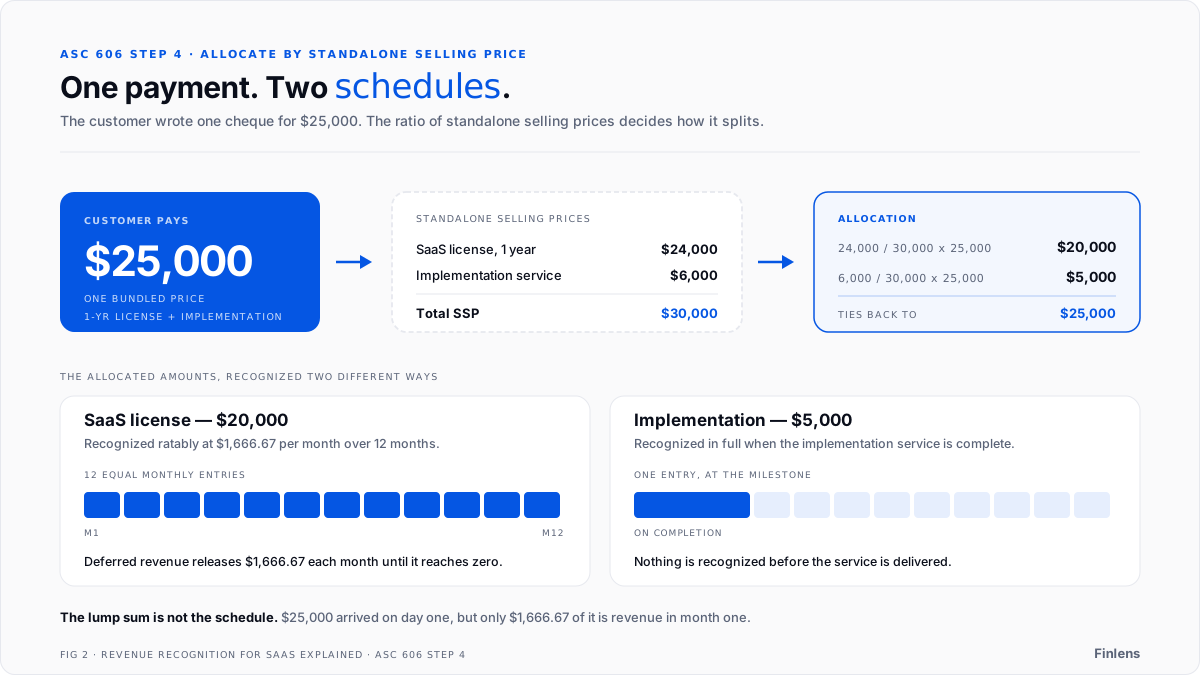
A customer pays a bundled price of $25,000 for a 1-year SaaS license and a one-time implementation project.
ItemStandalone Selling Price (SSP)SaaS License (1 year): $24,000 Implementation Service: $6,000 Total SSP: $30,000Total SSP$30,000
Allocation:
- SaaS License: ($24,000 / $30,000) × $25,000 = $20,000
- Implementation: ($6,000 / $30,000) × $25,000 = $5,000
Even though the customer paid $25,000 as a lump sum, you cannot recognize all of it on a single schedule. The $5,000 is recognized when implementation is complete; the $20,000 is recognized ratably at $1,666.67/month over 12 months.
Step 5: Recognize Revenue When (or As) Performance Obligations Are Satisfied
Revenue is recognized when control of the promised service transfers to the customer. For SaaS, this is almost always over time, not at a point in time.
Annual Prepaid Contracts: This is the single most common mistake. A customer pays $12,000 on January 1st for a 12-month subscription. You cannot book $12,000 as revenue in January.
The correct journal entries:
At payment receipt:
- Debit Cash: $12,000
- Credit Deferred Revenue: $12,000
Each month (January through December)
- Debit Deferred Revenue: $1,000
- Credit Revenue: $1,000
The cash hits your bank immediately, but the revenue is earned - and recognized - at $1,000/month as you deliver the service.
Usage-Based Pricing: Revenue is recognized as consumption occurs. If a customer uses 500 API calls on March 15th and your pricing is $0.01/call, you recognize $5.00 on March 15th. As the community recommends, the mental model that simplifies this is to treat usage as a daily micro-subscription - not a bolt-on to your flat plans. Build a metering ledger, close it daily, and roll it into your month-end revenue recognition job.
Free Trial Periods: No revenue is recognized during a free trial. Recognition begins only upon conversion to a paid subscription. For more on how deferred revenue works as a balance sheet liability, see what is deferred revenue. The contract, for ASC 606 purposes, doesn't exist until there's enforceable payment terms.
Why Spreadsheets Fail at Scale
As one SaaS operator shared on Reddit: "I work at a growing SaaS startup and so far have been handling all revenue recognition in Excel. Because we are growing pretty quickly (with more products and plans), this is becoming unmanageable."
It's a familiar story. Here's exactly where manual processes break down:
- The Prepaid Cash Mistake: Cash hits the bank, someone books it as revenue. No deferred revenue schedule. Overstated financials from day one.
- Misallocating Bundles: Without a formal allocation calculation, it's tempting to put everything on one schedule — a direct violation of Step 4.
- Non-Linear Contracts: Managing 100+ contracts with varied start dates, mid-term upgrades, and usage components in Excel is, as one accountant described, unmanageable. Formulas break. Rows get deleted. The audit trail disappears.
- Usage Forecasting: "Can't just use historical average because usage patterns change, but you also can't wait until month end to know the revenue number." Manual spreadsheets have no answer for this.
- Audit Exposure: Manual calculations that "might break under audit" are a liability. Auditors want a traceable, repeatable process — not a spreadsheet tab you built two years ago.
The community consensus: "Revenue recognition for complex pricing needs proper systems, not just spreadsheets."
The Next Step: Automating ASC 606 Compliance with Finlens
Once you understand the rules, the next question is: how do you execute them accurately, at scale, without building a finance team from scratch?
This is exactly the problem Finlens was built to solve. Finlens is an AI-powered accounting co-pilot that works on top of QuickBooks - not a replacement for it. There's zero migration friction. Your existing chart of accounts, historical data, and QuickBooks workflows stay intact. Finlens adds a layer of automation and intelligence on top.
Here's how it maps directly to the revenue recognition challenges covered in this article:
Automated Stripe Revenue Recognition: Finlens connects directly to Stripe and automatically generates the correct recognition schedules for each contract - handling annual prepays, recurring subscriptions, and usage-based billing. No more manually building deferred revenue waterfalls in Excel. The journal entries are posted automatically, correctly, every month.
GAAP Schedule Automation: Deferred revenue schedules, accruals, prepaids, and amortization are generated and maintained automatically within your accounting workflow. The schedules are audit-ready by design - traceable, timestamped, and reconciled against your Stripe data. For a comparison of enterprise ASC 606 tools, see the ASC 606 revenue recognition software guide.
Real-Time Financial Visibility: Finlens gives founders a live dashboard of burn rate, runway, MRR, and ARR - all calculated from GAAP-compliant numbers, not cash-basis guesses. When a VC asks for your ARR-to-GAAP reconciliation, you're not scrambling. You open the dashboard and the answer is already there.
For Accounting Firms: If you're a CPA managing multiple SaaS clients, Finlens's accountant platform centralizes everything - multi-client dashboards, automated month-end close (40–70% faster), and GAAP schedule generation across your entire client portfolio. The value proposition is clear: manage 50 clients like it's 5, without adding headcount.
Finlens starts at $0/month for early-stage founders (up to $50k/month in expenses), with the AI Accounting plan at $49/month for growing teams. It's backed by Y Combinator and Accel - built for the exact scale and complexity SaaS companies face.
- Founders: Explore Finlens for Founders →
- Accounting Firms: See how Finlens helps accountants →
Requirements change sharply once you are handling multi-element enterprise contracts, which is the scope of this comparison of the best ASC 606 revenue recognition software for SaaS.
.png)
FAQ
1. What is ASC 606 in simple terms?
ASC 606 is the revenue recognition standard issued by FASB. It requires companies to recognize revenue when they deliver a product or service to a customer, not when they receive payment. It uses a five-step model: identify the contract, identify performance obligations, determine the transaction price, allocate the price, and recognize revenue as obligations are satisfied.
2. How does ASC 606 apply to SaaS companies?
SaaS companies typically recognize subscription revenue ratably over the contract term. A $12,000 annual subscription paid upfront is recognized at $1,000/month, with the unearned portion sitting in deferred revenue on the balance sheet. Bundled services, usage-based pricing, and free trials each have their own treatment under the five-step model.
3. How do you handle Stripe billing under ASC 606?
Stripe collects cash and records charges, but it doesn't handle GAAP revenue recognition. You need to map each Stripe charge to its contract terms - annual prepays go to deferred revenue, monthly subscriptions recognize on receipt, and usage charges recognize on consumption. The journal entries then post to your GL (QuickBooks, Xero, or NetSuite) on the correct schedule.
4. What is deferred revenue in SaaS?
Deferred revenue is cash you've collected for a service you haven't delivered yet. It's a liability on the balance sheet. As you deliver the service each month, you move a portion from deferred revenue to recognized revenue. Failing to track this correctly is the most common ASC 606 mistake for SaaS companies.
5. Can you automate ASC 606 revenue recognition?
Yes. Tools that connect to your billing system (Stripe, Chargebee) and your GL (QuickBooks) can generate deferred revenue schedules, post monthly recognition entries, and handle fee separation automatically. This replaces the manual spreadsheet approach that breaks down as contract volume grows.
6. What happens if you don't follow ASC 606?
Misstated revenue. If you book annual prepaid cash as revenue in the month received, your income statement overstates revenue and your balance sheet understates liabilities. Auditors will flag it, investors will question your financials, and restating revenue retroactively is expensive and time-consuming.

