
Billing Software for CPAs in 2026: Fixed-Fee Margin Is the Real Problem, Not Invoicing


TL;DR: For CPA firms, billing conversation is usually wrong conversation.
The invoicing tools FreshBooks, Bill4Time, TimeSolv, Financial Cents all send invoices well enough.
The real problem is knowing before you send an invoice which fixed-fee client ate 12 hours vs 4 you priced in.
Finlens shows per-client close hours in real time so recurring monthly billing stops guessing at scope. Then billing tools below handle actual invoice generation and collection.
For most CPA firms on recurring monthly billing, leak isn't in invoice. It's in pricing clients quietly ate margin that never got repriced. The BLS projects roughly 120,000 accounting openings a year with a shrinking CPA pipeline, so every hour of margin lost to under-priced fixed-fee work is an hour firms can't afford to give away.
1. Finlens: per client margin visibility for CPA firms
Finlens is AI-native books layer that runs per-client per-month timers inside close workflow. Every hour your team spends categorizing, reviewing, or closing a client's books gets attributed to that client, automatically, at point work happens not by memory on a Friday-afternoon timesheet.
What Finlens actually gives you on billing side:
- Per-client per-month timers built into close workflow so hours attribute automatically to client whose file was open
- Real-time margin view hours in vs fixed fee, per client, always current
- Automatic time attribution when a bookkeeper opens a client file no separate timesheet app to update
- AP/AR management aging views per client, bill matching, overdue reminders wired into monthly close cycle
- Multi-client dashboard see margin risk across your entire client base without switching tools
- Client comms in-app so scope creep conversations happen with an audit trail, not in email
- Sync to your billing tool of choice (Ignition, FreshBooks, QBO Payments) or export directly to invoice
- Audit log for whole cycle
Why Finlens is #1 for CPA billing: Because billing tools below optimize last step turning hours into invoices. Finlens fixes step before it: knowing which client's scope has drifted, and by how much, while it's happening instead of on a Q3 realization review. You raise Client A's rate in March, not September.
Best for: CPA firms on fixed-fee monthly retainers where margin per client is real question. Firms scaling client count where "is this client profitable?" needs a real answer, not a gut feel. First entity is free pilot on client you already suspect is eating hours before committing.
Where Finlens pairs with tools below: Finlens surfaces margin data; billing tools generate and collect on invoice. Both layers matter.
The 6 billing tools worth pairing with Finlens
Six tools, ordered by fit for CPA firms specifically. Real G2 / Capterra data on each.
2. Ignition proposal, engagement, and recurring billing in one
Ignition (formerly Practice Ignition) is CPA-native pick when firm's actual pain is not just invoicing but entire engagement-to-payment cycle. Proposals, signed engagement letters, and automated recurring billing collect through one platform.
Pros:
- Automated recurring invoices tied to engagement scope you priced
- Integrated Stripe payments; syncs with Xero, QBO, and most practice management tools
- Proposal + billing on one platform reduces "did we send that engagement letter?" question
- Strong fit for advisory and CAS firms doing recurring monthly work
Cons:
- Not cheap Ignition sits at premium end of billing platforms
- Requires discipline in setup a bad engagement template propagates to every client
- Firms doing project-based (not recurring) work get less value from model
Best for: CAS firms and advisory practices whose primary billing pattern is recurring monthly retainers. Pairs cleanly with Finlens's margin visibility Ignition sends invoice, Finlens tells you whether invoice should have been higher.
3. Financial Cents small-firm all-in-one with billing built in
Financial Cents bundles workflow, time tracking, client portal, and billing into one product. Positioned as an all-in-one for small-to-mid firms.
Pricing: Solo $19/mo · Team $49/mo · Scale $69/mo per user (billed annually).
Pros:
- Time tracking, billing, and workflow in one tool no separate subscriptions to stitch
- 10,000+ firms use it real market fit for small-firm segment
- Client portal is passwordless (differentiator clients don't need another login to pay)
- 11 reports including realization, utilization, and effective hourly rate
Cons:
- Reviewers report per-seat costs climb quickly once team grows past 5–8 users
- Complexity for new users despite clean interface
- Limited bulk operations running same billing update across 30 clients is manual
- Slow customer support flagged in reviews
Best for: small-to-mid CPA firms (5–20 users) that want billing bundled with workflow rather than a standalone tool. Pairs with Finlens for margin-visibility layer on books work Financial Cents doesn't automate.
4. Karbon practice management with strong billing integration
Karbon isn't billing-first; it's practice-management-first with a solid billing module and native Ignition integration.
Pricing: ~$59–$89/user/month.
Pros:
- Billing integrates with Karbon's workflow so invoices generate off completed work
- Native Ignition integration means proposal-to-invoice runs through one connected pipeline
- Time tracking + billing + email triage in one workspace
Cons:
- Reviewers describe billing module itself as tedious, with recurring bugs (especially with Xero integration)
- Signup gated demo required, 1–2 week onboarding wait
- Karbon isn't cheap enough to justify buying it just for billing
Best for: mid-size firms buying Karbon for workflow anyway and using billing module as a bonus. Not a standalone billing pick.
5. TaxDome bundled portal + workflow + billing
TaxDome ships billing inside its practice-management bundle. Retainer management, invoicing, online payments, and integration with client portal.
Pricing: ~$800–$1,200/user/year (annual upfront), tiered.
Pros:
- Billing tied to client portal clients pay in same place they upload docs
- Retainer management is genuinely strong for firms billing against a deposit
- Integrated payments (Stripe) with automatic reminders
Cons:
- 6–8 week learning curve to fluent use per TaxDome's own docs
- Annual-upfront billing reviewers describe as "budgetary strain" when tiers increase
- Reporting is a weak spot; users want deeper billing analytics
Best for: tax-heavy firms already using TaxDome for portal + workflow. Not a standalone billing purchase.
6. Bill4Time and TimeSolv legal-adjacent billing tools
Bill4Time and TimeSolv came out of legal billing category and have grown into serving CPA firms with time-heavy billing needs (billable-hour tracking, retainer accounting).
Bill4Time pros (from Capterra): intuitive invoice creation, responsive support, syncs with QBO, some reviewers using it 10+ years happily. Bill4Time cons: no SSO (working on it), pricing continues rising, retainer handling has limits, invoice formatting less flexible than newer tools.
TimeSolv pros: easy to use, exceptional customer service (multiple reviewers say they eliminated an admin role after switching), strong trust-accounting features. TimeSolv cons: reporting is weak reviewers say getting meaningful reports is "nearly impossible" without cross-report reconciliation.
Best for: law-adjacent CPA firms with heavy hourly billing and trust-accounting needs. Not pick for a fixed-fee CAS practice.
7. FreshBooks simple pick for solo CPAs
FreshBooks is easiest billing platform for independent CPAs and small practices that want professional invoices and automated payment reminders without complexity.
Pricing: Lite $6.30/mo (up to 5 clients) · Plus $11.40/mo (up to 50 clients) · Premium $19.50/mo (unlimited).
Pros:
- Cheapest per-seat cost of any real billing tool
- Beautiful invoices, professional look, easy client experience
- Time tracking + payment automation included
Cons:
- Not CPA-native no realization or utilization reports, no engagement-letter-to-invoice flow
- Client tier caps are annoying for growing firms (Lite maxes at 5 clients)
- Reviewers wanting deep firm analytics outgrow FreshBooks fast
Best for: solo CPAs and 1–2 person practices where simplicity beats depth. Pairs with Finlens once firm grows past a handful of clients and margin visibility becomes real question.
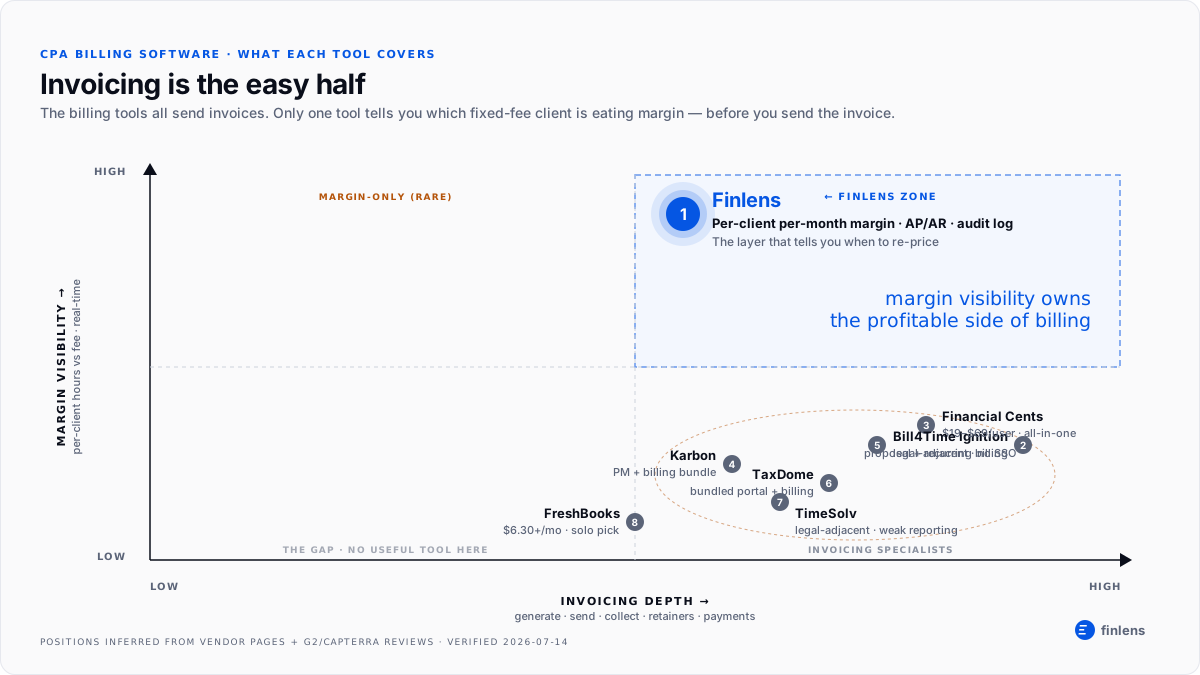
The margin-visibility map: where each tool sits
The visual below shows two dimensions that matter for CPA billing: invoicing depth (how well tool sends and collects) and margin-visibility depth (how well tool tells you which client is eating hours before you invoice). Every listicle stacks these tools as if they compete on both axes. They don't most are strong on one and thin on other.
Which billing tool fits which firm type
Solo CPA (1–2 people, under 20 clients). FreshBooks for invoices; Finlens for books and margin visibility once you have 5+ recurring monthly clients.
Small firm (5–20 users, mixed billing). Financial Cents for workflow+billing bundle; Finlens for margin layer that Financial Cents doesn't cover on books work.
Advisory / CAS firm on recurring monthly. Ignition for engagement-to-invoice; Finlens for per-client margin visibility that tells you when to re-price.
Tax-heavy firm. TaxDome for portal+billing bundle; Finlens on books for those same clients.
Law-adjacent CPA (trust accounting, heavy hourly). Bill4Time or TimeSolv; Finlens if firm also runs recurring monthly books.
More context on surrounding tools in our teardowns on accounting firm billing software for recurring monthly invoicing.
FAQs
What is best billing software for CPA firms in 2026?
For firms on fixed-fee monthly retainers, Ignition leads for engagement-to-invoice; Financial Cents for small-firm all-in-one; TaxDome for tax-heavy bundled workflow. But tool that most affects your billing outcomes isn't invoicing platform it's whatever surfaces per-client margin before you send invoice. That's what Finlens covers upstream of any billing tool.
How much does CPA billing software cost?
2026 pricing: FreshBooks $6.30–$19.50/mo; Financial Cents $19–$69/user/mo; Uku $19/member/mo; TaxDome ~$39.95–$49.95/user/mo (annual); Ignition premium tier; Karbon $59–$89/user/mo; Bill4Time and TimeSolv in mid range.
Do CPAs need separate time tracking and billing software?
Not necessarily. Financial Cents, Karbon, TaxDome, and Ignition all bundle time tracking with billing. Separate tools (BQE Core, Bill4Time, TimeSolv) are stronger for firms with heavy hourly billing and complex retainer accounting.
What's difference between value billing and time billing for CPAs?
Time billing invoices by billable hour (traditional legal-adjacent model). Value billing (fixed-fee monthly retainers) is where most CAS practices live. The billing tools handle both but only Finlens shows per-client margin risk on fixed-fee work, which is what determines whether value billing is actually profitable.
Can billing software integrate with QuickBooks Online?
Yes. Every tool referenced above syncs with QBO. Finlens is built natively on QBO's two-way sync and pushes reconciled books through so your billing tool reads clean numbers regardless of which one you pick.
Which CPA billing software has best reviews?
Financial Cents pulls strong small-firm sentiment; TimeSolv is repeatedly praised for customer service in Capterra reviews; Ignition holds strong positive sentiment among CAS firms. Rating averages hide fit story review complaints matter more.
Does Finlens replace CPA billing software?
No. Finlens shows per-client margin data and manages AP/AR (aging, bill matching, overdue reminders) but doesn't generate proposals or handle engagement letters. Pair it with Ignition, Financial Cents, or your existing billing tool.

