
Best Client Collaboration Software for Accountants and CPAs


Every accounting firm has a version of the same problem: client documents scattered across email threads, text messages, and random Dropbox links, while your team plays detective trying to figure out what's been received and what's still missing. The document chase alone can eat up hours each week—time that doesn't scale and doesn't grow your practice.
Client collaboration software exists to fix this, but the options range from simple file vaults to full workflow automation platforms. This guide breaks down what to look for, compares the leading tools for accountants and CPAs, and walks through how to actually get clients using whatever you choose.
Key Takeaways
- Client collaboration software centralizes document exchange, secure messaging, and workflow tracking between accounting firms and their clients—replacing scattered email threads and shared drives.
- The best tools go beyond file storage: look for QuickBooks integration, white-label branding, automated document collection, and workflow automation that actually reduces manual work.
- Top options include TaxDome for tax-focused CRM, Liscio for client communication, SmartVault for secure document storage, and Finlens for QBO firms that want collaboration plus automated month-end close.
- Firms managing 30+ clients can eliminate the document chase, give clients self-service access to financials, and close books faster by choosing software that connects directly to their existing ledger.
What Is Accounting Client Collaboration Software
Client collaboration software for accountants streamlines communication, document exchange, and workflow management between firms and their clients. Leading options include TaxDome (all-in-one CRM), Liscio (real-time chat and file sharing), SmartVault (secure document storage), and Client Hub (task management with client visibility). Secure portals eliminate email clutter and improve client onboarding by giving everyone a single place to work.
Unlike generic file-sharing tools like Dropbox or Google Drive, accounting client collaboration software is purpose-built for firm-client workflows. It understands that you're collecting bank statements, not vacation photos—and that compliance, audit trails, and data isolation actually matter when data breaches cost U.S. companies $10.22 million on average.
Most platforms include three core components:
- Client portal: A secure, branded space where clients upload documents and view their own financial information
- Document collection: Automated requests for receipts, statements, and tax documents—with tracking for what's still missing
- Workflow coordination: Task tracking and status visibility so both the firm and client know where things stand
The distinction matters. A shared folder holds files. Collaboration software moves work forward.
Why Accounting Firms Use Client Management Software
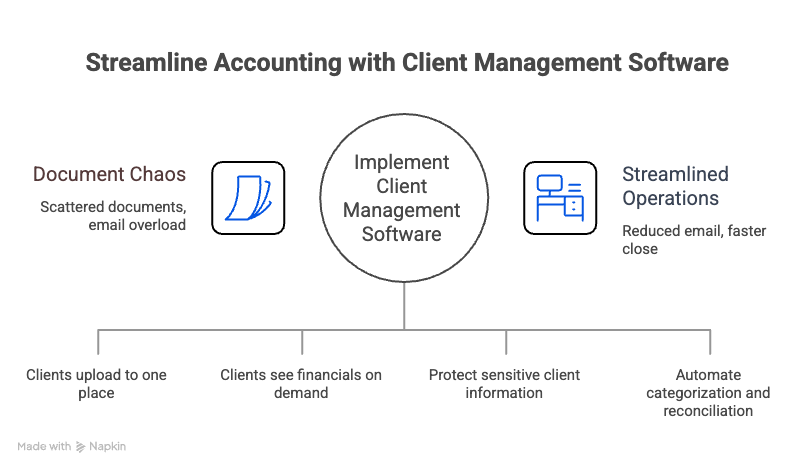
Eliminate the Document Chase and Reduce Email Overload
If you've ever searched your inbox for "bank statement" and found 47 results across 12 clients, you already know the problem. Documents arrive via email, text, Dropbox links, and sometimes fax. Tracking what's been received, what's missing, and what version is current becomes a job in itself.
A centralized portal replaces this chaos. Clients upload to one place. You see what's in and what's outstanding. The back-and-forth shrinks dramatically.
Give Clients Self-Service Access to Their Financials
Modern clients expect on-demand visibility. They don't want to email asking for their current cash balance or last month's P&L—they want to check it themselves.
A client-facing dashboard lets them see live balances, runway, income, and expenses without waiting for a report or scheduling a call. This positions your firm as more responsive and tech-forward, while reducing the volume of "quick question" emails hitting your inbox.
Strengthen Data Security for Sensitive Client Information
Email attachments and shared drives create real compliance risk. Sensitive financial data sitting in inboxes, forwarded threads, or unsecured folders is a liability waiting to happen.
Secure portals use encryption, role-based access controls, and audit trails to protect client information. For firms handling tax returns, payroll data, or financial statements, this isn't optional—it's table stakes.
Speed Up Month-End Close with Automated Workflows
Here's where collaboration software diverges. Some tools stop at file storage. Others go further, automating categorization, reconciliation, and close tasks directly.
When document collection flows into automated workflows, you're not just organizing files. You're eliminating the manual handoffs that slow down every close cycle. The difference between a portal and a month-end close platform is whether it does the work or just holds the paperwork.
.png)
What to Look for in Client Collaboration Software for Accounting Firms
Secure Document Upload Portal and Data Protection
Any tool you consider will ideally offer encryption (both in transit and at rest), SOC 2 compliance, and client-specific access controls. Your clients are trusting you with sensitive financial data—the software you use reflects that responsibility.
Features worth looking for include two-factor authentication, permission-based access, and detailed audit logs that track who viewed or downloaded what.
Integration with QuickBooks Online and Accounting Software
The best collaboration tools sync with your existing general ledger—no migration required. If you're running clients on QuickBooks Online, you want software that connects directly, pulling data in real time and pushing updates back without manual exports.
Shallow integrations that require CSV uploads or one-way syncs create more work, not less. Deep, two-way QBO sync is the standard to aim for.
White-Label Client Portal Branding
White-label portals let you present dashboards under your firm's brand, not the software vendor's logo. This matters for client perception—your clients see your name, your colors, your professionalism.
Some platforms offer white-labeling as a premium feature; others include it by default. If brand consistency matters to your firm, confirm this before committing.
Workflow Automation Beyond File Storage
There's a meaningful difference between passive portals (file storage only) and active platforms that automate tasks. A folder holds documents. A workflow moves them through transaction categorization, review, and posting.
The question worth asking: does this tool just store files, or does it actually reduce the hours your team spends on repetitive work?
Client Onboarding and Document Collection Automation
Strong onboarding software auto-sends document requests, tracks what's missing, and follows up with clients automatically. This eliminates the manual chasing that eats up staff time during busy season.
Features to look for include customizable request templates, deadline tracking, and automated reminders. The goal is to get clients trained on the portal from day one.
Real-Time Client Dashboards and Financial Visibility
Live dashboards showing cash, runway, income, and expenses shared via link with no client login required replace ad-hoc spreadsheet reporting. Clients get visibility without extra work from your team.
This feature is especially valuable for advisory-focused firms looking to differentiate their services, given CAS revenue is projected to double in three years.
Best Client Portal Software for Accountants and CPAs
The right choice depends on whether you primarily want file storage, practice management, or full close automation. Here's how the leading options compare.
Finlens
Best for: QBO firms that want collaboration plus automated month-end close
Finlens isn't just a portal—it does the work. The platform ingests documents, categorizes transactions with AI, reconciles accounts, and syncs everything back to QuickBooks Online. White-labeled dashboards let clients see live financials under your firm's brand, shared via link with no login required.
Fit: Ideal for firms managing 30+ clients who want to scale without adding headcount.
Limits: Built specifically for QuickBooks Online; not designed for Xero or desktop accounting software.
→ Explore Finlens for Accountants
TaxDome
Best for: Tax-focused practices wanting CRM, billing, and client portal in one
TaxDome combines secure messaging, document storage, e-signatures, and workflow automation in a single platform. It's particularly strong for tax preparation workflows and client communication.
Fit: Great for tax-heavy practices that want an all-in-one solution.
Limits: Less depth on bookkeeping automation and month-end close workflows.
Client Hub
Best for: Bookkeeping firms wanting practice management with built-in client communication
Client Hub offers task tracking, document management, and client-facing project updates. The interface is designed to be simple for clients to use, which helps with adoption.
Fit: Strong for firms prioritizing ease of use and client experience.
Limits: Doesn't automate accounting tasks like categorization or reconciliation.
SmartVault
Best for: Secure document storage and e-signatures
SmartVault integrates with QuickBooks, Lacerte, and ProSeries, making it a natural fit for firms already using those tools. The focus is on secure file management rather than workflow automation.
Fit: Ideal for firms that primarily want a secure document vault with strong integrations.
Limits: More focused on file management than active workflow automation.
Liscio
Best for: Client communication messaging, document requests, e-signatures
Liscio replaces email threads with secure, organized client communication. Push notifications and mobile access make it easy for clients to respond quickly. For QBO firms, understanding what QuickBooks handles natively helps clarify where a tool like Liscio fills the gap.
Fit: Strong for firms where communication bottlenecks are the primary pain point.
Limits: Doesn't touch the ledger or automate accounting tasks.
Karbon
Best for: Workflow and practice management across the firm
Karbon offers robust task tracking, team collaboration, and email integration. The client portal is a secondary feature rather than the core focus.
Fit: Best for firms that want firm-wide workflow management with client visibility as an add-on.
Limits: Client portal functionality is less developed than dedicated portal tools.
Content Snare
Best for: Structured document collection via custom forms
Content Snare excels at collecting specific documents through customizable request forms. It's particularly useful for onboarding and tax organizers.
Fit: Ideal for firms with complex document collection requirements.
Limits: No accounting automation—purely a collection tool.
Clustdoc
Best for: Client onboarding workflows and intake forms
Clustdoc offers compliance-ready onboarding with branded portals and conditional logic forms. It's strong at getting new clients set up efficiently.
Fit: Best for firms focused on streamlining the onboarding process.
Limits: Doesn't connect to the ledger or automate ongoing accounting work.
How to Compare Client Portal Solutions for Your Firm
Most firms end up layering an average of 8 different digital tools—a portal here, a document tool there, a practice management system on top. Platforms that combine collaboration with workflow automation reduce this tool sprawl and eliminate the friction of moving data between systems.
Best Practices for Implementing Client Portal Software for Accountants
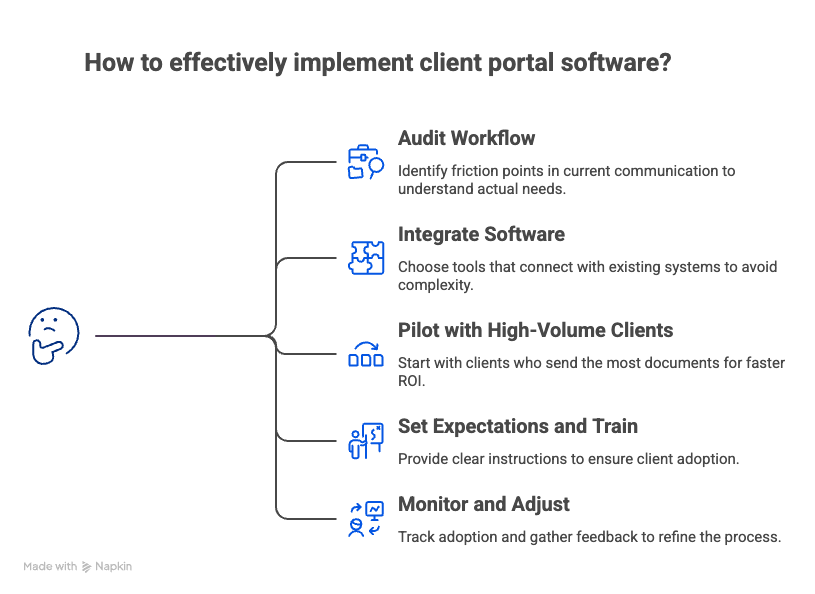
1. Audit Your Current Client Communication Workflow
Before choosing software, map where documents come in today—email, text, Dropbox, client uploads to your server. Identify the biggest friction points. Where do things get lost? Where do you spend the most time chasing?
This audit reveals what you actually want, not just what sounds good in a demo.
2. Choose Software That Integrates with Your Existing Stack
Prioritize tools that connect to QuickBooks Online, your practice management system, and communication tools like Slack. Avoid anything that requires migrating clients to a new general ledger.
The goal is to add capability, not complexity.
3. Start with High-Volume Clients First
Pilot the portal with clients who send the most documents or ask the most questions. High-volume relationships are where you'll see the fastest ROI—and where you'll learn what works before rolling out firm-wide.
4. Set Clear Expectations and Train Clients on the Portal
Send a simple onboarding email explaining what to upload and where. Most adoption failures come from unclear instructions, not bad software.
Consider creating a short video walkthrough or one-page guide. The easier you make it, the faster clients will stop emailing attachments.
5. Monitor Adoption and Adjust Based on Feedback
Track which clients are using the portal versus still emailing. Follow up with non-adopters—sometimes a quick phone call is all it takes. Refine your process based on what you learn.
How QBO Firms Use Finlens to Collaborate and Close Faster
For firms running clients on QuickBooks Online, the real bottleneck often isn't document collection—it's what happens after the documents arrive. Categorizing transactions, reconciling accounts, drafting accruals, and coordinating the close across dozens of clients still eats up hours every month.
Finlens combines client collaboration (white-labeled dashboards, document ingestion) with automated close workflows (AI categorization, reconciliation, accruals). Everything syncs to QBO—no new general ledger required. This AI layer for QuickBooks gives your clients real-time visibility into their financials under your brand, while your team spends minutes reviewing instead of hours reconciling.
→ Explore Finlens for Accountants
.png)
FAQs About Accounting Client Portal Software
What is the difference between a client portal and client collaboration software?
A client portal is a secure space for file uploads and downloads—essentially a branded folder. Client collaboration software adds workflow automation, task tracking, and real-time communication, going beyond passive storage to actively move work forward.
How much does client portal software for accountants typically cost?
Pricing varies widely. Some platforms charge per user, others per client, and some use tiered plans based on features. Per-client pricing with unlimited team members helps avoid surprise costs as your firm grows.
Can client collaboration software replace document tools like Dext or Hubdoc?
Some platforms—like Finlens—include document extraction and posting directly to QBO, eliminating the need for separate receipt-capture tools. Others focus purely on collection and storage, requiring you to maintain additional software for processing.
How do accounting firms get clients to actually use the portal?
Start with clear onboarding instructions and a simple walkthrough. Limit alternative channels—if you keep accepting email attachments, clients will keep sending them. Show clients the benefit of self-service access to their financials, and follow up with non-adopters directly.

