
Business Expense Tracking: The Complete Guide for Small Businesses and CPA-Firm Clients


Business expense tracking is ongoing discipline of recording, categorizing, and reconciling every dollar business spends, so numbers on books actually reflect reality and deductions on tax return can be defended if IRS asks.
It's everyday version of what expense management process describes at a higher level, and it's where most of day-to-day work actually happens, meaning categorization, receipt capture, reconciliation to bank feeds, and coding to correct chart of accounts line.
Every business does some form of expense tracking, whether it's a stack of receipts in a shoebox or a fully automated flow that pushes from corporate card to QuickBooks in seconds. The gap between those two extremes is difference between books that close on time and books that require a March scramble.
This guide covers what business expense tracking actually is in practice, why it matters more than most owners realize, methods available, a six-step setup a small business can follow to get started, categories that show up on almost every business's P&L, and mistakes that consistently undermine process.
What business expense tracking really means
At plainest level, business expense tracking is a set of habits and tools that answer four questions about every business purchase: what was bought, when and from whom, how it should be categorized, and whether receipt or supporting documentation is in system.
The tracking layer sits between raw transaction (a card swipe, a check written, a bill paid) and accounting records (general ledger, P&L, tax return). It's what turns a bank statement full of vendor names into structured data business can actually use.
Companies that treat tracking as an ongoing discipline see accurate books all year, catch problems within days rather than months, and hand clean data to their CPA at tax time. Companies that treat it as a year-end project instead see reconstructed categorization, guessed business purposes, and missing receipts that turn into disallowed deductions.
The stakes matter because expense data feeds three downstream systems at once. The books use it for P&L and balance sheet, tax return uses it for deductions, and leadership uses it for budgeting and forecasting.
Sloppy tracking degrades all three, and damage compounds quickly.
Why tracking business expenses actually matters
The benefits of proper expense tracking show up across five distinct areas, and each one alone would justify discipline.
Tax deductions business can defend. Every deduction claimed on tax return has to be supported by contemporaneous records. That means amount, date, vendor, business purpose, and category for each purchase, along with receipt when amount exceeds IRS threshold.
Missing that documentation means losing deduction in an audit, and losing deductions means paying tax on income that should have been offset. For sole proprietors and single-member LLCs filing Schedule C, tracked expenses feed Lines 8 through 27 directly, and small business tax deductions guide breaks down which categories move needle most.
Cash flow visibility. Owners who track expenses in real time see cash flow patterns as they emerge, rather than discovering three months later that recurring software subscriptions doubled or that vendor invoices are piling up. This visibility is what makes short-term decisions possible, from timing a big purchase to knowing whether payroll clears next Friday.
Budget accuracy. A budget built on real historical categorized spend is dramatically more accurate than one built on estimates. Real tracking data lets finance forecast next quarter with confidence, spot categories drifting over budget within days, and give leadership team numbers they can actually use.
Budgets built without tracking data tend to be aspirational at best and fictional at worst.
Fraud and error prevention. Regular tracking creates an audit trail that catches duplicate submissions, personal charges dressed up as business expenses, and vendor mistakes long before they compound.
Without tracking, these errors get lost in monthly card statements and often don't surface until year-end review, at which point recovery is often impossible.
Fundability and investor readiness. Businesses raising capital or seeking a loan need clean historicals, and clean historicals require consistent tracking. Investors and lenders look for well-organized books as a proxy for competent management, and a business that can produce categorized P&L in seconds signals financial discipline in a way messy books never can.
What "tracking" actually includes for each expense
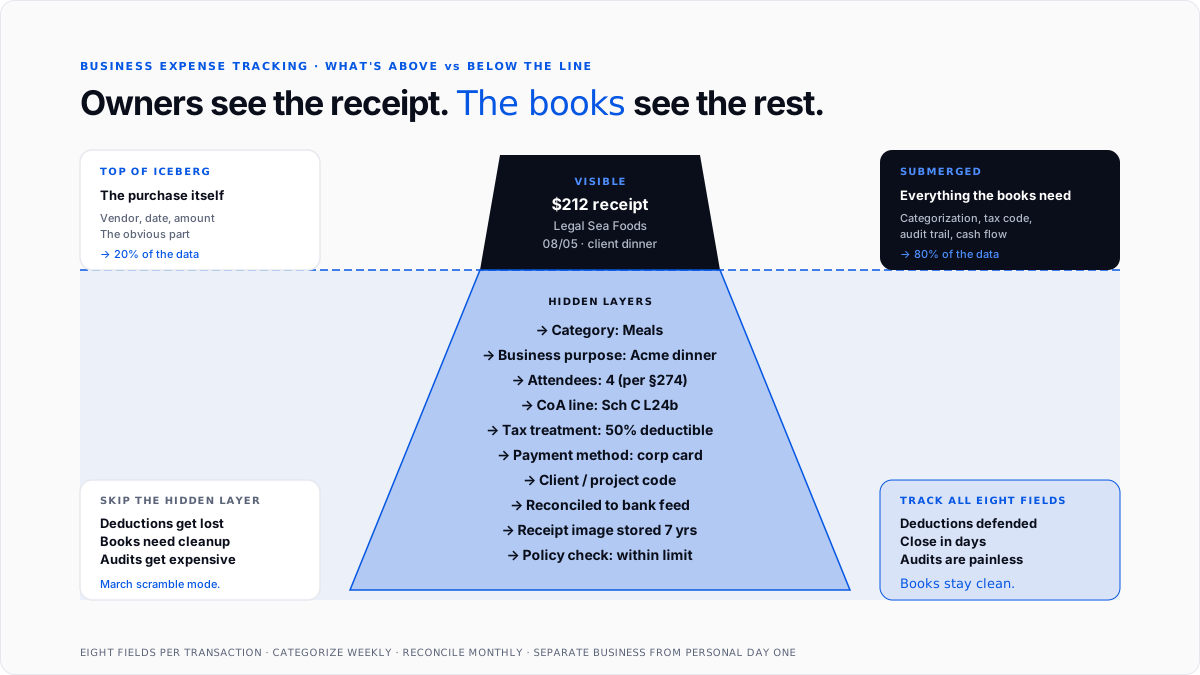
Every purchase that flows through tracking system needs enough data attached to it that a downstream user, meaning a bookkeeper, a CPA, or an auditor, can understand what happened without asking questions.
The core fields on every tracked expense are:
Businesses that capture all eight fields consistently have books that close cleanly. Businesses that skip fields (particularly business purpose and receipts) end up with categorized transactions that can't be defended in audit and can't be usefully analyzed for cost patterns.
The methods small businesses actually use to track expenses
There are five common methods for tracking business expenses, and most small businesses use some combination of them.
Manual spreadsheet tracking. The employee or owner records each expense in a Google Sheet or Excel workbook, one row per purchase, with columns for core fields. This is simplest method and it works fine at very low volume, though it requires discipline and is highly error-prone as volume grows.
The upside is zero cost and total flexibility. The downside is manual data entry, missed transactions, and no automatic reconciliation to bank feeds.
Dedicated expense tracking apps. Mobile apps let employees photograph receipts, and OCR extracts merchant, date, amount, and tax details. Some apps pull card transactions automatically from corporate card feeds. Apps in this category are lightweight and often sit alongside broader accounting software rather than replacing it.
Integrated accounting tools. Full accounting platforms like QuickBooks, Xero, and NetSuite include expense tracking as part of broader system. Bank feeds pull transactions automatically, software suggests categorization based on prior rules, and approved transactions flow straight into the general ledger with no manual step in middle.
For most small businesses running any kind of formal accounting, this is sensible default because tracking is not a separate system.
Corporate card programs with built-in tracking. Cards from Ramp, Brex, Mercury, and similar issuers combine spend controls, receipt capture, categorization, and sync to accounting software into one workflow. Employees photograph receipts from mobile app immediately after purchase, and categorization happens at point of transaction rather than at month-end.
AI-driven bulk categorization tools. For businesses with historical transactions that need to be cleaned up and categorized retroactively, tools like ones covered in best AI tools for bulk transaction categorization guide can process months or years of unclassified data in minutes.
This is often first move a business makes after realizing their tracking has been inconsistent.
Most small businesses combine two or three methods, meaning corporate cards for most spend, mobile app receipt capture for edge cases, and QuickBooks or Xero holding categorized ledger. The exact mix depends on team size, spending volume, and level of automation owner is ready to invest in.
The six-step setup a small business can actually follow
Getting from zero tracking to functional tracking is more achievable than most owners assume. The following six steps produce a working system that scales as business grows.
Step 1: Open dedicated business accounts. The single most important move is opening a separate business bank account and getting at least one business credit card that isn't used for personal spending. Commingling personal and business transactions is top reason small business books look chaotic, and it's fastest way to lose deductions in an audit.
Once accounts are separated, every business transaction happens through business account, and personal transactions never touch it.
Step 2: Choose tracking method. Pick method (or combination) that fits current business volume. Fewer than twenty transactions a month can survive on a spreadsheet for a while. Above that volume, moving to QuickBooks, Xero, or similar accounting software with connected bank feeds pays back setup effort quickly.
Step 3: Set up chart of accounts. The chart of accounts is categorization backbone. Standard categories map to Schedule C lines for sole proprietors, or to standard business tax return lines for LLCs, S-corps, and C-corps.
Setting this up correctly at start saves recategorization work later.
Step 4: Digitize receipt capture from day one. Every receipt should be captured digitally as it happens, either through a mobile receipt app, a corporate card program with built-in capture, or a simple "email it to myself" habit.
Paper receipts fade, get lost, and are difficult to search, so shifting to digital immediately is one of highest-impact habits an owner can build.
Step 5: Set a categorization discipline. Every transaction that hits tracking system should be categorized within a week, ideally as it happens. Delayed categorization is biggest source of March-scramble problem. If categorization can't happen inline, blocking off two hours a week to review and code recent transactions is a workable substitute.
Step 6: Reconcile monthly. At end of every month, match categorized transactions in tracking system against bank statement and credit card statement. Any discrepancies get resolved before books close for that month, so problems don't compound into subsequent periods.
This monthly rhythm is what separates books that stay clean from books that require cleanup projects like ones covered in automate bookkeeping cleanup.
Business expense categories that show up on almost every P&L
Almost every small business runs across same set of categories, though mix varies by industry. The core categories that map to Schedule C lines are:
- Advertising and marketing (Line 8)
- Car and truck expenses (Line 9)
- Contract labor paid to 1099 workers (Line 11)
- Depreciation and Section 179 (Line 13)
- Employee benefits (Line 14)
- Insurance excluding health (Line 15)
- Interest on business loans and credit cards (Line 16)
- Legal and professional services (Line 17)
- Office expense (Line 18)
- Rent for business property or equipment (Line 20)
- Repairs and maintenance (Line 21)
- Supplies used in business (Line 22)
- Taxes and licenses (Line 23)
- Travel (Line 24a)
- Meals at fifty percent (Line 24b)
- Utilities (Line 25)
- Wages paid to W-2 employees (Line 26)
- Other expenses that don't fit above (Line 27)
Categorization matters because different categories carry different tax treatment. Meals are 50% deductible, client entertainment is 0% deductible post-TCJA, home office follows its own rules, and some categories require additional documentation like mileage logs.
Miscategorizing a client meal as "office supplies" doesn't just make P&L less useful, it also changes deduction business gets to claim.
For businesses in specialized industries, standard categories get supplemented with industry-specific ones. Construction firms track materials by job. Restaurants track food cost variance separately from general supplies.
SaaS companies split hosting from generic software subscriptions. The base categories stay same, but sub-category depth adjusts to what business actually needs to manage.
The five mistakes that undermine tracking
Five failure modes show up over and over across small businesses, and each of them is preventable with a bit of discipline at setup.
Commingling personal and business spending. This is biggest single mistake, and it makes every other tracking problem worse. Personal charges on business cards, and business charges on personal cards, produce books that can't be trusted and returns that fall apart in an audit.
The fix is separating accounts on day one and never mixing again.
Waiting until year-end to categorize. Categorizing eleven months of expenses in December is a nightmare, and it introduces errors that would have been caught within days if discipline had been ongoing. Categorization has to happen weekly at minimum, and preferably at moment of purchase.
Missing receipts on purchases that need them. The IRS requires substantiation for expenses over $75 (and always for lodging), and missing receipts are fastest way to lose deductions. Digital receipt capture at moment of purchase eliminates this problem, but only if habit is enforced consistently.
Using inconsistent categorization. The same type of purchase should always end up in same category. A software subscription categorized as "software" one month and "office expense" next produces reports that can't be compared and trends that can't be spotted. Written categorization rules and periodic review catch inconsistency.
Not reconciling to bank feeds. Tracked transactions have to match what actually cleared bank. Skipping monthly reconciliation means small errors compound into big ones, and by time anyone notices, unwinding them takes hours.
Where tracking sits in bookkeeping stack
Business expense tracking is middle layer of small business finance stack.
The flow, at its simplest, is: bank accounts and cards at top, then tracking (whether spreadsheet or software), then accounting software (QuickBooks, Xero, NetSuite), then financial statements, and then tax return.
The tracking layer's job is to add structure to raw transactions, meaning categorization, business purpose, receipt attachment, and account coding, so that everything downstream has metadata it needs. Skip or rush tracking layer, and every downstream system suffers.
For CPA firms managing multiple client books, standardized tracking across clients is one of highest-leverage operational moves available. Every hour saved per client per month compounds fast across whole book.
Manual vs. automated tracking
The gap between running tracking on spreadsheets and running it on connected software is bigger than most owners appreciate before they've tried both.
Manual tracking is cheap up front and expensive over time. Every transaction requires typing, every category requires a manual decision, and every receipt requires manual attachment. Volume above about a hundred transactions a month starts to break model, and error rates climb sharply.
Automated tracking is more expensive at setup but dramatically cheaper per transaction. Bank feeds pull transactions automatically, OCR extracts receipts, categorization rules learn from prior decisions, and reconciliation runs continuously in background.
The setup investment usually pays back within one to two years for any business processing more than a few hundred transactions a month, and often faster once you count bookkeeper hours saved and error prevention.
Conclusion
Business expense tracking is everyday discipline that turns raw transactions into books that close cleanly and returns that hold up in audit.
The mechanics aren't complicated (record each purchase with right metadata, categorize consistently, capture receipts as they happen, and reconcile monthly to bank feeds), but payoff is enormous.
For small businesses building process from scratch, highest-return moves are separating personal and business accounts, choosing an accounting platform with connected bank feeds, setting up chart of accounts to match Schedule C lines, and enforcing a weekly categorization rhythm from start.
For CPA firms with many client books, standardizing tracking workflow across book is one of biggest operational levers available, because every hour saved per client per month compounds fast into a meaningful margin lift over year.
Frequently asked questions
How do I keep track of my business expenses?
Open a dedicated business bank account and business credit card, pick a tracking method (spreadsheet for very low volume, accounting software with bank feeds for anything more), digitize receipts as purchases happen, categorize weekly against a written chart of accounts, and reconcile monthly to bank statements.
These five habits cover fundamentals.
What is best way to track business expenses?
For most small businesses, highest-return setup is a corporate card program paired with mobile receipt capture and direct sync to QuickBooks or Xero. That combination automates categorization and captures documentation at moment of purchase, eliminating most manual work.
Do I need business expense tracking software or can I use a spreadsheet?
Spreadsheets work below about twenty transactions per month with strong discipline. Above that volume, dedicated accounting software with connected bank feeds saves so many hours that license fee is negligible in comparison.
What business expenses can I track for tax deductions?
Ordinary and necessary business expenses across standard Schedule C categories: advertising, car and truck, contract labor, depreciation, insurance, interest, legal and professional services, office expense, rent, repairs, supplies, taxes and licenses, travel, meals (50%), utilities, and wages.
How long do I need to keep business expense records?
The IRS requires at least three years after return is filed, and seven years is practical best practice to cover extended audit windows for substantial understatement. Digital storage is fine as long as records are legible and complete.
What is difference between expense tracking and expense management?
Expense tracking is ongoing recording and categorization of every business purchase. Expense management is broader system that includes policy setting, approval workflows, reimbursement, and reporting on top of tracking. Every business needs tracking. Businesses with multiple employees need full management framework.
Can I track business expenses using my personal credit card?
Technically yes, but it's a mistake. Commingling personal and business spending makes categorization harder, complicates tax preparation, and creates audit exposure. Open a dedicated business account before doing anything else.
How do I categorize a business expense correctly?
Match each purchase to a specific line on chart of accounts, following standard Schedule C categories for sole proprietors and equivalent lines for other entity types. When in doubt, look at where same category has been coded historically, and follow pattern for consistency.
What receipts do I need to keep for business expenses?
IRS Publication 463 requires receipts for lodging and for any non-lodging expense over $75, though most businesses require receipts on every purchase to keep workflow consistent. Even for sub-$75 purchases, business still needs to substantiate amount, date, vendor, business purpose, and attendees for meals.
How do I set up expense tracking for a brand new business?
Open a business bank account and business credit card, pick either QuickBooks, Xero, or a spreadsheet depending on expected volume, and set up a chart of accounts based on Schedule C for a sole proprietor or a standard business template for other entity types.
Connect bank feeds, decide on a receipt capture app, and set a weekly review rhythm. That's whole setup, and it takes less than a day for most owners.

