
Digits vs Kick for AI Bookkeeping in 2026


Freelancer or solo SMB? Kick. Banking and bookkeeping in one app, free tier available.
Founder ready to leave QuickBooks Online? Digits. AI-native GL trained on $825B in transactions.
CPA firm managing clients on QuickBooks Online? Finlens. No migration, multi-client dashboard, $30/client/month.
Key takeaways
- Digits is no longer an analytics layer. Its March 2025 Autonomous General Ledger launch made it a full QuickBooks Online replacement, trained on $825 billion in transactions.
- Kick is an embedded bank account with AI bookkeeping for SMBs and freelancers. It also requires leaving your existing accounting system.
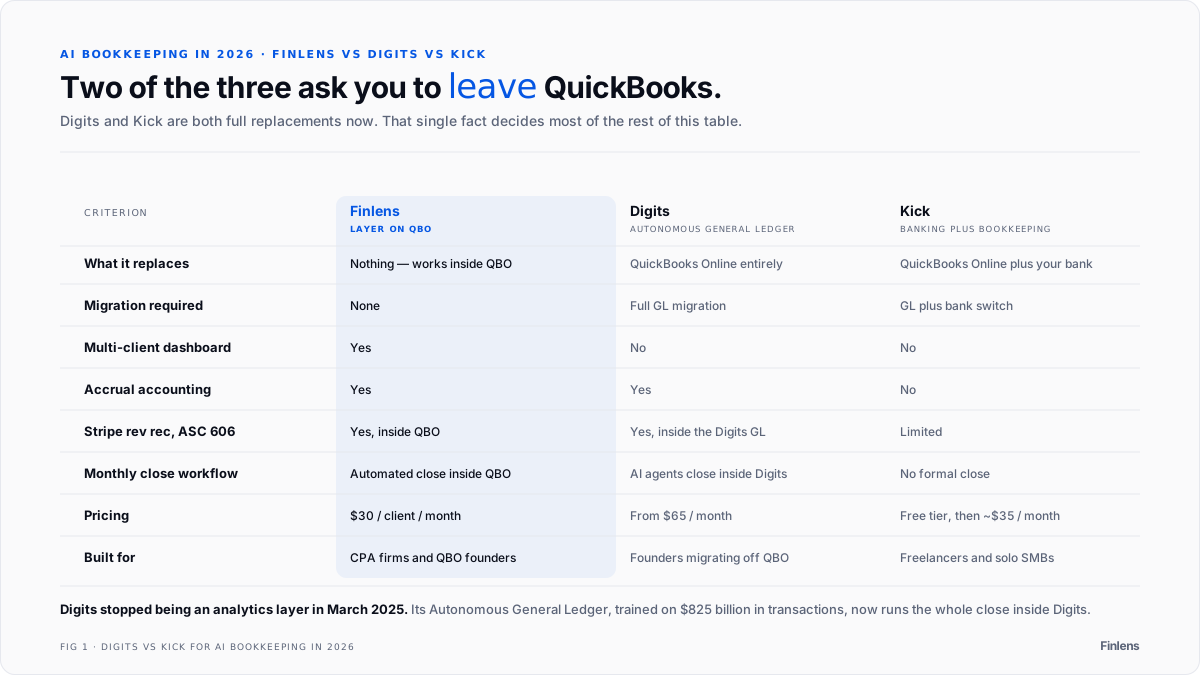
- Both Digits and Kick require migration away from QuickBooks Online. Neither has a multi-client dashboard.
- Finlens works inside QuickBooks Online. No migration, no new bank account, no new GL. Multi-client dashboard included.
- If you'll migrate to a new GL, Digits is the most advanced option. If you want banking and bookkeeping bundled, Kick fits. If you're an accounting firm on QuickBooks Online, Finlens is the only tool built for your workflow.
At a glance
Finlens: AI close automation inside QuickBooks
OnlineMigration: None required
Automation: Full close, categorization, reconciliation, accruals
Pricing: $30 / client / month
Best for: Accounting firms and QuickBooks Online founders
Digits: Autonomous General Ledger replacing QuickBooks
OnlineMigration: High, full GL switch
Automation: Full close via AI agents inside Digits AGL
Pricing: From $65 / month ·
Best for: Founders willing to migrate from QuickBooks Online
Kick: Embedded banking plus AI bookkeeping for SMBsMigration: Very high, GL plus bank switch
Automation: Categorization and tax prep
Pricing: Free tier, paid from ~$35 / month
·Best for: Freelancers and self-employed SMB owners
Does Digits replace QuickBooks Online or does it sit on top of it?
The answer changed in 2025. Digits launched its Autonomous General Ledger (AGL) in March 2025 and repositioned from an analytics layer into a full QuickBooks Online replacement. Digits AGL handles transaction categorization, reconciliation, journal entries, invoicing, bill pay, and month-end close. All of it happens inside Digits, not inside QuickBooks Online.
It's a full migration, not an add-on.
There's also some history worth knowing. Digits originally launched as a platform on top of QuickBooks Online. The company then ran its own full-service bookkeeping practice with in-house CPAs, which put it in direct competition with the accounting firms it was marketing to at the same time. Digits shut that practice down and sold it off in 2024. Today it describes itself as autonomous software where business owners manage their books with AI. Their website puts it plainly: "Most activity is auto-booked."
What Digits does well:
- Its proprietary models are trained on $825 billion in transactions and reportedly outperform GPT-4o by 54% on categorization accuracy.
- AI agents run entire workflows end to end, stopping only when human review is needed.
- Real-time dashboards, drag-and-drop reporting, and a 24/7 AI assistant are all included.
- A Firm Signature add-on lets accounting firms put their branding on the Digits interface for clients.
Where Digits runs into trouble:
- You have to migrate. Historical data, chart of accounts mapping, and client onboarding are real costs. They don't go away just because the software is good.
- Firm Signature is a premium add-on, not standard. Multi-client management isn't the core product.
- Firms with 20 clients on QuickBooks Online can't adopt Digits for those clients without migrating every single one of them.
- Pricing starts at $65 per month. Verify current tiers at digits.com/pricing.
Two community threads give a good read on how people are actually evaluating this. In r/smallbusiness: "Anyone have experience using Puzzle or Digits?", founders discuss whether AI-native GLs are ready for day-to-day use and where categorization still falls short. In r/Accounting: "Digits AI accounting — reputable?", accountants debate whether a tool with a short track record is trustworthy enough for real client work.
Bottom line. If you're a founder ready to migrate from QuickBooks Online and want a GL built for AI from scratch, Digits is worth a serious look. If you're an accounting firm with clients already on QuickBooks Online, the migration cost alone rules it out.
Does Kick automate bookkeeping or is it primarily a smart bank account?
Best for freelancers and self-employed owners
· Migration: Very high, GL plus bank switch
· Automation: Categorization and tax prep
· Free tier, paid from ~$35 / month
Kick is a bank account first. The bookkeeping is built on top of the banking, not the other way around. When you bank through Kick, your transactions categorize in real time. The company claims 97% of transactions are auto-categorized with no manual input.
What Kick does well:
- You don't need separate accounting software for a simple self-employed setup.
- The free tier covers categorization and basic reporting for most solo operators.
- Tax prep is built in, which cuts a lot of the year-end work.
- Setup is fast. Open the account, connect your existing accounts, done.
Where Kick runs into trouble:
- Switching your business banking is a bigger commitment than most established businesses will make. This isn't switching apps. It's switching banks.
- Accrual accounting, journal entries, formal period-end close, and ASC 606 revenue recognition aren't in scope.
- The firm workflow isn't built for accountants managing clients at scale.
- If you set up your categories wrong at the start, you'll lose deductions. That problem shows up at tax time, not at setup.
Three threads show how this plays out in practice. For a more detailed review of how Kick compares to Double (formerly Keeper), see the Double and Kick review. In r/smallbusiness: "Experiences with Kick bookkeeping", owners share what worked and what didn't. In r/Bookkeeping: "Opinion of Kick AI", bookkeeping professionals weigh in on where Kick fits for clients and where it creates problems. The consistent pattern: it works well for simple, single-entity businesses willing to switch banks. It doesn't hold up when complexity increases.
Bottom line. Kick is the right choice if you're a freelancer or small business owner who wants banking and bookkeeping in one app and can switch your business banking. It's not the right choice for SaaS companies, multi-entity businesses, or accounting firms. For a direct Digits vs QuickBooks feature comparison, see Digits vs QuickBooks.
How does Finlens compare to Digits and Kick for accounting firms?
Best for accounting firms and QuickBooks Online founders
· Migration: None, works inside QuickBooks Online
· Automation: Full close, categorization, reconciliation, accruals
· $30 / client / month
Here is the thing this comparison almost always misses. Digits and Kick are both full replacements for QuickBooks Online. Finlens isn't. Finlens works inside QuickBooks Online and automates the work that already happens there.
That's an architectural difference, not a preference.
There's a relevant thread on this exact tension at r/Accounting: "People need to stop trying to replace accounting". Accountants aren't against AI. They're skeptical of tools that try to replace the accountant rather than speed them up. Research from Stanford and MIT backs this up: accountants who use AI support more clients, close books faster, and produce better work. The tools that actually get adopted inside firms are the ones that make the accountant faster. For a head-to-head Truewind vs Finlens comparison, see Truewind vs Finlens.
For a firm with 20 clients on QuickBooks Online, migrating to Digits means migrating 20 clients. Chart of accounts mapping, historical data imports, client training, and the conversations that come when a client notices their financial software changed. That cost is real. It doesn't disappear because the AI is good.
Finlens doesn't require any of that. It connects to the QuickBooks Online books that already exist and starts automating without changing anything.
Here's what Finlens automates inside QuickBooks Online:
- Transaction categorization runs continuously. The AI learns from corrections. Accountants review exceptions with one click instead of working through the full queue.
- Bank reconciliation surfaces exceptions automatically. You're reviewing what didn't match, not manually matching everything.
- Accrual schedules post automatically. Prepaid expenses and deferred revenue don't require manual journal entries.
- Stripe revenue recognition calculates gross revenue, fees, refunds, and payouts, and splits annual subscriptions into monthly recognized amounts. This follows the five-step model in FASB ASC 606.
- Receipts forwarded by email are auto-matched to expenses.
- AP/AR aging is tracked with overdue notifications built in.
- Every client's close status is visible from one dashboard with one login.
Why the multi-client dashboard matters:
An accounting firm on Digits opens a separate Digits instance per client. An accounting firm on Kick manages each client separately. There's no aggregate view of who's behind, no cross-client exception dashboard, nothing.
Finlens shows the entire firm's book from one screen. That's the difference between a firm that can take on more clients and one that adds a staff member every time it does.
Firms who want to see this can visit the Finlens for accountants.
According to Finlens' data, one bookkeeper on Finlens can manage 300 or more businesses. The AICPA's guidance on technology in accounting practice consistently identifies transaction categorization and bank reconciliation as the highest-volume manual tasks in accounting firms. Those are the two workflows Finlens eliminates first.
The IRS requires businesses to keep records for at least three years from the date the tax return was filed. Books maintained in QuickBooks Online through Finlens are accurate and audit-ready for that full window, not just the current month.
Firms looking to increase capacity without hiring will find this is where the real capacity gain comes from: closing more books per month, not adding more headcount. For firms building broader AI workflows, the best ChatGPT prompts for accounting firms is a good companion to what Finlens automates.
Who should use Finlens instead of Digits or Kick:
If you manage multiple QuickBooks Online clients manually today, Finlens is the tool built for that workflow. SaaS founders can see how the QuickBooks Online integration works at the Finlens founders. If you evaluate Digits but can't absorb the migration cost, Finlens doesn't require it. If you evaluate Kick and can't move your business banking, Finlens gives you AI close automation without that.
Before Finlens: Open QuickBooks Online for each client, work through the uncategorized queue, reconcile the bank manually, post accrual entries, move to the next client. Repeat.
After Finlens: Categorization is done. Reconciliation flags what needs attention. Accruals post on schedule. The accountant reviews exceptions instead of processing everything from scratch.
For SaaS founders, the best tools for SaaS revenue recognition guide covers how Stripe revenue connects to QuickBooks Online properly. For firms evaluating the full stack, best accounting firm software for 2026 shows where Finlens fits in. For QuickBooks Online users who want to understand what best AI bookkeeping software looks like without migration, Finlens is the starting point.
What does month-end close look like with each tool?
With Digits, close happens inside Digits. AI agents run the workflow end to end and stop when they need human input. It's real close automation. But your books have to live in Digits. If you've made that migration, it works well.
With Kick, there's no formal close. Kick is self-managed bookkeeping with a year-end review cycle, not a monthly close process. If you need auditable period-closed financials or quarterly investor reporting, Kick isn't designed for that.
With Finlens, close is automated inside QuickBooks Online. Categorization happens throughout the month. Reconciliation flags exceptions as they come up. Accruals post automatically. By the time the close date arrives, the books are mostly done. The accountant reviews and approves instead of starting from scratch.
Firms that have moved to automated QuickBooks bookkeeping consistently describe the same shift: close becomes a review, not a build. Across 20 or 30 clients, that shift is what actually changes firm capacity. The best month-end close software guide covers how different deployment models affect this more than individual feature comparisons do.
Which tool is right for which buyer?
If you're a freelancer or small business owner willing to switch your banking and want one app for everything: Kick.
If you want a purpose-built AI-native GL and will migrate from QuickBooks Online: Digits.
If you run an accounting firm on QuickBooks Online and need to close more client books without adding headcount: Finlens.
If you're a SaaS founder on QuickBooks Online who needs Stripe revenue recognized correctly without switching systems: Finlens.
If you evaluated Digits but can't migrate your client book: Finlens. For a broader look at how Kick compares across its full competitor set, see the Kick comparison hub.
Digits and Kick are both real products with real AI capabilities. The question isn't which has better AI. It's whether migration is something you can and will do. Digits requires it. Kick requires it plus a banking change. Finlens doesn't require anything.
For accounting firms and QuickBooks Online founders, that's the whole comparison.

FAQ
What's the difference between Digits and Kick?
Digits is a full GL replacement for QuickBooks Online with AI agents that close the books. Kick is a bank account with bookkeeping built in, designed for freelancers and SMBs. Both require migration. Neither has a multi-client firm dashboard.
Does Digits replace QuickBooks Online?
Yes, as of March 2025. Digits launched an Autonomous General Ledger as a full replacement. Migration is required. It originally launched on top of QuickBooks, ran its own CPA practice, then sold that off in 2024.
Is Kick a replacement for QuickBooks Online?
For freelancers and simple businesses, yes. It requires switching both your accounting system and your bank. For SaaS companies, multi-entity businesses, or accounting firms that need formal close workflows, it isn't a fit.
Can either tool handle multiple clients for an accounting firm?
No. Both require separate accounts per entity. There's no aggregate view across clients. Finlens is the only tool in this comparison with a multi-client QuickBooks Online dashboard built specifically for accounting firms.
How accurate is the AI categorization?
Digits claims 54% better accuracy than GPT-4o on accounting tasks. Kick claims 97% auto-categorization. Finlens learns from each client's QuickBooks Online history and improves with corrections. All three get more accurate over time.
What does each tool cost?
Finlens is $30 per client per month, all features included. Digits starts at $65 per month, verify at digits.com/pricing. Kick has a free tier and paid plans from around $35 per month, verify at kick.co.
What happens to QuickBooks Online data if you switch to Digits or Kick?
Digits requires importing your data into its own GL. Kick requires a new bank account and new books. Finlens requires no changes. It works on your existing QuickBooks Online books from day one.
Which tool works best for a SaaS startup using Stripe?
Finlens handles Stripe revenue recognition inside QuickBooks Online, splitting annual subscriptions into monthly amounts per FASB ASC 606. Digits connects to Stripe inside its own GL. Kick has limited Stripe support.

