
Double HQ vs Kick Co: An Honest Head-to-Head for Accounting Firms


Key Takeaways
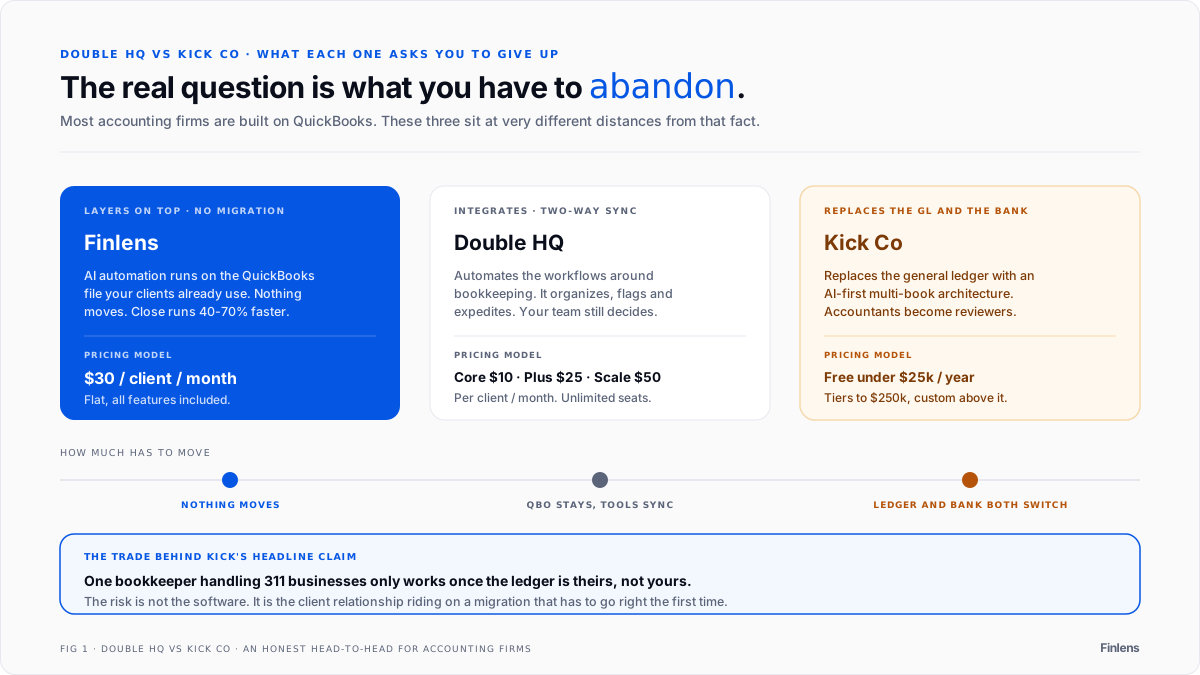
- The choice between Double HQ and Kick Co boils down to integrated practice management vs. a full AI bookkeeping replacement that requires migrating clients off QuickBooks.
- Most accounting firms are built on QuickBooks, but new tools often create friction by either sitting beside it or forcing a complete migration.
- The biggest barrier to adopting AI-native tools like Kick Co is the operational risk and client disruption involved in abandoning the QuickBooks ecosystem.
- Finlens offers a third path, adding an AI automation layer directly on top of QuickBooks to speed up month-end close by 40-70% without any migration. Learn more about Finlens for accountants.
You've probably heard both names by now. Double HQ keeps coming up in conversations about client workflow management. Kick Co gets mentioned whenever someone talks about AI-native bookkeeping automation. Both are genuinely interesting tools - and both are gunning for a spot in your firm's tech stack.
But here's the problem: most accounting firms are built on QuickBooks. And neither Double HQ nor Kick Co was designed to work with QuickBooks in the way your team actually needs.
That tension is exactly what this article is about. As one accountant put it on a recent Reddit thread about accounting automation: "Finding automation opportunities that work alongside your existing accounting software is key." That's the bar every tool in this comparison will be held to.
There's also a healthy dose of skepticism worth acknowledging. Accountants aren't rushing to become guinea pigs for unproven AI. When "the slightest variance or unexpected thing will trip it up," the cost isn't just a bad UX experience - it's a client relationship on the line. This comparison will cut through the hype and give you an honest look at what each platform actually delivers.
Double HQ vs. Kick Co: A Detailed Feature-by-Feature Breakdown
Before diving into specifics, here's a high-level snapshot:
Pricing Models: Pay-per-Client vs. Expense-Based Tiers
Double HQ uses a straightforward, per-client pricing model that scales predictably:
- Core Plan - $10/client/month: Includes two-way ledger integration, a custom-branded client portal, AI bank feeds, and task management.
- Plus Plan - $25/client/month: Adds one-click AI financial summaries and receipt management.
- Scale Plan - $50/client/month: Unlocks accruals & prepaids management and AI journal entries.
- Add-ons: Tax Suite at $200/month; team emails at $10/email/month.
Unlimited team members are included at every tier - you're only paying for connected clients. For firms with a stable client roster, this is easy to budget. (Source: Double HQ Pricing)
Kick Co ties pricing to a client's annual expense volume:
- Under $25k/year in expenses: Free.
- $25k–$250k/year: Access to Basic or Plus plans (30-day trial entry point).
- $250k+/year: Custom pricing required.
The free tier is genuinely attractive for firms serving early-stage startups. But for clients with growing transaction volumes, cost predictability gets harder to maintain. (Source: Kick Co for Accountants)
Depth of Automation: Workflow Assistance vs. Full Bookkeeping Replacement
This is where the two platforms diverge most sharply - not just in features, but in philosophy.
Double HQ automates the workflows around bookkeeping. It's designed to make your team more efficient, not replace the core GL tools they already use. Key capabilities include:
- Month-end close up to 3x faster using integrated file review tools
- Automatic flagging of miscoded transactions, uncategorized items, and missing payees
- Built-in task templates, internal chat, and 1099 management
The automation philosophy here is assistive: Double HQ organizes, flags, and expedites - your accountants still make the calls. (Source: Double HQ Bookkeeping Software)
Kick Co goes further - much further. Their goal is to replace the traditional general ledger with an AI-first system. They're building their own secure multi-book ledger architecture, and the vision is for AI to handle the repetitive work so accountants shift from preparers to reviewers. Their headline claim: "1 Bookkeeper can now handle 311 businesses."
CPA Anthony Sanchez reported that Kick "enabled us to decrease time-to-value by 60%," and bookkeeper Eoin Coney noted it made the firm "incredibly efficient on complex clients with high transaction volumes, categorizing thousands of transactions in just a couple of clicks."*
Impressive numbers. But the tradeoff is significant - and we'll get to that.

What Double HQ doesn't cover
Double HQ organizes the close. It doesn't do the accounting work inside the close. Three specific gaps:
Revenue recognition. If your clients run Stripe subscriptions with annual prepays, Double HQ doesn't generate deferred revenue schedules, split fees from gross revenue, or post monthly recognition entries. That's still manual or requires a separate tool.
GAAP schedule automation. Prepaid expense amortization, fixed asset depreciation, and accrued expense schedules don't generate automatically in Double HQ. Your team builds those in spreadsheets or posts them manually in QuickBooks.
Close workflow automation. Double HQ tracks tasks and flags errors, but it doesn't auto-post journal entries, auto-reconcile bank feeds, or auto-categorize transactions. The accountant still does the work - Double HQ just makes the checklist visible.
For firms where the bottleneck is the volume of manual accounting work across clients, not the visibility of what needs to be done, Double HQ solves the wrong layer.
Multi-Client Management: Integrated CRM vs. High-Volume Processing
Double HQ functions as an all-in-one practice management platform. Beyond the GL, it offers a built-in CRM for managing client information and staff assignments, a custom-branded client portal that replaces email threads and shared drives, and firm-wide reporting with time tracking. For firms that want to consolidate practice management and client communication into a single hub, it's a compelling package. For a dedicated look at client portal tools for CPA firms, see client portals for CPAs.
Kick Co takes a different angle - it's optimized for volume and throughput across many client accounts simultaneously. The platform is built to help firms scale client count without scaling headcount, with a particular edge for firms in high-transaction-volume niches like e-commerce or SaaS. If your primary bottleneck is categorizing thousands of monthly transactions across dozens of clients, Kick's architecture was designed with that exact problem in mind.
The QuickBooks Question: Integration vs. Migration
This is the make-or-break factor for most firms, and it's where the Double HQ vs. Kick Co decision often gets made.
Double HQ integrates with QuickBooks. It offers a genuine two-way sync - changes made inside Double HQ flow back to the client's QuickBooks or Xero file in real time. Your team works inside Double HQ for task management and review, and QuickBooks remains the authoritative GL. The catch: your team is still operating in a separate platform for a significant portion of the day, which creates workflow friction even if the data syncs back cleanly. (Source: Double HQ Integrations)
Kick Co requires migration off QuickBooks. This isn't a subtle distinction - Kick becomes the new system of record. They offer free migrations and onboarding support to ease the transition, but the ask is real: you're effectively asking every client to abandon QuickBooks, an ecosystem millions of businesses depend on across their banking, payroll, and finance integrations.
For firms serving clients who are embedded in the QuickBooks ecosystem, this is a significant friction point. For a broader comparison of how Digits stacks up against Kick on AI bookkeeping, see Digits vs Kick AI bookkeeping 2026. It means client conversations you probably don't want to have, potential pushback, and the risk of disrupting workflows that are working fine outside of bookkeeping. (Source: Kick Co for Accountants)
The Third Option: Augmenting QuickBooks with Finlens
What if you didn't have to choose between deep AI automation and keeping QuickBooks?
That's the gap Finlens is designed to fill. Rather than replacing QuickBooks or sitting beside it as a parallel system, Finlens works on top of QuickBooks - adding an AI automation layer directly onto your existing GL with zero migration friction.
Here's what that looks like in practice for accounting firms:
- Real-time QuickBooks sync across journal entries, bank transactions, bills, and invoices - not periodic exports, but live two-way sync.
- AI transaction categorization that learns from your existing patterns and GL logic, so it gets smarter the longer you use it.
- Automated month-end close including GAAP schedules - accruals, prepaids, amortization - generated automatically without spreadsheets. Finlens claims 40–70% faster close times as a result.
- Centralized multi-client dashboard with open items, approvals, and deadline tracking across your entire client roster. The pitch: manage 50 clients like it's 5.
- Client onboarding automation for chart of accounts setup and historical transaction categorization - the work that costs firms 10–15 hours per new client.
The critical differentiator isn't just feature depth. It's the absence of disruption. Double HQ replaces client communication and task tracking. Finlens replaces the manual data creation work - categorization, reconciliation, accrual schedules, revenue recognition - that takes up the majority of close hours. They solve different layers of the same problem. For a head-to-head comparison of Truewind and Finlens on AI accounting, see Truewind vs Finlens. You connect Finlens to your existing QuickBooks accounts and start automating immediately. No client conversations about switching systems. No retraining. No losing the integrations your clients rely on.
For firms nervous about being "guinea pigs" for unproven AI, there's also a meaningful signal of stability: Finlens is backed by Y Combinator and Accel, and its free tier means there's a no-risk entry point for teams that want to stress-test the platform before committing.

Automate Without the Migration Headache
The choice between new accounting tools often forces an uncomfortable decision: adopt a workflow tool that sits beside QuickBooks, or undertake a full migration to a new AI-native system. For most firms, the operational risk of leaving the QuickBooks ecosystem is too high. The real need isn't for a replacement but for automation that works with the tools you already have.
This is where Finlens offers a more direct path. Instead of working around QuickBooks or replacing it, you can add an AI layer directly on top of it. If your team is manually categorizing thousands of transactions or building GAAP schedules in spreadsheets, Finlens's AI categorization and month-end close automation can cut that time significantly. Book a quick walkthrough to see how it works with your existing QBO setup.
Frequently Asked Questions
Do I have to move my clients off QuickBooks to use Finlens?
No, you do not have to move clients off QuickBooks. Finlens is designed to work directly on top of QuickBooks, adding an AI automation layer without any data migration.
How is Finlens different from Double HQ or Kick Co?
Finlens is different because it augments QuickBooks instead of replacing it. It provides deep AI automation for month-end close without forcing you or your clients to migrate off your core general ledger.
What parts of the month-end close does Finlens automate?
Finlens automates key parts of the month-end close by using AI for transaction categorization and automatically generating GAAP schedules. This typically speeds up the close process by 40–70%.
Will AI in Finlens replace my accounting team?
No, the AI in Finlens does not replace your team. It acts as an AI co-pilot to handle repetitive tasks, freeing up your accountants to focus on high-value review and client advisory.

