
Expense Management Software for Small Business: 6 Tools Compared for 2026


The best expense management software for a small business today is Ramp for overwhelming majority of use cases free corporate cards. Expensify remains strongest pick when reimbursement volume dominates over corporate-card spend, especially for consultancies and remote teams paying travel out-of-pocket. BILL Spend & Expense (formerly Divvy) wins accountant-led setups. Rippling Spend fits businesses already committed to Rippling for payroll and HR. Zoho Expense and QuickBooks Online's built-in expense module cover value and micro-business tiers.
This guide compares six on real cost of ownership, actual QuickBooks Online export quality, and growth-stage economics with a decision framework by employee count. Once expenses land in general ledger, Finlens sits downstream as AI-native automation layer that CPA firms managing QuickBooks Online client books use to run categorization and month-end close.
Key takeaways
- Free tiers are not equal. Ramp, BILL, and Brex are free because they earn on card interchange they're only "free" if your business runs enough card volume to make economics work. Expensify's $5/user Control tier delivers more service than Ramp's free plan for reimbursement-heavy workflows where card volume is low.
- Category-fit matters more than feature-fit. A 15-person consultancy with $5K/month in employee-paid travel needs a different tool than a 15-person SaaS startup issuing $50K/month in corporate cards. Both are "small business" but winning platform is different.
- The QuickBooks Online export is where cleanup work is created. Every vendor advertises native QBO sync, but categorization quality on real transactions varies 3-4x. Verify on 20+ real transactions before committing to a rollout.
- Employee count under 25 rarely justifies enterprise depth. Airbase, Coupa, and SAP Concur solve problems most small businesses don't have multi-entity budgets, complex procurement workflows, SOX compliance. Pay for these when you actually have those problems, not before.
- Once expense transactions post to QuickBooks Online, Finlens applies firm-level categorization rules across every client book AI-native automation layer used by CPA firms to handle reconciliation and close after expense tool has exported its data.
Best expense management software for small business: comparison table
Pricing reflects publicly published tiers early 2026 for standard SMB configurations. Free-tier terms verified on vendor pricing pages.
The 6 platforms deep dive
1. Ramp category leader in 2026
Why it leads. Ramp has become SMB expense-management category leader by combining three properties no other free platform matches at scale: corporate card issuance with granular controls, AI-powered receipt matching that ties uploaded receipts to correct card transaction automatically, and native QuickBooks Online sync that preserves category-and-memo detail through export. On r/quickbooksonline Stripe reconciliation and QBO automation conversations consistently surface Ramp as go-to card platform SMBs recommend.
Best for. Businesses issuing 5+ corporate cards. The interchange-funded model works when meaningful spend flows through Ramp cards; if your card volume is under ~$10K/month, Ramp's free tier delivers less service than a paid Expensify tier because Ramp's revenue depends on card usage.
Six features that actually matter.
- Spend controls at card level: per-vendor limits, per-category restrictions, per-transaction ceilings, and per-employee daily limits. Card declines transaction before it happens no post-hoc approval chase.
- AI receipt matching: upload a receipt via mobile, iMessage, email, or Slack, and Ramp ties it to correct card transaction 80-90% of time automatically. The 10-20% that need manual review queue in a review inbox.
- Vendor spend analytics: Ramp identifies duplicate subscriptions, contract-renewal timing, and vendor consolidation opportunities. Real signal: a 50-person SaaS company on Ramp typically finds $15-30K/year in duplicate SaaS spend within first 90 days.
- Bill Pay integration: Ramp added ACH bill pay in 2024, extending platform from cards + expense to full AP. Cuts need for a separate BILL.com subscription.
- Cash-back rewards: 1.5% on all Ramp card purchases. On $30K/month card volume, that's $5,400/year of savings enough to fund a paid tier elsewhere if Ramp weren't already free.
Pricing subtlety. Ramp for Startups is genuinely free no per-user fee, no card fee, no monthly minimum. Ramp Plus ($12/user/mo) unlocks vendor negotiation service, procurement workflow, and stronger accounting integrations for mid-market. Ramp Enterprise is custom-priced.
Limitations. Reimbursement workflows are lighter than Expensify Ramp assumes most spend flows through card. Businesses whose employees dominantly pay out-of-pocket then reimburse via payroll find Expensify's approach cleaner. Ramp also requires credit underwriting bootstrapped businesses may hit lower card limits than venture-funded startups.
Where it breaks. Very high-volume card processors (>$500K/month spend on Ramp cards) start pushing limits of SMB tier's servicing. At that scale, Ramp Enterprise pricing kicks in, and "free" story ends.
2. Expensify reimbursement default
Why it earns #2. For businesses where employees pay out-of-pocket and get reimbursed on payroll, Expensify has been SMB category default for a decade. SmartScan reads receipts from a phone photo, extracts vendor and amount, files them into an expense report, and routes for approval. Concierge (Expensify's AI assistant) automates most of approval workflow. QuickBooks Online sync is category-leading export categorization has been refined over 10+ years of QBO users.
Best for. 5-50 person teams with heavy reimbursement volume. Consultancies (travel-heavy, no corporate cards), agencies (client-billed travel), remote teams (mixed personal-and-business spend).
Six features that actually matter.
- SmartScan OCR: best-in-class receipt data extraction. Test on 20 real receipts Expensify wins on messy receipts (crumpled, low-light, foreign language) where Ramp and Zoho struggle.
- Expense report routing: multi-level approval with per-policy configuration. Approver A first, then approver B for anything over $500, then finance. Setup takes 15 minutes; most SMBs never need to touch it again.
- Mileage tracking with GPS: mobile app detects drives and lets you swipe business/personal. IRS-compliant mileage log at year-end. This alone justifies Control tier for sales-heavy teams.
- Per-diem rules: configure by city and role. Employee gets right daily allowance without manual per-country per-diem math.
- QuickBooks Online + Xero integrations: among deepest connectors in category. Category mapping is fine-grained; export includes memos, tags, class, and location.
- Reimbursement via ACH: Expensify can push reimbursements directly to employee bank accounts, bypassing payroll. Reduces reimbursement lag from 2 weeks to 3 days.
Pricing subtlety. Free (Collect) is a real free tier but caps at 25 receipts per user per month. Control ($5/user/mo) is workhorse. Advanced ($9/user/mo) adds Concierge Travel and heavier admin. All tiers include unlimited SmartScan.
Limitations. No corporate card issuance Expensify partners with card providers but doesn't issue cards natively. Per-user pricing scales fast: a 40-person team on Control tier costs $200/month vs. Ramp's $0. If your card volume can fund Ramp's economics, Expensify's per-user model is expensive by comparison.
Where it breaks. Businesses committed to corporate cards + expense in one platform. Adding a separate card provider (Brex, Ramp, Divvy) on top of Expensify creates workflow overhead that Ramp collapses into one system.
3. BILL Spend & Expense (formerly Divvy) accountant channel play
Why it earns #3. BILL Spend & Expense (Divvy before 2021 rebrand) has strongest CPA-firm channel in corporate-card category. Accountants and bookkeepers actively recommend BILL because setup workflow is designed for accountant configuration, budget envelopes-per-department feature maps cleanly to how accountants think about SMB spend, and BILL's broader platform (bill pay, AR, spend + expense) makes it a natural full-stack recommendation for a growing business.
Best for. SMBs whose accountant or CPA firm recommends BILL. Often paired with BILL's AP module for a unified financial operations stack.
Six features that actually matter.
- Budget envelopes per department or category: admin creates a Marketing budget of $10K/month; every marketing spend hits that envelope. Real-time visibility for budget owner, real-time enforcement when limits approach.
- Per-transaction approval routing: every card transaction can require pre-approval or post-approval based on category and amount. More granular than Ramp's default rule set.
- QuickBooks Online / Xero / NetSuite / Sage Intacct sync: category-leading breadth across accounting platforms. Especially strong on Sage Intacct for mid-market accountants.
- Employee credit cards without personal credit checks: cards are BILL-issued, no individual credit inquiry. Faster onboarding for new employees.
- BILL's broader ecosystem: Bill Pay (AP), Accounts Receivable, and Spend & Expense in one login. For accountants managing multiple SMB clients, this is a differentiator.
- Real-time spend visibility for owners: mobile app gives founders a real-time view of company card spend. Distinct from Ramp's more accounting-focused UX.
Pricing subtlety: BILL Spend & Expense is free. BILL earns on card interchange and on paid BILL AP module ($45/user/mo Essentials). Businesses that adopt BILL Spend & Expense often expand to BILL Pay within first year.
Limitations: The employee-facing app is less polished than Ramp or Brex. Some employees find interface less intuitive. Card credit limits can be lower than Ramp's for equivalent business profiles because BILL underwrites more conservatively.
Where it breaks. Businesses without a strong accountant relationship. BILL's setup shines when accountant configures budget envelopes and approval rules; without that guidance, teams often under-utilize platform.
4. Rippling Spend HR-first bundle
Why it earns #4. Rippling Spend is Rippling's expense management module, tightly integrated with Rippling Payroll, Rippling HR, and Rippling IT. For businesses already running Rippling for other workflows, adding Spend eliminates second vendor login, second SSO integration, and second data source. Reimbursements flow through Rippling Payroll natively no export-and-import step.
Best for. Rippling customers wanting cards, expenses, and reimbursements inside same platform they already run for HR and payroll.
Six features that actually matter.
- Corporate card issuance: Rippling-issued cards with same real-time controls as Ramp per-vendor, per-category, per-transaction limits.
- Native payroll reimbursement: reimbursements auto-flow into next payroll run. No export-and-manual-entry step. Reimbursement-to-paycheck lag drops from 2 weeks to same-cycle.
- HR-triggered spend rules: when a new hire is provisioned in Rippling HR, their spend policies auto-configure based on role and department. Cross-workflow automation not available in standalone tools.
- Approval routing tied to HR org chart: approvers are auto-set by reporting relationship. No manual approval-tree maintenance.
- Rippling Bill Pay: Rippling added AP in 2023, extending Spend from cards + expense to a broader financial operations bundle.
- Integration with Rippling IT: track SaaS subscriptions issued via Rippling IT alongside expense management. Full software spend visibility.
Pricing subtlety. Rippling's pricing is bundle-based, and standalone Spend module pricing depends on your Rippling contract. Typical range: $8-15/user/month as an add-on to existing Rippling HR and Payroll. Standalone economics don't compete with Ramp's free tier.
Limitations. Only makes sense if you're on Rippling for other workflows. Non-Rippling businesses have no reason to adopt Rippling Spend. And Rippling as a full-stack platform is not for everyone some businesses prefer Gusto (simpler payroll) or ADP (deeper compliance).
Where it breaks. Businesses on Gusto, ADP, Justworks, or another payroll platform. Rippling Spend doesn't work standalone way Ramp does.
5. Zoho Expense value tier
Why it earns #5. Zoho Expense has strong OCR quality and reimbursement workflows at a materially lower per-user cost than Expensify. For businesses either already on Zoho Books, Zoho CRM, or broader Zoho ecosystem or for cost-conscious teams that don't need polish of Ramp or Expensify Zoho Expense delivers 80% of workflow at 40-60% of cost.
Best for. Zoho ecosystem customers, or budget-conscious 10-25 person teams doing reimbursement workflows without corporate card issuance.
Six features that actually matter.
- Receipt OCR with multi-currency: OCR handles international receipts (Yen, Euro, Rupee) natively. Strong for globally distributed teams.
- Multi-level approval routing: more configurable than Expensify's default rules. Support for per-department, per-region, per-project approver hierarchies.
- Per-diem library: pre-built per-diem rates for major cities globally. Configure once per region, apply to all trips in that region.
- Zoho Books native sync: for Zoho Books customers, integration is tighter than Zoho Expense to QuickBooks Online. Real-time sync of expenses, reimbursements, and mileage.
- Corporate card feed integration: connects to existing corporate card programs (not a card issuer itself) and pulls transactions for matching to receipts.
- Mobile app polish: Zoho Expense mobile app is cleaner than Zoho's older products. Employee resistance is lower than most people expect from a "value tier" tool.
Pricing subtlety. Free tier caps at 3 users, 5 receipts per user, and basic features. Standard ($3/user/mo) unlocks corporate card integrations and unlimited receipts. Premium ($5) adds custom reports and per-diems. Enterprise ($8) adds multi-entity.
Limitations. Not a corporate card issuer. Third-party integrations (Slack, Microsoft Teams, HRIS) are less polished than Expensify or Ramp. Support responsiveness has been criticized in past years, though 2024-2025 has seen material improvement.
Where it breaks. Businesses that want tightest possible QuickBooks Online integration Expensify's connector has been refined over more time and handles edge cases (partial refunds, split expenses, foreign currency) more cleanly.
6. QuickBooks Online built-in expense module
Why it's on this list. For smallest small businesses sole proprietors, side businesses, first-year startups QuickBooks Online includes expense capture inside QBO subscription. No additional vendor, no additional login, no export step. For under 30 monthly expense transactions, this is genuinely enough.
Best for. Solo owners and micro-businesses (1-5 employees) already on QuickBooks Online with fewer than 30 monthly expense transactions and no employee reimbursement workflow.
Six features that actually matter.
- In-app expense entry: QBO mobile app captures receipts with phone camera, extracts amount, and lets owner assign a category from QBO chart of accounts directly.
- GPS mileage tracking: QBO mobile app auto-detects drives (business or personal) and generates IRS-compliant mileage logs for Schedule C Line 9 deduction.
- Direct chart-of-accounts posting: expenses hit correct account without an export-and-import step. Categorization mapping is one-to-one.
- Tax-line mapping: categories map to Schedule C lines directly, so tax prep handoff is cleaner than a third-party tool export.
- Receipt storage: attaches receipt images to transactions, satisfying IRS Publication 583 documentation requirements for expenses over $75.
- Bank rules for auto-categorization: QBO's built-in Bank Rules feature auto-categorizes recurring vendor charges. Effectiveness varies a workflow complaint on r/QuickBooks about QBO auto-categorizations getting worse over time captures recurring drift.
Pricing subtlety. Included in QBO subscription. Simple Start $35/mo, Essentials $65, Plus $99, Advanced $235. No incremental cost for expense features.
Limitations. No corporate card issuance, no employee reimbursement workflow, no policy enforcement, no multi-level approval. QBO's built-in AI-suggested categorizations require review trusting them blindly creates drift.
Where it breaks. Any business past 5 employees, past $250K annual revenue, or with heavy reimbursement volume. QBO's built-in expense module was never designed for team workflow.
The real cost of ownership beyond sticker price
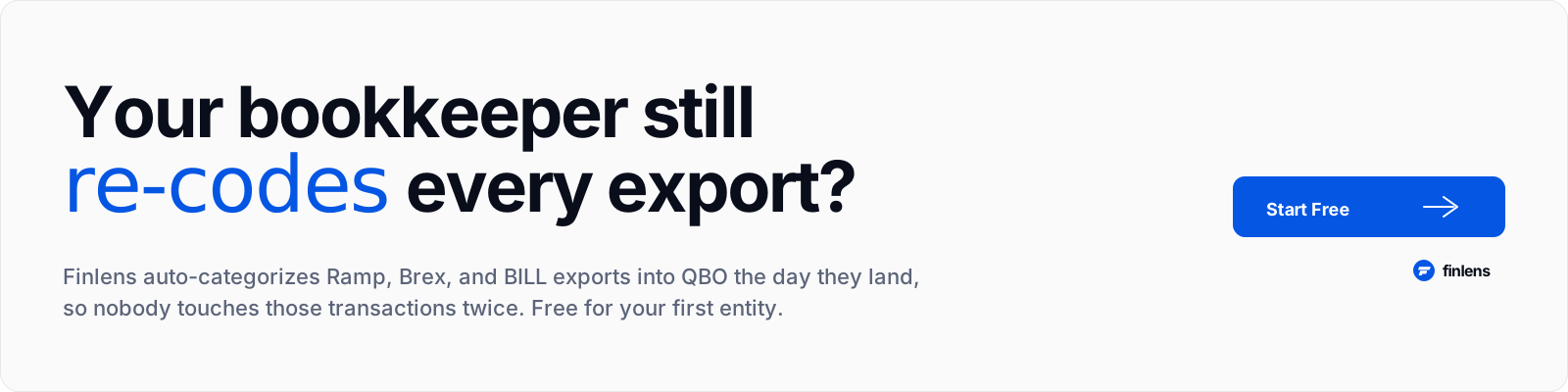
The vendor's advertised price is only one input. The full cost of ownership for expense management software includes:
Subscription cost: Ramp / BILL / Brex free; Expensify $5/user; Zoho $3/user; QBO built-in included; Rippling Spend $8/user.
Employee time saved (or lost): Poor mobile UX means employees delay filing reports a 15-person team losing 3 hours/month per employee to bad expense workflow is 45 hours/month × $60/hour = $2,700/month in lost productivity. This is hidden cost of sticker-cheap tools with clunky UX.
Bookkeeper cleanup hours: Every miscategorized transaction adds 5-10 minutes of accountant time to fix. On 200 monthly transactions with 10% miscategorization, that's 100-200 minutes/month × $75/hour = $125-250/month in cleanup cost.
Card interchange giveback (or capture): Ramp gives 1.5% cash back on all card spend. On $30K/month card volume, that's $450/month recaptured. For businesses that qualify for Ramp's model, this alone offsets cost of most alternative platforms.
Implementation and change management. SMB rollouts (Ramp, Expensify, Zoho) typically take 1-2 weeks including training. Enterprise migrations (SAP Concur, Airbase) take 2-4 months. For businesses under 100 employees, staying in SMB tier saves 6-8 weeks of implementation.
Real math for a 25-person consultancy with $8K/month reimbursement + $12K/month card spend:
- Ramp free tier: $0/month + 1.5% cash back = -$180/month net cost
- Expensify Control: $125/month + separate card provider = $125-250/month
- BILL Spend & Expense: $0/month + interchange = $0/month
- Rippling Spend: $200/month (25 users × $8)
At 25 employees, Ramp and BILL both come in cheaper than Expensify. For reimbursement-heavy workflows, Expensify's UX advantage may still justify premium; for card-heavy workflows, Ramp or BILL win on both economics and UX.
Which expense management tool should a small business choose
Use this framework rather than a single "best":
- Under 5 employees, under 30 monthly transactions: stay on QuickBooks Online's built-in expense module. No third-party tool needed.
- 5-25 employees, reimbursement-heavy, low card volume: Expensify Control tier at $5/user. The SmartScan advantage pays back within a month.
- 5-100 employees, corporate cards issued to 5+ employees: Ramp for Startups (free). Category leader in this bucket.
- 5-100 employees, accountant-configured setup, considering BILL AP: BILL Spend & Expense (free). Strong CPA channel.
- Rippling HR + Payroll customers: Rippling Spend as a module bundle. Elimination of second vendor login usually justifies cost.
- Zoho ecosystem customers or 10-25 people needing value tier: Zoho Expense at $3/user. Materially cheaper than Expensify with 80% of workflow.
Where Finlens fits automation layer downstream
None of six tools above handle accounting-side work after transactions post to QuickBooks Online. Categorization refinement, corporate card feed reconciliation against actual statements, and month-end close remain accountant's job. On a 200-monthly-transaction book, that's typically 5-8 hours of accountant time per client per month.
For CPA firms managing multiple small-business clients on QuickBooks Online, Finlens is AI-native automation layer that runs that downstream work. Firm-level categorization rules apply once and inherit into every client book. Bank and card reconciliation runs automatically. Month-end close checklist enforces cadence. The AI review queue surfaces 5-15% of transactions that need human judgment; rest post automatically.
Finlens is not an expense management tool. It doesn't replace Ramp, Expensify, or BILL. It sits underneath any of them, handling ledger-side work after export lands turning expense tool output into audit-ready GL entries across every client on firm's platform. On a 30-client book, Finlens typically compresses per-client close time by 40-60%, freeing bookkeepers to serve more clients or focus on judgment work.
Common expense management mistakes for small businesses
Picking tool before setting policy. Software enforces rules you give it. Define per-diem limits, approval thresholds, eligible expense categories, and reimbursement cadence before shopping for a tool. Rolling out Ramp without a policy means employees swipe on anything and accountant cleans it up. Rolling out Expensify without approval rules means every report goes to whoever employee guesses is right approver.
Assuming "free" means "free." Ramp, BILL, and Brex are free because interchange revenue funds them. If your card volume is under $10K/month, "free" tier delivers materially less service than a paid Expensify tier. Card platforms are only genuinely free when card economics work pay attention to monthly card spend, not just pricing page.
Skipping accounting-side integration test. Every tool advertises QuickBooks Online sync. Verify actual categorization quality on 20 real transactions before rolling out to whole team. A 90%-accurate mapping means 10% of transactions need re-coding at close on 200 monthly transactions, that's 20 fixes per month, or 100+ minutes of accountant time.
Not deciding cards vs reimbursements upfront. Corporate card platforms (Ramp, BILL, Brex) assume most spend flows through card. Reimbursement platforms (Expensify, Zoho) assume employees pay out-of-pocket and get reimbursed. Businesses that need both say, 60% card spend + 40% reimbursement usually pick a card platform (Ramp) and use its reimbursement workflow rather than run two tools.
Letting expense tool double as ledger. Even best expense tool exports summary data. The general ledger sits in QuickBooks Online, Xero, or NetSuite. The expense tool feeds ledger; it doesn't replace it. A workflow observation on r/Bookkeeping about clients categorizing everything as misc for months captures recurring bookkeeper pain even good expense tools produce cleanup work if setup isn't right.
Not training employees on mobile app. Every rollout is 20% software configuration and 80% employee behavior change. Expensify SmartScan works well when employees actually snap receipt at point of purchase; it fails when employees email themselves 40 receipts at month-end. Rollout training is not optional.
Common integrations to verify before committing
- QuickBooks Online direct sync verify mapping against your specific chart of accounts on 20 real transactions.
- Corporate card feed Ramp, BILL, Brex issue cards natively. Others integrate with existing cards via bank connections.
- Payroll sync for reimbursements Expensify + Gusto, Rippling native, Zoho + several. Test flow end-to-end.
- Receipt OCR quality every vendor claims OCR; test on 20 real messy receipts (crumpled, low-light, foreign language).
- Mobile app polish employees will resist clunky apps. Test on real devices before committing.
- HRIS sync for policy auto-config for Rippling, Workday, or BambooHR customers, this can save weeks of manual setup.
- Bill Pay integration if you're already thinking about AP, Ramp Bill Pay, BILL AP, or Rippling Bill Pay may consolidate vendors.
An expense-team lead on r/Accounting looking for software that survives a shifting org structure captures the real SMB constraint the price sheet hides: an expense tool that can't re-map GL codes and approval routes when your team doubles is a tool you'll rip out inside twelve months.
Conclusion
Expense management software for small business splits between corporate-card-first tools (Ramp, BILL, Brex) and reimbursement-first tools (Expensify, Zoho), with QuickBooks Online's built-in module serving smallest teams. For most SMBs issuing corporate cards, Ramp's free tier with 1.5% cash back and native QBO sync is strongest starting point. For reimbursement-dominant workflows, Expensify's SmartScan and mature QBO connector justify per-user cost. Once tool is picked, real accounting work happens after export categorization refinement, card feed reconciliation, close and that's where bookkeeping stack takes over.
Frequently asked questions
What is expense management software for small business?
Software that captures business expenses at point of spend (card swipe, receipt upload, mileage log), routes them through approval workflows, and exports categorized transactions into general ledger. The category splits between corporate-card platforms (Ramp, BILL, Brex), reimbursement platforms (Expensify, Zoho), and built-in tools (QuickBooks Online expense module).
How much does expense management software cost for small businesses?
Free tiers exist from Ramp, BILL Spend & Expense, QuickBooks Online (included), and Zoho Expense (up to 3 users). Paid reimbursement platforms run $3–$9 per user per month. Rippling Spend is $8/user as a Rippling module. Total cost of ownership is often 2-3x sticker price when you include employee time, bookkeeper cleanup, and implementation.
Which expense management software is best for a small business in 2026?
Ramp for businesses issuing corporate cards to 5+ employees (free, category leader). Expensify for reimbursement-heavy workflows. BILL Spend & Expense for accountant-configured setups. Rippling Spend for Rippling customers. Zoho Expense for value-tier or Zoho ecosystem customers.
Which expense management software integrates best with QuickBooks Online?
Ramp, Expensify, and BILL Spend & Expense have strongest QuickBooks Online integrations in 2026. Expensify's connector has longest tenure and handles edge cases (partial refunds, split expenses, foreign currency) most cleanly. Verify actual export quality on 20 real transactions before rolling out.
Do I need expense management software if I only have 3 employees?
For solo owners or teams under 5 with fewer than 30 monthly expense transactions, QuickBooks Online's built-in expense module is usually enough. Above that threshold, a dedicated tool starts paying back within a quarter through cleaner categorization and less bookkeeper cleanup.
Corporate card platforms vs reimbursement platforms which does my business need?
If most employee spend flows through cards you'd want business to own, use a corporate-card platform (Ramp, BILL, Brex). If most spend is out-of-pocket and reimbursed on payroll, use a reimbursement platform (Expensify, Zoho). Some businesses need both usually solved by adopting a card platform and using its reimbursement workflow.
Is Ramp actually free for small businesses?
Yes Ramp earns on card interchange rather than user subscriptions. The tradeoff is that Ramp's model assumes meaningful card volume (typically $10K+/month). Low-volume businesses may find free tier delivers less service than a $5/user paid tier from Expensify.
How does BILL Spend & Expense compare to Ramp for a small business?
Both are free (interchange-funded). Ramp's employee-facing mobile app is more polished and its AI receipt matching is stronger. BILL's accountant-facing configuration is deeper and its budget-envelopes-per-department feature maps more cleanly to how CPA firms think about SMB spend. The tiebreaker often is: does your accountant recommend one? If yes, take recommendation.
What happens after expenses land in QuickBooks Online?
Someone still has to categorize outliers (10-15% of transactions), reconcile card feeds against actual statements, and close books. Expense tools produce clean feeds; they don't close books. For CPA firms managing multiple small-business client books, Finlens is AI-native automation layer that runs categorization and reconciliation across every client from one dashboard.
Can I use QuickBooks Online expense module instead of Expensify?
For businesses under 5 employees with fewer than 30 monthly transactions, yes. For larger teams or reimbursement-heavy workflows, Expensify is materially better at receipt capture, policy enforcement, and reimbursement processing. QBO's built-in module was never designed for team workflows it's built for sole proprietor use case.
How long does an SMB expense management rollout take?
Ramp, BILL, Expensify: 1-2 weeks for setup, training, and first-cycle rollout. Zoho Expense: 1-2 weeks. Rippling Spend: usually already in place with Rippling. QuickBooks Online built-in: same-day. Enterprise tools (SAP Concur, Airbase) are 2-4 months but shouldn't be considered for SMBs.
What's ROI on expense management software for a 25-person company?
Real ROI shows up in three places: (1) employee time a good tool saves 2-4 hours/month per employee that would otherwise go to manual expense filing, (2) bookkeeper cleanup cleaner categorization saves 100-200 minutes/month in accountant time, (3) card cash back Ramp's 1.5% on $30K/month card volume is $450/month. Combined, most 25-person businesses see positive ROI within first quarter.

