
Free Accounting Templates for CPA Firms


Key takeaways
- Templates are for repeatable tasks that are not yet big enough to justify a system. They should never be firm’s permanent operating layer.
- Six template categories cover every mature firm: Bookkeeping, Financial Reporting, Tax Prep, CAS, Business Analysis, Firm Operations.
- Best free-source-by-category is highly consolidated five vendors cover 90% of what a firm needs.
- Every template gets locked, versioned, and re-branded before entering firm’s library. Without those three, you’re building shadow chaos, not a system.
- Templates hit a ceiling around 20+ clients at that point, firm either hires to run templates or graduates ledger work to an AI-native tool.
The template library six categories every mature firm covers
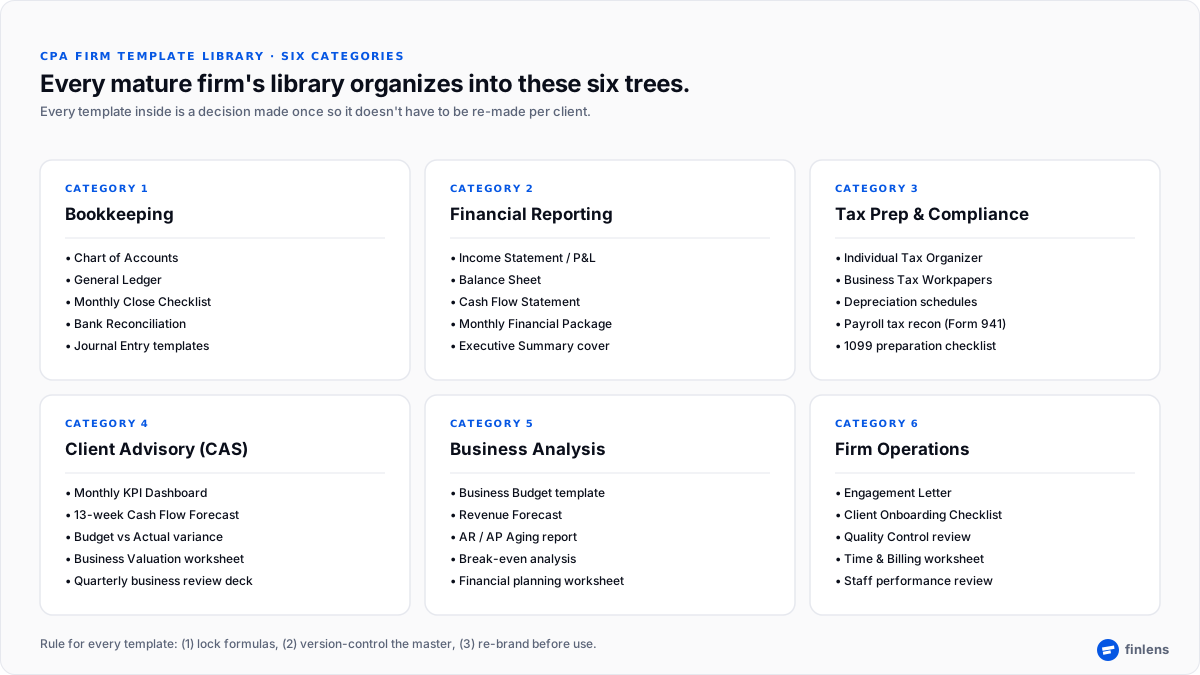
Not every firm needs every template on day one. But every firm eventually organizes its library into these six trees.
1. Bookkeeping & general accounting
The foundation. Runs on every client, every month.
- Chart of Accounts template Vertex42 Chart of Accounts, QuickBooks resources
- General Ledger template Vertex42 General Ledger or FreshBooks General Ledger
- Monthly Bookkeeping Close Checklist internal firm template; market versions are typically too generic
- Bank Reconciliation template Smartsheet Bank Reconciliation Templates or FreshBooks Bank Reconciliation
- Journal Entry templates for recurring adjustments (depreciation, deferred revenue, prepaid amortization)
2. Financial reporting
The client-facing artifacts. Should look same across every engagement.
- Income Statement / Profit & Loss Smartsheet Profit and Loss Templates
- Balance Sheet template Smartsheet Balance Sheet Templates or QuickBooks resources
- Cash Flow Statement template Microsoft Create Cash Flow Templates or Sage Cash Flow Template
- Monthly Financial Package cover page internal firm template with executive summary + KPIs
3. Tax preparation & compliance
The organizers and workpapers. Highest standardization ROI in library.
- Individual Tax Organizer usually pulled from tax-software vendor (Drake, Lacerte, ProSeries); customize with firm branding
- Business Tax Workpaper templates Schedule C, Schedule E, S-Corp / Partnership workpapers
- Depreciation schedules MACRS tables reference IRS Publication 946
- Payroll tax reconciliation workpaper Form 941 quarterly reconciliation
- 1099 preparation checklist vendor list + payment threshold check
4. Client Advisory Services (CAS)
Where firm’s advisory revenue actually happens.
- Monthly KPI Dashboard template revenue growth, gross margin, cash balance, current ratio
- Cash Flow Forecast (13-week) standard advisory artifact
- Budget vs Actual variance report see QuickBooks Budget Template resources
- Business Valuation worksheet EBITDA × industry multiple; internal firm template
5. Business analysis
For deeper strategic engagements.
- Business Budget template Score.org Financial Templates is small-business standard
- Revenue Forecast template Microsoft Create business finance templates
- AR / AP Aging report Smartsheet AR templates or QuickBooks-native
- Break-even Analysis worksheet internal firm template
- Small-business financial planning resources SBA financial management guide
6. Internal firm operations
The templates that run firm itself, not client.
- Engagement Letter template internal firm template; every service line needs one
- Quality Control Review Checklist pre-delivery review, partner sign-off
- Time and Billing worksheet see bookkeeping services fees guide for fee-structure conversation
- Staff performance review template quarterly, standardized across roles
Best free-template sources by category
Templates come from many places, but firms should limit themselves to a handful of trusted, professional-grade sources. This keeps library consistent and reduces “which version is real one” problem.
Sources verified live as of 2026-07-17. Third-party sites change layouts and links; verify current URL before adding to firm library.
Five operating rules every firm template must follow
The difference between a firm with a template library and a firm with a Google Drive full of spreadsheets is five rules. All five, on every template.
- Lock formula cells. Any cell containing a SUM(), VLOOKUP(), or calculated total gets locked. Staff should be entering inputs, not overwriting formulas. Excel: Review → Protect Sheet, unlock only input cells.
- Version-control master. Every template lives in a “Master Templates” folder with a version number in filename. When a template changes, version bumps. Old versions stay accessible but not editable. No staff should ever be editing a master template directly.
- Re-brand before use. Every template that goes to a client gets firm’s logo, colors, and footer disclaimer. Vendor watermarks removed. This is a 30-second job that separates a firm from an amateur bookkeeper.
- Match source date to bank date. For any ledger or reconciliation template, transaction dates match bank statement dates exactly. Firms that let staff enter “close to” dates end up with reconciliations that never balance.
- Save input separately from calculation. Templates that mix inputs and outputs on same tab break in third month. Standard shape: one tab for raw data entry, one tab for calculations, one tab for client-facing output.
These five rules turn a stack of spreadsheets into a firm operating asset.
When templates stop working and where a live system starts
Templates are right tool up to a point. That point is usually around 20 recurring clients for a bookkeeping practice, or when any of these signals show up:
- Different staff are running slightly different versions of same close checklist.
- Reconciliation tabs are being copy-pasted between clients and reformatted every month.
- The same categorization decision is being made repeatedly on same client (this vendor always goes to Software; this refund always maps to Product Revenue).
- Deferred revenue schedules on subscription clients are being rebuilt from scratch each month because last month’s schedule didn’t carry forward.
- Cleanup work on a new client’s back-year books is measured in days-per-year-behind.
When any of those signals hit, template layer has reached its ceiling. The firm has two options:
Option 1: Hire more staff to run templates. Each new staff member handles ~10 template-driven clients. Cost: $50,000–$75,000/year fully loaded per bookkeeper. Marginal capacity: linear.
Option 2: Graduate repeatable pieces to a live system. Categorization, payout decomposition, reconciliation, and deferred revenue move from monthly spreadsheet re-entry to an AI-native ledger layer. Cost: per-client subscription. Marginal capacity: non-linear because system carries per-client learning history and rules automatically.
Finlens is ledger-layer option in category 2. It handles Stripe payout decomposition, categorization with human-in-the-loop review, deferred revenue schedules, and writes clean entries directly to QuickBooks Online. Templates still hold their place engagement letters, workpaper cover sheets, KPI dashboards but monthly-close bookkeeping stops being a template exercise. Related: bookkeeping services fees covers delivery-cost math that changes when ledger layer moves off spreadsheets.
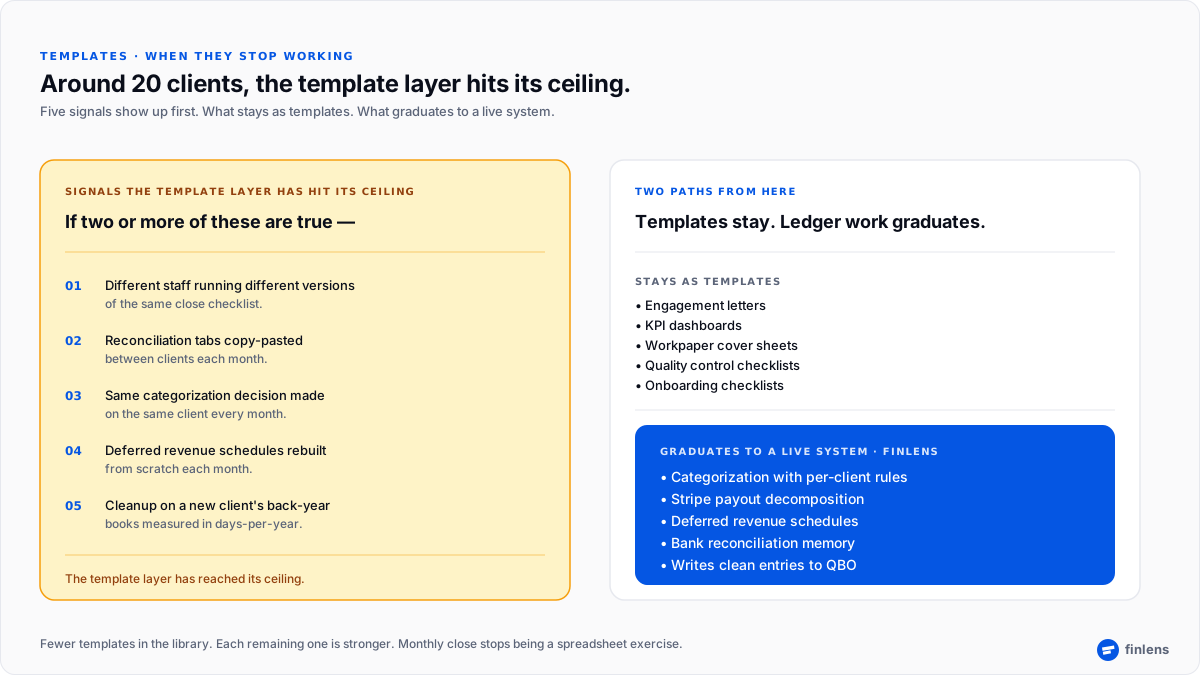
Figure 2. Five signals that a firm has outgrown its template layer, and what changes when ledger work graduates to a live system.
What firms should NOT try to template
Some things fail as templates. Skipping them saves time.
- Client-specific rules. Every client eventually has “this vendor always goes to X.” Templates cannot hold that memory across engagements. Rules live in a system, not a spreadsheet.
- Real-time bank feeds. No spreadsheet template gives live bank data. If firm needs live cash visibility, it needs a system or an API, not a template.
- Multi-entity consolidation. Templates struggle at 3+ entities. Firms should either use consolidation software or accept that workpaper will be manual.
- Tax return preparation. The IRS-form work happens in tax software (Drake, Lacerte, ProSeries, UltraTax). Templates support tax software but do not replace it.
- Complex depreciation and fixed-asset tracking. MACRS schedules across 15 asset classes across 5 years get complex. Fixed-asset software handles this cleanly; templates handle it poorly.
For anything on that list, buying a system is cheaper than maintaining a template that will break.
Conclusion
Pick one recurring client where monthly close is done in a spreadsheet template that gets rebuilt every month bring three months of that client’s QBO and we’ll show you which parts of that template were actually holding per-client memory spreadsheet couldn’t hold.
Frequently asked questions
What are most important free accounting templates for a small CPA firm?
The core five: Chart of Accounts, Monthly Bookkeeping Close Checklist, Bank Reconciliation, Income Statement / P&L, and Client Onboarding Checklist. Everything else is optional until firm has repeat need for it.
Where can I find free accounting templates in Excel?
The strongest free-template sources in 2026 are Vertex42 (general ledger, chart of accounts, expense report), Smartsheet (financial statements), Microsoft Create (cash flow, budget), FreshBooks (invoices, general ledger), and Wave (invoices). Score.org and SBA cover business planning. IRS.gov is only authoritative source for tax forms.
Are free accounting templates good enough for professional CPA firm use?
For repeatable, low-volume tasks yes, with three modifications: lock formulas, version-control master file, and re-brand with firm identity. Straight-out-of-the-box vendor templates should never go to clients.
What’s difference between free bookkeeping templates and accounting software?
Templates capture one instance of a task; accounting software captures state of a business over time. Templates are best for repeatable one-off artifacts (a close checklist, an engagement letter, an invoice). Software is required once firm needs to persist rules, learn per-client patterns, or maintain live bank feeds.
Can I use free accounting templates for tax preparation?
Yes for supporting workpapers (Schedule C business summary, depreciation schedules, 1099 vendor lists). No for actual return that belongs in tax software (Drake, Lacerte, ProSeries, UltraTax) that handles form calculations and e-file requirements.
When should a bookkeeping firm stop using templates and move to a live system?
The consistent signal is around 20 recurring clients. Watch for these earlier signals: different staff running slightly different versions of same checklist, deferred revenue schedules being rebuilt monthly, per-client categorization rules being re-made in each spreadsheet. When two or more of those show up, template layer has hit its ceiling.
What’s biggest mistake firms make with their template library?
Not version-controlling masters. Firms end up with five variations of same close checklist scattered across shared drives, and no one knows which one is current. Fix: one “Master Templates” folder with dated version numbers; nothing else in that folder is editable.
How does Finlens fit alongside a template-based firm workflow?
Finlens replaces specific templates that carry per-client memory badly categorization rules, payout decomposition, deferred revenue schedules. Template artifacts that don’t need per-client memory (engagement letters, KPI dashboards, workpaper cover sheets) stay as templates. The firm ends up with fewer templates but each one is stronger.
Template source URLs and layouts change frequently. Sources referenced in this article (Vertex42®, Smartsheet®, Microsoft Create®, FreshBooks®, Wave®, Score.org, SBA, QuickBooks®, IRS.gov) are property of their respective owners; Finlens is not affiliated with, endorsed by, or sponsored by any of them. Verify current template availability and licensing terms directly with each source before adding to firm library. This article is educational and not legal or tax advice.

