
Is QuickBooks Free? The Real Answer on Free Tier, Free Trial, and Free Alternatives (2026)


Yes, QuickBooks Online has a permanently free tier called QuickBooks Free that costs $0 per month with no credit card required. It comes with strict monthly limits on invoices, receipt uploads, and contractors, so it fits solo owners with very light usage and stops working well as soon as business volume grows.
For businesses that need more than free tier allows, Intuit offers a 30-day free trial of every paid plan (Simple Start, Essentials, Plus, and Advanced), which gives you unlimited access to full feature set before you commit to a subscription. After trial, monthly pricing kicks in.
This guide walks through what QuickBooks Free actually includes, what limits mean in practice, how 30-day free trial works, when free tier makes sense and when it doesn't, how to think about free-versus-paid decision, and free alternatives worth considering if QuickBooks Free doesn't fit.
It's written for freelancers evaluating whether they can get away with free tier, small business owners deciding whether to commit to a paid plan, and CPA-firm clients trying to understand what their accountant recommends.
The two "free" options that people usually confuse
Two different "free" options exist inside QuickBooks Online product family, and they get confused constantly.
Option 1: QuickBooks Free. A permanently free tier that costs $0 per month forever, with monthly caps on how many invoices, receipts, and contractors you can use. Fits solo owners with very light activity.
Option 2: The 30-day free trial. A temporary unlimited-access trial of any paid tier (Solopreneur, Simple Start, Essentials, Plus, or Advanced) that gives you full feature set for 30 days without payment. After trial, monthly pricing starts.
The two options serve different purposes. QuickBooks Free is a long-term home for very small operations. The 30-day trial is a way to test-drive a paid tier before committing.
What QuickBooks Free actually includes
QuickBooks Free is a real product with real features. It's not a marketing stunt. But limits matter, and understanding them is what makes free-versus-paid decision straightforward.
Bank connection. You can connect one bank account to import income and expense transactions automatically. This is core bookkeeping feature and it works same way as on paid tiers, just limited to a single account.
Invoices. Two custom invoices per month, plus one estimate. If you use QuickBooks Payments to accept online payment, invoice limit becomes unlimited. This is Intuit's incentive to route your customer payments through their platform.
Receipts. Two manual receipt uploads per month. Mobile OCR is supported but constrained to two-per-month cap.
Contractors. One 1099-eligible contractor tracked in system. If you pay more than one contractor, you'll hit this cap immediately.
Reports. Essential reports including profit and loss, balance sheet, and account quick reports. Custom and advanced reports aren't included.
User access. One user only. No accountant portal access on free tier, which is significant if you work with a CPA.
The pattern is clear. QuickBooks Free covers absolute minimum for a very small operation and stops working moment activity picks up.
Who free tier actually fits
The free tier fits a specific and narrow user profile. Understanding whether you fit that profile is what makes decision easy.
Solo owners with minimal activity. A freelancer sending one or two invoices a month, tracking a handful of expenses, and working with one contractor can fit inside free tier's limits comfortably.
New businesses just getting started. In first month or two of operation before invoice volume grows, free tier can serve as a starting point that upgrades naturally as volume increases.
Side businesses run alongside a day job. A weekend consultant, an Etsy seller, or a rental property owner with light transaction volume can operate within caps for a long time.
Anyone testing whether QuickBooks fits. The free tier is a longer-term test-drive than 30-day trial for owners who want to explore product without a deadline.
For anyone outside these profiles, free tier's caps will bind quickly and force an upgrade decision. That's intent of product, and it's not a hidden trap: caps are stated clearly upfront.
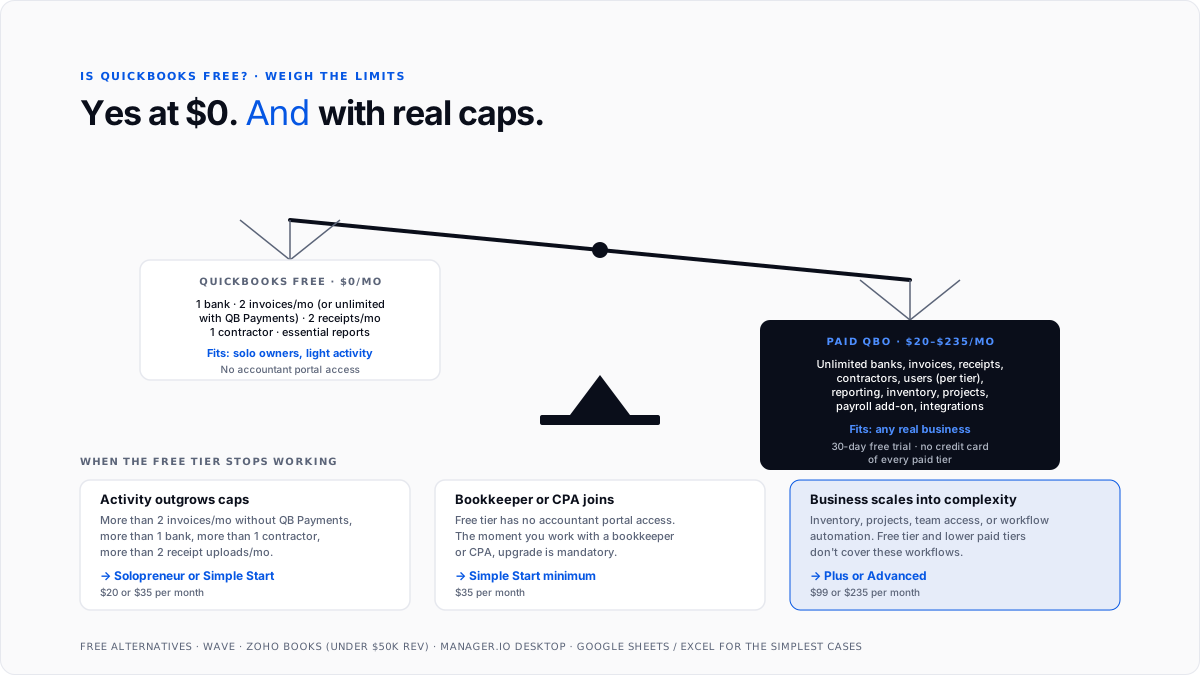
When free tier stops working
Several concrete signals mean it's time to move to a paid tier.
You're sending more than two invoices a month. Unless you're using QuickBooks Payments to unlock unlimited invoicing, 2-per-month cap becomes binding constraint fastest for service businesses.
You need more than one bank account connected. Businesses with a checking account and a business credit card have already hit free tier's single-account limit.
You have more than one contractor to pay. The 1-contractor limit blocks any business with a small team of 1099 workers.
You need your accountant to have access. Free tier doesn't include accountant portal access, which is table stakes for anyone working with a bookkeeper or CPA.
You need advanced reporting. Custom reports, budget-vs-actual analysis, and industry-specific reporting are all paid-tier features.
You're growing. Free tier caps are designed for solo owners with low activity. Any business on a growth trajectory will hit them within months.
How 30-day free trial works
Separately from free tier, Intuit offers a 30-day free trial of every paid QuickBooks Online plan. This is mechanism for test-driving Simple Start, Essentials, Plus, or Advanced before committing.
No credit card required. Sign up with just an email and business name. You don't provide payment information until trial ends and you convert to a paid subscription.
Full feature access. The trial gives you complete feature set of whatever tier you signed up for. No caps, no watermarks, no limitations beyond 30-day window.
Data carries forward. If you decide to subscribe at end of trial, everything you set up (chart of accounts, connected bank feeds, customers, invoices) carries into paid subscription. You don't lose your work.
Alternative: 90% off promotion. Intuit periodically runs a promotional discount (currently 90% off first three months) instead of 30-day trial. This lets you commit to a subscription immediately at a heavy discount. The trial-vs-discount choice usually shows up on signup page.
The trial is right path for owners who already know they need a full QuickBooks setup and just want to test platform before paying.
The paid tiers and their pricing
Understanding what paid tiers cost and include is what makes "free versus paid" decision concrete.
Pricing changes periodically and promotional discounts are common, so check current prices at intuit.com before committing.
For most owners deciding whether to pay, practical question is whether $35 to $99 monthly cost is worth time saved and accuracy gained. For businesses generating any real revenue, answer is almost always yes because bookkeeper hours saved and tax deductions defended dramatically exceed subscription cost.
Free alternatives worth considering
If QuickBooks Free doesn't fit and paid tiers seem premature, several free alternatives are worth evaluating.
Wave is free at base tier and covers invoicing, expense tracking, and basic reporting for very small businesses. Feature depth drops off compared to any paid QuickBooks tier, and support is limited. Wave charges for payment processing and payroll separately.
Zoho Books offers a generous free tier for businesses with less than $50K in annual revenue. Feature depth is stronger than Wave and includes basic project tracking and multi-currency. Zoho's broader business suite makes it appealing if you're already using Zoho CRM or Zoho Mail.
Manager.io is completely free desktop accounting software with no volume limits. Runs on Windows, Mac, and Linux. Cloud sync is a paid add-on. Feature depth is strong for a free product but desktop-only default limits how it works for multi-user teams.
Spreadsheets are traditional starting point. Google Sheets or Excel with a well-designed template covers basic bookkeeping at zero cost. Works fine at very low transaction volume. Becomes painful as volume grows and doesn't produce audit-ready records.
When to pay for QuickBooks
The decision to pay for a QuickBooks subscription usually breaks down to three questions.
Are you generating meaningful revenue?
Any business generating more than about $50K a year in revenue benefits from paid QuickBooks in bookkeeper hours saved, tax deductions defended, and reporting accuracy.
Do you work with an accountant?
If yes, they almost certainly want paid QuickBooks with accountant portal access. The how to write off business expenses guide covers what proper bookkeeping means for deduction defense.
Are you growing?
Businesses on a growth trajectory hit free tier caps quickly. Starting on paid means avoiding a mid-year migration that always feels harder than it should.
For businesses that answer yes to any of these, one of paid tiers is worth money.
How QuickBooks Free integrates with broader ecosystem
The free tier still connects into broader QuickBooks ecosystem, though with limits.
Bank feed connections work through same infrastructure that connects to more than 25,000 US financial institutions. Mobile app support is available for iOS and Android. Third-party integrations through QuickBooks App Store are supported, though app-specific limits vary.
Payroll is not included and can't be added to free tier. QuickBooks Payroll is a paid add-on that only integrates with paid QuickBooks Online tiers. See payroll tax guide for how underlying payroll tax structure works.
Modern CPA firms that manage many client books rarely put clients on free tier because missing accountant portal access blocks their workflow. The AI layer for QuickBooks guide covers automation that firms layer on top of paid subscriptions.
Conclusion
QuickBooks Free is a permanently free tier that costs $0 per month indefinitely, with strict monthly limits on invoices, receipt uploads, and contractors. It works for solo owners with very light activity and stops working as soon as business grows past caps.
The 30-day free trial is a separate mechanism for test-driving any paid tier before committing to a subscription. It provides full unlimited access for 30 days with no credit card required.
For most owners, free tier is either a longer-term home for very small operations or a stepping stone toward a paid subscription once volume grows. The best AI tools for bulk transaction categorization guide covers automation layers that make paid QuickBooks more valuable at scale, and automate bookkeeping cleanup guide covers what to do when transition from free to paid tier reveals categorization gaps that need cleanup.
For CPA firms and bookkeepers, free tier is rarely appropriate for real client work because it lacks accountant portal access and caps interfere with normal bookkeeping workflow. Paid tiers, especially Plus, are practical default for firm-managed client files.
Frequently asked questions
Is QuickBooks free forever?
QuickBooks Free is a $0-per-month tier you can use indefinitely, with monthly caps on invoices, receipts, and contractors. It's not same as paid tiers, but it doesn't expire.
Is there a QuickBooks free trial?
Yes. Intuit offers a 30-day free trial of every paid QuickBooks Online plan, no credit card required. The trial gives you full access to tier you signed up for during trial window.
How long is QuickBooks free trial?
30 days. After trial, monthly subscription starts automatically if you provide payment. If you don't provide payment, account converts to a limited state and eventually gets archived.
Can I get QuickBooks free forever?
Yes, on QuickBooks Free tier, with strict monthly limits. If your usage stays within those limits, tier is free indefinitely.
Is QuickBooks Free good enough for a small business?
For very small operations sending fewer than 2 invoices a month and paying only one contractor, yes. For anything more than that, caps will bind quickly and force an upgrade.
What's cheapest paid QuickBooks Online plan?
Solopreneur at around $20 a month for freelancers filing Schedule C. Simple Start at around $35 a month for solo owners needing full bookkeeping. Both are significantly cheaper than higher tiers.
Can I use QuickBooks without paying for it?
Yes, either through QuickBooks Free (permanently free with caps) or 30-day free trial of any paid tier. Both are legitimate ways to use product at $0.
What's included in QuickBooks free version?
One connected bank account, 2 invoices per month (or unlimited if using QuickBooks Payments), 2 receipt uploads per month, 1 contractor, essential reports, and one user.
Does QuickBooks free include payroll?
No. Payroll is a paid add-on that only integrates with paid QuickBooks Online tiers.
What are best free alternatives to QuickBooks?
Wave for very small businesses, Zoho Books for businesses under $50K revenue, Manager.io for desktop-only accounting, and Google Sheets or Excel templates for simplest cases.
Can I upgrade from QuickBooks Free to a paid tier?
Yes, and your data carries forward automatically. You keep your chart of accounts, bank feed connections, customers, and history. The upgrade takes minutes and paid tier features unlock immediately.
Do I need a credit card for QuickBooks free trial?
No. Intuit's 30-day free trial requires only email and business name to sign up. Credit card is required only at end of trial if you convert to a paid subscription.

