
Payroll Management Software: 5 Tools Compared for 2026


The best payroll management software depends on headcount, whether you operate across multiple states, and what accounting system your bookkeeping runs on. Gusto is SMB category default with strong onboarding and benefits. QuickBooks Payroll wins for businesses on QuickBooks Online and, according to Forbes Advisor, for integration depth overall. ADP RUN handles scale and multi-state compliance. Paychex bundles payroll with HR services. OnPay is modern, affordable option for small teams. For CPA firms managing many client payrolls, Finlens sits downstream receiving payroll journal entries into QuickBooks or Xero ledger and reconciling them across entire client book.
Key takeaways
- Every US employer must comply with federal payroll tax rules in IRS Publication 15 (Circular E) federal income tax withholding, Social Security, Medicare, and FUTA. Payroll software calculates and remits these automatically.
- Software choice usually comes down to three variables: headcount, number of states, and existing accounting system.
- Businesses on QuickBooks Online often land on QuickBooks Payroll for tightest integration. Businesses without that constraint frequently pick Gusto.
- Payroll software typically costs $6–$15 per employee per month plus a $30–$50 base fee. Enterprise-scale platforms are custom-priced. For CPA firms pricing their services, payroll processing fee is one line item; ledger cleanup afterward is a bigger one.
- CAS firms and CPA practices managing many client payrolls should choose payroll providers whose journal entries sync cleanly into QuickBooks or Xero that ledger integration determines how much manual cleanup falls on firm at month-end.
- Finlens completes payroll workflow on accounting side receiving payroll journal entries from Gusto, QuickBooks Payroll, ADP, or others, automating categorization on top of QuickBooks, and running clean reconciliation across CPA firms' entire LLC and small-business client books.
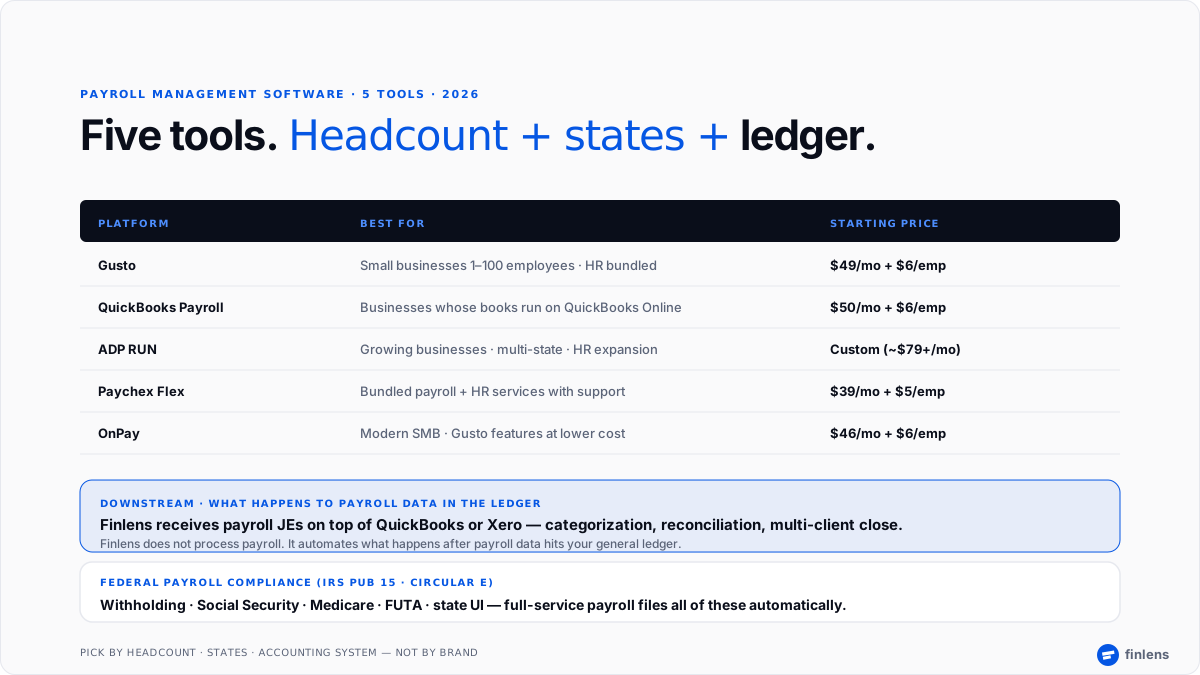
Best payroll management software: comparison table
Pricing reflects published starting tiers as of early 2026 and does not include benefits administration or state filing fees.
The 5 best payroll management software tools
1. Gusto
Overview. Gusto is SMB category default for payroll in US and shows up on nearly every small-business shortlist. Its onboarding flow, employee self-service, and integrated benefits (health insurance, 401(k), workers comp) set mid-market bar. A user on r/smallbusiness described it as "one that Just Works if you're under 50 employees and don't have complex needs."
Best for. Small businesses with 1–100 employees who want payroll, benefits, and light HR in a single platform without dedicated procurement effort.
Key features. Full-service payroll (federal, state, local tax filing), unlimited pay runs, direct deposit, W-2 and 1099 filing, benefits marketplace, employee self-service, PTO tracking, and integrations with QuickBooks Online, Xero, FreshBooks, and 100+ other tools.
Pricing. $49/mo Simple + $6/employee · $80/mo Plus + $12/employee · $180/mo Premium + $22/employee. Contractor-only plan $35/mo + $6/contractor.
Limitations. Multi-state compliance costs extra on lower tiers. Premium tier pricing rises quickly for headcount above 25. Less depth on complex international payroll than ADP or enterprise tools.
Where it breaks. Multi-country payroll, businesses with 200+ employees needing full HRIS, and enterprises with complex union / prevailing-wage requirements.
2. QuickBooks Payroll
Overview. QuickBooks Payroll is Intuit's payroll product tightly integrated with QuickBooks Online. According to G2's payroll software category data, it retains one of largest SMB installed bases specifically because businesses already running QuickBooks avoid integration friction of a third-party payroll product. Payroll journal entries land automatically in QuickBooks general ledger and firms running Finlens on top of QuickBooks pick up those JEs into automated multi-client reconciliation as part of month-end close.
Best for. Businesses whose accounting runs on QuickBooks Online where tightest ledger integration matters more than best-in-class payroll UI.
Key features. Full-service payroll, automated tax filing, same-day direct deposit at higher tiers, employee benefits, workers' comp, contractor payments, and native two-way sync with QuickBooks Online.
Pricing. $50/mo Core + $6/employee · $85/mo Premium + $9/employee · $130/mo Elite + $11/employee.
Limitations. Requires QuickBooks Online standalone use makes less sense. Multi-state filing at higher tier. Benefits marketplace less mature than Gusto. Support quality varies by tier.
Where it breaks. Businesses not on QuickBooks Online; multi-country payroll; complex union or industry-specific pay rules.
3. ADP RUN
Overview. ADP RUN is SMB entry point into ADP's broader payroll platform and is incumbent enterprise brand adapted for small business. According to Forbes Advisor's 2026 payroll roundup, ADP is strongest choice for growing companies that anticipate multi-state or HR-service expansion. Members of r/Accounting consistently recommend ADP for businesses expecting to cross state lines within a year.
Best for. Growing businesses with 20+ employees, multi-state operations, or a near-term HR services need beyond payroll. For CPA firms serving multi-state clients, ADP's tax-jurisdiction coverage is one of strongest in market.
Key features. Full-service payroll, tax filing across all 50 states, HR services and compliance advisor, workers' comp, benefits administration, employee self-service, and a broad ecosystem of add-ons (retirement plans, background checks, learning).
Pricing. Custom, typically starting around $79/mo + per-employee fee. Add-ons (HR, benefits, workers' comp) priced separately.
Limitations. Pricing is quote-only no transparent tiers on website. Interface is functional but less polished than Gusto. Cross-sell pressure into HR add-ons is a common complaint.
Where it breaks. Solo operators and micro-businesses under 5 employees ADP is over-featured and over-priced at that scale.
4. Paychex Flex
Overview. Paychex is other longstanding SMB payroll incumbent alongside ADP. Its Paychex Flex platform bundles payroll with HR services and a dedicated payroll specialist a service model that appeals to businesses wanting a phone-a-friend rather than pure self-service software.
Best for. SMBs wanting bundled payroll + HR services with dedicated support access and option to add benefits administration.
Key features. Full-service payroll, tax filing, HR services, benefits, retirement plan administration, time and attendance, and dedicated Paychex specialist per account.
Pricing. $39/mo Essentials + $5/employee · higher tiers custom. Enterprise (Paychex Flex Enterprise) custom quoted.
Limitations. Pricing rises significantly as headcount grows and add-ons pile on. Software interface is functional rather than modern. Some users on r/smallbusiness report sales-cycle friction and difficulty getting straight pricing.
Where it breaks. Businesses wanting pure self-service payroll without a bundled HR/support relationship Gusto or OnPay serve those better.
5. OnPay
Overview. OnPay is modern-affordable option in SMB payroll a Gusto-alternative with strong feature coverage at a lower monthly price. Consistent recommendation across r/Payroll threads for businesses that find Gusto pricing steep at headcount growth.
Best for. Small businesses wanting Gusto-level features (full-service payroll, benefits, employee self-service) at a lower monthly cost.
Key features. Full-service payroll, tax filing across all 50 states, unlimited pay runs, direct deposit, W-2 and 1099, benefits administration, integration with QuickBooks Online, Xero, and time-tracking tools.
Pricing. $46/mo + $6/employee (single tier no upsell pressure).
Limitations. Smaller integration ecosystem than Gusto. Less brand recognition when hiring some new employees don't immediately trust an unfamiliar payroll provider. HR features are lighter than ADP or Paychex.
Where it breaks. Businesses needing deep HR services beyond payroll; enterprises with 200+ employees.
Which payroll management software should you choose
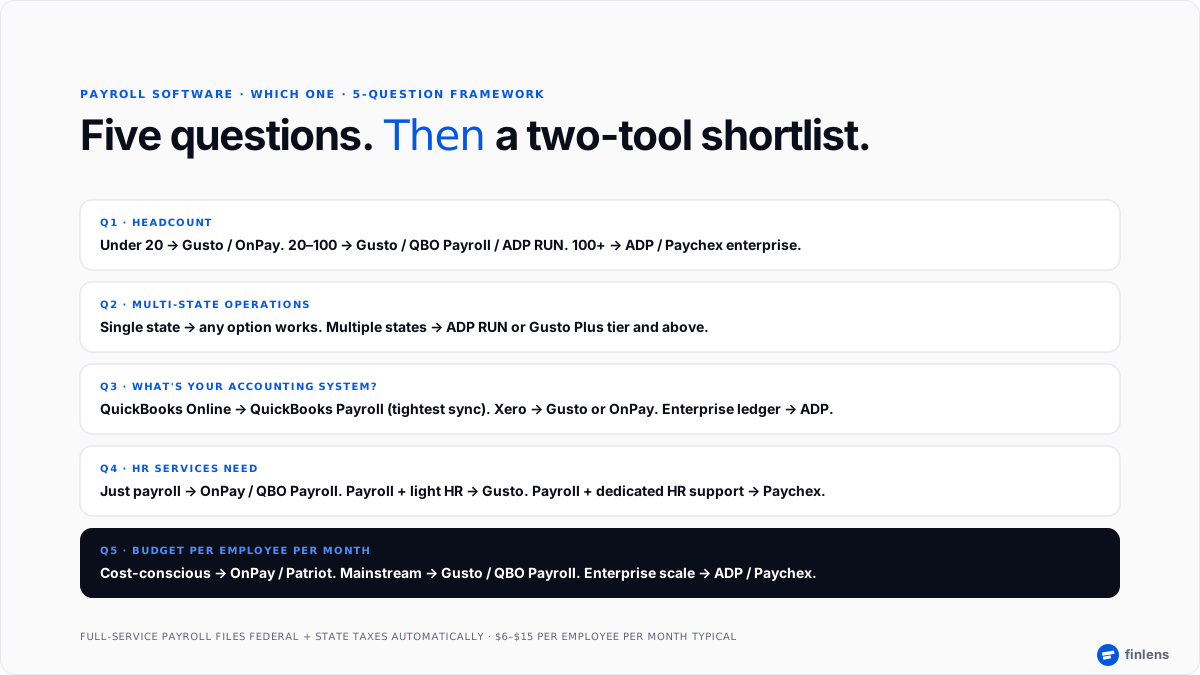
The right tool depends on headcount, state footprint, and what accounting system your books run on. Use this decision framework:
- Use Gusto if you have 1–100 employees, want HR + benefits in same platform, and value onboarding polish.
- Use QuickBooks Payroll if your books already run on QuickBooks Online and tight ledger integration matters most.
- Use ADP RUN if you have 20+ employees, operate in multiple states, or anticipate expanding into HR services.
- Use Paychex Flex if you want bundled payroll + HR services with a dedicated support relationship.
- Use OnPay if you want Gusto-level features at a lower per-month cost and don't need deep HR add-ons.
A practitioner heuristic from r/Accounting that recurs across payroll threads: "The one that syncs cleanly with your accounting software is worth more than a $10/month cost savings on payroll side." Payroll JE mistakes take longer to unwind than price differential is worth. A parallel thread on r/Bookkeeping reinforces point bookkeepers universally recommend matching payroll provider to whatever ledger client already runs on, since fixing a broken payroll sync mid-quarter is more expensive than any onboarding friction of switching payroll tools.
Core features every payroll software should have
Beyond brand and price, these are features to confirm. Per Investopedia's payroll overview, core function of payroll extends beyond just cutting paychecks it covers tax withholding, benefits deductions, garnishments, employer tax remittance, and year-end reporting. Any tool worth paying for handles all of these end-to-end.
- Full-service tax filing federal, state, and local. Confirm provider files in every state you operate in.
- Direct deposit same-day, next-day, or 2-day depending on tier.
- W-2 and 1099-NEC generation and filing automatic year-end for employees and contractors.
- Multi-state payroll separate state IDs, state-specific withholding, unemployment insurance.
- Employee self-service portal pay stubs, W-2s, PTO requests, tax form updates.
- Time tracking integration either native or clean sync with a time-tracking product.
- Benefits administration health insurance, 401(k), workers' comp either native or through a partner.
- Accounting sync bidirectional integration with QuickBooks Online, Xero, or primary ledger.
The U.S. Small Business Administration hiring guide covers underlying compliance obligations these features exist to meet.
How Finlens fits into payroll workflows
Payroll management software handles pay run calculating gross-to-net, filing taxes, and moving money to employees. What happens next is where accounting takes over: payroll journal entries land in general ledger, and those entries need to be categorized correctly, reconciled against payroll provider's reports, and rolled into monthly close.
For CPA firms and CAS providers managing many client payrolls simultaneously, this downstream work is where hours quietly disappear. Every client's payroll JEs need to hit right accounts. Every payroll tax remittance needs to reconcile. Every 401(k) match, PTO accrual, and employer benefit expense needs correct categorization. Across 50+ client books, this is a real portion of firm's monthly labor.
Finlens sits downstream of payroll provider on top of QuickBooks Online or Xero. It receives payroll journal entries automatically, applies each firm's chart of accounts and categorization rules, surfaces exceptions across every client in a single review queue, and reconciles payroll side of ledger against payroll provider's reports as part of month-end close. The result is that payroll bookkeeping stops consuming senior hours those hours move to advisory, and firm's pricing tiers stay defensible even as client count grows.
Finlens does not process payroll Gusto, QuickBooks Payroll, ADP, Paychex, and OnPay handle that. Finlens handles what happens to payroll data once it lands in ledger.
Conclusion
The right payroll management software depends on headcount, state footprint, and what accounting system your books already run on. Most small businesses land on Gusto or QuickBooks Payroll. Growing multi-state businesses graduate to ADP RUN. Businesses wanting bundled HR services pick Paychex. Cost-conscious modern SMBs pick OnPay.
Book a 20-minute walkthrough with Finlens if you run a CPA firm managing many client payrolls on QuickBooks or Xero Finlens automates ledger side of payroll (categorization, reconciliation, close) so partner hours stop disappearing into payroll JE cleanup across client book.
FAQ
What is most used payroll software?
QuickBooks Payroll and Gusto lead US SMB payroll by installed base per G2. ADP retains largest overall US payroll installed base counting mid-market and enterprise. Paychex sits close behind ADP in SMB-to-mid-market segment.
Can I do payroll in Excel?
Technically yes for a handful of employees, but risk is high. Excel does not file taxes automatically, does not track W-2 or 1099 obligations, and does not withhold or remit correctly across states. Even cheapest full-service payroll software ($39–$50/mo) is materially cheaper than penalty exposure of a missed federal or state deposit.
What is best free payroll software?
There is no genuinely free full-service payroll software in US. Any tool advertised as "free" typically charges for tax filing, direct deposit, or state compliance. The lowest-cost full-service option is roughly $20–$40/mo at entry tier.
Does Finlens replace payroll software?
No. Finlens does not process payroll. Finlens is accounting-ledger and close-automation layer used by CPA firms and businesses to receive payroll journal entries from Gusto, QuickBooks Payroll, ADP, or others and reconcile those entries cleanly into general ledger layered on top of QuickBooks Online or Xero.
How much does payroll software cost per employee?
Standard SMB pricing is $6–$15 per employee per month plus a $30–$80 base fee. A 10-employee business on Gusto or OnPay lands around $100–$130/month all-in. ADP and Paychex trend higher with add-ons. Enterprise is custom-quoted.
How does payroll software file taxes?
Full-service payroll software calculates federal, state, and local payroll tax withholdings from each pay run, remits withheld amounts to appropriate agency by required deadline, and files quarterly and annual returns (Form 941, Form 940, state equivalents, W-2s, W-3s). This is reason most businesses use payroll software rather than doing payroll manually.
Do I need payroll software for one employee?
Yes. The compliance obligations federal withholding, Social Security, Medicare, FUTA, state unemployment, state withholding, W-2 filing apply to businesses with a single W-2 employee just as they do at scale. Even a $39/mo entry-tier payroll tool is cheaper than penalty exposure.

