
How Does QuickBooks Bill Pay Work and What Does It Cost?


QuickBooks Bill Pay is Intuit's native accounts payable product built directly into QuickBooks Online. It lets you receive vendor bills, route them for approval, schedule payments, and pay by ACH or check without leaving QBO. Intuit rebuilt Bill Pay as a first-party product in 2023 after previously partnering with Bill.com and Melio for the same workflow.
This guide walks through what Bill Pay is, how the workflow operates, the three sub-tier pricing, and where the ceiling sits.
What is QuickBooks Bill Pay?
Bill Pay is a QuickBooks Online feature, not a separate product. To use it you need an active QBO subscription (any tier from Simple Start upward). Once turned on inside QBO, you get a bills inbox, vendor payment scheduling, ACH and check payment methods, and automatic GL posting when a bill gets paid.
Under the hood, Bill Pay is Intuit's own money-movement infrastructure. Bank rails are ACH for electronic payments and physical check printing and mailing (handled by Intuit's processor). The three things Bill Pay does that manual AP does not: eliminates double entry, manages approval workflow, and handles actual money movement.
How much does QuickBooks Bill Pay cost?
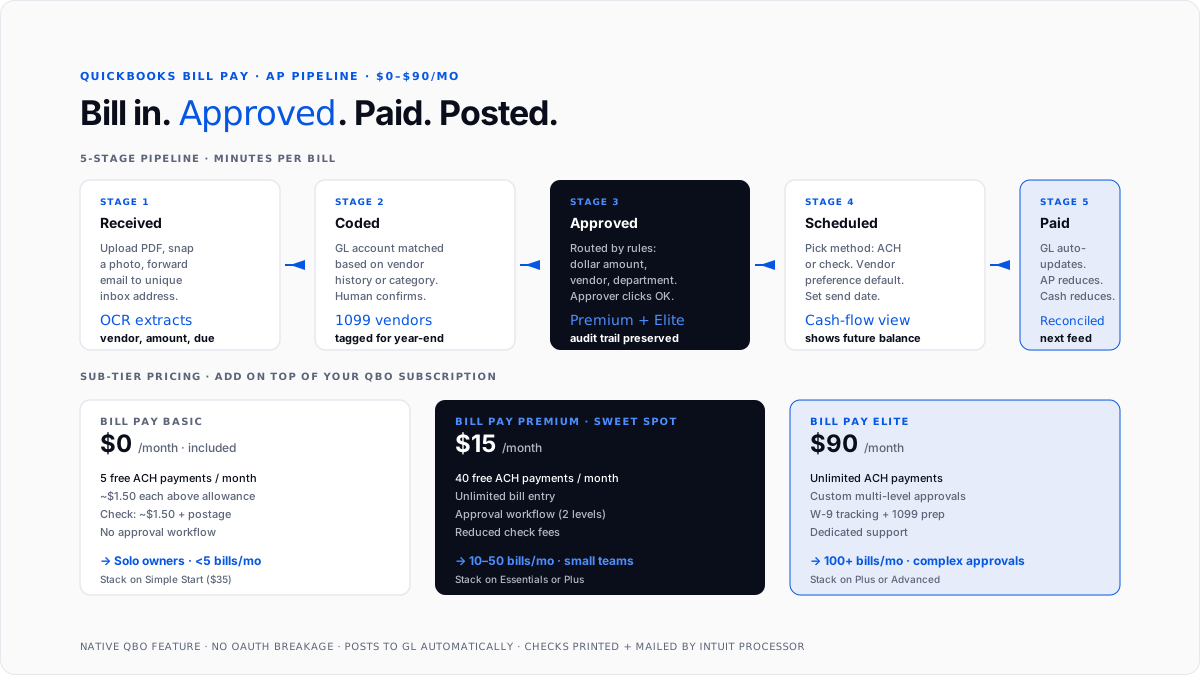
Three sub-tiers layered on top of your QBO subscription.
Bill Pay Basic - Free. Included in most QBO plans. Covers 5 free ACH payments per month. Additional ACH of ~$1.50 each. Check payments of ~$1.50 each plus postage.
Bill Pay Premium - $15/month. 40 free ACH payments per month, unlimited bill entry, approval workflow, and reduced check fees. This is where most Essentials and Plus users end up.
Bill Pay Elite-$90/month. Unlimited ACH payments, custom approval workflows, W-9 tracking, 1099 preparation integration, and dedicated support. Fits businesses with 100+ bills per month.
Payment fees on top of the tier subscription:
- ACH above the included allowance: ~$1.50 each
- Check payments: ~$1.50 each plus mailing (or free at Premium up to a monthly cap)
- Credit card: 2.9% fee paid by the vendor being paid
- International wires: variable, typically $10-25
How does the Bill Pay workflow actually operate?
Step-by-step from bill received to bill paid.
Step 1: Bill enters the system. Three ways in. Upload a PDF or snap a mobile photo (QuickBooks reads vendor, invoice number, amount, and due date via OCR). Forward vendor bills from email to a unique Bill Pay inbox address. Or set up recurring bills that appear on the schedule each period.
Step 2: Vendor and GL account matched. Bill Pay looks up the vendor in your existing QBO vendor list. It suggests a GL account based on prior bills from that vendor or the vendor category. You confirm or override.
Step 3: Approval routing (Premium and Elite). If your business has multi-person approval, the bill routes to the designated approver by dollar amount, vendor, department, or a combination. Approvers get notified and click approve.
Step 4: Payment scheduled. Approved bills sit in the "ready to pay" queue. Select bills to pay this run, pick the payment method (ACH or check) per vendor, and pick the send date.
Step 5: Payment executes. On the send date, Bill Pay debits your business bank account. ACH arrives in 1-5 business days. Checks print and mail from Intuit's processor, arriving in 3-7 business days.
Step 6: GL updated. The bill flips from unpaid to paid automatically. The cash reduction and AP account update in the general ledger. Reconciliation at month-end matches the bank feed against Bill Pay's payment log.
Total time per bill for a configured setup: 30-60 seconds from receipt to scheduled.
How does Bill Pay compare to standalone AP tools?
Standalone tools like Bill.com and Ramp are more feature-rich than Bill Pay's Basic and Premium tiers. Elite gets closer but still has gaps.
What Bill Pay does well. Native QBO integration (no OAuth breakage), simple pricing at Basic and Premium tiers, fast setup, free tier for light AP volume, approval workflow at Premium and above, and check printing without a separate service.
Where standalone AP tools pull ahead. Multi-entity support (Bill.com handles parent-subsidiary structures natively; Bill Pay is single-entity), more complex approval hierarchies, sync with more accounting systems (Sage, NetSuite, Oracle), international payments at scale, integrated corporate card + expense + AP bundles (Ramp), and heavier vendor-onboarding portals.
For businesses fully in the QBO ecosystem with straightforward AP, Bill Pay is the honest choice.
Which QuickBooks tier should you pair with Bill Pay?
Simple Start + Bill Pay Basic. The free tier of Bill Pay is stacked on $35 Simple Start. For a solo owner with 3-5 vendor bills a month who wants to move off manual entry.
Essentials + Bill Pay Premium ($65 + $15 = $80/month). Sweet spot for two-to-three-person service businesses.
Plus + Bill Pay Premium ($99 + $15 = $114/month). The same premium tier is layered on Plus, which adds inventory, projects, and class tracking.
Advanced + Bill Pay Elite ($235 + $90 = $325/month). Full-featured AP inside the top QBO tier. Custom approvals, unlimited payments, dedicated support.
How do you set up Bill Pay?
Initial setup takes 20-30 minutes across three configuration areas.
Bank connection. Link the business checking account you want Bill Pay to debit. Can be QuickBooks Money, a traditional business bank, or any account already connected to QBO. Micro-deposit verification or Plaid instant verification.
Vendor list. Bill Pay uses your existing QBO vendor list. Vendors need names, mailing addresses (for check payments), and (ideally) bank information (for ACH). Bill Pay can send vendors a payment invitation to enter their own ACH details directly, without you handling sensitive data. For W-9 collection basics, see Form W-9.
Approval rules (Premium and Elite). Define who approves what. Common patterns: all bills over $500 route to the owner, all bills from a specific vendor list route to the CFO, and all bills under $500 skip approval. Rules can nest and combine.
Ongoing use is maintenance-free. New vendors get added when their first bill arrives.
How does month-end reconciliation work?
Bill Pay handles the AP side of month-end largely automatically.
Bill entry throughout the month. Every bill entered creates an AP journal entry (debit expense or asset, credit accounts payable).
Payment throughout the month. Every payment executed creates a payment journal entry (debit AP, credit cash).
Month-end AP aging. The AP aging report (0-30, 31-60, 61-90, 90+) shows every unpaid bill by age.
Bank reconciliation. The bank feed pulls actual ACH debits and check clears. Bill Pay's payment log matches automatically.
1099 vendor tracking. For vendors flagged as 1099-eligible, Bill Pay maintains the running total for year-end 1099-NEC prep. See 1099-NEC filing deadline.
How do approval workflows work in Bill Pay?
The approval workflow is where Premium and Elite earn their subscription fee. A real-world hierarchy for a 10-person business:
Rule 1. All bills under $250 → no approval, direct to pay queue.
Rule 2. Bills $250-$2,500 → one approval from the department head.
Rule 3. Bills over $2,500 → two approvals (department head + owner).
Rule 4. Bills from specific vendors (legal, insurance, tax) → route directly to the owner regardless of amount.
Rule 5. Bills flagged as "urgent" → skip the queue and go to the owner immediately.
Premium supports up to two approval levels. Elite supports unlimited levels and matrix-based rules.
Which payment methods does Bill Pay support?
Three methods, with vendors indicating preferences.
ACH. Free at all tiers up to the monthly allowance. Above the allowance, ~$1.50 per payment.
Check. ~$1.50 per check plus postage, or free at Premium up to a cap. Intuit's processor prints and mails to the vendor's address.
Credit card. 2.9% fee paid by the vendor being paid (not by you). Useful for earning rewards on your business credit card, though most vendors decline card payments due to the surcharge.
Vendors can indicate their preferred method in their profile. Bill Pay defaults to the preferred method when you schedule a payment, but you can override it per payment.
What are the common Bill Pay setup mistakes?
Not collecting vendor bank information. ACH is faster and cheaper than check, but only with vendor bank details. Use the vendor invitation feature.
Ignoring approval workflow. Leaving every bill on "no approval required" loses the audit trail Bill Pay was built to provide.
Not tagging 1099-eligible vendors. Flag contract labor vendors as 1099-eligible when added. Year-end prep becomes a click instead of a spreadsheet exercise.
Using Bill Pay Basic for real AP volume. The 5-payment monthly allowance runs out fast. Businesses with 15+ monthly payments should be on Premium.
Not connecting a dedicated business bank account. Solo owners running Bill Pay off a mixed personal-and-business account create reconciliation headaches.
When is Bill Pay not enough?
Multi-entity businesses. Bill Pay handles one QBO company file. Parent-subsidiary structures often need Bill.com.
Complex approval matrices. Elite handles most needs, but truly complex logic (matrix-based, project-based, and department-and-role combined) sometimes outgrows it.
International vendor payments at scale. Businesses paying dozens of international vendors regularly get better rates from specialty tools (Wise Business, Bill.com's international tier).
Corporate card + expense + AP bundled. Ramp bundles all three. Businesses wanting a unified spend stack find Ramp compelling.
Very large AP volume. Businesses processing 500+ bills per month typically move to enterprise AP platforms.
For AI-first accounting alongside Bill Pay, see AI layer for QuickBooks. For the pattern of automating routine tasks, how to automate bookkeeping tasks in QuickBooks covers the hooks. For expense management alongside AP, how to write off business expenses covers the deduction rules.
Conclusion
QuickBooks Bill Pay is Intuit's native accounts payable product inside QuickBooks Online. Three tiers (Free, $15 Premium, and $90 Elite) stack on top of any QBO subscription and handle the full AP loop from receipt through approval, scheduling, payment execution, and GL posting. For most small businesses processing 10-50 vendor bills a month, Premium layered on Essentials or Plus is the honest choice. Where Bill Pay stops being enough are multi-entity businesses, complex approval matrices, heavy international volume, or businesses that want AP bundled with corporate cards and expense management.
FAQs
How much does QuickBooks Bill Pay cost?
Three sub-tiers. Basic is free (5 ACH payments per month, ~$1.50 per additional). Premium is $15/month (40 free ACH, unlimited bill entry, approval workflow). Elite is $90/month (unlimited payments, custom approvals, W-9 tracking, and dedicated support). All stack on top of your QBO subscription.
Is QuickBooks Bill Pay free?
The Basic sub-tier is free and included in most QBO plans. It covers 5 ACH payments per month, with additional payments at ~$1.50 each. Premium at $15/month is more cost-effective for businesses with more than a handful of monthly bills.
Does QuickBooks Bill Pay work with ACH?
Yes. ACH is the primary payment method. Basic includes 5 free per month, Premium 40, and Elite unlimited. Payments above the allowance cost ~$1.50 each.
Can QuickBooks Bill Pay print checks?
Yes. Supported at all tiers. Intuit's processor prints and mails checks to the vendor's address. Cost is ~$1.50 per check plus postage, or free at Premium up to a monthly cap.
Does QuickBooks Bill Pay integrate with QuickBooks Online automatically?
Yes. Bill Pay is a native QBO feature, not a third-party integration. Bills entered post to the general ledger automatically, and payments update the bills and cash account without manual journal entries.
How does QuickBooks Bill Pay compare to Bill.com?
Bill Pay wins on native QBO integration, simpler pricing, and lower entry cost. Bill.com wins on multi-entity support, deeper approval hierarchies, sync with more accounting systems (Sage, NetSuite, and Oracle), and enterprise-scale vendor management.
Does QuickBooks Bill Pay support 1099 preparation?
Bill Pay tracks payments to 1099-eligible vendors throughout the year. At Elite, it integrates directly with QBO's 1099 preparation for year-end filing. At Basic and Premium, tracking is there, but 1099 filing runs through QBO's standard 1099 module.
Can I use QuickBooks Bill Pay without Premium or Elite?
Yes. Basic is included in most QBO subscriptions and works for light AP volume (up to 5 ACH payments per month). Businesses with higher volume or approval-workflow needs typically upgrade to Premium ($15/mo) or Elite ($90/mo).

