
QuickBooks Online Accounting Explained: What It Is, What It Costs, and Who It's For (2026)


QuickBooks Online (QBO) is Intuit's cloud accounting product. Launched in 2001, hosted in the browser, priced in five tiers from around $20/month to several hundred, and used by roughly 7 million small businesses worldwide. It's the default US small business ledger and the reason accounting firms recommend it by default.
Key takeaways
- QBO is a cloud accounting product made by Intuit. Not a separate company, not a spinoff. Owned and developed by Intuit continuously since 2001.
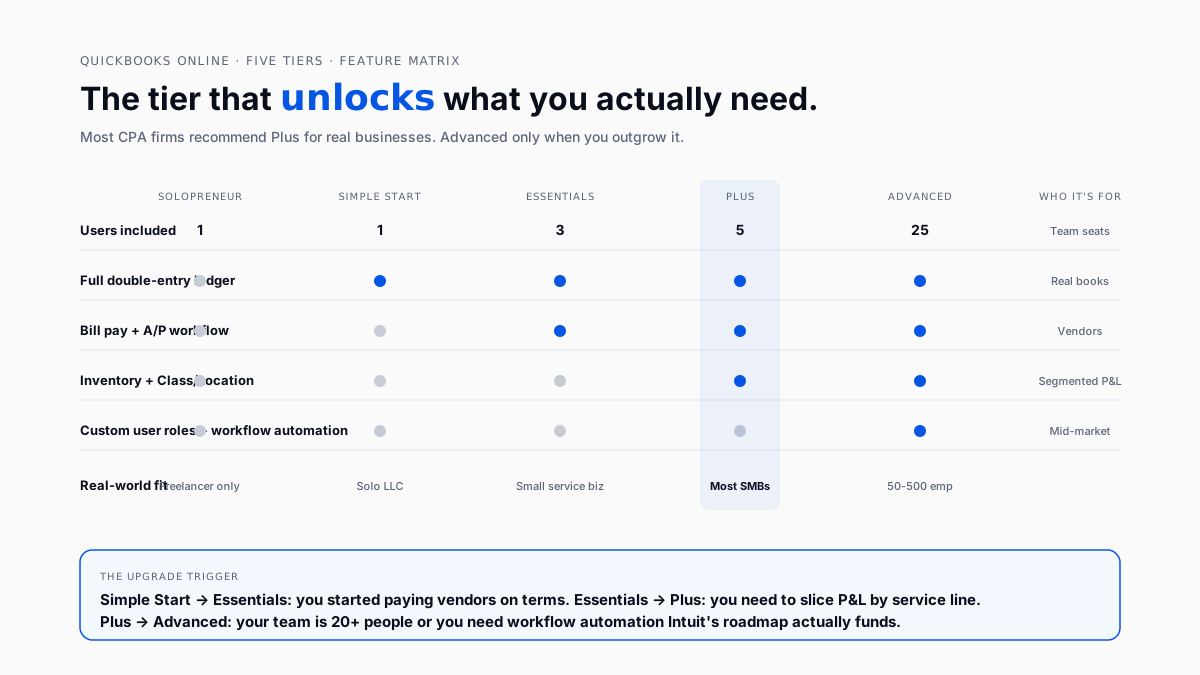
- Five subscription tiers: Solopreneur, Simple Start, Essentials, Plus, and Advanced. Most CPA firms recommend Plus for real businesses.
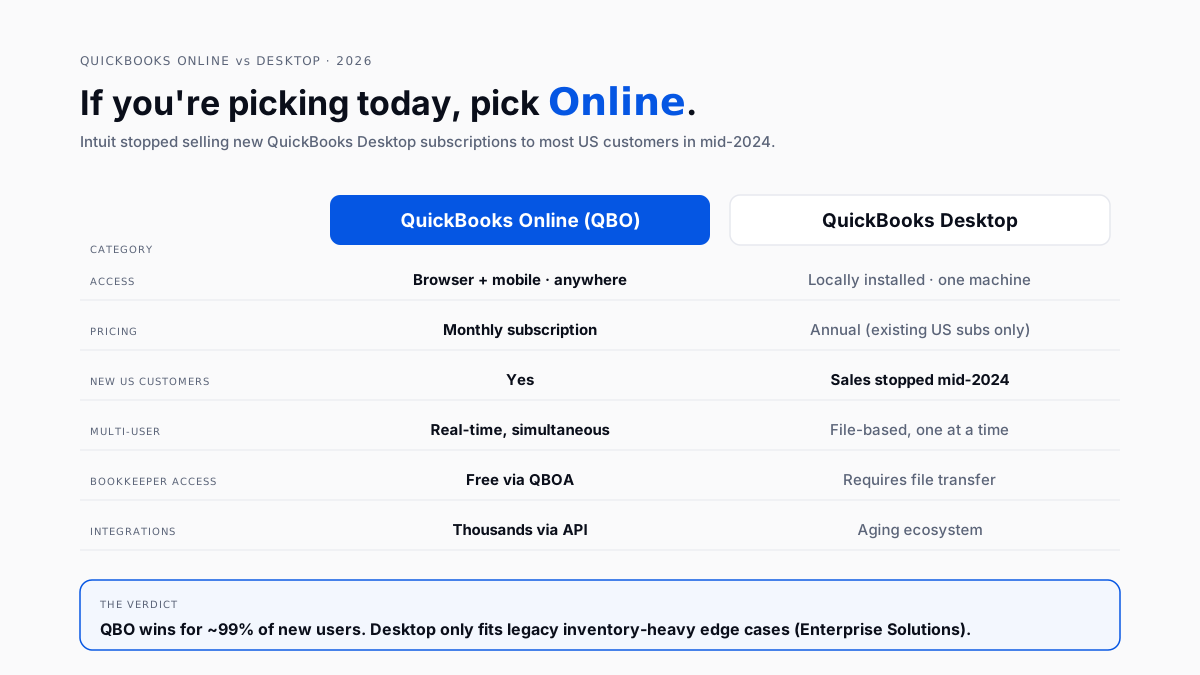
- QBO vs. Desktop: Intuit stopped selling new Desktop subscriptions to most US customers in mid-2024. If you're picking today, you're picking QBO.
- ~80% US small business accounting software market share - the ecosystem depth is the moat, not the ledger itself.
- Four modules do 95% of the work: bank feeds, invoicing, bill pay + A/P, and reports.
- Firms managing 30+ client files typically add an AI categorization layer on top rather than switching platforms.
What is QuickBooks Online?
QuickBooks Online is Intuit's cloud-based double-entry accounting product for small businesses. Users log in through a browser or mobile app, connect bank and credit card accounts via a live feed, categorize transactions into a chart of accounts, and generate financial reports at month-end.
The product sits at the center of an ecosystem: bank feeds, QuickBooks Payroll, QuickBooks Payments, QuickBooks Bill Pay, and thousands of third-party integrations for expense management, revenue recognition, and reporting depth.
What does QuickBooks Online do?
Four modules handle 95% of a typical business's use of QBO.
Bank feeds pull transactions from connected accounts. Someone has to accept each one into the right account, class, and location. Intuit Assist suggests categories now, but accuracy on nuanced items (owner draws, split personal-business meals, mixed capital-vs-operating expenses) is uneven enough that bookkeepers review every one.
Invoicing sends invoices, tracks paid/unpaid, and applies payments. When a customer pays via QuickBooks Payments, the deposit syncs to the bank account automatically. Revenue recognition for SaaS or service billing is thin, which is why firms with real ASC 606 needs use an add-on. See connect QBO and Stripe revenue.
Bill pay + A/P covers vendor bill entry, approval, and payment. Native bill pay ships in Essentials and above. Most mid-market firms bolt on Ramp or Bill.com because native approval workflows are shallow beyond a single approver.
Reports produce P&L, balance sheet, cash flow, A/R aging, and A/P aging. Advanced reporting (custom columns, multi-entity roll-ups) requires Plus or Advanced. Custom reports are the #1 reason firms upgrade tiers.
QuickBooks Online vs. QuickBooks Desktop: Which Should You Use?
Pick QBO. Intuit stopped selling new desktop subscriptions to most US customers in mid-2024. The roadmap and product investment have moved fully to QBO.
Existing Desktop subscribers can still renew. Enterprise Solutions (the top Desktop SKU) is still sold to larger businesses that need the desktop-first workflow. Everyone else lands on QBO.
How much does QuickBooks Online cost?
QBO runs from around $20/month at the entry level (Solopreneur) to several hundred/month for Advanced. Intuit publishes list prices on quickbooks.intuit.com and raises them annually-assume 5-10% drift per year.
Which tier should you pick?
- Freelancer with Schedule C only? Solopreneur, but expect to outgrow it in a year.
- Solo LLC or single owner? Simple Start.
- Small service business with a bookkeeper? Essentials.
- Most real businesses with employees? Plus. Class and location tracking is what unlocks segmented P&L, and that's what separates "keeping books" from "using books."
- 50+ employees or need workflow automation? Advanced
Founders on r/smallbusiness arer/smallbusiness asking whether QBO is still worth it in 2026 point at the same friction: price hikes at the mid tiers, feature gates that force upgrades, and a suspicion that some of what Advanced charges for used to sit inside Plus.
Is QuickBooks Online cloud-based?
Yes. Books live on Intuit's servers. Users access it through a browser or mobile app. Multiple users can be in the same file at the same time. Backups, updates, and version management happen automatically on Intuit's side.
The single biggest reason QBO won out over Desktop is access. The owner in Denver, the bookkeeper in Manila, and the CPA in New York can all be inside the same file at the same time. Nobody emails backups around. Nobody restores from Dropbox. Nobody waits for someone to close the file.
Who is QuickBooks Online for?
Two audiences, one product:
- Small business owners running one set of books-Simple — Simple Start or Essentials. Log in weekly, categorize what the bank feed pulled, cut an invoice or two.
- Accounting and bookkeeping firms managing many client files - QuickBooks — QuickBooks Online Accountant (QBOA) is Intuit's free practitioner front-end. Firms manage all client files from one login.
A bookkeeper venting on r/bookkeeping that everyone hates QBO but nobody has a good replacement captured the practitioner reality: the gaps are real, but the ecosystem depth and integration count keep switching cost above frustration cost.
What is QuickBooks Online Accountant (QBOA)?
QBOA is Intuit's free front-end for practitioners. Bookkeepers and CPAs use it to manage many client files from one login. QBOA access doesn't count against a client's paid user seats - which is why practitioner economics favor QBO over most competitors.
Three capabilities QBOA gives a firm that client-side QBO doesn't:
- Client switcher. Jump between files without logging in and out.
- Accountant toolbox. Reclassify transactions in bulk, write off invoices, and access trial balance.
- ProAdvisor directory. Firms that certify staff appear in Intuit's Find-a-ProAdvisor inbound channel.
What are the limits of QuickBooks Online?
Every honest evaluation includes what breaks. Five recurring gaps:
- Reporting flexibility. Custom columns, multi-entity roll-ups, real management reporting - all need Advanced or an add-on layer.
- Multi-entity in one file. Not supported. Options: multiple subscriptions with manual reconciliation, upgrade to Advanced for limited multi-entity, or move to NetSuite. See intercompany reconciliation in QuickBooks.
- Categorization AI. Intuit Assist handles frequent vendors well and mixed-purpose transactions poorly.
- Batch operations. Duplicating invoices, mass-updating vendors, re-categorizing history - click-heavy outside Advanced.
- Approval workflows. Native bill pay approvals are shallow. Firms bolt on Ramp or Bill.com anyway.
Bookkeepers on r/Accounting discussing QBO staff-accountant workflows describe the ceiling: QBO handles the ledger, but the analytical work moves to Excel or a dedicated reporting layer.
When should you add a layer instead of switching?
The evaluation almost never comes down to "Should we leave QBO?" It comes down to what to put on top.
- Solo owner? Stay on Simple Start or Essentials. Hire a bookkeeper by the hour before you hire more software.
- 5-50 employees? Move to Plus. Add a receipt-capture tool (Ramp, Expensify, or Zoho Expense). Consider close automation if month-end takes >5 working days. See best month-end close software for QuickBooks.
- CPA firm managing 30+ client books? QBO alone stops being enough. If your firm spends >20 hours a week categorizing bank feeds across clients, ROI on an AI categorization layer is measured in weeks, not quarters. See automation for CPA firms running QuickBooks at scale.
A bookkeeper on r/Bookkeeping asking whether anyone had actually tested Intuit's free QBO Solopreneur tier captured the practitioner suspicion of freemium: free usually means constrained enough that a real business grows out of it in a quarter. That's usually correct.
The 2026 QBO stack
The default stack for a QBO-first firm has settled:
- Ledger: QBO (or QBOA for firms)
- Practitioner front-end: QBOA-free
- Receipts: Ramp, Expensify, or Zoho Expense
- Bill pay: QuickBooks Bill Pay, Bill.com, or Ramp
- Payments in: Stripe → connect QBO + Stripe revenue
- AI categorization: Finlens, Uncat, or Botkeeper
- Close automation: dedicated tool or workflow-tool templates
- Reporting depth: Fathom, LivePlan, or Advanced tier's built-in
For firms handling 30+ client files, the AI categorization layer beats every other choice on ROI. Categorization time is the biggest single-hour consumer; accuracy gains show up in the same month, and clients feel it immediately (books close on time). See the AI layer for the QuickBooks pattern or the bulk transaction categorization tools that sit on top of QBO.
Conclusion
QBO isn't a decision; it's a starting point. For US small businesses and the firms that keep their books, QBO is the default ledger. The meaningful choices happen in what you put around it: categorization layer, close workflow, client portal, reporting depth. Firms that treat QBO as a base and stack automation on top of it get the leverage QBO's marketing implies but the product alone doesn't deliver.
FAQ
Is QuickBooks Online the same as QuickBooks Desktop?
No. QBO is browser-based and hosted by Intuit; Desktop is locally installed. Intuit stopped selling new Desktop subscriptions to most US customers in mid-2024. The double-entry ledger concepts are the same. The UI, integrations, and roadmap diverge sharply.
Is QuickBooks Online cloud-based?
Yes. Books live on Intuit's servers. Users log in through a browser or mobile app. Multiple users can be in the same file simultaneously. Backups, updates, and version management happen on Intuit's side.
How much does QuickBooks Online cost in 2026?
From ~$20/month at Solopreneur up through Simple Start, Essentials, and Plus, and several hundred/month for Advanced. Intuit publishes current list prices on quickbooks.intuit.com and adjusts them annually.
Can I try QuickBooks Online for free?
Yes - Intuit offers a 30-day free trial on most tiers. Solopreneur has had free-tier experiments. Conversion after 30 days is aggressive. A permanent free tier that stays free long-term does not currently exist in QBO's lineup.
Is QuickBooks Online good for small businesses?
For most US small businesses, yes. Owners on r/smallbusiness asking whether QuickBooks is still worth it in 2026 typically land there after evaluating alternatives and deciding the switching cost is higher than the frustration.
Does QuickBooks Online do payroll?
Payroll is a separate Intuit product (QuickBooks Payroll) that integrates natively. Priced on top of the accounting subscription. Firms running payroll through Gusto or Rippling push journal entries into QBO via integration.
What is a QuickBooks Online Accountant?
QBOA is Intuit's free front-end for accounting and bookkeeping firms. It manages many client files from one login and doesn't consume the client's paid user seats.
Does QBO handle multi-entity or consolidated financials?
Not inside a single file. Options: run multiple QBO subscriptions with manual reconciliation, upgrade to Advanced for limited multi-entity reporting, or move to NetSuite for true consolidation. See intercompany reconciliation in QuickBooks.

