
QuickBooks Online Features: The Complete Breakdown by Tier (2026)


QuickBooks Online features cluster into eight categories: invoicing and payments, expense tracking, receipt capture, bank and card feed connections, financial reporting, inventory and project tracking, payroll and tax automation, and workflow and user management.
Every QuickBooks Online tier includes first four categories at some level. The higher tiers layer additional capabilities on top, which is what drives most of pricing difference between Simple Start at around $35 a month and Advanced at around $235.
This guide walks through each of eight feature categories in detail, showing what each tier actually delivers inside each one, then breaks down which tier fits which business profile, how features compare to major alternatives like Xero and FreshBooks, and workflows features are designed to support.
It's written for owners deciding which QuickBooks Online plan to buy, freelancers deciding whether to upgrade from Solopreneur, and CPA-firm partners standardizing tier recommendations across their client base.
The eight feature categories at a glance
Almost every workflow you run inside QuickBooks Online touches one of eight feature categories. Understanding which categories matter for your business is what makes tier choice straightforward rather than confusing.
Category 1: Invoicing and payments. Creating and sending professional invoices, accepting online payments through QuickBooks Payments, tracking accounts receivable aging, and running recurring subscription billing.
Category 2: Expense tracking. Categorizing incoming transactions, applying bank rules for recurring vendors, splitting expenses across categories, and tagging them by project or client.
Category 3: Receipt capture. Mobile OCR that reads receipts from phone photos, email forwarding for digital receipts, and automatic matching to bank feed transactions.
Category 4: Bank and card feed connections. Direct connections to more than 25,000 US financial institutions that pull transactions daily and land them in a review queue.
Category 5: Financial reporting. Profit and loss, balance sheet, cash flow, accounts receivable aging, sales by customer, and dozens of other standard and custom reports.
Category 6: Inventory and project tracking. Stock levels, purchase orders, cost of goods sold, plus project-level P&L for service businesses billing per engagement.
Category 7: Payroll and tax automation. QuickBooks Payroll add-on for wages, tax withholding, and quarterly and annual filings. Sales tax calculation is built in.
Category 8: Workflow and user management. Multi-user access with role-based permissions, approval workflows for high-value transactions, and audit logs.
What each tier actually delivers
The five tiers of QuickBooks Online layer features on top of one another rather than replacing them. Every higher tier includes everything from tier below, plus additional capabilities.
Solopreneur
Solopreneur is designed for freelancers and gig workers filing Schedule C. It's a simpler product than Simple Start with a specific focus on self-employed workflows.
Core features include mileage tracking with standard IRS rate applied, expense categorization aligned to Schedule C, basic invoicing, quarterly estimated tax calculation, and separation of business and personal transactions within a single bank feed.
Solopreneur costs around $20 a month and works well for gig economy workers, consultants without employees, and single-owner service businesses that don't need multi-user access.
Simple Start
Simple Start is entry point for full QuickBooks Online bookkeeping. One user plus optional accountant access, and it handles core small business workflows.
The tier adds full-featured invoicing with recurring options, expense tracking with bank feeds and rules, receipt capture through mobile OCR, financial reporting on profit and loss and balance sheet, and 1099 contractor tracking (with eligible checkbox during vendor setup).
Simple Start costs around $35 a month. It fits solo business owners and very small operations that don't need bill payment workflow or multiple users, but do need real double-entry bookkeeping.
Essentials
Essentials adds three-user access and expands workflow scope beyond just recording transactions. This is where QuickBooks starts feeling like a real business management platform rather than just a bookkeeping tool.
Additional features include bill management (accounts payable), time tracking for employees or contractors, multi-currency support for businesses invoicing internationally, and enhanced sales tax handling for businesses collecting across jurisdictions.
Essentials costs around $65 a month. It fits growing service businesses with employees who need to enter time, and businesses paying vendors on Net 30 terms.
Plus
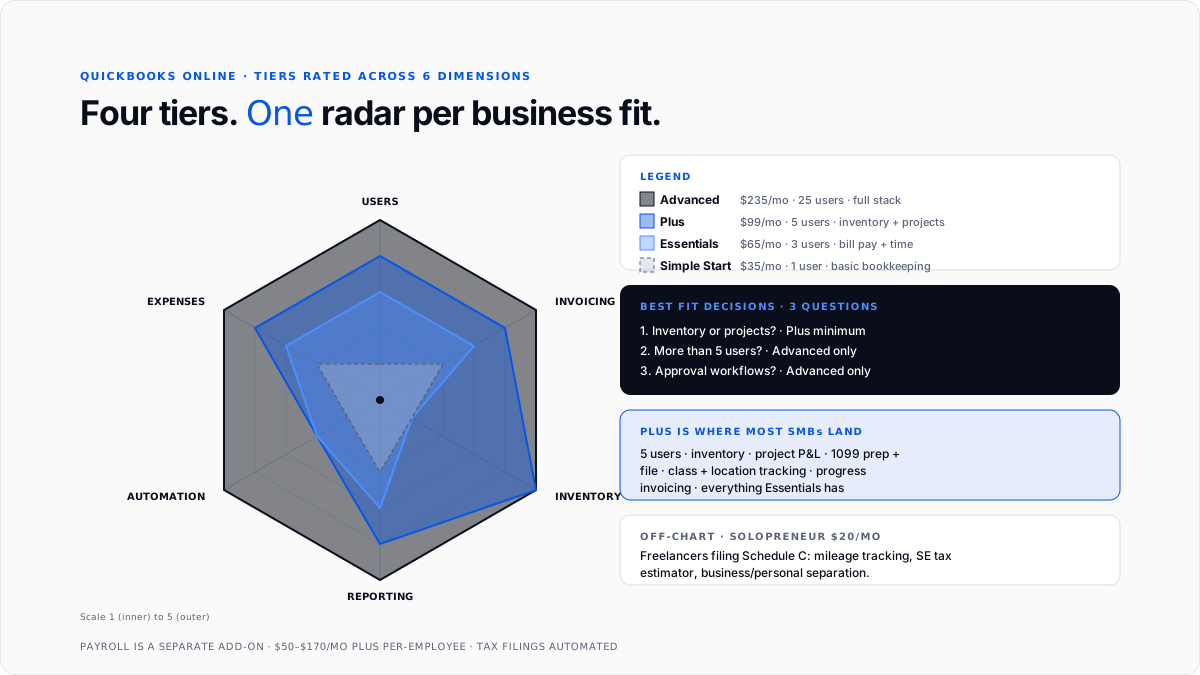
Plus is where most established small businesses land. Five-user access and addition of inventory and project tracking makes it appropriate tier for majority of QuickBooks Online use cases.
Additional features include inventory tracking with purchase orders and cost of goods sold, project profitability with billable expenses and time, class and location tracking for businesses with multiple product lines or locations, and 1099 preparation and filing at year-end.
Plus costs around $99 a month. It fits established small businesses with inventory, service businesses billing per project, businesses with multiple locations or product lines, and any operation that needs full profitability analysis at project or class level.
Advanced
Advanced is aimed at mid-market businesses with more complex needs. Up to 25 users, custom user roles, workflow automation, and dedicated account management.
Additional features include batch invoicing for businesses billing many customers at once, workflow automation for approvals and reminders, custom user roles and permissions beyond standard set, revenue recognition for subscription businesses, and dedicated account management with priority support.
Advanced costs around $235 a month. It fits mid-market businesses that have outgrown Plus but haven't yet moved to NetSuite, professional services firms with formal approval workflows, and businesses with heavy customization needs.
How tiers stack up on eight categories
The table below shows what each category actually looks like at each tier. Everything in a lower tier is included in higher tiers.
Feature deep-dive: what actually matters day to day
Not every listed feature carries same weight in real use. A few features drive majority of daily value.
Bank feeds are single most important feature
The bank feed is what most owners actually spend time inside QuickBooks doing. Every business account connects through a direct feed that pulls transactions daily, and every transaction lands in review queue for categorization.
Bank rules amplify value dramatically. Setting up a rule that auto-categorizes Adobe as "Software subscriptions" once means every future Adobe charge posts to right category without user intervention. Well-configured QuickBooks setups auto-categorize 80 to 90% of transactions, and users only manually review remaining exceptions.
This feature is present in every tier from Simple Start up.
Invoicing pays for subscription for most service businesses
Professional invoicing with online payment acceptance is second highest-leverage feature for most businesses. Send a customer an invoice with a payment link, they click and pay by card or bank transfer, and payment lands in QuickBooks matched to invoice automatically.
Recurring invoicing (Essentials and up) is what makes subscription businesses viable inside QuickBooks. Retainer clients, subscription products, and monthly service billing all run on recurring invoices with automatic delivery.
Progress invoicing (Plus and up) lets project-based businesses invoice a percentage of a project as milestones complete, rather than only at end. This is important for consulting firms, construction contractors, and anyone billing on a milestone schedule.
Receipt capture is workflow win owners feel first
Mobile receipt capture is often first feature owners genuinely love about QuickBooks. Snap a photo of a paper receipt from QuickBooks Online mobile app, and OCR extracts merchant, date, amount, and tax within seconds.
Email forwarding for digital receipts is sibling workflow that matters for SaaS-heavy businesses. Set up a special email address inside QuickBooks, forward any digital receipt to it, and receipt gets ingested automatically without any typing.
Both capabilities are present from Simple Start up. See historical transaction categorization tools for QuickBooks guide for how receipt capture layer combines with backfill workflows when catching up on months of unrecorded activity.
Inventory turns Plus into a real product-business platform
Inventory tracking on Plus and Advanced is what makes QuickBooks Online viable for product businesses. Stock levels, purchase orders, cost of goods sold calculation, and reorder alerts all run inside platform.
For businesses that don't sell physical products, inventory isn't a factor and Essentials often works fine. For businesses that do, Plus becomes practical starting point because Simple Start and Essentials don't support inventory at all.
Project profitability is Plus feature service businesses value most
Project tracking on Plus lets service businesses tag every billable time entry and expense to a specific project, then see P&L per project rather than only in aggregate.
For consultancies, agencies, and any service business that runs discrete engagements, this is what turns QuickBooks from a general accounting tool into a management platform that surfaces which projects are actually profitable.
Workflow automation is Advanced feature that justifies upgrade
Advanced adds workflow automation, meaning custom rules that route transactions or reminders based on business logic. This is feature that makes Advanced worth price step-up over Plus for businesses that need approval workflows or automated processes.
Batch invoicing, custom user roles, revenue recognition, and dedicated account management round out Advanced feature set. These are all valuable for right business but rarely justify upgrade on their own.
How QuickBooks Online features compare to alternatives
QuickBooks Online is often compared to Xero, FreshBooks, Wave, and Sage. The feature comparison depends heavily on specific workflow.
Xero matches QuickBooks Online on most core features. The interfaces differ, but underlying capabilities across invoicing, expenses, reporting, and inventory are broadly comparable. Xero has cleaner design in some workflows and stronger international presence. QuickBooks Online has more third-party integrations and stronger US-market presence.
FreshBooks is stronger than QuickBooks Online on time tracking and project billing for very small service businesses, weaker on complex accounting workflows and reporting.
Wave is free at base tier and works well for very small operations. Feature depth drops off quickly compared to any paid QuickBooks tier.
Sage Intacct competes with QuickBooks Advanced at upper end of SMB market. Stronger in specific industries like nonprofits and financial services. Broader ERP capabilities.
For most US small businesses evaluating cloud accounting, QuickBooks Online sits as mainstream default because of feature depth, ecosystem, and CPA firm familiarity. The exceptions are businesses whose accountant has a strong preference for a different platform.
How CPA firms use QuickBooks Online features
For CPA firms and bookkeeping firms managing many client books, QuickBooks Online Accountant is workspace that consolidates access to all client files with one login.
The firm partner or bookkeeper sees every client's file, pending tasks, and review queue in one dashboard. Client-level features (categorization, reconciliation, reporting) work same way inside each client's individual file.
Modern firms often add automation layers on top of standard QuickBooks feature set. The AI layer for QuickBooks guide covers this pattern, and automate QuickBooks bookkeeping guide covers specific workflows firms automate to scale client capacity per bookkeeper.
Which tier to pick
The right tier is usually clearer than marketing suggests. Three questions cover most decisions.
Do you have inventory or need project-level P&L?
If yes, Plus is minimum. Simple Start and Essentials don't support these workflows.
How many users need access?
If more than 5, Advanced is minimum. If 3 to 5, Essentials or Plus depending on other needs. If just you, Solopreneur or Simple Start.
Do you need approval workflows or custom user roles?
If yes, Advanced. If not, Plus is usually sufficient.
Beyond those three questions, most tier decisions come down to price sensitivity and expected growth. Businesses expecting rapid growth often start one tier higher than they strictly need, so they don't have to migrate immediately.
Conclusion
QuickBooks Online features cluster into eight categories, and every tier includes core four (invoicing, expenses, receipts, bank feeds) plus additional layers as you move up ladder.
For most small businesses, Plus is practical landing spot because it adds inventory, projects, and 5-user access on top of core workflow features. Simple Start works for solo owners without those needs. Advanced fits mid-market businesses with approval workflow or custom role requirements.
For owners evaluating tiers, three questions that drive decision are whether you need inventory or project tracking, how many users need access, and whether you need approval workflows or custom roles.
The best AI tools for bulk transaction categorization guide covers automation layers that can be added on top of any tier to reduce manual categorization work that eats most owner time in QuickBooks.
For CPA firms managing many client books, standardizing on Plus across client base (with Advanced for mid-market clients) and layering AI-driven automation on top is what turns QuickBooks Online from a per-client tool into a firm-level operating platform.
Frequently asked questions
What features come with QuickBooks Online?
Every tier includes invoicing, expense tracking, bank feed connections, receipt capture, and financial reporting. Higher tiers add multi-user access, bill payment, inventory, projects, and workflow automation on top.
Which QuickBooks Online plan is best?
For most established small businesses with inventory or projects, Plus. For growing service businesses without inventory, Essentials. For solopreneurs, Solopreneur or Simple Start. For mid-market businesses with approval workflows, Advanced.
What features does QuickBooks Online Advanced have?
Everything Plus has, plus 25-user access, custom user roles, workflow automation, batch invoicing, custom fields, revenue recognition, and dedicated account management.
Does QuickBooks Online include payroll?
No, but QuickBooks Payroll is a separate add-on that integrates directly with any QuickBooks Online tier. Payroll pricing runs $50 to $170 per month plus per-employee fees.
Does QuickBooks Online do inventory?
Only on Plus and Advanced. Simple Start and Essentials don't include inventory tracking. Solopreneur doesn't either.
Can QuickBooks Online handle multiple businesses?
Each business needs its own subscription. QuickBooks Online doesn't support multiple companies in one login way Desktop did. CPA firms use QuickBooks Online Accountant to manage many client files, but each client keeps a separate subscription.
What features does QuickBooks Online Plus have?
Everything in Essentials plus inventory tracking, project profitability, 5-user access, class and location tracking, and 1099 preparation. This is tier most established small businesses land on.
Is QuickBooks Online cloud-based?
Yes. All data lives on Intuit servers and users access it through a browser or mobile app. This is different from QuickBooks Desktop, which runs locally on a specific computer.
Does QuickBooks Online have a mobile app?
Yes, for both iOS and Android. The mobile app handles receipt capture, invoicing, mileage tracking, and basic reporting. Complex editing usually happens on desktop web interface.
Can QuickBooks Online integrate with other tools?
Yes. Hundreds of third-party integrations through QuickBooks App Store cover payment processors, e-commerce, CRM, and specialty industry tools. The connect QBO to Stripe revenue guide covers one common integration example.
What features does QuickBooks Solopreneur have?
Mileage tracking, expense categorization aligned to Schedule C, basic invoicing, quarterly estimated tax calculation, and business/personal transaction separation. It's simpler than Simple Start and specifically designed for self-employed workers filing Schedule C.

