
Remote Collaboration Tools for Accounting Firms: What Distributed Firms Actually Use After the trial Period


Year one of remote accounting work felt fine. The team set up Zoom, picked Slack or Teams, opened a Google Drive folder, and got back to work. Tax season went mostly OK because everyone was hyper-attentive about communication during the transition.
Year two is where the honeymoon ends. A senior reviewer in Phoenix realizes the preparer in Tampa has been doing something a specific way for six months and nobody flagged it because the screen-share-and-walk-through that would have caught it on day one never happened. A client document that landed in someone's DMs at 11 PM Eastern got buried by morning and didn't get worked on until Friday. The partner can't tell the difference between team members who are slammed and team members who are coasting because everyone is "busy on Slack."
This is the post about the tools that survive contact with year two. The default stack (Slack + Zoom + Google Drive) covers about 60% of the real work. The remaining 40% is where distributed accounting firms either build a deliberate operating system or quietly become less productive than they were when everyone was in the office.
What the default stack actually misses
The Slack-plus-Zoom-plus-Drive setup handles synchronous communication and document sharing. It misses three things that accounting work specifically requires:
Visible work-in-progress. In an office, you can see what someone is working on. Their monitor is open to the file. Remote, you can't. Slack status messages are aspirational. The senior reviewer can't tell whether the preparer is heads-down on a complex return or stuck and not asking for help.
Decision documentation. A partner answers a tax question for a preparer over a 10-minute Zoom call. The answer affects 12 other clients in similar situations. The conversation evaporates. Six months later, three different team members are handling the same question different ways because the original decision never got captured.
Asynchronous handoffs. A senior reviewer in California finishes a review at 6 PM Pacific and needs the preparer in New York to make corrections in the morning. The review notes need to be specific enough that the preparer can act on them without follow-up. Slack-DM-with-screenshot is not specific enough.
The tools that handle these three gaps are where remote firms invest after they've outgrown the default stack.
The actual layers of the remote firm tech stack
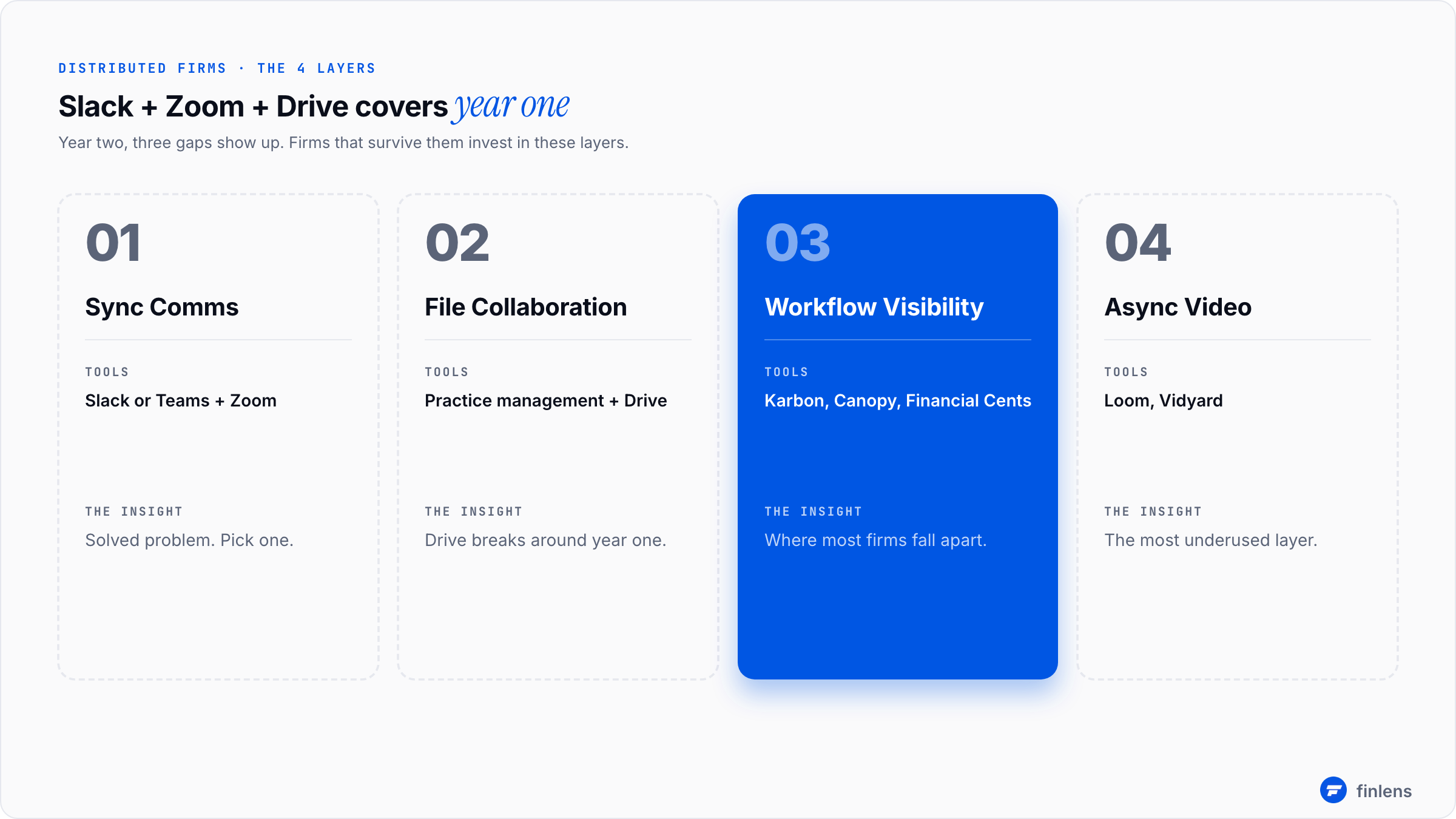
A distributed accounting firm needs four layers. Most firms try to consolidate down to one or two and end up with gaps. The four:
1. Synchronous communication (chat + video). Slack or Teams plus Zoom. Solved problem. Pick one and stop talking about it.
2. Document and file collaboration. Google Drive or OneDrive plus practice management. The trick is making the document storage searchable across years and across team members. Google Drive folder structures break around year two.
3. Workflow visibility. Where most firms fall apart. Practice management software (Karbon, Canopy, Financial Cents) is the only category that solves this for accounting-specific work. General PM tools (Asana, Notion, Monday) don't know what a monthly close is.
4. Asynchronous video. The most underused layer. Loom, or alternatives like Vidyard, let team members record 3-minute walkthroughs of complex situations. A 3-minute video of the senior reviewer walking through a tricky reconciliation is worth more than 15 messages back and forth.
The first three are obvious. The fourth is where most firms haven't caught up. Remote firms that adopted Loom for review notes and walkthrough explanations report meaningful time savings, usually a 30-40% reduction in back-and-forth on complex engagements.
What actually works for the synchronous layer
Slack vs Teams is mostly a religious war. Functional difference for accounting firms:
Slack. Better third-party integrations. Channels organize cleanly by client if you create one channel per client (works up to about 50 clients before the sidebar becomes unusable). Search is better. Pricing: $7-15/user/month for the paid tiers.
Teams. Better if your firm is already in Microsoft 365. The video conferencing is now competitive with Zoom. Pricing typically rolls into the M365 license.
For accounting firms specifically, the right choice is usually whichever one matches your office productivity suite. If you're in Google Workspace, Slack. If you're in Microsoft 365, you're in Teams. Neither tool is meaningfully better for accounting work specifically.
Zoom for client video calls is still the default. The Zoom-vs.-Teams-meetings-vs.-Google-Meet question matters less than whether you're consistent. Pick one and stop switching.
Where remote firms actually get tripped up
Three patterns show up repeatedly:
Pattern 1: Slack becomes the work tracker. A client emails the firm. The preparer pastes the question into a client-specific Slack channel. The conversation happens in Slack. The decision happens in Slack. The work happens. Nobody updates the practice management tool. Two months later, no one can reconstruct what happened on that engagement because the entire trail lives in Slack messages that scrolled past view.
The fix: practice management is the system of record. Slack is for the conversation while the work is happening. The conclusion gets logged in the practice management tool. This requires discipline. It does not happen automatically.
Pattern 2: Document storage drift. In year one, the firm has a clean Google Drive structure: one folder per client, a subfolder per engagement, and consistent naming. By month 18, three team members have created their own variants because the original structure didn't quite fit the work they were doing. Documents start showing up in personal Drive folders. The 2024 W-2 for Client X is in three different places.
The fix: Practice management software with proper document management beats free-floating Drive. Karbon, Canopy, and Financial Cents all do this. The day you migrate the document organization into the practice management tool is the day you stop losing files.
Pattern 3: Time zone-induced delay accumulation. A firm with team members in three time zones handles a question on a hand-off basis. Phoenix asks Tampa at 4 PM Eastern. Tampa is offline. Tampa replies at 9 AM the next morning. Phoenix has moved on to a different question. The original question gets answered 18 hours after it was asked. Multiply by 8-10 such handoffs per week, and the cumulative delay becomes significant.
The fix: explicit handoff protocols and async video. Loom walkthroughs let Phoenix answer the question once in a way that's clear enough for Tampa to act on without follow-up. The 5-minute recording on Loom saves 30 minutes of back-and-forth.
What distributed firms past 20 staff actually use
The realistic stack at firm size 20-50 with team members in 3+ time zones:
Total monthly software spend for 25 staff: roughly $8,000-$15,000. That's against monthly revenue typically $200K-$500K at this firm's size. Software is 2-5% of revenue, in line with the AICPA Tech Trends Survey benchmarks.
The security layer remote firms forget
A distributed firm handles client SSNs and bank details across multiple locations, multiple devices, and multiple networks. The security posture has to be deliberate, not assumed.
The minimum baseline most carriers and regulators expect:
- Multi-factor authentication on every tool that touches client data
- Encrypted laptops for every team member
- VPN or zero-trust networking for accessing firm resources
- Documented data handling procedures (this is the WISP requirement for tax firms covered in the WISP guide)
- Quarterly access review (who can access what, are any of those accesses stale)
The NIST Cybersecurity Framework is the standard most professional services firms use to structure these decisions. You don't need to implement it in full. You do need the baseline.
The piece distributed firms miss most often is stale access. A bookkeeper who left in March still has Google Drive access in October because nobody ran the offboarding checklist. The quarterly access review catches this. Without it, you accumulate excess debt.
Where most remote collaboration listicles go wrong
The standard "10 best remote collaboration tools" listicle is built for tech companies, not accounting firms. The tools recommended (Notion, ClickUp, Loom, Linear, and Figma) are great for product teams. They don't know what a 1099 or a balance sheet reconciliation is.
For accounting firms, the right framing is: Which two or three of the four layers above are gaps in our current setup? Then buy specifically for those gaps. Don't replace tools that already work
The list that actually works for accounting firms is shorter than typical:
- One synchronous chat (Slack or Teams)
- One video tool (Zoom, usually)
- One practice management tool (Karbon, Canopy, or Financial Cents)
- One async video tool (Loom)
- One bookkeeping automation tool if you do bookkeeping (Finlens, Docyt)
- The tax software you already use
That's six tools. Everything else is supporting infrastructure.
What this category will not fix
A few honest limits:
Hiring and firing. Bad hires hurt more in remote environments because the warning signs take longer to surface. No collaboration tool fixes this. The hiring process needs to be more rigorous, not the tools.
Time zone math. A firm with team members in 4+ time zones cannot fully solve the latency problem with tools alone. Some delay is structural. The right call is usually constraining the time zone spread, not buying more tools.
Culture. Remote firms with weak culture fall apart faster than in-office firms. The collaboration tools amplify whatever culture exists. They don't create one.
Frequently asked questions
What's the minimum tool stack for a fully remote 5-person accounting firm?
Slack or Teams for chat. Zoom for client calls. Google Drive or OneDrive for documents. QBO Accountant for client work. A tax software product. Practice management is optional under 5 people but recommended once you cross 10 clients. Total monthly cost: $200-$500.
Is Notion good for accounting firm collaboration?
Notion is great for documentation and lightweight project management. It is not great as a primary practice management tool because it doesn't know what a monthly bookkeeping close is. Best use: as a knowledge base for firm procedures and policies, not as the workflow tool.
Do we need a separate file storage tool if we have practice management?
Modern practice management tools (Karbon, Canopy, and Financial Cents) include document storage. For most firms, this is sufficient and beats free-floating Google Drive. Heavy audit work might require dedicated workpaper management covered in the workpaper management software guide.
How does Loom actually help in accounting work?
Three concrete uses: a senior reviewer walking through complex review notes (saves email back-and-forth), training new hires on firm procedures (records once, watches forever), and client-facing explanations of unusual line items on returns (saves multiple meeting requests).
What about asynchronous-first vs. asynchronously synchronous-first remote work?
For accounting firms, the right answer is mixed. Client-facing work (kickoff calls, tax review meetings) stays synchronous. Internal work (review notes, training, decision documentation) shifts asynchronous where possible. Firms that go fully synchronous burn out their team. Firms that go fully asynchronous lose context.
How does Finlens fit in a remote firm?
Finlens automates the bookkeeping work that the team would otherwise be doing manually across multiple time zones. The work happens against QuickBooks Online (which everyone can access from anywhere), and the AI handles the categorization that would otherwise require team coordination. The reduction in coordination overhead is part of why Finlens matters more in remote firms than in office firms.
The right move past year one of remote operations is to invest in the workflow visibility layer and the async video layer specifically. Those are the two gaps the default Slack-plus-Drive stack leaves open. For the broader operational picture, the 50-client management playbook and the scaling an accounting firm guide cover what changes at higher firm sizes.

