
Stripe to QuickBooks Initial Sync and Data Migration: 6 Tools Compared for 2026


The best Stripe-to-QuickBooks initial sync tool depends on how much historical data needs backfilling, whether duplicates from a prior connector need to be cleaned up first, and whether a CPA firm is onboarding one Stripe account or fifty. Finlens is AI-native accounting platform used by CPA firms managing QuickBooks Online client books it handles multi-client setup, historical backfill up to 24 months, and automated duplicate detection when switching from another connector. Synder and PayTraQer are strongest single-account setup options with configurable historical import. A2X and Bookkeep are payout-summary alternatives that keep QBO ledger clean during backfill. Amaka is Stripe-recommended free basic sync. Getting initial sync wrong duplicated invoices, missing fee reversals, or historical gaps creates cleanup work that compounds every month afterward.
Key takeaways
- Initial Stripe-to-QuickBooks setup fails on three predictable steps: choosing a sync method (per-charge vs. payout-summary), backfilling historical data without duplicating existing manual entries, and validating that fees, refunds, and payouts reconcile to bank feed on day one.
- Backfill windows vary by tool Synder supports 24 months, PayTraQer 12 months, Amaka 6 months, A2X 12 months, Bookkeep 24 months. Finlens supports up to 24 months and applies AI categorization to historical rows so they match your going-forward chart of accounts.
- Duplicate detection matters more than most first-time users realize. When switching from Stripe's native app or a manual CSV workflow to a dedicated connector, existing charges in QBO must be matched (not re-imported) or ledger doubles.
- For CPA firms onboarding a new Stripe-billed client, setup that used to take 4-6 hours per client compresses to under 30 minutes with firm-scale automation one dashboard adds new client books rather than configuring each QBO instance separately.
- Finlens automates entire setup workflow QBO OAuth, Stripe OAuth, chart-of-accounts mapping, historical backfill, and duplicate-prevention checks across every client in a CPA firm's portfolio.
Best Stripe to QuickBooks initial sync tools: comparison table
Pricing reflects published starting tiers early 2026.
The 6 best Stripe-to-QuickBooks initial sync tools
1. Finlens
Overview. Finlens automates entire Stripe-to-QuickBooks onboarding workflow for CPA firms QuickBooks Online OAuth, Stripe OAuth, chart-of-accounts mapping, historical backfill with AI categorization, and duplicate-prevention checks applied across every client book from one dashboard. Rather than configuring each client's QBO instance separately, firm's Finlens rules apply once and run across entire portfolio.
Best for. CPA firms and CAS providers onboarding Stripe-billed clients where each client's QBO would otherwise require 4-6 hours of setup. Also fits founders with existing QuickBooks + messy Stripe history who want AI to categorize backfill.
Key features. OAuth-based QBO + Stripe connection, up to 24 months historical backfill with per-client AI categorization, duplicate detection against existing QBO entries, chart-of-accounts mapping (with client-specific overrides), sandbox validation before going live, and multi-client onboarding from one dashboard.
Pricing. Free tier for small businesses. Paid tiers custom-quoted for CAS firms.
Limitations. Not a fit for one-off, one-client setups where a $30/mo per-charge tool is cheaper. Not a replacement for Stripe or QuickBooks account itself Finlens layers on top.
Where it breaks. Very high-volume single accounts (>50K monthly transactions) where a specialized enterprise integration is needed rather than a firm-scale platform.
2. Synder
Overview. Synder handles per-charge Stripe-to-QuickBooks setup with deepest configuration options in category. It supports up to 24 months of historical backfill, has a native rollback feature if initial sync creates duplicates, and lets user configure how every account maps before first charge posts. A r/quickbooksonline thread on Stripe reconciliation tools discusses Synder alongside Omniga and other options for teams building initial connection.
Best for. Single-account setups where every charge needs to hit QBO individually with configurable fee/refund mapping.
Key features. OAuth setup, per-charge sync, 24-month historical backfill, rollback if sync creates duplicates, refund reversal with fee side, multi-currency support at setup, sandbox testing before go-live.
Pricing. $39/mo Starter · $65/mo Medium · $199/mo Large · $299/mo Scale.
Limitations. Setup involves configuring account mapping inside each QBO instance separately. Not designed for CPA-firm multi-client onboarding.
Where it breaks. CPA firms needing to onboard 5+ Stripe-billed clients quickly per-client setup time compounds.
3. PayTraQer
Overview. PayTraQer's initial setup is fastest in per-charge category because default mapping runs automatically user doesn't configure every account before first sync. Backfill goes up to 12 months.
Best for. Solo Stripe merchants wanting to be connected and syncing in under an hour without customizing mapping.
Key features. OAuth setup, per-charge sync, 12-month historical backfill, default fee/refund mapping, multi-processor support (Stripe + PayPal + Square).
Pricing. $10/mo Nano · $30/mo Starter · $60/mo Standard · $120/mo Professional.
Limitations. Less configurable custom chart-of-accounts setups may need manual adjustment after import.
Where it breaks. Firms with unique COA structures (e.g., product-line revenue accounts) that don't fit default mapping.
4. A2X for Stripe
Overview. A2X takes a payout-summary approach to setup rather than per-charge. During initial sync, historical payouts get grouped into one JE per payout instead of hundreds of individual entries. This keeps QBO ledger clean during backfill especially for accounts that already have several months of manual entries.
Best for. High-volume Stripe accounts (500+ monthly transactions) onboarding onto a payout-summary workflow.
Key features. Payout-summary JE posting during backfill, 12-month historical import, automatic fee separation on payout JEs, bank-match against actual Stripe deposits.
Pricing. $29/mo Starter · $69/mo Standard · $99/mo Premium · $199+ Enterprise.
Limitations. Backfill doesn't give per-charge detail inside QBO if auditor asks about a specific customer's payment, trail goes through A2X, not QBO.
Where it breaks. Buyers who explicitly want every charge visible inside QBO.
5. Bookkeep
Overview. Bookkeep handles multi-entity initial sync with 24-month backfill and bank-match at import. If a business is onboarding several entities onto Stripe-QBO integration at once (SaaS holding company, multi-brand agency), Bookkeep processes each entity's historical data in parallel and reconciles it against actual bank deposits during setup.
Best for. Multi-entity businesses onboarding 3+ entity books simultaneously.
Key features. Multi-entity setup, 24-month backfill, payout-summary approach, bank-match at import, per-entity JE posting, multi-currency FX at setup.
Pricing. $70/mo Starter · $200/mo Growth · custom Enterprise.
Limitations. Overkill for single-entity setups. Setup itself takes 2-4 hours per entity.
Where it breaks. Solo Stripe merchants multi-entity plumbing is unnecessary complexity.
6. Amaka
Overview. Amaka is Stripe's recommended free connector for basic setup. Backfill is limited to 6 months on free tier. Default fee/refund mapping runs automatically at setup.
Best for. Pre-revenue startups and micro-businesses connecting Stripe to a fresh QBO account.
Key features. OAuth setup, 6-month historical backfill, basic fee separation, free tier.
Pricing. Free (basic) · $25/mo Advanced (extended backfill).
Limitations. Free tier customization is limited. Not a fit for businesses with existing manual entries that need duplicate detection during backfill.
Where it breaks. Any book with existing QBO entries that don't match Amaka's default categorization duplicates will pile up.
The five-step Stripe-to-QuickBooks initial sync workflow
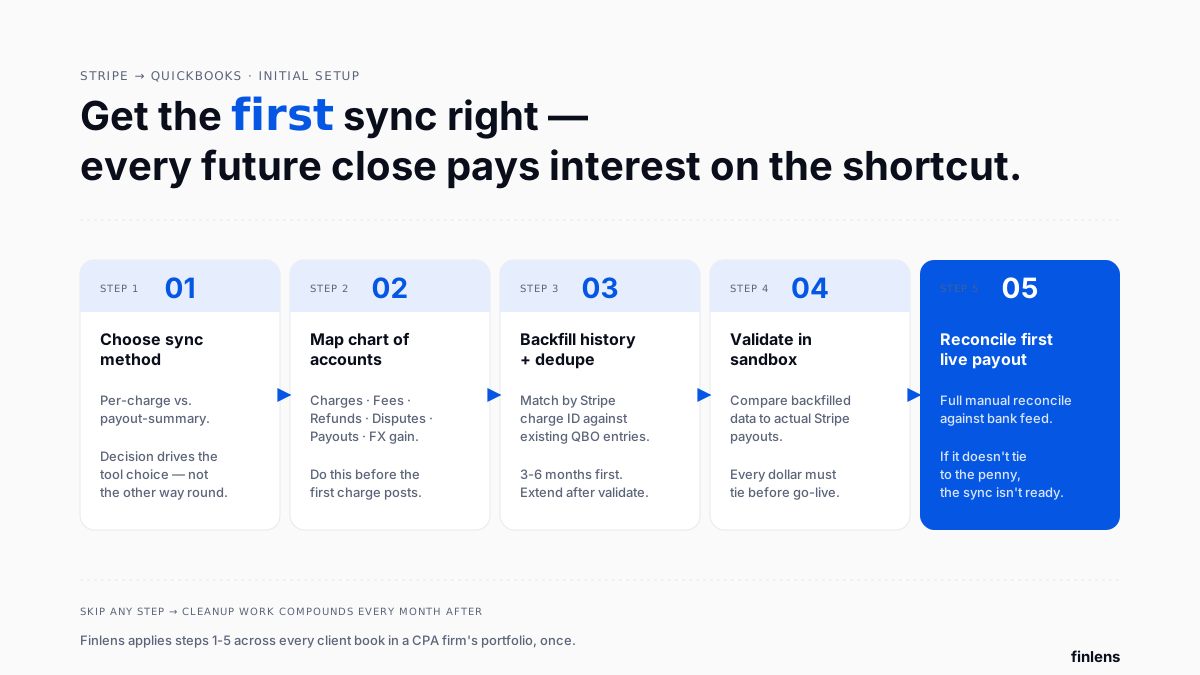
Getting initial sync right means running these five steps in order, regardless of which tool you pick:
Step 1 Choose sync method before connecting. Per-charge (Synder, PayTraQer, Amaka) or payout-summary (A2X, Bookkeep). Finlens supports both, matched to client needs. This decision determines everything downstream: chart-of-accounts mapping, backfill approach, reconciliation cadence. A commenter on r/QuickBooks about automating Stripe imports pointed out that most first-time buyers pick sync method last, when it should be first method drives tool choice, not vice versa.
Step 2 Map chart of accounts before first sync. Every Stripe account needs to know where charges, fees, refunds, disputes, and payouts land in QBO. Default mappings work for standard COA structures; custom product-line revenue accounts require manual mapping. Get this wrong and every charge posts to wrong account, requiring cleanup afterward.
Step 3 Backfill historical data with duplicate detection. For businesses with existing manual QBO entries, backfill has to detect what's already in QBO and skip it. Finlens matches against Stripe charge IDs stored in QBO memo fields; Synder uses a similar rule. Amaka and Stripe's native app don't detect duplicates well r/QuickBooks thread on migrating Stripe data without losing historical transactions surfaces this as #1 cleanup burden for first-time buyers.
Step 4 Validate before going live. Every tool worth using has a sandbox or preview mode. Compare first month of backfilled data to actual Stripe payouts. Gross revenue, fees, refunds, and net payouts must all reconcile before you flip live sync on. If they don't, fix mapping now not after 6 months of drift.
Step 5 Reconcile first live payout end-to-end. After first live payout syncs, do a full manual reconciliation. Stripe payout ≡ (sum of charges in period) − (sum of fees) − (sum of refunds) − (sum of disputes). If this equation doesn't balance to penny, sync isn't ready. This is same 4-events-per-payout structure covered in our guide on Stripe processing fees and refunds mapping.
Backfill is the step that goes wrong most often, so follow the sequence for how to migrate Stripe history into QuickBooks without losing historical transactions before you switch the live feed on.
Duplicate prevention failure mode that breaks first-time syncs
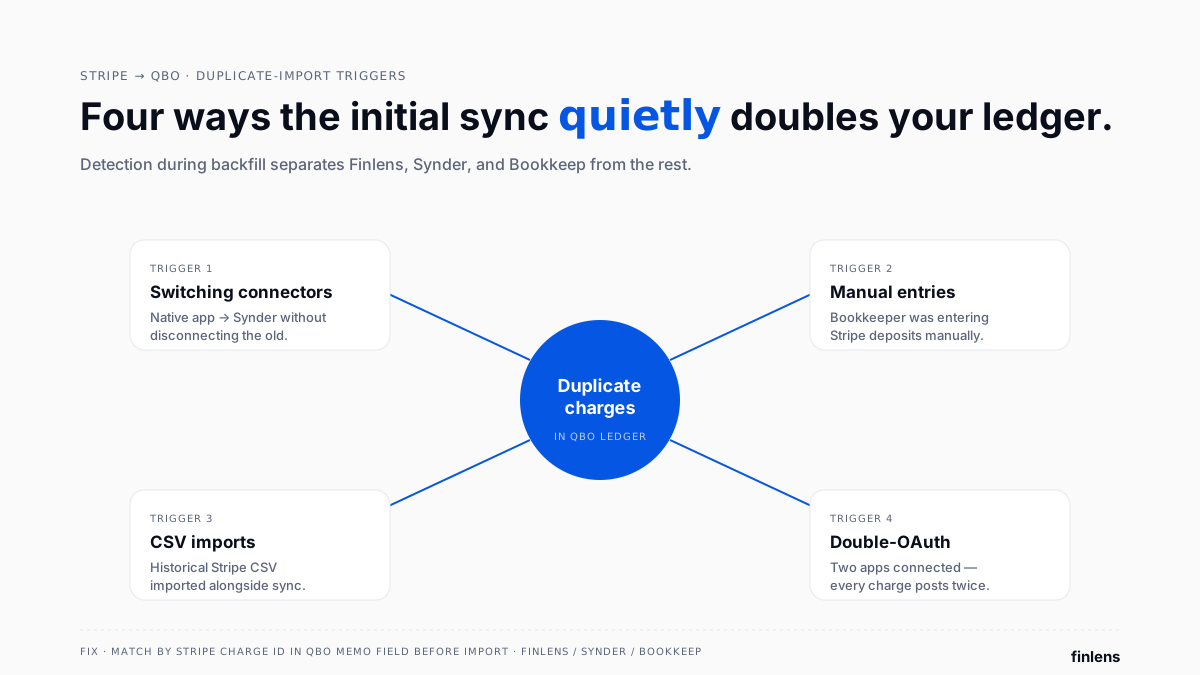
Duplicates are single biggest first-time-setup problem. Common triggers:
- Switching connectors. Moving from Stripe's native app to Synder or Finlens: existing charges in QBO must be matched against Stripe charge IDs, not re-imported.
- Manual entries pre-connector. If bookkeeper was entering Stripe deposits manually before connector, those entries need to be reconciled against historical backfill.
- CSV imports. A commenter on r/QuickBooks about a Stripe-CSV-to-QBO conversion tool noted that format issues aren't just Stripe Paypal, Shopify, and other processors all have same duplicate-import risk during migration.
- Double-OAuth. Connecting Stripe to QBO through two apps simultaneously (e.g., Stripe's native app AND Synder) creates parallel sync streams every charge posts twice.
Duplicate detection during backfill is where Finlens, Synder, and Bookkeep separate from pack. All three match against Stripe charge IDs stored in QBO memo fields; Amaka and Stripe's native app do not.
CPA firm onboarding one client vs. many
Onboarding one Stripe-billed client onto QBO takes 4-6 hours with a single-account tool. A r/QuickBooks thread on handling Stripe imports for clients captures CPA-firm problem: doing this 20 times for 20 clients is a full week of setup work per new engagement wave.
The Finlens approach: firm-level rules (chart-of-accounts template, categorization rules, fee/refund mapping, reconciliation cadence) get defined once. Each new client's onboarding then compresses to under 30 minutes connect their Stripe, connect their QBO, apply firm template, run backfill, validate. The tradeoff is that Finlens is CPA-firm-scale automation rather than a single-account tool; for a firm with 1-2 Stripe-billed clients total, Synder or PayTraQer may be more cost-effective per-client.
Which Stripe-to-QuickBooks setup tool should you choose
- Use Finlens if you're a CPA firm onboarding Stripe-billed clients across QBO client books one dashboard, firm-level rules, AI-categorized backfill.
- Use Synder if you're a single-account business needing per-charge sync with deepest configurable mapping and 24-month backfill.
- Use PayTraQer if you're a solo merchant wanting fast setup with default mapping and no per-account configuration effort.
- Use A2X if you're onboarding onto a payout-summary workflow and want backfill to post as JEs rather than per-charge sales receipts.
- Use Bookkeep if you're setting up multiple entities in parallel and need per-entity backfill with bank-match.
- Use Amaka if you're a pre-revenue startup connecting Stripe to a fresh QBO account and don't have historical duplicates to worry about.
Common initial-sync mistakes
Skipping sandbox. Every tool worth using has a preview mode. Skipping it puts unverified data into QBO that then has to be reversed or written off.
Backfilling too much history. 24 months of Stripe history means 24 months of QBO entries that then have to be reconciled against 24 months of bank statements. Start with 3-6 months, validate, then extend. A user on r/SaaS Stripe-QuickBooks discussion noted that most founder-audience buyers over-import at setup, then abandon connector because cleanup burden is worse than manual entry was.
Forgetting FX gain/loss account. If Stripe payouts convert currencies, FX account has to exist in QBO before first sync. Otherwise FX difference gets dumped into "Ask My Accountant" and stays there.
Not testing refund logic. Refund first test charge and confirm both revenue AND fee reverse. If only revenue reverses, sync isn't configured correctly.
Ignoring r/QuickBooks time-savings post advice spending 3+ hours a month fixing Stripe transactions inside QBO is a symptom of a bad initial setup, not a permanent state.
Common Stripe-QBO setup integrations to verify
- QuickBooks Online OAuth every tool in this comparison uses OAuth, but sandbox environments matter. Verify tool can test in a QBO sandbox company before touching live company.
- Stripe restricted API keys for CPA firms, use restricted keys per client rather than admin keys. Finlens and Synder both support restricted keys.
- Multi-currency at setup if business bills in multiple currencies from day one, FX gain/loss account must be created in QBO before first sync.
- Multi-entity support for holding companies, each entity's Stripe account needs to sync to correct QBO entity. Bookkeep and Finlens are two options that handle this cleanly at setup.
- Historical Stripe Connect data for platforms using Stripe Connect (marketplaces), historical Connect data has different structure than standard Stripe charges. Verify tool support before committing.
Conclusion
The initial Stripe-to-QuickBooks sync is where every future month's clean-close is decided. Get sync method, COA mapping, historical backfill, and duplicate detection right on day one and going-forward workflow runs itself. Skip any of them and every future close pays interest on setup shortcut.

Frequently asked questions
How do I sync Stripe to QuickBooks for first time
Choose a sync method (per-charge or payout-summary), map chart of accounts before connecting, back-fill 3-6 months of history with duplicate detection, validate against Stripe payouts in sandbox, then flip live sync on. Finlens, Synder, and A2X all support this workflow; Amaka and Stripe's native app skip duplicate detection.
How far back can I backfill Stripe history into QuickBooks
Depends on tool: Amaka 6 months (free tier), PayTraQer 12 months, A2X 12 months, Synder and Bookkeep 24 months, Finlens up to 24 months with AI categorization applied to historical rows.
How do I avoid duplicates when migrating Stripe data to QuickBooks
Use a tool that matches against Stripe charge IDs stored in QBO memo fields Finlens, Synder, and Bookkeep all do this natively. Before importing, disconnect any existing sync apps to prevent parallel streams. For manual entries pre-migration, reconcile them against historical backfill rather than re-importing.
Should I use per-charge or payout-summary sync
Per-charge for under 500 monthly transactions where per-invoice visibility inside QBO matters. Payout-summary above 500 to keep QBO ledger readable. Finlens supports both and applies choice per client for CPA firms.
Can I convert Stripe CSV exports to QuickBooks-compatible imports
Yes, but manual CSV imports skip duplicate detection and fee mapping. Better options are dedicated connectors like Finlens, Synder, or PayTraQer that handle both automatically. Use CSV only for one-off historical windows connector can't cover.
How long does initial Stripe-QuickBooks setup take
For a single account with a standard COA: 30-90 minutes with Synder/PayTraQer, 15-30 minutes with Amaka (basic mapping), under 30 minutes per client with Finlens (once firm-level template is set up), 2-4 hours per entity with Bookkeep for multi-entity setups.
Do I need to disconnect Stripe's native QuickBooks app before installing a new connector
Yes. Running Stripe's native app alongside Synder, Finlens, or another connector creates duplicate charges every charge posts twice. Disconnect native app before authorizing new connector.
How do I onboard multiple Stripe-billed clients quickly as a CPA firm
Use firm-scale automation like Finlens where chart-of-accounts template, categorization rules, and reconciliation cadence get defined once at firm level. Each new client's onboarding then compresses to under 30 minutes vs. 4-6 hours per client with single-account tools.

