
What Is a Check Register: Definition, How It Works and Why It Still Matters in Modern Bookkeeping


Key Takeaways
- A check register records every check written from an account: check number, date, payee, amount, and the running balance after each entry. It gives a real-time cash position that the bank statement cannot provide because it includes checks not yet cleared.
- The difference between the check register balance and the bank statement balance at any point in time is primarily explained by outstanding checks and deposits in transit. This is the mechanics of bank reconciliation.
- Outstanding checks are checks written and recorded in the register that have not yet cleared the bank. They reduce the true cash available even though the bank balance does not reflect them yet.
- In modern accounting software including QuickBooks Online, the check register concept is embedded in the bank register and reconciliation module. The tool changed. The underlying logic did not.
- Businesses that use bank balance as their real-time cash position without accounting for outstanding checks are operating with an inflated view of available funds.
What Is a Check Register?
A check register is a written or digital log maintained by a business or individual to track all checks issued from a specific bank account. It records each transaction in sequence and maintains a running balance that reflects the account position after every check written, deposit made, and fee charged.
According to Patriot Software, a check register allows businesses to track payments before they appear on a bank statement, ensuring the recorded balance reflects what has actually been committed from the account rather than what the bank has processed so far.
The check register sits between the business's internal records and the bank's external records. It captures what the business knows to be true about its cash position, while the bank statement captures what has cleared as of the statement date. The gap between the two is the foundation of the bank reconciliation process.
What a Check Register Contains
A standard check register captures the following information for every transaction:
The check number identifies the specific check issued. Sequential numbering allows the register to flag gaps, which may indicate a lost or stolen check that was never recorded.
The date records when the check was written, not when it clears the bank. This distinction is critical for the reconciliation process: a check written on January 29 that clears February 3 is a January liability regardless of when the bank processes it.
The payee name identifies who received the check. This allows the register to serve as an AP reference as well as a cash tracking tool.
The amount records the check value. Some registers also note whether the check was voided, stopped, or returned.
The running balance updates after every entry to show the current cash position based on all issued checks and recorded deposits, regardless of what has cleared.
A complete check register also includes deposits, electronic payments, bank fees, and any other transactions that affect the account balance. A register limited to checks only produces an incomplete cash position picture.
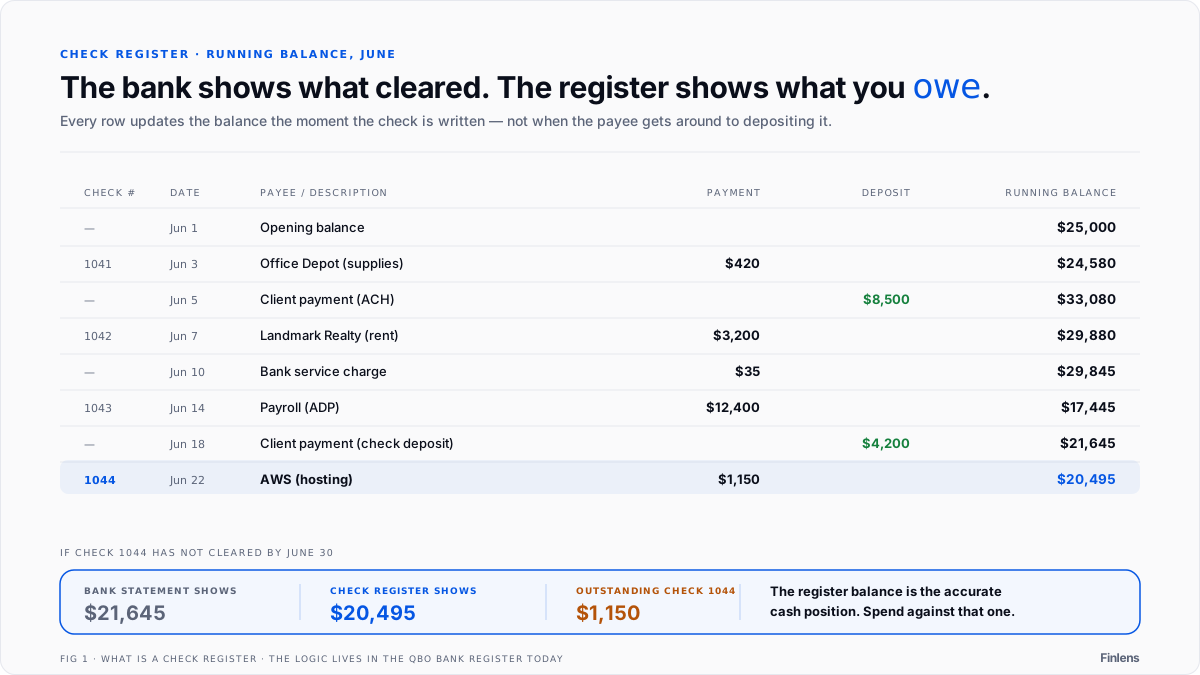
Here's what a basic check register looks like in practice:
Every row updates the running balance. If check 1044 hasn't cleared the bank by June 30, the bank statement shows $21,645, but the register shows $20,495. That $1,150 difference is the outstanding check - and the register balance is the accurate cash position.
Why Check Registers Still Matter in Digital Banking
The argument against maintaining a check register in the era of online banking is intuitive: if the bank shows a real-time balance, why maintain a separate record? The answer is that the bank balance and the true cash position are not the same number.
Online banking shows the balance the bank recognizes based on transactions that have cleared. It does not reflect checks that have been written and mailed but not yet deposited by the payee. A business that issues a $15,000 check to a vendor on the 27th of the month and receives payment on the 30th has a bank balance that is $15,000 higher than its true available cash for three days. If the business uses the bank balance to make payment decisions in that window, it may commit funds that are already spoken for.
The check register solves this by recording the check when it is issued, immediately reducing the registered balance to reflect the commitment. The business's decision-making view of cash is accurate regardless of when the check clears.
In practice, many small businesses have replaced the manual check register entirely with online banking and suffer the occasional overdraft or near-overdraft as a result. The businesses that maintain accurate cash positions, whether through a register, accounting software, or regular reconciliation, consistently avoid this class of error.
Check Register vs. Bank Statement: The Reconciliation Bridge
The bank reconciliation process exists specifically to resolve the difference between two accurate but different views of the same account: the business's records and the bank's records.
The business records include checks written but not yet cleared (outstanding checks) and deposits recorded but not yet posted (deposits in transit). The bank records include bank charges, interest, and returned items that the business may not have recorded yet.
The check register is the source document for identifying outstanding checks. Every check in the register that does not appear on the bank statement is, by definition, outstanding. The total of outstanding checks is one of the two primary reconciling items that explains why the register balance does not match the bank statement balance.
A business with a strong check register practice arrives at bank reconciliation with a complete list of issued checks and their dates. Identifying outstanding items is a matching exercise rather than a reconstruction project. A business without a current check register arrives at reconciliation not knowing which checks have cleared and which have not and, and must rebuild that information from check images, payee calls, or prior period records.
This is why accountants who manage clients with check-heavy payment flows consistently push for current, accurate check registers. The reconciliation is only as easy as the records are complete.
Outstanding Checks: The Most Important Check Register Concept
An outstanding check is a check that has been written, recorded in the check register, and sent to the payee, but not yet cleared the bank. Outstanding checks are the primary reason the check register balance differs from the bank statement balance at any point in time.
Outstanding checks represent a real liability. The money has been committed even though the bank has not transferred it yet. A vendor who receives a check in the mail on Friday and deposits it Monday has three days during which the amount is outstanding. If the business account is near a low balance during that window, a payment decision made on the bank balance rather than the register balance may create an overdraft when the check clears.
The practical rule: the lower of the bank balance and the register balance is the conservative view of available funds. Making payment decisions based on the register balance, which accounts for all issued but uncleared checks, is the safer practice. For a full walkthrough of how cash accounts are verified across all sources, see the cash reconciliation guide.
Old outstanding checks, typically those that are 90 days or older without clearing, also create a specific accounting question: has the payee lost the check, or are they holding it intentionally? Checks that are not cashed within a defined period (typically one to three years depending on state law) become subject to unclaimed property (escheatment) laws that require the business to remit the funds to the state. A check register that tracks issuance dates makes identifying aged outstanding checks straightforward.
Check Registers in Accounting Software
Modern accounting software embeds the check register concept into the bank register module. In QuickBooks Online, every check written from a connected bank account appears in the bank register with the check number, payee, amount, and status (cleared or uncleared). The register view shows the running balance accounting for all issued transactions, cleared or not. The reconciliation module uses this register to match cleared transactions against the bank statement.
The AP check register report referenced in professional accounting platforms like those documented by LexisNexis provides a structured view of all checks issued through the accounts payable module: check number, date, vendor, amount, and clearing status. For high-volume AP operations, this report is the starting point for identifying outstanding items, auditing payment history, and researching specific disbursements.
For accountants managing clients with active check-based payment workflows, keeping the bank register in QuickBooks Online current is the modern equivalent of maintaining a check register. Every check issued needs to be recorded when issued, not when it clears, to keep the running balance accurate.
How a check register helps catch bank errors
Banks process thousands of transactions daily, and errors happen. A check clears for $1,500 instead of $1,050. A deposit posts to the wrong account. A fee gets charged twice. Without a check register to compare against, these errors sit unnoticed until the next reconciliation - or longer.
The register gives you a line-by-line record of what should have happened. When the bank statement arrives and a number doesn't match, the register is the reference that tells you whether the error is on your side or the bank's. Businesses that skip the register and rely on bank balance alone have no independent record to dispute a bank error with.
Check registers and fraud detection
A check register with sequential numbering is one of the simplest fraud detection tools a business has. If check numbers jump from 1045 to 1047, a check is missing. That gap could mean a lost check, a voided check that wasn't recorded, or a stolen check that someone is trying to cash.
For businesses still issuing paper checks, the register also catches unauthorized checks. If a check number appears on the bank statement that doesn't exist in the register, someone outside the business wrote a check on the account. Without the register as a baseline, there's no way to spot this until the cash shortage becomes obvious - which could be weeks or months later.
Maintaining Accurate Cash Records With QuickBooks Online
The check register discipline, recording outgoing payments at issuance rather than at clearing, is what keeps a business's true cash position visible between bank statement dates. For accountants managing this across multiple clients, keeping QuickBooks Online bank registers current requires consistent transaction entry and timely reconciliation.
Accountants who have structured bookkeeping automation in QuickBooks Online across their client book maintain current registers without alot of manual data entry, since payment transactions categorize and record as they occur rather than accumulating for monthly batch entry. And since the monthly bank reconciliation depends directly on having accurate outstanding check records, clean register maintenance directly shortens month-end close time. For the broader process of verifying all financial records against external evidence, see the reconciliation in accounting guide.
Finlens runs natively inside QuickBooks Online with no migration and automates the categorization and reconciliation that keeps client bank registers current and accurate throughout the month.
Before Finlens: The reconciliation starts by identifying which checks have cleared, which requires manually comparing the check register to the bank statement when the register has not been maintained throughout the month.
After Finlens: The bank register is current. Outstanding checks are visible in real time. Reconciliation is a matching exercise against a clean starting record rather than a reconstruction from bank images.
The check register is one of the oldest tools in bookkeeping. The underlying concept, that cash position must account for committed but uncleared payments, remains as relevant in a QuickBooks Online environment as it was in a paper ledger one.
.png)
FAQ
What is a check register?
A check register is a record of all checks issued from a bank account, including check number, date, payee, amount, and running balance after each transaction. It tracks the true cash position of an account including checks not yet cleared by the bank.
What is the difference between a check register and a bank statement?
A bank statement shows transactions that have cleared the bank. A check register shows all transactions including checks issued but not yet cleared (outstanding checks) and deposits recorded but not yet posted. The difference between the two is reconciled during the bank reconciliation process.
What is an outstanding check?
An outstanding check is a check that has been written and recorded in the check register but not yet cleared the bank. Outstanding checks reduce the true available cash balance even though the bank balance does not reflect them yet.
Why is a check register important?
A check register provides an accurate view of true cash available at any time by accounting for issued checks that have not yet cleared. Businesses that rely only on bank balance without tracking outstanding checks may overdraw their account when those checks eventually clear.
How does a check register relate to bank reconciliation?
The check register is the source document for identifying outstanding checks, which is one of the primary reconciling items in a bank reconciliation. Checks in the register that do not appear on the bank statement are outstanding checks that explain the difference between the register balance and the bank statement balance.
Do businesses still need a check register?
Yes. Even businesses that pay primarily electronically need to track issued payments against their cash position. In modern accounting software like QuickBooks Online, the check register concept is embedded in the bank register module, which shows all issued transactions whether cleared or uncleared.

