
The QuickBooks guide to accounts payable, vendor bills, and 1099 filing (2026)


This is a working reference for founders, controllers, and firm bookkeepers running the bill-to-pay cycle on QuickBooks Online. Every technique is sourced to Intuit's own documentation, the IRS instructions, or a real thread on the QuickBooks Community. Numbers cited from user reports are flagged as anecdotal rather than benchmarks.
The problem this guide addresses
Two failure modes account for most misstated A/P balances on QBO.
The first is bills paid outside the Pay Bills workflow. A user records the bill (debit expense, credit A/P), then pays the vendor with a Write Check or an Expense transaction instead of Pay Bills. The check clears the bank; the bill stays open on A/P Aging forever. The Community thread on paid bills still showing on A/P documents this failure across multiple books.
The second is contractor payments miscategorized for 1099 reporting. Payments made by credit card, PayPal, Venmo, or any third-party payment network are excluded from Form 1099-NEC and 1099-MISC the processor is required to file 1099-K on those. When QBO's contractor tracking counts an ACH payment as reportable but a credit-card payment as excluded, the total reported to the IRS is only the ACH portion. The Community thread on credit-card contractor payments missing from 1099 summary covers the pattern; Intuit's help article on payments excluded from 1099 explains the IRS rule.
The sections below cover the account setup, the bill-to-pay lifecycle, the six A/P misstatement causes and fixes, the 2026 1099 thresholds and filing deadlines, the contractor-tracking rules, the approval and segregation-of-duties workflow available on QBO Advanced, and where the standard workflow stops scaling.
The A/P identity
Every A/P misstatement resolves to a mismatch between three totals:
Balance Sheet A/P = Sum of open bills on A/P Ageing = Sum of open payables per vendor
When those three do not agree, the book has one of six defects: a bill paid outside Pay Bills, a vendor credit not applied, a bill entered but not received, a payment applied to the wrong bill, a journal entry to A/P without a vendor, or an A/P Aging as-of date mismatch. Every fix reduces to identifying which of the six applies to which vendor.
Intuit's help article on paying bills in QBO covers the mechanics. This guide covers the failure modes and the 1099 layer above.
The account setup
Seven chart-of-accounts entries carry the A/P cycle. The full close-cycle account setup sits in the QuickBooks month-end and year-end close guide.
- Accounts Payable (Accounts Payable). QBO auto-creates this the first bill is entered. Do not delete it.
- Vendor Deposits (Other Current Asset). Holds prepayments to vendors before the good or service is received. Do not post directly to expense before the bill arrives.
- Prepaid Expenses (Other Current Asset). Holds paid-but-not-yet-consumed subscriptions, insurance premiums, retainers. Amortized to expense over the service period. Full accrual treatment sits in the accrual and prepaid expense guide.
- Accrued Expenses (Other Current Liability). Holds unbilled expenses at period-end. Reverses when the bill arrives.
- Bad Debt Expense (Expense) used on the A/R side, but referenced when a vendor credit represents a customer-side write-off.
- 1099 Contractor Payments (Expense, sub-account or class). Not strictly required but simplifies year-end 1099 reconciliation.
- Owner's Draw (Equity) for founder-led books. Personal-purpose payments run out of Owner's Draw rather than the operating expense accounts.
Vendor setup and the W-9 gate
Before a vendor can be paid, QBO needs three things:
- Vendor record. Settings → Vendors → New. Legal name, DBA if any, address, email, phone.
- Payment method. ACH bank account (for QuickBooks Bill Pay ACH) or a check-issuing configuration.
- W-9 on file. For any US-based individual, sole proprietor, single-member LLC, or partnership that is likely to hit the 1099 threshold.
The W-9 collects the legal name, address, entity type, and Taxpayer Identification Number (TIN either SSN or EIN). Intuit's help article on setting up contractors for 1099s covers the QBO fields required. QBO Contractor Portal will send a W-9 request electronically; without it, the W-9 has to be collected out-of-band and keyed manually.
Two settings on the vendor record matter for 1099 treatment:
- Track payments for 1099. Must be on for the vendor to appear in the 1099 prep workflow. Off means QBO does not accumulate the vendor's payments in the 1099 summary.
- Tax ID. The nine-digit TIN. The IRS provides a TIN Matching service to verify a name-TIN pair before filing; a mismatched pair triggers a CP2100 notice, and repeated mismatches trigger backup withholding at 24%.
The bill-to-pay lifecycle
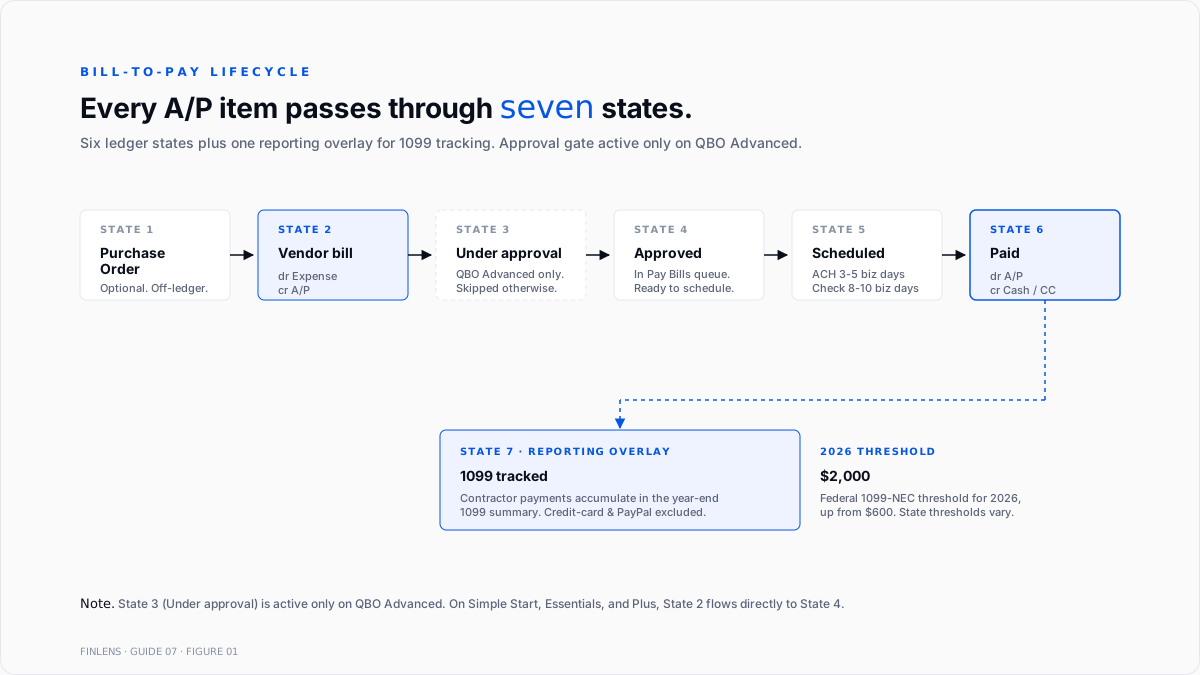
Every A/P item flows through the same seven states. Which transitions apply depends on the payment terms, the approval workflow, and the payment method.
Figure 1 (referenced above) traces the full lifecycle.
1. Purchase order. Optional. A pre-bill commitment to buy. POs do not hit the ledger.
2. Vendor bill. Posted to the ledger. Debit Expense (or an asset account for capital purchases), credit A/P. Days-outstanding clock starts on bill date.
3. Bill under approval. On QBO Advanced with the approval workflow enabled, the bill sits in an intermediate state until the approver signs off. On Simple Start, Essentials, and Plus, this state is skipped.
4. Approved / ready to pay. The bill is eligible for payment. Appears in the Pay Bills queue.
5. Scheduled payment. Payment date set through Pay Bills. ACH transfers take 3–5 business days; paper checks take 8–10.
6. Paid. Payment cleared. Debit A/P, credit Cash (or Credit Card). Bill moves off A/P Aging.
7. 1099-tracked. For contractor payments meeting the reporting threshold, the payment amount accumulates in the year-end 1099 summary. This is a reporting state, not a ledger state.
Payment terms and their effects
Payment terms are set at the vendor level (Settings → Vendors → Terms) or overridden per bill. The four common terms:
- Due on receipt. Payment expected immediately. Aging counts every day the bill is open.
- Net 15 / Net 30 / Net 45 / Net 60. Payment expected within N calendar days of bill date. Aging buckets count from the due date.
- 2/10 net 30. 2% discount if paid within 10 days; full amount at 30. On the A/P side, the discount reduces the expense (or captured as Purchase Discounts income on some books).
- Milestone-based. Payment tied to delivery signals. Common on construction and long-term services contracts.
Early-pay discounts often go untaken because the bill sits in A/P past the discount date. Trailing 12-month discount capture is a useful A/P KPI a healthy book captures >80% of available early-pay discounts.
The six A/P misstatements cause
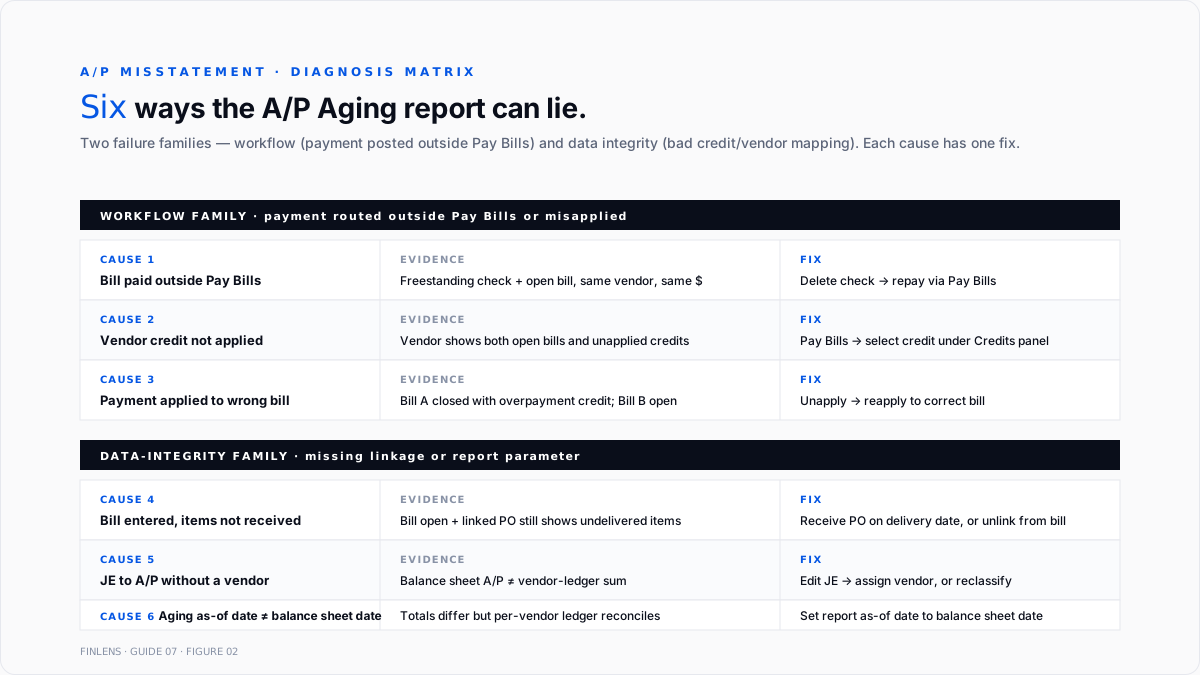
Every discrepancy between the A/P Aging report and expected open-bill reality traces to one of six causes.
1. Bill paid outside the Pay Bills workflow
The most common cause. The vendor bill was entered (dr Expense, cr A/P), then paid using Write Check or an Expense transaction against the bank account instead of Pay Bills. The check debits the bank correctly, but nothing clears the A/P side.
Diagnosis. Open the vendor's transaction list. A paid check with the vendor name appears alongside an open bill for the same amount.
Fix. Delete the freestanding cheque or expense. Repay through Pay Bills, selecting the correct bill. Alternatively, if the cheque has cleared the bank and cannot be reissued, apply the payment via journal entry: debit A/P (with vendor selected), credit an offset that removes the duplicate expense.
2. Vendor credit issued but not applied
A credit memo from the vendor (for a return, adjustment, or overpayment) was entered but never applied to a specific bill.
Diagnosis. The vendor shows a credit balance on the A/P Aging or a mix of open bills and unapplied credits.
Fix. Open Pay Bills. Select the bill. Select the credit under Credits. Save.
The Community thread on vendor bill payments showing as credits covers this failure at scale, when multiple credits stack against multiple bills.
3. Bill entered, but the item was never received.
For books tracking inventory or purchase orders, a bill was entered against a PO before the goods were physically received. Two entries need to happen: Receive Items and Enter Bill. Skipping Receive Items leaves the PO open and the inventory subledger wrong.
Fix. On the vendor bill, verify the linked PO was received. If not, either receive the PO now (dated on the actual delivery date) or edit the bill to remove the PO link.
4. Payment applied to the wrong bill
Two bills open from the same vendor, one for $2,400 and one for $2,600. The payment was $2,600 but was applied against the $2,400 bill, leaving the $2,600 open and a $200 overpayment credit on the $2,400.
Fix. Open Pay Bills for the vendor. Unapply the payment. Reapply against the correct bill.
5. Journal entry to A/P without a vendor
A JE that debits or credits A/P with no vendor selected shows up in the balance-sheet total but not on any individual vendor ledger.
Fix. Edit the JE to select the correct vendor. If no vendor applies, the JE should not touch A/P reclassify to the correct account.
6. A/P Aging as-of date mismatch
The A/P Aging Summary defaults to the current date. When running for period-end, the as-of date must be set to the balance sheet date. A mismatch is a report-parameter error, not a defect.
Fix. Set the A/P Aging Detail As of Date = balance sheet date.
The 2026 1099 filing regime
Three changes matter for 2026 payments (reported in 2027).
The threshold
Intuit's 2026 small business 1099 rules covers the change: the federal Form 1099-NEC reporting threshold for nonemployee compensation increases from $600 to $2,000 for payments made in 2026. Backup-withholding triggers still require a 1099 regardless of dollar amount.
State thresholds may differ. Some states (California, Massachusetts, others) still require reporting at $600 or their own state-specific level. Verify state requirements separately.
The forms
- Form 1099-NEC. Non-employee compensation. The most common form for contractors, consultants, freelancers, and unincorporated service providers.
- Form 1099-MISC. Miscellaneous income rents, prizes, medical/health care payments, gross proceeds to attorneys, and other categories that used to be on 1099-NEC before the 2020 split.
- Form 1099-K. Payments through a third-party network (credit card processors, PayPal, Venmo). Filed by the processor, not the payer.
The deadlines (TY2026, filed in 2027)
- 1099-NEC. To recipients and to IRS by February 1, 2027 (January 31 falls on a Sunday).
- 1099-MISC. To recipients by February 1, 2027. Electronic filing to IRS by March 31, 2027.
- W-2 (payroll). To employees and to SSA by February 1, 2027.
The e-file mandate
Since tax year 2023, any filer with 10 or more information returns in aggregate (across 1099s, W-2s, 1098s, and other forms combined) must file electronically. The 10-return threshold is a hard rule; paper filing above 10 returns triggers a rejection.
Contractor payment tracking what QBO includes and excludes
QBO auto-excludes payments made by credit card, debit card, gift card, PayPal, Venmo, or any third-party payment network from the 1099 summary. The IRS requires those to be reported on 1099-K by the processor, not on 1099-NEC by the payer.
The exclusion rule has one important QBO-specific gotcha: the exclusion is triggered by the account type used on the payment, not the payment-method dropdown. Intuit's help article on excluded 1099 payments covers this: an Expense transaction posted from a bank account but with the Payment Method dropdown set to "Credit Card" will still be counted for 1099 purposes. To exclude the payment correctly, the transaction must post from an account that is typed Credit Card (or a similar third-party processor account) on the chart of accounts.
The recurring miscategorization: a contractor invoice paid via a business credit card, entered as an Expense against the bank with Credit Card selected as payment method. The payment does not hit the credit-card liability account, and it counts toward the contractor's 1099 total.
Fix. Rebuild the payment: run the charge through the actual credit card account (dr Contractor Expense, cr Credit Card liability), then record the credit card payment separately from bank to card.
The Community thread on credit-card contractor payments missing from 1099 covers the mirror-image case (payments the user thought would be included but were excluded because the account type auto-excluded them).
The 1099 preparation workflow
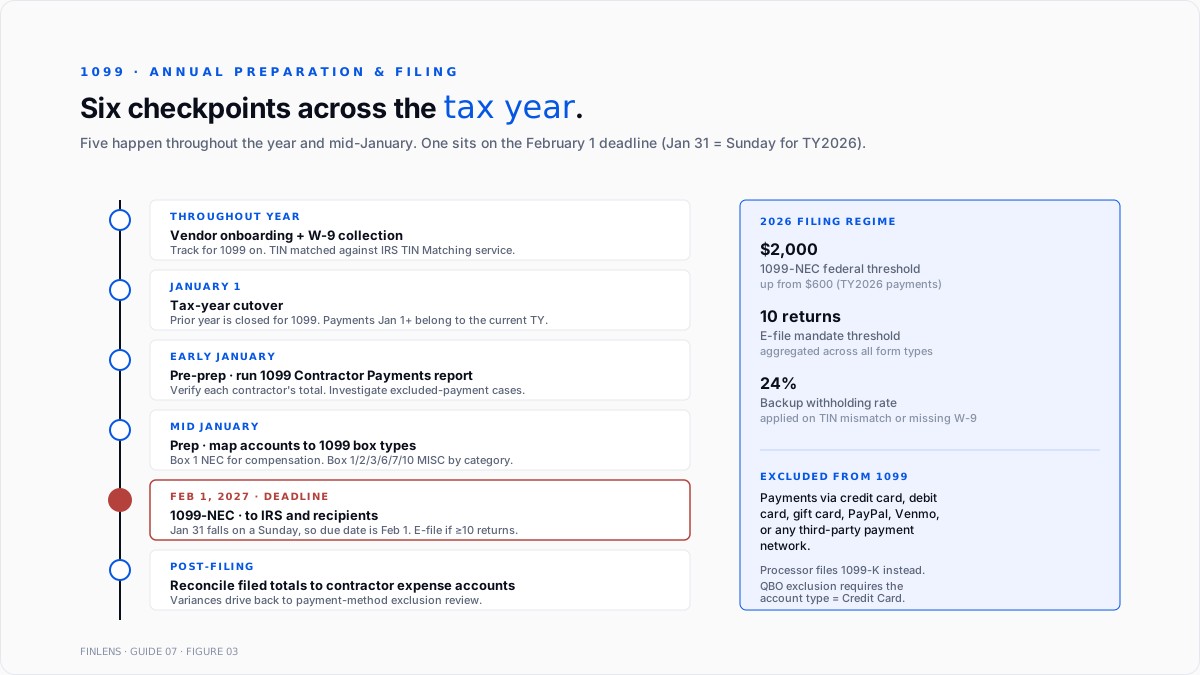
Intuit's help article on creating and filing 1099s in QBO covers the mechanics. The workflow across the tax year:
Throughout the year. Every new contractor gets a W-9 collected before the first payment. Vendor record has Track for 1099 turned on. Payment method chosen (ACH via QuickBooks Bill Pay, physical check, credit card knowing that credit card payments will not appear on 1099).
January 1 cutover. The prior tax year is closed for 1099 purposes. Payments dated January 1 onward belong to the current year.
Early January pre-prep. Run the 1099 Contractor Payments report. Verify each contractor's total against expected. Investigate any variance through the payment-tracking causes above.
Mid-January prep. Open the 1099 prep workflow in QBO. Confirm each contractor is above the threshold or has backup-withholding triggering the filing. Confirm the mapping of chart-of-accounts entries to 1099 box types (Box 1 for nonemployee compensation on 1099-NEC; Boxes 1, 2, 3, 6, 7, 10, and others on 1099-MISC by category).
January 31 → February 1 deadline. File 1099-NEC to IRS and send recipient copies. QBO's 1099 e-file service submits to IRS directly.
February 1 → March 31. File 1099-MISC to recipients (Feb 1) and IRS (Mar 31 for e-file, Feb 28 for paper).
Post-filing reconciliation. Match the filed 1099 totals against the contractor expense accounts. Any variance drives a check against the payment-method exclusion rules.
Approval workflows and segregation of duties
For books with more than one bookkeeper or a materiality threshold requiring second-review, the approval workflow separates bill entry from bill payment. This is available only on QBO Advanced.
Intuit's help article on bill approval workflows covers the setup. Three roles map to three stages of the payables process:
- Bill Clerk. Can add bills and vendors. Cannot approve or pay.
- Bill Approver. Can approve bills. Cannot add or pay.
- Bill Payer. Can pay approved bills. Cannot add or approve.
Approval conditions trigger review based on bill amount, vendor, or expense account. A common configuration: bills above $1,000 route to a designated approver; bills above $10,000 route to two approvers in sequence.
One SoD gap to close: if the approver is also the person who created the bill, QBO auto-approves without a review step. On multi-approver books, either enforce a policy that creators cannot approve their own bills, or route creator-flagged bills to a secondary approver.
For books below the Advanced tier that need approval workflow, third-party layers (Bill.com, Ramp, ApprovalMax, Tipalti) add the approval layer on top of QBO's standard bill flow. The trade-off is a monthly per-user fee and an integration reconciliation to run each period.
The month-end A/P close
The A/P close is one section of the month-end cycle. Full close treatment in the QuickBooks month-end and year-end close guide.
The A/P-specific steps:
- Run A/P Aging Detail as of period-end. Confirm total matches the A/P line on the balance sheet.
- Investigate any variance through the six-cause checklist.
- Age the payables into the 30/60/90 buckets.
- Accrue unbilled expenses (utilities, professional services, freight-in) via journal entry: debit Expense, credit Accrued Expenses. Reverse the accrual when the bill arrives.
- Verify all approved bills scheduled for payment are queued.
- Save the aging report to the audit workpapers.
The accrual step is the most commonly-skipped one. Books that skip it understate expenses in the current period and overstate the following.
Where in-QBO A/P management stops scaling
Three failure modes compound at higher volume:
Bill volume above 100 per month. Manual entry of every bill becomes the bottleneck. OCR bill capture (built into Advanced tier or via third-party integrations) removes about 70% of the keying time but adds a reconciliation step for OCR errors.
Multi-entity or multi-client books. A firm managing 20 clients runs 20 separate A/P workflows, 20 approval matrices, and 20 1099 prep cycles every year.
Complex approval matrices. Multi-step approvals, dollar-threshold routing, department-based routing, and expense-account-based routing all compound past what QBO Advanced's native workflow supports. Books with more than three approval tiers usually move to a dedicated A/P platform.
The Finlens approach
Finlens is an AI accounting platform for QBO firms and founder-led businesses. A/P hygiene and 1099 workflow are two features in a 17-feature product.
For A/P specifically, Finlens does the following:
- AI bill capture parses vendor invoices from email or PDF, extracts the vendor, amount, date, line items, and proposed expense category, and creates the QBO bill with a confidence score.
- Flags 1099-tracking errors as they happen a contractor payment charged to a bank expense but tagged Credit Card in the payment-method dropdown gets caught before it accumulates in the wrong bucket.
- Runs the 1099 prep pass across every client on a firm's book in one workflow, without re-authenticating.
The features that keep A/P accurate rather than just automated are the ones surrounding the bill itself:
- W-9 request automation. New vendors above the 1099 threshold get an automated W-9 request; TIN matching runs against the IRS TIN Matching service.
- Human-in-the-loop review gates every proposed bill entry, category assignment, and 1099 exclusion decision through a CPA.
- Approval workflow layers on top of QBO's native flow for firms on tiers below Advanced.
- Audit log produces a tamper-evident record of every bill entered, approved, and paid.
The verification checklist
- Balance sheet A/P matches A/P Aging Detail total as of the same date.
- Sum of open bills per vendor equals the A/P Aging Detail total.
- No unapplied vendor credits older than one billing cycle.
- No standalone checks or Expense transactions to vendors with open bills.
- No journal entries to A/P without a vendor selected.
- Every US-based individual, sole proprietor, single-member LLC, or partnership vendor above the payment threshold has a W-9 on file with a matched TIN.
- Every contractor payment via credit card or third-party processor is posted from an account typed Credit Card (or similar), not from a bank account with a payment-method label.
- 1099 Contractor Payments report reconciles to the total 1099s to be filed.
- Accrued Expenses at period-end reflects material unbilled items.
For a firm managing A/P and 1099 across multiple QBO clients, the firm platform runs the workflow at scale. For a founder running bill pay on a single book, the founder-facing product handles OCR capture, approval routing, and 1099 prep.
.png)
FAQ
Why a paid bill still shows on the A/P Aging report?
Four causes. (1) The bill was paid outside Pay Bills via Write Check or Expense against the bank account. (2) A vendor credit exists but was never applied to the bill. (3) The payment was applied to a different bill by mistake. (4) The A/P Aging as-of date is earlier than the payment date.
The difference between a vendor credit and a vendor deposit?
Vendor credit reduces A/P without moving cash used when the vendor returns money owed or issues a credit for returned goods. Vendor deposit is cash paid to a vendor before the bill arrives sits in Vendor Deposits (Other Current Asset) until the bill matches against it.
Whether to file a 1099 for a payment under $2,000 in 2026?
Only if backup withholding was applied. The federal reporting threshold for 2026 payments is $2,000 for 1099-NEC. State thresholds may be lower California and some other states still require reporting at $600 or a state-specific level.
Whether to file a 1099 for a contractor paid entirely by credit card?
No. Payments made via credit card, debit card, gift card, or third-party network (PayPal, Venmo) are excluded from 1099-NEC and 1099-MISC. The processor files 1099-K on the contractor's behalf.
How to handle a contractor who was underpaid according to the 1099 report?
Verify the payment-method tagging in QBO. A common cause is contractor payments run through a credit card charged to a bank Expense account with a Payment Method label of Credit Card the account type triggers inclusion in the 1099 total, but the label does not exclude it.
Realistic 1099 prep timing?
30–60 minutes for a book with fewer than 10 contractors and complete W-9s on file. 4–8 hours for a book with 30+ contractors and missing or mismatched TINs. Multi-entity books multiply the per-entity time by the entity count.

