
The definitive guide to QuickBooks month-end & year-end close (2026)


This is a working reference for founders and controllers running close cycle on QuickBooks Online. Every step is sourced to Intuit's own documentation or a real thread on QuickBooks Community.
Closing books in QBO
"Closing books" in QBO refers to two different activities that are commonly collapsed. The full accounting cycle covers reconciling every balance-sheet account, posting every adjusting entry required to state revenue and expense on accrual basis, and producing financial statements that tie to general ledger. Separately, "Close books" toggle at Settings → Advanced → Accounting sets a closing date and either warns or blocks users from editing transactions before that date. Intuit's Lock your books help article covers toggle.
QBO does not post a physical journal entry to Retained Earnings at year-end. Instead, Balance Sheet report displays prior year's Net Income closing virtually into Retained Earnings underlying P&L transactions remain in general ledger, but report treats them as closed for prior year. The close-books toggle enforces lock date on transactional layer; RE roll-up is a reporting convention rather than an entry you can see in transaction list.
Every other close activity is manual: bank reconciliation, accruals, prepaids, deferred revenue release, bad debt write-off, depreciation, income tax accrual, intercompany elimination. This guide covers manual work.
The account setup
Every adjusting entry below depends on these accounts existing in chart of accounts. This is canonical setup referenced by deferred revenue guide, Stripe-to-QuickBooks guide, and bank reconciliation guide.
- Accrued Liabilities (Other Current Liabilities) expenses incurred but not yet invoiced.
- Accrued Revenue (Other Current Assets) revenue earned but not yet invoiced.
- Prepaid Expenses (Other Current Assets) cash paid in advance for services still to be received.
- Deferred Revenue (Other Current Liabilities) cash received in advance for services still to be delivered.
- Allowance for Doubtful Accounts (contra-asset under A/R) estimated future uncollectible portion of outstanding invoices.
- Accumulated Depreciation (contra-asset under Fixed Assets) cumulative depreciation booked against each fixed asset.
- Reconciliation Discrepancies (Expense, auto-created on first force adjustment) sink for reconciliation force adjustments.
Plus P&L accounts: Bad Debt Expense, Depreciation Expense, Bank Service Charges, and Interest Income.
For a book with material inventory, stock-based compensation, or lease activity, additional accounts are required. Those are covered briefly in "What six-entry library omits" section below.
Phase 1 Transactions
Everything recorded before close cycle starts.
Sales and invoices. Every invoice for period is dated within period. An invoice dated in following month for services delivered in closing month requires an accrued revenue adjustment (Phase 2, item 2) and is most common source of understated revenue.
Bills and expenses. Every vendor bill for services received in period is entered with a bill date within period. A bill dated in following month for a service consumed in closing month requires an accrued liability adjustment (Phase 2, item 1).
Bank feed categorization. Every bank and credit card transaction in period is categorized. Uncategorized transactions do not appear on P&L or balance sheet until they are added.
Payroll. Payroll for period is fully processed, including employer payroll tax accrual for taxes owed on wages paid in period but not yet remitted.
The Community thread on month-end close checklist covers this phase from a practitioner perspective.
Phase 2 The six standard adjusting entries
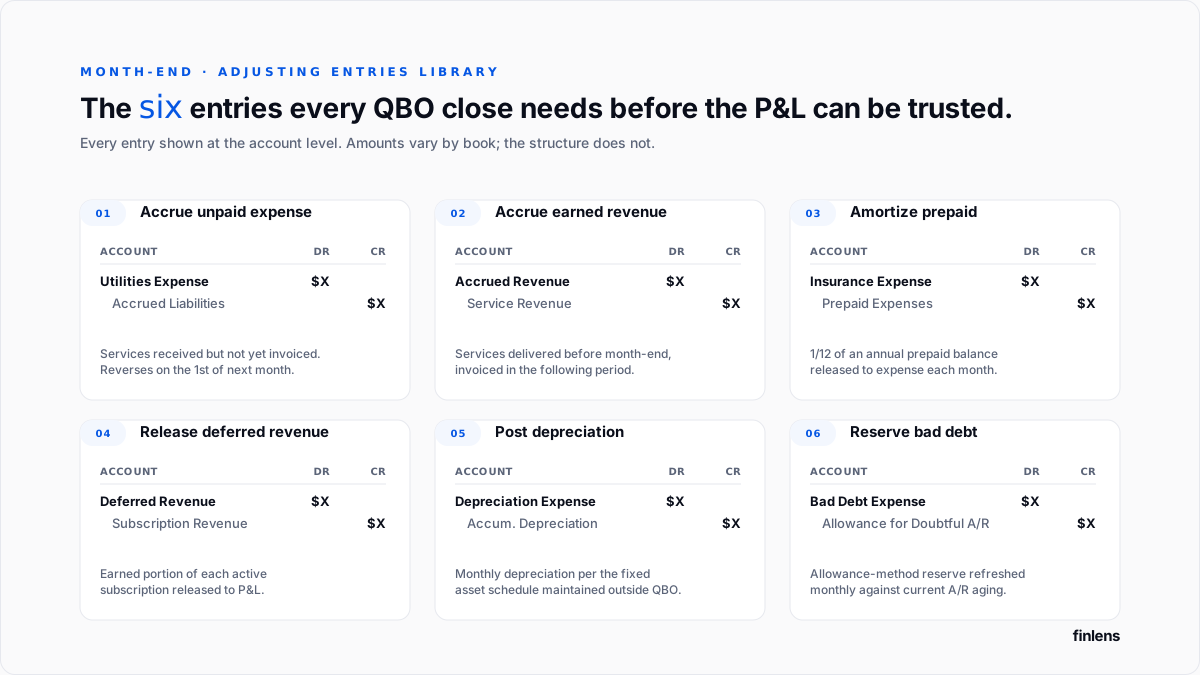
1. Accrue unpaid expenses
For utilities, unbilled vendor work, or services received before month-end but invoiced afterward:
- Debit expense account (e.g. Utilities Expense)
- Credit Accrued Liabilities
Reverses on first day of following month.
2. Accrued earned but unbilled revenue
For services delivered before month-end where the invoice is issued in the following period:
- Debit Accrued Revenue
- Credit revenue account
Reverses when the actual invoice is issued.
3. Amortize prepaid expenses
For annual software subscriptions, prepaid rent, and insurance policies expensed to a prepaid balance-sheet account at payment time:
- Debit expense account
- Credit Prepaid Expenses
The monthly amount is 1/12 of annual contract value on straight-line amortization.
4. Release deferred revenue.
For each active subscription contract, earned portion for month is released from Deferred Revenue. Per-contract treatment sits in deferred revenue recognition guide.
- Debit Deferred Revenue
- Credit Subscription Revenue
5. Post depreciation
For each fixed asset, monthly depreciation amount from depreciation schedule maintained outside QBO:
- Debit Depreciation Expense
- Credit Accumulated Depreciation
6. Write off or reserve bad debt.
Two approaches, both documented in Intuit's write off bad debt article.
Direct write-off, when a specific invoice is confirmed uncollectible:
- Debit Bad Debt Expense
- Credit Accounts Receivable (via a credit memo applied against specific invoice)
Allowance method, when estimated future uncollectible portion of outstanding A/R is reserved monthly:
- Debit Bad Debt Expense
- Credit Allowance for Doubtful Accounts
Under GAAP, a business with more than 12 months of A/R history uses allowance method.
What six-entry library omits
The library above covers recurring adjustments for a standard SaaS or services business. Four additional treatment areas surface for businesses with specific facts:
- Income tax accrual. Estimated federal and state income tax owed on period's activity. Covered in year-end additions section below. For books that produce quarterly financials with tax provision, this is a monthly entry.
- Stock-based compensation. Fair-value expense of options and RSUs granted, amortized over vesting period per ASC 718. Requires a valuation model (Black-Scholes or lattice) maintained outside QBO. Monthly SBC expense posts as a debit to Stock-Based Compensation Expense and a credit to Additional Paid-In Capital.
- Lease accounting under ASC 842. Operating and finance leases require a Right-of-Use asset and a corresponding lease liability at inception, with monthly interest accretion and asset amortization. QBO does not track lease schedules natively; a spreadsheet or dedicated lease-accounting tool maintains schedule and posts summary entries.
- Inventory adjustments. For a book with physical inventory, monthly cost-of-goods-sold and inventory shrink entries reconcile perpetual inventory count to balance-sheet total.
None of these four are automatable inside QBO's native tooling; each requires an external schedule feeding a monthly summary JE.
Phase 3 Reconciliation
Five reconciliations, in typical failure-risk order.
Bank reconciliation. Every bank account reconciled against bank statement. Detailed workflow (including beginning-balance debug and force-adjustment guidance) sits in bank reconciliation guide.
Credit card reconciliation. Same process, different mechanics credit card statement's ending balance is a liability, not a cash position, so unpaid balance reconciles against credit card liability account, not against cash.
A/R aging. A/R balance on balance sheet ties to total on A/R Aging Detail report at period-end.
A/P aging. A/P balance ties to A/P Aging Detail report.
Payroll clearing. Payroll liability accounts reconciled against payroll processor's report for period. A non-zero balance at period-end is either an unremitted liability or a posting error.
Each reconciliation produces a report saved to audit workpapers.
Phase 4 Locking period
At Settings → Advanced → Accounting → Close books:
- Turn on "Close books" switch.
- Set closing date to last day of period.
- Choose enforcement level: Warn on edit (users see a warning but can proceed) or Warn and require password (users must enter password to make changes before closing date).
Password-protected is standard for firms managing multiple clients or teams with more than three users on QBO file.
A December 31 closing date activates virtual Retained Earnings roll-up in Balance Sheet report Net Income for closed year displays as closed to Retained Earnings, while underlying P&L transactions remain in transaction list. The Community thread on closing entries and Year End FAQs document this behavior.
Intercompany eliminations
For a book on a QBO file that consolidates multiple legal entities or a firm managing multiple client entities that transact with each other intercompany transactions have to be eliminated at consolidation.
The three most common intercompany transactions:
- Intercompany loans. Entity A lends to Entity B. Consolidated books eliminate both receivable on A and payable on B against each other.
- Intercompany services. Entity A charges Entity B a management fee. Consolidated books eliminate A's revenue against B's expense.
- Intercompany transfers. Cash moved between entity accounts. Consolidated books eliminate both sides against a single intercompany suspense account.
QBO does not natively consolidate multiple entity files. Two paths handle it: (1) manual consolidation in Excel with elimination entries applied at consolidated worksheet level, or (2) a consolidation tool that reads each entity's trial balance and applies elimination rules automatically. The Multi-Entity dashboard in Finlens is one implementation.
For a single-entity book, this section does not apply.
Year-end additions
Six activities specific to December that do not appear in monthly cycle.
Income tax accrual. Estimated federal and state income tax for year accrued as of December 31, offsetting to an Income Tax Payable liability. Trued up when return is filed.
Retained earnings verification. After reporting roll-up displays, Retained Earnings balance in Balance Sheet is verified against sum of prior years' net income. A variance points to a prior-period adjustment that posted outside standard year-end flow.
Fixed asset review. Full depreciation schedule reviewed for year. Assets fully depreciated during year are noted. Assets disposed of require a disposition entry (removing asset from Fixed Assets, its accumulated depreciation from Accumulated Depreciation, cash received, and a gain or loss to P&L).
1099 filings. Three separate 1099 forms apply:
- 1099-NEC Non-Employee Compensation. Filed for every vendor paid more than $600 during year for services. Filing deadline: January 31.
- 1099-MISC Miscellaneous Income. Filed for rent payments over $600, gross royalties over $10, and a handful of other specific categories. Filing deadline: February 28 (paper) or March 31 (electronic).
- 1099-K Payment Card and Third-Party Network Transactions. Issued by payment processors (Stripe, PayPal, Square) to business, not filed by business. Reconciled at year-end against P&L, since a mismatch between 1099-K gross volume and booked revenue is a diligence flag. Covered in Stripe-to-QuickBooks guide.
Intuit's year-end guide covers 1099-NEC workflow inside QBO.
W-2 issuance. For businesses running payroll through QuickBooks or a connected processor, W-2s issued to employees by January 31. The year-end checklist for QuickBooks Online Accountant covers payroll steps.
Balance sheet review with CPA. Every balance sheet account reviewed with tax preparer before return is filed.
Prior-period adjustments
Adjustments identified after a period has been closed fall into three buckets, and treatment differs.
Immaterial current-year adjustments. A prior-month error caught inside same fiscal year. Enter closing password, unlock affected period, post correcting entry with original transaction date, and re-lock. The reconciliation for affected account is updated so next period's opening balance still ties.
Material current-year adjustments. Same mechanics, but correcting entry is disclosed in reporting for current year. If adjustment materially changes P&L, prior monthly reports are re-issued.
Prior-year adjustments identified after year is closed. These are ones that break books. The typical scenario: CPA reviews tax return in March and finds a $50,000 revenue-recognition error dated in October of closed year. Three treatment options:
- Post to Retained Earnings. The CPA books adjusting entry against Retained Earnings dated in closed year. The Balance Sheet updates because RE roll-up is a report convention, not a JE. But P&L for closed year does not change entry is on balance sheet, and P&L transactions still show original amounts. This is treatment used when re-issuing prior year's financials is impractical.
- Reopen and restate. Unlock prior year, post correcting entry with a date in affected period, re-lock, and re-issue prior year's financial statements. Used when prior year's financials have not been distributed externally, or when amount is large enough that a restatement is unavoidable.
- Post to current year. Book correcting entry with a current-year date, disclosed as "prior-period adjustment recognized in current period." Used for immaterial amounts where audit or review team has agreed current-year treatment is acceptable.
The Community thread on unlocking a closed year covers mechanics for option 2. The Community thread on balance sheet changes after a period closed on cash basis covers failure mode when option 1 is applied without documentation.
For any material prior-year adjustment, coordinate with audit or tax partner before posting.
Common close mistakes
Editing a closed period without unlocking it. QBO's warn-only setting allows this by default. The change posts, reconciliation report is not updated, and next period's opening balance no longer matches prior period's closing balance.
Not reversing accruals. An accrued expense JE that is not reversed at start of following month double-counts expense when vendor invoice arrives.
Booking deferred revenue release manually per contract. Manual per-contract releases consume hours and introduce off-by-one errors. Automation is described in deferred revenue recognition guide.
Missing payroll tax accrual. The employer portion of FICA and Medicare on wages paid in period is accrued at period-end, not on actual remittance date.
Not reconciling payment-processor clearing account. Clearing accounts return to zero (or an explainable in-transit balance) at every period-end. A non-zero clearing balance is either an unmatched charge or an unrecorded fee. Full treatment in Stripe-to-QuickBooks guide.
Prior-year adjustments posted to Retained Earnings without documentation. Covered in section above.
Where in-QBO close stops scaling
QBO's close mechanics carry a single-entity book with fewer than 100 monthly transactions, no subscription revenue, no active fixed asset schedule, and one bank account. Above any of those thresholds, each Phase 2 adjusting entry becomes a per-item calculation living in a spreadsheet.
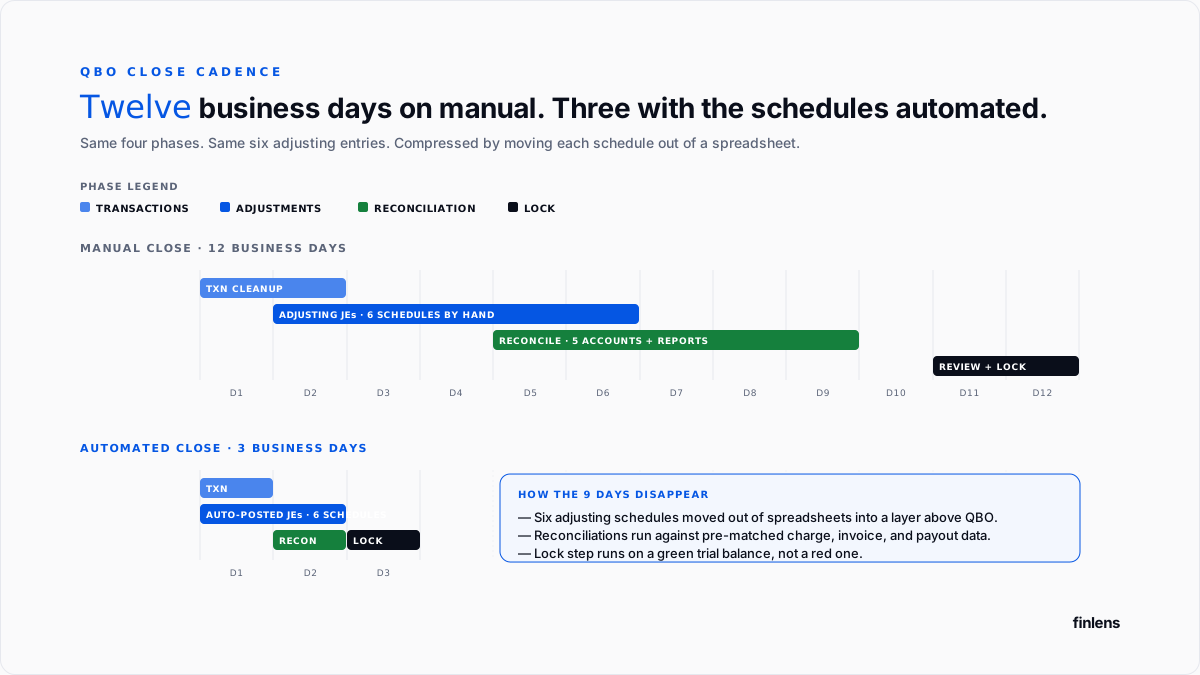
Reported close timing varies widely with book complexity. A commonly cited practitioner benchmark for a mid-market SaaS on QBO without automation is 8 to 12 business days per close. Books running an automation platform above QBO report close timing in 3 to 5 business day range. These are practitioner-reported ranges, not audited benchmarks actual gain depends heavily on which of six adjusting entries platform automates and volume of exceptions in each period.
The Finlens approach
Finlens is an AI accounting platform for QBO firms and founder-led businesses. Close automation is one feature of a 17-feature product.
For close specifically, Finlens maintains each of six adjusting schedules automatically and posts a single summary journal entry per schedule into QBO at month-end:
- Deferred revenue release per contract.
- Prepaid amortization per prepaid item.
- Depreciation per fixed asset.
- Accrual worksheet for unpaid expenses and unbilled revenue, reversed on first of following month.
- Bad debt reserve refreshed monthly against current A/R aging.
- Clearing account reconciliation for Stripe, Shopify, Amazon.
The features that keep six schedules accurate rather than just automated are ones surrounding them:
- AI transaction categorization flags miscategorized transactions before they land in wrong adjusting schedule.
- Anomaly detection surfaces P&L variances from prior periods that controller would otherwise catch in CPA review before reporting cycle.
- Audit log produces a tamper-evident record of every posted entry, source contract, and change event.
- AI Assistant answers close-review questions from ledger without exporting to a spreadsheet.
The general ledger stays in QBO; six schedules run above it. This is pattern Finlens uses on QuickBooks, paired with accrual and schedule automation layer.
Above roughly 15 active subscription contracts or two entities with intercompany activity, labor time saved is materially larger than platform cost.
The verification checklist
- Every bank and credit card account reconciled with a report attached.
- A/R aging total ties to A/R balance.
- A/P aging total ties to A/P balance.
- Payroll clearing accounts at zero or explainable.
- All six adjusting entries in Phase 2 posted for period.
- Trial balance ties.
- Closing date set in QBO with at least Warn-on-edit enforcement.
For a firm running close across multiple SaaS clients on QBO, firm platform handles all six schedules across book. For a controller on a single founder-led company, founder-facing product covers same.
.png)
FAQ
How does QBO's close-books toggle differ from a full accounting close?
The toggle sets a lock date and, at year-end, activates a virtual retained earnings roll-up in the balance sheet report. Every other close activity is manual.
Warn-only versus password-protected close?
Password-protected is standard for firms with multiple clients or teams with more than three users. Warn-only is acceptable for a single controller on a single company.
How to handle a prior-period adjustment identified by CPA?
Three options, covered in prior-period adjustments section above. For any material amount, coordinate with audit or tax partner before posting.
Direct write-off versus allowance method for bad debt?
Under GAAP, a business with more than 12 months of A/R history uses the allowance method.
Whether accrual entries need to be reversed manually?
Yes, unless accrual is posted as a QBO recurring reversing journal entry.
Realistic close timing for a $2M–$20M ARR SaaS on QBO?
Practitioner-reported ranges: 8 to 12 business days on manual schedules maintained in spreadsheets; 3 to 5 business days with an automation platform maintaining six adjusting schedules. Actual timing depends on the volume of exceptions and complexity of contract book.

