
The QuickBooks bank reconciliation guide: discrepancies, beginning balances, and adjusting entries (2026)


This is a working reference for founders and controllers reconciling a QuickBooks Online bank account against a bank statement when numbers don't tie. Every technique is sourced to Intuit's own documentation or a real thread on QuickBooks Community.
The reconciliation identity
The bank reconciliation solves a single equation for every account, every period. Expressed from book side (form QBO's Reconcile screen uses):
Book balance + Deposits in transit − Outstanding checks ± Bank items not yet in books = Bank statement balance
Standard textbook form expresses this from bank side (Bank balance + Deposits in transit − Outstanding checks = Adjusted book balance). Both forms are algebraically equivalent; book-side form matches QBO's UI and is used throughout this guide.
The book balance is what QBO shows. The bank statement balance is what bank shows. The four adjustment categories are reasons two do not match at a point in time. When equation balances, account is reconciled.
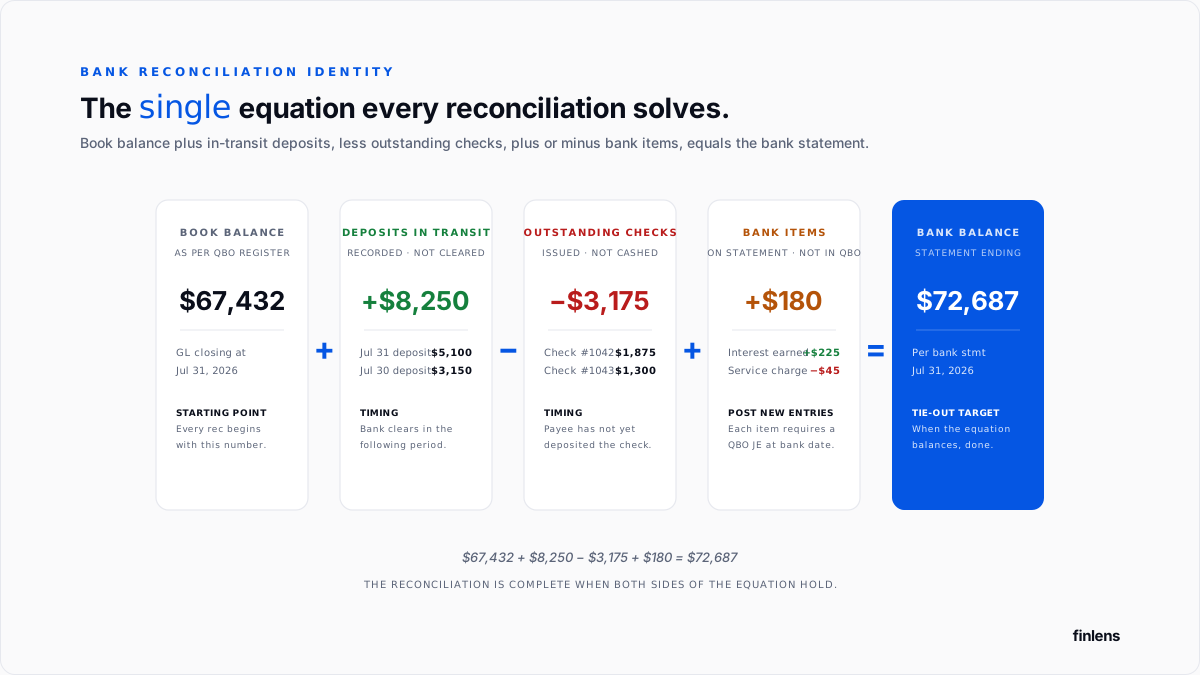
Intuit's Reconcile an account help article covers QBO mechanics. This guide covers underlying accounting and failure modes.
The account setup
Two accounts specific to reconciliation. The full close-cycle account setup is covered in QuickBooks month-end and year-end close guide.
- Reconciliation Discrepancies (Expense account). QBO auto-creates this first time a force adjustment is booked. Force adjustments post as a debit or credit here.
- Bank Service Charges (Expense, detail type: Bank Charges). For fees deducted by bank that were not recorded from a bill.
Additional book-specific accounts: Interest Income for bank interest, and an NSF Fees subcategory of Bank Service Charges for returned-check fees.
The five discrepancy sources
Every reconciliation mismatch traces to one of five categories.
Timing. Deposits in transit (recorded in QBO, not yet cleared by bank) and outstanding checks (recorded in QBO, not yet cashed by payee). No adjustment required resolves in following period.
Missing entries in QBO. Bank fees, interest income, ACH returns, and bank-initiated adjustments all appear on bank statement without a corresponding QBO transaction. Each requires a new QBO entry dated on bank's date.
Duplicates in QBO. The same transaction entered twice once from manual entry and once from bank feed, or once from an invoice payment and once from a bank deposit. The Community thread on Stripe duplicates covers payment-processor variant.
Errors in transaction itself. Wrong amount, wrong date, wrong account, wrong sign. Transposition errors within a single number are common ($1,234 entered as $1,243). If two adjacent digits within an entry were transposed, resulting dollar discrepancy is divisible by 9. This does not apply to differences between two separate transactions only to a single number where two adjacent digits swapped.
Bank errors. The bank posts a transaction that did not happen, or misstates amount. Every bank error requires a call to bank plus a QBO entry in a suspense account until bank issues a correcting entry.
Beginning balance discrepancies
The beginning balance in QBO's reconciliation screen is ending balance from previous reconciliation. When those two do not match, current reconciliation cannot start.
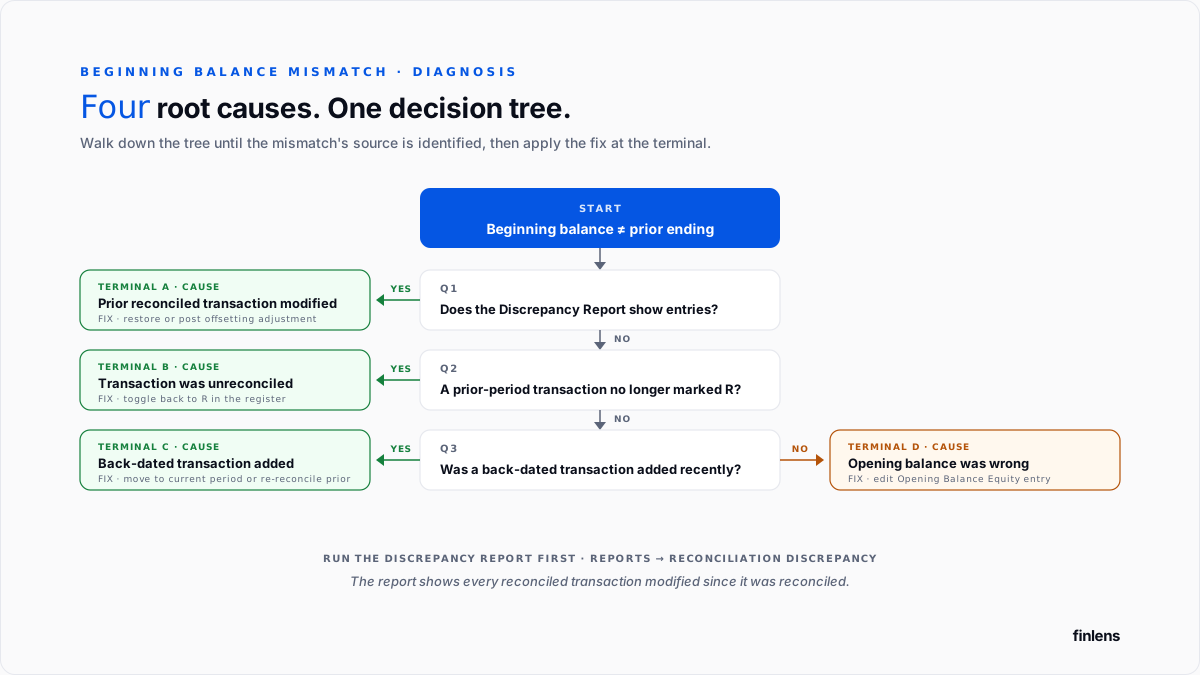
Four causes account for most mismatches. Intuit's help article on fixing beginning balance issues covers each.
1. A previously reconciled transaction was edited, deleted, or moved
The most common cause. Someone opened a transaction inside a period already reconciled, changed amount or date, and saved.
Fix. Run Reconciliation Discrepancy Report at Reports → Reconciliation Discrepancy. The report lists every reconciled transaction that has been modified since it was reconciled, with date of change and delta. Restore each transaction to its reconciled state or post an offsetting adjustment.
2. A previously reconciled transaction was unreconciled
An entire transaction was manually toggled from "R" back to blank or "C". The prior period's cleared total drops by transaction amount.
Fix. In account register, locate transaction and toggle it back to "R".
3. A transaction dated in a prior reconciled period was added after fact
A vendor bill or bank feed entry with a date earlier than last reconciliation. Adding it now increases reconciled activity in that period, but reconciled ending balance stays where it was.
Fix. Move transaction to a date in current unreconciled period if that is accurate date. Or unreconcile prior period, add transaction, and re-reconcile.
4. The opening balance for account was wrong
Only applies on first-time reconciliation or account migration. Intuit's first-time reconciliation fix article covers fix: edit Opening Balance Equity entry in register and set it to actual bank balance on QBO start date.
End-of-period discrepancies
A reconciliation started correctly (beginning balance matches) but ends with a non-zero difference between cleared total and bank statement balance.
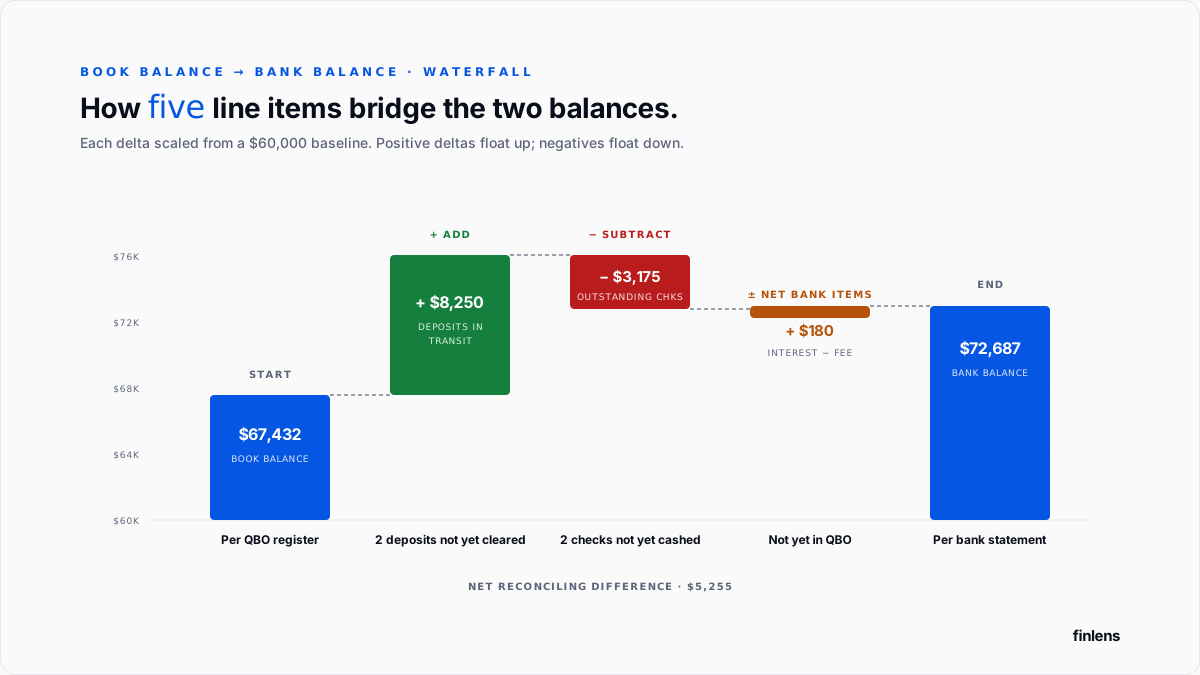
The workflow, per Intuit's end-of-reconciliation fix article:
- Confirm statement dates. The Statement Ending Date must match exact date on bank statement.
- Confirm statement ending balance. Typos in this field are fastest source of a large discrepancy.
- Sort cleared transactions by amount. A missing bank charge is usually smallest cleared item; a missing deposit is usually largest.
- Check for a single-transaction difference. If discrepancy equals a single transaction on bank statement, that transaction is likely missing from QBO.
- Check for a doubled-transaction difference. If discrepancy equals twice a specific transaction, it exists in QBO but is either marked cleared with wrong sign or duplicated.
- Check divisibility by 9. If discrepancy is divisible by 9, a two-adjacent-digit transposition within a single entry is likely.
The -$0.00 rounding case
A specific failure mode: difference field shows -$0.00 or $0.00 with a minus sign, and QBO blocks Finish button. The Community thread on this issue covers it.
The cause is a sub-penny rounding difference usually from a foreign-currency conversion, a Stripe fee calculation, or a Ramp cashback line where underlying number is something like -$0.003 but QBO displays it rounded to -$0.00.
Fix. Open QBO register for account. Filter to reconciliation period. Look for any transaction with an amount that has more than two decimal places (visible if you export register to Excel). Correct that transaction's amount to intended two-decimal value. If no such transaction is found, residual is a compounding rounding error acceptable for force-adjustment to Reconciliation Discrepancies account.
The T-account view
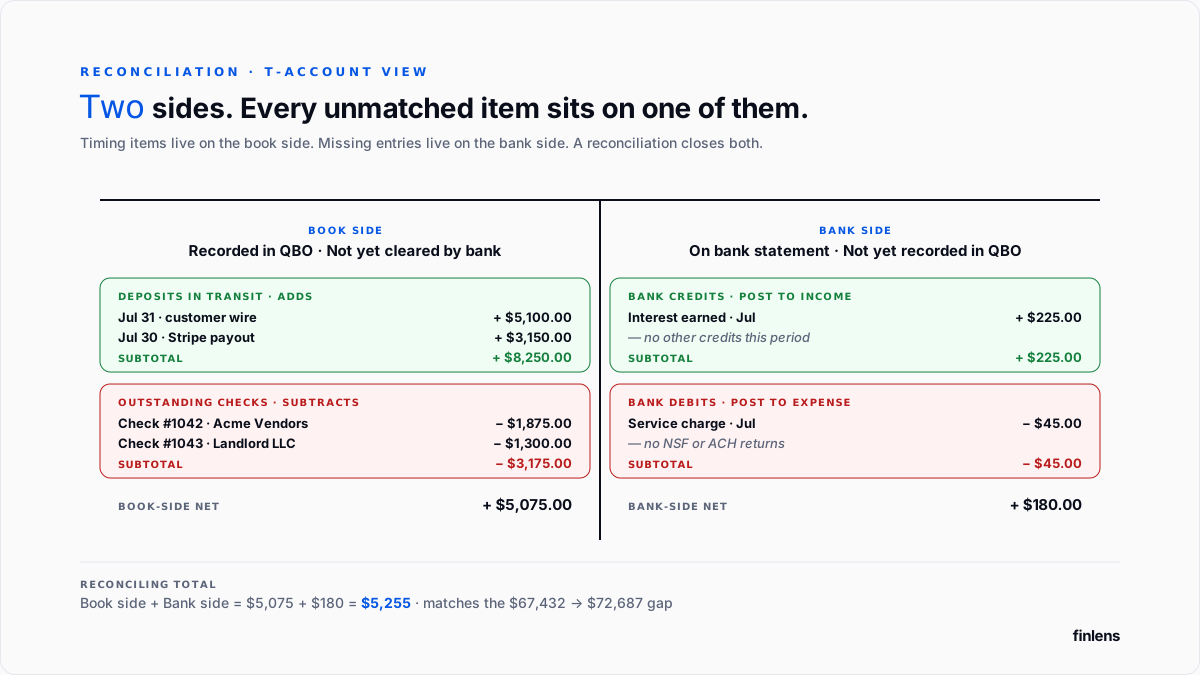
A reconciliation resolves to one truth: how much cash business actually has. Both QBO and bank should agree on that number at reconciliation date. When they don't, difference lives on one of two sides.
The book side holds items business has entered but bank has not yet processed (outstanding checks, deposits in transit). These items are correctly booked and need time to clear.
The bank side holds items bank has processed but QBO does not know about (service charges, interest, ACH returns, bank corrections). These items are missing from QBO and require a new entry dated at bank's date.
A reconciliation is complete when every item on bank statement is either matched or added, and every uncleared QBO transaction is documented as an outstanding item.
When to force-adjust and when not to
QBO's "Finish Later" screen offers a force-adjust option that posts a journal entry to Reconciliation Discrepancies expense account. The Community thread on recording a bank adjustment covers mechanics.
Force-adjust is appropriate in two cases:
- Immaterial rounding. Sub-dollar differences from fee calculation or interest rounding, when every specific transaction is reconciled and residual is a compounding rounding error.
- A bank-side error bank has confirmed but not yet corrected. The adjustment reverses in following period when bank posts its correction.
Force-adjust is not appropriate for discrepancies larger than account's typical monthly transaction volume, discrepancies that have not been investigated with sort-by-amount and divisibility-by-9 checks, any discrepancy on an account that has never been reconciled before (opening balance is fix), or any discrepancy on an account undergoing audit review.
Force-adjusting an uninvestigated discrepancy hides underlying error in Reconciliation Discrepancies expense account, where auditors flag material balances and require documentation.
Credit card reconciliation
Credit card reconciliation follows same beginning-balance and end-of-period diagnostic workflow, but three mechanical differences matter.
The account is a liability, not an asset. The QBO chart-of-accounts entry is a Credit Card account (or Long-Term Liability). The register shows unpaid balance to card issuer, not a cash position.
The reconciled balance is statement balance, not ending liability. Credit card statements have both an ending balance (what's owed as of statement date) and a payment due date balance (what's owed if payment is made by due date, including any recent activity). QBO reconciles against ending balance of statement being reconciled not current-day liability, which continues to accrue new charges.
Unmatched payments show up on both sides. A credit card payment recorded in QBO as a bank feed transaction (from checking to card) hits credit card register as a debit reducing liability. The card statement shows it as a credit to balance. Both sides have to reconcile checking-account reconciliation and credit card reconciliation are two separate passes.
For corporate card programs, three additional treatments:
- Ramp. Each cardholder's activity syncs to QBO as individual transactions. Categorization is set at cardholder level in Ramp and flows through. Reconciliation is against Ramp's statement report, not underlying bank card issuer.
- Brex. Similar to Ramp with addition of a "Brex Cash" account layer that acts as a spending source. Reconcile Brex Cash account separately from any card liability.
- Bill Divvy (now BILL Spend & Expense). Sync produces both a "Card" liability and a "Wallet" cash account. The wallet fund transfers between two require a reconciliation of wallet as well.
Non-bank payment platforms
Increasingly common for founder-led books, these platforms reconcile differently from a traditional bank account.
PayPal. Reconcile against monthly statement PDF from PayPal, not bank feed. The Deposit column on statement matches customer payments received; Debit column matches withdrawals to bank + PayPal fees. PayPal fees post to Bank Service Charges or a dedicated PayPal Fees expense account.
Venmo Business. Similar to PayPal statement-based reconciliation against Venmo monthly report. Venmo fees are a percentage of received payments; withdrawal to a linked bank is a separate transaction reconciled on bank side.
Cash App for Business. Statement-based reconciliation. Fees are per-transaction, comparable to a payment processor.
Wise (business). Multi-currency account with per-currency sub-balances. Each currency reconciles as a separate account with its own statement and its own FX gain/loss to home currency at each period-end.
Mercury / Novo / Relay. Fintech bank accounts with standard bank statements. Reconciliation follows standard bank workflow above. Bank feed reliability varies by fintech Mercury has one of more stable QBO integrations; smaller fintechs often require CSV import.
Each platform's fees post to same expense taxonomy as Stripe fees Bank Service Charges or a platform-specific expense line. Netting fees against revenue is same failure mode described in Stripe-to-QuickBooks guide.
Recurring reconciliation failures
Unreconciled Stripe or payment-processor clearing account. Every payout in bank feed has to match Stripe charges through Stripe Clearing account. When clearing account is not reconciled monthly, bank rec cannot close cleanly. Full treatment in Stripe-to-QuickBooks guide.
Outstanding checks over 6 months old. Uncashed checks past state's escheatment period are stale-dated and must be either voided or escheated to state. Escheatment periods vary Delaware is 5 years, California is 3 years, most other states fall in 3–5 year range. The National Association of Unclaimed Property Administrators maintains state-by-state references. Blindly voiding a stale check without payee contact can create a duplicate liability if payee later attempts to cash it.
Bank feed rules that miscategorize. Auto-categorization rules routing deposits to wrong income account or expenses to wrong account produce reconciled transactions with wrong P&L classification.
Manual transactions posted directly to bank register. A journal entry or check that debits bank register outside invoice/bill/deposit workflow bypasses A/R, A/P, or appropriate revenue and expense accounts.
Where in-QBO reconciliation stops scaling
The QBO reconciliation tool handles a single account with fewer than 500 monthly transactions cleanly. Above that volume, three failure modes compound:
Payment-processor volume. Hundreds of individual charges per payout. Reconciling each payout back to its constituent charges by hand takes hours per payout.
Multi-account and multi-entity structures. A firm managing 20 clients or a business running 5 legal entities faces 5–20 reconciliations every month.
Corporate card platforms. Ramp, Brex, and Bill Divvy each sync differently, with per-transaction categorization and receipt-matching running outside standard bank feed.
The Finlens approach
Finlens is an AI accounting platform for QBO firms and founder-led businesses. Reconciliation automation is one feature in a 17-feature product.
For reconciliation specifically, Finlens does following:
- Ingests bank and card feeds directly through Plaid's 12,000+ institution coverage, so fintech and international accounts sync alongside traditional banks.
- Reconciles payment-processor clearing accounts (Stripe, Shopify, Amazon, PayPal) at payout level, matching each charge to its bank deposit.
- Flags beginning-balance discrepancies moment a reconciled transaction is modified, before next reconciliation cycle starts.
The features that keep reconciliation accurate rather than just automated are ones surrounding reconciliation itself:
- AI transaction categorization with confidence scores flags bank-feed transactions that don't match expected category, so a miscategorized transaction is caught before it reconciles into wrong P&L account.
- Human-in-the-loop review gates every proposed categorization through a CPA before it posts.
- Multi-client dashboard runs reconciliations across every client on a firm's book without re-authenticating per client.
- Audit log produces a tamper-evident record of every reconciliation posted, force adjustment made, and prior-period edit.
The verification checklist
- Statement ending date in QBO matches bank statement's ending date exactly.
- Statement ending balance in QBO matches bank statement to cent.
- Beginning balance in QBO matches ending balance of last successful reconciliation.
- Every transaction on bank statement is either matched to a QBO entry or added.
- Every outstanding item is documented with expected clear date.
- Reconciliation Discrepancies account balance is zero or explainable at year-end.
- Reconciliation report saved to audit workpapers.
For a firm managing reconciliations across multiple clients on QBO, firm platform covers workflow across the book. For a controller running reconciliation on a single founder-led company, founder-facing product handles clearing-account reconciliation automatically.
.png)
FAQ
How to view Reconciliation Discrepancy Report?
Reports → Reconciliation Discrepancy. Select account. The report lists every reconciled transaction modified since it was reconciled, with change date and delta.
Do outstanding checks over one year old need to be voided?
Under most state escheatment laws, checks uncashed after 3 to 5 years become unclaimed property and must be remitted to state. Between 6 months and the escheatment threshold, checks are stale-dated: they can be voided if payee is contacted and confirms non-receipt.
How to reconcile when the bank feed has duplicate transactions?
Merge duplicates before finalizing reconciliation. In bank feed review screen, select both copies and use Match option.
The difference between "cleared" and "reconciled" in QBO?
"Cleared" ("C") means the transaction appeared in bank feed and was accepted. Reconciled ("R") means transaction was included in a completed reconciliation. Cleared transactions can be edited without triggering a beginning-balance error; reconciled transactions cannot.
Whether a force adjustment can be reversed?
Yes, by deleting auto-generated journal entry for reconciliation discrepancies. Reversing reopens reconciliation. The original discrepancy still has to be resolved.
Realistic reconciliation timing?
15–30 minutes per account per month when beginning balance matches on first try. 2–4 hours when it does not. Books running Stripe or Shopify volume without automation add 4–8 hours per payment processor per month for clearing-account reconciliation.

