
The QuickBooks guide to accounts receivable, invoicing, and collections (2026)


This is a working reference for founders and controllers running the invoice-to-cash cycle on QuickBooks Online. Every technique is sourced to Intuit's own documentation, the FASB standard, or a real thread on the QuickBooks Community. Numbers cited from user reports are flagged as anecdotal rather than benchmarks.
The problem this guide addresses
Two failure modes account for most misstated A/R balances on QBO.
The first is unapplied payments. A customer payment lands in QBO through a bank feed, a Stripe payout, or a manually-entered Receive Payment but never gets applied to the specific invoice it was meant to pay. The invoice stays open on the A/R Aging report while the payment sits as an unapplied credit against the customer, and the balance sheet A/R total is right in aggregate but wrong per invoice. The Community thread on paid invoices appearing as unpaid on aging documents this failure across multiple firms.
The second is uncollectible A/R sitting on the books past its useful life. Invoices from customers who churned, closed, or stopped responding stay in A/R forever, inflating both the aging report and the balance sheet. Under FASB's ASC 326 credit-losses standard (effective for private companies from fiscal years beginning after December 15, 2022), a receivable that is not expected to be collected must be reserved against through an Allowance for Credit Losses, or written off directly through a bad-debt credit memo.
The sections below cover the account setup, the invoice lifecycle, the seven states an invoice can occupy, the failure modes that misstate A/R, the DSO and aging benchmarks that indicate whether collections are working, and the collections workflow itself.
The A/R identity
Every A/R misstatement resolves to a mismatch between three totals:
Balance Sheet A/R = Sum of open invoices on A/R Aging = Sum of open receivables per customer
When those three do not agree, the book has one of four defects: an unapplied payment, an unlinked bank deposit, a journal entry posted directly to A/R without a customer, or a credit memo issued but not applied to an invoice. Every fix reduces to identifying which of the four applies to which customer.
Intuit's help article on the A/R Aging report covers the mechanics. This guide covers the failure modes and the ASC-326 treatment above.
The account setup
Six chart-of-accounts entries carry the A/R cycle. The full close-cycle account setup sits in the QuickBooks month-end and year-end close guide.
- Accounts Receivable (Accounts Receivable). QBO auto-creates this the first invoice is issued. Do not delete it.
- Allowance for Credit Losses (Accounts Receivable, sub-account of A/R). A contra account that carries the CECL reserve. Also called Allowance for Doubtful Accounts on legacy books. The Community thread on setting up AFDA covers the QBO setup.
- Bad Debt Expense (Expense, detail type: Bad Debts). The P&L entry when a receivable is reserved or written off.
- Undeposited Funds (Other Current Asset). Holds customer payments before batch deposit. Full treatment in the categorizing transactions and Undeposited Funds guide.
- Customer Deposits (Other Current Liability). Holds prepayments received before revenue is earned. Do not credit customer payments directly to a revenue account when the service has not yet been delivered.
- Sales Discounts (Income, contra). For early-pay discounts (2/10 net 30 terms and similar).
Additional book-specific: a Retainage Receivable (Other Current Asset) sub-account for construction and long-project books that hold back a percentage of each progress invoice until final acceptance.
The invoice-to-cash lifecycle
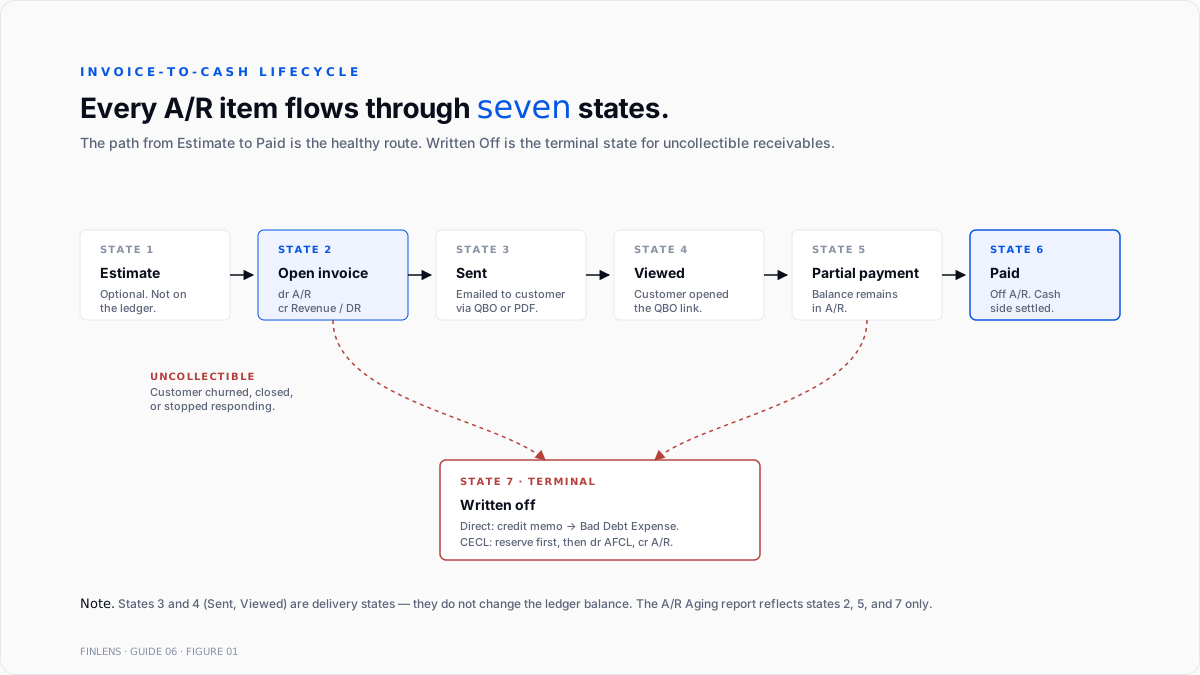
Every A/R item flows through the same seven states on QBO. Which transitions apply depends on the payment terms, the customer's behavior, and the collections cadence.
Figure 1 (referenced above) traces the full lifecycle.
1. Estimate. Optional. A pre-invoice quote. Estimates do not hit the ledger. Progress invoicing converts an estimate into one or more invoices over the project's life.
2. Open invoice. Posted to the ledger. Debit A/R, credit Revenue (accrual) or Deferred Revenue (accrual with performance obligation not yet satisfied). Days-outstanding clock starts on invoice date, not due date.
3. Sent. The invoice has been emailed or otherwise delivered to the customer. Send status is tracked separately from ledger status in QBO.
4. Viewed. Customer opened the invoice link. This state exists only for invoices sent through QBO's email delivery; PDF invoices attached to external emails do not show viewed status.
5. Partial payment. A payment less than the invoice total has been applied. Balance stays in A/R at the reduced amount. Common on progress-billed projects and net-terms customers taking early-pay discounts.
6. Paid. Full payment applied. Invoice moves off the A/R Aging report. Balance sheet A/R decreases by the invoice amount.
7. Written off. The receivable is no longer expected to be collected. Either reserved through Allowance for Credit Losses (before write-off) or fully written off through a bad-debt credit memo. Both treatments covered below.
Payment terms and their ledger effects
Payment terms are set at the customer level (Settings → Customers) or overridden per invoice. The four common terms:
- Due on receipt. Payment expected immediately. Days-outstanding counts every day the invoice is open.
- Net 15 / Net 30 / Net 45 / Net 60. Payment expected within N calendar days of invoice date. Aging buckets on the A/R Aging report count from the due date, not the invoice date.
- 2/10 net 30. 2% discount if paid within 10 days; full amount due at 30 days. Sales Discounts contra-income account absorbs the discount when applied.
- Milestone-based. No fixed due date; payment tied to project completion signals. Progress invoicing is the QBO feature that maps to this.
The Intuit help article on progress invoicing covers the feature. Turn on at Settings → Account and Settings → Sales → Progress Invoicing. An estimate can be split into any number of partial invoices, billed either by line-item selection or by percentage.
The seven A/R misstatement causes
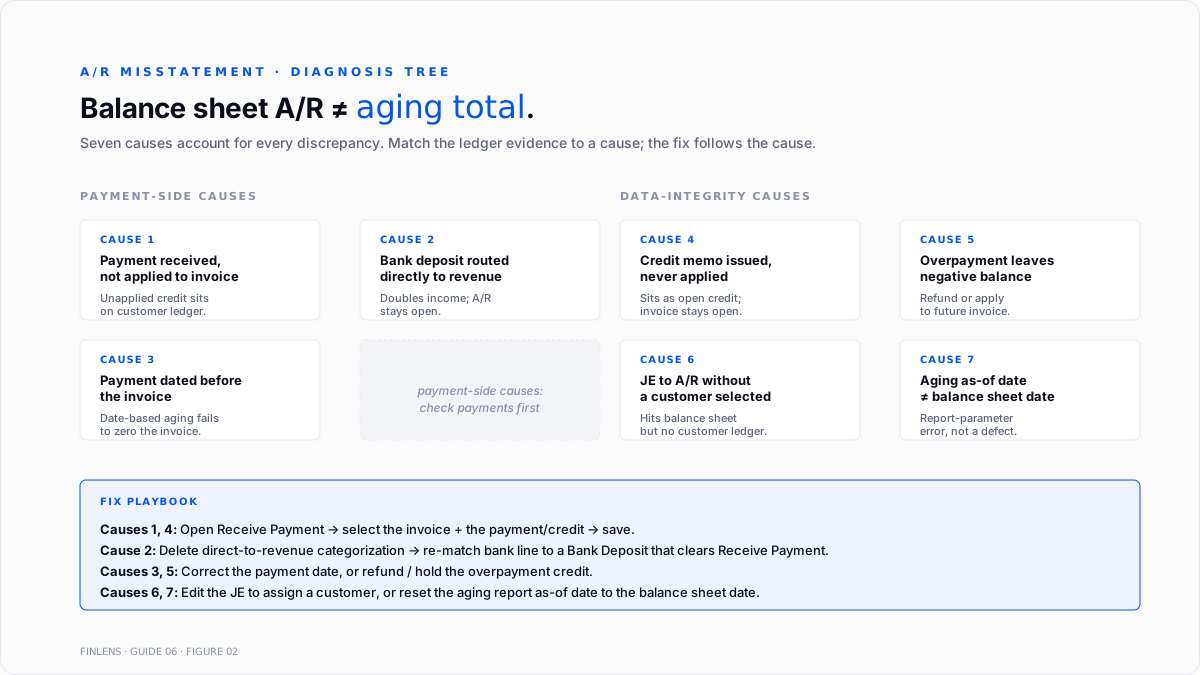
Every discrepancy between the A/R Aging report and expected open-invoice reality traces to one of seven causes.
1. Payment received but not applied to invoice
The most common cause. A customer payment posted through Receive Payment or a bank-feed match landed against the customer but was not applied to a specific open invoice.
Diagnosis. Open the customer's transaction list. An unapplied payment appears as a standalone credit line with a positive balance while an open invoice for the same amount sits above it.
Fix. Open the payment, select the invoice under Outstanding Transactions, save. The Community thread on payments showing on A/R aging covers this pattern; the workaround is often to unapply and reapply.
2. Bank deposit not routed through the A/R workflow
A customer payment appeared in the bank feed and was categorized to a revenue account directly, bypassing the invoice. The invoice stays open on A/R Aging; the P&L books the revenue twice (once from the invoice, once from the bank deposit).
Fix. Delete the direct-to-revenue categorization on the bank line. Re-match the bank feed transaction to a Bank Deposit that clears the correct Receive Payment. Full treatment in the categorizing transactions and Undeposited Funds guide.
3. Payment dated before the invoice
A payment recorded with a date earlier than the invoice date. The A/R Aging report is dated-based: the aging as-of date counts open invoices whose date is on or before the as-of date, and applied payments whose date is on or before the as-of date. A payment dated before the invoice does not reduce the invoice's open balance on any aging report dated between the payment date and invoice date.
Fix. Edit the payment date to be equal to or later than the invoice date.
4. Credit memo issued but not applied
A credit memo was created (either for a return, a discount, or a bad-debt write-off) but was never applied to a specific invoice through the Receive Payment workflow.
Fix. Open Receive Payment for the customer. Select the invoice under Outstanding Transactions. Select the credit memo under Credits. Save.
5. Overpayment
Customer paid more than the invoice amount. The invoice closes; the excess sits as an unapplied credit on the customer. Not a defect per se but the A/R Aging report may show the customer's balance as negative until the credit is either refunded or applied to a future invoice.
Fix. Either issue a refund receipt (dr Customer Deposits or A/R, cr Bank) or hold the credit and apply it to the next invoice.
6. Journal entry posted directly to A/R without a customer
A JE that debits or credits A/R with no customer selected shows up in the balance-sheet total but not on any individual customer's ledger. The three totals identity breaks.
Fix. Edit the JE to select the correct customer. If no customer applies, the JE should not touch A/R reclassify to the correct account.
7. A/R Aging report as-of date does not match balance sheet date
The A/R Aging report defaults to the current date. When run for a period-end that is not today (e.g., last month's close), the as-of date must be manually set. A mismatch between the aging as-of date and the balance sheet date produces a difference in the two totals that is not a defect it is a report-parameter error.
Fix. Set the A/R Aging Detail report to As of Date = balance sheet date. Confirm the report footer matches the balance sheet date.
Aging buckets and what they mean
The A/R Aging Summary report divides open invoices into buckets:
- Current. Not yet due.
- 1–30 days past due. Overdue but within a normal follow-up window.
- 31–60 days past due. Requires active collections attention.
- 61–90 days past due. Escalated collections; consider reserving under CECL.
- 90+ days past due. High probability of non-collection; reserve or write off.
Bucket thresholds are configurable at Reports → A/R Aging Summary → Customize → Aging Method. The default 30/60/90 aligns with standard commercial credit reporting and the customary CECL reserve tiering.
A rule of thumb from practitioner reports: healthy B2B books carry ≤10% of A/R in the 61+ bucket. Books above 25% in 61+ typically have a collections process problem, not a credit problem the invoices are collectible but nobody is following up.
DSO and the collections benchmark
Days Sales Outstanding is the standard collections KPI:
DSO = (Average A/R for the period ÷ Credit sales for the period) × Days in period
QBO does not surface DSO natively. Compute it from the A/R Aging report and the P&L revenue line:
- Average A/R. (Beginning A/R + Ending A/R) ÷ 2 for the period.
- Credit sales. Total revenue minus cash sales for the period. On books where every sale is invoiced, this equals total revenue.
- Days in period. 30 for a month, 90 for a quarter, 365 for a year.
A DSO higher than payment terms + 15 days signals a collections issue. A book with net-30 terms and DSO of 55 days is losing an average of 25 days of working capital per invoice.
DSO trending up over consecutive months, holding sales constant, means either aging is worsening or a subset of customers is stretching payment. Segment DSO by customer size or channel to isolate the driver.
The bad-debt write-off workflow
Two treatments apply depending on the accounting basis and materiality.
Cash-basis or immaterial: direct write-off via credit memo
Intuit's help article on writing off bad debt covers the mechanics:
- Create a Bad Debts expense account (Expense → Bad Debts).
- Create a non-inventory item named "Bad Debt," mapped to the Bad Debts expense account.
- Issue a credit memo to the customer, one line, Bad Debt item, amount equal to the open invoice.
- Apply the credit memo to the invoice via Receive Payment.
The invoice closes; the P&L shows the write-off as Bad Debts expense; the balance sheet A/R decreases.
The Community thread on writing off A/R with a credit memo covers a common QBO quirk: the item creation screen defaults the mapping account to Income, and users have to switch the account type to Expense manually.
Accrual-basis with material A/R: CECL allowance method
Under ASC 326, a private company with material trade receivables must estimate lifetime expected credit losses at the time each receivable is recognized. The allowance is booked once and adjusted at each period-end.
Reserve entry (period-end). Debit Bad Debt Expense, credit Allowance for Credit Losses. Amount equals the estimated lifetime credit loss on the current A/R balance, less the existing allowance balance.
Write-off entry (when a specific receivable is deemed uncollectible). Debit Allowance for Credit Losses, credit A/R for the specific customer/invoice. The write-off does not hit the P&L again the expense was already recognized when the allowance was established.
The estimate method most defensible for small-business books is the aging method: assign a loss-rate percentage to each aging bucket (e.g., 1% current, 5% 1–30, 15% 31–60, 40% 61–90, 75% 90+), multiply by the bucket balance, sum to the required allowance. Adjust the allowance to that target at period-end.
The collections workflow
Every open receivable follows the same escalation ladder. The cadence depends on the book's payment terms and collections capacity.
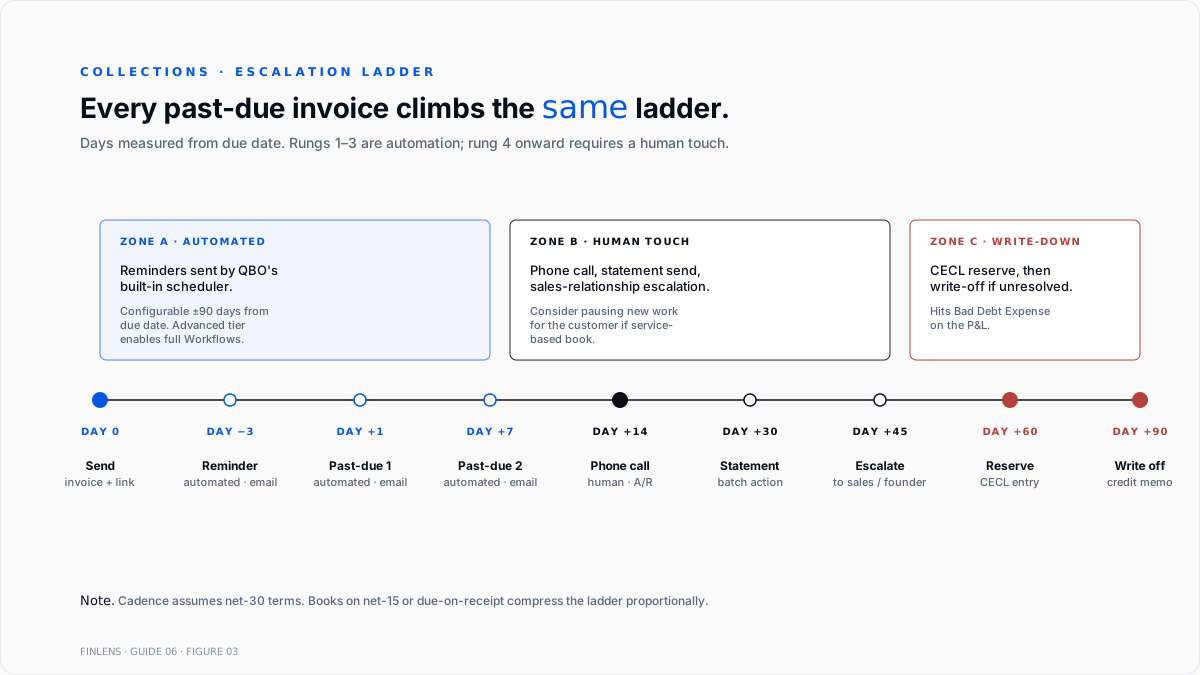
Day 0 (invoice date). Send the invoice with a payment link. QBO Payments-enabled books surface a Pay Now button; other books include payment instructions inline.
Day −3 (three days before due). Optional friendly reminder. Intuit's help article on invoice reminders covers the built-in automated reminder configurable at Settings → Sales → Reminders, up to 90 days before or after the due date.
Day +1 (day after due). First past-due reminder. Email. Same language as the friendly reminder.
Day +7. Second past-due reminder. Email plus a note that a call will follow if unpaid.
Day +14. Phone call from the A/R contact. Confirm receipt of invoice, ask about payment blocker, get commitment to a specific payment date.
Day +30. Statement of account, all open invoices for the customer. QBO Batch Actions → Send Statement. Consider pausing new work if service-based.
Day +45. Escalate to sales or founder relationship contact for direct outreach.
Day +60. Consider CECL reserve on the invoice.
Day +90. Write off if uncollectible.
Two automations reduce the cadence overhead:
- Recurring invoices with Autopay. For recurring subscription or retainer relationships, the customer's card is charged automatically on the due date. Intuit's autopay for recurring invoices article covers the toggle. Requires QuickBooks Payments and adds processor fees.
- Automated reminders. Configurable per-invoice or globally. Reduces the day +1 and day +7 manual sends to zero. Advanced-tier books get the full Workflows engine, which can trigger reminders based on multiple conditions.
The month-end A/R close
The A/R close is one section of the month-end cycle. Full close treatment in the QuickBooks month-end and year-end close guide.
The A/R-specific closing steps:
- Run A/R Aging Detail as of the period-end date. Confirm the total matches the A/R line on the balance sheet.
- Investigate any variance through the seven-cause checklist above.
- Age the receivables into the 30/60/90 buckets.
- Update the Allowance for Credit Losses to the CECL-target level, if applicable.
- Write off any receivables past the write-off threshold via credit memo.
- Run DSO and compare to the trailing 3-month average.
- Save the aging report to the audit workpapers.
Payment-processor reconciliation
When invoices are paid through a processor (Stripe, Square, PayPal, QuickBooks Payments), the payment flow adds a reconciliation step. Full treatment in the Stripe-to-QuickBooks guide.
The processor-specific pattern:
- Customer pays the invoice through a processor link on the invoice.
- The processor holds the funds for 2–7 business days (varies by processor).
- The processor payout deposits the net-of-fees amount into the bank.
- QBO reconciliation must match the invoice payment (gross) against the payout deposit (net) plus the fees expense.
The most common misstatement on processor-paid A/R is treating the net payout as the customer payment. This understates revenue by the fees and inflates the invoice as still-open even after the customer has paid.
Where in-QBO A/R management stops scaling
Three failure modes compound at higher volume:
Invoice count above 200 per month. Manual follow-up on past-due invoices becomes the collections bottleneck. Automated reminders cover the first two touches; day +14 phone follow-up scales only with headcount.
Multi-entity or multi-client books. A firm managing 20 clients runs 20 separate A/R aging analyses, 20 collections cadences, and 20 CECL calculations every month.
Complex payment terms. Progress billing, milestone billing, retainage, early-pay discounts, and multi-currency invoicing compound the aging-report edge cases. Books running two or more of these together often need supplemental workpapers outside QBO to keep A/R accurate.
The Finlens approach
Finlens is an AI accounting platform for QBO firms and founder-led businesses. A/R hygiene is one workflow in a 17-feature product.
For A/R specifically, Finlens does the following:
- Auto-reconciles processor payments against open invoices at the payout level, so a Stripe or QuickBooks Payments payout closes the correct invoices and books fees to the correct expense line without a manual matching pass.
- Flags unapplied payments and credit memos the moment they are created, so the seven-cause failure modes do not compound between period-ends.
- Computes DSO and aging trend across every client on the firm's book, in one dashboard, without re-authenticating per client.
The features that keep A/R accurate rather than just automated are the ones surrounding the receivable itself:
- Automated CECL reserve calculation using the aging method, applied at each period-end with a reviewable proposed JE.
- Human-in-the-loop review gates every write-off and every reserve adjustment through a CPA before posting.
- Audit log produces a tamper-evident record of every write-off, reserve adjustment, and prior-period edit.
- Multi-entity roll-up aggregates A/R across every entity on the firm's book without re-keying.
The verification checklist
- Balance sheet A/R matches A/R Aging Detail total as of the same date.
- Sum of open invoices per customer equals the A/R Aging Detail total.
- No unapplied payments older than one billing cycle.
- No credit memos older than one billing cycle without an applied invoice.
- No journal entries to A/R without a customer selected.
- Allowance for Credit Losses reflects the current-period aging method calculation.
- DSO within payment terms + 15 days, or a documented reason for the variance.
- Bad Debt Expense YTD explainable per customer.
- Every write-off has a corresponding credit memo linked to a specific invoice.
For a firm managing A/R hygiene across multiple QBO clients, the firm platform runs aging, DSO, and CECL calculations across every entity. For a founder running collections on a single book, the founder-facing product auto-reconciles processor payments and flags unapplied credits before they accumulate.
.png)
FAQ
Why a paid invoice still shows on the A/R Aging report?
Four causes. (1) The payment date is later than the aging as-of date. (2) The payment was received but not applied to the specific invoice through Receive Payment. (3) The bank deposit was categorized to a revenue account directly, bypassing A/R. (4) A credit memo exists but was not applied to the invoice.
The difference between a credit memo and a refund receipt?
Credit memo reduces A/R without moving cash used when the receivable is being written down or the customer has an unapplied credit for future use. Refund receipt reduces cash used when the customer is being sent money back. Neither should be booked as a negative invoice.
Whether to use the direct write-off method or the CECL allowance method?
Direct write-off is acceptable for cash-basis books and for accrual-basis books where the total write-off amount is immaterial. CECL is required under GAAP for accrual-basis private companies with material trade receivables, from fiscal years beginning after December 15, 2022.
How to compute DSO when the book has both cash and credit sales?
Include only credit sales (invoiced sales) in the denominator. Cash sales collected at the point of sale never enter A/R and should not be counted.
Whether to send statements when individual invoice reminders are already automated?
Statements consolidate every open invoice for a customer into one document. Useful for customers with 3+ open invoices at once, or as a monthly close-out touch. Invoice reminders are per-invoice; statements are per-customer.
Realistic A/R close timing?
30–60 minutes per month for a book with fewer than 100 open invoices at month-end and no CECL calculation. 2–4 hours for a book with 500+ open invoices, active collections, and a monthly CECL adjustment. Multi-entity books multiply the per-entity time by the entity count.

