
The founder's guide to connecting Stripe to QuickBooks without breaking your P&L (2026)


This is a working reference for founders and controllers whose revenue runs through Stripe and whose books live in QuickBooks Online. Every technique is sourced to Intuit documentation, Stripe's own product docs, or a real thread on QuickBooks Community.
The problem this guide addresses
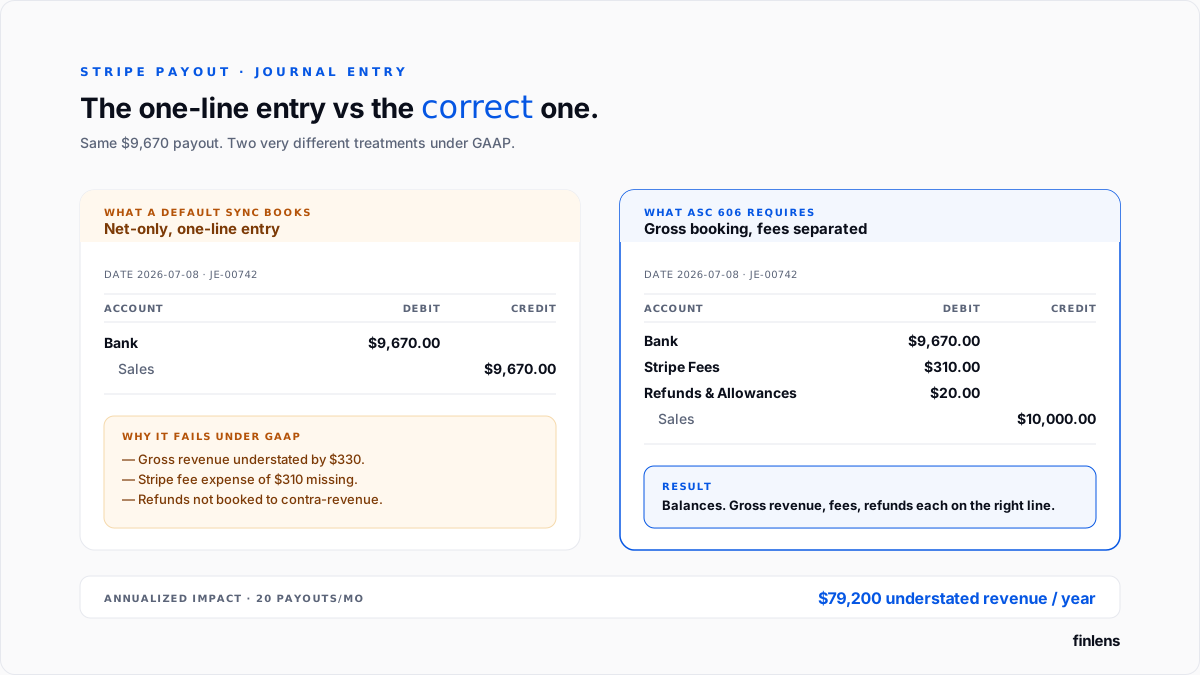
Stripe deposits net cash into your bank account. QuickBooks records that net deposit as revenue. Your P&L is now wrong on both lines.
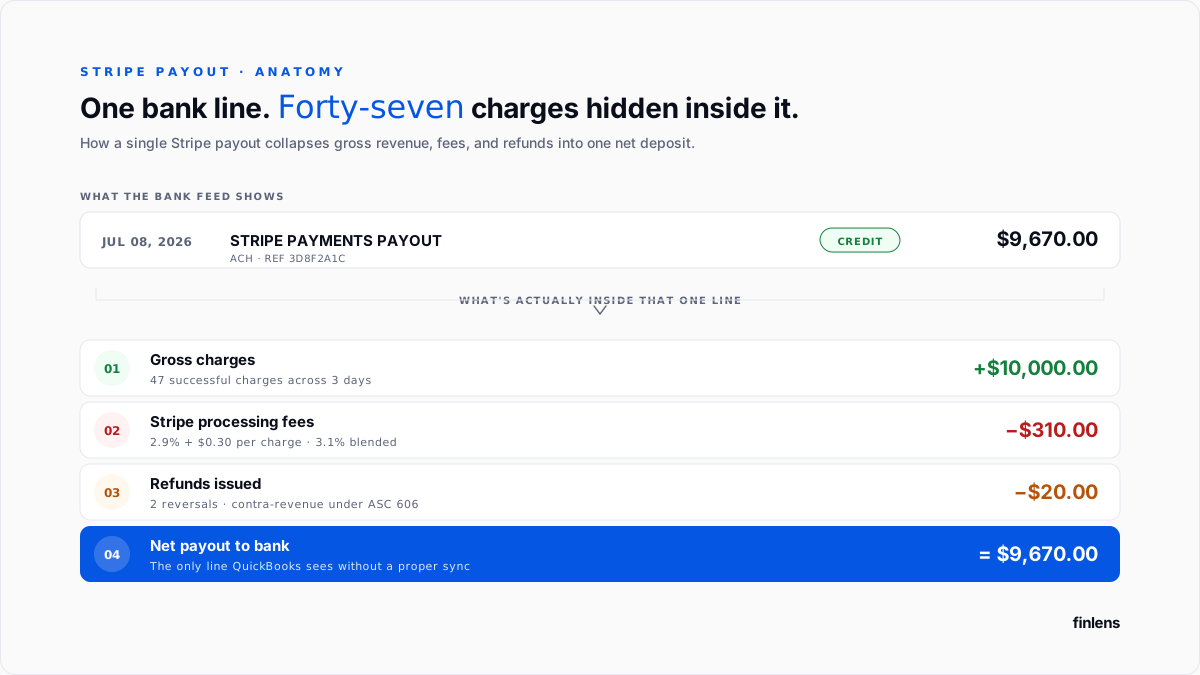
A customer pays $103.00 on a Stripe invoice. Stripe deducts processing fee and deposits $99.70 into your bank a few days later, bundled with dozens of other charges into a single payout. If nothing sits between Stripe and QBO, bank feed shows one $99.70 deposit categorized as sales. The correct treatment is:
- Gross revenue: $103.00
- Processing fee expense: $3.30
- Net cash received: $99.70
Booking $99.70 as revenue understates top line and completely omits fee expense. Across a $2M annualized book, that's roughly $60,000 of revenue that disappears and $60,000 of expense that never gets recorded.
The QuickBooks Community thread on Stripe fees not being recorded is canonical description of this failure. The thread on matching a deposit to an invoice when fees changed amount received covers same problem from invoice-matching side.
Note on fee: 2.9% + $0.30 per charge is Stripe's rate for standard US online cards. International cards add 1.5%, Amex Link and instant-payout carry different pricing, and Stripe Connect charges layer application fees on top. The Stripe pricing page is current source of record for a US-only, standard-cards book 3.1% blended rate above is realistic; for anything else, model specific fee mix.
Why native Intuit Stripe connector alone is not enough
Intuit's own Stripe connector syncs Stripe activity into QBO. It is faster than manual entry and free with any paid QBO tier.
It also has three limitations that break P&L on any book with meaningful Stripe volume.
1. Historical import capped at 24 months. The connector imports up to two years of prior Stripe activity on initial setup. Anything older stays in Stripe only. Verified in Community thread on categorizing historical data from Strip and Intuit's help article, current as of 2026.
2. Duplicate transactions when bank feed is also connected. The payout appears in both feeds from Stripe as an itemized set of charges, fees, and a payout; from bank as a single net deposit. Without careful matching, QBO records both. The Community thread on Stripe duplicating bank transactions and thread on avoiding duplicates when connecting Stripe, WooCommerce, and GoHighLevel both walk through same issue.
3. Sales receipts posted directly to P&L income account. Even when duplicates are avoided, connector posts Stripe sales as sales receipts against whatever income account product is mapped to. For a subscription business, revenue is recognized on Stripe invoice date rather than ratably over service period failure mode described in deferred revenue recognition guide. One user who activated sync reported on r/smallbusiness that their booked revenue jumped to 1.4x correct figure a single user account, not a general product benchmark.
The chart of accounts setup
Three accounts specific to a Stripe stack. The full close-cycle account setup is covered in QuickBooks month-end and year-end close guide.
1. Stripe Clearing Account Type: Bank. Detail Type: Cash on hand. Holds balance between when Stripe charges a customer and when Stripe pays out. Every Stripe charge lands here; every payout debits it. The Community thread on Stripe payouts reconciliation documents this pattern.
2. Stripe Fees Account Type: Expenses. Detail Type: Bank Charges. Every Stripe fee per-charge, currency conversion, radar fraud, Connect application fee hits this account.
3. Point subscription products at Deferred Revenue same setup as deferred revenue guide. One-time charges (implementation, hardware, single-service items) map to income account directly.
Verify with one live $100 test charge: after payout arrives, Stripe Clearing returns to $0, operating bank shows net payout, Stripe Fees shows exact fee Stripe charged, and Subscription Revenue (P&L) shows $0 for a subscription product.
Method 1 Manual payout entry
For each Stripe payout: download payout report from Stripe dashboard, create a bank deposit in QBO for net payout amount, add one line per charge (gross, credited to Sales) plus one negative line for total Stripe fees on that payout (debited to Stripe Fees). The Community thread on matching a deposit to an invoice with a fee walks through split-deposit pattern.
This works on any QBO tier at zero software cost with full control over each entry.
The failure mode is volume. On a book with 20 payouts a month and 500 charges per payout, this is 500 lines per deposit and 20 deposits per month. The Community thread on Stripe payouts reconciliation contains one controller's estimate of 4–8 hours per payout on a 500-charge stack. That's a single practitioner's number and depends heavily on team skill, transaction complexity, and how clean Stripe Clearing account is going in a book with dispute activity, refunds, and Connect application fees will land closer to upper bound; a clean subscription book closer to lower.
Manual entry is practical up to roughly 3–5 payouts per month with fewer than 50 charges per payout.
Method 2 Intuit's native Stripe connector
Installation: Apps → Find apps → search "Stripe Connector by QuickBooks" → install → authorize → choose historical import window (up to 24 months) → map Stripe products to QBO items → choose deposit account (Stripe Clearing) and fee expense account (Stripe Fees).
Once configured, Stripe charges post as sales receipts and payouts post as transfers from Stripe Clearing to operating bank. The Community thread on reconciling Stripe invoices and fees against bank transactions documents this setup in production.
Fit: a founder-led business with fewer than 100 Stripe transactions per month, no subscription revenue, no cross-currency activity, and no historical Stripe data older than 24 months.
Method 3 Third-party sync tools
Several third-party tools sync Stripe activity into QBO with more control than native connector. Honest one-line summary of each:
- Synder payout-level decomposition with strong support for Stripe, Shopify, and PayPal in same book. Best fit for e-commerce plus Stripe combined. Higher price point than Bookkeep or Acodei.
- Bookkeep payout-level automation focused on summarized daily journal entries. Best fit for businesses that don't need per-charge detail in QBO and prefer a clean end-of-day summary.
- Acodei direct Stripe-to-QBO sync with detailed charge-level posting. Best fit for straightforward Stripe subscription books that want per-charge visibility in QBO.
- PayTraQer (SaasAnt) Stripe, PayPal, Amazon, Shopify sync with configurable posting rules. Best fit for multi-channel books; strongest customization of posting logic.
- A2X originally built for Amazon; supports Stripe as a secondary. Best fit when Amazon is primary sales channel and Stripe is a smaller line.
None of these tools handle deferred revenue recognition for subscription contracts natively. That is same limitation Intuit connector has, and reason setup section above points subscription items at Deferred Revenue rather than directly at a P&L income account.
Third-party sync tools are fit for a book with 100–1,000 monthly Stripe transactions, no meaningful subscription revenue, and a single-currency Stripe account.
Method 4 The Finlens approach
Finlens is an AI accounting platform for QBO firms and founder-led businesses. Stripe reconciliation is one feature in a 17-feature product, and it does not sit in isolation from rest of ledger.
For Stripe specifically, Finlens does following:
- Ingests Stripe events directly from Stripe API not from QBO Stripe connector so charges, fees, refunds, and disputes arrive at charge-level detail regardless of payout batching.
- Decomposes each payout into charges, fees, refunds, and disputes, matched to Stripe invoices and QBO customer records.
- Generates deferred revenue schedules for subscription charges automatically same schedule described in deferred revenue guide.
- Posts a reconciled summary entry into QBO per payout, referencing every source charge for audit trail.
The features that keep reconciled entry accurate are ones surrounding it:
- AI transaction categorization flags Stripe charges that don't match a product mapping (a Connect application fee that arrives at a new revenue stream) before they post to wrong account.
- Human-in-the-loop review gates every posted entry through a CPA before it hits QBO.
- Multi-currency and multi-entity support carries source-currency schedules forward per contract and reconciles per legal entity.
- Duplicate detection across every sync source bank feed, native connector, third-party syncer catches same charge before it lands twice.
Above roughly 200 monthly Stripe transactions, labor time to run manual or third-party workflows compounds faster than platform cost.
Refunds, disputes, and chargebacks under ASC 606
Under ASC 606, refunds are a form of variable consideration (§606-10-32-11 through 32-14). They reduce transaction price rather than land in expense column, and they should hit a contra-revenue account, not a refund-expense account.
Refunds
A customer paid $100 on invoice 1234 and is refunded $100 four days later.
- Debit Sales Refunds (contra-revenue): $100
- Credit Stripe Clearing: $100
Since 2019 Stripe does not return original processing fee on a refund; fee stays in Stripe Fees expense from original charge. Stripe's fee refund policy is source. Refunds issued before mid-2019 followed earlier fee-refunded policy if you're reviewing historical books, change date matters.
Pending disputes
When a customer disputes a charge, Stripe places disputed amount on hold and deducts it from a future payout.
- Debit Disputed Charges Receivable (a suspense receivable, not revenue): amount + Stripe's dispute fee
- Credit Stripe Clearing: same amount
"Disputed Charges Receivable" or "Chargeback Suspense" are common names for this account. Do not name it "Chargeback A/R" that conflates it with customer A/R aging and confuses collections workflow.
Disputes resolved in your favor
- Debit Stripe Clearing: original disputed amount
- Credit Disputed Charges Receivable: same amount
The Stripe dispute fee stays as an expense.
Disputes lost
- Debit Bad Debt Expense (or Chargeback Losses): original amount + Stripe fee
- Credit Disputed Charges Receivable: same amount
This treats loss as a cost of doing business, not as a revenue reversal.
Dispute reserve
ASC 606's variable-consideration guidance requires an estimate of expected value of consideration entity will receive. For a book with material dispute activity, that estimate is commonly implemented as a Dispute Reserve liability accrued monthly against expected losses. The specific account structure reserve liability vs. contra-revenue accrual vs. direct write-off timing is not mandated by standard; it's a policy call, typically made with audit partner.
Full expansion of refund and chargeback bookings sits in Finlens piece on Stripe COGS mapping for refunds and chargebacks.
Historical import two-year cap
Intuit's connector imports up to 24 months of Stripe history on initial setup, verified current for 2026 in Intuit's help article and multiple community threads.
Three options for a business with more than two years of Stripe history:
- Leave older activity in Stripe only. Acceptable if pre-cutoff activity is not needed for tax filings, audit review, or diligence.
- Manual CSV import. Stripe's dashboard allows CSV export of full history; CSV can be transformed and imported into QBO through QBO CSV import tool at payout-level detail (not per-charge).
- Third-party or automation platform backfill. Tools that read directly from Stripe API can import full available history back to account creation. QBO Advanced with a third-party partner can extend practical import window beyond 24-month native cap.
The Community thread on categorizing historical data from Stripe covers trade-offs.
Multi-currency Stripe accounts
Three treatments for a US-based QBO ledger with a Stripe account that accepts EUR, GBP, AUD, or CAD.
- Charge-level conversion. Each foreign-currency charge is converted to USD at Stripe's mid-market rate at charge time, minus Stripe's FX fee (typically 1% above mid-market for cross-border cards).
- Payout-level conversion. Stripe payouts in a foreign currency to a US bank are converted at payout-time rate different from charge-time rate.
- FX gain/loss. The gap between charge-time and payout-time conversion is booked to an FX Gain/Loss income statement account, not to Sales.
The deferred revenue guide's multi-currency section covers ASC 830 treatment for balance sheet side.
1099-K and Stripe
Stripe issues a 1099-K to every US-based Standard account with gross transaction volume above IRS threshold (threshold moved from $20,000 / 200 transactions historically to $5,000 for 2024 and lower thresholds in subsequent years IRS's Form 1099-K page is current source).
Two treatments matter at year-end:
- The 1099-K reports gross transaction volume, not net. Booking Stripe revenue on a net basis in QBO produces a P&L that will not tie to 1099-K, which is a diligence flag.
- Refunds are reported on 1099-K as gross positive volume, not netted against original charges. A book that recognizes refunds against Sales (rather than as contra-revenue against Sales Refunds) will see a compounding mismatch year over year.
Both issues resolve automatically when chart-of-accounts setup above is followed. The 1099-K becomes a proof-check, not a reconciliation surprise.
The month-end verification checklist
- Stripe Clearing balance ties to sum of unpayout charges in Stripe at period-end date.
- Every payout from Stripe in period appears in QBO with correct net amount.
- Sum of Stripe Fees expense matches fee total in Stripe's dashboard for period.
- Refunds in period are booked to contra-revenue, not to expense.
- Disputed Charges Receivable ties to sum of pending disputes in Stripe at period-end.
- Subscription revenue posted in period reconciles to sum of ratable amounts per the deferred revenue schedule.
- Every charge appears exactly once across the StripeStripe feed and bank feed.
- Gross transaction volume for year (running total) reconciles to Stripe dashboard 1099-K tie-out check.
For a founder book with Stripe activity that still lives partly in spreadsheets, Finlens automation for founders handles each of the treatments above with charge-level detail and multi-currency support.
.png)
FAQ
Whether the native Intuit Stripe connector is enough on its own?
For a business with fewer than 100 monthly Stripe transactions, no subscription revenue, no cross-currency activity, and no historical Stripe data older than 24 months, a native connector is sufficient. Above any of those thresholds, either a third-party syncer or an automation platform is required.
How to prevent duplicate transactions?
Only one source posts Stripe activity to QBO, either the connector or the bank feed. If the connector is active, the operating bank's Stripe payouts should be matched (not added) when they appear in the bank feed. The Community thread on Stripe duplicating bank transactions covers matching workflow.
How to book Stripe fees under ASC 606?
Stripe processing fees are an operating expense, not a revenue reduction. They post to a Stripe Fees expense account. Netting fees against revenue understates gross revenue and hides the true cost of payment processing.
How to book refunds under ASC 606?
Refunds are variable consideration. They post to a contra-revenue account (Sales Refunds or Refunds & Allowances), not to expense. Since 2019, Stripe has not returned the original processing fee on a refund.
How to handle historical Stripe data older than 24 months?
Three options: leave it in Stripe, manually CSV-import at payout level, or use a third-party tool or automation platform that reads directly from Stripe API.
How does Finlens differ from third-party syncers?
A third-party syncer decomposes each payout into charges, fees, refunds, and disputes and posts them into QBO. Finlens does same and adds deferred revenue schedule generation, multi-currency and multi-entity support, duplicate detection across every sync source, AI-flagged categorization mismatches, and human-in-the-loop review before every post. Deferred revenue and reconciliation are two features of a 17-feature platform syncer category that treats them as a whole product.

