
The QuickBooks guide to prepaid expenses and accrued expenses (2026)


This is a working reference for founders, controllers, and firm bookkeepers running the accrual side of the expense cycle on QuickBooks Online. Every technique is sourced to Intuit's own documentation, the FASB standard, or a real thread on the QuickBooks Community. Numbers cited from user reports are flagged as anecdotal rather than benchmarks.
The problem this guide addresses
Two failure modes account for most misstated expense timing on accrual-basis QBO books.
The first is the annual-paid, monthly-consumed expense that gets booked in full on the payment date. A $12,000 annual insurance premium paid in January hits January's P&L as $12,000 of insurance expense; the remaining eleven months of coverage never touch the P&L. The Beancount write-up on prepaid expenses distorting monthly profit calls this "the most common error in QuickBooks files." Every recurring subscription paid annually the InsurTech premium, the software license, the annual retainer, the rent-paid-in-advance creates the same lumpy P&L failure when the amortisation step is skipped.
The second is the unbilled expense at month-end. Legal work delivered in June but billed July 15. Utilities consumed in June but posted to the July bill. Payroll for the last week of June paid on July 5. On an accrual-basis book, all three belong in June's expenses; on cash-basis, none of them do. When the accrual step is skipped, June's expenses are understated and July's are overstated. Intuit's help article on prepaid expenses and amortization covers the prepaid side; the accrual side sits in the month-end close workflow.
The sections below cover the account setup, the four expense-timing scenarios and their correct treatment, the prepaid-amortization workflow, the accrued-expense workflow, the reversing-entry mechanic that keeps accruals from double-counting, the recurring journal entry feature and where it breaks, and the IRS 12-month rule that lets some prepayments be expensed immediately for tax purposes.
The accrual identity
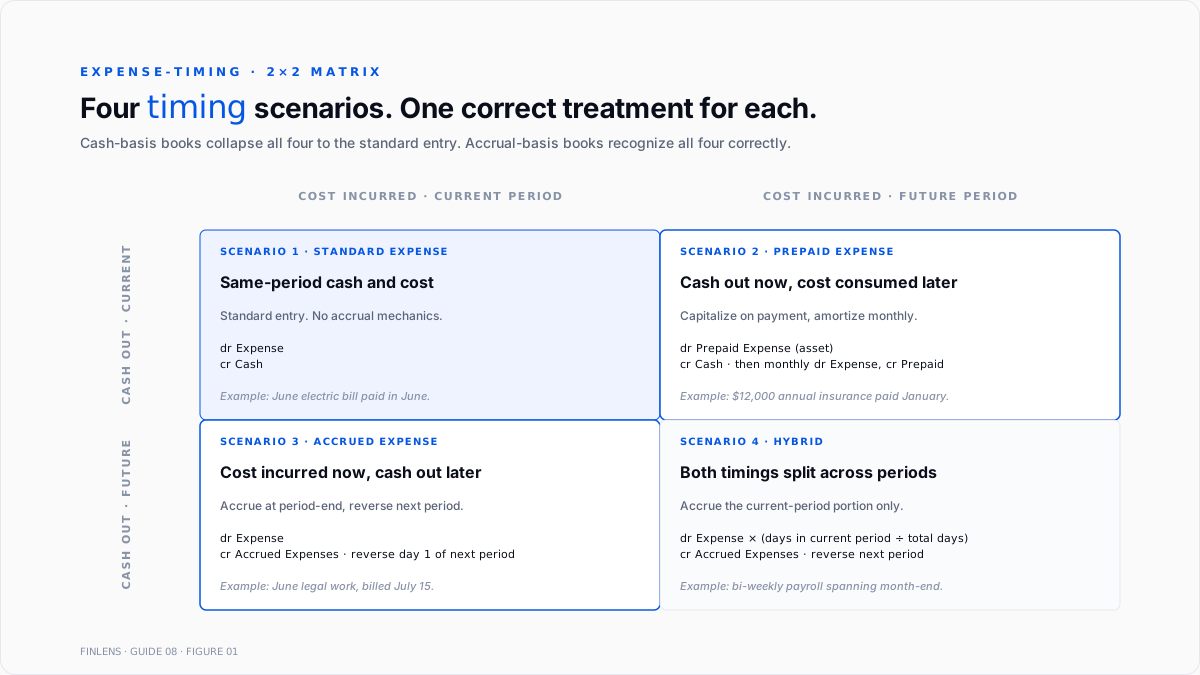
Every expense entry answers two questions: when was the cost incurred, and when is the cash moving. The four combinations of those two questions produce the four expense-timing scenarios.
Cash out ↔ Cost incurred (same period). Standard expense entry debit Expense, credit Cash. No accrual mechanics required.
Cash out (now) ↔ Cost incurred (later). Prepaid expense. Cash left the bank in the current period but the expense is consumed over future periods.
Cash out (later) ↔ Cost incurred (now). Accrued expense. Cost is consumed in the current period but the bill has not yet arrived or been paid.
Cash out ↔ Cost incurred (both split across periods). A hybrid most common on payroll and rent with a mid-month cutoff.
Cash-basis books collapse all four to the first: expense recognized when cash moves. Accrual-basis books recognize all four correctly. Every misstatement on an accrual book resolves to one of the four being treated as if it were the first.
The account setup
Six chart-of-accounts entries carry the prepaid and accrued cycle. The full close-cycle account setup sits in the QuickBooks month-end and year-end close guide.
- Prepaid Expenses (Other Current Asset). Umbrella for all prepayments. Best practice: create sub-accounts per category (Prepaid Insurance, Prepaid Rent, Prepaid Software, Prepaid Retainers).
- Accrued Expenses (Other Current Liability). Umbrella for period-end unbilled accruals. Best practice: sub-accounts for Accrued Utilities, Accrued Professional Fees, Accrued Interest, Accrued Wages/PTO.
- Prepaid Insurance (Other Current Asset, sub of Prepaid Expenses). Insurance premiums covering future periods.
- Prepaid Rent (Other Current Asset, sub of Prepaid Expenses). Rent paid in advance of the coverage period.
- Accrued Wages (Other Current Liability, sub of Accrued Expenses). Payroll earned but not yet paid.
- Accrued Vacation / PTO (Other Current Liability, sub of Accrued Expenses). Vested but unused PTO liability under ASC 710-10-25-1.
For books that need finer granularity: Prepaid Software (annual SaaS licenses), Prepaid Deposits (security deposits, though these are non-amortizing and go to a separate Deposits Held account on the balance sheet).
The prepaid expense amortization workflow
The workflow has three steps: capitalize on payment, amortize monthly, reconcile the balance at period-end.
Step 1 Capitalize on payment
Payment lands in the bank feed. Instead of categorizing to an expense account directly, categorize to the appropriate Prepaid Expenses sub-account.
For a $12,000 annual insurance premium paid January 15:
- Debit: Prepaid Insurance $12,000
- Credit: Cash / Bank $12,000
If the bill was entered through Pay Bills, the same effect: dr Prepaid Insurance, cr A/P, and then the payment clears A/P against Cash separately.
Step 2 Amortize each month
At period-end (or the last day of each month), post the amortization journal entry:
- Debit: Insurance Expense $1,000 ($12,000 ÷ 12)
- Credit: Prepaid Insurance $1,000
Repeat for eleven months. At the end of December, Prepaid Insurance is zero and Insurance Expense has absorbed the full $12,000 spread evenly across the coverage period.
Step 3 Reconcile at period-end
Every month, verify the Prepaid Expenses balance on the balance sheet equals the sum of remaining unamortized portions on the schedule:
Prepaid Expenses balance = Σ (Original prepayment − Cumulative amortization) across every active prepaid item
When they don't agree, either an amortization entry was missed (balance too high), an amortization was double-posted (balance too low), or a new prepayment was categorized to expense directly (balance too low, expense overstated).
Intuit's help article on recording and allocating prepaid expenses covers the mechanics. Intuit's note on QBO not having a native amortization schedule is explicit: the schedule has to live outside QBO or be maintained through the Recurring Transactions feature.
Recurring journal entries what they solve and what they don't
QBO's Recurring Transactions feature (Settings → Recurring Transactions → New → Journal Entry) automates a fixed JE on a schedule. For the $12,000/12-month insurance amortization, one recurring JE dated the last day of each month posts the $1,000 amortization automatically.
Where it works:
- Fixed amounts, fixed schedules. Straight-line amortization of a single prepayment. Same debit, same credit, every month.
- Setup once, run forever. Schedule end date matches the coverage end date, so the recurring JE stops on its own after 12 (or however many) posts.
Where it breaks:
- Variable amounts. Utilities that fluctuate month-to-month, subscriptions with usage tiering, or any accrual whose amount depends on a period-end measurement. Recurring JEs are fixed; they cannot pull from a spreadsheet, an API, or another QBO report.
- Multiple prepayments in one account. Once five or ten prepaid items are active, each needing its own recurring JE, the recurring templates list becomes hard to reconcile against the balance sheet.
- Amendments after the fact. Editing a recurring template does not restate prior entries. If the schedule was wrong for six months, the past six months have to be edited by hand.
Volume ceiling per practitioner reports: recurring JEs remain manageable up to roughly 10–15 concurrent prepaid amortizations. Books above that threshold either move to a spreadsheet-plus-manual-entry workflow, buy a dedicated accrual tool, or move to a platform that automates the schedule.
The IRS 12-month rule (tax vs GAAP timing)
Under IRS Regulation §1.263(a)-4(f), a prepayment can be deducted in the year paid even if amortized on the books when both conditions hold:
- The right or benefit does not extend beyond 12 months from the payment date.
- The right or benefit does not extend beyond the end of the taxable year following the taxable year in which the payment was made.
Example: a 12-month insurance premium paid October 1, 2026 covers through September 30, 2027. Both conditions hold 12 months from payment date, ends in the taxable year following. The full $12,000 is deductible on the 2026 tax return.
The 12-month rule is a tax-only accommodation. Book-side GAAP still requires amortization for accrual-basis books. The difference between book and tax expense in year 1 creates a temporary deferred tax difference that reverses over the amortization period. Small businesses on the cash basis or with an accountable-plan election often ignore the book amortization entirely and take the tax deduction a defensible choice for immaterial prepayments, less so once the prepaid balance moves the balance sheet.
The accrued expense workflow
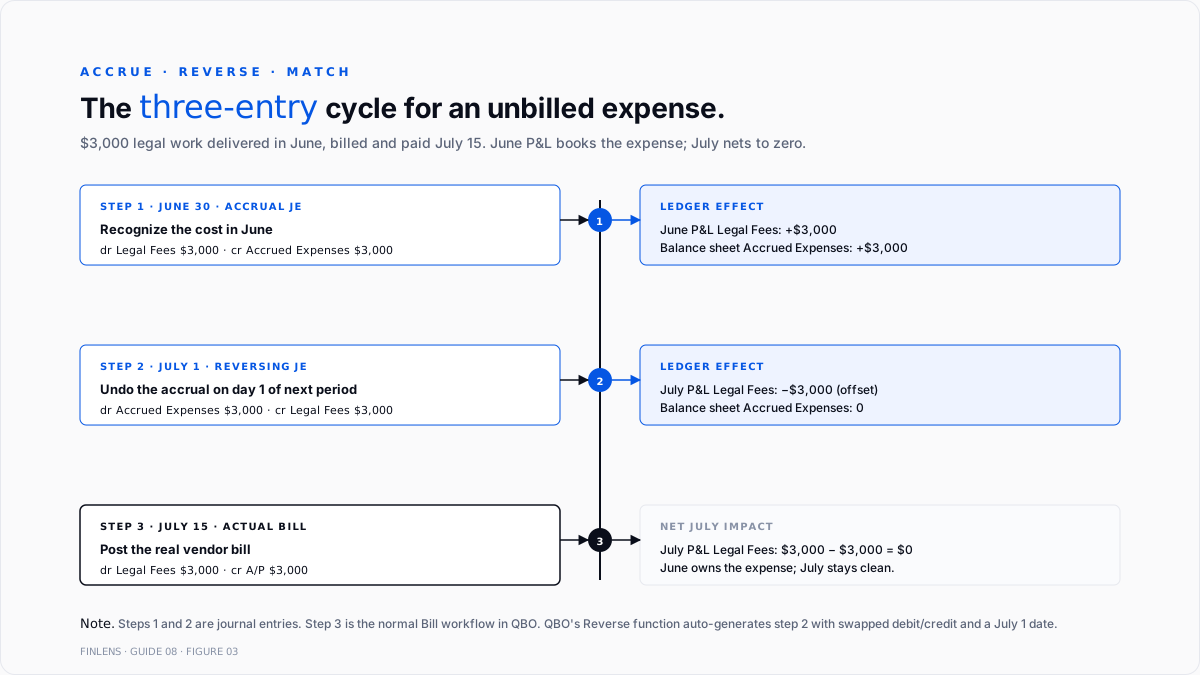
The workflow has four steps: identify the accrual, book the JE at period-end, reverse in the following period, and match the actual bill against the reversal.
Step 1 Identify what needs accruing
At period-end, review every recurring vendor and every category where the timing of the bill differs from the timing of the consumption. Common accruals:
- Utilities. Consumed in the current month, billed on the next month's cycle. Estimate from prior-month usage.
- Professional services. Attorney, consultant, contractor work delivered in the current month but billed after month-end. Estimate from engagement letter or prior invoices.
- Wages/salaries. For any pay period ending after month-end (bi-weekly pay periods routinely span two months). Estimate from timecards or standard salaries.
- PTO liability. Under ASC 710-10-25-1, vested but unused vacation is a liability. Calculate as unused hours × fully-loaded hourly rate.
- Interest on loans. Interest accrued through the period-end date on any interest-bearing liability, even if the payment date is later.
- Sales tax collected. For books that collect sales tax between remittance dates.
Step 2 Book the accrual JE at period-end
For each accrual identified, post an adjusting journal entry dated the last day of the period:
- Debit: [Expense account]
- Credit: Accrued Expenses (or the appropriate sub-account)
Include a specific memo "Accrued June utilities estimate based on May bill" so the audit trail is readable at year-end.
Step 3 Reverse the accrual on the first day of the next period
The reversal is a mirror-image JE dated the first day of the next period:
- Debit: Accrued Expenses
- Credit: [Expense account]
QBO's Reverse function (open the original JE → Reverse in the action toolbar) auto-generates the reversal with swapped debit/credit and a date on the first of the next period. The Dancing Numbers write-up on month-end accruals in QBO covers the mechanic.
Step 4 Post the actual bill (or check) against the reversed account
When the utility bill arrives in July for June's consumption, post it against the Utilities Expense account (or through the standard bill workflow). The reversing entry from step 3 has already credited Utilities Expense; the actual bill debits Utilities Expense. Net July impact is zero if the estimate matched; a variance if it did not.
The variance goes to Utilities Expense in July. Over 12 months, the variances trend toward zero on a well-estimated book.
The four expense-timing scenarios worked out
Each of the four scenarios traced through an example.
Scenario 1 Cash out and cost incurred, same period
$400 electricity bill for June, received and paid in June. Standard expense: dr Utilities $400, cr Cash $400. No accrual mechanics.
Scenario 2 Prepaid: cash out now, cost incurred later
$12,000 annual insurance premium paid January 15 covering January–December.
- January 15: dr Prepaid Insurance $12,000, cr Cash $12,000.
- January 31 through December 31: dr Insurance Expense $1,000, cr Prepaid Insurance $1,000 (twelve times).
At December 31, Prepaid Insurance is zero and $12,000 has hit Insurance Expense evenly.
Scenario 3 Accrued: cost incurred now, cash out later
$3,000 legal fees for work delivered in June, billed and paid July 15.
- June 30: dr Legal Fees $3,000, cr Accrued Expenses $3,000.
- July 1: reversing JE dr Accrued Expenses $3,000, cr Legal Fees $3,000.
- July 15: bill entered as dr Legal Fees $3,000, cr A/P $3,000; A/P paid as dr A/P $3,000, cr Cash $3,000.
June P&L shows $3,000 legal expense; July P&L shows zero net legal expense from this invoice (the reversing entry and the actual bill cancel).
Scenario 4 Hybrid: cost and cash both split across periods
Bi-weekly payroll of $20,000 covering June 20 – July 3, paid July 8. Ten of the fourteen days are in June.
- June 30: Dr Wage Expense $14,286 (10/14 × $20,000), cr Accrued Wages $14,286.
- July 1: reversing JE dr Accrued Wages $14,286, cr Wage Expense $14,286.
- July 8: full payroll runs and posts $20,000 to Wage Expense.
Net July wage expense = $20,000 − $14,286 = $5,714, which is exactly the 4/14 portion (July 1–3) that belongs in July.
The month-end close checklist for accruals
The accrual step is one section of the month-end cycle. Full close treatment sits in the QuickBooks month-end and year-end close guide. The accrual-specific steps:
- Amortize every active prepaid item for the month.
- Reconcile the Prepaid Expenses balance on the balance sheet to the sum of remaining schedules.
- Post every period-end accrual utilities, professional services, payroll, PTO, interest.
- Confirm every prior-period reversing entry posted correctly and did not double-count.
- Update the Accrued Expenses balance on the balance sheet should equal the sum of the current-period accruals booked but not yet reversed.
- Save the schedules (prepaid amortization, accrual detail) to the audit workpapers.
Two recurring failure modes worth flagging in a close review:
- Prepaid Expenses balance growing month-over-month with no new prepayments. Amortization entries are being missed. Compare to the schedule.
- Accrued Expenses balance carrying an item longer than one period. The reversal or the actual bill did not post. The accrual is compounding.
Where in-QBO accrual workflow stops scaling
Three failure modes compound at higher volume:
Prepaid item count above ~15. Recurring JE templates become hard to reconcile against the balance sheet. Each item needs its own template and its own end date; when one prepayment ends and a new one starts, the template list churns.
Variable-amount accruals. Utilities, usage-based software subscriptions, tiered SaaS licenses, revenue-share payouts all break the fixed-amount assumption of Recurring JEs. Estimating each from prior-period data requires either a spreadsheet or a purpose-built accrual tool.
Multi-entity books. A firm managing 20 clients runs the same accrual review 20 times each month. Each entity has its own prepaids, its own accruals, and its own reversing-entry hygiene.
The Finlens approach
Finlens is an AI accounting platform for QBO firms and founder-led businesses. Accrual automation is one feature in a 17-feature product.
For prepaids and accruals specifically, Finlens does the following:
- Auto-generates prepaid amortization schedules from bill capture. When a bill is entered whose coverage period exceeds the current month, Finlens proposes a Prepaid Expenses categorization and a straight-line schedule.
- Books variable accruals from prior-period signals utility estimates from trailing three months, professional service estimates from engagement letters, payroll accruals from timecard data.
- Manages the reverse-and-match cycle every period-end accrual auto-reverses on the first of the next period, and the actual bill (when it arrives) is matched against the reversal so the P&L variance is a single, reviewable line.
The features that keep accrual accurate rather than just automated are the ones surrounding the accrual itself:
- AI bill capture identifies coverage periods on invoices (insurance policy dates, software subscription terms) and proposes the schedule automatically.
- Human-in-the-loop review gates every proposed schedule, every accrual, and every reversal through a CPA before posting.
- Multi-client dashboard runs the accrual pass across every entity on a firm's book without re-authenticating.
- Audit log produces a tamper-evident record of every schedule, adjustment, and reversal.
The verification checklist
- Prepaid Expenses balance on the balance sheet equals the sum of remaining unamortized amounts on active schedules.
- Every active prepaid item has a schedule showing original amount, coverage period, monthly amortization, and remaining balance.
- No expense account contains a full-year prepayment that should have been capitalized (spot-check the largest monthly expenses).
- Accrued Expenses balance equals the sum of current-period accruals not yet reversed.
- Every prior-period accrual has either a reversing entry or a matching actual bill.
- No accrual sub-account carries a balance older than 60 days (accruals compounding into the balance sheet).
- PTO liability equals unused vacation hours × fully-loaded hourly rate across the employee base.
- Prepaid and accrued schedules saved to the audit workpapers.
For a firm managing accrual hygiene across multiple QBO clients, the firm platform runs the prepaid/accrual pass at scale. For a founder running the accrual close on a single book, the founder-facing product auto-generates amortization schedules and books variable accruals from prior-period signals.
.png)
FAQ
The difference between a prepaid expense and a vendor deposit?
Prepaid expense is a cost paid in advance for a good or service the buyer will consume over a defined period insurance premium, annual software license, rent. Amortized to expense over the coverage period. Vendor deposit is cash paid to a vendor before a specific bill arrives, and sits as Vendor Deposits (Other Current Asset) until the bill is entered and matched. Full treatment in the accounts payable and vendor bills guide.
Whether an annual subscription paid in December can be expensed in December?
For tax purposes, yes, under the IRS 12-month rule if the coverage does not extend beyond 12 months and ends in the following tax year. For book purposes under accrual GAAP, no amortize over the coverage period. Cash-basis books can expense on payment.
Whether to use a Recurring Journal Entry or a manual entry each month?
Recurring JEs work well for fixed-amount, fixed-schedule amortizations. Manual entries are cleaner when the schedule needs to change (early termination, coverage extension) or when the amount varies month-to-month.
The difference between an accrued expense and accounts payable?
Accounts Payable is a bill that has been received and entered into QBO. Accrued Expenses is a cost that has been consumed but not yet billed no vendor bill in hand at period-end.
How to handle a prepaid item that was expensed directly?
Reclassify: post a JE debiting Prepaid Expenses and crediting the expense account for the unamortized portion. Set up the schedule going forward and continue amortization from the current month.
Realistic accrual close timing?
30–60 minutes per month for a book with fewer than 5 active prepaid items and 3–5 recurring accruals. 2–4 hours for a book with 15+ prepaid items, variable-amount accruals, and PTO liability tracking. Multi-entity books multiply the per-entity time by the entity count.

