
Third-Party Payroll Journal Entries in QuickBooks: Gusto, Rippling, and ADP Setup Guide


Payroll accounting sits at the intersection of three systems: the payroll processor that runs pay and remits taxes, the bank that clears the drafts, and QuickBooks that carries the general ledger.
When the payroll processor is Gusto, Rippling, or ADP rather than QuickBooks Payroll, every pay run generates a journal entry that must land in QBO with the correct chart-of-accounts mapping, class or department segmentation, and matched bank clearance.
This guide covers the payroll journal entry structure that all three vendors use, the specific integration mechanics for each, the chart-of-accounts mapping required for a balanced entry, and the common problems that surface at month-end close.
What is a third-party payroll journal entry?
A third-party payroll journal entry is a balanced accounting entry posted into QuickBooks by an external payroll processor after each pay run. The entry records every element of the payroll cycle on the day the payroll debits are drafted from the operating bank account.
The entry sits in QBO as if a bookkeeper had entered it manually, then matches to the corresponding bank feed transactions during reconciliation. Automated posting removes the manual work of transcribing payroll reports into QBO. It does not remove the mapping, matching, or exception review work required to keep the general ledger accurate.
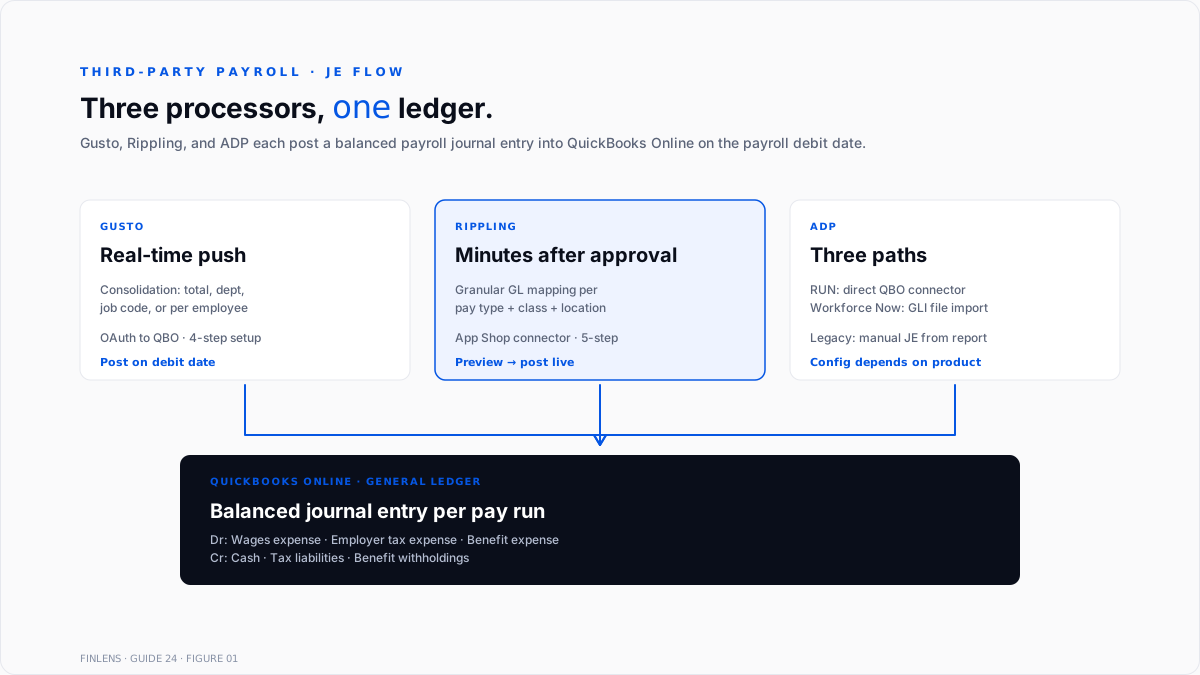
Gusto, Rippling, and ADP each generate the same fundamental entry structure, with variations in consolidation logic, mapping controls, and posting frequency.
What does the payroll journal entry structure look like?
A single-run payroll journal entry contains three debit categories and three credit categories. The total of debits equals the total of credits by construction.
Debits (expenses hit here)
- Gross Wages Expense (salary, hourly, bonus, commission)
- Employer Payroll Tax Expense (employer FICA, FUTA, SUTA, employer HSA contributions)
- Employee Benefits Expense (employer share of health, dental, vision, retirement match)
Credits (cash and liabilities hit here)
- Cash / Operating Bank (net pay draft + tax draft + benefit draft, or one consolidated draft depending on the processor)
- Payroll Tax Liabilities (federal income tax withheld, employee FICA, state and local withholding, SUTA, FUTA)
- Benefit Withholding Liabilities (employee 401(k), health insurance, HSA, garnishments)
The processor consolidates the individual employee lines into a single summary entry unless the firm has enabled per-department, per-class, or per-employee segmentation. Consolidation options are set in the payroll processor, not in QuickBooks.
The general framework and mapping approach is documented in Finlens' team journal entry automation guide.
How does Gusto push journal entries to QuickBooks Online?
Gusto posts a summarized journal entry to QBO on the payroll debit date. Setup runs in four steps.
Step 1: Connect Gusto to QuickBooks. In Gusto, navigate to App Directory, select QuickBooks Online, and authenticate the OAuth connection.
Step 2: Choose journal entry consolidation. Gusto offers four consolidation methods: by total (one summary entry), by department, by job code, or by individual employee. Most firms select by department for reporting granularity without per-employee noise.
Step 3: Map the chart of accounts. Gusto's payroll items (gross wages, employer taxes, benefits, deductions, contractor payments) each map to a specific QBO account. Mapping is required before Gusto will post the first entry.
Step 4: Run a test payroll. Confirm the entry posts correctly, that debits equal credits, and that the mapping resolves to the expected P&L and balance sheet accounts. Correct any mapping gaps before the next live run.
After go-live, Gusto pushes a new journal entry after each payroll process. The entry date matches the debit date, not the pay date. This is the source of the most common reconciliation problem, covered in the bank feed matching section below.
How does Rippling push journal entries to QuickBooks Online?
Rippling's payroll journal entry integration follows a similar pattern with more granular GL mapping controls. Setup runs in five steps.
Step 1: Install the connector. From the Rippling App Shop, search for QuickBooks Online, install the connector, and authenticate.
Step 2: Map pay types. Rippling requires explicit GL mapping for each pay type (salary, hourly, bonus, commission, PTO, sick, and holiday). Each maps to a QBO expense account.
Step 3: Map tax and deduction accounts. Employer taxes route to payroll tax expense accounts. Withholdings route to payroll tax liability accounts. Benefits are split between employer expense and employee liability.
Step 4: Configure dimensions. Class, department, and location tracking each require explicit setup if per-segment reporting is needed. Multi-entity firms configure legal entity separation here
Step 5: Test payroll. Run a small test payroll and validate that debit and credit allocations balance. Rippling generates a preview report before pushing the entry live.
Rippling posts within minutes of payroll approval, which typically leads the bank clearance by one to two business days. Real-time posting is cleaner for month-end close but requires attention to bank feed matching windows.
How does ADP handle QuickBooks integration?
ADP's QuickBooks integration path depends on the specific ADP product. Three approaches exist in 2026.
ADP RUN direct sync. ADP RUN offers a native QuickBooks Online connector for small business plans. Setup runs through the ADP Marketplace. The connector posts a summarized journal entry after each pay run, similar to Gusto and Rippling. Mapping happens once during setup.
ADP Workforce Now with General Ledger Interface. Workforce Now uses the General Ledger Interface (GLI) to export payroll data as an IIF file (QuickBooks Desktop) or CSV (mapping template for QBO). The IIF or CSV imports on demand rather than posting automatically. Firms with complex allocation logic prefer this control.
Manual journal entry from ADP reports. For firms using older ADP products without native connectors, the payroll accountant downloads the Payroll Journal report from ADP each pay period and enters a summary journal entry manually in QBO. This is the most common path for mid-market firms still on legacy ADP configurations.
The manual path is where firms accumulate the most errors: transcription mistakes, missed employer tax accruals, or unmapped benefit deductions. Automation reduces the manual work but does not eliminate the mapping and matching review.
How should the chart of accounts be mapped for third-party payroll?
The chart of accounts mapping is the single most important setup step. Errors here surface as unclassified expense, wrong-tier P&L presentation, or unreconciled payroll liabilities at month-end.
Wages and salaries expense. Gross wages split by employee type: Salaried wages, hourly wages, bonuses, and commissions. Contractor payments run separately through 1099 expense accounts. Coverage for W-2 vs. 1099 classification is in Finlens' W-2 vs 1099 guide.
Employer payroll tax expense. Employer FICA (Social Security + Medicare), FUTA, and SUTA. Sometimes split by tax type for state reporting. State and local variations require per-state SUTA accounts if operating in multiple jurisdictions.
Employee benefits expense. Employer share of health insurance, dental, vision, 401(k) match, and HSA contributions. Split by benefit type for GAAP presentation on the P&L.
Payroll tax liabilities. Federal income tax withheld, employee FICA (Social Security + Medicare), state withholding, local withholding, SUTA payable, FUTA payable. These are clear when the processor remits taxes to the IRS and state agencies. Coverage of the underlying tax deposits is in Finlens' payroll tax guide.
Benefit withholding liabilities. Employee 401(k), health insurance employee share, HSA employee contribution, and garnishments. These are clear when the processor remits to the plan administrator or garnishment authority.
Cash / Operating Bank. The net-pay draft, the tax draft, and the benefit-remittance draft each post as separate debits against operating cash on the debit date. Processors that consolidate drafts show a single credit; those that split show multiple.
The full QBO chart-of-accounts framework is covered in Finlens' QuickBooks chart of accounts guide.
Why do payroll journal entries and bank feed transactions not auto-match?
The most common Gusto and Rippling reconciliation problem is a date mismatch between the posted journal entry and the bank feed transaction. The problem has a fixed cause.
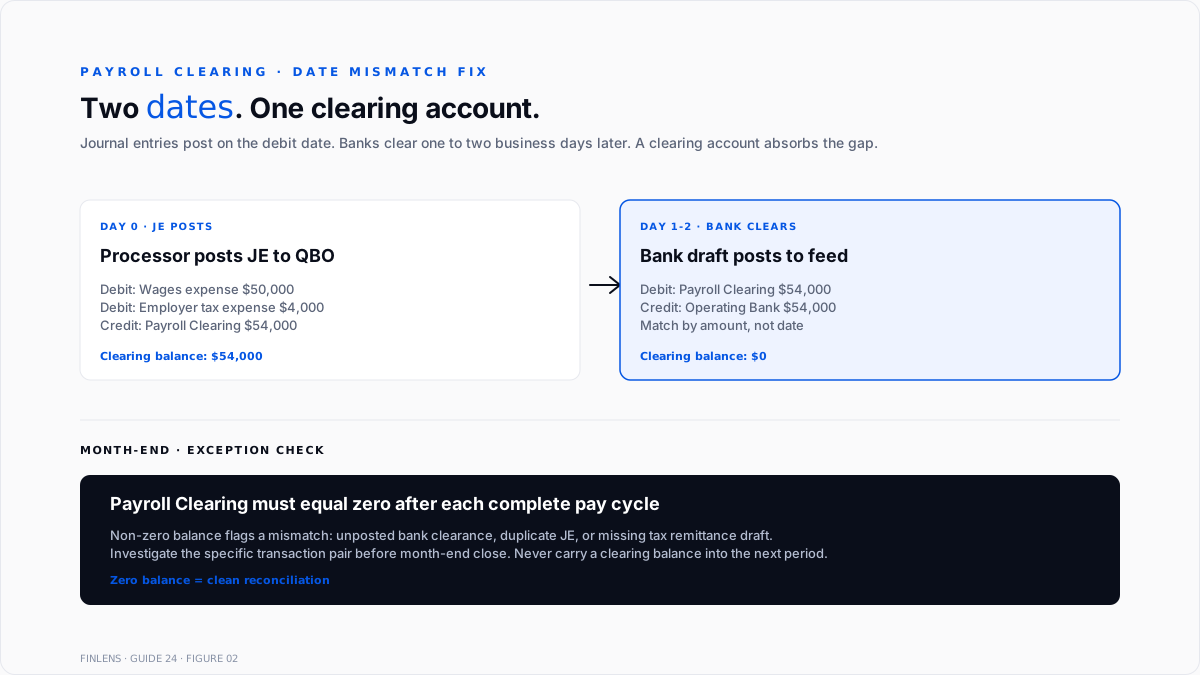
Payroll processors post the journal entry on the debit date, meaning the date they initiate the ACH draft. The bank posts the transaction on the clearance date, typically one to two business days later. QBO's automatic match window uses date proximity as one input, so a two-day gap can prevent auto-matching.
Three resolution paths exist.
Use Find Match manually. In the For Review tab, select the bank transaction, click Find Match, and locate the payroll journal entry within the extended date range. Confirm the match. This works for one-off drafts.
Adjust the journal entry date. Some firms edit the journal entry date after posting to match the bank clearance date. This creates a clean match but drifts the general ledger date from the actual payroll debit date, which affects the month-end cutoff.
Rely on amount-based matching. For firms with unique payroll draft amounts each period, amount alone often triggers the auto-match despite the date gap. This is fragile if payroll amounts stay constant week to week.
The cleanest approach for firms with high payroll volume is a payroll clearing account. The journal entry posts to Payroll Clearing (a current liability) on the debit date. When the bank clearance hits, the deposit debits Payroll Clearing rather than an expense account. The clearing account zeroes out after each pay run,run and any residual balance flags a mismatch immediately.
How are contractor payments recorded through third-party payroll?
Contractor payments through Gusto, Rippling, or ADP require different handling than W-2 employee wages. The 1099-NEC reporting flows to the payroll processor, not to QuickBooks directly.
In Gusto. Contractor payments post to a Contractor Payments expense account on QBO's chart of accounts. The processor issues 1099-NEC forms at year-end for contractors paid $600 or more during the year. QBO records the expense but does not receive the 1099 filing data by default.
In Rippling. Contractor payments follow the same expense-mapping pattern. Rippling's contractor management module tracks 1099 eligibility separately from the QBO journal entry.
In ADP. ADP contractor payments (through ADP RUN or ADP Payroll for Contractors) post to a Contractor Expense account. ADP handles 1099-NEC filing directly at year-end.
The recurring problem is duplicate contractor payments when a contractor is paid through both the payroll processor and a QBO bill or expense workflow. Firms should route every contractor payment through one system consistently. Filing deadlines and mechanics are documented in Finlens' 1099-NEC filing deadline guide.
What are the most common third-party payroll journal entry mistakes?
Six mistakes recur across cleanup engagements.
Mapping to Uncategorized Expense. During setup, one or more Gusto or Rippling pay items map to an "Uncategorized" account or are left unmapped. The journal entry still posts, but the expense lands in the wrong bucket. Every pay run compounds the miscategorization.
Missing employer tax accrual. Firms map employee withholdings but forget to map employer payroll tax expense. The P&L understates payroll cost by the employer FICA + FUTA + SUTA amount, which typically runs 7.65% to 10% of gross wages.
Duplicating the JE with a manual entry. A bookkeeper does not realize the processor is posting automatically and enters a manual journal entry for the same pay period. Payroll expense doubles on the P&L until reconciliation catches it.
Miscategorized benefit deductions. Employee 401(k) contributions post as an expense instead of as a liability. The result is understated payroll liability on the balance sheet and overstated employee benefit expense on the P&L. Retirement plan trustees flag this at audit.
Ignoring class or department tagging. Firms enable class tracking in QBO but do not configure the payroll processor to send class information with the journal entry. Payroll expense lands with no class assigned and never allocates to the correct segment on the P&L.
Late reconciliation. Payroll drafts posts to the bank feed each pay period, but the journal entry match happens weekly or monthly. Small variances accumulate. By month-end, the reconciliation takes hours instead of minutes.
Conclusion
Finlens is a QuickBooks-compatible AI accounting platform. For firms running Gusto, Rippling, or ADP alongside QBO, Finlens automates the journal entry review, bank feed matching, and month-end variance detection that manual reconciliation demands.
Every payroll journal entry that posts to QBO gets a same-day match check against the bank feed. When the debit date leads to the bank clearance date, Finlens holds the match through the clearance window and confirms both sides' balances before closing the loop. Variances flag immediately: unmapped pay items, missing employer tax accruals, or duplicate manual entries alongside auto-posted entries.
The clearing-account pattern is automated. Finlens routes every payroll draft through a Payroll Clearing liability and confirms zero-balance closure after each pay cycle. Any non-zero balance at month-end surfaces as an exception rather than a hidden reconciling item.
For CPA firms managing multiple client payroll cycles across Gusto, Rippling, and ADP, Finlens's multi-entity view surfaces payroll problems across every client from a single dashboard. Unmapped items, duplicate entries, and reconciliation gaps all flag automatically. That multi-entity workflow is documented in Finlens' payroll management software guide.
.png)
FAQ
Can Gusto sync payroll journal entries to QuickBooks Desktop?
Yes, through a chart-of-accounts export and manual import workflow. Gusto does not maintain a real-time API connection to Desktop the way it does to QBO. Firms on Desktop typically export the payroll report as CSV or use the IIF format for manual import each pay period.
What is the difference between a summary journal entry and a per-employee journal entry?
A summary entry consolidates all employees into one entry per pay run with account-level detail only. A per-employee entry generates one entry per employee, preserving individual detail in QBO. Summary entries keep the general ledger clean. Per-employee entries support employee-level P&L reporting at the cost of ledger volume.
Why do employer taxes show as expenses while employee withholdings show as liabilities?
Employer taxes (employer FICA, FUTA, and SUTA) are firm expenses paid to the IRS and state agencies from firm cash. Employee withholdings are money withheld from employee gross pay and held temporarily before remittance. Withholdings are the firm's liability to the employee until the tax agency receives them, not a firm expense.
How is a payroll clearing account structured in QuickBooks?
Create a current liability account called "Payroll Clearing." Each payroll journal entry credits Payroll Clearing on the debit date. Each bank clearance debits payroll clearing. The account should net to zero after every complete pay cycle. A non-zero balance signals a mismatch requiring investigation.
What happens if the payroll processor posts an entry to a wrong account?
The entry still balances (debits equal credits) but lands in the wrong P&L or balance sheet line. Correction requires a reversing journal entry to move the expense or liability to the correct account, then updating the mapping in the payroll processor to prevent recurrence. Auditors flag mapping drift, so the mapping review is a recurring task.
Can multiple entities use one Gusto or Rippling account with different QuickBooks companies?
Rippling supports multi-entity payroll with separate QBO connections per entity. Gusto supports separate Gusto accounts per entity with separate QBO connections; a single Gusto account maps to a single QBO file. ADP handles multi-entity through separate company codes each mapped to its own GL.
Should contractor payments run through Gusto or through QuickBooks bills?
Contractor payments should run through one system consistently, not both. Firms that use Gusto for W-2 payroll typically also use Gusto for contractor 1099 payments to keep 1099-NEC filing centralized. Firms that keep contractor management in QuickBooks issue 1099-NEC through QBO's 1099 workflow instead.
How often should third-party payroll mapping be reviewed?
At least once per year, plus after any change to the chart of accounts, hiring model, or benefit plan. A new pay type (bonus tier, retention pay, or commission split) or a new benefit (401(k) match or HSA contribution) requires new mapping. Unmapped items surface as unclassified expense on the P&L.

