
The QuickBooks guide to W-2 year-end payroll close (2026)


This is a working reference for founders and controllers closing a payroll year in QuickBooks and filing Forms W-2 and W-3. Every technique is sourced to Intuit's own documentation, IRS and SSA guidance, or a real thread on the QuickBooks Community. Numbers cited from user reports are flagged as anecdotal rather than benchmarks.
The problem this guide addresses
W-2 season fails for a reason that has nothing to do with January. The forms are generated from payroll items configured in the prior twelve months, and a payroll item mapped to the wrong tax tracking type in March produces a wrong box in January. By the time the discrepancy is visible, twelve months of paychecks carry it.
Failure mode one: Box 1 does not agree to the payroll summary. A QuickBooks Desktop Payroll user on thread 10236 configured a deduction with the Other tax tracking type, intending it to reduce federal income wages without reducing Social Security, Medicare, or state wages. Payroll ran correctly.
The Tax Form Worksheet calculated correctly, showing Box 1 below Boxes 3, 5, and 16 by the deduction amount. Then Create Form for the Annual W-2/W-3 produced Box 1 equal to Boxes 3, 5, and 16. The thread ran to twelve replies and was marked solved.
The resolution turned on a distinction most books never draw: Box 1 wages and federal-taxed wages are not the same number, and the worksheet reports both.
A separate thread documents Box 1 failing to reconcile against the Employee Payroll Summary, and a third covers Box 1 and Box 16 diverging. The pattern is consistent. The forms are right and the expectation is wrong, or a payroll item is mapped to a tracking type that does what it says rather than what was intended.
Failure mode two: the fringe benefit that gets missed every year. A bookkeeper for a partnership filing as an S corporation posted on thread 2668 that the company pays dental and vision premiums for all employees and three owners. The CPA instructs them every year to add the owners' premiums to those W-2s.
Every year it is missed, and the CPA issues an additional W-2 for the owners. Twelve replies, 294 views, and the poster still filing through QuickBooks Online Payroll.
That failure is structural. Non-cash fringe benefits do not arrive through a pay run. They have to be pushed into the wage base deliberately, before the last paycheck of the year, or they require a correction afterward.
The W-2 identity
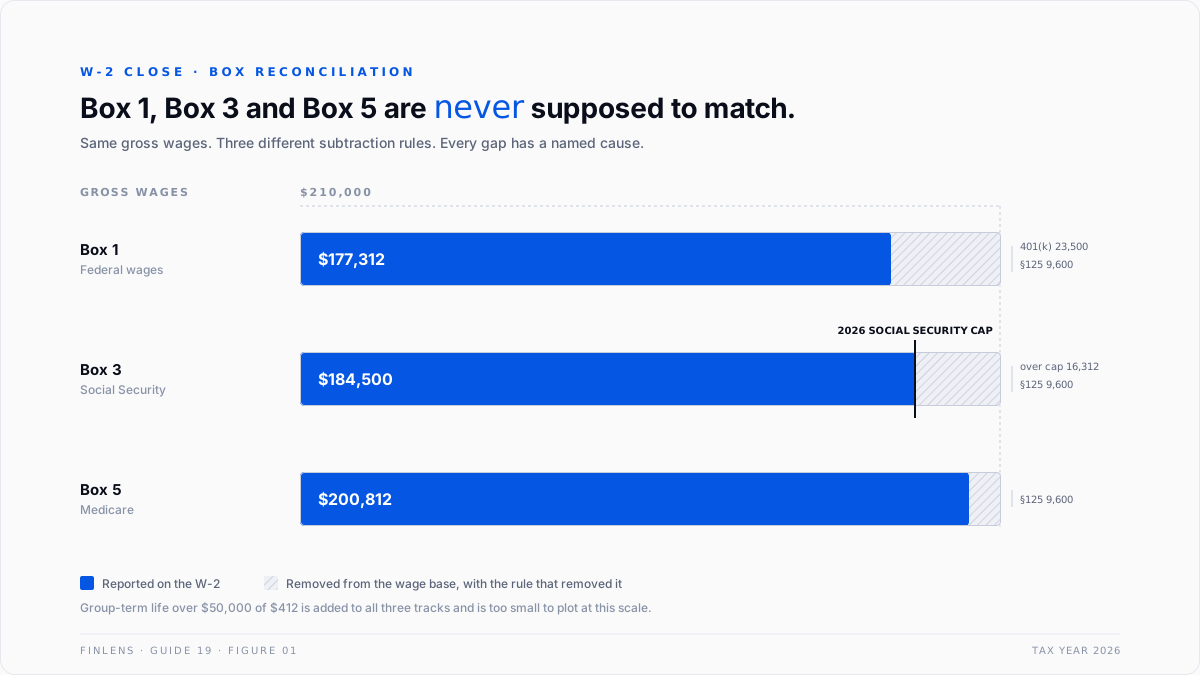
Boxes 1, 3, and 5 are not supposed to match. Every legitimate difference has a named cause, and the close is the act of proving each difference.
Box 1 (federal taxable wages)
= gross wages
- Section 125 cafeteria deductions (health, dental, vision, FSA, HSA)
- elective retirement deferrals (401(k), 403(b), SIMPLE)
+ taxable fringe benefits
Box 3 (Social Security wages)
= gross wages
- Section 125 cafeteria deductions
+ taxable fringe benefits
capped at the annual Social Security wage base
Box 5 (Medicare wages)
= same construction as Box 3, uncapped
Three consequences follow directly.
Box 1 is below Box 5 by the amount of elective retirement deferrals. Deferrals reduce income tax but not FICA. If Box 1 equals Box 5 in a file with a 401(k) plan, either nobody deferred or the payroll item is mapped wrong.
Box 3 is capped and Box 5 is not. For tax year 2026 the Social Security wage base is $184,500, up from $176,100 in 2025, per the Social Security Administration's annual announcement. An employee earning above that ceiling shows Box 3 at exactly $184,500 and Box 5 at full wages. Employee and employer each pay $11,439 at the cap.
Section 125 reduces all three. Health, dental, vision, and FSA deductions taken through a cafeteria plan reduce Box 1, Box 3, and Box 5 together. That is why they are invisible in a Box 1 to Box 5 comparison and why they must be checked against the plan documents rather than the form.
The account and item setup
The W-2 is produced from payroll item configuration, not from the chart of accounts. Six configurations carry the outcome.
Two of these are the frequent sources of error.
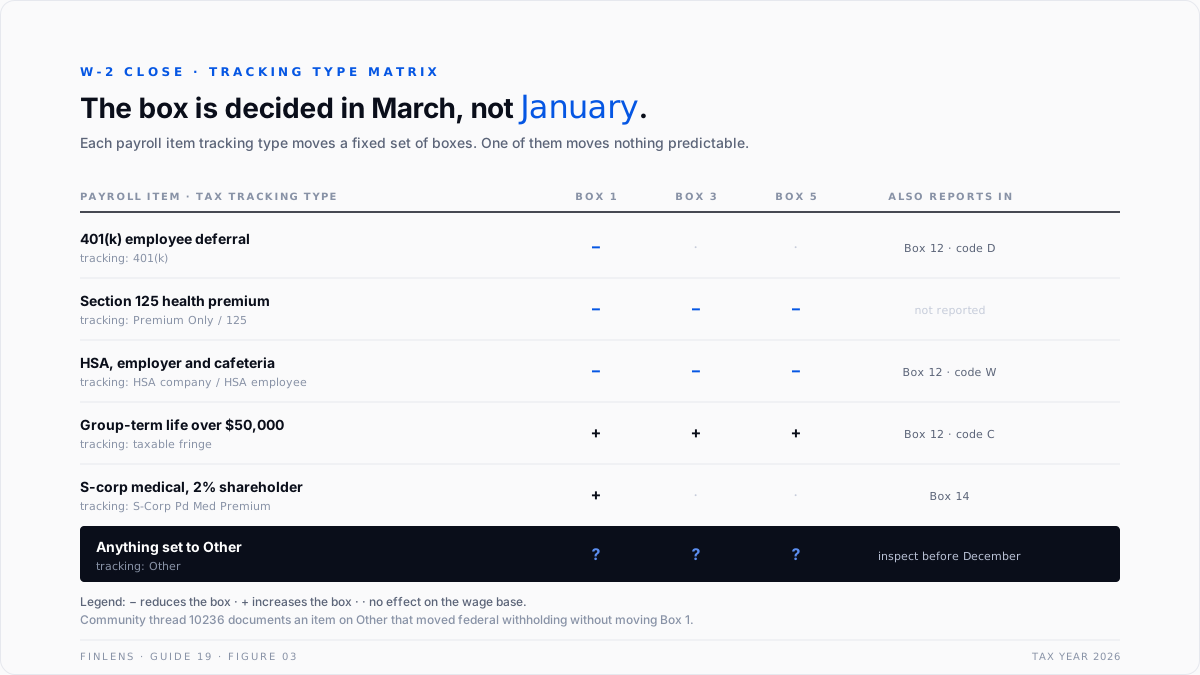
The Other tracking type. Selecting Other tells QuickBooks the item has no standard tax treatment, and the behaviour that follows is intentional but rarely what the configurer expected. Thread 10236 above is exactly this case. Any item on Other should be re-inspected before December.
Employer-sponsored coverage in Box 12 code DD. Code DD reports the total cost of employer-sponsored health coverage. It is informational under the Affordable Care Act reporting requirement and does not enter Box 1. It is distinct from the S corporation shareholder treatment, which does enter Box 1.
Intuit's documentation on reporting employer health insurance on W-2s and on setting up an S-corp medical payroll item covers the two paths separately because they are separate.
The year-end close sequence
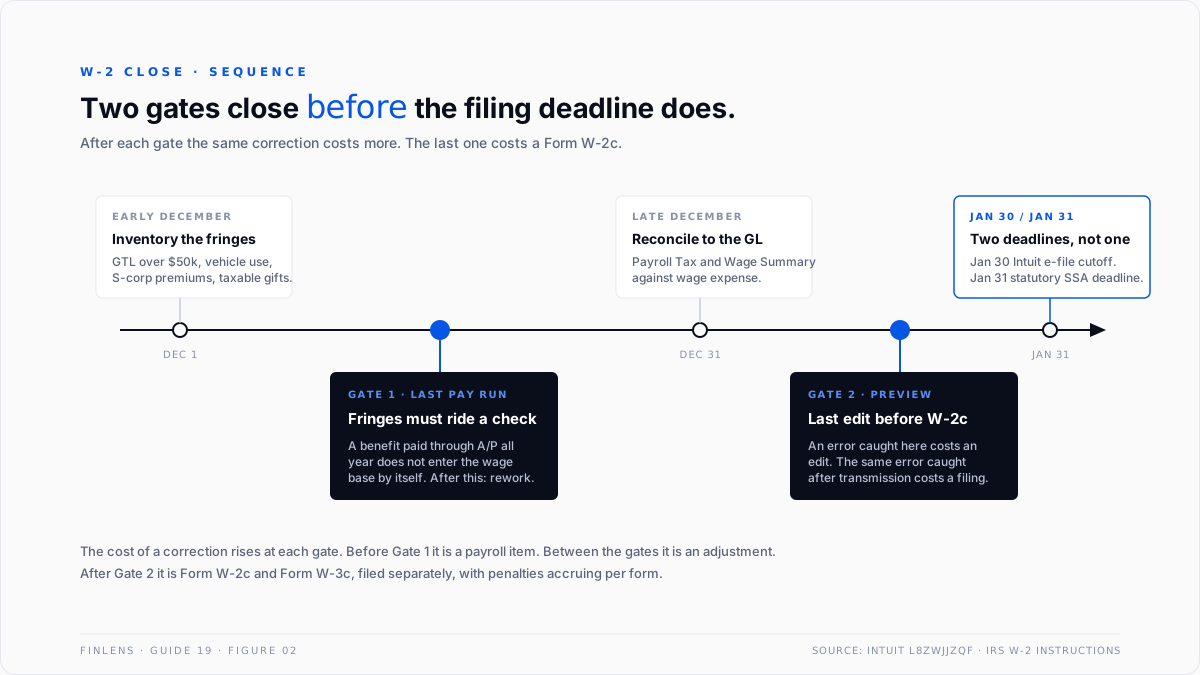
The sequence is time-ordered, and two of the steps have hard deadlines that fall before the filing date.
December, before the final pay run. Post every non-cash fringe benefit. Group-term life over $50,000, personal use of a company vehicle, S corporation shareholder health premiums, and taxable gifts all have to ride a paycheck to enter the wage base. After the last check of the year they require a correction instead.
This is the step thread 2668 documents being missed annually.
December, after the final pay run. Run the Payroll Tax and Wage Summary and the Payroll Details reports for the full calendar year. Reconcile total Box 1 wages to the wage expense in the general ledger, and total employer tax to payroll tax expense.
Differences here are ledger mapping problems, covered in the third-party payroll journal entry guide where payroll runs outside QuickBooks.
Early January, before submission. Preview the W-2s. Intuit's guidance in the year-end checklist for QuickBooks Online Payroll makes the point plainly: previewing and fixing an error before transmission avoids a Form W-2c. After transmission the correction is a separate filing.
January 30 and January 31. The statutory deadline to furnish W-2s to employees and file with the Social Security Administration is January 31. Intuit's own electronic submission cutoff is January 30, because the service needs transmission lead time, per understand the timing for your W-2s.
Treating January 31 as the internal deadline misses the Intuit window by a day. Users on QuickBooks Desktop Payroll Standard or Basic have a further constraint: state W-2 and W-3 filings are done manually outside QuickBooks by January 31.
The failure-mode catalog
Six diagnoses account for most W-2 season work.
1. Box 1 equals Box 5 in a file with a retirement plan. Cause: the deferral payroll item is not mapped to a retirement tracking type, so it reduced nothing or reduced everything. Fix: correct the item mapping, then run a wage-base correction for the year before filing.
2. Box 3 exceeds the Social Security wage base. Cause: an employee changed employee records mid-year, or a prior-employer wage entry was loaded incorrectly, so the year-to-date cap did not apply. Fix: verify the employee has a single record for the year and that the cap applied at the right cumulative point.
3. Box 12 code DD is missing. Cause: employer health coverage cost was never configured as a reporting item. Fix: add the informational item before filing. Employers below the filing threshold for the reporting requirement are exempt, so confirm the threshold applies before treating it as an error.
4. S corporation shareholder premiums absent from Box 1. Cause: the premium was expensed through accounts payable and never entered the wage base. Fix: post it through a fringe-benefit paycheck before year end. After year end, the correction path runs through the amendment guidance rather than an edit.
5. An employee is missing from the W-2 batch entirely. Cause: terminated employee marked inactive in a way that excludes them, or an employee with zero net pay in the final period. A user reported two employees absent from the W-2 set while present on the payroll summary.
Fix: reconcile the employee count on the W-3 to the count of employees paid at any point in the year, not to the current active roster.
6. Missing or pending Social Security number. Cause: a new hire whose SSN application has not returned. A thread on printing and e-filing a W-2 for an employee who has applied for an SSN covers the mechanics. Fix: file with the SSA-permitted placeholder rather than delaying the batch, then issue a W-2c when the number arrives.
Worked example
One employee, full calendar year 2026.
The three boxes resolve as follows.
Three numbers, all different, all correct. The gap between Box 1 and Box 5 is $23,500, exactly the deferral. The gap between Box 3 and Box 5 is $16,312, exactly the amount by which wages exceeded the cap.
Both gaps are explainable to the cent, and a close is finished when both explain. Box 4 Social Security tax withheld is $11,439.00, which is 6.2% of the cap. Medicare withholding includes the additional 0.9% on wages above $200,000, which applies to $812 of this employee's Medicare wages.
Where in-QBO W-2 close stops scaling
Threshold one: any fringe benefit that does not ride a pay run. QuickBooks handles fringe benefits correctly when they are configured as payroll items. It offers no mechanism that notices a benefit was paid through accounts payable all year and belongs in wages. That detection is external to the product, which is why thread 2668 repeats annually.
Threshold two: more than one state. Boxes 15 through 17 multiply per state, and the sum of state wages does not have to equal Box 1. Reciprocity agreements, different state treatments of Section 125, and mid-year relocations each break a naive cross-check. The multi-state mechanics sit in the multi-state payroll guide.
Threshold three: roughly 50 employees across more than a handful of client files. For a firm, the binding constraint is that the Box 1 to Box 5 reconciliation is a per-employee test surfaced one file at a time.
Finding the single employee whose deferral item was mapped wrong requires the difference to be computed across the whole population, which QBO does not present.
The Finlens approach
Finlens reads the payroll data already in QuickBooks and runs the reconciliation as a continuous check rather than a January exercise.
1. Box-gap explanation across the employee population. For every employee, the Box 1 to Box 5 and Box 3 to Box 5 differences are computed and attributed to a named cause: deferral, cafeteria plan, wage-base cap, or taxable fringe. Any difference that does not resolve to a named cause is raised as an exception, with the contributing payroll item identified.
2. Payroll item tracking-type audit. Every payroll item is checked against its tax tracking type, and any item set to Other is flagged with the boxes it will and will not move. This runs monthly, so the March misconfiguration surfaces in March rather than in the following January.
3. Fringe-benefit sweep before the final pay run. Vendor payments that carry the signature of a shareholder health premium, a group-term life policy, or a vehicle allowance are surfaced ahead of the last pay period of the year, while they can still be posted through payroll instead of corrected afterward.
Four supporting capabilities sit around those three.
- A wage-expense tie between total Box 1 wages on the payroll reports and wage expense in the general ledger.
- An employee-count reconciliation against the W-3.
- A Social Security cap check confirming the ceiling applied at the correct cumulative point for every employee crossing it.
- A cross-file exception view, so a firm sees every client's unresolved box gaps in one table.
Verification checklist
Nine lines to run before transmitting a W-2 batch.
- Box 1 minus Box 5 equals total elective retirement deferrals for that employee.
- Box 3 equals the lesser of Box 5 and the annual Social Security wage base.
- Box 4 equals 6.2% of Box 3 for every employee.
- Box 6 equals 1.45% of Box 5, plus 0.9% of Medicare wages above $200,000.
- Every payroll item using the Other tracking type has been inspected and its box effect confirmed.
- Every non-cash fringe benefit for the year has ridden a pay run, not an accounts payable entry.
- The W-3 employee count equals the count of employees paid at any point in the year, not the active roster.
- Total Box 1 wages tie to wage expense in the general ledger, with reconciling items listed.
- The batch has been previewed. Errors found at preview cost an edit; errors found after transmission cost a W-2c.
FAQ
Should Box 1, Box 3, and Box 5 ever match?
Only in a file with no retirement deferrals, no cafeteria plan, no taxable fringe benefits, and no employee above the Social Security wage base. In most files, matching boxes indicate a mapping problem rather than a clean year.
What is the actual filing deadline?
January 31 to furnish employees and file with the Social Security Administration. Intuit's electronic submission cutoff is January 30, one day earlier, because the service needs transmission lead time.
Can a W-2 be corrected after filing without a W-2c?
No. Once transmitted, corrections run through Form W-2c and Form W-3c. This is the reason the preview step exists and the reason it should not be skipped under time pressure.
Is employer-paid health insurance taxable to the employee?
Employer-sponsored coverage reported in Box 12 code DD is informational and not taxable. Premiums paid for a more-than-2% S corporation shareholder are different: they enter Box 1 and report in Box 14.
Why does a deduction reduce federal withholding but not Box 1?
Because federal-taxed wages and Box 1 wages are separate quantities. An item on the Other tracking type can move one without moving the other, which is precisely the behaviour documented on thread 10236.
What happens to an employee with no Social Security number at filing time?
File the batch on time using the SSA-permitted placeholder rather than holding the whole submission, then issue a W-2c when the number is received. Late filing penalties accrue per form.

