Accounting Firm Automation That Scales With QuickBooks
Finlens layers AI automation on top of your existing QuickBooks so your firm can handle more clients without adding headcount.
Scaling Your Firm Is Still Manual
Month-End Close Drains Hours
Your team juggles spreadsheets, email threads, and QuickBooks to close each client every month.
Onboarding Slows You Down
Setting up chart of accounts and categorizing historical transactions takes 10 to 15 hours per new client.
Growth Requires More Hires
Adding clients without automating workflows means adding bookkeepers, shrinking your margins every time.
Automate the Work. Keep Your QuickBooks.
Finlens sits on top of QuickBooks with no migration required. AI handles transaction categorization, month-end close, and GAAP schedules, so your firm adds clients without adding staff.
Centralized Multi-Client Dashboard
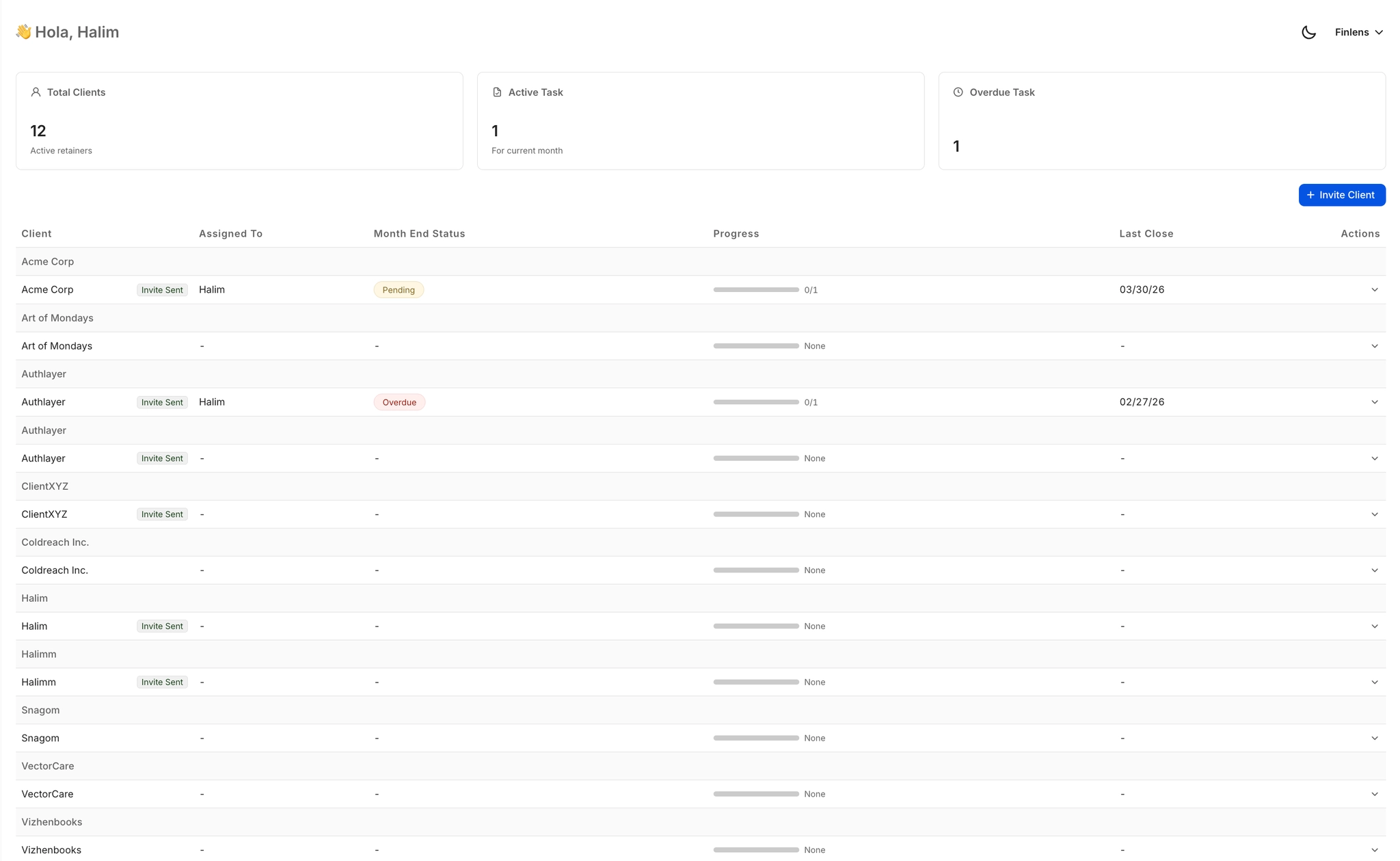
Manage 50 or more clients from a single view with open items, approvals, and deadline tracking. Switch between clients instantly without logging into separate QuickBooks accounts.
Month-End Close Automation
Task assignment, progress tracking, and close timers replace the spreadsheet and email chaos of your current month-end workflow. Firms close 40 to 70 percent faster across every client.

AI Transaction Categorization
Every transaction is auto-categorized at first pass using historical patterns and GL logic. Eliminates hours of manual tagging per client each month without removing accountant oversight.

Automated Chart of Accounts Setup
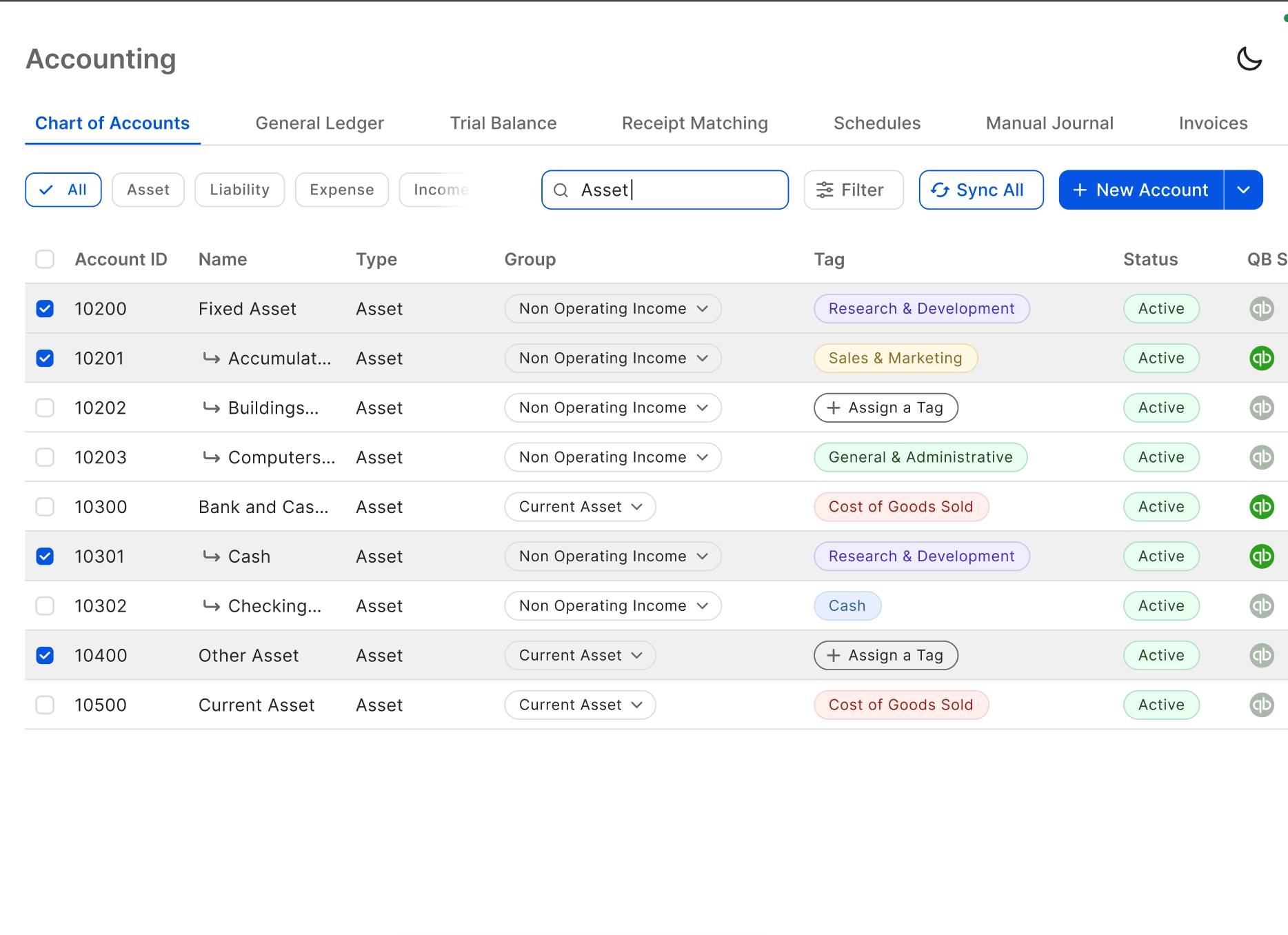
Apply a complete chart of accounts to a new client instantly. Finlens collapses the manual setup that previously consumed 3 or more hours per onboarding into a single automated step.
Automated Bank Reconciliation
Bank statements are matched against QuickBooks records automatically. Discrepancies are flagged and clear items are auto-matched, removing one of the most tedious steps from your monthly close.

Ready to Transform Your Business?
How It Works
Get started in minutes, not months.
Connect QuickBooks
Finlens reads your GL and identifies accrual-eligible transactions
Review AI-Generated Schedules
Finlens auto-builds prepaid, deferred revenue, and amortization schedules; your team reviews and approves
Entries Post Automatically at Month-End
Journal entries sync to QuickBooks on schedule; close faster, audit trail preserved
Why Choose Finlens
Why teams choose Finlens.
Works on Top of QuickBooks
No migration. No new GL. Finlens augments the tools your team already uses — real-time two-way sync means your QuickBooks data is always current.
80%+ Less Manual Bookkeeping
AI categorization, automated reconciliation, and smart schedules replace the spreadsheet work that eats your team’s hours.
Backed by Y Combinator & Accel
Built in San Francisco by a team that understands accounting workflows. Trusted by firms and founders scaling fast.
12,000+ Bank Connections
Connect every bank account, credit card, and financial tool your clients use. Powered by Plaid.
Frequently Asked Questions
Does Finlens replace QuickBooks?
No. Finlens is designed to work on top of QuickBooks, not replace it. Your existing QuickBooks data, workflows, and client files stay exactly where they are. Finlens adds a real-time two-way sync layer and automates the manual tasks that happen around QuickBooks, such as transaction categorization, month-end close coordination, and GAAP schedule generation. There is no migration required and no disruption to your current setup.
How does accounting firm automation work with Finlens?
Finlens connects to your existing QuickBooks accounts and applies AI automation to the most time-consuming recurring workflows in your firm. Transactions are categorized automatically, month-end close tasks are assigned and tracked per client, bank reconciliation runs in the background, and GAAP schedules are generated without spreadsheets. Your accountants review and approve AI output before anything posts to QuickBooks, keeping your team in control at all times.
How long does it take to onboard a new client?
Finlens significantly reduces the time required to onboard a new client. The automated chart of accounts setup saves 3 or more hours per onboarding, and historical transaction categorization runs automatically rather than requiring manual review line by line. Clients that previously took 10 to 15 hours to set up can be onboarded in a fraction of that time.
Will my accountants lose control over the books?
No. Finlens uses a human-in-the-loop review model. The AI suggests categorizations and close actions, but nothing is posted to QuickBooks without accountant approval. Your team can approve, correct, or override any AI suggestion with one click. This keeps your firm in full control and maintains the accuracy and compliance standards your clients depend on.
How many clients can one accountant manage using Finlens?
Finlens is built around the idea of managing 50 clients like it is 5. The multi-client dashboard gives your team a single view of all client open items, deadlines, and approvals. Automation handles the repetitive per-client work, such as transaction categorization and bank reconciliation, so each accountant on your team can take on significantly more client work without a proportional increase in hours.