AI Month End Close Automation for Small Business
Finlens layers AI automation on top of QuickBooks to automate your month-end close and deliver real-time financial clarity without migration or manual work.
Month-End Close Is Still Manual
Close Takes Too Long
Pulling transactions, matching receipts, and chasing entries manually burns days every month that should go toward running the business.
Books Are Always Stale
By the time the close is done, the numbers are already outdated — leaving founders and owners flying blind on cash flow and runway.
QuickBooks Still Needs You
QuickBooks tracks the data but won't categorize, reconcile, or close automatically — someone still has to do it all by hand.
AI Automation That Closes the Books For You
Finlens sits on top of your existing QuickBooks and automates the most painful parts of month-end close — categorization, reconciliation, and GAAP schedules — with no migration required and real-time sync.
Automated Month-End Close Workflow
Finlens automates task assignment, progress tracking, and close execution for your entire month-end workflow. Small business owners can close up to 40-70% faster without juggling spreadsheets, emails, or checklists.

AI Transaction Categorization
Every transaction is categorized automatically using GL logic and historical patterns. Finlens learns from corrections over time, so your books stay accurate and month-end prep is minimal.

Automated Bank Reconciliation
Finlens automatically matches transactions to bank records, flagging discrepancies without manual line-by-line review. Month-end reconciliation happens continuously, not in a last-minute scramble.

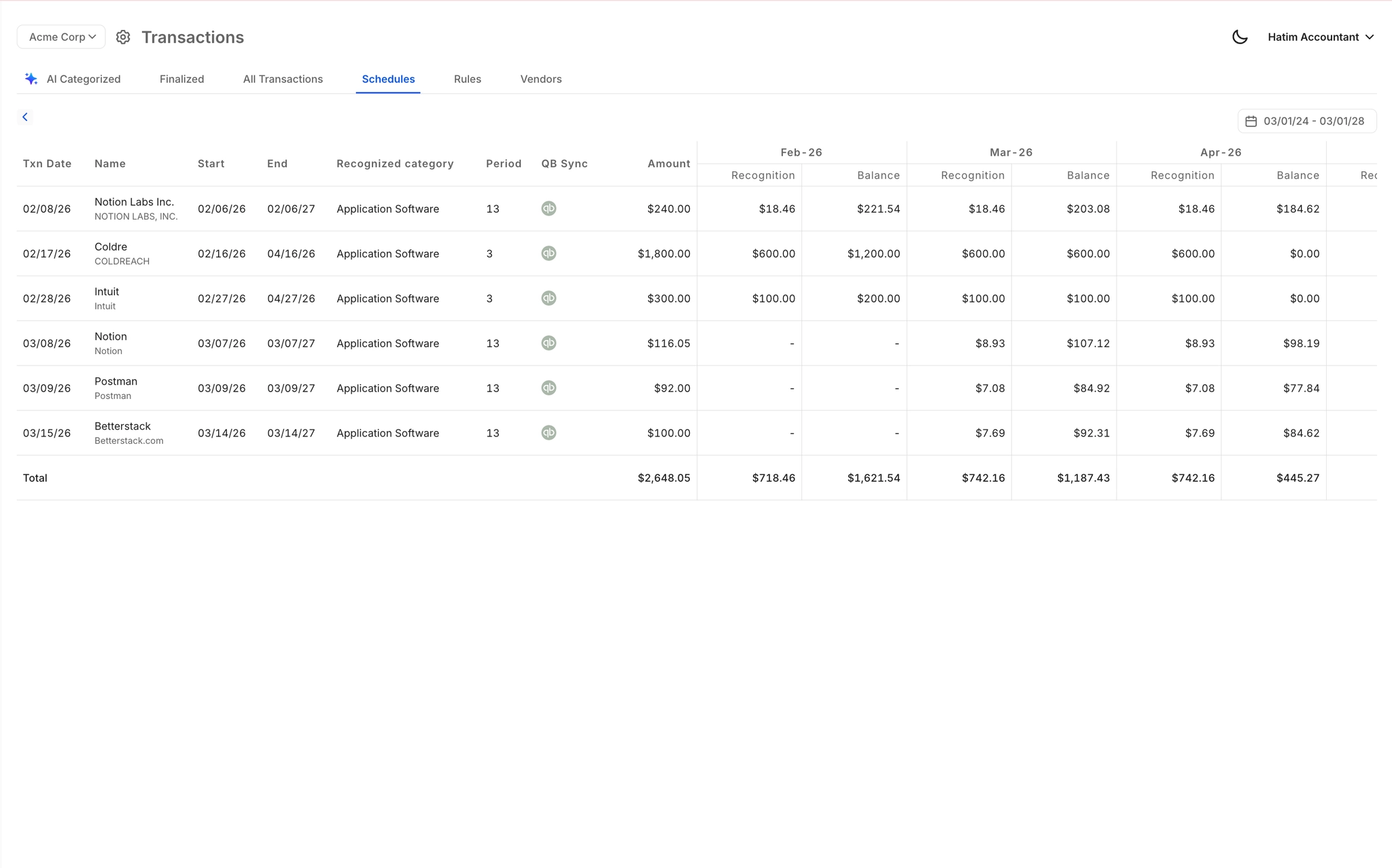
Automated Accruals and Prepaid Schedules
Accruals, prepaids, and amortization schedules are generated automatically without spreadsheets. Journal entries post directly to QuickBooks, keeping your books GAAP-compliant at close without manual input.
Real-Time QuickBooks Two-Way Sync
Finlens syncs with QuickBooks in real time — categorized transactions, journal entries, and reconciled accounts flow both ways automatically. No migration, no duplicate entry, no manual exports.

Ready to Transform Your Business?
How It Works
Get started in minutes, not months.
Connect QuickBooks
Finlens reads your GL and identifies accrual-eligible transactions
Review AI-Generated Schedules
Finlens auto-builds prepaid, deferred revenue, and amortization schedules; your team reviews and approves
Entries Post Automatically at Month-End
Journal entries sync to QuickBooks on schedule; close faster, audit trail preserved
Why Choose Finlens
Why teams choose Finlens.
Works on Top of QuickBooks
No migration. No new GL. Finlens augments the tools your team already uses — real-time two-way sync means your QuickBooks data is always current.
80%+ Less Manual Bookkeeping
AI categorization, automated reconciliation, and smart schedules replace the spreadsheet work that eats your team’s hours.
Backed by Y Combinator & Accel
Built in San Francisco by a team that understands accounting workflows. Trusted by firms and founders scaling fast.
12,000+ Bank Connections
Connect every bank account, credit card, and financial tool your clients use. Powered by Plaid.
Frequently Asked Questions
Does Finlens replace QuickBooks for small businesses?
No. Finlens works on top of QuickBooks, not instead of it. Your existing QuickBooks account stays exactly as it is. Finlens connects to it, pulls your transaction data in real time, applies categorization and accounting logic, and posts entries back automatically. You keep QuickBooks as your general ledger — Finlens handles the manual work that QuickBooks doesn't do on its own.
How much faster is month-end close with Finlens?
Finlens claims 40-70% faster month-end close times for businesses that automate their workflow through the platform. The exact time saved depends on your transaction volume and how much of your current close process is manual. Tasks like transaction categorization, reconciliation, and GAAP schedule generation are the biggest time drivers that Finlens automates.
Do I need accounting expertise to use Finlens?
No deep accounting expertise is required to get started. Finlens is built to give small business owners and founders real-time financial visibility without needing to be a finance professional. The AI handles categorization and schedules automatically. If you work with a CPA or bookkeeper, they can collaborate inside the same platform.
What does Finlens cost for a small business?
Finlens offers a free Starter plan for businesses with up to $50,000 per month in expenses. The AI Accounting plan is $49 per month for businesses with up to $100,000 per month in expenses and includes AI-powered automation features. A custom Flexible Plan is also available and includes a dedicated CPA and monthly bookkeeping.
How does Finlens handle bank connections and reconciliation?
Finlens connects to over 1,100 bank accounts, credit cards, and financial tools. Once connected, transactions are pulled in automatically and matched against your QuickBooks records. Reconciliation happens continuously as transactions arrive — not as a manual process at the end of each month. Discrepancies are flagged for your review.