Maxio Alternative That Works With QuickBooks
Finlens is the AI accounting co-pilot that layers on QuickBooks, giving you real-time burn rate and runway visibility without migration or complex setup.
Why Founders Are Leaving Maxio
Forced Migration Kills Momentum
Switching to a new financial platform means re-entering history, retraining your team, and risking data gaps.
Stale Data Costs You Answers
When VC questions hit, you need runway and burn numbers now — not after a manual export and spreadsheet refresh.
Paying for Features You Don't Use
Maxio is built around complex billing workflows. Founders who just need visibility end up paying for overhead they never touch.
A Maxio Alternative Built on QuickBooks
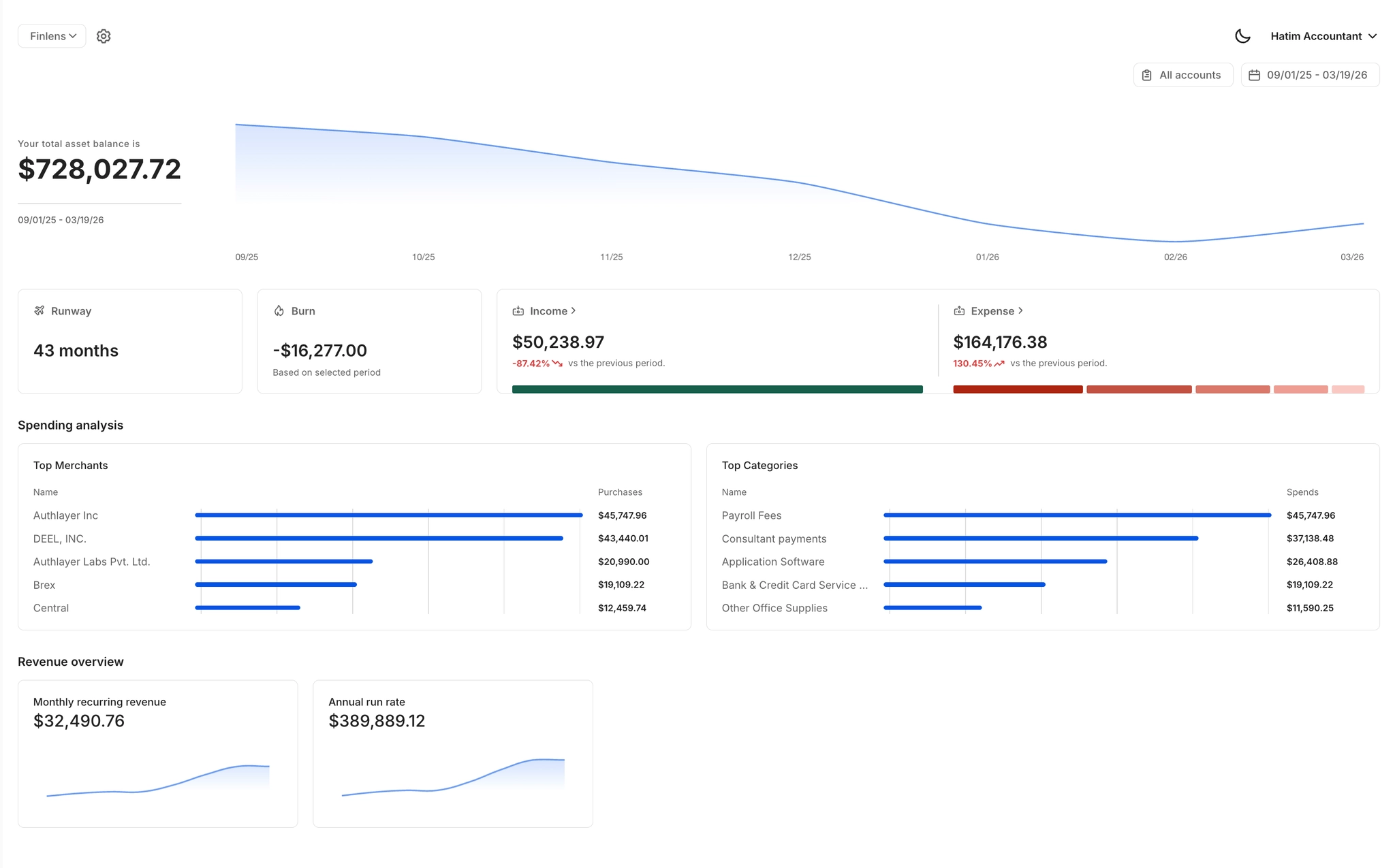
Finlens augments QuickBooks instead of replacing it. Real-time burn rate, runway, MRR, and ARR surface instantly in a founder dashboard — powered by AI categorization and live sync. No migration required.
Real-Time Burn and Runway Dashboard
A single live view of burn rate, runway, MRR, ARR, vendor spend, and cash flow. Always current — no manual calculations, no opening QuickBooks just to answer a VC question.
QuickBooks Two-Way Sync
Finlens connects directly to your existing QuickBooks — no data migration, no parallel ledgers. Categorized transactions and journal entries sync both ways in real time.

AI Transaction Categorization
Every transaction is categorized automatically using GL logic and historical patterns. Your books stay current without you touching QuickBooks, so your financial data is never stale.

Stripe Revenue Recognition
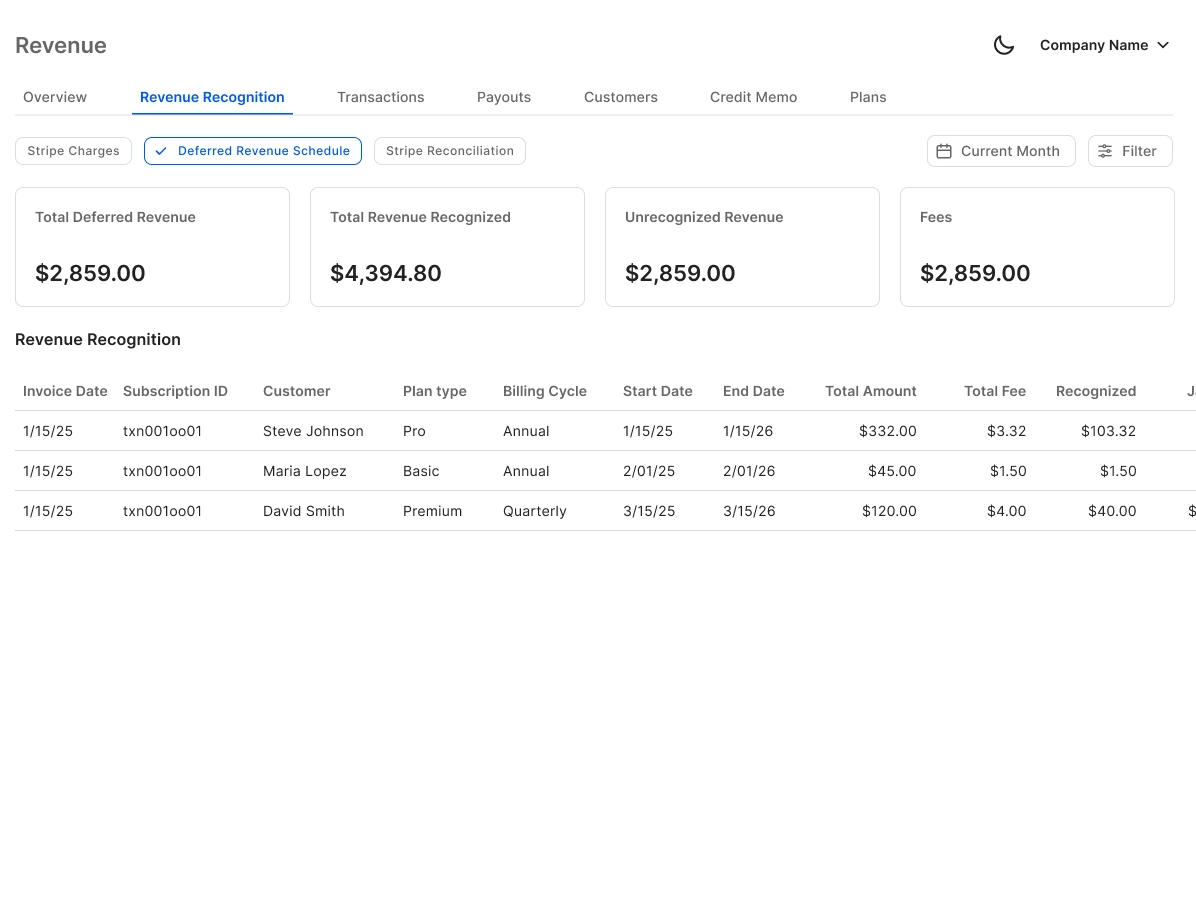
Auto-calculates gross revenue, Stripe fees, refunds, and payouts. Annual subscriptions are broken into monthly recognized revenue so your MRR numbers are always GAAP-compliant.
Investor-Ready Report Exports
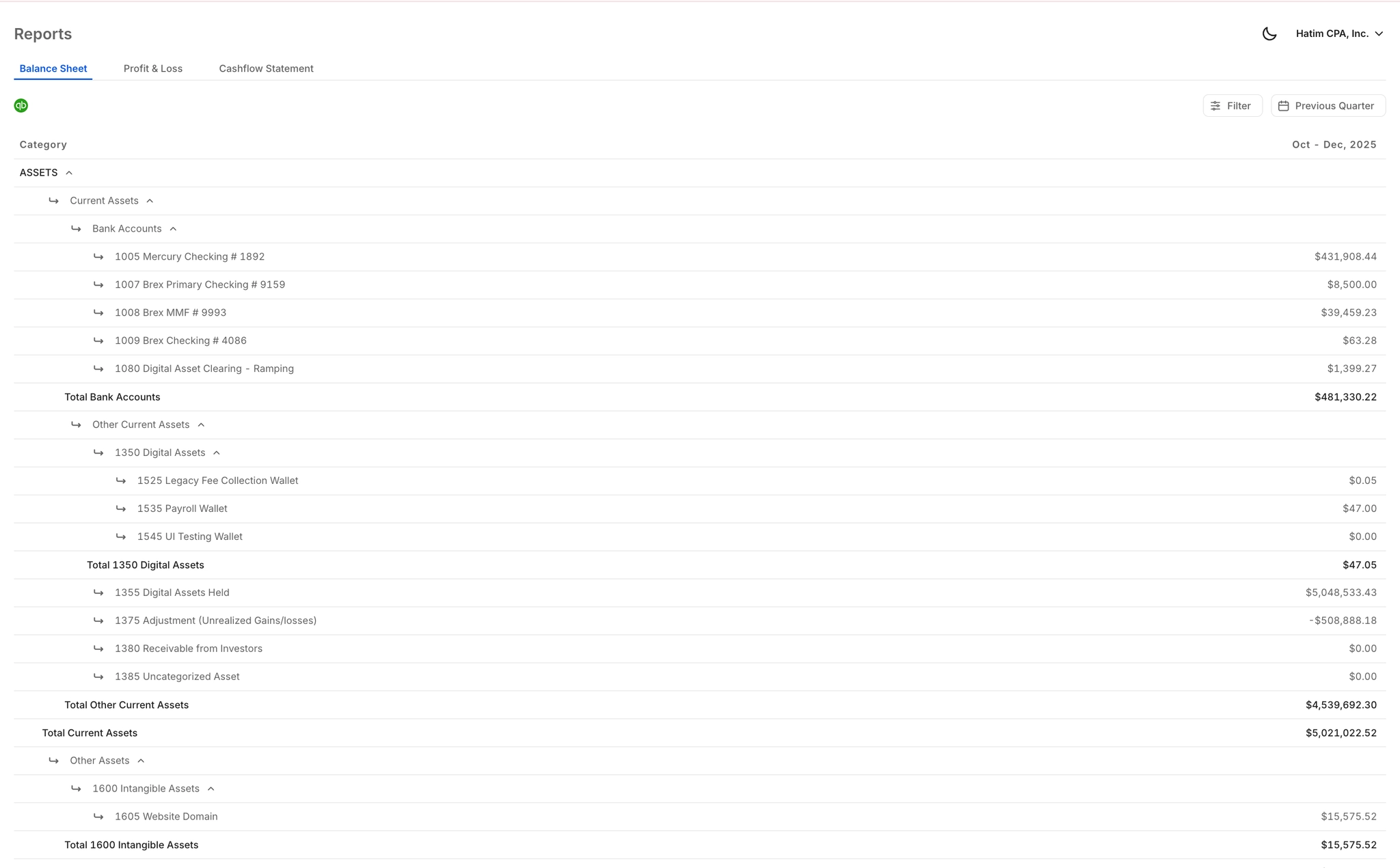
Clean, formatted financial exports built for due diligence, board meetings, and VC updates. Pull and send reports instantly without waiting on your accountant.
Ready to Transform Your Business?
How It Works
Get started in minutes, not months.
Connect QuickBooks
Finlens reads your GL and identifies accrual-eligible transactions
Review AI-Generated Schedules
Finlens auto-builds prepaid, deferred revenue, and amortization schedules; your team reviews and approves
Entries Post Automatically at Month-End
Journal entries sync to QuickBooks on schedule; close faster, audit trail preserved
Why Choose Finlens
Why teams choose Finlens.
Works on Top of QuickBooks
No migration. No new GL. Finlens augments the tools your team already uses — real-time two-way sync means your QuickBooks data is always current.
80%+ Less Manual Bookkeeping
AI categorization, automated reconciliation, and smart schedules replace the spreadsheet work that eats your team’s hours.
Backed by Y Combinator & Accel
Built in San Francisco by a team that understands accounting workflows. Trusted by firms and founders scaling fast.
12,000+ Bank Connections
Connect every bank account, credit card, and financial tool your clients use. Powered by Plaid.
Frequently Asked Questions
Does Finlens replace QuickBooks like Maxio does?
No. Finlens works on top of QuickBooks — it does not replace it. This is the core difference from Maxio. Your existing QuickBooks data stays intact, and Finlens layers AI automation and a real-time founder dashboard directly on top. No migration, no new general ledger to maintain. If you are already on QuickBooks, you can connect Finlens without disrupting anything.
How quickly can I see my burn rate and runway after connecting?
Finlens syncs with QuickBooks in real time. Once connected, your consolidated dashboard showing burn rate, runway, MRR, ARR, and vendor spend populates from your existing transaction history. You do not need to re-enter data or set up a new chart of accounts from scratch.
Does Finlens work if I also use Stripe for payments?
Yes. Finlens connects to Stripe and auto-calculates gross revenue, fees, refunds, and payouts. It also breaks annual subscriptions into monthly recognized revenue, which keeps your MRR figures GAAP-compliant and eliminates the manual Stripe-to-QuickBooks CSV workflow that most founders rely on.
What does Finlens cost compared to Maxio?
Finlens offers a Starter plan at $0 per month for founders with up to $50K per month in expenses. The AI Accounting plan is $49 per month for up to $100K per month in expenses. A flexible plan with a dedicated CPA and monthly bookkeeping is available at custom pricing. No complex billing tiers required.
Can my accountant or CFO also access Finlens?
Yes. Finlens includes a team collaboration workspace designed for founders, CPAs, and CFOs to work together. Your accountant can review AI-suggested categorizations, approve entries, and access reports — all within the same platform, without needing separate QuickBooks logins or email threads.