Automate Month End Close Without Replacing QuickBooks
Finlens layers AI automation on top of QuickBooks to accelerate your close cycle with GAAP-compliant schedules, bank reconciliation, and automated reporting.
Month End Close Is Still Manual Chaos
Close Cycles Run Too Long
Reconciliations, accruals, and journal entries done manually push close dates back every month without fail.
GAAP Schedules Live in Spreadsheets
Prepaid amortization and accrual schedules maintained by hand are error-prone and break during audits.
Bank Reconciliation Eats Hours
Manually matching bank statements against QuickBooks records is the most tedious step in every single close.
Automate Month End Close on Top of QuickBooks
Finlens sits on top of your existing QuickBooks setup and automates the most time-consuming close tasks: bank reconciliation, GAAP schedule generation, transaction categorization, and financial reporting — no migration required.
Automated Month End Close Workflow
Task management, progress tracking, and team assignment across the entire close cycle. Coordinates categorization, reconciliation, accruals, and reporting in one workflow instead of juggling spreadsheets, Notion checklists, and email threads.

Automated Bank Reconciliation
Auto-matches bank statement entries against QuickBooks records and flags any discrepancies for review. Eliminates the most tedious recurring step in month-end close so your team stops spending hours on manual statement matching.

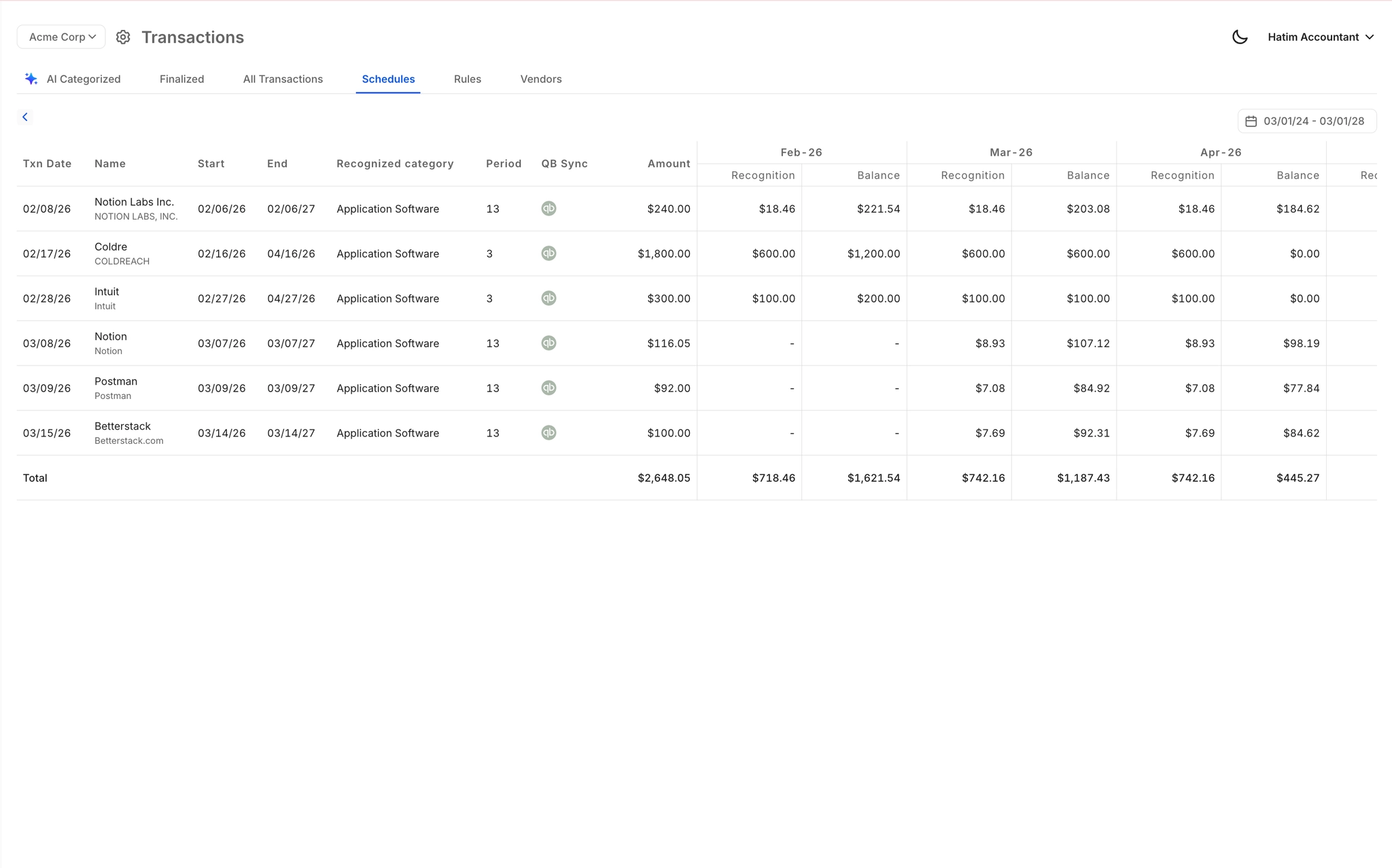
Automated GAAP Schedules and Accruals
Generates accrual, prepaid, deferred revenue, and amortization schedules automatically and posts the corresponding journal entries without spreadsheets. Replaces error-prone manual schedules with audit-ready outputs every close.
AI Transaction Categorization at Close
Every transaction is categorized at first pass using GL logic, historical patterns, and learned corrections before the close even begins. Eliminates hours of manual tagging so your team starts the close with clean books.

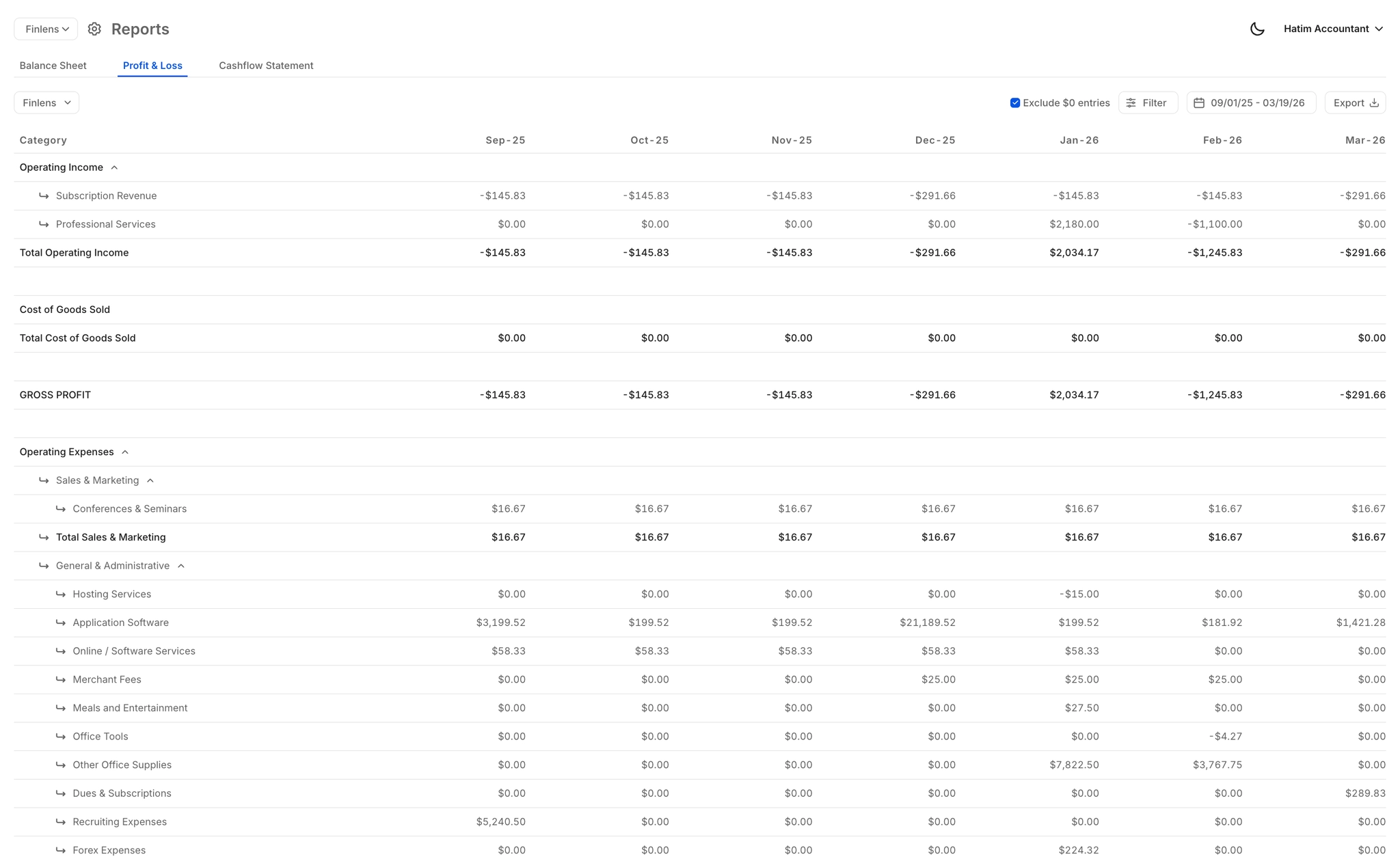
Real-Time Close Reporting
Auto-generated P&L, Balance Sheet, and Cash Flow reports that are always current — no rebuilding exports after close. Clients and stakeholders get accurate reports immediately after the close workflow completes.
Ready to Transform Your Business?
How It Works
Get started in minutes, not months.
Connect QuickBooks
Finlens reads your GL and identifies accrual-eligible transactions
Review AI-Generated Schedules
Finlens auto-builds prepaid, deferred revenue, and amortization schedules; your team reviews and approves
Entries Post Automatically at Month-End
Journal entries sync to QuickBooks on schedule; close faster, audit trail preserved
Why Choose Finlens
Why teams choose Finlens.
Works on Top of QuickBooks
No migration. No new GL. Finlens augments the tools your team already uses — real-time two-way sync means your QuickBooks data is always current.
80%+ Less Manual Bookkeeping
AI categorization, automated reconciliation, and smart schedules replace the spreadsheet work that eats your team’s hours.
Backed by Y Combinator & Accel
Built in San Francisco by a team that understands accounting workflows. Trusted by firms and founders scaling fast.
12,000+ Bank Connections
Connect every bank account, credit card, and financial tool your clients use. Powered by Plaid.
Frequently Asked Questions
Does Finlens replace QuickBooks to automate month end close?
No. Finlens works on top of QuickBooks, not instead of it. There is no migration, no data export, and no disruption to your existing setup. Finlens adds an AI automation layer that handles the close tasks your team currently performs manually inside QuickBooks and spreadsheets — reconciliations, GAAP schedules, categorization, and reporting — while keeping QuickBooks as your system of record.
How much faster can Finlens make my month end close?
Finlens claims 40 to 70 percent faster close times based on the automation of the most time-consuming close tasks: bank reconciliation, GAAP schedule generation, transaction categorization, and financial report generation. The actual time savings depend on your current close process, client volume, and transaction complexity.
Which month end close tasks does Finlens actually automate?
Finlens automates bank reconciliation, GAAP schedule generation (accruals, prepaids, deferred revenue, amortization), AI-powered transaction categorization, and financial report generation including P&L, Balance Sheet, and Cash Flow statements. It also provides task management and team assignment tools to coordinate the full close workflow in one place.
Does Finlens support GAAP compliance during the close process?
Yes. Finlens automates GAAP-compliant schedules for accruals, prepaid expenses, deferred revenue, and amortization, and auto-generates the corresponding journal entries. These outputs are designed to be audit-ready, replacing the manual spreadsheet-based schedules that most teams maintain today.
How does bank reconciliation automation work in Finlens?
Finlens automatically matches bank statement entries against your QuickBooks records and flags any discrepancies that require human review. Clear items are matched and reconciled without manual intervention. This runs as part of the broader month-end close workflow so reconciliation is no longer a separate, time-consuming step your team has to coordinate manually.