Automate Month End Journal Entries in QuickBooks
Finlens layers AI automation on top of QuickBooks to eliminate manual journal entries for accruals, prepaids, and amortization while ensuring GAAP compliance.
Month-End Close Is Still Manual
Hours Lost to Journal Entries
Preparing, entering, and posting journal entries manually each month consumes hours your team cannot get back.
Errors Compound Every Close
Manual accrual and prepaid schedules built in spreadsheets introduce errors that cascade through your financials and GAAP reports.
Close Deadlines Keep Slipping
Coordinating categorization, reconciliation, and journal entries across email threads and spreadsheets pushes close dates later every month.
GAAP Journal Entries Generated Automatically in QuickBooks
Finlens sits on top of QuickBooks and automates the preparation and posting of journal entries for accruals, prepaids, and amortization. No spreadsheets, no migration, no manual entry. Close 40-70% faster every month.
Automated Accrual and Prepaid Schedules
Finlens auto-generates journal entries for accruals, prepaids, deferred revenue, and amortization without a single spreadsheet. Each schedule posts directly to QuickBooks with full GAAP compliance.
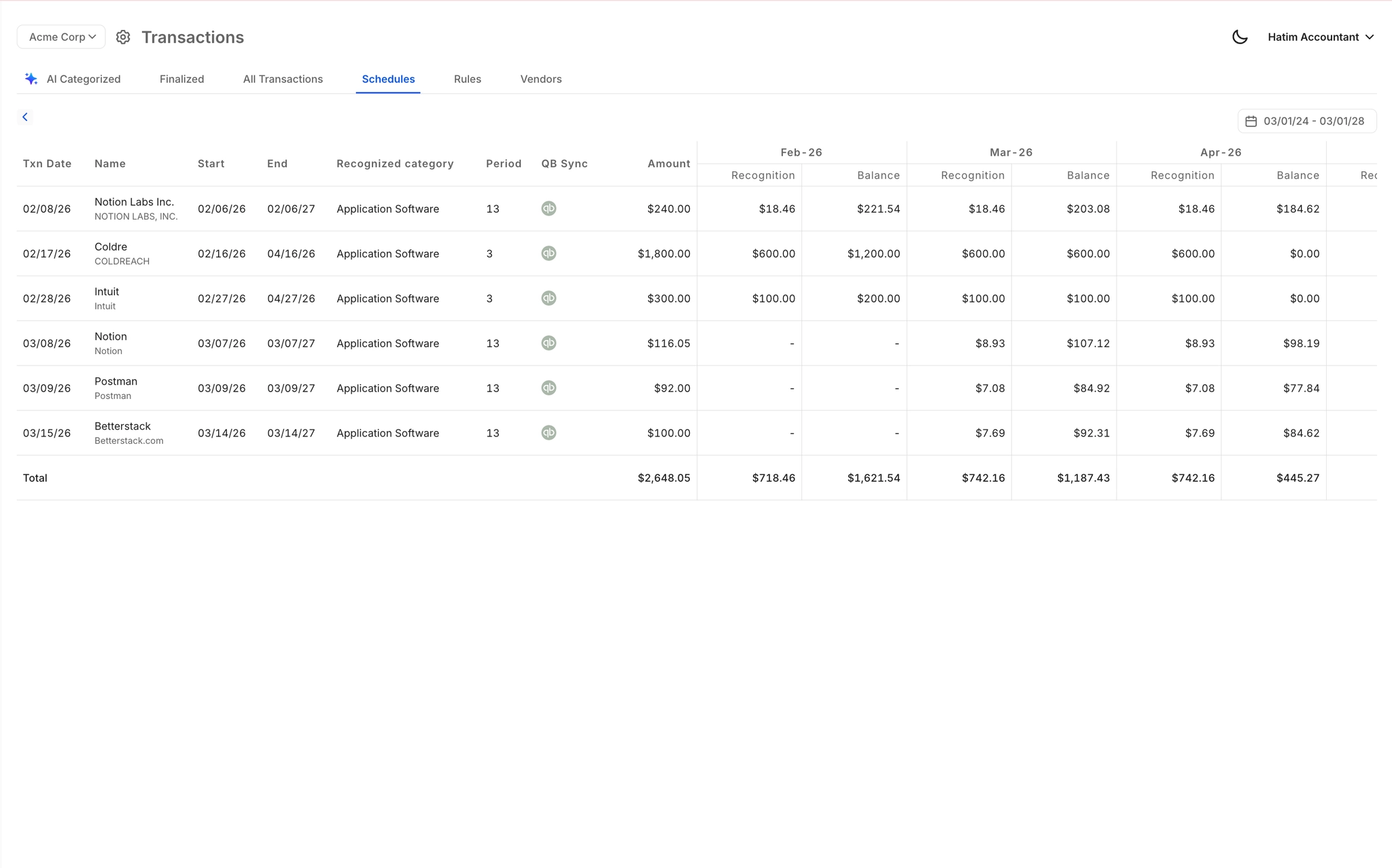
Month-End Close Workflow Automation
Task assignment, progress tracking, and deadline visibility for the entire close cycle. Teams close 40-70% faster by replacing disconnected spreadsheets, email threads, and Notion checklists with a single automated workflow.

Automated Bank Reconciliation
Auto-matches bank statement transactions against QuickBooks records and flags discrepancies instantly. Removes the most tedious manual step in the close process so your team can focus on review, not data matching.

Real-Time QuickBooks Two-Way Sync
Every journal entry, categorized transaction, bill, and invoice flows bidirectionally between Finlens and QuickBooks in real time. No migration, no duplicate data entry, no stale records.

Controller Review Before Anything Posts
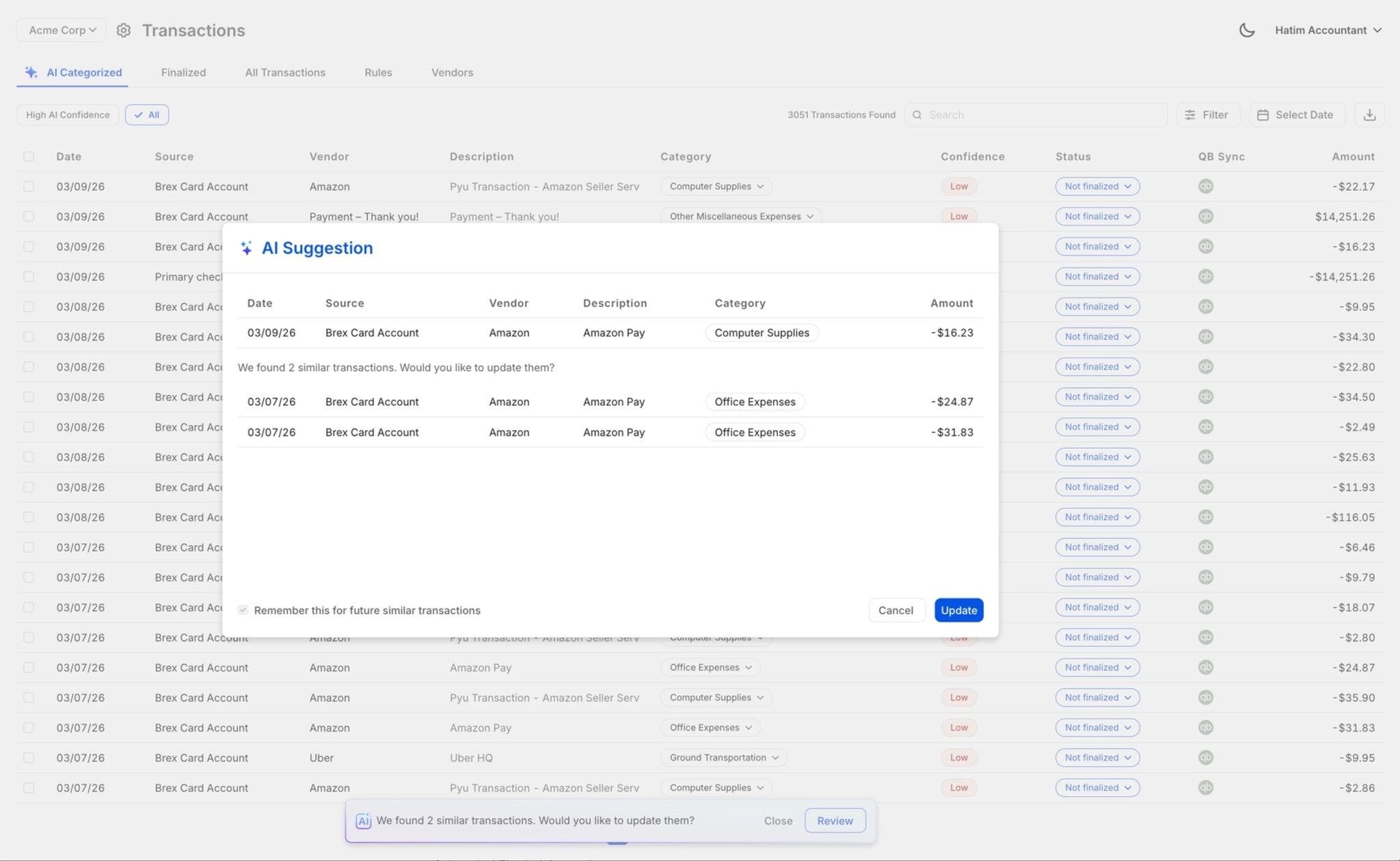
AI suggests journal entries and categorizations; your controller approves, overrides, or corrects before anything posts to QuickBooks. Full audit control stays with your team, not the algorithm.
Ready to Transform Your Business?
How It Works
Get started in minutes, not months.
Connect QuickBooks
Finlens reads your GL and identifies accrual-eligible transactions
Review AI-Generated Schedules
Finlens auto-builds prepaid, deferred revenue, and amortization schedules; your team reviews and approves
Entries Post Automatically at Month-End
Journal entries sync to QuickBooks on schedule; close faster, audit trail preserved
Why Choose Finlens
Why teams choose Finlens.
Works on Top of QuickBooks
No migration. No new GL. Finlens augments the tools your team already uses — real-time two-way sync means your QuickBooks data is always current.
80%+ Less Manual Bookkeeping
AI categorization, automated reconciliation, and smart schedules replace the spreadsheet work that eats your team’s hours.
Backed by Y Combinator & Accel
Built in San Francisco by a team that understands accounting workflows. Trusted by firms and founders scaling fast.
12,000+ Bank Connections
Connect every bank account, credit card, and financial tool your clients use. Powered by Plaid.
Frequently Asked Questions
Does Finlens replace QuickBooks for journal entry management?
No. Finlens works on top of QuickBooks, not instead of it. Your existing QuickBooks setup stays exactly as is. Finlens adds an automation layer that generates and posts journal entries for accruals, prepaids, and amortization directly into QuickBooks via real-time two-way sync. There is no migration, no data export, and no parallel ledger to manage.
Which journal entries can Finlens automate at month-end?
Finlens automates journal entries for accruals, prepaid expenses, deferred revenue, and amortization schedules. These are the recurring GAAP-required entries that most teams still build manually in spreadsheets each month. The automation generates the correct entries, maps them to the appropriate GL accounts, and posts them to QuickBooks after controller review and approval.
How much faster will month-end close be with Finlens?
Finlens claims 40-70% faster month-end close times. The time savings come from automating the most manual steps in the close workflow: journal entry preparation, bank reconciliation, and transaction categorization. Instead of coordinating across spreadsheets and email threads, your team works inside a single workflow with task tracking and deadline visibility.
Do accountants still review entries before they post to QuickBooks?
Yes. Finlens uses a human-in-the-loop review model. The AI prepares and suggests journal entries, but nothing posts to QuickBooks without explicit approval from your controller or accountant. You can approve, override, or correct any entry with one click. This ensures your team retains full accountability for the books while eliminating the manual preparation work.
How long does it take to get Finlens connected to QuickBooks?
Finlens connects to your existing QuickBooks account without requiring data migration or a new chart of accounts setup. The integration is designed to minimize onboarding friction so your team can begin automating journal entries quickly without disrupting an active close cycle.