Automate Stripe Journal Entries in QuickBooks
Finlens connects Stripe to QuickBooks and auto-posts journal entries for payments, fees, and refunds in real time. No manual exports, no reconciliation backlog.
Stripe Reconciliation Is Still Manual
CSV Exports Eat Your Hours
Manually downloading Stripe reports and mapping transactions to QuickBooks burns hours every month with zero margin for error.
Fees and Refunds Slip Through
Stripe fees, partial refunds, and failed payment retries rarely get coded correctly when entered by hand, distorting your revenue.
Month-End Close Gets Delayed
Unreconciled Stripe transactions pile up and stall the entire close cycle, pushing deadlines and frustrating clients.
Stripe to QuickBooks Automation Built for Accountants
Finlens reads every Stripe transaction, applies the correct accounting treatment, and posts journal entries directly to QuickBooks in real time. Payments, fees, refunds, and payouts all handled automatically — no spreadsheets, no manual input.
Automated Stripe Journal Entry Posting
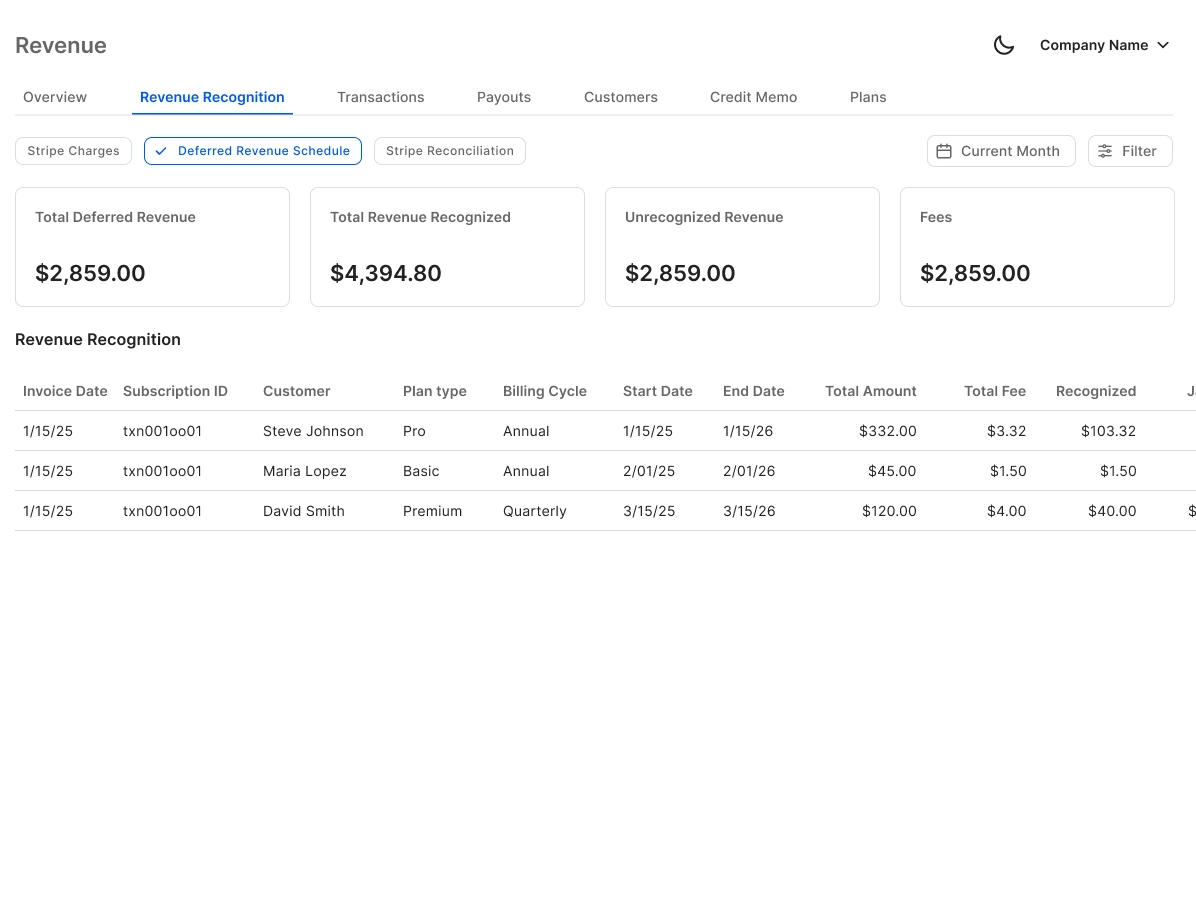
Auto-calculates gross revenue, Stripe fees, refunds, and payouts — then posts the corresponding journal entries directly to QuickBooks. Annual subscriptions are split into monthly recognized revenue automatically.
Real-Time QuickBooks Two-Way Sync
Every Stripe-sourced entry flows into QuickBooks instantly and stays in sync bidirectionally. No migration required — Finlens layers on top of your existing QBO setup.

AI Categorization for Stripe Transactions
Every Stripe transaction is categorized at first pass using GL logic and learned patterns. Reduces the manual coding that causes errors during high-volume months.

Automated Stripe Bank Reconciliation
Matches Stripe payouts against your bank deposits automatically, flagging discrepancies before they reach your close checklist. Keeps your reconciliation clean without the line-by-line review.

Month-End Close Acceleration
With Stripe entries posting automatically throughout the month, your close checklist starts shorter. Finlens accelerates the full close cycle — claims 40-70% faster close times for teams using it.

Ready to Transform Your Business?
How It Works
Get started in minutes, not months.
Connect QuickBooks
Finlens reads your GL and identifies accrual-eligible transactions
Review AI-Generated Schedules
Finlens auto-builds prepaid, deferred revenue, and amortization schedules; your team reviews and approves
Entries Post Automatically at Month-End
Journal entries sync to QuickBooks on schedule; close faster, audit trail preserved
Why Choose Finlens
Why teams choose Finlens.
Works on Top of QuickBooks
No migration. No new GL. Finlens augments the tools your team already uses — real-time two-way sync means your QuickBooks data is always current.
80%+ Less Manual Bookkeeping
AI categorization, automated reconciliation, and smart schedules replace the spreadsheet work that eats your team’s hours.
Backed by Y Combinator & Accel
Built in San Francisco by a team that understands accounting workflows. Trusted by firms and founders scaling fast.
12,000+ Bank Connections
Connect every bank account, credit card, and financial tool your clients use. Powered by Plaid.
Frequently Asked Questions
Does Finlens replace QuickBooks?
No. Finlens works on top of QuickBooks, not instead of it. It connects to your existing QBO account, reads your Stripe data, and posts journal entries directly into your ledger. There is no migration, no parallel system, and no disruption to the workflows you already have in place. Your QuickBooks remains the system of record.
How does Finlens automate Stripe journal entries?
Finlens connects directly to your Stripe account and QuickBooks. It reads every incoming transaction — payments, fees, refunds, and payouts — applies the appropriate accounting treatment based on GL logic, and posts the corresponding journal entries to QuickBooks in real time. You no longer need to export CSV files, map columns, or manually enter transactions.
Does it handle Stripe fees and refunds separately?
Yes. Finlens breaks out gross revenue, Stripe processing fees, refunds, and net payouts as separate line items in the journal entry. This ensures your revenue figures are accurate and your expense accounts reflect actual payment processing costs — a common source of error in manual workflows.
Can Finlens handle Stripe subscription revenue recognition?
Yes. For annual or multi-month subscriptions processed through Stripe, Finlens automatically splits the payment into monthly recognized revenue and creates the corresponding deferred revenue entries in QuickBooks. This keeps your financials GAAP-compliant without requiring a separate spreadsheet or RevRec tool.
How long does it take to connect Stripe and QuickBooks?
Setup is fast. You connect your Stripe account and authorize your QuickBooks integration through the Finlens dashboard. Once connected, Finlens begins pulling transaction data and applying accounting logic immediately. There is no lengthy onboarding process or data migration required to get started.